AUX BUICK RANDEZVOUS 2007 User Guide
[x] Cancel search | Manufacturer: BUICK, Model Year: 2007, Model line: RANDEZVOUS, Model: BUICK RANDEZVOUS 2007Pages: 528, PDF Size: 2.99 MB
Page 290 of 528
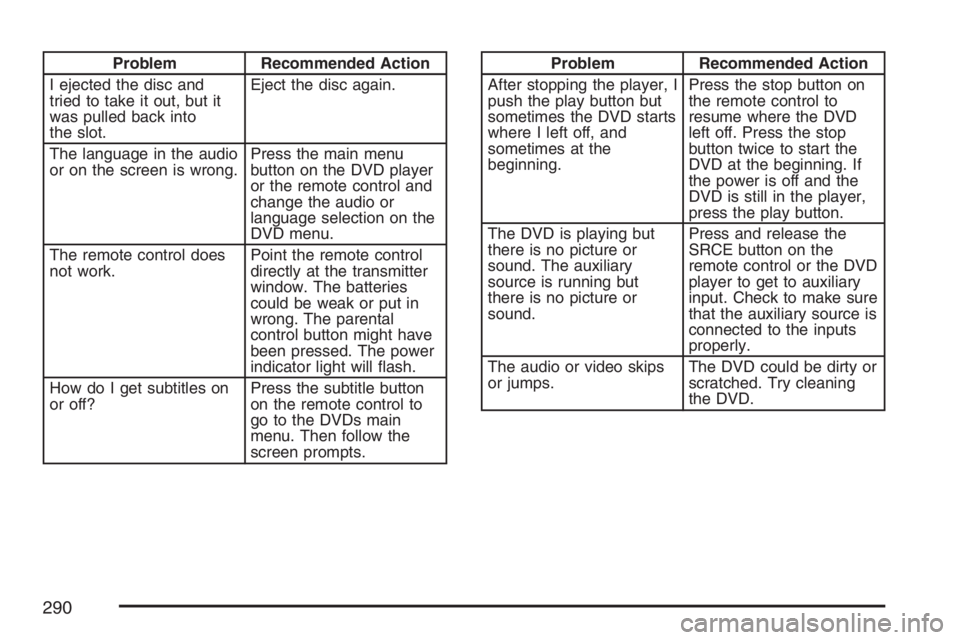
Problem Recommended Action
I ejected the disc and
tried to take it out, but it
was pulled back into
the slot.Eject the disc again.
The language in the audio
or on the screen is wrong.Press the main menu
button on the DVD player
or the remote control and
change the audio or
language selection on the
DVD menu.
The remote control does
not work.Point the remote control
directly at the transmitter
window. The batteries
could be weak or put in
wrong. The parental
control button might have
been pressed. The power
indicator light will ash.
How do I get subtitles on
or off?Press the subtitle button
on the remote control to
go to the DVDs main
menu. Then follow the
screen prompts.Problem Recommended Action
After stopping the player, I
push the play button but
sometimes the DVD starts
where I left off, and
sometimes at the
beginning.Press the stop button on
the remote control to
resume where the DVD
left off. Press the stop
button twice to start the
DVD at the beginning. If
the power is off and the
DVD is still in the player,
press the play button.
The DVD is playing but
there is no picture or
sound. The auxiliary
source is running but
there is no picture or
sound.Press and release the
SRCE button on the
remote control or the DVD
player to get to auxiliary
input. Check to make sure
that the auxiliary source is
connected to the inputs
properly.
The audio or video skips
or jumps.The DVD could be dirty or
scratched. Try cleaning
the DVD.
290
Page 292 of 528
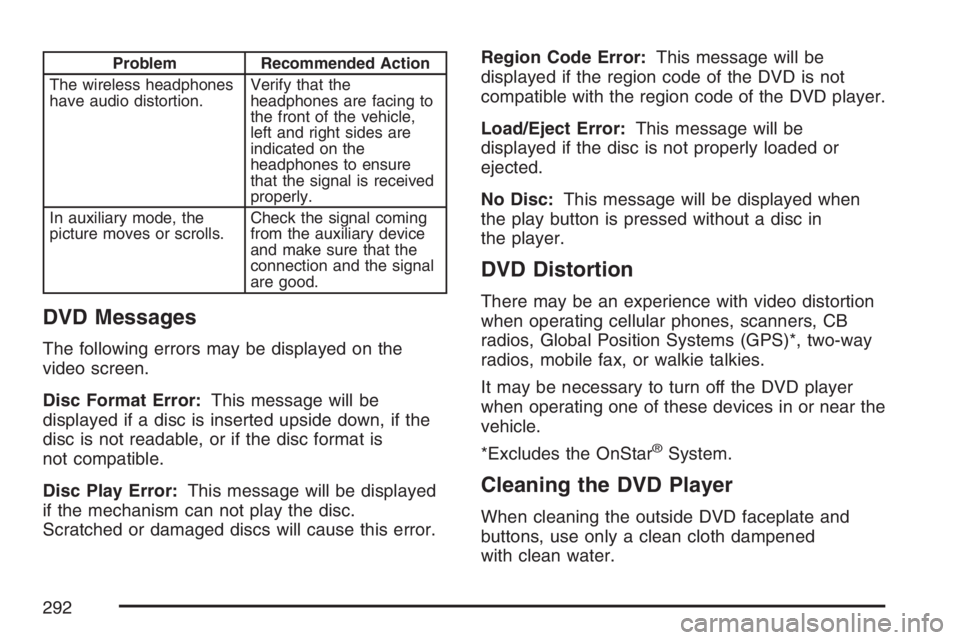
Problem Recommended Action
The wireless headphones
have audio distortion.Verify that the
headphones are facing to
the front of the vehicle,
left and right sides are
indicated on the
headphones to ensure
that the signal is received
properly.
In auxiliary mode, the
picture moves or scrolls.Check the signal coming
from the auxiliary device
and make sure that the
connection and the signal
are good.
DVD Messages
The following errors may be displayed on the
video screen.
Disc Format Error:This message will be
displayed if a disc is inserted upside down, if the
disc is not readable, or if the disc format is
not compatible.
Disc Play Error:This message will be displayed
if the mechanism can not play the disc.
Scratched or damaged discs will cause this error.Region Code Error:This message will be
displayed if the region code of the DVD is not
compatible with the region code of the DVD player.
Load/Eject Error:This message will be
displayed if the disc is not properly loaded or
ejected.
No Disc:This message will be displayed when
the play button is pressed without a disc in
the player.
DVD Distortion
There may be an experience with video distortion
when operating cellular phones, scanners, CB
radios, Global Position Systems (GPS)*, two-way
radios, mobile fax, or walkie talkies.
It may be necessary to turn off the DVD player
when operating one of these devices in or near the
vehicle.
*Excludes the OnStar
®System.
Cleaning the DVD Player
When cleaning the outside DVD faceplate and
buttons, use only a clean cloth dampened
with clean water.
292
Page 464 of 528

Fuse Usage
1 Empty
2 Steering Wheel Radio Controls
3 Power Door Locks
4 Empty
5 Empty
6 Empty
7 Empty
8 Empty
Fuse Usage
9 Empty
10Turn Signal and Hazard Lamp
Flashers
11 Power Seats
12Electronic Level Control (ELC)
Compressor
13 Liftgate and Endgate
14 Rear Auxiliary Power Outlet
15Electronic Level Control (ELC)
Compressor Relay and Height
Sensor
16 Heated Mirrors
17 Power Mirrors
18 Ignition 1 Module
19 Turn Signal Switch
21 Rear Defogger
22 Airbag Module
24 TCC Switch
25 HVAC Blower Motor
464