change time BUICK REGAL 1996 Owners Manual
[x] Cancel search | Manufacturer: BUICK, Model Year: 1996, Model line: REGAL, Model: BUICK REGAL 1996Pages: 356, PDF Size: 17.97 MB
Page 4 of 356
GEmRAL MOTORS, GM and the GM Emblem,
BUICK, the BUICK Emblem and the name REGAL
are
registered trademarks of General Motors Corporation.
This manual includes the latest information at the time it
was printed. We reserve the right to make changes in the
product after that time without further notice. For
vehicles first sold in Canada, substitute the name
“General Motors of Canada Limited” for Buick Motor
Division whenever it appears in
this manual.
WE SUPPORT
VOLUNTARY TECHNICIAN
CERTIFICATION THROUGH
AUTOMOTIVE
National Institute for
SERVICE
EXCELLENCE
For Canadian Owners Who Prefer a
French Language Manual:
Aux propriktaires canadiens: Vous pouvez vous
procurer un exemplaire de
ce guide en franqais chez
votre concessionaire
ou au:
Please keep this manual in
your Buick,
so it will be there
if you ever need it when you’re on the road. If you sell
the vehicle, please leave this manual in it
so the new
owner can use it.
DGN Marketing Services Ltd.
1500 Bonhill Rd.
Mississauga, Ontario L5T 1C7
Litho in.
U.S.A.
Part No. 25632198 B First Edition
ProCarManuals.com
Page 71 of 356
Matching Transmitter(s) To Your Vehicle
Each key chain transmitter is coded to prevent another
transmitter from unlocking your vehicle. If
a transmitter
is lost or stolen, a replacement can be purchased through
your dealer. Remember to bring any remaining
transmitters with you when
you go to your dealer. When
the dealer matches the replacement transmitter to your
vehicle, any remaining transmitters must also be
matched. Once the new transmitter is coded, the lost
transmitter will not unlock your vehicle. Each vehicle
can have only two transmitters matched to
it.
Battc ieplacemel
Under normal use, the batteries in your key chain
transmitter should last about two years.
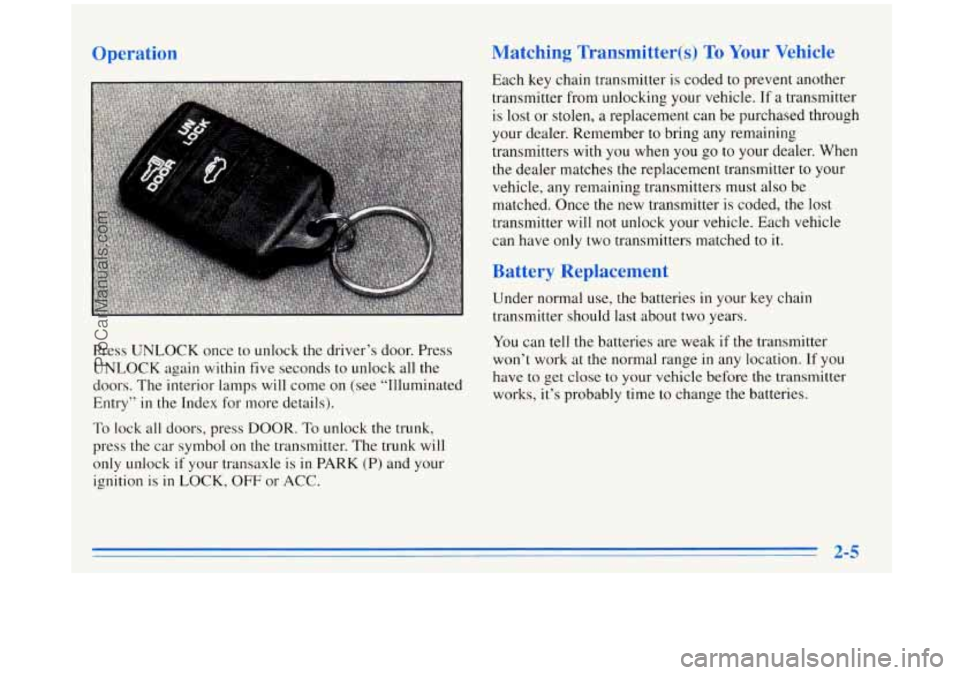
Press UNLOCK once to unlock the driver’s door. Press
UNLOCK again within five seconds to unlock all the
doors. The interior lamps will come on (see “Illuminated
Entry” in the Index for more details). You
can tell the batteries are weak if the transmitter
won’t work at the normal range in any location.
If you
have to get close
to your vehicle before the transmitter
works, it’s probably time to change the batteries.
To lock all doors, press DOOR. To unlock the trunk,
press the car symbol on the transmitter. The trunk will
only unlock
if your transaxle is in PARK (P) and your
ignition is
in LOCK, OFF or ACC.
AC
ProCarManuals.com
Page 77 of 356
Starting Your Engine
Move your shift lever to PARK (P) or NEUTRAL (N).
Your engine won’t start in any other position -- that’s a
safety feature.
To restart when you’re already moving,
use
NEUTRAL (N) only.
I NOTICE:
Don’t try to shift to PARK (P) if your Buick is
moving.
If you do, you could damage the
transaxle. Shift to PARK
(P) only when your
vehicle is stopped.
Starting Your 3.1 Liter Engine
1. Without pushing the accelerator pedal, turn your
ignition
key to START. When the engine starts, let
go of the key. The idle speed will go down as your
engine gets warm.
NOTICE:
Holding your key in START for longer than
15 seconds at a time will cause your battery to
be drained much sooner. And the excessive heat
can damage your starter motor.
2. If your engine won’t start (or starts but then stops), it
could be flooded with too much gasoline. Try
pushing your accelerator pedal all the way
to the
floor and holding it there
as you hold the key in
START for up to 15 seconds. This clears the extra
gasoline from the engine.
NOTICE:
Your engine is designed to work with the
electronics in your vehicle.
If you add electrical
parts or accessories, you could change the way
the engine operates. Before adding electrical
equipment, check with your dealer.
If you don’t,
your engine might not perform properly.
(Continued)
2-11
ProCarManuals.com
Page 78 of 356
NOTICE: (Continued)
If you ever have to have your vehicle towed, see
the part of this manual that tells how to do it
without damaging your vehicle. See “Towing
Your Vehicle” in the Index.
lr
1. Without pushing the accelerator pedal, turn your
ignition key
to START. When the engine starts, let
go
of the key. The idle speed will go down as your
engine gets warm.
NOTICE:
Holding your key in START for longer than
15 seconds at a time will cause your battery to
be drained much sooner. And the excessive heat
can damage your starter motor.
2. If it doesn’t start right away, hold your key in
START for about three to five seconds at a time until
your engine starts. Wait about 15 seconds between
each try
to help avoid draining your battery.
3. If your engine still won’t start (or starts but then stops), \
it could be flooded with too much gasoline. Try
pushing your accelerator pedal all the way to the floor
and holding it there
as you hold the key in START for
about three seconds. If the vehicle starts briefly but
then stops again, do the same thing, but
this time keep
the pedal down for five or six seconds.
This clears the
extra gasoline from
the engine. After waiting about
15 seconds, repeat the normal starting procedure.
NOTICE:
Your engine is designed to work with the
electronics in your vehicle. If you add electrical
parts or accessories, you could change the
way
the engine operates. Before adding electrical
equipment, check with your dealer.
If you don’t,
your engine might not perform properly.
If you ever have to have your vehicle towed, see
the part
of this manual that tells how to do it
without damaging your vehicle. See “Towing
Your Vehicle” in the Index.
2-12
ProCarManuals.com
Page 93 of 356
If a bulb is burned out, replace it to help avoid an
accident. If the arrows don’t go on at all when you
signal a turn, check for burned-out bulbs and check the
fuse (see “Fuses and Circuit Breakers’’ in
the Index).
A chime will sound if you leave your turn signal on for
more than 1/2 mile
(0.8 km).
Headlamp High/Low Beam
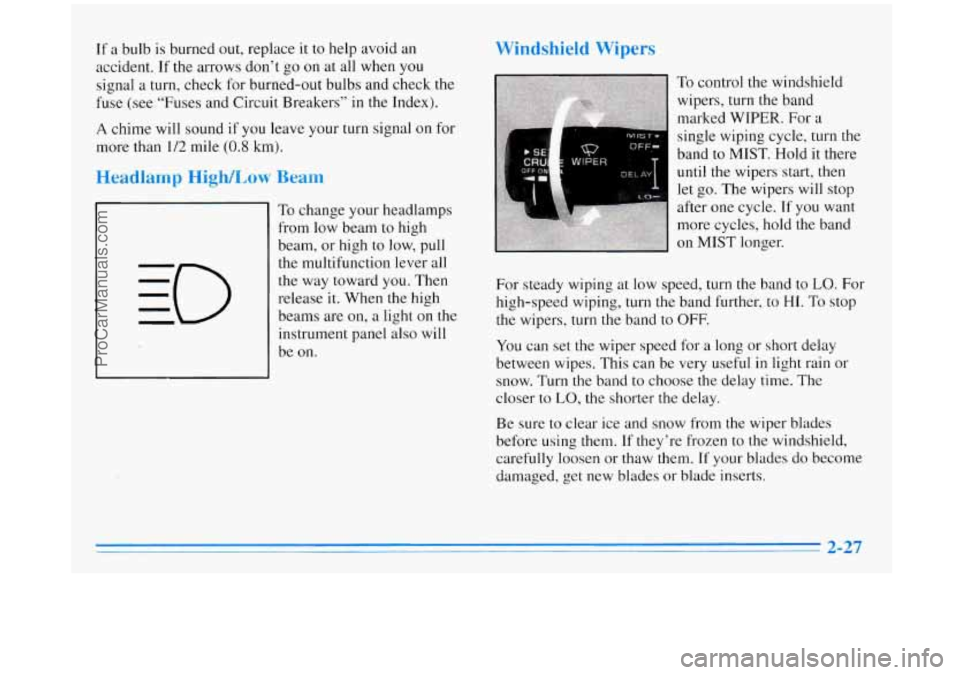
To change your headlamps
from low beam to high
beam, or high
to low, pull
the multifunction lever all
the way toward you. Then
release it. When
the high
beams are on, a light on
the
instrument panel also will
be on.
Windshield Wipers
To control the windshield
wipers, turn the band
marked WIPER.
For a
single wiping cycle, turn the
band to MIST. Hold it there
until the wipers start, then
let go. The wipers will stop
after one cycle.
If you want
more cycles, hold the band
on
MIST longer.
For steady wiping at low speed, turn the band to
LO. For
high-speed wiping, turn the band further, to
HI. To stop
the wipers, turn the band to
OFF.
You can set the wiper speed for a long or short delay
between wipes. This can be very useful in light rain or
snow. Turn the band to choose the delay time. The
closer to
LO, the shorter the delay.
Be sure
to clear ice and snow from the wiper blades
before using them.
If they’re frozen to the windshield,
carefully loosen or thaw them. If your blades do become
damaged, get new blades
or blade inserts.
ProCarManuals.com
Page 131 of 356
AM-FM Stereo with Cassette Tape
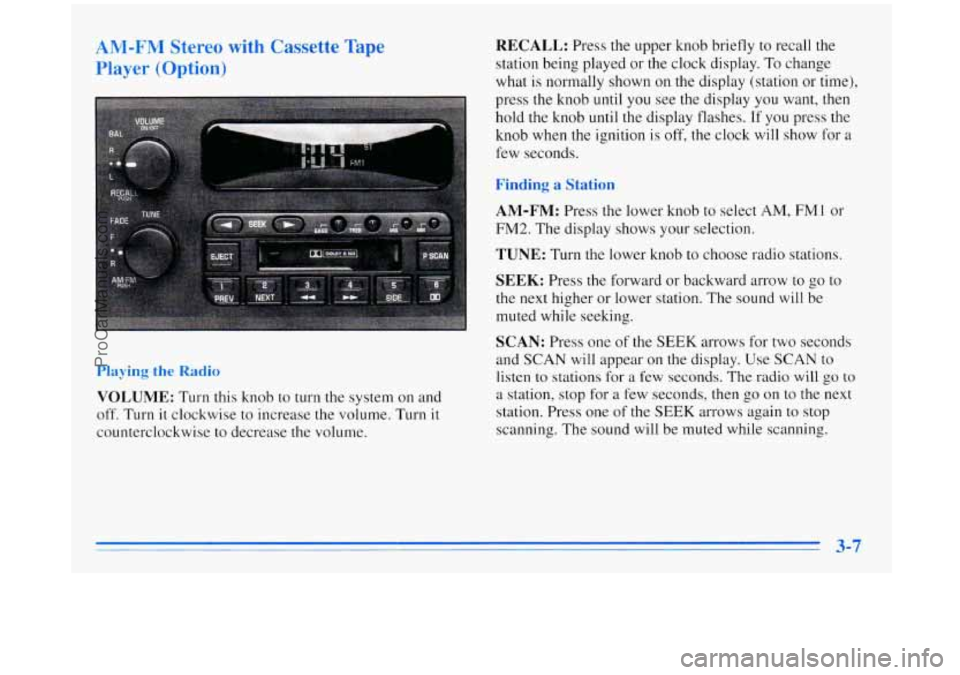
Player (Option) RECALL: Press the upper knob briefly to recall the
station being played or the clock display.
To change
what is normally shown on the display (station or time),
press the knob until you see the display you want,
then
hold the knob until the display flashes. If you press the
knob when the ignition is
off, the clock will show for a
few seconds.
Finding a Station
AM-FM:
Press the lower knob to select AM, FMl or
FM2. The display shows your selection.
TUNE: Turn the lower knob to choose radio stations.
SEEK: Press the forward or backward arrow to go to
the next higher or lower station. The sound will be
muted while seeking.
SCAN: Press one of the SEEK arrows for two seconds
and SCAN
will appear on the display. Use SCAN to
listen to stations for a few seconds. The radio will go to
a station, stop for a few seconds, then go on to the next
station. Press one
of the SEEK arrows again to stop
scanning. The sound will be muted while scanning.
Playing the Radio
VOLUME: Turn this knob to turn the system on and
off. Turn it clockwise to increase the volume. Turn it
counterclockwise to decrease the volume.
3-7
ProCarManuals.com
Page 134 of 356
AM-FM Stereo with Cassette Tape Player
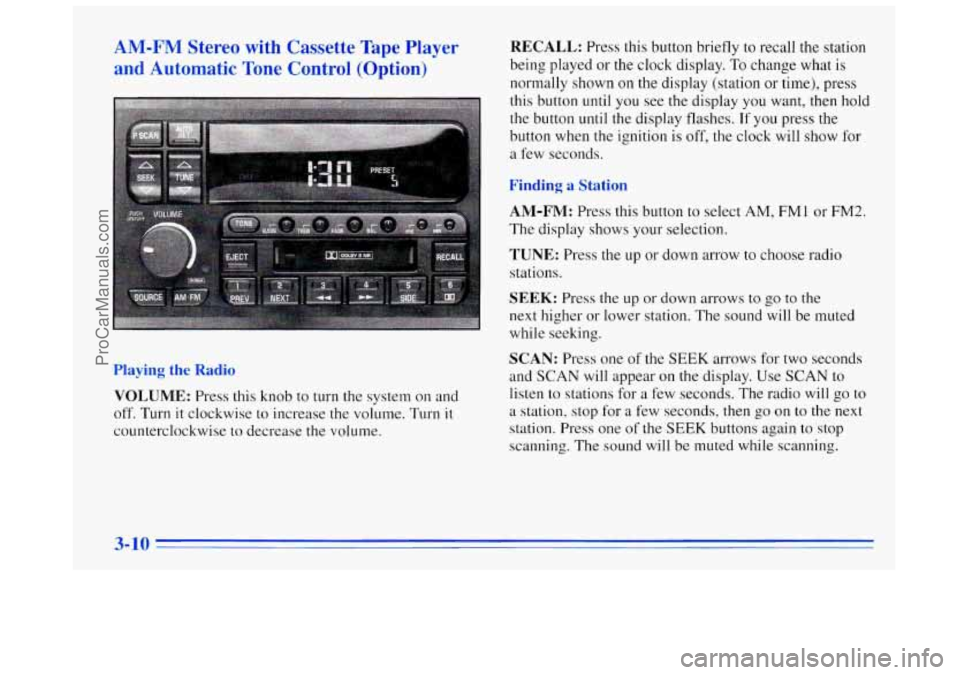
and Automatic Tone Control (Option) RECALL: Press this button briefly to recall the station
being played or the clock display.
To change what is
normally shown on the display (station
or time), press
this button until you see the display you want, then hold
the button
until the display flashes. If you press the
button when the ignition is off,
the clock will show for
a few seconds.
Finding a Station
AM-FM:
Press this button to select AM, FM1 or FM2.
The display shows your selection.
TUNE: Press the up or down arrow to choose radio
stations.
Playing the Radio
VOLUME: Press this knob to turn the system on and
off. Turn it clockwise to increase the volume. Turn it
counterclockwise to decrease the volume.
SEEK: Press the up or down arrows to go to the
next higher or lower station.
The sound will be muted
while seeking.
SCAN: Press one of the SEEK arrows for two seconds
and
SCAN will appear on the display. Use SCAN to
listen to stations for
a few seconds. The radio will go to
a station, stop for a few seconds, then go on to the next
station. Press one of the
SEEK buttons again to stop
scanning.
The sound will be muted while scanning.
ProCarManuals.com
Page 138 of 356
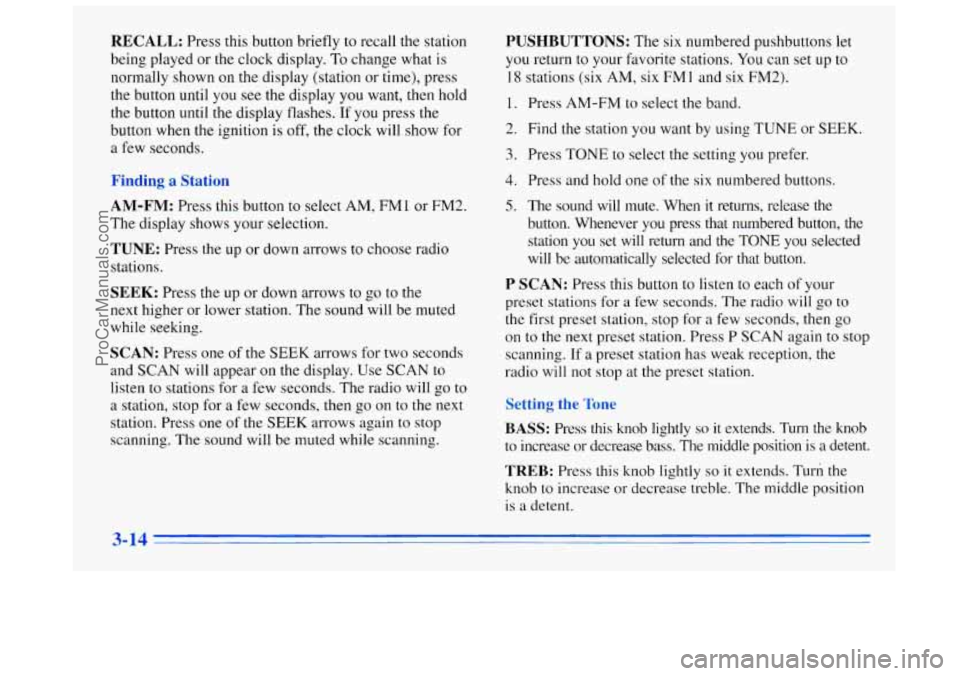
RECALL: Press this button briefly to recall the station
being played or the clock display. To change what is
normally shown on the display (station or time), press
the button until you see the display
you want, then hold
the button
until the display flashes. If you press the
button when the ignition is off, the clock will show for
a few seconds.
ung a :atlon
AM-FM: Press this button to select AM, FM1 or FM2.
The display shows your selection.
TUNE: Press the up or down arrows to choose radio
stations.
SEEK: Press the up or down arrows to go to the
next higher or lower station. The sound will be muted
while seeking.
SCAN: Press one of the SEEK arrows for two seconds
and
SCAN will appear on the display. Use SCAN to
listen to stations for a few seconds. The radio will go to
a station, stop
for a few seconds, then go on to the next
station. Press one of the SEEK arrows again to stop
scanning. The sound will be muted while scanning.
PUSHBUTTONS: The six numbered pushbuttons let
you return to your favorite stations. You can set up to
18 stations (six AM, six FM 1 and six FM2).
1. Press AM-FM to select the band.
2. Find the station you want by using TUNE or SEEK.
3. Press TONE to select the setting you prefer.
4. Press and hold one of the six numbered buttons.
5. The sound will mute. When it returns, release the
button. Whenever you press that numbered button, the
station you set will return and the TONE you selected
will be automatically selected for that button.
P SCAN: Press this button to listen to each of your
preset stations
for a few seconds. The radio will go to
the first preset station, stop for
a few seconds, then go
on to the next preset station. Press P
SCAN again to stop
scanning. If
a preset station has weak reception, the
radio will not stop at the preset station.
TREB: Press this knob lightly so it extends. Turn the
knob to increase
or decrease treble. The middle position
is a detent.
3-14
ProCarManuals.com
Page 139 of 356
Push the knobs back in when you are not using them.
TONE: This feature allows you to choose preset treble
and bass equalization settings designed for classical,
pop, rock,
jazz, talk and countrylwestern stations.
CLASS will appear on the display when you first press
TONE. Each time you press it, another setting will
appear on the display. Press
it again after C & W
appears and MANUAL will appear. Tone control will
return to the TREB and BASS knobs. Also,
if you use
the TREB and BASS knobs, control will return to them
and MANUAL will appear.
djusting the Spc cers
BAL: Press this knob lightly so it extends. Turn this
knob to move the sound to the left or right speakers. The
middle position is
a detent and balances the speakers.
FADE: Press this knob lightly so it extends. Turn this
knob to move the sound to the front or rear speakers. The
middle position is a detent and balances the speakers.
Cc
Insert a disc partway into the slot, label side up. The
player will pull
it in. The disc should begin playing.
If you’re driving on a very rough road or if it’s very hot,
the disc may not play and
ERR (error) may appear on
the display. Press RECALL
to take ERR off the display. When
things get back to normal, the disc should play.
If
the disc comes out, it could be that:
0 The disc is upside down.
0 It is dirty, scratched or wet.
0 It is very humid. (If so, wait about an hour and
RECALL: Press this button to see which track is
playing. Press it again within five seconds
to see how
long
it has been playing. To change what is normally
shown on the display (track or elapsed time), press the
button until you see the display you want, then hold the
button
until the display flashes.
PREV (1): Press this button to go to the start of the
current track
if more than eight seconds have played.
If you hold the button or press it more than once, the
player
will continu’e moving back through the disc. The
sound will be muted while seeking.
NEXT (2): Press this button to go to the next track. If
you hold the button
or press it more than once, the
player will continue moving forward through the disc.
The sound will be muted while seeking.
try
again.)
ProCarManuals.com
Page 141 of 356
RECALL: Press this button briefly to recall the station
being played or the clock display. To change what is
normally shown on the display (station or time), press
the button until you see
the display you want, then hold
the button until the display flashes. If
you press the
button when the ignition is off,
the clock will show for
a few seconds.
AM-FM: Press this button to select AM, FMl or FM2.
The display shows your selection.
TUNE: Press the up or down arrow to choose
radio stations.
SEEK: Press the up or down arrows to go to the
next higher or lower station. The sound will be muted
while seeking.
SCAN: Press one of the SEEK arrows for two seconds
and
SCAN will appear on the display. Use SCAN to
listen to stations for a few seconds. The radio will go
to
a station, stop for a few seconds, then go on to the next
station. Press one of the
SEEK arrows again to stop
scanning. The sound will be muted while scanning.
PUSHBUTTONS: The six numbered pushbuttons let
you return to your favorite stations.
You can set up to
18 stations (six AM, six FM1 and six FM2).
1. Press AM-FM to select the band.
2. Find the station you want by using TUNE or SEEK.
3. Press TONE to select the setting you prefer.
4. Press and hold one of the six numbered buttons.
5. The sound will mute. When it returns, release the
button. Whenever you press that numbered button, the
station
you set will return and the TONE you selected
will be automatically selected for that button.
P SCAN: Press this button to listen to each of your
preset stations for
a few seconds. The radio will go to
the first preset station, stop for
a few seconds, then go
on to the next preset station. Press P SCAN again to stop
scanning. If a preset station
has weak reception, the
radio will not stop at the preset station.
AUTO PRESET Press this button and the system will
seek and set the
12 strongest FM or the 6 strongest AM
stations on your preset buttons.
To return to the stations
you manually set, press AUTO PRESET again.
ProCarManuals.com