radio BUICK REGAL 1996 Owners Manual
[x] Cancel search | Manufacturer: BUICK, Model Year: 1996, Model line: REGAL, Model: BUICK REGAL 1996Pages: 356, PDF Size: 17.97 MB
Page 70 of 356
Just close your doors and turn on the ignition. All of the
doors will lock when
you move your shift lever out of
PARK (P) or NEUTRAL (N). All doors will unlock
automatically when the ignition is turned off.
If someone needs to get out while
the vehicle is running,
have that person use the manual or power lock. When
the
door is closed again, it will lock automatically as long as
the shift lever is
out of PARK (P) or NEUTRAL (N) and
the ignition is on. Note that the door must be opened,
then closed, or the door will not automatically relock.
If
you don’t .want the doors to unlock automatically
when
you turn the ignition off, you can remove the
LOCK CONTROL fuse in the instrument panel fuse
block. See “Fuses and Circuit Breakers” in the Index.
-,wing Your Vehicle
If you are leaving the vehicle, take your keys, open your
door and set the locks from inside. Then get
out and
close the door.
Remote Keyl. !c Entry (Option)
If your Buick has this option, you can lock and unlock your
doors
or unlock your trunk from up to 30 feet (9 m) away
using the key chain transmitter supplied with your vehicle.
Your Remote Keyless Entry transmitter operates on a
radio frequency subject to Federal Communications
Commission (FCC) Rules.
This device complies with
Part 15 of the FCC Rules.
Operation is subject to the following two conditions:
(1) This device may not cause harmful interference, and
(2) This device must accept any interference received,
including interference that may cause undesired operation.
Should interference to this system occur, try this:
a
a
0
a
Check to determine if battery replacement is
necessary. See the instructions on battery replacement.
Check the distance. You may be
too far from your
vehicle. This product has a maximum range.
Check the location. Other vehicles or objects may be
blocking the signal.
See your Buick dealer or a qualified technician for service.
Changes or modifications to this system by other than an
authorized service facility could void authorization to
use this equipment.
2-4
ProCarManuals.com
Page 76 of 356
A E
C
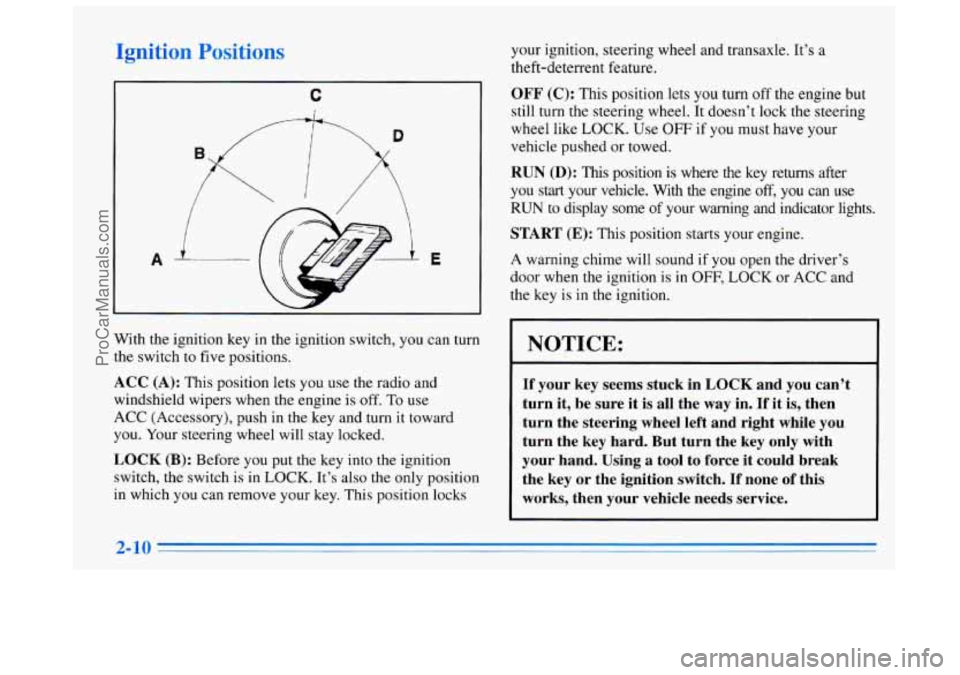
With the ignition key in the ignition switch, you can turn
the switch to five positions.
ACC (A): This position lets you use the radio and
windshield wipers when the engine is
off. To use
ACC (Accessory), push in the key and turn
it toward
you. Your steering wheel will stay locked.
LOCK (B): Before you put the key into the ignition
switch, the switch is in
LOCK. It’s also the only position
in which you can remove your key. This position locks your
ignition, steering wheel and transaxle. It’s
a
theft-deterrent feature.
OFF (C): This position lets you turn off the engine but
still turn the steering wheel. It doesn’t lock the steering
wheel like LOCK. Use OFF
if you must have your
vehicle pushed or towed.
RUN (D): This position is where the key returns after
you start your vehicle. With the engine
off, you can use
RUN to display some of your warning and indicator lights.
START (E): This position starts your engine.
A warning chime will sound if you open the driver’s
door when the ignition is
in OFF, LOCK or ACC ,and
the key is in the ignition.
- .. - _- -
NOTICE:
If your key seems stuck in LOCK and you can’t
turn it, be sure
it is all the way in. If it is, then
turn the steering wheel left and right while you
turn the key hard. But turn the key only with
your hand. Using
a tool to force it could break
the key or the ignition switch.
If none of this
works, then your vehicle needs service.
ProCarManuals.com
Page 113 of 356
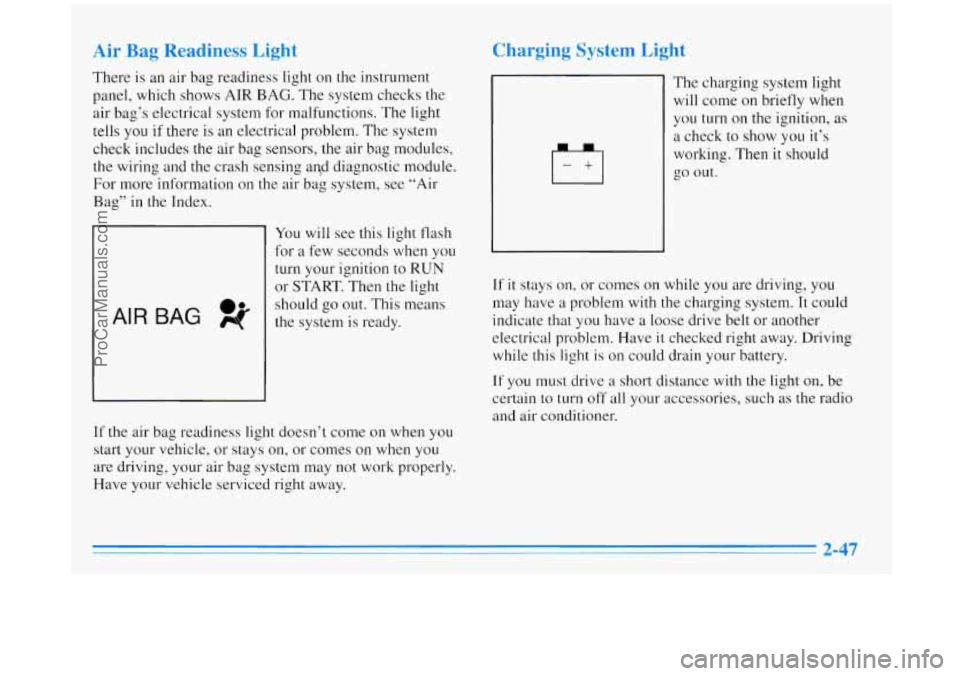
Air Bag Readiness Light
There is an air bag readiness light on the instrument
panel, which shows
AIR BAG. The system checks the
air bag’s electrical system for malfunctions. The light
tells you if there is an electrical problem. The system
check includes
the air bag sensors, the air bag modules,
the wiring and the crash sensing
and diagnostic module.
For more information on the air bag system, see “Air
Bag” in the Index.
AIR BAG pf 0.
You will see this light flash
for a few seconds when you
turn your ignition to
RUN
or START. Then the light
should go out. This means
the system is ready.
If the air bag readiness light doesn’t come on when you
start your vehicle, or stays on, or comes on when you
are driving, your air bag system may not work properly.
Have your vehicle serviced right away.
Charging System Light
The charging system light
will come on briefly when
you turn
on the ignition, as
a check to show you it’s
working. Then it should
go out.
If it stays on, or comes on while you are driving, you
may have
a problem with the charging system. It could
indicate that you have
a loose drive belt or another
electrical problem. Have
it checked right away. Driving
while this light is on could drain your battery.
If you must drive a short distance with the light on, be
certain to turn
off all your accessories, such as the radio
and air conditioner.
ProCarManuals.com
Page 131 of 356
AM-FM Stereo with Cassette Tape
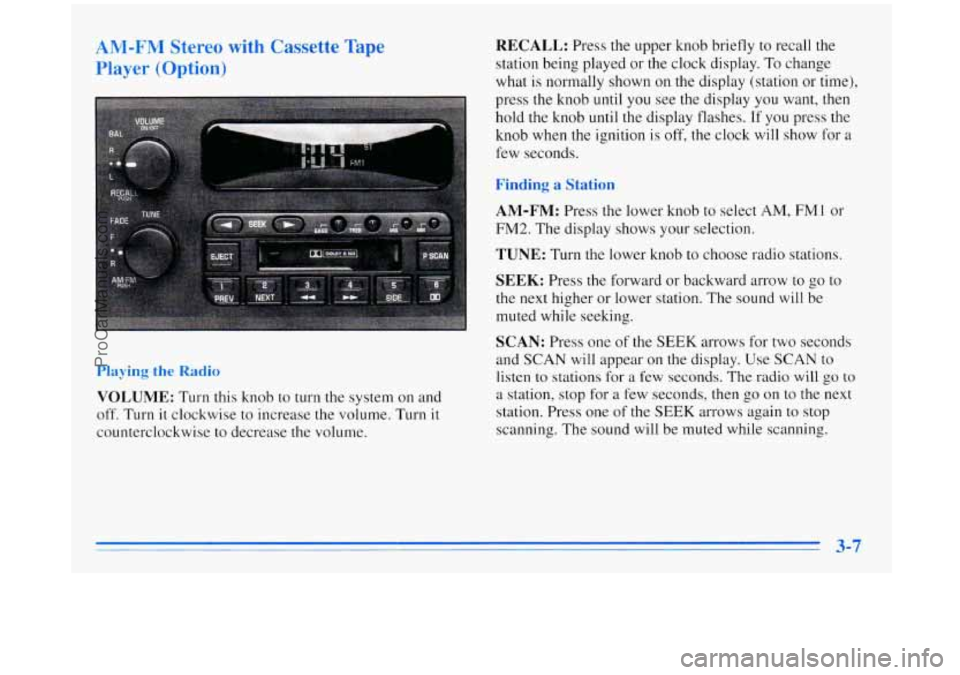
Player (Option) RECALL: Press the upper knob briefly to recall the
station being played or the clock display.
To change
what is normally shown on the display (station or time),
press the knob until you see the display you want,
then
hold the knob until the display flashes. If you press the
knob when the ignition is
off, the clock will show for a
few seconds.
Finding a Station
AM-FM:
Press the lower knob to select AM, FMl or
FM2. The display shows your selection.
TUNE: Turn the lower knob to choose radio stations.
SEEK: Press the forward or backward arrow to go to
the next higher or lower station. The sound will be
muted while seeking.
SCAN: Press one of the SEEK arrows for two seconds
and SCAN
will appear on the display. Use SCAN to
listen to stations for a few seconds. The radio will go to
a station, stop for a few seconds, then go on to the next
station. Press one
of the SEEK arrows again to stop
scanning. The sound will be muted while scanning.
Playing the Radio
VOLUME: Turn this knob to turn the system on and
off. Turn it clockwise to increase the volume. Turn it
counterclockwise to decrease the volume.
3-7
ProCarManuals.com
Page 132 of 356
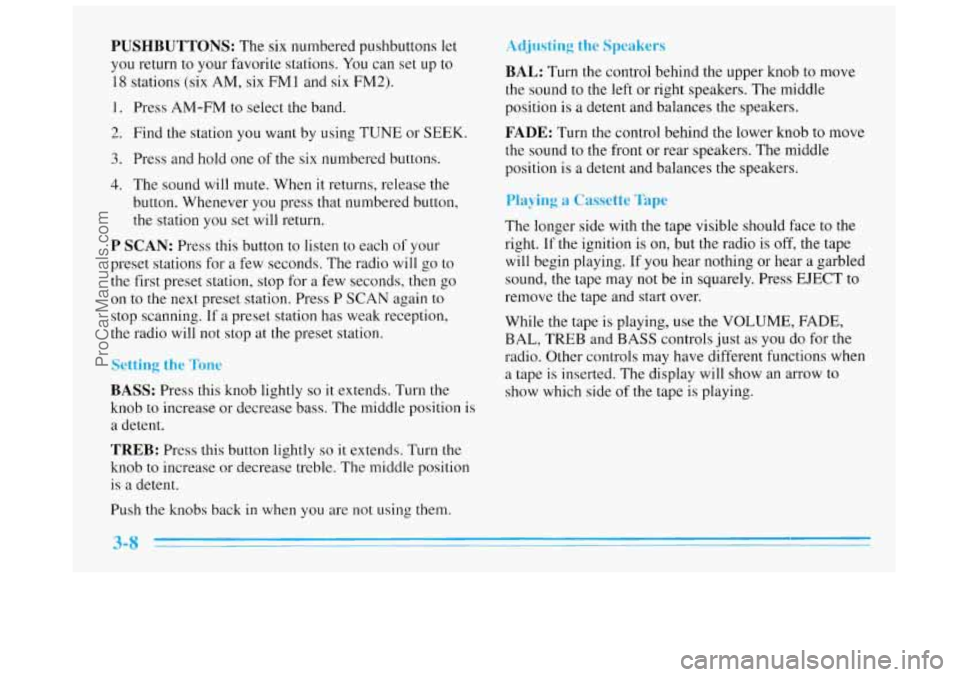
PUSHBUTTONS: The six numbered pushbuttons let
you return to your favorite stations.
You can set up to
18 stations (six AM, six FMl and six FM2).
1. Press AM-FM to select the band.
2. Find the station you want by using TUNE or SEEK.
3. Press and hold one of the six numbered buttons.
4. The sound will mute. When it returns, release the
button. Whenever you press that numbered button,
the station
you set will return.
P SCAN: Press this button to listen to each of your
preset stations for
a few seconds. The radio will go to
the first preset station, stop for a few seconds, then go
on to the next preset station. Press P SCAN again to
stop scanning.
If a preset station has weak reception,
the radio will not stop at the preset station.
Setting the Tone
BASS: Press this knob lightly so it extends. Turn the
knob to increase or decrease bass. The middle position is
a detent.
TREB: Press this button lightly so it extends. Turn the
knob to increase or decrease treble. The middle position
is a detent.
Push the knobs back in when you are not using them.
Adjusting the Speakers
BAL: Turn the control behind the upper knob to move
the sound to the left or right speakers. The middle
position is
a detent and balances the speakers.
FADE: Turn the control behind the lower knob to move
the sound to the front
or rear speakers. The middle
position is
a detent and balances the speakers.
Playing a Cassette Tape
The longer side with the tape visible should face to the
right.
If the ignition is on, but the radio is off, the tape
will begin playing. If you hear nothing or hear
a garbled
sound, the tape may not be in squarely. Press EJECT to
remove the tape and start over.
While the tape
is playing, use the VOLUh-, FADE,
BAL, TREB and BASS controls just as you do for the
radio. Other controls may have different functions when
a tape is inserted. The display will show an arrow to
show which side
of the tape is playing.
ProCarManuals.com
Page 133 of 356
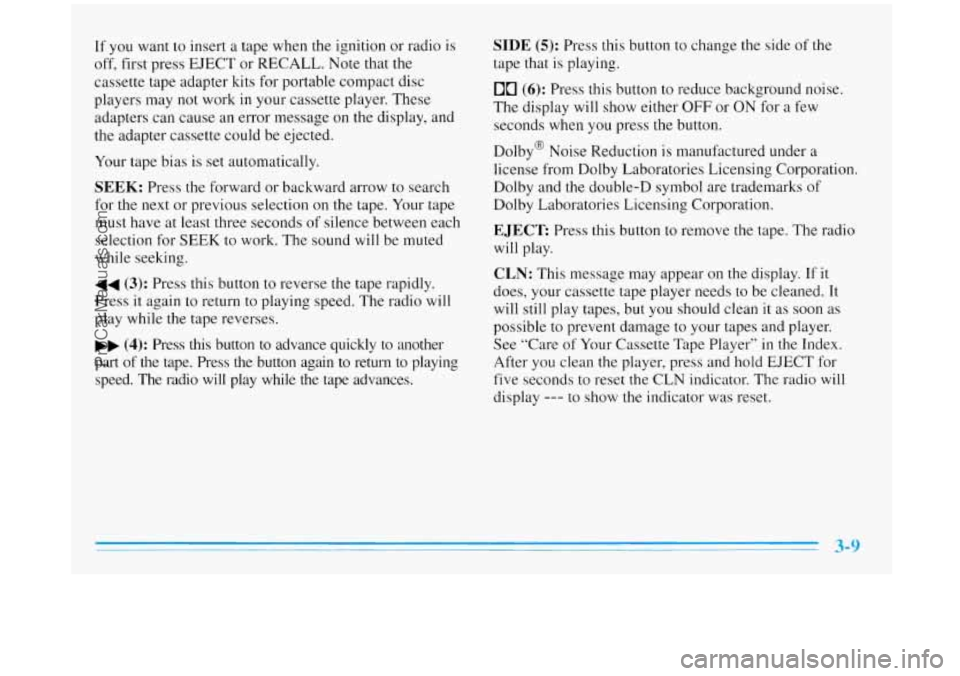
If you want to insert a tape when the ignition or radio is
off, first press EJECT or RECALL. Note that the
cassette tape adapter kits for portable compact disc
players may
not work in your cassette player. These
adapters can cause an error message on the display, and
the adapter cassette could be ejected.
Your tape bias is
set automatically.
SEEK: Press the forward or backward arrow to search
for the next or previous selection on
the tape. Your tape
must have at least three seconds of silence between each
selection for SEEK to work. The sound will be muted
while seeking.
44 (3): Press this button to reverse the tape rapidly.
Press
it again to return to playing speed. The radio will
play while the tape reverses.
bb (4): Press this button to advance quickly to another
part
of the tape. Press the button again to return to playing
speed. The radio will play while the tape advances.
SIDE (5): Press this button to change the side of the
tape that
is playing.
00 (6): Press this button to reduce background noise.
The display will show either
OFF or ON for a few
seconds when you press the button.
Dolby@ Noise Reduction
is manufactured under a
license from Dolby Laboratories Licensing Corporation.
Dolby and the double-D symbol are trademarks of
Dolby Laboratories Licensing Corporation.
EJECT Press this button to remove the tape. The radio
will play.
CLN: This message may appear on the display. If it
does, your cassette tape player needs to be cleaned. It
will
still play tapes, but you should clean it as soon as
possible to prevent damage to your tapes and player.
See “Care of Your Cassette Tape Player”
in the Index.
After
you clean the player, press and hold EJECT for
five seconds to reset the
CLN indicator. The radio will
display
--- to show the indicator was reset.
ProCarManuals.com
Page 134 of 356
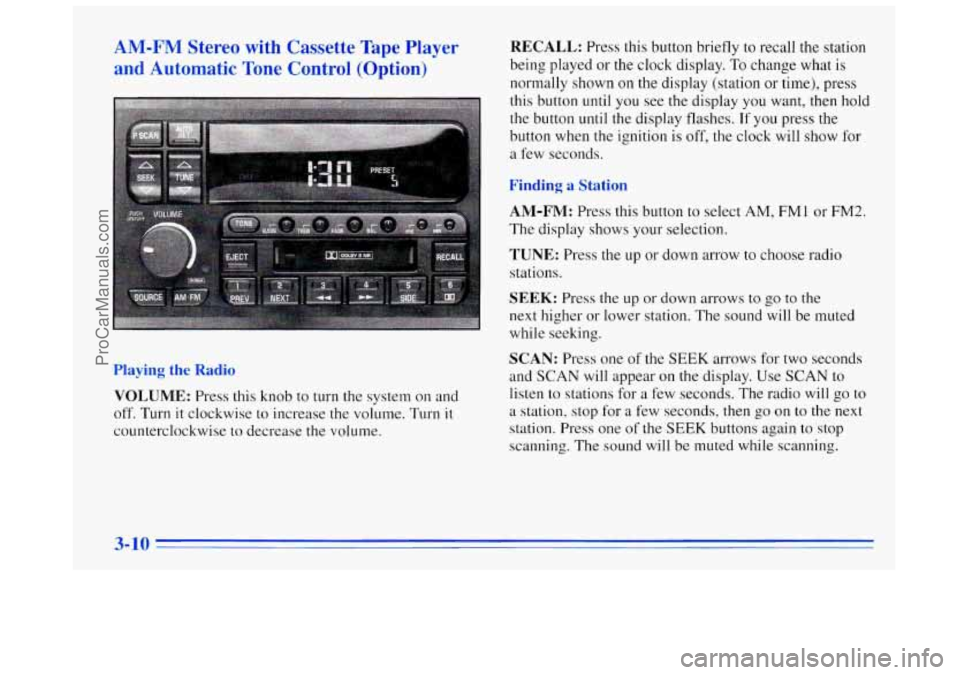
AM-FM Stereo with Cassette Tape Player
and Automatic Tone Control (Option) RECALL: Press this button briefly to recall the station
being played or the clock display.
To change what is
normally shown on the display (station
or time), press
this button until you see the display you want, then hold
the button
until the display flashes. If you press the
button when the ignition is off,
the clock will show for
a few seconds.
Finding a Station
AM-FM:
Press this button to select AM, FM1 or FM2.
The display shows your selection.
TUNE: Press the up or down arrow to choose radio
stations.
Playing the Radio
VOLUME: Press this knob to turn the system on and
off. Turn it clockwise to increase the volume. Turn it
counterclockwise to decrease the volume.
SEEK: Press the up or down arrows to go to the
next higher or lower station.
The sound will be muted
while seeking.
SCAN: Press one of the SEEK arrows for two seconds
and
SCAN will appear on the display. Use SCAN to
listen to stations for
a few seconds. The radio will go to
a station, stop for a few seconds, then go on to the next
station. Press one of the
SEEK buttons again to stop
scanning.
The sound will be muted while scanning.
ProCarManuals.com
Page 135 of 356
PUSHBUTTONS: The six numbered pushbuttons let
you return to your favorite stations. You can set up to
18 stations (six AM, six FM1 and six FM2).
1. Press AM-FM to select the band.
2. Find the station you want by using TUNE or SEEK.
3. Press TONE to select the setting you prefer.
4. Press and hold one of the six numbered buttons.
5. The sound will mute. When it returns, release the
button. Whenever you press that numbered button, the
station
you set will return and the TONE you selected
will be automatically selected for that button.
P SCAN: Press this button to listen to each of your
preset stations for a few seconds. The radio will go to
the first preset station, stop for a few seconds, then go
on to the next preset station. Press P SCAN again to stop
scanning.
If a preset station has weak reception, the
radio will not stop at the preset station.
AUTO SET Press this button and the system will seek
and set the
12 strongest FM or the 6 strongest AM
stations on your preset buttons. To return to the stations
you manually set, press AUTO SET again.
Setting the Tone
BASS:
Press this knob lightly so it extends. Turn the
knob to increase or decrease bass. The middle position is
a detent.
TREB: Press this knob lightly so it extends. Turn the
knob to increase or decrease treble. The middle position
is a detent.
Push the knobs back
in when you are not using them.
TONE: This feature allows you to choose preset treble
and bass equalization settings designed for classical,
pop, rock, jazz, talk and country/western stations.
CLASS will appear on the display when you first press
TONE. Each time you press it, another setting will
appear on the display. Press
it again after C & W
appears and MANUAL will appear. Tone control will
return to the TREB and BASS knobs,
Also, if you use
the TREB and
BASS knobs, control will return to them
and
MANUAL will appear.
Adjusting the Speakers
BAL: Press this knob lightly so it extends. Turn the
knob to move
the sound to the left or right speakers. The
middle position
is a detent and balances the speakers.
3-11
ProCarManuals.com
Page 136 of 356
FADE: Turn the knob to move the sound to the front or
rear speakers. The middle position is a detent and
balances the speakers.
Push the knobs back in when you are not using them.
Playing a Cassette Tape
The longer side wlcn the tape visible should face to the
right.
If the ignition is on, but the radio is off, the tape
will begin playing.
If you hear nothing or hear a garbled
sound, the tape may
not be in squarely. Press EJECT to
remove the tape and start over.
While the tape is playing, use the
VOLUME, FADE,
BAL, TREE and BASS controls just as you do for the
radio. Other controls may have different functions when
a tape is inserted. The display will show an arrow to
show which side of the tape is playing.
If you want to insert a tape when the ignition or radio is
off, first press EJECT or RECALL. Note that the
cassette tape adapter kits for portable compact disc
players may not work
in your cassette player. These
adapters can cause
an error message on the display, and
the adapter cassette could be ejected.
Your tape bias is set automatically.
PREV (1): Press this button to search for the previous
selection on the tape. Your tape must have at least three
seconds of silence between each selection for PREV to
work. The sound will be muted while seeking.
NEXT (2): Press this button to search for the next
selection on the tape. Your tape must have at least three
seconds of silence between each selection'for NEXT to
work. The sound will be muted
while seeking.
The
SEEK up and down arrows will also find the
previous and next selections on the tape.
44 (3): Press this button to reverse the tape rapidly.
Press it again to return to playing speed. The radio will
play while the tape reverses.
bb (4): Press this button to advance quickly to another
part of the tape. Press
the button again to return to playing
speed.
The radio will play while the tape advances.
SIDE (5): Press this button to change the side of the
tape that is playing.
00 (6): Press this button to reduce background noise.
The double-D symbol will appear on the display.
3-12
ProCarManuals.com
Page 137 of 356
Dolby Noise Reduction is manufactured under a license
from Dolby Laboratories Licensing Corporation. Dolby
and the double-D symbol are trademarks of Dolby
Laboratories Licensing Corporation.
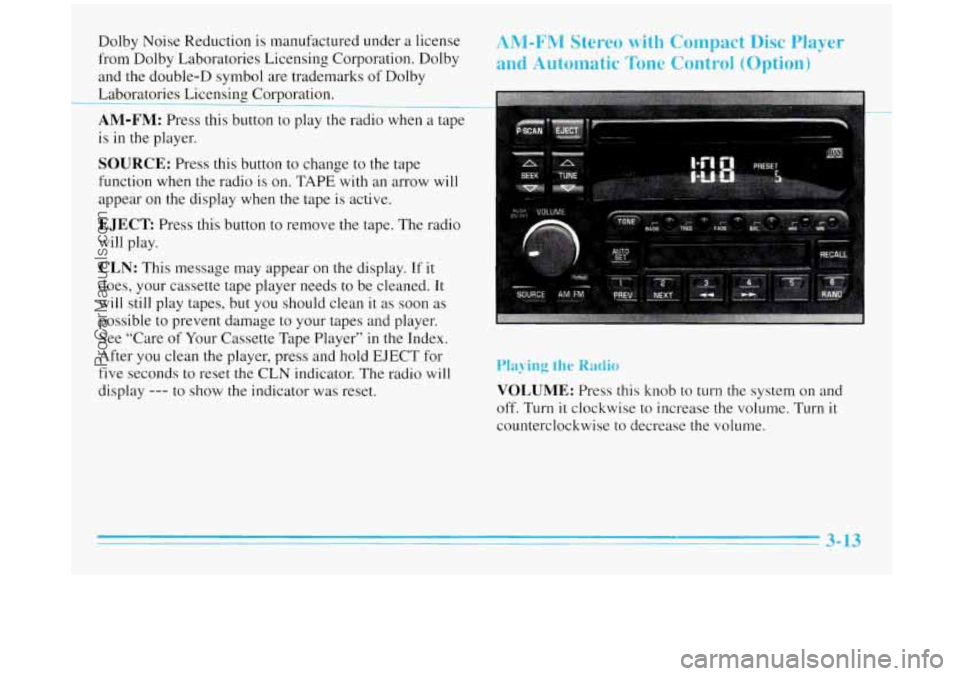
AM-FM: Press this button to play the radio when a tape
is in the player.
SOURCE: Press this button to change to the tape
function when the radio
is on. TAPE with an arrow will
appear on the display when the tape is active.
EJECT Press this button to remove the tape. The radio
will play.
CLN: This message may appear on the display. If it
does, your cassette tape player needs to be cleaned. It
will still play tapes, but you should clean
it as soon as
possible to prevent damage to your tapes and player.
See “Care of Your Cassette Tape Player” in the Index.
After you clean the player, press and hold
EJECT for
five seconds to reset
the CLN indicator. The radio will
display
--- to show the indicator was reset.
ANI-FM Stereo with Compact Disc Player
and Automatic
Tone Control (Option)
Playing the Radio
VOLUME: Press this knob to turn the system on and
off. Turn it clockwise to increase the volume. Turn it
counterclockwise to decrease the volume.
3- 13
ProCarManuals.com