brakes BUICK REGAL 2011 User Guide
[x] Cancel search | Manufacturer: BUICK, Model Year: 2011, Model line: REGAL, Model: BUICK REGAL 2011Pages: 368, PDF Size: 5.35 MB
Page 207 of 368
Black plate (17,1)Buick Regal Owner Manual - 2011
Driving and Operating 9-17
Following break‐in, engine speed
and load can be gradually
increased.
Ignition Positions
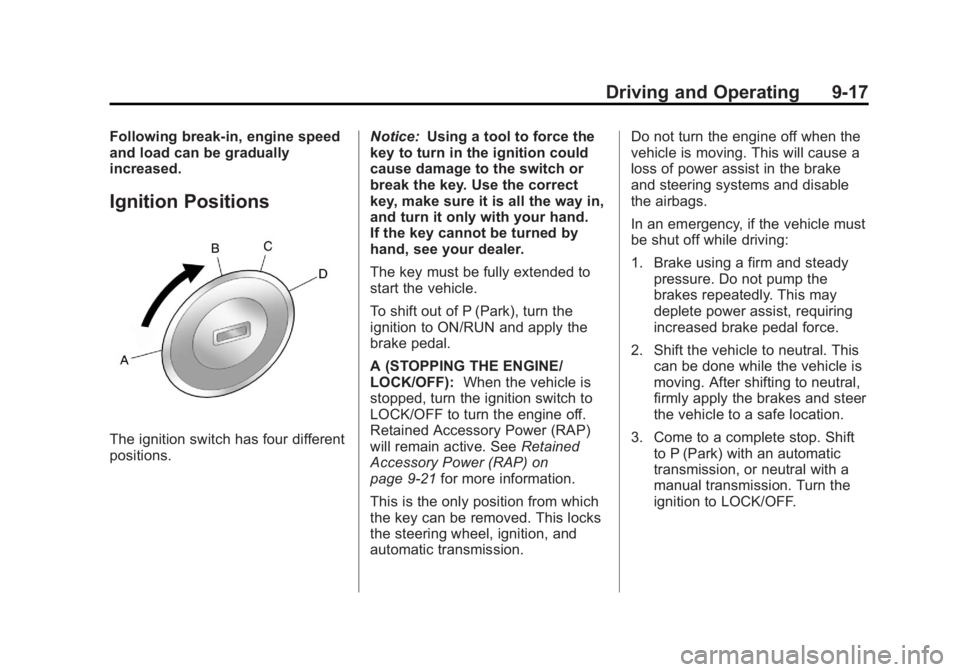
The ignition switch has four different
positions.Notice:
Using a tool to force the
key to turn in the ignition could
cause damage to the switch or
break the key. Use the correct
key, make sure it is all the way in,
and turn it only with your hand.
If the key cannot be turned by
hand, see your dealer.
The key must be fully extended to
start the vehicle.
To shift out of P (Park), turn the
ignition to ON/RUN and apply the
brake pedal.
A (STOPPING THE ENGINE/
LOCK/OFF): When the vehicle is
stopped, turn the ignition switch to
LOCK/OFF to turn the engine off.
Retained Accessory Power (RAP)
will remain active. See Retained
Accessory Power (RAP) on
page 9‑21 for more information.
This is the only position from which
the key can be removed. This locks
the steering wheel, ignition, and
automatic transmission. Do not turn the engine off when the
vehicle is moving. This will cause a
loss of power assist in the brake
and steering systems and disable
the airbags.
In an emergency, if the vehicle must
be shut off while driving:
1. Brake using a firm and steady
pressure. Do not pump the
brakes repeatedly. This may
deplete power assist, requiring
increased brake pedal force.
2. Shift the vehicle to neutral. This can be done while the vehicle is
moving. After shifting to neutral,
firmly apply the brakes and steer
the vehicle to a safe location.
3. Come to a complete stop. Shift to P (Park) with an automatic
transmission, or neutral with a
manual transmission. Turn the
ignition to LOCK/OFF.
Page 220 of 368
Black plate (30,1)Buick Regal Owner Manual - 2011
9-30 Driving and Operating
To stop, let up on the accelerator
pedal and press the brake pedal.
Just before the vehicle stops, press
the clutch pedal and the brake
pedal, and shift to Neutral.
Neutral:Use this position when
you start or idle the engine.
The shift lever is in Neutral when it
is centered in the shift pattern, not in
any gear.
R (Reverse): To back up, with the
vehicle at a complete stop, press
down the clutch pedal. Then pull up
on the button on the selector lever,
and shift into R (Reverse). Let up
on the clutch pedal slowly while
pressing the accelerator pedal. If R (Reverse) gear does not
engage, shift the transmission to
Neutral, release the clutch pedal
and press it back down. Repeat the
gear selection.
Notice:
Shifting to R (Reverse)
while the vehicle is moving
forward could damage the
transmission. The repairs would
not be covered by the vehicle
warranty. Shift to R (Reverse) only
after the vehicle is stopped.
Use R (Reverse) along with the
parking brake to park the vehicle.
When operating, press the clutch
pedal down completely. Do not use
the pedal as a foot rest.Brakes
Antilock Brake
System (ABS)
This vehicle has the Antilock Brake
System (ABS), an advanced
electronic braking system that helps
prevent a braking skid.
When the engine is started and the
vehicle begins to drive away, ABS
checks itself. A momentary motor or
clicking noise might be heard while
this test is going on, and it might
even be noticed that the brake
pedal moves a little. This is normal.
If there is a problem with ABS, this
warning light stays on. See Antilock
Brake System (ABS) Warning Light
on page 5‑17.
Page 221 of 368
Black plate (31,1)Buick Regal Owner Manual - 2011
Driving and Operating 9-31
If driving safely on a wet road and it
becomes necessary to slam on the
brakes and continue braking to
avoid a sudden obstacle, a
computer senses that the wheels
are slowing down. If one of the
wheels is about to stop rolling, the
computer will separately work the
brakes at each wheel.
ABS can change the brake pressure
to each wheel, as required, faster
than any driver could. This can help
the driver steer around the obstacle
while braking hard.
As the brakes are applied, the
computer keeps receiving updates
on wheel speed and controls
braking pressure accordingly.
Remember: ABS does not change
the time needed to get a foot up to
the brake pedal or always decrease
stopping distance. If you get tooclose to the vehicle in front of you,
there will not be enough time to
apply the brakes if that vehicle
suddenly slows or stops. Always
leave enough room up ahead to
stop, even with ABS.
Using ABS
Do not pump the brakes. Just hold
the brake pedal down firmly and let
ABS work. You might hear the ABS
pump or motor operating and feel
the brake pedal pulsate, but this is
normal.
Braking in Emergencies
ABS allows the driver to steer and
brake at the same time. In many
emergencies, steering can help
more than even the very best
braking.
Parking Brake
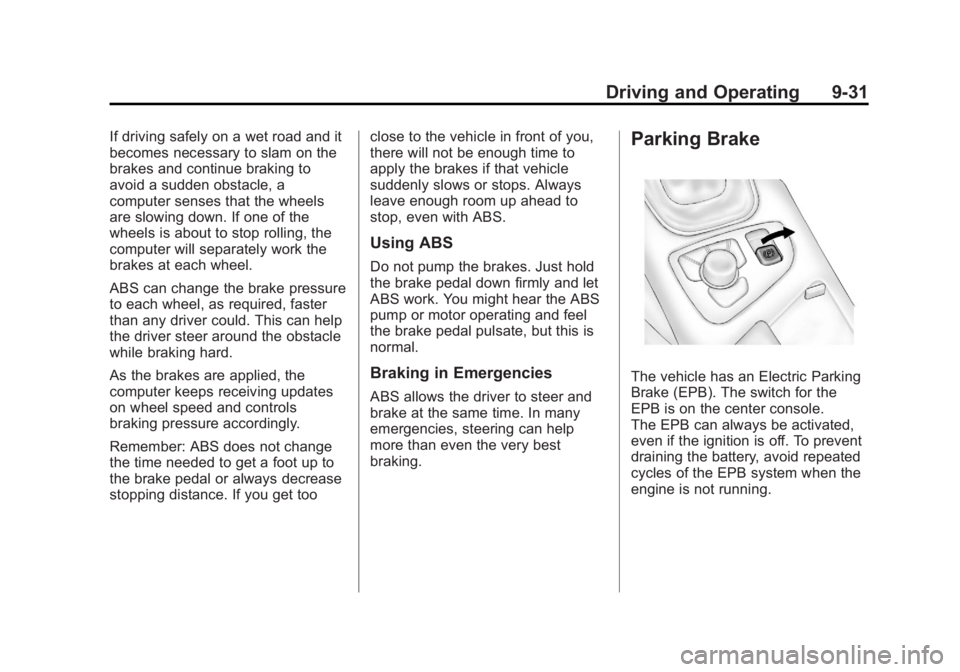
The vehicle has an Electric Parking
Brake (EPB). The switch for the
EPB is on the center console.
The EPB can always be activated,
even if the ignition is off. To prevent
draining the battery, avoid repeated
cycles of the EPB system when the
engine is not running.
Page 224 of 368
Black plate (34,1)Buick Regal Owner Manual - 2011
9-34 Driving and Operating
The stability system hydraulic brake
control module increases brake
pressure at each corner of the
vehicle until the ABS activates.
Minor brake pedal pulsation or
pedal movement during this time
is normal and the driver should
continue to apply the brake pedal
as the driving situation dictates.
The brake assist feature will
automatically disengage when
the brake pedal is released or
brake pedal pressure is quickly
decreased.Hill Start Assist (HSA)
Some vehicles have a Hill Start
Assist (HSA) feature, which may be
useful when the vehicle is stopped
on a grade. This feature is designed
to prevent the vehicle from rolling,
either forward or rearward, during
vehicle drive off. After the driver
completely stops and holds the
vehicle in a complete standstill on a
grade, HSA will be automatically
activated. During the transition
period between when the driver
releases the brake pedal and starts
to accelerate to drive off on a grade,
HSA holds the braking pressure to
ensure that there is no rolling. The
brakes will automatically release
when the accelerator pedal is
applied within the two‐second
window. It will not activate if the
vehicle is in a drive gear and facing
downhill or if the vehicle is facing
uphill and in R (Reverse).
Ride Control Systems
Traction Control
System (TCS)
The vehicle may have a Traction
Control System (TCS) that limits
wheel slip. The system operates if it
senses that one or both of the front
wheels are slipping or beginning to
lose traction. When this happens,
the system reduces engine power
and/or applies brake pressure to the
slipping wheel(s).
The system may be heard or felt
while it is working, but this is
normal.
TCS automatically comes on
whenever the vehicle is started.
To limit wheel slip, especially in
slippery road conditions, the system
should always be left on. But,
TCS can be turned off if needed.
Page 226 of 368
Black plate (36,1)Buick Regal Owner Manual - 2011
9-36 Driving and Operating
Press and release the
TCS/StabiliTrak button again
to turn the system back on.
It may be necessary to turn the
system off if the vehicle gets stuck
in sand, mud, or snow and rocking
the vehicle is required. SeeIf the
Vehicle Is Stuck on page 9‑11 for
more information. See also Winter
Driving on page 9‑9 for information
on using TCS when driving in snowy
or icy conditions.
Adding non‐GM accessories can
affect the vehicle performance.
See Accessories and Modifications
on page 10‑3 for more information.
StabiliTrak®System
The vehicle may have a vehicle
stability enhancement system called
StabiliTrak. It is an advanced
computer-controlled system that
assists with directional control of the
vehicle in difficult driving conditions. StabiliTrak activates when the
computer senses a difference
between the intended path and the
direction the vehicle is actually
traveling. StabiliTrak selectively
applies braking pressure to the
vehicle brakes to help steer the
vehicle in the intended direction.
StabiliTrak comes on automatically
whenever the vehicle is started.
To assist with directional control
of the vehicle, the system should
always be left on.
When StabiliTrak activates,
d
flashes on the instrument panel.
A noise may be heard or vibration
may be felt in the brake pedal.
This is normal. Continue to steer the
vehicle in the intended direction.
See
Traction Control System (TCS)/
StabiliTrak
®Light on page 5‑18 for
more information. If a problem is detected with
StabiliTrak, SERVICE
STABILITRAK is displayed on the
Driver Information Center (DIC).
See
Ride Control System Messages
on page 5‑29. When this message
is displayed and
dcomes on and
stays on, the vehicle is safe to drive
but the system is not operational.
Driving should be adjusted
accordingly.
If
dcomes on and stays on, reset
the system.
To reset:
1. Stop the vehicle.
2. Turn the engine off and waiting 15 seconds.
3. Start the engine.
If
dstill comes on and stays on, the
vehicle needs service.
Page 230 of 368
Black plate (40,1)Buick Regal Owner Manual - 2011
9-40 Driving and Operating
1(On/Off):Press to turn the
cruise control system on and off.
An indicator light will turn on or off in
the instrument panel cluster.
*(Cancel): Press to disengage
cruise control without erasing the
set speed from memory.
RES/+ (Resume/Accelerate):
Move the thumbwheel up to make
the vehicle resume to a previously
set speed or to accelerate.
SET/− (Set/Coast): Move the
thumbwheel down to set a speed or
to make the vehicle decelerate.
Setting Cruise Control
If the cruise button is on when not in
use, it could get bumped and go into
cruise when not desired. Keep the
cruise control switch off when cruise
is not being used.
1. Press
1to turn cruise
control on.
2. Get to the speed desired. 3. Move the thumbwheel down
toward SET/− and release it.
The desired set speed briefly
appears in the instrument panel
cluster.
4. Take your foot off the accelerator pedal.
Resuming a Set Speed
If the cruise control is set at a
desired speed and then the brakes
are applied, the cruise control is
disengaged without erasing the set
speed from memory.
Once the vehicle speed reaches
about 40 km/h (25 mph) or more,
move the thumbwheel up toward
RES/+ briefly. The vehicle returns to
the previous set speed and stays
there. Increasing Speed While Using
Cruise Control
If the cruise control system is
already activated:
.Move the thumbwheel up toward
RES/+ and hold it until the
desired speed is reached, then
release it.
.To increase vehicle speed in
small amounts, move the
thumbwheel up toward RES/+
briefly and then release it. Each
time this is done, the vehicle
goes about 1.6 km/h (1 mph)
faster.
Page 231 of 368
Black plate (41,1)Buick Regal Owner Manual - 2011
Driving and Operating 9-41
Reducing Speed While Using
Cruise Control
If the cruise control system is
already activated:
.Move the thumbwheel toward
SET/−and hold until the desired
lower speed is reached, then
release it.
.To slow down in small amounts,
move the thumbwheel toward
SET/− briefly. Each time this is
done, the vehicle goes about
1.6 km/h (1 mph) slower.
Passing Another Vehicle While
Using Cruise Control
Use the accelerator pedal to
increase the vehicle speed. When
you take your foot off the pedal, the
vehicle will slow down to the
previous set cruise control speed. Using Cruise Control on Hills
How well the cruise control works
on hills depends upon the vehicle
speed, load, and the steepness of
the hills. When going up steep hills,
you might have to step on the
accelerator pedal to maintain
the vehicle speed. When going
downhill, you might have to brake
or shift to a lower gear to maintain
the vehicle speed. When the brakes
are applied, the cruise control is
disengaged.
Ending Cruise Control
There are three ways to end cruise
control:
.Step lightly on the brake pedal
or clutch to disengage cruise
control.
.Press*on the steering wheel.
.Press1on the steering wheel
to turn off the cruise control.
Erasing Speed Memory
The cruise control set speed is
erased from memory by pressing
the
1button or if the ignition is
turned off.
Page 233 of 368

Black plate (43,1)Buick Regal Owner Manual - 2011
Driving and Operating 9-43
PARK ASSIST OFF displays on the
Driver Information Center (DIC) to
indicate that URPA is off. The
message disappears after a short
period of time.
Turning the System On and Off
The URPA system can be turned on
and off using the park assist button
located next to the radio.
The park assist button lights up
when the system is on or in standby
and turns off when it has been
disabled.
URPA defaults to the on setting
each time the vehicle is started.
When the System Does Not
Seem to Work Properly
SERVICE PARK ASSIST:If this
message occurs, take the vehicle to
your dealer to repair the system.
PARK ASSIST OFF: If the URPA
system does not activate due to a
temporary condition, the message
displays on the DIC. See Driver
Information Center (DIC) on
page 5‑22 for more information.
This can occur under the following
conditions:
.The driver has disabled the
system.
.The ultrasonic sensors are not
clean. Keep the vehicle's rear
bumper free of mud, dirt, snow,
ice, and slush. For cleaning
instructions, see Exterior Care
on page 10‑77.
.An object was hanging out of the
trunk during the last drive cycle.
Once the object is removed and
URPA detects no objects of
interest, the URPA will return to
normal operation.
.The vehicle's bumper is
damaged. Take the vehicle to
your dealer to repair the system.
.Other conditions, such as
vibrations from a jackhammer or
the compression of air brakes on
a very large truck, are affecting
system performance.
If the system is still disabled after
checking all conditions listed above
and driving forward at least 40 km/h
(25 mph), take the vehicle to your
dealer.
Page 241 of 368
Black plate (1,1)Buick Regal Owner Manual - 2011
Vehicle Care 10-1
Vehicle Care
General Information
General Information . . . . . . . . . . 10-2
California Proposition 65Warning . . . . . . . . . . . . . . . . . . . . 10-3
California Perchlorate Materials Requirements . . . . 10-3
Accessories and Modifications . . . . . . . . . . . . . . . 10-3
Vehicle Checks
Doing Your OwnService Work . . . . . . . . . . . . . . . 10-4
Hood . . . . . . . . . . . . . . . . . . . . . . . . 10-5
Engine Compartment Overview . . . . . . . . . . . . . . . . . . . 10-6
Engine Oil . . . . . . . . . . . . . . . . . . . 10-9
Engine Oil Life System . . . . . 10-13
Automatic Transmission Fluid . . . . . . . . . . . . . . . . . . . . . . 10-14
Manual Transmission Fluid . . . . . . . . . . . . . . . . . . . . . . 10-14 Hydraulic Clutch . . . . . . . . . . . . 10-14
Engine Air Cleaner/Filter . . . . 10-15
Cooling System . . . . . . . . . . . . 10-17
Engine Coolant . . . . . . . . . . . . . 10-18
Engine Overheating . . . . . . . . 10-21
Power Steering Fluid . . . . . . . 10-23
Washer Fluid . . . . . . . . . . . . . . . 10-24
Brakes . . . . . . . . . . . . . . . . . . . . . 10-25
Brake Fluid . . . . . . . . . . . . . . . . . 10-26
Battery . . . . . . . . . . . . . . . . . . . . . 10-27
Starter Switch Check . . . . . . . 10-28
Automatic Transmission Shift
Lock Control Function
Check . . . . . . . . . . . . . . . . . . . . . 10-28
Ignition Transmission Lock Check . . . . . . . . . . . . . . . . . . . . . 10-29
Park Brake and P (Park) Mechanism Check . . . . . . . . 10-29
Wiper Blade Replacement . . . . . . . . . . . . . . 10-30
Headlamp Aiming
Headlamp Aiming . . . . . . . . . . 10-30
Bulb Replacement
Bulb Replacement . . . . . . . . . . 10-31
Halogen Bulbs . . . . . . . . . . . . . . 10-31
Headlamps, Front TurnSignal and Parking
Lamps . . . . . . . . . . . . . . . . . . . . 10-31
Fog Lamps . . . . . . . . . . . . . . . . . 10-32
Taillamps, Turn Signal, Stoplamps, and Back-Up
Lamps . . . . . . . . . . . . . . . . . . . . 10-33
License Plate Lamp . . . . . . . . 10-34
Replacement Bulbs . . . . . . . . . 10-34
Electrical System
Electrical System Overload . . . . . . . . . . . . . . . . . . 10-35
Fuses and Circuit Breakers . . . . . . . . . . . . . . . . . . 10-36
Engine Compartment Fuse Block . . . . . . . . . . . . . . . . . . . . . 10-36
Instrument Panel Fuse Block . . . . . . . . . . . . . . . . . . . . . 10-40
Page 243 of 368
Black plate (3,1)Buick Regal Owner Manual - 2011
Vehicle Care 10-3
California Proposition
65 Warning
Most motor vehicles, including this
one, contain and/or emit chemicals
known to the State of California to
cause cancer and birth defects or
other reproductive harm. Engine
exhaust, many parts and systems,
many fluids, and some component
wear by-products contain and/or
emit these chemicals.
California Perchlorate
Materials Requirements
Certain types of automotive
applications, such as airbag
initiators, seat belt pretensioners,
and lithium batteries contained in
Remote Keyless Entry transmitters,
may contain perchlorate materials.
Special handling may be necessary.
For additional information, see
www.dtsc.ca.gov/hazardouswaste/
perchlorate.
Accessories and
Modifications
Adding non‐dealer accessories or
making modifications to the vehicle
can affect vehicle performance and
safety, including such things as
airbags, braking, stability, ride and
handling, emissions systems,
aerodynamics, durability, and
electronic systems like antilock
brakes, traction control, and stability
control. These accessories or
modifications could even cause
malfunction or damage not covered
by the vehicle warranty.Damage to vehicle components
resulting from modifications or the
installation or use of non‐GM
certified parts, including control
module or software modifications, is
not covered under the terms of the
vehicle warranty and may affect
remaining warranty coverage for
affected parts.
GM Accessories are designed to
complement and function with other
systems on the vehicle. Your GM
dealer can accessorize the vehicle
using genuine GM Accessories.
When you go to your GM dealer
and ask for GM Accessories, you
will know that GM-trained and
supported service technicians will
perform the work using genuine GM
Accessories.
Also, see
Adding Equipment to the
Airbag-Equipped Vehicle on
page 3‑38.