phone BUICK REGAL 2011 Owner's Guide
[x] Cancel search | Manufacturer: BUICK, Model Year: 2011, Model line: REGAL, Model: BUICK REGAL 2011Pages: 368, PDF Size: 5.35 MB
Page 178 of 368
Black plate (28,1)Buick Regal Owner Manual - 2011
7-28 Infotainment System
2. Say“Directory.” The system
responds “Directory” and lists all
stored name tags. The system
returns to the main menu when
the list is complete.
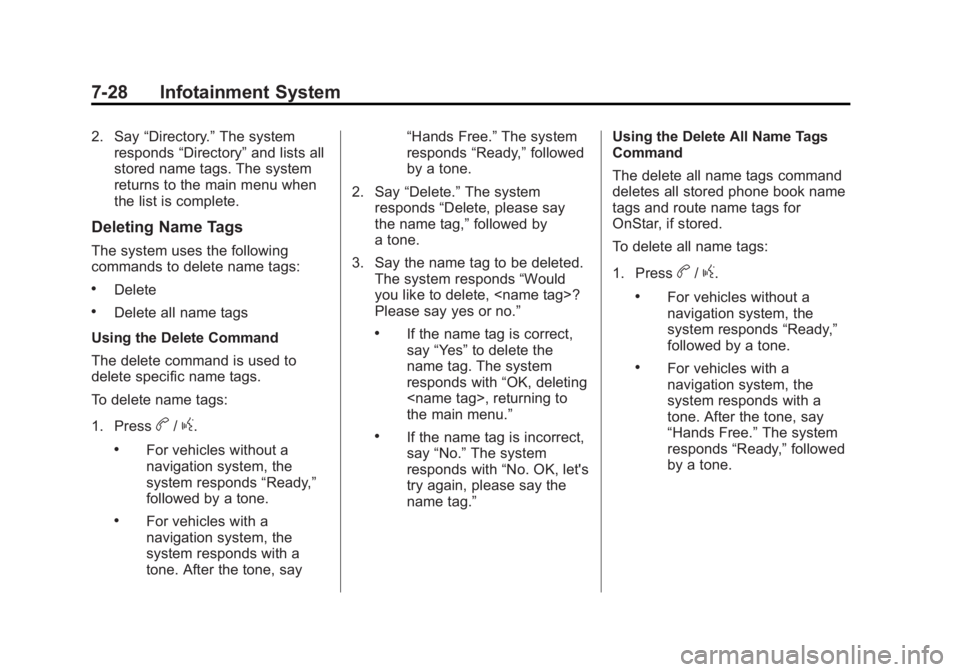
Deleting Name Tags
The system uses the following
commands to delete name tags:
.Delete
.Delete all name tags
Using the Delete Command
The delete command is used to
delete specific name tags.
To delete name tags:
1. Press
b/g.
.For vehicles without a
navigation system, the
system responds “Ready,”
followed by a tone.
.For vehicles with a
navigation system, the
system responds with a
tone. After the tone, say “Hands Free.”
The system
responds “Ready,”followed
by a tone.
2. Say “Delete.” The system
responds “Delete, please say
the name tag,” followed by
a tone.
3. Say the name tag to be deleted. The system responds “Would
you like to delete,
Please say yes or no.”
.If the name tag is correct,
say “Yes” to delete the
name tag. The system
responds with “OK, deleting
the main menu.”
.If the name tag is incorrect,
say “No.” The system
responds with “No. OK, let's
try again, please say the
name tag.” Using the Delete All Name Tags
Command
The delete all name tags command
deletes all stored phone book name
tags and route name tags for
OnStar, if stored.
To delete all name tags:
1. Press
b/g.
.For vehicles without a
navigation system, the
system responds
“Ready,”
followed by a tone.
.For vehicles with a
navigation system, the
system responds with a
tone. After the tone, say
“Hands Free.” The system
responds “Ready,”followed
by a tone.
Page 179 of 368
Black plate (29,1)Buick Regal Owner Manual - 2011
Infotainment System 7-29
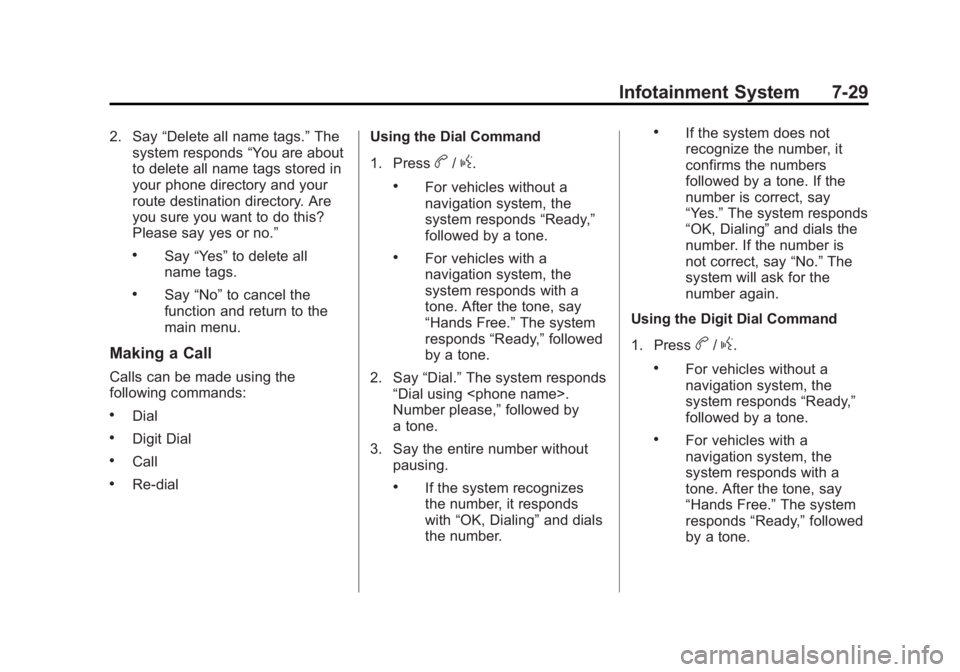
2. Say“Delete all name tags.” The
system responds “You are about
to delete all name tags stored in
your phone directory and your
route destination directory. Are
you sure you want to do this?
Please say yes or no.”
.Say “Yes” to delete all
name tags.
.Say “No” to cancel the
function and return to the
main menu.
Making a Call
Calls can be made using the
following commands:
.Dial
.Digit Dial
.Call
.Re‐dial Using the Dial Command
1. Press
b/g.
.For vehicles without a
navigation system, the
system responds
“Ready,”
followed by a tone.
.For vehicles with a
navigation system, the
system responds with a
tone. After the tone, say
“Hands Free.” The system
responds “Ready,”followed
by a tone.
2. Say “Dial.”The system responds
“Dial using
Number please,” followed by
a tone.
3. Say the entire number without pausing.
.If the system recognizes
the number, it responds
with “OK, Dialing” and dials
the number.
.If the system does not
recognize the number, it
confirms the numbers
followed by a tone. If the
number is correct, say
“Yes.” The system responds
“OK, Dialing” and dials the
number. If the number is
not correct, say “No.”The
system will ask for the
number again.
Using the Digit Dial Command
1. Press
b/g.
.For vehicles without a
navigation system, the
system responds “Ready,”
followed by a tone.
.For vehicles with a
navigation system, the
system responds with a
tone. After the tone, say
“Hands Free.” The system
responds “Ready,”followed
by a tone.
Page 180 of 368
Black plate (30,1)Buick Regal Owner Manual - 2011
7-30 Infotainment System
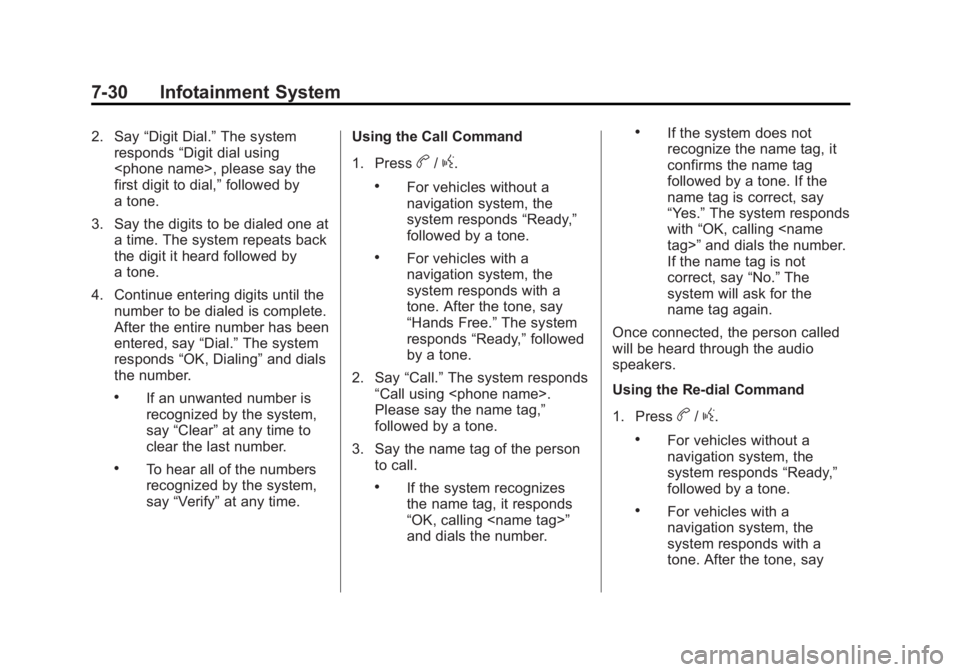
2. Say“Digit Dial.” The system
responds “Digit dial using
first digit to dial,” followed by
a tone.
3. Say the digits to be dialed one at a time. The system repeats back
the digit it heard followed by
a tone.
4. Continue entering digits until the number to be dialed is complete.
After the entire number has been
entered, say “Dial.”The system
responds “OK, Dialing” and dials
the number.
.If an unwanted number is
recognized by the system,
say “Clear” at any time to
clear the last number.
.To hear all of the numbers
recognized by the system,
say “Verify” at any time. Using the Call Command
1. Press
b/g.
.For vehicles without a
navigation system, the
system responds
“Ready,”
followed by a tone.
.For vehicles with a
navigation system, the
system responds with a
tone. After the tone, say
“Hands Free.” The system
responds “Ready,”followed
by a tone.
2. Say “Call.”The system responds
“Call using
Please say the name tag,”
followed by a tone.
3. Say the name tag of the person to call.
.If the system recognizes
the name tag, it responds
“OK, calling
and dials the number.
.If the system does not
recognize the name tag, it
confirms the name tag
followed by a tone. If the
name tag is correct, say
“Yes.” The system responds
with “OK, calling
If the name tag is not
correct, say “No.”The
system will ask for the
name tag again.
Once connected, the person called
will be heard through the audio
speakers.
Using the Re‐dial Command
1. Press
b/g.
.For vehicles without a
navigation system, the
system responds “Ready,”
followed by a tone.
.For vehicles with a
navigation system, the
system responds with a
tone. After the tone, say
Page 181 of 368
Black plate (31,1)Buick Regal Owner Manual - 2011
Infotainment System 7-31
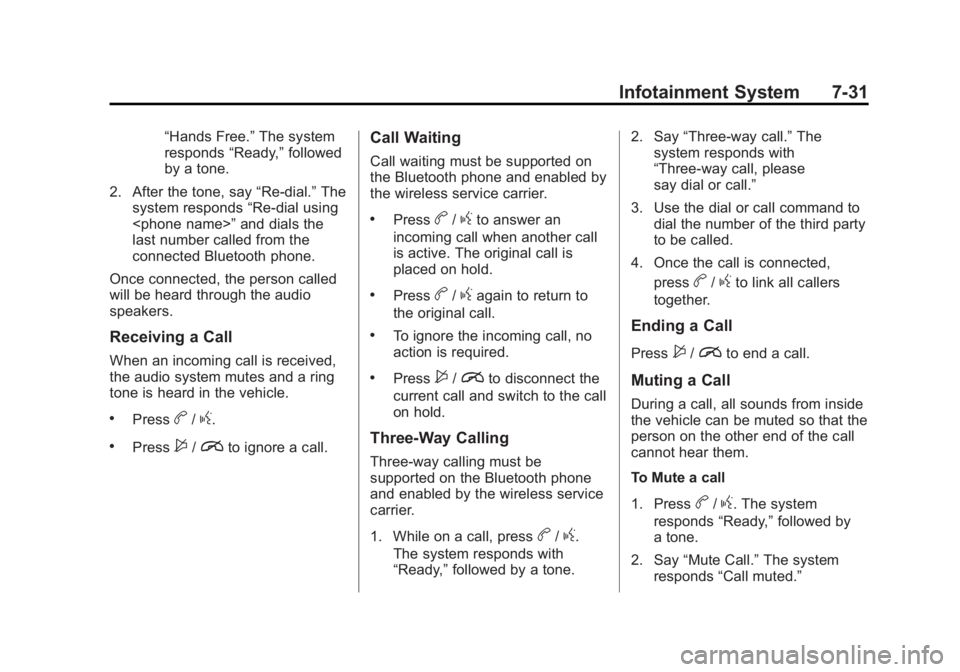
“Hands Free.”The system
responds “Ready,”followed
by a tone.
2. After the tone, say “Re‐dial.”The
system responds “Re‐dial using
last number called from the
connected Bluetooth phone.
Once connected, the person called
will be heard through the audio
speakers.
Receiving a Call
When an incoming call is received,
the audio system mutes and a ring
tone is heard in the vehicle.
.Pressb/g.
.Press$/ito ignore a call.
Call Waiting
Call waiting must be supported on
the Bluetooth phone and enabled by
the wireless service carrier.
.Pressb/gto answer an
incoming call when another call
is active. The original call is
placed on hold.
.Pressb/gagain to return to
the original call.
.To ignore the incoming call, no
action is required.
.Press$/ito disconnect the
current call and switch to the call
on hold.
Three‐Way Calling
Three‐way calling must be
supported on the Bluetooth phone
and enabled by the wireless service
carrier.
1. While on a call, press
b/g.
The system responds with
“Ready,” followed by a tone. 2. Say
“Three‐way call.” The
system responds with
“Three‐way call, please
say dial or call.”
3. Use the dial or call command to dial the number of the third party
to be called.
4. Once the call is connected, press
b/gto link all callers
together.
Ending a Call
Press$/ito end a call.
Muting a Call
During a call, all sounds from inside
the vehicle can be muted so that the
person on the other end of the call
cannot hear them.
To Mute a call
1. Press
b/g. The system
responds “Ready,”followed by
a tone.
2. Say “Mute Call.” The system
responds “Call muted.”
Page 182 of 368
Black plate (32,1)Buick Regal Owner Manual - 2011
7-32 Infotainment System
To Cancel Mute
1. Press
b/g. The system
responds “Ready,”followed by
a tone.
2. After the tone, say “Mute Call.”
The system responds
“Resuming call.”
Transferring a Call
Audio can be transferred between
the in‐vehicle Bluetooth system and
the cell phone.
To Transfer Audio to the Cell
Phone
During a call with the audio in the
vehicle:
1. Press
b/g. The system
responds “Ready,”followed by
a tone.
2. Say “Transfer Call.” The system
responds “Transferring call” and
the audio transfers to the cell
phone. To Transfer Audio to the In-Vehicle
Bluetooth System
The cell phone must be paired and
connected with the Bluetooth
system before a call can be
transferred. The connection process
can take up to two minutes after the
ignition is turned to ON/RUN or
ACC/ACCESSORY.
For vehicles without a navigation
system, press
b/gduring a call
with the audio on the cell phone.
The audio transfers to the vehicle.
For vehicles with a navigation
system, press
b/gduring a call
with the audio on the cell phone.
If the audio does not transfer to the
vehicle, use the audio transfer
feature on the cell phone. See the
cell phone manufacturer's user
guide for more information.
Voice Pass-Thru
Voice pass‐thru allows access to the
voice recognition commands on the
cell phone. See the cell phone
manufacturer's user guide to see if
the cell phone supports this feature.
To access contacts stored in the cell
phone:
1. Press
b/g.
.For vehicles without a
navigation system, the
system responds “Ready,”
followed by a tone.
.For vehicles with a
navigation system, the
system responds with a
tone. After the tone, say
“Hands Free.” The system
responds “Ready,”followed
by a tone.
2. Say “Bluetooth.” The system
responds “Bluetooth ready,”
followed by a tone.
Page 183 of 368
Black plate (33,1)Buick Regal Owner Manual - 2011
Infotainment System 7-33
3. Say“Voice.” The system
responds “OK, accessing
The cell phone's normal prompt
messages will go through their
cycle according to the phone's
operating instructions.
Dual Tone Multi-Frequency
(DTMF) Tones
The in‐vehicle Bluetooth system can
send numbers and the numbers
stored as name tags during a call.
Use this feature when calling a
menu‐driven phone system.
Account numbers can also be
stored for use.
Sending a Number During a Call
1. Press
b/g. The system
responds “Ready,”followed by
a tone.
2. Say “Dial.”The system responds
“Say a number to send tones,”
followed by a tone. 3. Say the number to send.
.If the system recognizes
the number, it responds
“OK, Sending Number”
and
the dial tones are sent and
the call continues.
.If the system does not
recognize the number, it
responds “Dial Number,
please say yes or no?,”
followed by a tone. If the
number is correct, say
“Yes.” The system responds
“OK, Sending Number” and
the dial tones are sent and
the call continues.
Sending a Stored Name Tag
During a Call
1. Press
b/g. The system
responds “Ready,”followed by
a tone.
2. Say “Send name tag.” The
system responds “Say a name
tag to send tones,” followed by
a tone. 3. Say the name tag to send.
.If the system recognizes
the number, it responds
“OK, Sending
and the dial tones are sent
and the call continues.
.If the system does not
recognize the name tag, it
responds
“Dial
please say yes or no?,”
followed by a tone. If the
name tag is correct, say
“Yes.” The system responds
with “OK, Sending
sent and the call continues.
Clearing the System
Unless information is deleted out of
the in‐vehicle Bluetooth system, it
will be retained indefinitely. This
includes all saved name tags in the
phone book and phone pairing
information. For information on how
to delete this information, see the
previous sections on “Deleting a
Paired Phone“ and“Deleting
Name Tags.”
Page 238 of 368
Black plate (48,1)Buick Regal Owner Manual - 2011
9-48 Driving and Operating
Filling the Tank
{WARNING
Fuel vapor burns violently and a
fuel fire can cause bad injuries.
To help avoid injuries to you and
others, read and follow all the
instructions on the fuel pump
island. Turn off the engine when
refueling. Do not smoke near fuel
or when refueling the vehicle.
Do not use cellular phones. Keep
sparks, flames, and smoking
materials away from fuel. Do not
leave the fuel pump unattended
when refueling the vehicle. This is
against the law in some places.
Do not re-enter the vehicle while
pumping fuel. Keep children away
from the fuel pump; never let
children pump fuel.
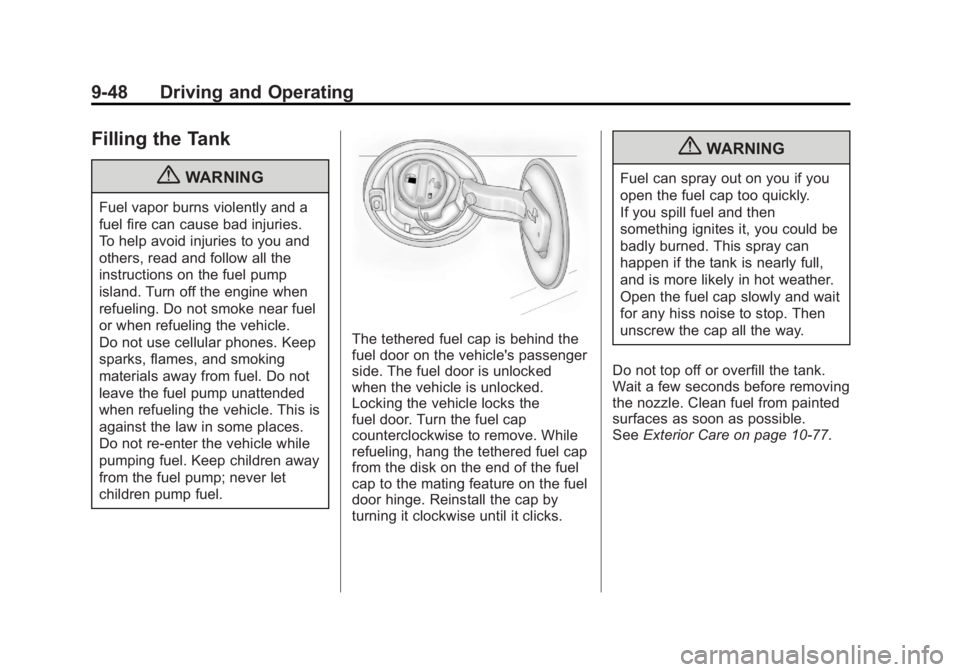
The tethered fuel cap is behind the
fuel door on the vehicle's passenger
side. The fuel door is unlocked
when the vehicle is unlocked.
Locking the vehicle locks the
fuel door. Turn the fuel cap
counterclockwise to remove. While
refueling, hang the tethered fuel cap
from the disk on the end of the fuel
cap to the mating feature on the fuel
door hinge. Reinstall the cap by
turning it clockwise until it clicks.
{WARNING
Fuel can spray out on you if you
open the fuel cap too quickly.
If you spill fuel and then
something ignites it, you could be
badly burned. This spray can
happen if the tank is nearly full,
and is more likely in hot weather.
Open the fuel cap slowly and wait
for any hiss noise to stop. Then
unscrew the cap all the way.
Do not top off or overfill the tank.
Wait a few seconds before removing
the nozzle. Clean fuel from painted
surfaces as soon as possible.
See Exterior Care on page 10‑77.
Page 239 of 368
Black plate (49,1)Buick Regal Owner Manual - 2011
Driving and Operating 9-49
{WARNING
If a fire starts while you are
refueling, do not remove the
nozzle. Shut off the flow of fuel
by shutting off the pump or by
notifying the station attendant.
Leave the area immediately.
Notice: If a new fuel cap is
needed, be sure to get the right
type of cap from your dealer.
The wrong type of fuel cap might
not fit properly, might cause the
malfunction indicator lamp to
light, and could damage the fuel
tank and emissions system. See
Malfunction Indicator Lamp on
page 5‑13.
Filling a Portable Fuel
Container
{WARNING
Never fill a portable fuel container
while it is in the vehicle. Static
electricity discharge from the
container can ignite the fuel
vapor. You can be badly burned
and the vehicle damaged if this
occurs. To help avoid injury to you
and others:
.Dispense fuel only into
approved containers.
.Do not fill a container while it
is inside a vehicle, in a
vehicle's trunk, pickup bed,
or on any surface other than
the ground.
(Continued)
WARNING (Continued)
.Bring the fill nozzle in contact
with the inside of the fill
opening before operating the
nozzle. Contact should be
maintained until the filling is
complete.
.Do not smoke while
pumping fuel.
.Do not use a cellular phone
while pumping fuel.
Page 341 of 368
Black plate (1,1)Buick Regal Owner Manual - 2011
Customer Information 13-1
Customer
Information
Customer Information
Customer SatisfactionProcedure . . . . . . . . . . . . . . . . . . 13-1
Customer Assistance Offices . . . . . . . . . . . . . . . . . . . . . 13-3
Customer Assistance for Text Telephone (TTY) Users . . . . . 13-4
Online Owner Center . . . . . . . . 13-4
GM Mobility Reimbursement Program . . . . . . . . . . . . . . . . . . . . 13-5
Roadside Assistance Program . . . . . . . . . . . . . . . . . . . . 13-5
Scheduling Service Appointments . . . . . . . . . . . . . . 13-7
Courtesy Transportation Program . . . . . . . . . . . . . . . . . . . . 13-8
Collision Damage Repair . . . . 13-9
Service Publications Ordering Information . . . . . . 13-11
Reporting Safety Defects
Reporting Safety Defects tothe United States
Government . . . . . . . . . . . . . . . 13-12
Reporting Safety Defects to the Canadian
Government . . . . . . . . . . . . . . . 13-13
Reporting Safety Defects to General Motors . . . . . . . . . . . 13-13
Vehicle Data Recording and
Privacy
Vehicle Data Recording andPrivacy . . . . . . . . . . . . . . . . . . . . 13-14
Event Data Recorders . . . . . . 13-14
OnStar
®. . . . . . . . . . . . . . . . . . . . 13-15
Navigation System . . . . . . . . . 13-15
Radio Frequency Identification (RFID) . . . . . . . 13-15
Radio Frequency Statement . . . . . . . . . . . . . . . . . 13-15
Customer Information
Customer Satisfaction
Procedure
Your satisfaction and goodwill are
important to your dealer and to
Buick. Normally, any concerns with
the sales transaction or the
operation of the vehicle will be
resolved by your dealer's sales or
service departments. Sometimes,
however, despite the best intentions
of all concerned, misunderstandings
can occur. If your concern has not
been resolved to your satisfaction,
the following steps should be taken:
STEP ONE: Discuss your concern
with a member of dealership
management. Normally, concerns
can be quickly resolved at that level.
If the matter has already been
reviewed with the sales, service,
or parts manager, contact the owner
of your dealership or the general
manager.
Page 342 of 368
Black plate (2,1)Buick Regal Owner Manual - 2011
13-2 Customer Information
STEP TWO:If after contacting a
member of dealership management,
it appears your concern cannot be
resolved by your dealership without
further help, in the U.S., call
1-800-521-7300. In Canada, contact
General Motors of Canada
Customer Communication Centre at
1‐800-263-3777 (English) or
1-800-263-7854 (French).
We encourage you to call the
toll-free number in order to give your
inquiry prompt attention. Have the
following information available to
give the Customer Assistance
representative:
.Vehicle Identification
Number (VIN). This is available
from the vehicle registration or
title, or the plate at the top left of
the instrument panel and visible
through the windshield.
.Dealership name and location.
.Vehicle delivery date and
present mileage. When contacting Buick, remember
that your concern will likely be
resolved at a dealer's facility. That is
why we suggest following Step One
first.
STEP THREE
—U.S. Owners:
Both General Motors and your
dealer are committed to making
sure you are completely satisfied
with your new vehicle. However,
if you continue to remain unsatisfied
after following the procedure
outlined in Steps One and Two, you
can file with the Better Business
Bureau (BBB) Auto Line
®Program
to enforce your rights.
The BBB Auto Line Program is an
out-of-court program administered
by the Council of Better Business
Bureaus to settle automotive
disputes regarding vehicle repairs or
the interpretation of the New Vehicle
Limited Warranty. Although you may
be required to resort to this informal
dispute resolution program prior to
filing a court action, use of the
program is free of charge and your
case will generally be heard within 40 days. If you do not agree with the
decision given in your case, you
may reject it and proceed with any
other venue for relief available
to you.
You may contact the BBB Auto Line
Program using the toll-free
telephone number or write them at
the following address:
BBB Auto Line Program
Council of Better Business
Bureaus, Inc.
4200 Wilson Boulevard
Suite 800
Arlington, VA 22203-1838
Telephone: 1-800-955-5100
www.dr.bbb.org/goauto
This program is available in all
50 states and the District of
Columbia. Eligibility is limited by
vehicle age, mileage, and other
factors. General Motors reserves
the right to change eligibility
limitations and/or discontinue its
participation in this program.