radio BUICK REGAL 2011 Owner's Guide
[x] Cancel search | Manufacturer: BUICK, Model Year: 2011, Model line: REGAL, Model: BUICK REGAL 2011Pages: 368, PDF Size: 5.35 MB
Page 158 of 368
Black plate (8,1)Buick Regal Owner Manual - 2011
7-8 Infotainment System
AS 1/2:Press to open the
autostore list and select autostore
pages.
RDS (Radio Data System)
The radio may have RDS. The RDS
feature is available for use only on
FM stations that broadcast RDS
information. This feature only works
when the information from the radio
station is available. In rare cases, a
radio station could broadcast
incorrect information that causes the
radio features to work improperly.
If this happens, contact the radio
station.
While the radio is tuned to an
FM-RDS station, the station name
or call letters display.
Radio Menus
Radio menus are available for AM
and FM.
Push the
Zknob to open the
main radio menu for that band.
Selecting a Band
Press the RADIO/BAND button to
choose AM, FM, or XM™,
if equipped. The last station that
was playing starts playing again.
Selecting a Station
Seek Tuning
If the radio station is not known:
Briefly press
s ©or¨\to
automatically search for the next
available station. If a station is not
found, the radio switches to a more
sensitive search level. If a station
still is not found, the frequency that
was last active begins to play.
If the radio station is known:
Press and hold
s ©or¨\until
the station on the display is
reached, then release the button.
Manual Tuning
Turn the
Zknob to select the
frequency on the display. Favorites List
1. Press the
Zknob.
2. Select Favorites List.
3. Select the station.
Station Lists
1. Press the
Zknob.
2. Select AM or FM Station List. All receivable stations in the current
reception area are displayed. If a
station list has not been created,
an automatic station search
is done.
3. Select the station.
Category Lists
Most stations that broadcast an
RDS program‐type code specify the
type of programming transmitted.
Some stations change the program
type code depending on the
content. The system stores the RDS
stations sorted by program type in
the FM category list.
Page 159 of 368
Black plate (9,1)Buick Regal Owner Manual - 2011
Infotainment System 7-9
To search for a programming type
determined by station:
1. Press the
Zknob.
2. Select FM Category List. A list of all programming types available
displays.
3. Select the programming type. A list of stations that transmit
programming of the selected
type displays.
4. Select the station. The category lists are updated
when the station lists are
updated.
Updating Station & Category Lists
If stations stored in the station list
can no longer be received:
1. Press the
Zknob.
2. Select Update AM or FM Station List, if the stations stored in the
station list are no longer
received. A station search will be
completed and the first station in
the updated list will play. To cancel the station search, press
the
Zknob.
Storing a Station as a Favorite
Stations from all bands can be
stored in any order in the favorite
pages.
Up to six stations can be stored in
each favorite page and the number
of available favorite pages can
be set.
Storing Stations
To store the station to a position in
the list, press the corresponding
numeric button 1 to 6 until a beep is
heard. The stored station will begin
playback.
Retrieving Stations
Press the FAV 1/2/3 button to open
a favorite page or to switch to
another favorite page. Briefly press
one of the 1 to 6 buttons to retrieve
the station.
Autostore Stations
AS 1/2 (Autostore):
Autostore
searches and stores six FM and
six AM stations with the strongest
signal. To use autostore:
1. Press RADIO/BAND to select FM or AM.
2. Press AS 1/2 for at least two seconds. The radio then
searches for available stations.
3. The radio automatically stores the six strongest stations found
as autostore presets.
Press the AS 1/2 button to alternate
between the autostore stations and
favorites.
AS displays on the radio when using
autostore presets.
Autostore does not delete
previously stored favorite stations.
Autostore does not function with XM
radio stations.
Page 160 of 368
Black plate (10,1)Buick Regal Owner Manual - 2011
7-10 Infotainment System
Satellite Radio
Vehicles with an XM™Satellite
Radio tuner and a valid XM Satellite
Radio subscription can receive XM
programming.
XM Satellite Radio Service
XM is a satellite radio service based
in the 48 contiguous United States
and 10 Canadian provinces. XM
Satellite Radio has a wide variety of
programming and commercial-free
music, coast to coast, and in
digital-quality sound. A service fee
is required to receive the XM
service. If XM Service needs to be
reactivated, the radio will display
"No Subscription Please Renew" on
channel XM1. For more information,
contact XM at www.xmradio.com or
call 1-800-929-2100 in the U.S. and
www.xmradio.ca or call
1-877-438-9677 in Canada.
Control Buttons
The buttons used to control the XM
radio are:
RADIO/BAND: Press to turn the
radio on and choose between AM,
FM, and XM™, if equipped.
Z(Menu/Select): Turn to
search for channels and press to
navigate the available menus.
INFO: Press to display additional
information that may be available
about the current song.
s ©/¨\:Press to go to the
previous or next channel.
FAV 1/2/3: Press to open the
favorites list and select favorite
pages.
Buttons 1 to 6: Press to select
preset stations.
Selecting the XM Band
Press the RADIO/BAND button to
choose between the AM, FM, and
XM bands. The last channel played
in that band begins to play when
that band is selected.
XM Categories
XM channels are organized in
categories.
Removing or Adding Categories
Channels in a category that have
been removed can still be accessed
by using the
s ©or¨\
buttons, or theZknob.
To add or remove categories:
1. Press the CONFIG button.
2. Select Radio Settings.
3. Select XM Categories.
4. Turn the
Zknob to highlight
the category.
5. Press the
Zknob to remove
or add the category.
Page 162 of 368
Black plate (12,1)Buick Regal Owner Manual - 2011
7-12 Infotainment System
XM Messages
XL (Explicit Language
Channels):These channels, or any
others, can be blocked by request,
by calling 1-800-929-2100 in the
U.S. and 1-877-438-9677 in
Canada.
XM Updating: The encryption code
in the receiver is being updated. No
action is required. This process
should take no longer than
30 seconds.
Loading XM: The audio system is
acquiring and processing audio and
text data. No action is needed. This
message should disappear shortly.
Channel Off Air: This channel is
not currently in service. Tune in to
another channel.
Channel Unauth: This channel is
blocked or cannot be received with
your XM subscription package.
Channel Unavailable: This
previously assigned channel is no
longer assigned. Tune to another
station. No Artist Info:
The system is
working properly. No artist
information is available at this time
on this channel.
No Title Info: The system is
working properly. No song title
information is available at this time
on this channel.
No CAT Info: The system is
working properly. No category
information is available at this time
on this channel.
No Information: The system is
working properly. No text or
informational messages are
available at this time on this
channel.
No Subscription Please Renew:
The XM subscription needs to be
reactivated. Contact XM at
www.xmradio.com or call
1-800-929-2100 in the U.S. and
www.xmradio.ca or call
1-877-438-9677 in Canada. No XM Signal:
The system is
working properly. The vehicle may
be in a location where the XM signal
is being blocked. When the vehicle
is moved into an open area, the
signal should return.
CAT Not Found: The system is
working properly. There are no
channels available for the selected
category.
XM Radio ID: If tuned to channel 0,
this message alternates with the XM
Radio eight‐digit radio ID label. This
label is needed to activate the
service.
Unknown: If this message is
received when tuned to channel 0,
there could be a receiver fault.
Consult with your dealer.
Check Antenna: If this message
does not clear within a short period
of time, the receiver could have a
fault. Consult with your dealer.
Page 163 of 368
Black plate (13,1)Buick Regal Owner Manual - 2011
Infotainment System 7-13
XM Not Available:If this message
does not clear within a short period
of time, the receiver could have a
fault. Consult with your dealer.
Radio Reception
Frequency interference and static
can occur during normal radio
reception if items such as cellular
phone chargers, vehicle
convenience accessories, and
external electronic devices are
plugged into the accessory power
outlet. If there is interference or
static, unplug the item from the
accessory power outlet.
FM
FM signals only reach about
16 to 65 km (10 to 40 mi). Although
the radio has a built-in electronic
circuit that automatically works to
reduce interference, some static
can occur, especially around tall
buildings or hills, causing the sound
to fade in and out.
AM
The range for most AM stations is
greater than for FM, especially at
night. The longer range can cause
station frequencies to interfere
with each other. For better radio
reception, most AM radio stations
boost the power levels during the
day, and then reduce these levels
during the night. Static can also
occur when things like storms and
power lines interfere with radio
reception. When this happens, try
reducing the treble on the radio.
XM™ Satellite Radio Service
XM satellite radio service gives
digital radio reception from coast to
coast in the 48 contiguous United
States, and in Canada. Just as
with FM, tall buildings or hills can
interfere with satellite radio signals,
causing the sound to fade in and
out. In addition, traveling or standing
under heavy foliage, bridges,
garages, or tunnels may cause loss
of the XM signal for a period of time.
Cellular Phone Usage
Cellular phone usage may cause
interference with the vehicle's radio.
This interference may occur when
making or receiving phone calls,
charging the phone's battery, or
simply having the phone on. This
interference can cause an increased
level of static while listening to the
radio. If static is received while
listening to the radio, unplug the
cellular phone and turn it off.
Backglass Antenna
The AM-FM antenna is integrated
with the rear window defogger,
located in the rear window. Make
sure that the inside surface of the
rear window is not scratched and
that the lines on the glass are not
damaged. If the inside surface is
damaged, it could interfere with
radio reception. For proper radio
reception, the antenna connector
needs to be properly attached to the
post on the glass.
Page 164 of 368

Black plate (14,1)Buick Regal Owner Manual - 2011
7-14 Infotainment System
If a cellular telephone antenna
needs to be attached to the glass,
make sure that the grid lines for the
AM-FM antenna are not damaged.
There is enough space between the
grid lines to attach a cellular
telephone antenna without
interfering with radio reception.
Notice:Using a razor blade or
sharp object to clear the inside
rear window can damage the rear
window antenna and/or the rear
window defogger. Repairs would
not be covered by the vehicle
warranty. Do not clear the inside
rear window with sharp objects. Notice:
Do not apply aftermarket
glass tinting with metallic film.
The metallic film in some tinting
materials will interfere with or
distort the incoming radio
reception. Any damage caused to
your backglass antenna due to
metallic tinting materials will not
be covered by the vehicle
warranty.
Satellite Radio Antenna
For vehicles with XM satellite radio
service, the antenna is located on
the roof of the vehicle. Keep the
antenna clear of obstructions for
clear radio reception.
Audio Players
CD Player
The CD player can play audio CDs
and MP3 CDs.
The CD player will not play
8 cm (3 in) CDs.
Care of CDs
Sound quality can be reduced due
to disc quality, recording method,
quality of the music recorded, and
disc handling. Handle discs carefully
and store them in their original
cases or other protective cases
away from direct sunlight and dust.
If the bottom surface of a disc is
damaged, the disc may not play
properly or at all. Do not touch the
bottom surface of a disc while
handling it; this could damage the
surface. Pick up discs by grasping
the outer edges or the edge of the
hole and the outer edge.
Page 171 of 368
Black plate (21,1)Buick Regal Owner Manual - 2011
Infotainment System 7-21
SeeRadio Frequency Statement on
page 13‑15 for Federal
Communications Commission (FCC)
rules and Industry Canada
Standards.
Bluetooth (Infotainment
Controls)
For information about how to
navigate the menu system using the
infotainment controls, see Operation
on page 7‑4.
Pairing
A Bluetooth‐enabled cell phone
must be paired to the Bluetooth
system first and then connected to
the vehicle before it can be used.
See the cell phone manufacturer's
user guide for Bluetooth functions
before pairing the cell phone. If a
Bluetooth phone is not connected,
calls can be made using OnStar
®
Hands‐Free Calling, if available.
Refer to the OnStar Owner's Guide
for more information. The pairing process can be started
by using the voice recognition
system or the controls on the
infotainment system.
Pairing information:
.Up to five cell phones can be
paired to the Bluetooth system.
.The pairing process is disabled
when the vehicle is moving.
.The Bluetooth system links with
the first available paired cell
phone in the order the phone
was paired.
.Only one paired cell phone can
be connected to the Bluetooth
system at a time.
.Pairing should only need to be
completed once, unless changes
to the pairing information have
been made or the phone is
deleted.
To link to a different paired phone,
see “Linking to a Different Phone”
later in this section. Pairing a Phone
1. Press the CONFIG button.
2. Select Phone Settings.
3. Select Bluetooth.
4. Select Pair Device (Phone).
A four‐digit Personal
Identification Number (PIN)
appears on the display.
If the “Add new GPS device”
option is selected, the system
will start a search for Bluetooth
“Hands‐free” profile devices just
like if “Add new Phone” was
selected. The additional GPS
location feature which would
provide the vehicle's GPS
location through the Bluetooth
Serial Port Profile is not
available.
5. Start the pairing process on the cell phone that will be paired to
the vehicle. Reference the cell
phone manufacturer's user guide
for information on this process.
Page 187 of 368

Black plate (3,1)Buick Regal Owner Manual - 2011
Climate Controls 8-3
Press AUTO to return to automatic
operation and the air conditioner
runs as needed. When the indicator
light is on, the air conditioner runs
automatically to cool the air inside
the vehicle or to dry the air needed
to defog the windshield faster.
h(Recirculation):Press to turn
on recirculation. An indicator light
comes on. Air is recirculated to
quickly cool the inside of the vehicle
or prevent outside air and odors
from entering.
Rear Window Defogger
=(Rear Window Defogger):
Press to turn the rear window
defogger on or off.
The rear window defogger
turns off automatically after about
10 minutes. If turned on again, it
runs for about five minutes before
turning off. At higher speeds, the
rear window defogger may stay on
continuously. For vehicles with heated outside
rearview mirrors, they turn on with
the rear window defogger and help
to clear fog or frost from the surface
of the mirror. See
Heated Mirrors on
page 2‑11.
Notice: Do not try to clear frost
or other material from the inside
of the front windshield and rear
window with a razor blade or
anything else that is sharp. This
may damage the rear window
defogger grid and affect your
radio's ability to pick up stations
clearly. The repairs wouldn't be
covered by your warranty.
Sensors
The solar sensor located on top of
the instrument panel near the
windshield monitors the solar heat.
The climate control system
uses the sensor information to
adjust the temperature, fan speed,
recirculation, and air delivery mode
for best comfort.
If the sensor is covered, the
automatic climate control system
may not work properly.
Page 233 of 368

Black plate (43,1)Buick Regal Owner Manual - 2011
Driving and Operating 9-43
PARK ASSIST OFF displays on the
Driver Information Center (DIC) to
indicate that URPA is off. The
message disappears after a short
period of time.
Turning the System On and Off
The URPA system can be turned on
and off using the park assist button
located next to the radio.
The park assist button lights up
when the system is on or in standby
and turns off when it has been
disabled.
URPA defaults to the on setting
each time the vehicle is started.
When the System Does Not
Seem to Work Properly
SERVICE PARK ASSIST:If this
message occurs, take the vehicle to
your dealer to repair the system.
PARK ASSIST OFF: If the URPA
system does not activate due to a
temporary condition, the message
displays on the DIC. See Driver
Information Center (DIC) on
page 5‑22 for more information.
This can occur under the following
conditions:
.The driver has disabled the
system.
.The ultrasonic sensors are not
clean. Keep the vehicle's rear
bumper free of mud, dirt, snow,
ice, and slush. For cleaning
instructions, see Exterior Care
on page 10‑77.
.An object was hanging out of the
trunk during the last drive cycle.
Once the object is removed and
URPA detects no objects of
interest, the URPA will return to
normal operation.
.The vehicle's bumper is
damaged. Take the vehicle to
your dealer to repair the system.
.Other conditions, such as
vibrations from a jackhammer or
the compression of air brakes on
a very large truck, are affecting
system performance.
If the system is still disabled after
checking all conditions listed above
and driving forward at least 40 km/h
(25 mph), take the vehicle to your
dealer.
Page 280 of 368
Black plate (40,1)Buick Regal Owner Manual - 2011
10-40 Vehicle Care
Instrument Panel Fuse
Block
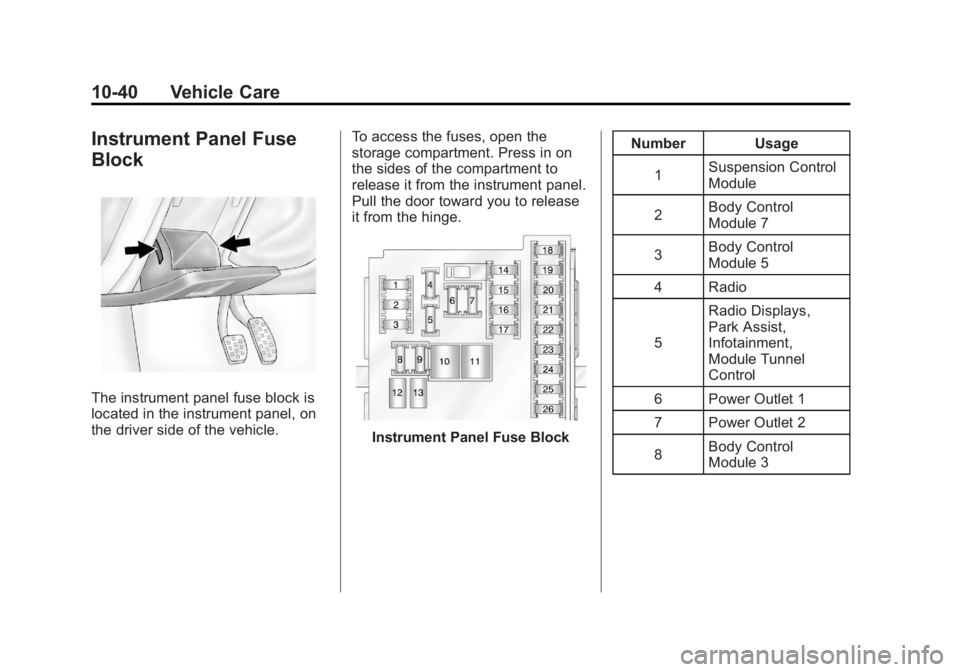
The instrument panel fuse block is
located in the instrument panel, on
the driver side of the vehicle.To access the fuses, open the
storage compartment. Press in on
the sides of the compartment to
release it from the instrument panel.
Pull the door toward you to release
it from the hinge.
Instrument Panel Fuse BlockNumber Usage
1 Suspension Control
Module
2 Body Control
Module 7
3 Body Control
Module 5
4 Radio
5 Radio Displays,
Park Assist,
Infotainment,
Module Tunnel
Control
6 Power Outlet 1
7 Power Outlet 2
8 Body Control
Module 3