seat BUICK REGAL 2011 Manual PDF
[x] Cancel search | Manufacturer: BUICK, Model Year: 2011, Model line: REGAL, Model: BUICK REGAL 2011Pages: 368, PDF Size: 5.35 MB
Page 103 of 368
Black plate (61,1)Buick Regal Owner Manual - 2011
Seats and Restraints 3-61
passenger airbag status
indicator should light and stay lit
when you start the vehicle. See
Passenger Airbag Status
Indicator on page 5‑12.
2. Put the child restraint on the seat.
3. Pick up the latch plate, and run the lap and shoulder portions of
the vehicle's safety belt through
or around the restraint. The child
restraint instructions will show
you how.
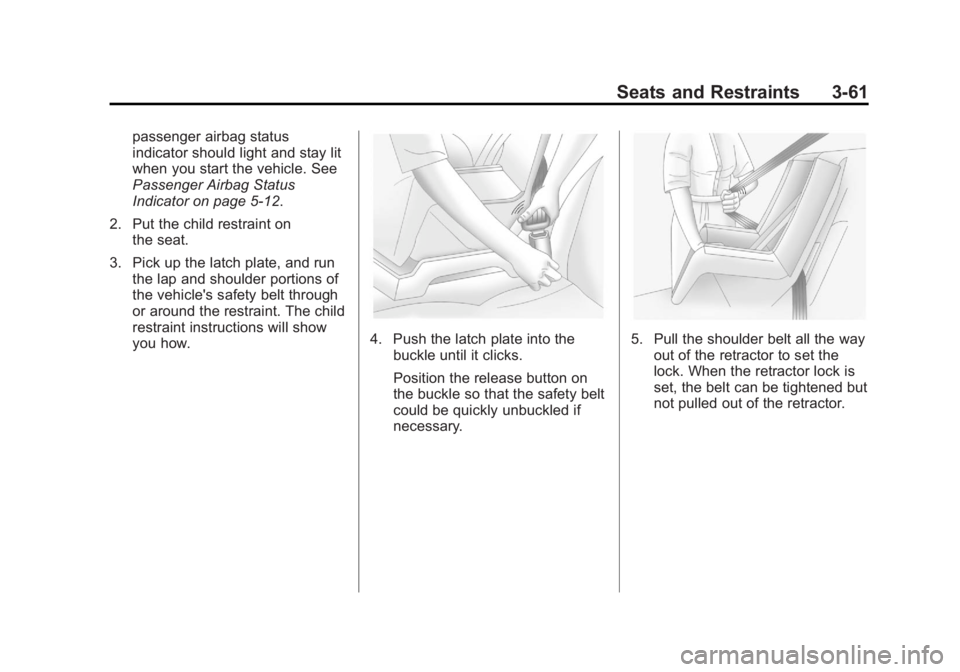
4. Push the latch plate into the
buckle until it clicks.
Position the release button on
the buckle so that the safety belt
could be quickly unbuckled if
necessary.5. Pull the shoulder belt all the wayout of the retractor to set the
lock. When the retractor lock is
set, the belt can be tightened but
not pulled out of the retractor.
Page 104 of 368
Black plate (62,1)Buick Regal Owner Manual - 2011
3-62 Seats and Restraints
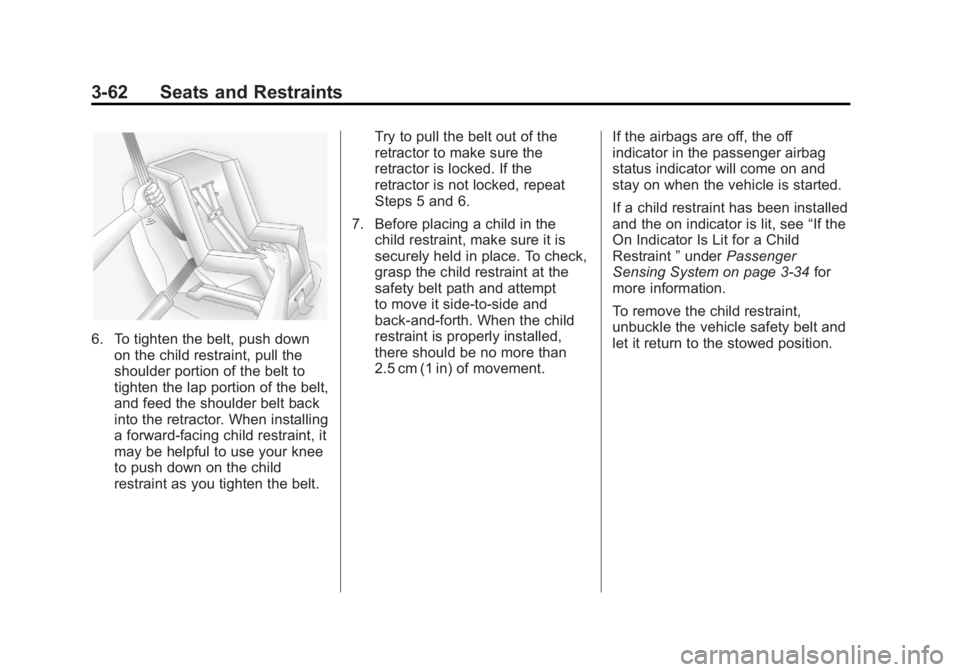
6. To tighten the belt, push downon the child restraint, pull the
shoulder portion of the belt to
tighten the lap portion of the belt,
and feed the shoulder belt back
into the retractor. When installing
a forward-facing child restraint, it
may be helpful to use your knee
to push down on the child
restraint as you tighten the belt. Try to pull the belt out of the
retractor to make sure the
retractor is locked. If the
retractor is not locked, repeat
Steps 5 and 6.
7. Before placing a child in the child restraint, make sure it is
securely held in place. To check,
grasp the child restraint at the
safety belt path and attempt
to move it side‐to‐side and
back‐and‐forth. When the child
restraint is properly installed,
there should be no more than
2.5 cm (1 in) of movement. If the airbags are off, the off
indicator in the passenger airbag
status indicator will come on and
stay on when the vehicle is started.
If a child restraint has been installed
and the on indicator is lit, see
“If the
On Indicator Is Lit for a Child
Restraint ”under Passenger
Sensing System on page 3‑34 for
more information.
To remove the child restraint,
unbuckle the vehicle safety belt and
let it return to the stowed position.
Page 106 of 368
Black plate (2,1)Buick Regal Owner Manual - 2011
4-2 Storage
Cupholders
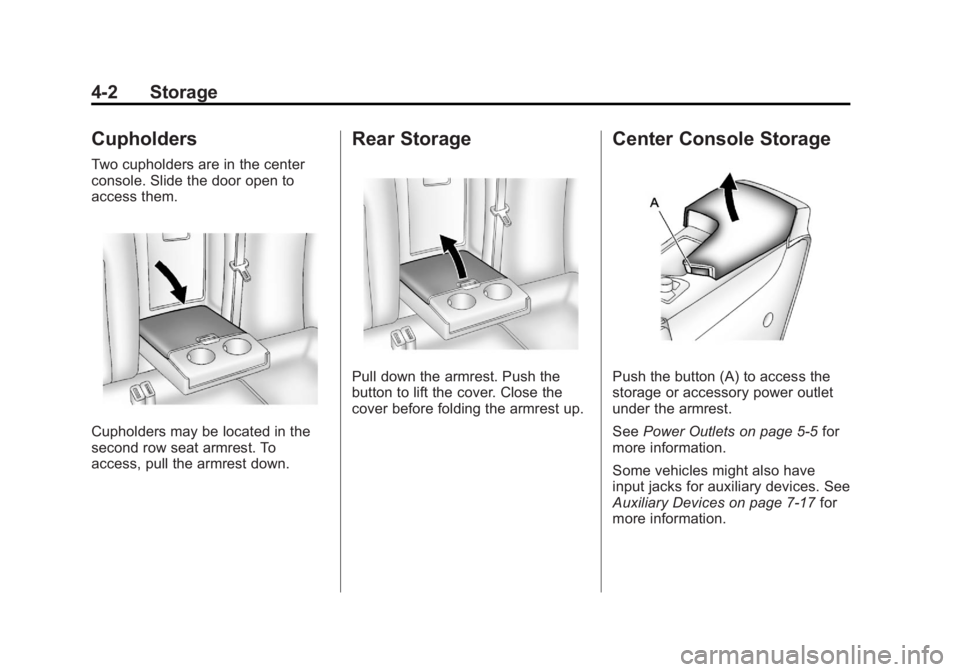
Two cupholders are in the center
console. Slide the door open to
access them.
Cupholders may be located in the
second row seat armrest. To
access, pull the armrest down.
Rear Storage
Pull down the armrest. Push the
button to lift the cover. Close the
cover before folding the armrest up.
Center Console Storage
Push the button (A) to access the
storage or accessory power outlet
under the armrest.
SeePower Outlets on page 5‑5 for
more information.
Some vehicles might also have
input jacks for auxiliary devices. See
Auxiliary Devices on page 7‑17 for
more information.
Page 114 of 368
Black plate (6,1)Buick Regal Owner Manual - 2011
5-6 Instruments and Controls
Certain electrical accessories
may not be compatible with the
accessory power outlets and could
overload vehicle or adapter fuses.
If there is a problem, see your
dealer.
When adding electrical equipment,
be sure to follow the installation
instructions included with the
equipment. SeeAdd-On Electrical
Equipment on page 9‑50.
Notice: Hanging heavy
equipment from the power
outlet can cause damage not
covered by the vehicle warranty.
The power outlets are designed
for accessory power plugs only,
such as cell phone charge cords. Power Outlet 110 Volt Alternating
Current
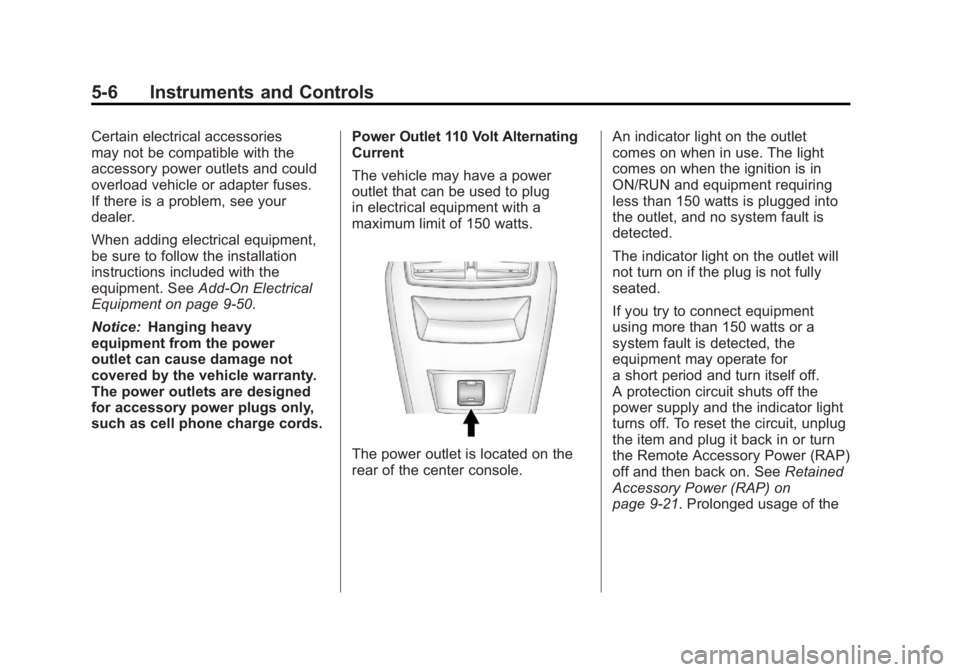
The vehicle may have a power
outlet that can be used to plug
in electrical equipment with a
maximum limit of 150 watts.
The power outlet is located on the
rear of the center console.An indicator light on the outlet
comes on when in use. The light
comes on when the ignition is in
ON/RUN and equipment requiring
less than 150 watts is plugged into
the outlet, and no system fault is
detected.
The indicator light on the outlet will
not turn on if the plug is not fully
seated.
If you try to connect equipment
using more than 150 watts or a
system fault is detected, the
equipment may operate for
a short period and turn itself off.
A protection circuit shuts off the
power supply and the indicator light
turns off. To reset the circuit, unplug
the item and plug it back in or turn
the Remote Accessory Power (RAP)
off and then back on. See
Retained
Accessory Power (RAP) on
page 9‑21. Prolonged usage of the
Page 119 of 368

Black plate (11,1)Buick Regal Owner Manual - 2011
Instruments and Controls 5-11
Safety Belt Reminders
Driver Safety Belt Reminder
Light
There is a driver safety belt
reminder light on the instrument
panel cluster.
When the engine is started this light
begins to flash and a chime comes
on for several seconds to remind
the driver to fasten their safety belt.
The light also stays on if the driver
remains unbuckled.
This cycle repeats if the driver is
unbuckled while the vehicle is
moving.
If the driver safety belt is already
buckled, neither the light nor the
chime comes on.
Passenger Safety Belt
Reminder Light
There is a passenger safety belt
reminder light located on the center
console.
When the engine is started this light
begins to flash and a chime comes
on for several seconds to remind
the passenger to fasten their safety
belt. The light also stays on if the
passenger remains unbuckled.
This cycle repeats if the passenger
is unbuckled while the vehicle is
moving.
If the passenger safety belt is
buckled, neither the chime nor the
light comes on.The front passenger safety belt
warning light and chime may turn on
if an object is put on the seat such
as a briefcase, handbag, grocery
bag, laptop, or other electronic
device. To turn off the warning light
and/or chime, remove the object
from the seat or buckle the
safety belt.
Airbag Readiness Light
This light shows if there is an
electrical problem. The system
check includes the airbag sensor,
the pretensioners, the airbag
modules, the wiring, and the crash
sensing and diagnostic module.
For more information on the airbag
system, see
Airbag System on
page 3‑27.
Page 120 of 368
Black plate (12,1)Buick Regal Owner Manual - 2011
5-12 Instruments and Controls
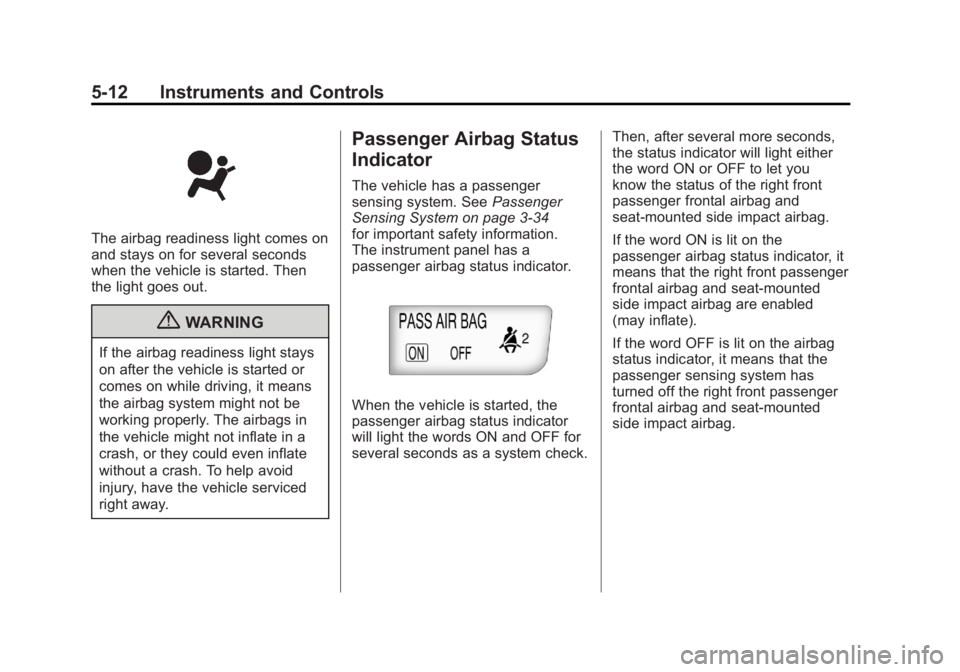
The airbag readiness light comes on
and stays on for several seconds
when the vehicle is started. Then
the light goes out.
{WARNING
If the airbag readiness light stays
on after the vehicle is started or
comes on while driving, it means
the airbag system might not be
working properly. The airbags in
the vehicle might not inflate in a
crash, or they could even inflate
without a crash. To help avoid
injury, have the vehicle serviced
right away.
Passenger Airbag Status
Indicator
The vehicle has a passenger
sensing system. SeePassenger
Sensing System on page 3‑34
for important safety information.
The instrument panel has a
passenger airbag status indicator.
When the vehicle is started, the
passenger airbag status indicator
will light the words ON and OFF for
several seconds as a system check. Then, after several more seconds,
the status indicator will light either
the word ON or OFF to let you
know the status of the right front
passenger frontal airbag and
seat‐mounted side impact airbag.
If the word ON is lit on the
passenger airbag status indicator, it
means that the right front passenger
frontal airbag and seat‐mounted
side impact airbag are enabled
(may inflate).
If the word OFF is lit on the airbag
status indicator, it means that the
passenger sensing system has
turned off the right front passenger
frontal airbag and seat-mounted
side impact airbag.
Page 150 of 368
Black plate (6,1)Buick Regal Owner Manual - 2011
6-6 Lighting
Lighting Features
Entry Lighting
The headlamps, taillamps, license
plate lamps, back‐up lamps, dome
lamps, and most of the interior lights
turn on briefly when the Remote
Keyless Entry (RKE)
Kis pressed.
See Remote Keyless Entry (RKE)
System Operation on page 2‑3.
When the driver door is opened, all
control lights, Driver Information
Center (DIC) lights and door
pocket lights turn on. After about
30 seconds the exterior lamps
turn off, and then the dome and
remaining interior lights will dim to
off. Entry lighting can be disabled
manually by changing the ignition
out of the OFF position, or by
pressing the RKE
Qbutton.
This feature can be activated or
deactivated in the Configuration
Settings menu in the Info Display. Press CONFIG on the audio system
to call up the menu. See
Vehicle
Personalization on page 5‑31.
Exit Lighting
The headlamps, taillamps, parking
lamps, back‐up lamps, and license
plate lamps come on at night, or in
areas with limited lighting, when the
key is removed from the ignition.
The dome lamps also come on
when the key is removed from the
ignition. The exterior lamps and
dome lamps remain on after the
door is closed for a set amount of
time, then automatically turn off.
The exterior lamps turn off
immediately by turning the exterior
lamps control off.
The exit lighting feature can be
changed. See Vehicle
Personalization on page 5‑31.
Battery Power Protection
The battery saver feature is
designed to protect the vehicle's
battery.
To prevent battery discharge while
driving, the following systems are
reduced automatically in two stages
and then turned off:
.Heated rear window and mirrors
.Heated seats
.Fan
In the second stage, a Driver
Information Center (DIC) message
is displayed confirming the
activation of the battery discharge
protection. See Battery Voltage and
Charging Messages on page 5‑26.
If the exterior lamps or any interior
lights are left on and the ignition is
turned off, the battery power
protection system automatically
turns the lamp off after about
10 minutes.
Page 185 of 368
Black plate (1,1)Buick Regal Owner Manual - 2011
Climate Controls 8-1
Climate Controls
Climate Control Systems
Dual Automatic Climate ControlSystem . . . . . . . . . . . . . . . . . . . . . . 8-1
Air Vents
Air Vents . . . . . . . . . . . . . . . . . . . . . . 8-4
Maintenance
Passenger Compartment AirFilter . . . . . . . . . . . . . . . . . . . . . . . . . 8-4
Climate Control Systems
Dual Automatic Climate Control System
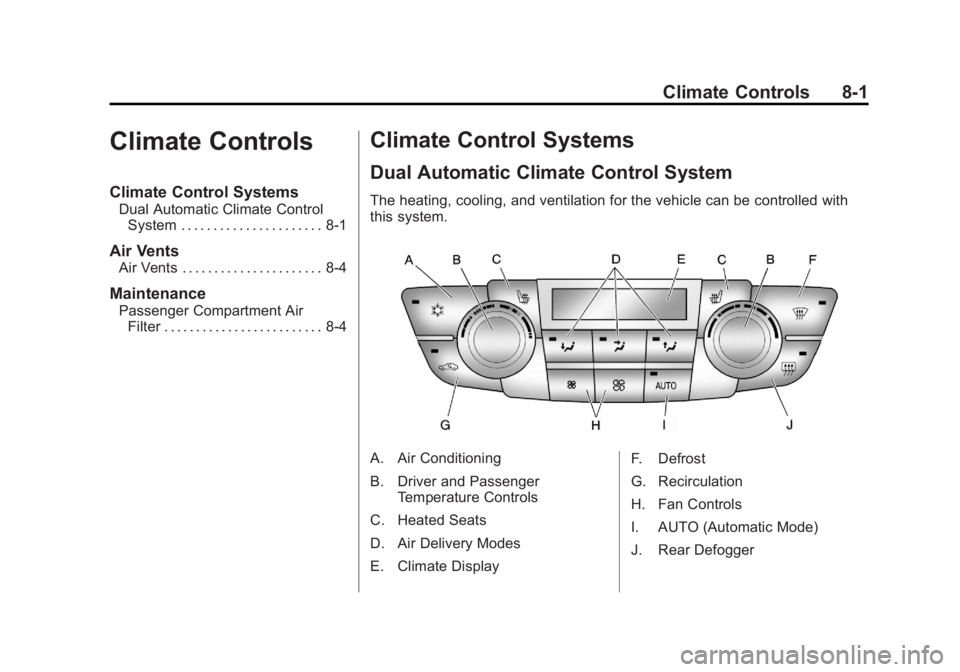
The heating, cooling, and ventilation for the vehicle can be controlled with
this system.
A. Air Conditioning
B. Driver and Passenger
Temperature Controls
C. Heated Seats
D. Air Delivery Modes
E. Climate Display F. Defrost
G. Recirculation
H. Fan Controls
I. AUTO (Automatic Mode)
J. Rear Defogger
Page 188 of 368
Black plate (4,1)Buick Regal Owner Manual - 2011
8-4 Climate Controls
Air Vents
Use the louvers located on the air
vents to change the direction of the
airflow.
To open a vent, move the
thumbwheel to | . To close the vent,
move the thumbwheel to
9.
Operation Tips
.Keep all outlets open whenever
possible for best system
performance.
.Keep the paths under all seats
clear of objects to help circulate
the air inside the vehicle more
effectively.
.Use of non-GM approved hood
deflectors can adversely affect
the performance of the system.
Maintenance
Passenger Compartment
Air Filter
The filter removes dust, pollen, and
other airborne irritants from outside
air that is pulled into the vehicle.
The filter should be replaced as part
of routine scheduled maintenance.
See Scheduled Maintenance on
page 11‑2 for replacement intervals.
To find out what type of filter to use,
see Maintenance Replacement
Parts on page 11‑8.
The passenger compartment air
filter can be accessed by removing
the entire glove box.
1. Open the passenger side door. Remove the end cover located
on the side of the instrument
panel in the top right corner.
Remove the screw affixed to the
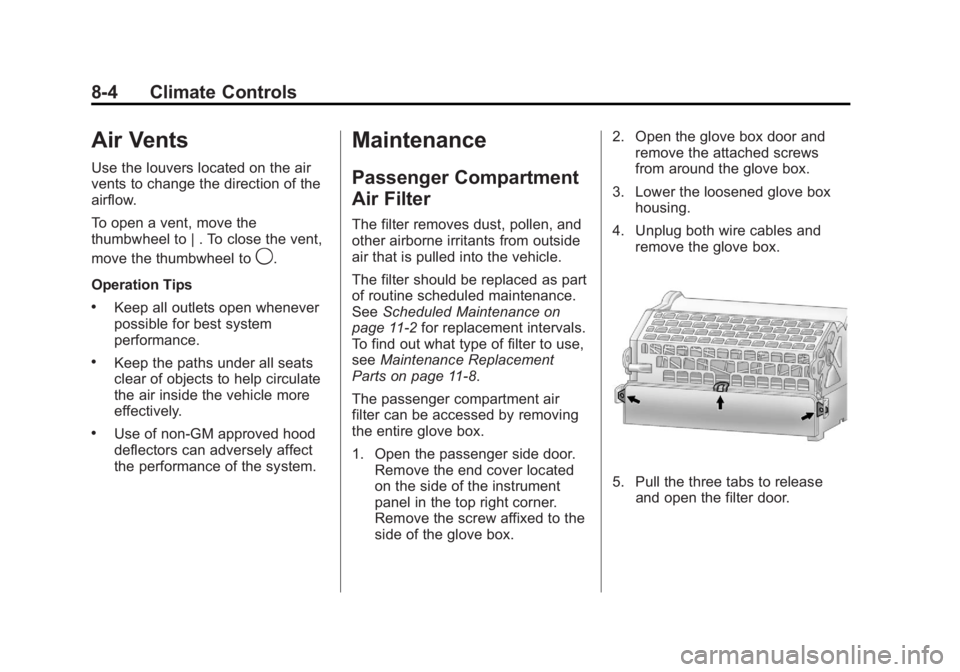
side of the glove box. 2. Open the glove box door and
remove the attached screws
from around the glove box.
3. Lower the loosened glove box housing.
4. Unplug both wire cables and remove the glove box.
5. Pull the three tabs to releaseand open the filter door.
Page 203 of 368
Black plate (13,1)Buick Regal Owner Manual - 2011
Driving and Operating 9-13
The Tire and Loading
Information label shows the
number of occupant seating
positions (A), and the maximum
vehicle capacity weight (B) in
kilograms and pounds.
The Tire and Loading
Information label also shows
the tire size of the original
equipment tires (C) and the
recommended cold tire inflation
pressures (D). For more
information on tires and inflation
seeTires on page 10‑42 and
Tire Pressure on page 10‑49.
There is also important loading
information on the Certification
label. It tells you the Gross
Vehicle Weight Rating (GVWR)
and the Gross Axle Weight
Rating (GAWR) for the front and
rear axle. See “Certification
Label” later in this section. Steps for Determining Correct
Load Limit
1.Locate the statement
“The combined weight of
occupants and cargo should
never exceed XXX kg or
XXX lbs”
on your vehicle's
placard.
2.Determine the combined
weight of the driver and
passengers that will be riding
in your vehicle.
3.Subtract the combined
weight of the driver and
passengers from XXX kg or
XXX lbs.
4.The resulting figure equals
the available amount of cargo
and luggage load capacity.
For example, if the “XXX”
amount equals 1400 lbs and
there will be five 150 lb passengers in your vehicle,
the amount of available cargo
and luggage load capacity is
650 lbs (1400
−750 (5 x 150)
= 650 lbs).
5.Determine the combined
weight of luggage and cargo
being loaded on the vehicle.
That weight may not safely
exceed the available cargo
and luggage load capacity
calculated in Step 4.
6.If your vehicle will be towing
a trailer, the load from your
trailer will be transferred to
your vehicle. Consult this
manual to determine how this
reduces the available cargo
and luggage load capacity of
your vehicle.
This vehicle is neither designed
nor intended to tow a trailer.