air conditioning BUICK REGAL 2011 Owner's Manual
[x] Cancel search | Manufacturer: BUICK, Model Year: 2011, Model line: REGAL, Model: BUICK REGAL 2011Pages: 368, PDF Size: 5.35 MB
Page 4 of 368
Black plate (4,1)Buick Regal Owner Manual - 2011
iv Introduction
WarningorCaution indicates a
hazard that could result in injury or
death.
{WARNING
These mean there is something
that could hurt you or other
people.
Notice: This means there is
something that could result in
property or vehicle damage. This
would not be covered by the
vehicle's warranty.
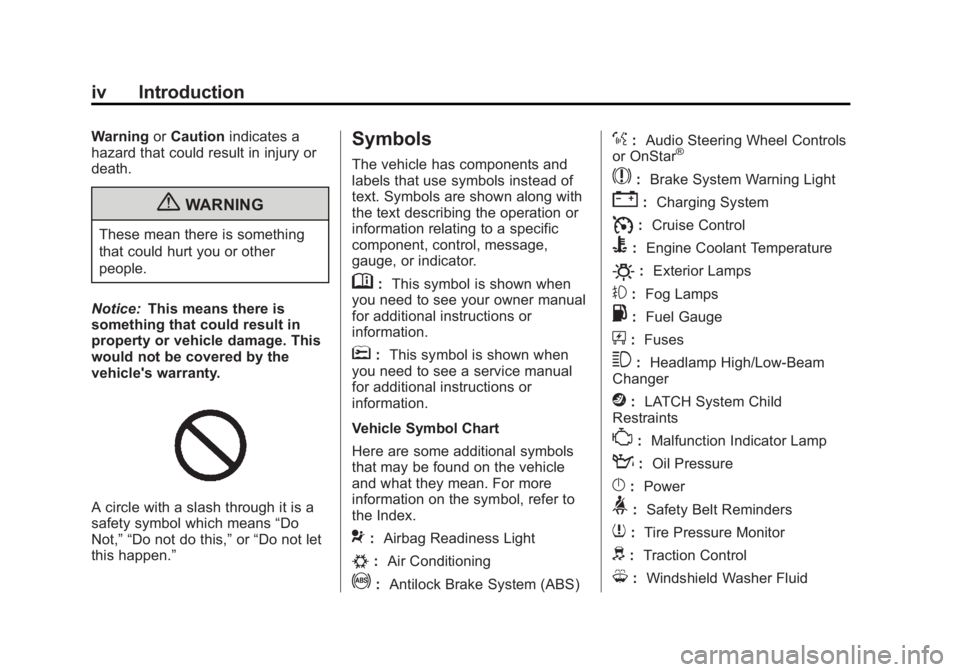
A circle with a slash through it is a
safety symbol which means “Do
Not,” “Do not do this,” or“Do not let
this happen.”
Symbols
The vehicle has components and
labels that use symbols instead of
text. Symbols are shown along with
the text describing the operation or
information relating to a specific
component, control, message,
gauge, or indicator.
M: This symbol is shown when
you need to see your owner manual
for additional instructions or
information.
*: This symbol is shown when
you need to see a service manual
for additional instructions or
information.
Vehicle Symbol Chart
Here are some additional symbols
that may be found on the vehicle
and what they mean. For more
information on the symbol, refer to
the Index.
9: Airbag Readiness Light
#:Air Conditioning
!:Antilock Brake System (ABS)
%:Audio Steering Wheel Controls
or OnStar®
$: Brake System Warning Light
":Charging System
I:Cruise Control
B: Engine Coolant Temperature
O:Exterior Lamps
#:Fog Lamps
.: Fuel Gauge
+:Fuses
3: Headlamp High/Low-Beam
Changer
j: LATCH System Child
Restraints
*: Malfunction Indicator Lamp
::Oil Pressure
}:Power
>:Safety Belt Reminders
7:Tire Pressure Monitor
d:Traction Control
M:Windshield Washer Fluid
Page 15 of 368
Black plate (11,1)Buick Regal Owner Manual - 2011
In Brief 1-11
3:For a single wipe, briefly move
the wiper lever down. For several
wipes, hold the wiper lever down.
Windshield Washer
Pull the windshield wiper lever to
spray windshield washer fluid and
activate the wipers.
See Windshield Wiper/Washer on
page 5‑3.
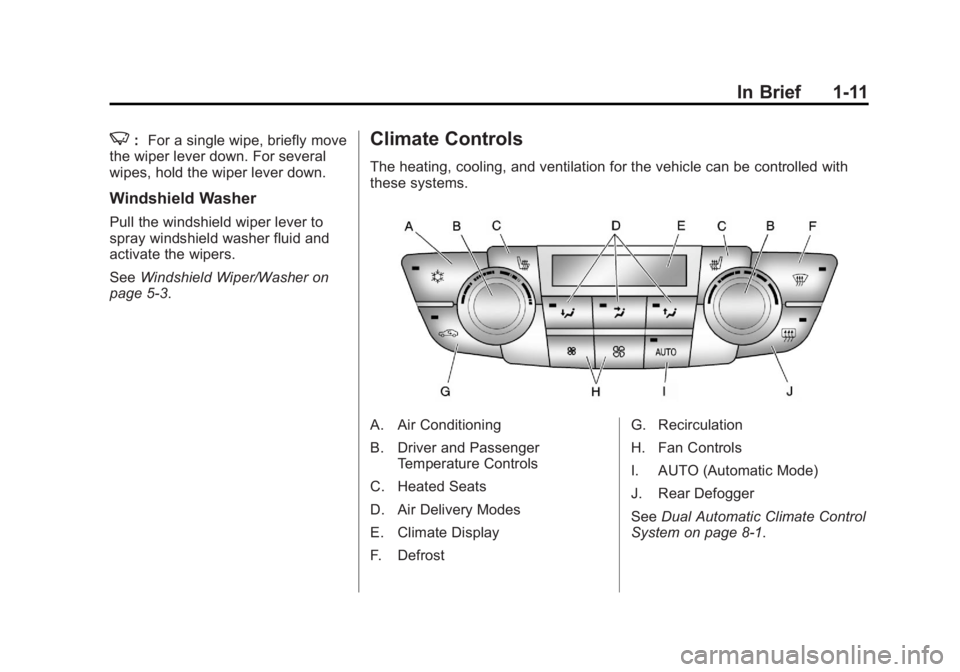
Climate Controls
The heating, cooling, and ventilation for the vehicle can be controlled with
these systems.
A. Air Conditioning
B. Driver and Passenger Temperature Controls
C. Heated Seats
D. Air Delivery Modes
E. Climate Display
F. Defrost G. Recirculation
H. Fan Controls
I. AUTO (Automatic Mode)
J. Rear Defogger
See
Dual Automatic Climate Control
System on page 8‑1.
Page 135 of 368
Black plate (27,1)Buick Regal Owner Manual - 2011
Instruments and Controls 5-27
Door Ajar Messages
DRIVER DOOR OPEN
This message will display when the
driver door is open. Close the door
completely.
HOOD OPEN
This message will display when the
hood is open. Close the hood
completely.
LEFT REAR DOOR OPEN
This message will display when the
driver side rear door is open. Close
the door completely.
PASSENGER DOOR OPEN
This message will display when the
front passenger door is open. Close
the door completely.
RIGHT REAR DOOR OPEN
This message will display when the
passenger side rear door is open.
Close the door completely.
TRUNK OPEN
This message will display when
the trunk is open. Close the trunk
completely.
Engine Cooling System
Messages
A/C OFF DUE TO HIGH
ENGINE TEMP
This message displays when the
engine coolant becomes hotter than
the normal operating temperature.
To avoid added strain on a hot
engine, the air conditioning
compressor automatically turns off.
When the coolant temperature
returns to normal, the air
conditioning compressor turns back
on. You can continue to drive the
vehicle.
If this message continues to appear,
have the system repaired by your
dealer as soon as possible to avoid
damage to the engine.
COOLANT LEVEL LOW ADD
COOLANT
This message will display if the
coolant is low. SeeEngine Coolant
on page 10‑18.
ENGINE OVERHEATED —
IDLE ENGINE
This message displays when the
engine coolant temperature is too
hot. Stop and allow the vehicle to
idle until it cools down.
ENGINE OVERHEATED —
STOP ENGINE
This message displays and a
continuous chime sounds if the
engine cooling system reaches
unsafe temperatures for operation.
Stop and turn off the vehicle as
soon as it is safe to do so to avoid
severe damage. This message
clears when the engine has cooled
to a safe operating temperature.
Page 140 of 368
Black plate (32,1)Buick Regal Owner Manual - 2011
5-32 Instruments and Controls
Climate and Air Quality
Select the Climate and Air Quality
menu and the following will be
displayed:
.Auto Fan Speed
.Air Conditioning Mode
.Auto Area Zone Temp
.Auto Defog
.Auto Rear Defog
Auto Fan Speed
This allows selection of the
automatic fan speed to run lower or
higher than normal.
Press the
Zknob when Auto
Fan Speed is highlighted to open
the menu. Turn the knob to highlight
High, Medium, or Low. Press the
knob to confirm the selection and
move back to the last menu. Air Conditioning Mode
This allows selection of automatic
start of the air conditioning upon
vehicle start. Selecting On indicates
the air conditioning will be on when
the vehicle is started. Selecting Off
turns the air conditioning off each
time the vehicle is started. Last
Setting will resume the last setting
when the vehicle was shut off.
Press the
Zknob when Air
Conditioning Mode is highlighted.
Turn the knob to highlight On, Off,
or Last Setting. Press the knob to
confirm the selection and go back to
the last menu.
Auto Area Zone Temp
This allows selection of the number
of zones of temperature control
upon vehicle start. Selecting Single
Zone automatically resets the
passenger temperature setting the
same as the driver's for every vehicle start. The air conditioning
system will operate using only the
driver's setting until the passenger
temperature setting is changed.
Selecting Dual Zone or Last Setting
will keep the passenger temperature
adjustment separate from the
driver's setting all the time.
Press the
Zknob when Auto
Area Zone Temp is highlighted. Turn
the knob to highlight Single Zone,
Dual Zone, or Last Setting. Press
the knob to confirm the selection
and go back to the last menu.
Auto Defog
This allows the auto defog to be
turned on or off on dual zone
climate control systems.
Press the
Zknob when Auto
Defog is highlighted to select On or
Off. Turn the knob to confirm the
selection and move back to the
last menu.
Page 185 of 368
Black plate (1,1)Buick Regal Owner Manual - 2011
Climate Controls 8-1
Climate Controls
Climate Control Systems
Dual Automatic Climate ControlSystem . . . . . . . . . . . . . . . . . . . . . . 8-1
Air Vents
Air Vents . . . . . . . . . . . . . . . . . . . . . . 8-4
Maintenance
Passenger Compartment AirFilter . . . . . . . . . . . . . . . . . . . . . . . . . 8-4
Climate Control Systems
Dual Automatic Climate Control System
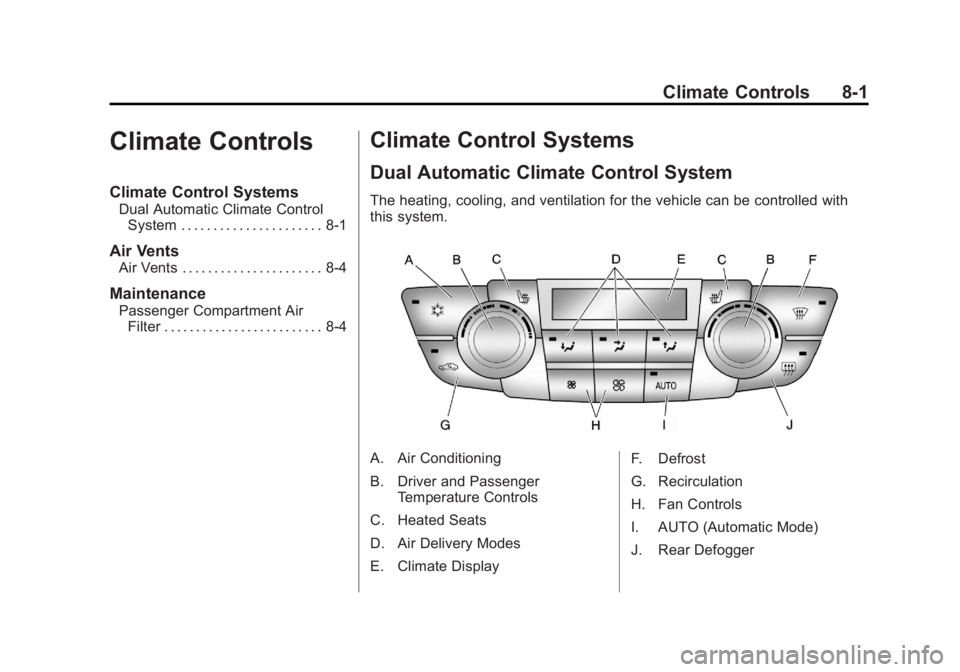
The heating, cooling, and ventilation for the vehicle can be controlled with
this system.
A. Air Conditioning
B. Driver and Passenger
Temperature Controls
C. Heated Seats
D. Air Delivery Modes
E. Climate Display F. Defrost
G. Recirculation
H. Fan Controls
I. AUTO (Automatic Mode)
J. Rear Defogger
Page 186 of 368
Black plate (2,1)Buick Regal Owner Manual - 2011
8-2 Climate Controls
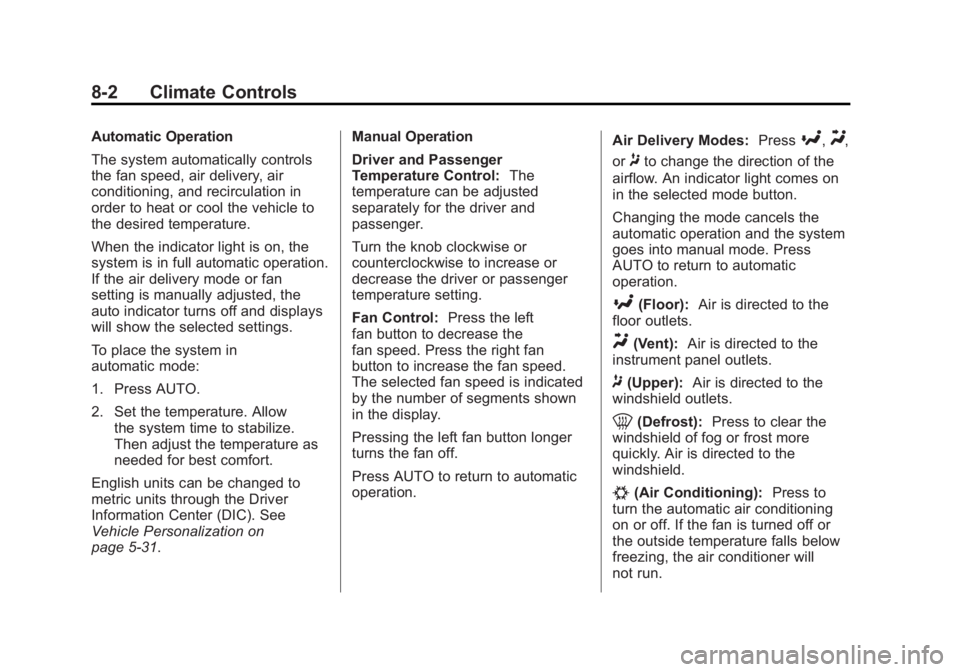
Automatic Operation
The system automatically controls
the fan speed, air delivery, air
conditioning, and recirculation in
order to heat or cool the vehicle to
the desired temperature.
When the indicator light is on, the
system is in full automatic operation.
If the air delivery mode or fan
setting is manually adjusted, the
auto indicator turns off and displays
will show the selected settings.
To place the system in
automatic mode:
1. Press AUTO.
2. Set the temperature. Allowthe system time to stabilize.
Then adjust the temperature as
needed for best comfort.
English units can be changed to
metric units through the Driver
Information Center (DIC). See
Vehicle Personalization on
page 5‑31. Manual Operation
Driver and Passenger
Temperature Control:
The
temperature can be adjusted
separately for the driver and
passenger.
Turn the knob clockwise or
counterclockwise to increase or
decrease the driver or passenger
temperature setting.
Fan Control: Press the left
fan button to decrease the
fan speed. Press the right fan
button to increase the fan speed.
The selected fan speed is indicated
by the number of segments shown
in the display.
Pressing the left fan button longer
turns the fan off.
Press AUTO to return to automatic
operation. Air Delivery Modes:
Press[,Y,
or
8to change the direction of the
airflow. An indicator light comes on
in the selected mode button.
Changing the mode cancels the
automatic operation and the system
goes into manual mode. Press
AUTO to return to automatic
operation.
[(Floor): Air is directed to the
floor outlets.
Y(Vent): Air is directed to the
instrument panel outlets.
8(Upper): Air is directed to the
windshield outlets.
0(Defrost): Press to clear the
windshield of fog or frost more
quickly. Air is directed to the
windshield.
#(Air Conditioning): Press to
turn the automatic air conditioning
on or off. If the fan is turned off or
the outside temperature falls below
freezing, the air conditioner will
not run.
Page 262 of 368
Black plate (22,1)Buick Regal Owner Manual - 2011
10-22 Vehicle Care
If it is decided not to lift the hood
when this warning appears, but
instead get service help right away,
seeRoadside Assistance Program
on page 13‑5.
If it is decided to lift the hood, make
sure the vehicle is parked on a level
surface.
Then check to see if the engine
cooling fans are running. If the
engine is overheating, both fans
should be running. If they are not,
do not continue to run the engine
and have the vehicle serviced.
Notice: Engine damage from
running the engine without
coolant is not covered by the
warranty.If Steam Is Coming from the
Engine Compartment
{WARNING
Steam from an overheated engine
can burn you badly, even if you
just open the hood. Stay away
from the engine if you see or hear
steam coming from it. Just turn it
off and get everyone away from
the vehicle until it cools down.
Wait until there is no sign of
steam or coolant before you open
the hood.
If you keep driving when the
engine is overheated, the liquids
in it can catch fire. You or others
could be badly burned. Stop the
engine if it overheats, and get out
of the vehicle until the engine
is cool.
If No Steam Is Coming from
the Engine Compartment
If an engine overheat warning is
displayed but no steam can be seen
or heard, the problem may not be
too serious. Sometimes the engine
can get a little too hot when the
vehicle:
.Climbs a long hill on a hot day.
.Stops after high-speed driving.
.Idles for long periods in traffic.
.Tows a trailer.
If the overheat warning is displayed
with no sign of steam:
1. Turn the air conditioning off.
2. Turn the heater on to the highest temperature and to the highest
fan speed. Open the windows as
necessary.
3. In heavy traffic, let the engine idle in N (Neutral) while stopped.
If it is safe to do so, pull off the
road, shift to P (Park) or
N (Neutral), and let the
engine idle.
Page 281 of 368
Black plate (41,1)Buick Regal Owner Manual - 2011
Vehicle Care 10-41
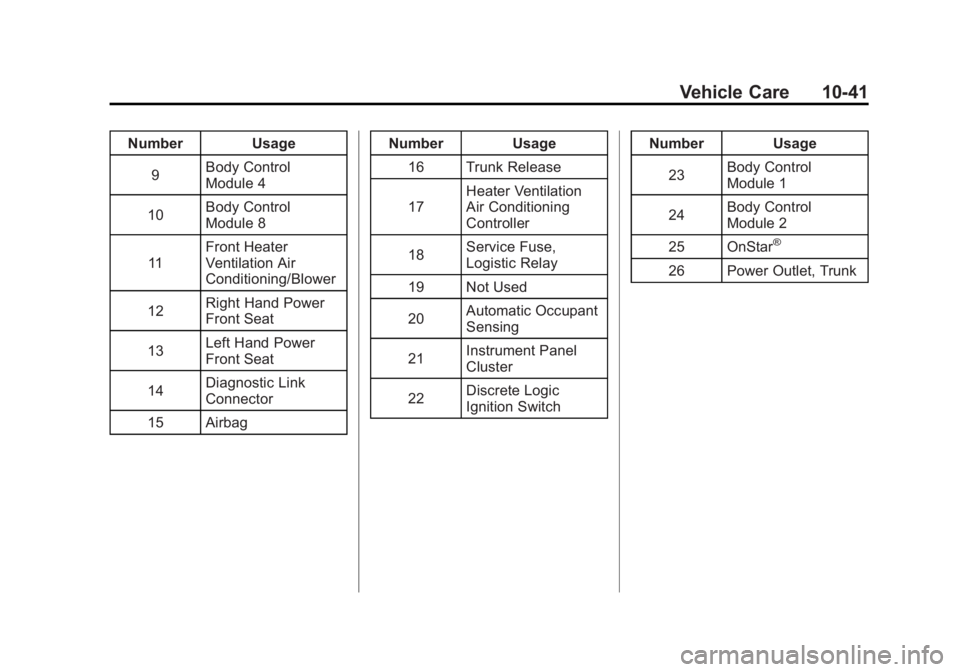
Number Usage9 Body Control
Module 4
10 Body Control
Module 8
11 Front Heater
Ventilation Air
Conditioning/Blower
12 Right Hand Power
Front Seat
13 Left Hand Power
Front Seat
14 Diagnostic Link
Connector
15 Airbag Number Usage
16 Trunk Release
17 Heater Ventilation
Air Conditioning
Controller
18 Service Fuse,
Logistic Relay
19 Not Used
20 Automatic Occupant
Sensing
21 Instrument Panel
Cluster
22 Discrete Logic
Ignition Switch Number Usage
23 Body Control
Module 1
24 Body Control
Module 2
25 OnStar
®
26 Power Outlet, Trunk
Page 286 of 368
Black plate (46,1)Buick Regal Owner Manual - 2011
10-46 Vehicle Care
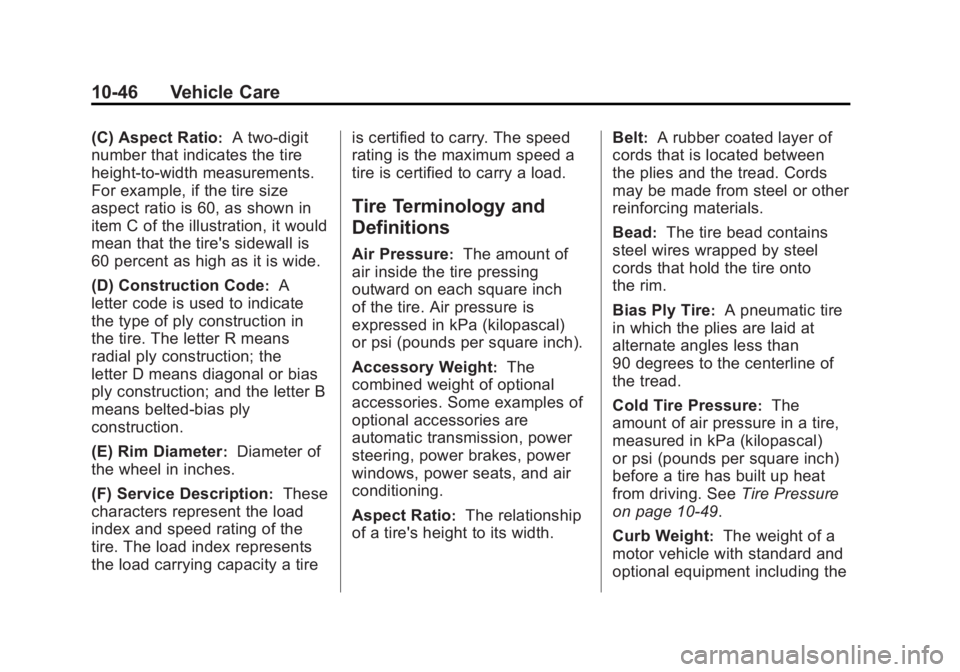
(C) Aspect Ratio:A two‐digit
number that indicates the tire
height‐to‐width measurements.
For example, if the tire size
aspect ratio is 60, as shown in
item C of the illustration, it would
mean that the tire's sidewall is
60 percent as high as it is wide.
(D) Construction Code
:A
letter code is used to indicate
the type of ply construction in
the tire. The letter R means
radial ply construction; the
letter D means diagonal or bias
ply construction; and the letter B
means belted‐bias ply
construction.
(E) Rim Diameter
:Diameter of
the wheel in inches.
(F) Service Description
:These
characters represent the load
index and speed rating of the
tire. The load index represents
the load carrying capacity a tire is certified to carry. The speed
rating is the maximum speed a
tire is certified to carry a load.
Tire Terminology and
Definitions
Air Pressure:The amount of
air inside the tire pressing
outward on each square inch
of the tire. Air pressure is
expressed in kPa (kilopascal)
or psi (pounds per square inch).
Accessory Weight
:The
combined weight of optional
accessories. Some examples of
optional accessories are
automatic transmission, power
steering, power brakes, power
windows, power seats, and air
conditioning.
Aspect Ratio
:The relationship
of a tire's height to its width. Belt
:A rubber coated layer of
cords that is located between
the plies and the tread. Cords
may be made from steel or other
reinforcing materials.
Bead
:The tire bead contains
steel wires wrapped by steel
cords that hold the tire onto
the rim.
Bias Ply Tire
:A pneumatic tire
in which the plies are laid at
alternate angles less than
90 degrees to the centerline of
the tread.
Cold Tire Pressure
:The
amount of air pressure in a tire,
measured in kPa (kilopascal)
or psi (pounds per square inch)
before a tire has built up heat
from driving. See Tire Pressure
on page 10‑49.
Curb Weight
:The weight of a
motor vehicle with standard and
optional equipment including the
Page 338 of 368
Black plate (2,1)Buick Regal Owner Manual - 2011
12-2 Technical Data
Vehicle Data
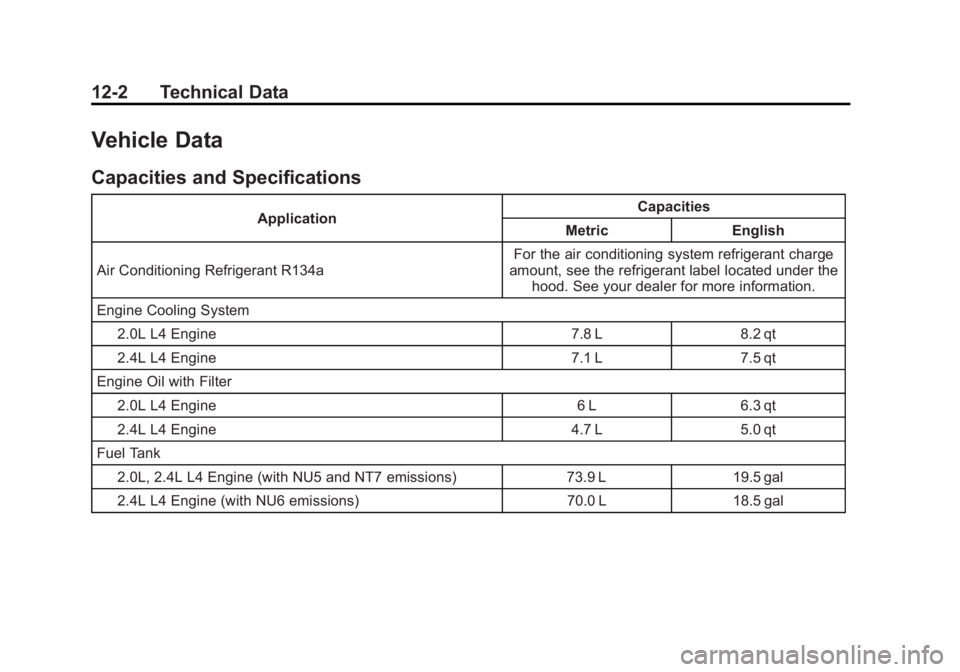
Capacities and Specifications
ApplicationCapacities
Metric English
Air Conditioning Refrigerant R134a For the air conditioning system refrigerant charge
amount, see the refrigerant label located under the hood. See your dealer for more information.
Engine Cooling System 2.0L L4 Engine 7.8 L 8.2 qt
2.4L L4 Engine 7.1 L 7.5 qt
Engine Oil with Filter
2.0L L4 Engine 6 L 6.3 qt
2.4L L4 Engine 4.7 L 5.0 qt
Fuel Tank
2.0L, 2.4L L4 Engine (with NU5 and NT7 emissions) 73.9 L 19.5 gal
2.4L L4 Engine (with NU6 emissions) 70.0 L 18.5 gal