center console BUICK REGAL 2014 Owner's Manual
[x] Cancel search | Manufacturer: BUICK, Model Year: 2014, Model line: REGAL, Model: BUICK REGAL 2014Pages: 404, PDF Size: 4.61 MB
Page 17 of 404
Black plate (11,1)Buick Regal Owner Manual (GMNA-Localizing-U.S./Canada/Mexico-
6081497) - 2014 - CRC 2nd Edition - 11/22/13
In Brief 1-11
Exterior Mirrors
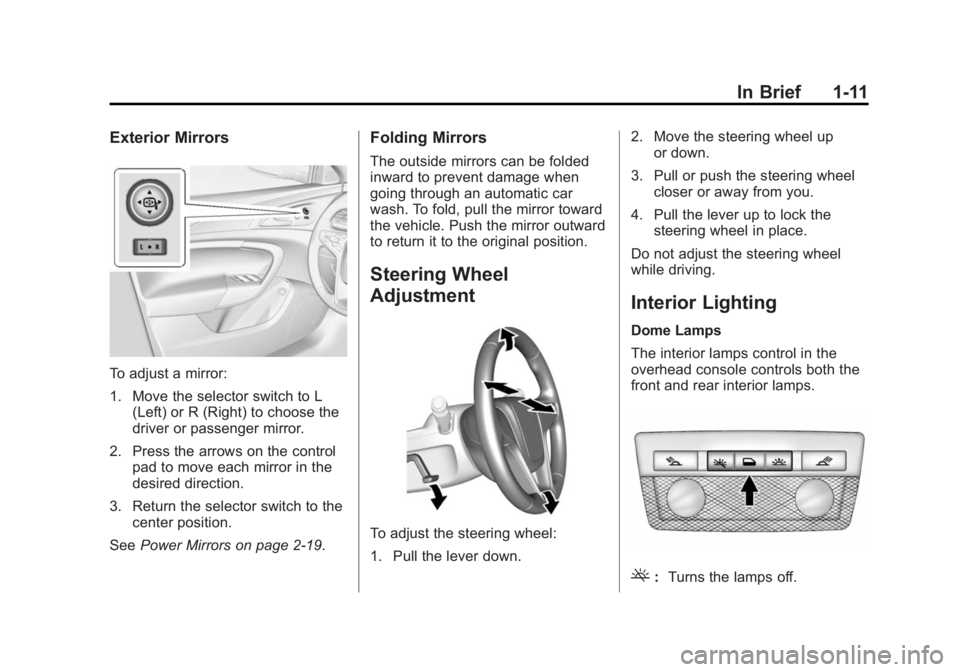
To adjust a mirror:
1. Move the selector switch to L(Left) or R (Right) to choose the
driver or passenger mirror.
2. Press the arrows on the control pad to move each mirror in the
desired direction.
3. Return the selector switch to the center position.
See Power Mirrors on page 2-19.
Folding Mirrors
The outside mirrors can be folded
inward to prevent damage when
going through an automatic car
wash. To fold, pull the mirror toward
the vehicle. Push the mirror outward
to return it to the original position.
Steering Wheel
Adjustment
To adjust the steering wheel:
1. Pull the lever down. 2. Move the steering wheel up
or down.
3. Pull or push the steering wheel closer or away from you.
4. Pull the lever up to lock the steering wheel in place.
Do not adjust the steering wheel
while driving.
Interior Lighting
Dome Lamps
The interior lamps control in the
overhead console controls both the
front and rear interior lamps.
(: Turns the lamps off.
Page 24 of 404
Black plate (18,1)Buick Regal Owner Manual (GMNA-Localizing-U.S./Canada/Mexico-
6081497) - 2014 - CRC 2nd Edition - 11/22/13
1-18 In Brief
Power Outlets
The accessory power outlet can be
used to plug in electrical equipment,
such as a cell phone or MP3 player.
There are two 12-volt accessory
power outlets located:
.On the center stack next to the
ashtray.
.Inside the center console.
The outlet is powered when the
ignition is in ON/RUN or ACC/
ACCESSORY, or until the driver
door is opened within 10 minutes of
turning off the vehicle. See Retained
Accessory Power (RAP) on
page 9-24.
Open the protective cover to use the
accessory power outlet.
See Power Outlets on page 5-5.
Universal Remote System
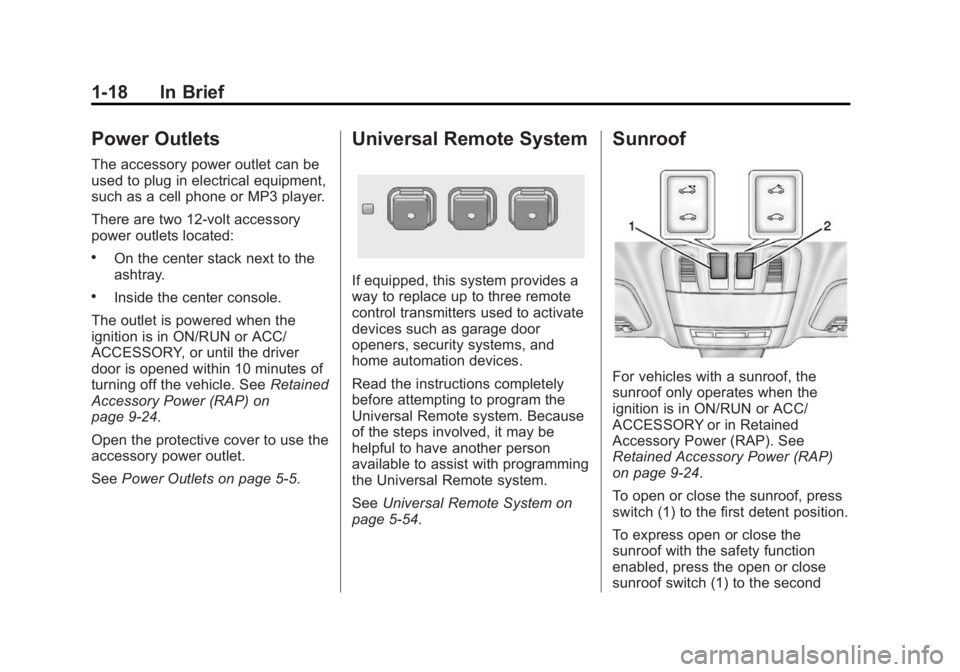
If equipped, this system provides a
way to replace up to three remote
control transmitters used to activate
devices such as garage door
openers, security systems, and
home automation devices.
Read the instructions completely
before attempting to program the
Universal Remote system. Because
of the steps involved, it may be
helpful to have another person
available to assist with programming
the Universal Remote system.
SeeUniversal Remote System on
page 5-54.
Sunroof
For vehicles with a sunroof, the
sunroof only operates when the
ignition is in ON/RUN or ACC/
ACCESSORY or in Retained
Accessory Power (RAP). See
Retained Accessory Power (RAP)
on page 9-24.
To open or close the sunroof, press
switch (1) to the first detent position.
To express open or close the
sunroof with the safety function
enabled, press the open or close
sunroof switch (1) to the second
Page 37 of 404
Black plate (7,1)Buick Regal Owner Manual (GMNA-Localizing-U.S./Canada/Mexico-
6081497) - 2014 - CRC 2nd Edition - 11/27/13
Keys, Doors, and Windows 2-7
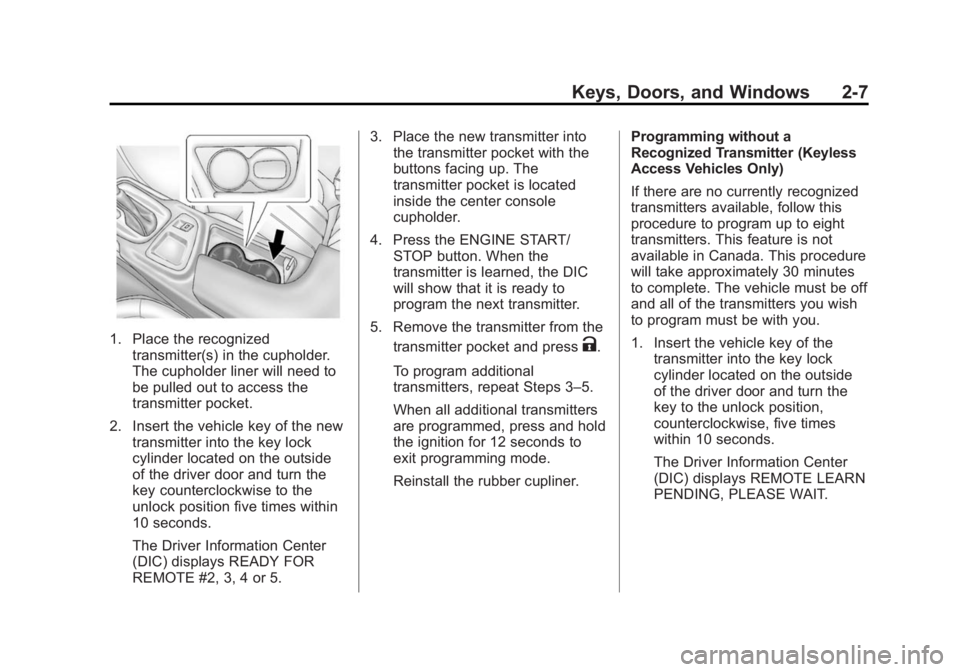
1. Place the recognizedtransmitter(s) in the cupholder.
The cupholder liner will need to
be pulled out to access the
transmitter pocket.
2. Insert the vehicle key of the new transmitter into the key lock
cylinder located on the outside
of the driver door and turn the
key counterclockwise to the
unlock position five times within
10 seconds.
The Driver Information Center
(DIC) displays READY FOR
REMOTE #2, 3, 4 or 5. 3. Place the new transmitter into
the transmitter pocket with the
buttons facing up. The
transmitter pocket is located
inside the center console
cupholder.
4. Press the ENGINE START/ STOP button. When the
transmitter is learned, the DIC
will show that it is ready to
program the next transmitter.
5. Remove the transmitter from the transmitter pocket and pressK.
To program additional
transmitters, repeat Steps 3–5.
When all additional transmitters
are programmed, press and hold
the ignition for 12 seconds to
exit programming mode.
Reinstall the rubber cupliner. Programming without a
Recognized Transmitter (Keyless
Access Vehicles Only)
If there are no currently recognized
transmitters available, follow this
procedure to program up to eight
transmitters. This feature is not
available in Canada. This procedure
will take approximately 30 minutes
to complete. The vehicle must be off
and all of the transmitters you wish
to program must be with you.
1. Insert the vehicle key of the
transmitter into the key lock
cylinder located on the outside
of the driver door and turn the
key to the unlock position,
counterclockwise, five times
within 10 seconds.
The Driver Information Center
(DIC) displays REMOTE LEARN
PENDING, PLEASE WAIT.
Page 38 of 404
Black plate (8,1)Buick Regal Owner Manual (GMNA-Localizing-U.S./Canada/Mexico-
6081497) - 2014 - CRC 2nd Edition - 11/27/13
2-8 Keys, Doors, and Windows
2. Wait for 10 minutes until the DICdisplays PRESS ENGINE
START BUTTON TO LEARN
and then press the ENGINE
START/STOP button.
The DIC display will again show
REMOTE LEARN PENDING,
PLEASE WAIT.
3. Repeat Step 2 two additional times. After the third time all
previously known transmitters
will no longer work with the
vehicle. Remaining transmitters
can be relearned during the next
steps.
The DIC display should now
show READY FOR REMOTE
# 1.
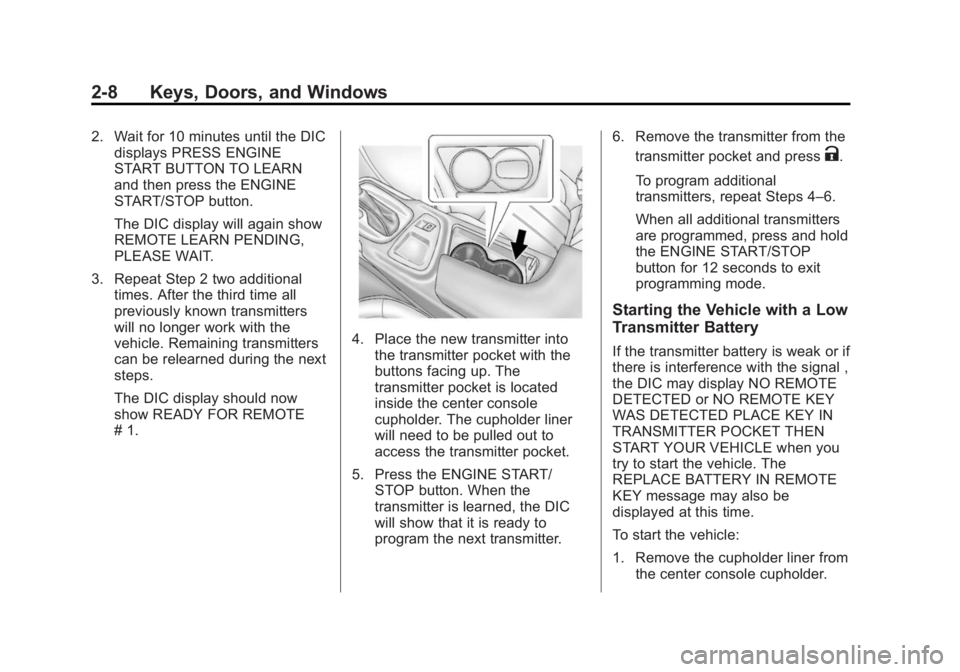
4. Place the new transmitter intothe transmitter pocket with the
buttons facing up. The
transmitter pocket is located
inside the center console
cupholder. The cupholder liner
will need to be pulled out to
access the transmitter pocket.
5. Press the ENGINE START/ STOP button. When the
transmitter is learned, the DIC
will show that it is ready to
program the next transmitter. 6. Remove the transmitter from the
transmitter pocket and press
K.
To program additional
transmitters, repeat Steps 4–6.
When all additional transmitters
are programmed, press and hold
the ENGINE START/STOP
button for 12 seconds to exit
programming mode.
Starting the Vehicle with a Low
Transmitter Battery
If the transmitter battery is weak or if
there is interference with the signal ,
the DIC may display NO REMOTE
DETECTED or NO REMOTE KEY
WAS DETECTED PLACE KEY IN
TRANSMITTER POCKET THEN
START YOUR VEHICLE when you
try to start the vehicle. The
REPLACE BATTERY IN REMOTE
KEY message may also be
displayed at this time.
To start the vehicle:
1. Remove the cupholder liner from the center console cupholder.
Page 107 of 404
Black plate (1,1)Buick Regal Owner Manual (GMNA-Localizing-U.S./Canada/Mexico-
6081497) - 2014 - CRC 2nd Edition - 11/22/13
Storage 4-1
Storage
Storage Compartments
Storage Compartments . . . . . . . 4-1
Instrument Panel Storage . . . . . 4-1
Glove Box . . . . . . . . . . . . . . . . . . . . 4-1
Cupholders . . . . . . . . . . . . . . . . . . . 4-2
Rear Storage . . . . . . . . . . . . . . . . . 4-3
Center Console Storage . . . . . . 4-3
Additional Storage Features
Cargo Net . . . . . . . . . . . . . . . . . . . . . 4-3
Convenience Net . . . . . . . . . . . . . 4-4
Storage
Compartments
{Warning
Do not store heavy or sharp
objects in storage compartments.
In a crash, these objects may
cause the cover to open and
could result in injury.
Instrument Panel Storage
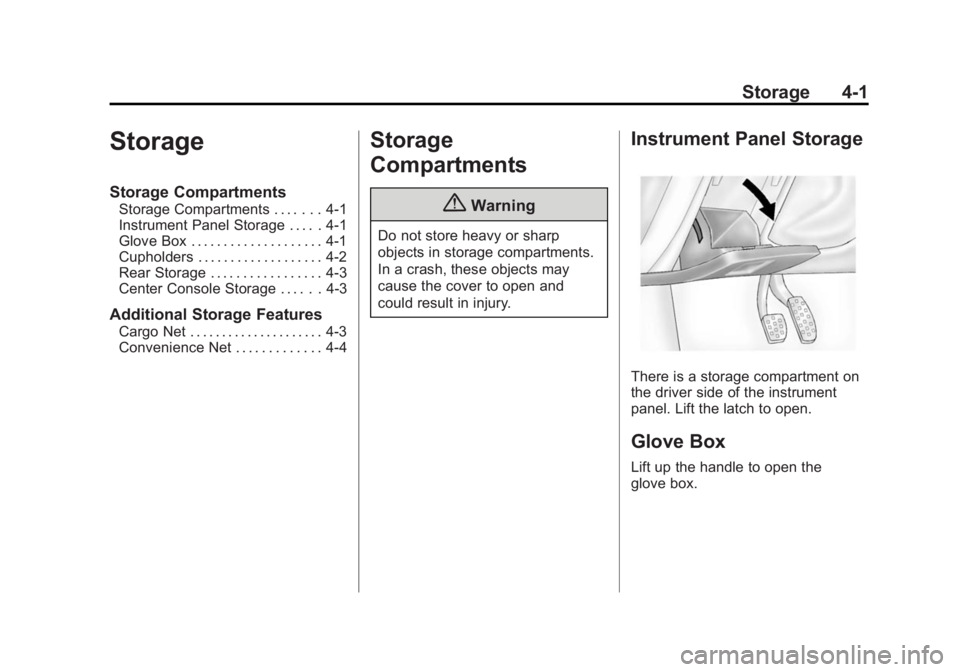
There is a storage compartment on
the driver side of the instrument
panel. Lift the latch to open.
Glove Box
Lift up the handle to open the
glove box.
Page 108 of 404
Black plate (2,1)Buick Regal Owner Manual (GMNA-Localizing-U.S./Canada/Mexico-
6081497) - 2014 - CRC 2nd Edition - 11/22/13
4-2 Storage
Cupholders
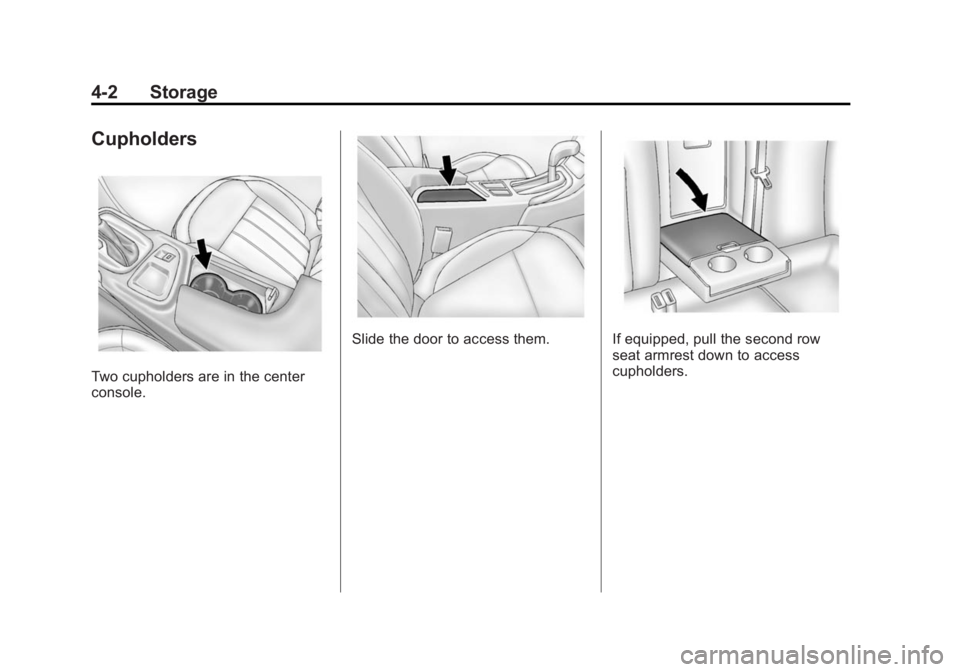
Two cupholders are in the center
console.
Slide the door to access them.If equipped, pull the second row
seat armrest down to access
cupholders.
Page 109 of 404
Black plate (3,1)Buick Regal Owner Manual (GMNA-Localizing-U.S./Canada/Mexico-
6081497) - 2014 - CRC 2nd Edition - 11/22/13
Storage 4-3
Rear Storage
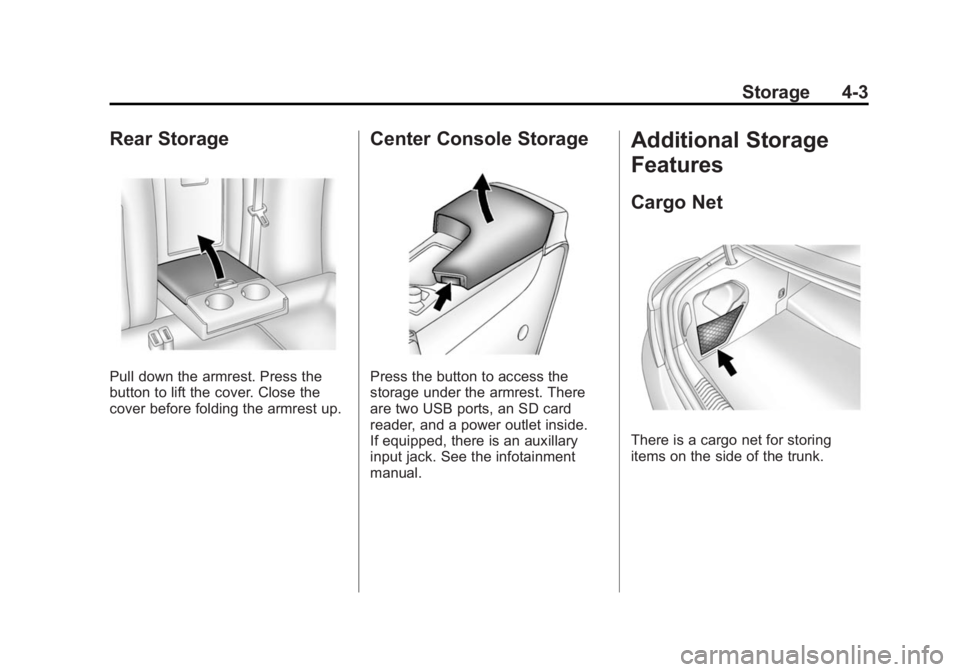
Pull down the armrest. Press the
button to lift the cover. Close the
cover before folding the armrest up.
Center Console Storage
Press the button to access the
storage under the armrest. There
are two USB ports, an SD card
reader, and a power outlet inside.
If equipped, there is an auxillary
input jack. See the infotainment
manual.
Additional Storage
Features
Cargo Net
There is a cargo net for storing
items on the side of the trunk.
Page 115 of 404
Black plate (5,1)Buick Regal Owner Manual (GMNA-Localizing-U.S./Canada/Mexico-
6081497) - 2014 - CRC 2nd Edition - 11/22/13
Instruments and Controls 5-5
If auto timing is set, the time
displayed on the clock may not
update immediately when driving
into a new time zone.
Press
qBACK to go to the last
menu and save the changes or
{to
return to the Home Page.
Power Outlets
The accessory power outlet can be
used to plug in electrical equipment,
such as a cell phone or MP3 player.
There are two 12-volt accessory
power outlets:
.On the center stack next to the
ashtray.
.Inside the center console.
The outlet is powered when the
ignition is in ON/RUN or ACC/
ACCESSORY, or until the driver
door is opened within 10 minutes of
turning off the vehicle. See Retained
Accessory Power (RAP) on
page 9-24. Open the protective cover to use the
accessory power outlet.
Certain electrical accessories may
not be compatible with the
accessory power outlet and could
overload vehicle or adapter fuses.
If there is a problem, see your
dealer.
When adding electrical equipment,
be sure to follow the installation
instructions included with the
equipment. See
Add-On Electrical
Equipment on page 9-65.
{Caution
Hanging heavy equipment from
the power outlet can cause
damage not covered by the
vehicle warranty. The power
outlets are designed for
accessory power plugs only, such
as cell phone charge cords. Power Outlet 110 Volt Alternating
Current
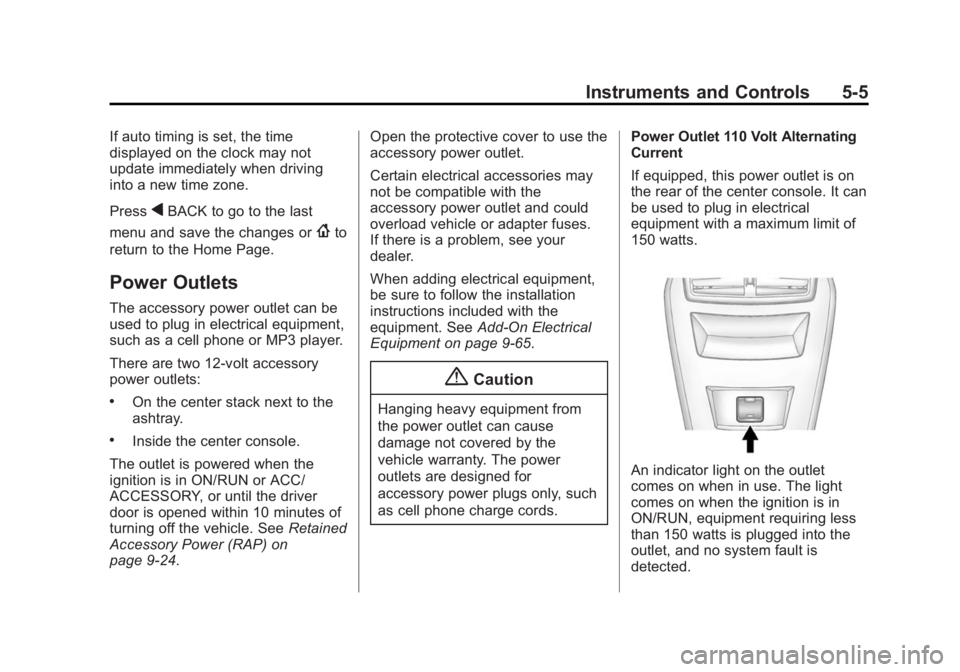
If equipped, this power outlet is on
the rear of the center console. It can
be used to plug in electrical
equipment with a maximum limit of
150 watts.
An indicator light on the outlet
comes on when in use. The light
comes on when the ignition is in
ON/RUN, equipment requiring less
than 150 watts is plugged into the
outlet, and no system fault is
detected.
Page 215 of 404
Black plate (33,1)Buick Regal Owner Manual (GMNA-Localizing-U.S./Canada/Mexico-
6081497) - 2014 - CRC 2nd Edition - 11/22/13
Driving and Operating 9-33
If driving safely on a wet road and it
becomes necessary to slam on the
brakes and continue braking to
avoid a sudden obstacle, a
computer senses the wheels are
slowing down. If one of the wheels
is about to stop rolling, the computer
will separately work the brakes at
each wheel.
ABS can change the brake pressure
to each wheel, as required, faster
than any driver could. This can help
you steer around the obstacle while
braking hard.
As the brakes are applied, the
computer keeps receiving updates
on wheel speed and controls
braking pressure accordingly.
Remember: ABS does not change
the time needed to get a foot up to
the brake pedal or always decrease
stopping distance. If you get too
close to the vehicle in front of you,
there will not be enough time to
apply the brakes if that vehiclesuddenly slows or stops. Always
leave enough room up ahead to
stop, even with ABS.
Using ABS
Do not pump the brakes. Just hold
the brake pedal down firmly and let
ABS work. You may hear the ABS
pump or motor operating and feel
the brake pedal pulsate. This is
normal.
Braking in Emergencies
ABS allows you to steer and brake
at the same time. In many
emergencies, steering can help
more than even the very best
braking.
Parking Brake
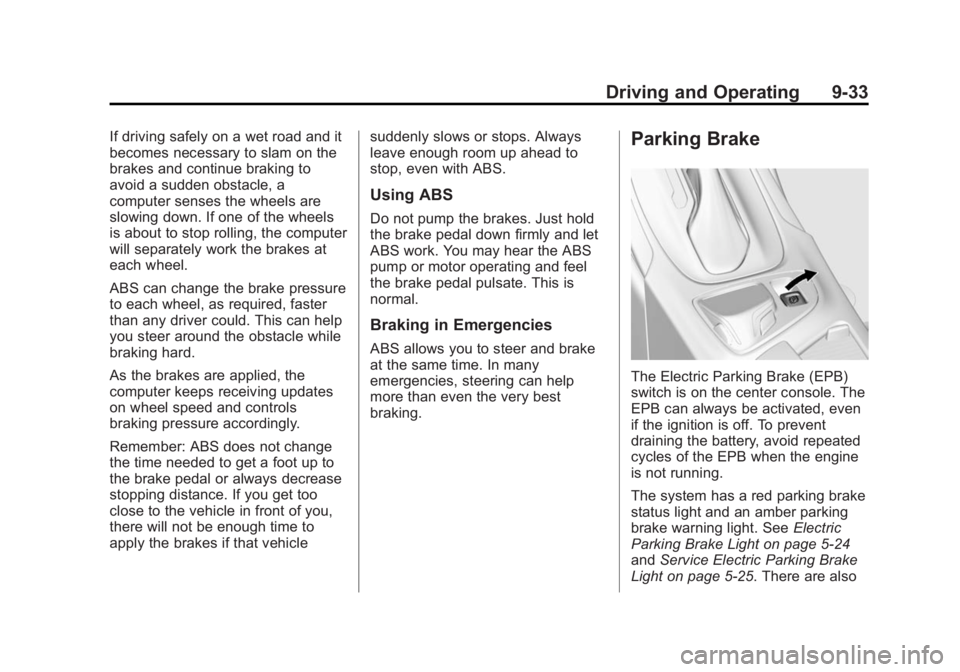
The Electric Parking Brake (EPB)
switch is on the center console. The
EPB can always be activated, even
if the ignition is off. To prevent
draining the battery, avoid repeated
cycles of the EPB when the engine
is not running.
The system has a red parking brake
status light and an amber parking
brake warning light. See
Electric
Parking Brake Light on page 5-24
and Service Electric Parking Brake
Light on page 5-25. There are also
Page 392 of 404
Black plate (2,1)Buick Regal Owner Manual (GMNA-Localizing-U.S./Canada/Mexico-
6081497) - 2014 - CRC 2nd Edition - 11/27/13
i-2 INDEX
BrakeSystem Warning Light . . . . . . . . 5-24
Brakes . . . . . . . . . . . . . . . . . . . . . . . . 10-24 Antilock . . . . . . . . . . . . . . . . . . . . . . . 9-32
Assist . . . . . . . . . . . . . . . . . . . . . . . . . 9-35
Fluid . . . . . . . . . . . . . . . . . . . . . . . . 10-25
Parking . . . . . . . . . . . . . . . . . . . . . . . 9-33
System Messages . . . . . . . . . . . . 5-39
Braking . . . . . . . . . . . . . . . . . . . . . . . . . 9-3
Braking System Active Emergency . . . . . . . . . . . . 1-17
Break-In, New Vehicle . . . . . . . . . 9-15
Bulb Replacement . . . . . . . . . . . . 10-34 Fog Lamps . . . . . . . . . . . . . 6-4, 10-32
Halogen Bulbs . . . . . . . . . . . . . . 10-31
Headlamp Aiming . . . . . . . . . . . 10-30
Headlamps . . . . . . . . . . . . . . . . . 10-31
Headlamps, Front TurnSignal, and Parking
Lamps . . . . . . . . . . . . . . . . . . . . 10-31
High Intensity Discharge
(HID) Lighting . . . . . . . . . . . . . 10-31
License Plate Lamps . . . . . . . 10-33
Taillamps, Turn Signal, Stoplamps, and
Back-up Lamps . . . . . . . . . . . 10-33 Buying New Tires . . . . . . . . . . . . . 10-57
C
Calibration . . . . . . . . . . . . . . . . . . . . . . 5-4
California
Fuel Requirements . . . . . . . . . . . 9-61
Perchlorate MaterialsRequirements . . . . . . . . . . . . . . . 10-3
Warning . . . . . . . . . . . . . . . . . . . . . . 10-2
Canadian Vehicle Owners . . . . . . . . iii
Capacities and Specifications . . . . . . . . . . . . . . . . 12-2
Carbon Monoxide
Engine Exhaust . . . . . . . . . . . . . . . 9-26
Trunk . . . . . . . . . . . . . . . . . . . . . . . . . 2-14
Winter Driving . . . . . . . . . . . . . . . . . 9-8
Cargo Net . . . . . . . . . . . . . . . . . . . . . . 4-3
Cautions, Danger, and Warnings . . . . . . . . . . . . . . . . . . . . . . . . iv
Center Console Storage . . . . . . . . 4-3
Chains, Tire . . . . . . . . . . . . . . . . . . 10-62
Charging System Light . . . . . . . . 5-21
Check Engine Light . . . . . . . . . . . . . . . . . . 5-21
IgnitionTransmission Lock . . . . . . . . 10-29 Child Restraints
Infants and Young
Children . . . . . . . . . . . . . . . . . . . . . 3-33
Lower Anchors and Tethers for Children . . . . . . . . . 3-38
Older Children . . . . . . . . . . . . . . . . 3-31
Securing . . . . . . . . . . . . . . . . 3-46, 3-48
Systems . . . . . . . . . . . . . . . . . . . . . . 3-35
Cigarette Lighter . . . . . . . . . . . . . . . . 5-6
Circuit Breakers . . . . . . . . . . . . . . 10-35
Cleaning Exterior Care . . . . . . . . . . . . . . . 10-86
Interior Care . . . . . . . . . . . . . . . . 10-90
Climate Control Systems Dual Automatic . . . . . . . . . . . . . . . . 8-1
Clock . . . . . . . . . . . . . . . . . . . . . . . . . . . 5-4
Cluster, Instrument . . . . . . . 5-9, 5-13
Clutch, Hydraulic . . . . . . . . . . . . . 10-15
Collision Damage Repair . . . . . . 13-9
Compact Spare Tire . . . . . . . . . . 10-76
Compartments
Storage . . . . . . . . . . . . . . . . . . . . . . . . 4-1
Compass . . . . . . . . . . . . . . . . . . . . . . . 5-4 Messages . . . . . . . . . . . . . . . . . . . . 5-40
Compressor Kit, Tire
Sealant . . . . . . . . . . . . . . . . . . . . . . 10-64