ac temp BUICK REGAL 2016 User Guide
[x] Cancel search | Manufacturer: BUICK, Model Year: 2016, Model line: REGAL, Model: BUICK REGAL 2016Pages: 357, PDF Size: 5.37 MB
Page 92 of 357
Buick Regal Owner Manual (GMNA-Localizing-U.S./Canada/Mexico-
9159380) - 2016 - CRC - 2/23/16
Seats and Restraints 91
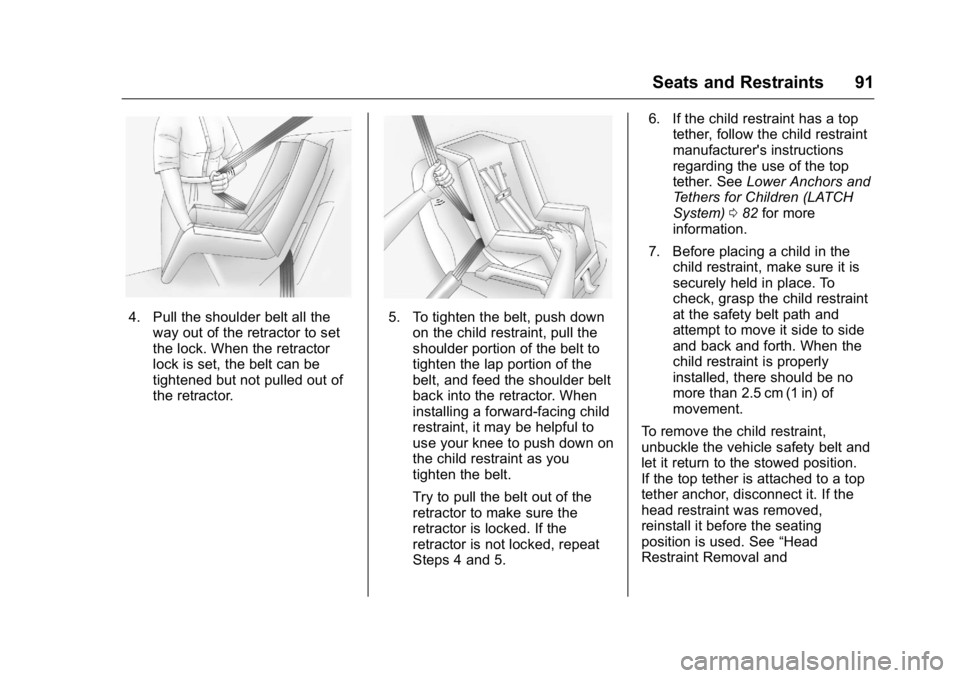
4. Pull the shoulder belt all theway out of the retractor to set
the lock. When the retractor
lock is set, the belt can be
tightened but not pulled out of
the retractor.5. To tighten the belt, push downon the child restraint, pull the
shoulder portion of the belt to
tighten the lap portion of the
belt, and feed the shoulder belt
back into the retractor. When
installing a forward-facing child
restraint, it may be helpful to
use your knee to push down on
the child restraint as you
tighten the belt.
Try to pull the belt out of the
retractor to make sure the
retractor is locked. If the
retractor is not locked, repeat
Steps 4 and 5. 6. If the child restraint has a top
tether, follow the child restraint
manufacturer's instructions
regarding the use of the top
tether. See Lower Anchors and
Tethers for Children (LATCH
System) 082 for more
information.
7. Before placing a child in the child restraint, make sure it is
securely held in place. To
check, grasp the child restraint
at the safety belt path and
attempt to move it side to side
and back and forth. When the
child restraint is properly
installed, there should be no
more than 2.5 cm (1 in) of
movement.
To remove the child restraint,
unbuckle the vehicle safety belt and
let it return to the stowed position.
If the top tether is attached to a top
tether anchor, disconnect it. If the
head restraint was removed,
reinstall it before the seating
position is used. See “Head
Restraint Removal and
Page 95 of 357

Buick Regal Owner Manual (GMNA-Localizing-U.S./Canada/Mexico-
9159380) - 2016 - CRC - 2/23/16
94 Seats and Restraints
6. To tighten the belt, push downon the child restraint, pull the
shoulder portion of the belt to
tighten the lap portion of the
belt, and feed the shoulder belt
back into the retractor. When
installing a forward-facing child
restraint, it may be helpful to
use your knee to push down on
the child restraint as you
tighten the belt.
Try to pull the belt out of the
retractor to make sure the
retractor is locked. If the
retractor is not locked, repeat
Steps 5 and 6. 7. Before placing a child in the
child restraint, make sure it is
securely held in place. To
check, grasp the child restraint
at the safety belt path and
attempt to move it side to side
and back and forth. When the
child restraint is properly
installed, there should be no
more than 2.5 cm (1 in) of
movement.
If the airbag is off, the off indicator in
the passenger airbag status
indicator will come on and stay on
when the vehicle is started.
If a child restraint has been installed
and the on indicator is lit, see “If the
On Indicator Is Lit for a Child
Restraint” underPassenger Sensing
System 069.
To remove the child restraint,
unbuckle the vehicle safety belt and
let it return to the stowed position.
Page 99 of 357
Buick Regal Owner Manual (GMNA-Localizing-U.S./Canada/Mexico-
9159380) - 2016 - CRC - 2/23/16
98 Instruments and Controls
Instruments and
Controls
Controls
Steering Wheel Adjustment . . . . 99
Steering Wheel Controls . . . . . . . 99
Heated Steering Wheel . . . . . . . . 99
Horn . . . . . . . . . . . . . . . . . . . . . . . . . . 100
Windshield Wiper/Washer . . . . 100
Compass . . . . . . . . . . . . . . . . . . . . . 101
Clock . . . . . . . . . . . . . . . . . . . . . . . . . 101
Power Outlets . . . . . . . . . . . . . . . . 101
Cigarette Lighter . . . . . . . . . . . . . . 103
Ashtrays . . . . . . . . . . . . . . . . . . . . . . 103
Warning Lights, Gauges, and
Indicators
Warning Lights, Gauges, andIndicators . . . . . . . . . . . . . . . . . . . 103
Instrument Cluster (Base Level Cluster) . . . . . . . . . . . . . . . . . . . . . 104
Instrument Cluster (Uplevel Cluster) . . . . . . . . . . . . . . . . . . . . . 108
Speedometer . . . . . . . . . . . . . . . . . 110
Odometer . . . . . . . . . . . . . . . . . . . . . 110
Trip Odometer . . . . . . . . . . . . . . . . 111
Tachometer . . . . . . . . . . . . . . . . . . . 111
Fuel Gauge . . . . . . . . . . . . . . . . . . . 111 Engine Coolant Temperature
Gauge . . . . . . . . . . . . . . . . . . . . . . 112
Safety Belt Reminders . . . . . . . . 113
Airbag Readiness Light . . . . . . . 114
Passenger Airbag Status Indicator . . . . . . . . . . . . . . . . . . . . . 114
Charging System Light . . . . . . . 115
Malfunction Indicator Lamp (Check Engine Light) . . . . . . . . 116
Brake System Warning Light . . . . . . . . . . . . . . . . . . . . . . . . 117
Electric Parking Brake Light . . . . . . . . . . . . . . . . . . . . . . . . 118
Service Electric Parking Brake Light . . . . . . . . . . . . . . . . . . . . . . . . 118
Antilock Brake System (ABS) Warning Light . . . . . . . . . . . . . . . 119
Lane Departure Warning (LDW) Light . . . . . . . . . . . . . . . . . 119
Vehicle Ahead Indicator . . . . . . . 119
Traction Off Light . . . . . . . . . . . . . 120
StabiliTrak
®OFF Light . . . . . . . . 120
Traction Control System (TCS)/ StabiliTrak
®Light . . . . . . . . . . . 120
Engine Coolant Temperature Warning Light . . . . . . . . . . . . . . . 121
Tire Pressure Light . . . . . . . . . . . 121
Engine Oil Pressure Light . . . . 121
Low Fuel Warning Light . . . . . . 122
Security Light . . . . . . . . . . . . . . . . . 122
High-Beam On Light . . . . . . . . . . 122 Front Fog Lamp Light . . . . . . . . . 123
Lamps On Reminder . . . . . . . . . 123
Cruise Control Light . . . . . . . . . . 123
Door Ajar Light . . . . . . . . . . . . . . . 123
Information Displays
Power Flows
(eAssist Only) . . . . . . . . . . . . . . . 124
Energy Information (eAssist Only) . . . . . . . . . . . . . . . 125
Driver Information Center (DIC) (Base Level Cluster) . . . . . . . . 125
Driver Information Center (DIC) (Uplevel Cluster) . . . . . . . . . . . . 127
Vehicle Messages
Vehicle Messages . . . . . . . . . . . . 131
Battery Voltage and ChargingMessages . . . . . . . . . . . . . . . . . . . 131
Brake System Messages . . . . . 131
Compass Messages . . . . . . . . . . 132
Cruise Control Messages . . . . . 132
Door Ajar Messages . . . . . . . . . . 133
Engine Cooling System Messages . . . . . . . . . . . . . . . . . . . 133
Engine Oil Messages . . . . . . . . . 134
Engine Power Messages . . . . . 134
Fuel System Messages . . . . . . . 134
Key and Lock Messages . . . . . 135
Object Detection System Messages . . . . . . . . . . . . . . . . . . . 135
Page 110 of 357
Buick Regal Owner Manual (GMNA-Localizing-U.S./Canada/Mexico-
9159380) - 2016 - CRC - 2/23/16
Instruments and Controls 109
Cluster Menu
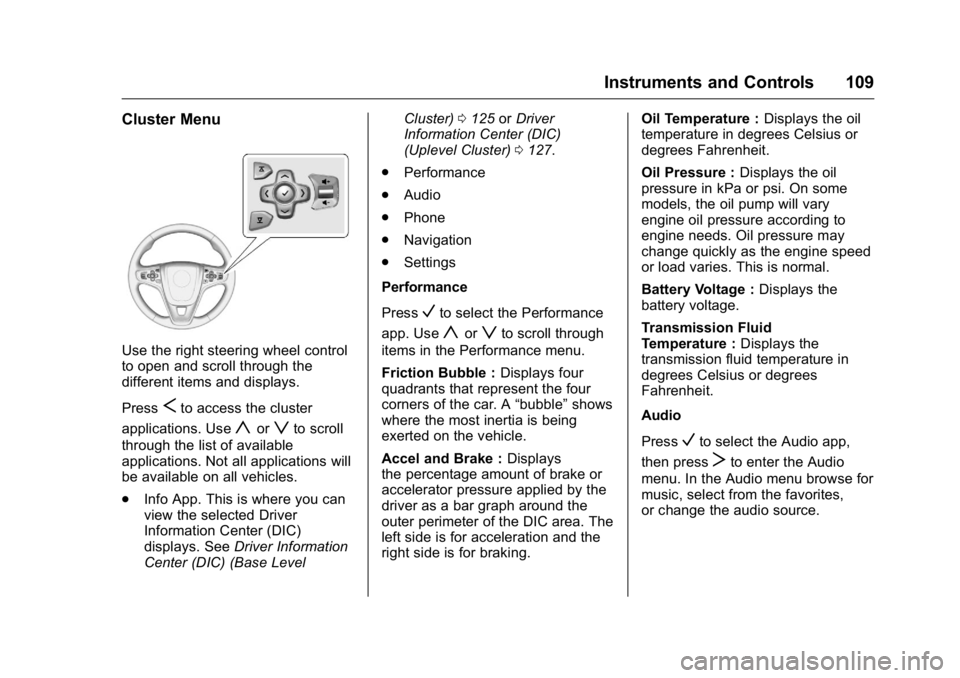
Use the right steering wheel control
to open and scroll through the
different items and displays.
Press
Sto access the cluster
applications. Use
yorzto scroll
through the list of available
applications. Not all applications will
be available on all vehicles.
. Info App. This is where you can
view the selected Driver
Information Center (DIC)
displays. See Driver Information
Center (DIC) (Base Level Cluster)
0125 orDriver
Information Center (DIC)
(Uplevel Cluster) 0127.
. Performance
. Audio
. Phone
. Navigation
. Settings
Performance
Press
Vto select the Performance
app. Use
yorzto scroll through
items in the Performance menu.
Friction Bubble : Displays four
quadrants that represent the four
corners of the car. A “bubble”shows
where the most inertia is being
exerted on the vehicle.
Accel and Brake : Displays
the percentage amount of brake or
accelerator pressure applied by the
driver as a bar graph around the
outer perimeter of the DIC area. The
left side is for acceleration and the
right side is for braking. Oil Temperature :
Displays the oil
temperature in degrees Celsius or
degrees Fahrenheit.
Oil Pressure : Displays the oil
pressure in kPa or psi. On some
models, the oil pump will vary
engine oil pressure according to
engine needs. Oil pressure may
change quickly as the engine speed
or load varies. This is normal.
Battery Voltage : Displays the
battery voltage.
Transmission Fluid
Temperature : Displays the
transmission fluid temperature in
degrees Celsius or degrees
Fahrenheit.
Audio
Press
Vto select the Audio app,
then press
Tto enter the Audio
menu. In the Audio menu browse for
music, select from the favorites,
or change the audio source.
Page 113 of 357
Buick Regal Owner Manual (GMNA-Localizing-U.S./Canada/Mexico-
9159380) - 2016 - CRC - 2/23/16
112 Instruments and Controls
Base Level English
Uplevel English
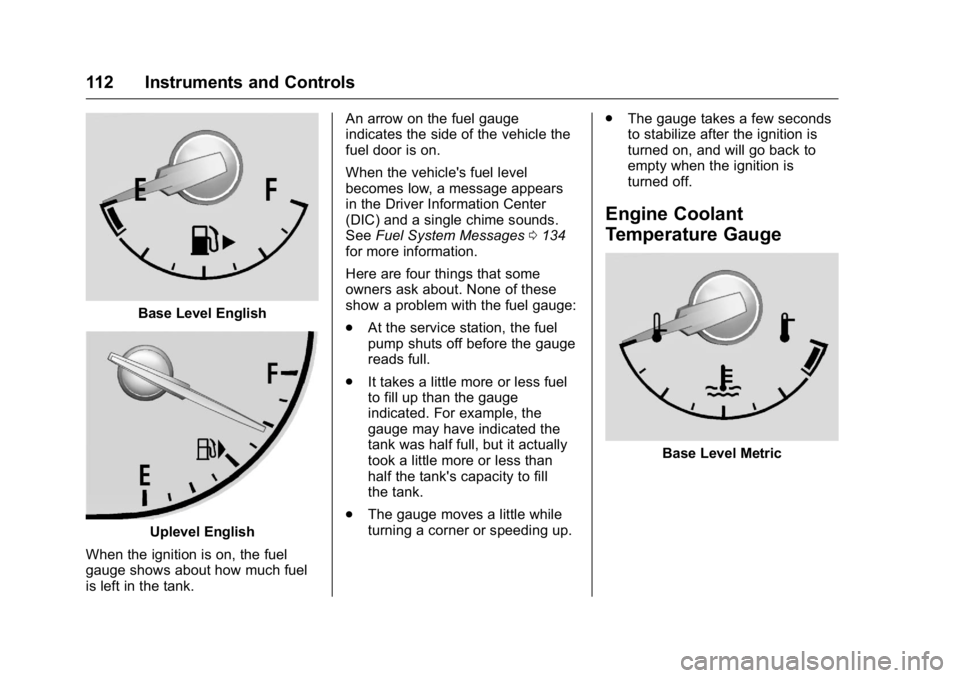
When the ignition is on, the fuel
gauge shows about how much fuel
is left in the tank. An arrow on the fuel gauge
indicates the side of the vehicle the
fuel door is on.
When the vehicle's fuel level
becomes low, a message appears
in the Driver Information Center
(DIC) and a single chime sounds.
See
Fuel System Messages 0134
for more information.
Here are four things that some
owners ask about. None of these
show a problem with the fuel gauge:
. At the service station, the fuel
pump shuts off before the gauge
reads full.
. It takes a little more or less fuel
to fill up than the gauge
indicated. For example, the
gauge may have indicated the
tank was half full, but it actually
took a little more or less than
half the tank's capacity to fill
the tank.
. The gauge moves a little while
turning a corner or speeding up. .
The gauge takes a few seconds
to stabilize after the ignition is
turned on, and will go back to
empty when the ignition is
turned off.
Engine Coolant
Temperature Gauge
Base Level Metric
Page 114 of 357
Buick Regal Owner Manual (GMNA-Localizing-U.S./Canada/Mexico-
9159380) - 2016 - CRC - 2/23/16
Instruments and Controls 113
Uplevel Metric
Base Level English
Uplevel English
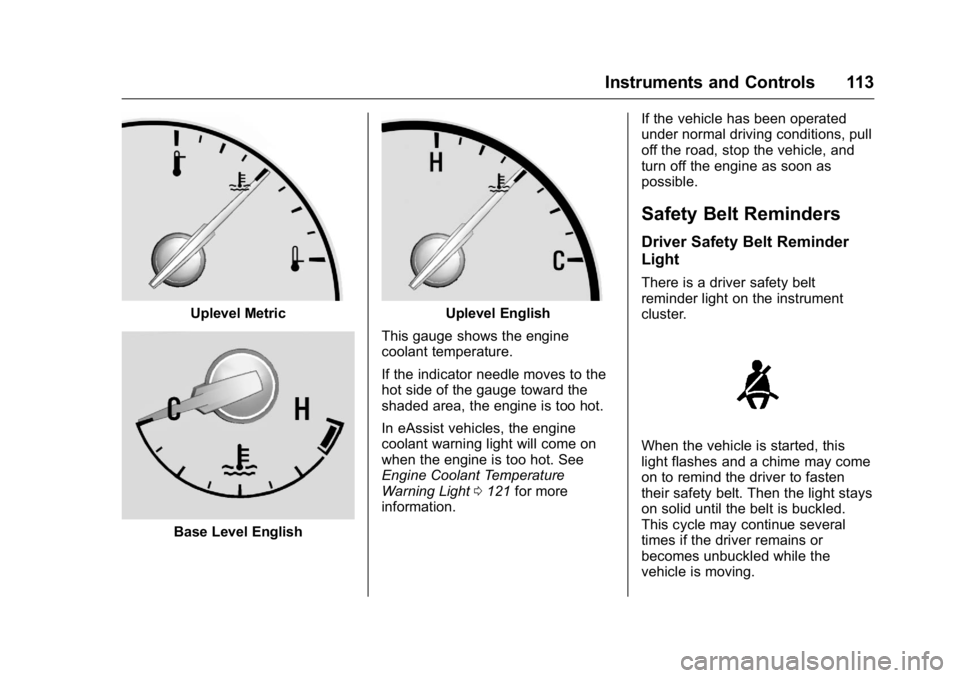
This gauge shows the engine
coolant temperature.
If the indicator needle moves to the
hot side of the gauge toward the
shaded area, the engine is too hot.
In eAssist vehicles, the engine
coolant warning light will come on
when the engine is too hot. See
Engine Coolant Temperature
Warning Light 0121 for more
information. If the vehicle has been operated
under normal driving conditions, pull
off the road, stop the vehicle, and
turn off the engine as soon as
possible.
Safety Belt Reminders
Driver Safety Belt Reminder
Light
There is a driver safety belt
reminder light on the instrument
cluster.
When the vehicle is started, this
light flashes and a chime may come
on to remind the driver to fasten
their safety belt. Then the light stays
on solid until the belt is buckled.
This cycle may continue several
times if the driver remains or
becomes unbuckled while the
vehicle is moving.
Page 122 of 357
Buick Regal Owner Manual (GMNA-Localizing-U.S./Canada/Mexico-
9159380) - 2016 - CRC - 2/23/16
Instruments and Controls 121
Engine Coolant
Temperature Warning
Light
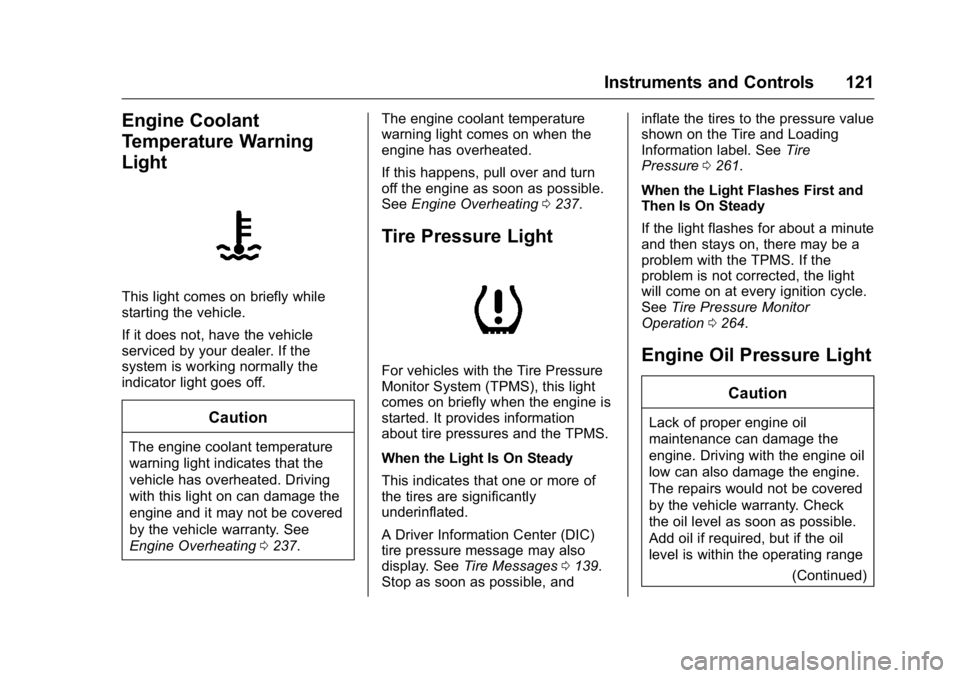
This light comes on briefly while
starting the vehicle.
If it does not, have the vehicle
serviced by your dealer. If the
system is working normally the
indicator light goes off.
Caution
The engine coolant temperature
warning light indicates that the
vehicle has overheated. Driving
with this light on can damage the
engine and it may not be covered
by the vehicle warranty. See
Engine Overheating0237. The engine coolant temperature
warning light comes on when the
engine has overheated.
If this happens, pull over and turn
off the engine as soon as possible.
See
Engine Overheating 0237.
Tire Pressure Light
For vehicles with the Tire Pressure
Monitor System (TPMS), this light
comes on briefly when the engine is
started. It provides information
about tire pressures and the TPMS.
When the Light Is On Steady
This indicates that one or more of
the tires are significantly
underinflated.
A Driver Information Center (DIC)
tire pressure message may also
display. See Tire Messages 0139.
Stop as soon as possible, and inflate the tires to the pressure value
shown on the Tire and Loading
Information label. See
Tire
Pressure 0261.
When the Light Flashes First and
Then Is On Steady
If the light flashes for about a minute
and then stays on, there may be a
problem with the TPMS. If the
problem is not corrected, the light
will come on at every ignition cycle.
See Tire Pressure Monitor
Operation 0264.Engine Oil Pressure Light
Caution
Lack of proper engine oil
maintenance can damage the
engine. Driving with the engine oil
low can also damage the engine.
The repairs would not be covered
by the vehicle warranty. Check
the oil level as soon as possible.
Add oil if required, but if the oil
level is within the operating range
(Continued)
Page 128 of 357
Buick Regal Owner Manual (GMNA-Localizing-U.S./Canada/Mexico-
9159380) - 2016 - CRC - 2/23/16
Instruments and Controls 127
Oil Life :Displays an estimate of
the oil's remaining useful life.
If REMAINING OIL LIFE 99% is
displayed, that means 99% of the
current oil life remains.
When the remaining oil life is low,
the CHANGE ENGINE OIL SOON
message will appear on the display.
See Engine Oil Messages 0134.
The oil should be changed as soon
as possible. See Engine Oil0228.
In addition to the engine oil life
system monitoring the oil life,
additional maintenance is
recommended in the Maintenance
Schedule. See Maintenance
Schedule 0305.
The Oil Life display must be reset
after each oil change. It will not
reset itself. Do not reset the Oil Life
display accidentally at any time
other than when the oil has just
been changed. It cannot be reset
accurately until the next oil change.
To reset the engine oil life system,
press and hold
Vfor several seconds while the Oil Life display is
active. See
Engine Oil Life
System 0230.
Coolant Temperature : Displays
the coolant temperature in either
degrees Celsius (°C) or degrees
Fahrenheit (°F).
Tire Pressure : Displays the
approximate pressures of all four
tires. Tire pressure is displayed in
either kilopascal (kPa) or in pounds
per square inch (psi). If the pressure
is low, the value for that tire is
shown in amber. See Tire Pressure
Monitor System 0262 andTire
Pressure Monitor Operation 0264.
Battery Voltage : Displays the
current battery voltage. The battery
voltage can fluctuate while viewing
this information on the DIC. This is
normal.
Speed Signs : Displays sign
information, which comes from a
roadway database in the onboard
navigation. Following Distance/Gap Setting :
When Adaptive Cruise Control
(ACC) is not engaged, the current
follow time to the vehicle ahead is
displayed as a time value on this
page. When ACC has been
engaged, the display switches to the
gap setting page. This page shows
the current gap setting. See
Forward Collision Alert (FCA)
System
0207 andAdaptive Cruise
Control 0197.
Drive Cycle Info (eAssist Only) :
Shows the distance and fuel
economy for the current drive cycle.
Driver Information Center
(DIC) (Uplevel Cluster)
The DIC displays are shown in the
center of the instrument cluster in
the Info App. See Instrument Cluster
(Base Level Cluster) 0104 or
Instrument Cluster (Uplevel Cluster)
0 108. The Info App is only
available when the vehicle is in ON/
RUN. The displays show the status
of many vehicle systems. The
controls for the DIC are on the right
steering wheel control.
Page 132 of 357
Buick Regal Owner Manual (GMNA-Localizing-U.S./Canada/Mexico-
9159380) - 2016 - CRC - 2/23/16
Instruments and Controls 131
Vehicle Messages
Messages displayed on the DIC
indicate the status of the vehicle or
some action that may be needed to
correct a condition. Multiple
messages may appear one after
another.
The messages that do not require
immediate action can be
acknowledged and cleared by
pressing
V.
The messages that require
immediate action cannot be cleared
until that action is performed.
All messages should be taken
seriously; clearing the message
does not correct the problem.
The following are the possible
messages and some information
about them.
Battery Voltage and
Charging Messages
BATTERY SAVER ACTIVE
This message displays when the
vehicle has detected that the battery
voltage is dropping beyond a
reasonable point. The battery saver
system starts reducing features of
the vehicle that may be noticed. At
the point that features are disabled,
this message displays. Turn off
unnecessary accessories to allow
the battery to recharge.
LOW BATTERY
This message is displayed when the
battery voltage is low. See Battery -
North America 0241.
SERVICE BATTERY
CHARGING SYSTEM
This message is displayed when
there is a fault in the battery
charging system. Take the vehicle to
your dealer for service.
Brake System Messages
BRAKE FLUID LOW
This message is displayed when the
brake fluid level is low. See Brake
Fluid 0240.
STEP ON BRAKE TO
RELEASE PARK BRAKE
This message is displayed if you
attempt to release the electric
parking brake without the brake
pedal applied. See Parking Brake
0 189 for more information.
RELEASE PARK BRAKE
SWITCH
This message is displayed if the
electric parking brake is on while the
vehicle is in motion. Release it
before you attempt to drive. See
Parking Brake 0189 for more
information.
SERVICE BRAKE ASSIST
This message may be displayed
when there is a problem with the
brake boost assist system. When
this message is displayed, the brake
boost assist motor might be heard
Page 133 of 357
Buick Regal Owner Manual (GMNA-Localizing-U.S./Canada/Mexico-
9159380) - 2016 - CRC - 2/23/16
132 Instruments and Controls
operating and you might notice
pulsation in the brake pedal. This is
normal under these conditions. Take
the vehicle to your dealer for
service.
SERVICE PARKING BRAKE
This message is displayed when
there is a problem with the electric
parking brake. SeeParking Brake
0 189 for more information. Take the
vehicle to your dealer.
Compass Messages
CAL
This message is displayed when the
compass needs to be calibrated.
See Compass 0101.
– –
Dashes will be displayed if the
compass needs service. See your
dealer for service.
Cruise Control Messages
ADAPTIVE CRUISE SET
TO XXX
This message displays when the
Adaptive Cruise Control (ACC)
speed is set. See Adaptive Cruise
Control 0197.
ADAPTIVE CRUISE
TEMPORARILY UNAVAILABLE
This message displays when
attempting to activate Adaptive
Cruise Control (ACC) when it is
temporarily unavailable. The ACC
system does not need service.
This can occur under the following
conditions:
.
Cruise is turned on when the
vehicle is stopped.
. The radar can't see objects well.
See next message.
FRONT RADAR BLOCKED —
SEE OWNER MANUAL
This message can occur under the
following conditions:
. The radar is not clean. Keep the
radar sensors free of mud, dirt,
snow, ice, and slush. Clean the
entire front and/or rear of the
vehicle. For cleaning
instructions, see Exterior
Care 0295.
. Heavy rain or snow is interfering
with the radar object detection or
camera performance.
CRUISE SET TO XXX
This message displays when the
cruise control speed is set. See
Cruise Control 0194.
NO CRUISE BRAKING GAS
PEDAL APPLIED
This message displays when
Adaptive Cruise Control (ACC) is
active and the driver is pressing the
gas pedal. When this occurs, ACC
will not brake. See Adaptive Cruise
Control 0197.