light BUICK REGAL 2016 Owner's Manual
[x] Cancel search | Manufacturer: BUICK, Model Year: 2016, Model line: REGAL, Model: BUICK REGAL 2016Pages: 357, PDF Size: 5.37 MB
Page 2 of 357
Buick Regal Owner Manual (GMNA-Localizing-U.S./Canada/Mexico-
9159380) - 2016 - CRC - 2/23/16
ContentsIntroduction . . . . . . . . . . . . . . . . . . . . . . 2
In Brief . . . . . . . . . . . . . . . . . . . . . . . . . . . 5
Keys, Doors, and Windows . . . . . 26
Seats and Restraints . . . . . . . . . . . 49
Storage . . . . . . . . . . . . . . . . . . . . . . . . . 95
Instruments and Controls . . . . . . . 98
Lighting . . . . . . . . . . . . . . . . . . . . . . . 150
Infotainment System . . . . . . . . . . 156
Climate Controls . . . . . . . . . . . . . . 157
Driving and Operating . . . . . . . . . 163
Vehicle Care . . . . . . . . . . . . . . . . . . 219
Service and Maintenance . . . . . 304
Technical Data . . . . . . . . . . . . . . . . 318
Customer Information . . . . . . . . . 322
Reporting Safety Defects . . . . . . 332
OnStar . . . . . . . . . . . . . . . . . . . . . . . . 336
Index . . . . . . . . . . . . . . . . . . . . 346
Page 4 of 357
Buick Regal Owner Manual (GMNA-Localizing-U.S./Canada/Mexico-
9159380) - 2016 - CRC - 2/23/16
Introduction 3
Danger, Warning, and
Caution
Warning messages found on vehicle
labels and in this manual describe
hazards and what to do to avoid or
reduce them.
{Danger
Danger indicates a hazard with a
high level of risk which will result
in serious injury or death.
{Warning
Warning indicates a hazard that
could result in injury or death.
Caution
Caution indicates a hazard that
could result in property or vehicle
damage.
A circle with a slash through it is a
safety symbol which means“Do
Not,” “Do not do this,” or“Do not let
this happen.”
Symbols
The vehicle has components and
labels that use symbols instead of
text. Symbols are shown along with
the text describing the operation or
information relating to a specific
component, control, message,
gauge, or indicator.
M: Shown when the owner
manual has additional instructions
or information.
*: Shown when the service
manual has additional instructions
or information.
0: Shown when there is more
information on another page —
“see page.” Vehicle Symbol Chart
Here are some additional symbols
that may be found on the vehicle
and what they mean. For more
information on the symbol, refer to
the Index.
9:
Airbag Readiness Light
#:Air Conditioning
!:Antilock Brake System (ABS)
g: Audio Steering Wheel Controls
or OnStar®(if equipped)
$: Brake System Warning Light
":Charging System
I: Cruise Control
`:Do Not Puncture
^:Do Not Service
B:Engine Coolant Temperature
O:Exterior Lamps
g: First Responder
_:Flame/Fire Prohibited
#:Fog Lamps
.:Fuel Gauge
+: Fuses
Page 6 of 357
Buick Regal Owner Manual (GMNA-Localizing-U.S./Canada/Mexico-
9159380) - 2016 - CRC - 2/23/16
In Brief 5
In Brief
Instrument Panel
Instrument Panel . . . . . . . . . . . . . . . . 6
Initial Drive Information
Initial Drive Information . . . . . . . . . . 8
Remote Keyless Entry (RKE)System . . . . . . . . . . . . . . . . . . . . . . . . 8
Remote Vehicle Start . . . . . . . . . . . 8
Door Locks . . . . . . . . . . . . . . . . . . . . . 9
Trunk Release . . . . . . . . . . . . . . . . . . 9
Windows . . . . . . . . . . . . . . . . . . . . . . . 10
Seat Adjustment . . . . . . . . . . . . . . . 10
Memory Features . . . . . . . . . . . . . . 11
Heated Seats . . . . . . . . . . . . . . . . . . 11
Head Restraint Adjustment . . . . 12
Safety Belts . . . . . . . . . . . . . . . . . . . . 12
Passenger Sensing System . . . 12
Mirror Adjustment . . . . . . . . . . . . . . 13
Steering Wheel Adjustment . . . . 13
Interior Lighting . . . . . . . . . . . . . . . . 14
Exterior Lighting . . . . . . . . . . . . . . . 14
Windshield Wiper/Washer . . . . . . 15
Climate Controls . . . . . . . . . . . . . . . 16
Transmission . . . . . . . . . . . . . . . . . . 16
Vehicle Features
Infotainment System . . . . . . . . . . . 17
Steering Wheel Controls . . . . . . . 17
Cruise Control . . . . . . . . . . . . . . . . . 17
Driver Information Center (DIC) . . . . . . . . . . . . . . . . . 18
Forward Collision Alert (FCA) System . . . . . . . . . . . . . . . . . . . . . . . 18
Front Automatic Braking (FAB) System . . . . . . . . . . . . . . . . . . . . . . . 18
Lane Departure Warning (LDW) . . . . . . . . . . . . . . . 19
Lane Change Alert (LCA) . . . . . . 19
Rear Vision Camera (RVC) . . . . 19
Rear Cross Traffic Alert (RCTA) System . . . . . . . . . . . . . . . . . . . . . . . 19
Parking Assist . . . . . . . . . . . . . . . . . 19
Power Outlets . . . . . . . . . . . . . . . . . 20
Universal Remote System . . . . . 20
Sunroof . . . . . . . . . . . . . . . . . . . . . . . . 20
eAssist Features
eAssist®Overview . . . . . . . . . . . . . 21
High Voltage Safety Information . . . . . . . . . . . . . . . . . . . 22
Automatic Engine Start/Stop Feature . . . . . . . . . . . . . . . . . . . . . . . 22
Regenerative Braking . . . . . . . . . . 22
Battery . . . . . . . . . . . . . . . . . . . . . . . . . 22
Service . . . . . . . . . . . . . . . . . . . . . . . . 23
Performance and Maintenance
Traction Control/Electronic Stability Control . . . . . . . . . . . . . . 23
Tire Pressure Monitor . . . . . . . . . . 23
Engine Oil Life System . . . . . . . . 24
Driving for Better Fuel Economy . . . . . . . . . . . . . . . . . . . . . 24
Roadside Assistance Program . . . . . . . . . . . . . . . . . . . . . . 25
Page 8 of 357

Buick Regal Owner Manual (GMNA-Localizing-U.S./Canada/Mexico-
9159380) - 2016 - CRC - 2/23/16
In Brief 7
1.Exterior Lamp Controls 0150.
Fog Lamps 0153 (If
Equipped).
Instrument Panel Illumination
Control 0153.
2. Air Vents 0161.
3. Turn Signal Lever. See Turn
and Lane-Change
Signals 0152.
4. Cruise Control 0194 (If
Equipped).
Adaptive Cruise Control 0197
(If Equipped).
Heated Steering Wheel 099 (If
Equipped).
Forward Collision Alert (FCA)
System 0207 (If Equipped).
5. Instrument Cluster (Base Level
Cluster) 0104 orInstrument
Cluster (Uplevel Cluster) 0108.
Driver Information Center
Display. See Driver Information
Center (DIC) (Base Level
Cluster) 0125 orDriver
Information Center (DIC)
(Uplevel Cluster) 0127. 6.
Steering Wheel Controls 099
(If Equipped).
Driver Information Center (DIC)
Controls. See Driver
Information Center (DIC) (Base
Level Cluster) 0125 orDriver
Information Center (DIC)
(Uplevel Cluster) 0127.
7. Windshield Wiper/
Washer 0100.
8. Infotainment 0156.
9. Traction Control/Electronic
Stability Control 0192.
Hazard Warning
Flashers 0152.
GS/Sport Buttons (If
Equipped). See Selective Ride
Control 0193.
Parking Assist Button (If
Equipped). See Assistance
Systems for Parking or
Backing 0204.
Lane Departure Warning
(LDW) 0212 (If Equipped).
10. Light Sensor. See Automatic
Headlamp System 0151. 11. Passenger Safety Belt
Reminder Light. See Safety
Belt Reminders 0113.
12. Heated Front Seats 055 (If
Equipped).
13. Electric Parking Brake Switch. SeeParking Brake 0189.
14. Shift Lever. See Automatic
Transmission 0186.
15. Dual Automatic Climate Control
System 0157.
16. Ignition Positions (Key Access)
0175 orIgnition Positions
(Keyless Access) 0177.
17. Horn 0100.
18. Steering Wheel
Adjustment 099.
19. Hood Release. See Hood 0222.
20. Data Link Connector (DLC) (Out of View). See Malfunction
Indicator Lamp (Check Engine
Light) 0116.
21. Instrument Panel Storage 095.
Page 12 of 357
Buick Regal Owner Manual (GMNA-Localizing-U.S./Canada/Mexico-
9159380) - 2016 - CRC - 2/23/16
In Brief 11
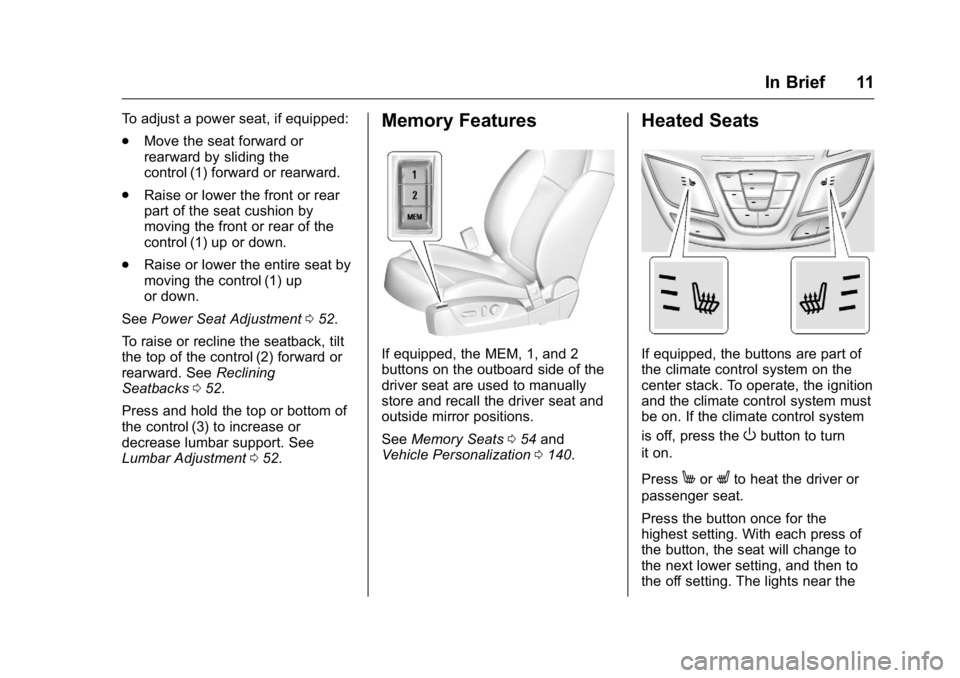
To adjust a power seat, if equipped:
.Move the seat forward or
rearward by sliding the
control (1) forward or rearward.
. Raise or lower the front or rear
part of the seat cushion by
moving the front or rear of the
control (1) up or down.
. Raise or lower the entire seat by
moving the control (1) up
or down.
See Power Seat Adjustment 052.
To raise or recline the seatback, tilt
the top of the control (2) forward or
rearward. See Reclining
Seatbacks 052.
Press and hold the top or bottom of
the control (3) to increase or
decrease lumbar support. See
Lumbar Adjustment 052.Memory Features
If equipped, the MEM, 1, and 2
buttons on the outboard side of the
driver seat are used to manually
store and recall the driver seat and
outside mirror positions.
See Memory Seats 054 and
Vehicle Personalization 0140.
Heated Seats
If equipped, the buttons are part of
the climate control system on the
center stack. To operate, the ignition
and the climate control system must
be on. If the climate control system
is off, press the
Obutton to turn
it on.
Press
MorLto heat the driver or
passenger seat.
Press the button once for the
highest setting. With each press of
the button, the seat will change to
the next lower setting, and then to
the off setting. The lights near the
Page 15 of 357
Buick Regal Owner Manual (GMNA-Localizing-U.S./Canada/Mexico-
9159380) - 2016 - CRC - 2/23/16
14 In Brief
3. Pull or push the steering wheelcloser or away from you.
4. Pull the lever up to lock the steering wheel in place.
Do not adjust the steering wheel
while driving.
Interior Lighting
Dome Lamps
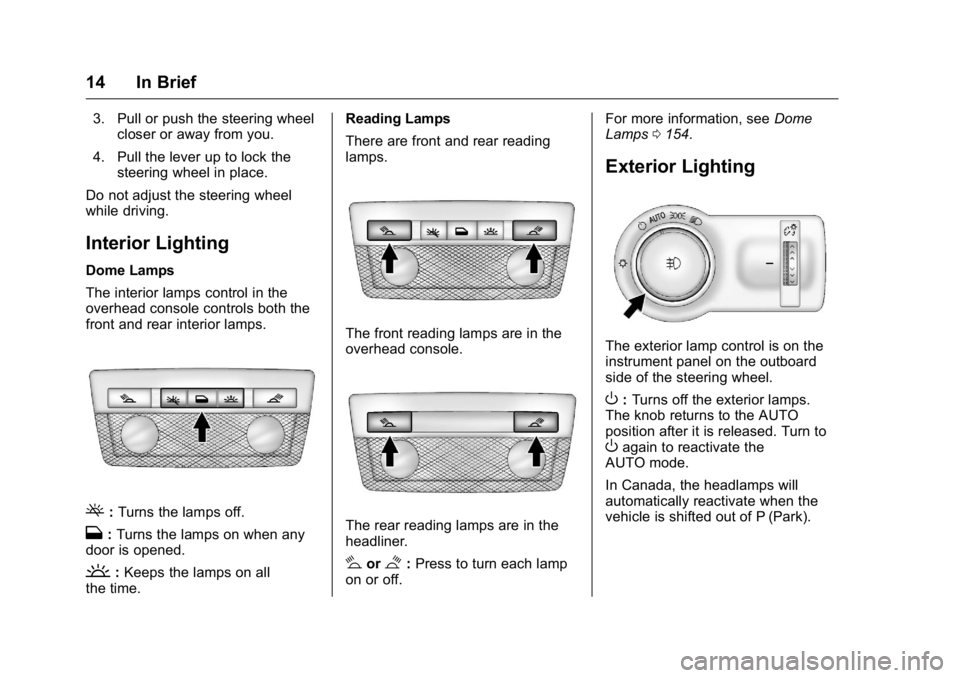
The interior lamps control in the
overhead console controls both the
front and rear interior lamps.
(: Turns the lamps off.
H: Turns the lamps on when any
door is opened.
': Keeps the lamps on all
the time. Reading Lamps
There are front and rear reading
lamps.
The front reading lamps are in the
overhead console.
The rear reading lamps are in the
headliner.
#or$:
Press to turn each lamp
on or off. For more information, see
Dome
Lamps 0154.
Exterior Lighting
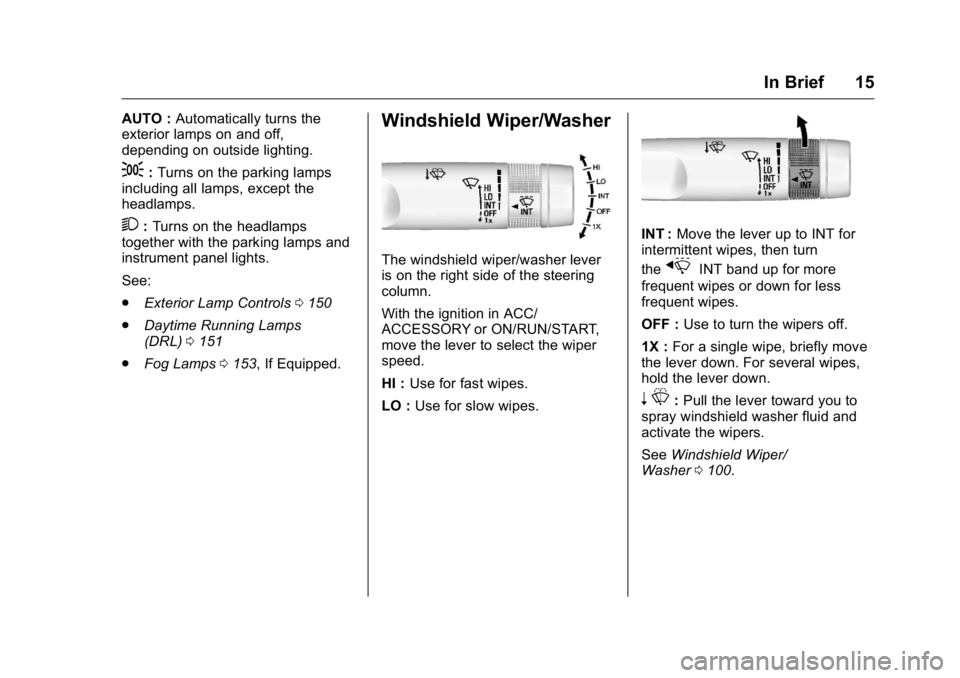
The exterior lamp control is on the
instrument panel on the outboard
side of the steering wheel.
O:Turns off the exterior lamps.
The knob returns to the AUTO
position after it is released. Turn to
Oagain to reactivate the
AUTO mode.
In Canada, the headlamps will
automatically reactivate when the
vehicle is shifted out of P (Park).
Page 16 of 357
Buick Regal Owner Manual (GMNA-Localizing-U.S./Canada/Mexico-
9159380) - 2016 - CRC - 2/23/16
In Brief 15
AUTO :Automatically turns the
exterior lamps on and off,
depending on outside lighting.
;: Turns on the parking lamps
including all lamps, except the
headlamps.
2: Turns on the headlamps
together with the parking lamps and
instrument panel lights.
See:
. Exterior Lamp Controls 0150
. Daytime Running Lamps
(DRL) 0151
. Fog Lamps 0153, If Equipped.
Windshield Wiper/Washer
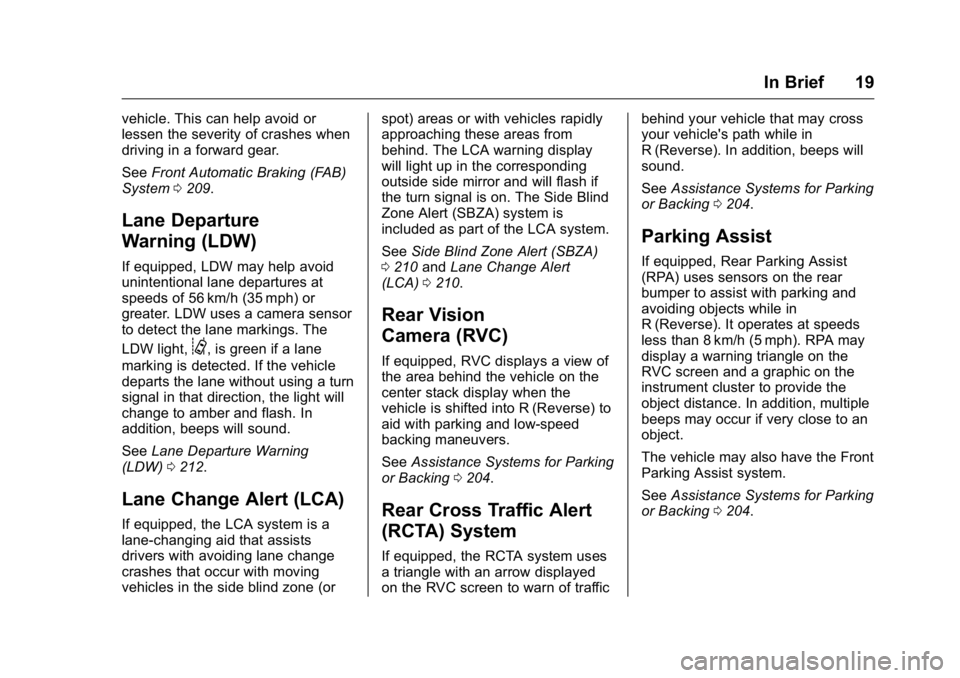
The windshield wiper/washer lever
is on the right side of the steering
column.
With the ignition in ACC/
ACCESSORY or ON/RUN/START,
move the lever to select the wiper
speed.
HI : Use for fast wipes.
LO : Use for slow wipes.
INT : Move the lever up to INT for
intermittent wipes, then turn
the
xINT band up for more
frequent wipes or down for less
frequent wipes.
OFF : Use to turn the wipers off.
1X : For a single wipe, briefly move
the lever down. For several wipes,
hold the lever down.
n L: Pull the lever toward you to
spray windshield washer fluid and
activate the wipers.
See Windshield Wiper/
Washer 0100.
Page 20 of 357
Buick Regal Owner Manual (GMNA-Localizing-U.S./Canada/Mexico-
9159380) - 2016 - CRC - 2/23/16
In Brief 19
vehicle. This can help avoid or
lessen the severity of crashes when
driving in a forward gear.
SeeFront Automatic Braking (FAB)
System 0209.
Lane Departure
Warning (LDW)
If equipped, LDW may help avoid
unintentional lane departures at
speeds of 56 km/h (35 mph) or
greater. LDW uses a camera sensor
to detect the lane markings. The
LDW light,
@, is green if a lane
marking is detected. If the vehicle
departs the lane without using a turn
signal in that direction, the light will
change to amber and flash. In
addition, beeps will sound.
See Lane Departure Warning
(LDW) 0212.
Lane Change Alert (LCA)
If equipped, the LCA system is a
lane-changing aid that assists
drivers with avoiding lane change
crashes that occur with moving
vehicles in the side blind zone (or spot) areas or with vehicles rapidly
approaching these areas from
behind. The LCA warning display
will light up in the corresponding
outside side mirror and will flash if
the turn signal is on. The Side Blind
Zone Alert (SBZA) system is
included as part of the LCA system.
See
Side Blind Zone Alert (SBZA)
0 210 andLane Change Alert
(LCA) 0210.
Rear Vision
Camera (RVC)
If equipped, RVC displays a view of
the area behind the vehicle on the
center stack display when the
vehicle is shifted into R (Reverse) to
aid with parking and low-speed
backing maneuvers.
See Assistance Systems for Parking
or Backing 0204.
Rear Cross Traffic Alert
(RCTA) System
If equipped, the RCTA system uses
a triangle with an arrow displayed
on the RVC screen to warn of traffic behind your vehicle that may cross
your vehicle's path while in
R (Reverse). In addition, beeps will
sound.
See
Assistance Systems for Parking
or Backing 0204.
Parking Assist
If equipped, Rear Parking Assist
(RPA) uses sensors on the rear
bumper to assist with parking and
avoiding objects while in
R (Reverse). It operates at speeds
less than 8 km/h (5 mph). RPA may
display a warning triangle on the
RVC screen and a graphic on the
instrument cluster to provide the
object distance. In addition, multiple
beeps may occur if very close to an
object.
The vehicle may also have the Front
Parking Assist system.
See Assistance Systems for Parking
or Backing 0204.
Page 22 of 357
Buick Regal Owner Manual (GMNA-Localizing-U.S./Canada/Mexico-
9159380) - 2016 - CRC - 2/23/16
In Brief 21
To express-open or express-close
the sunroof with the safety function
enabled, press the open or close
sunroof switch (1) to the second
detent position and release. To stop
the movement, press the switch
again.
To automatically tilt or close the
sunroof, press the tilt open or close
sunroof switch (2).
If an object is in the path of the
sunroof while it is closing, the
automatic reversal feature will
detect the object and stop the
sunroof. The sunroof will then return
to the full-open or vent position.
The sunroof glass panel cannot be
opened or closed if the vehicle has
an electrical failure.
SeeSunroof 047.eAssist Features
eAssist®Overview
If the vehicle has eAssist, there are
several additional features that
contribute to increased efficiency.
Vehicles with eAssist have an
automatic engine start/stop feature.
This feature saves fuel by shutting
the engine off when the vehicle is
stopped. When the engine shuts off
automatically, all the accessories
will continue to operate normally. In
very hot or cold conditions, the
engine will only shut off
automatically part of the time. See
Starting the Engine 0178.
There are two air conditioning
settings available. The comfort
setting maximizes cabin comfort.
The eco setting maximizes
efficiency allowing more frequent,
and longer engine stops than the
comfort setting. See Dual Automatic
Climate Control System 0157. This vehicle has a Hill Start Assist
(HSA) feature, which may be useful
when the vehicle is stopped on a
grade. See
Hill Start Assist
(HSA) 0191.
Vehicles with eAssist have a slightly
different instrument cluster, which
includes an AUTO STOP indicator
on the tachometer. See Instrument
Cluster (Base Level Cluster) 0104
or Instrument Cluster (Uplevel
Cluster) 0108.
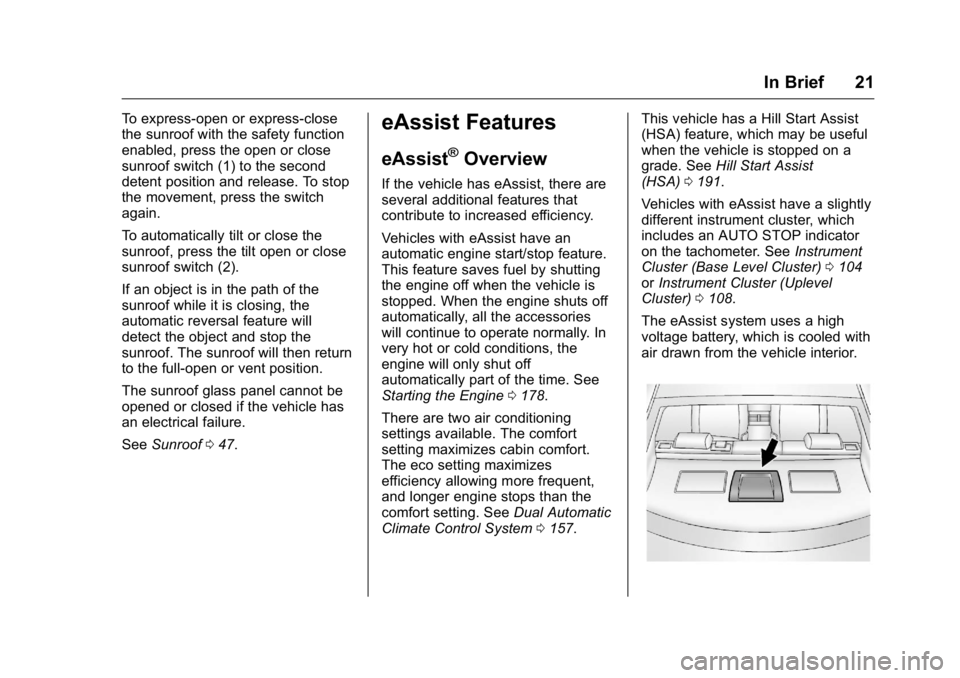
The eAssist system uses a high
voltage battery, which is cooled with
air drawn from the vehicle interior.
Page 24 of 357
Buick Regal Owner Manual (GMNA-Localizing-U.S./Canada/Mexico-
9159380) - 2016 - CRC - 2/23/16
In Brief 23
Service
Never try to do your own service on
eAssist components. You can be
injured and the vehicle can be
damaged if you try to do your own
service work. Service and repair of
these high voltage components
should only be performed by a
trained service technician with the
proper knowledge and tools. See
Doing Your Own Service
Work0221.
Performance and
Maintenance
Traction Control/
Electronic Stability
Control
The traction control system limits
wheel slip. The system turns on
automatically every time the vehicle
is started.
The StabiliTrak system assists with
directional control of the vehicle in
difficult driving conditions. The
system turns on automatically every
time the vehicle is started.
.
To turn off traction control, press
and release
gon the center
stack.
iilluminates and the
appropriate DIC message is
displayed. See Ride Control
System Messages 0137.
. Press and release
gagain to
turn on traction control.
. To turn off both traction control
and StabiliTrak, press and hold
g, on the center stack, untili
andgilluminate in the
instrument cluster and the
appropriate DIC message is
displayed. See Ride Control
System Messages 0137.
. Press and release
gto turn on
both systems.
See Traction Control/Electronic
Stability Control 0192.
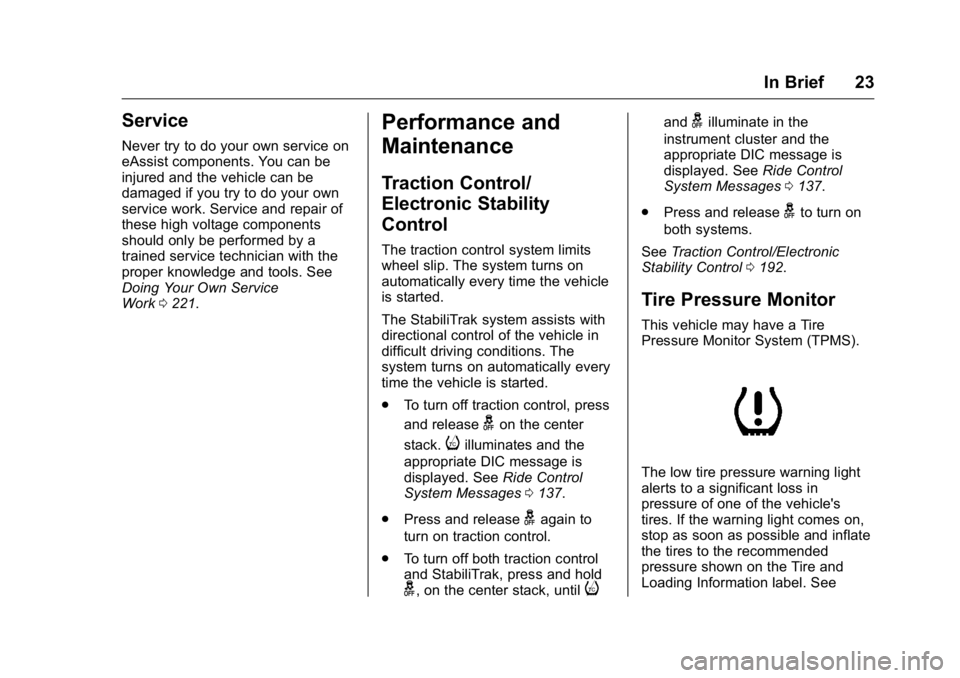
Tire Pressure Monitor
This vehicle may have a Tire
Pressure Monitor System (TPMS).
The low tire pressure warning light
alerts to a significant loss in
pressure of one of the vehicle's
tires. If the warning light comes on,
stop as soon as possible and inflate
the tires to the recommended
pressure shown on the Tire and
Loading Information label. See