ignition BUICK REGAL 2018 Repair Manual
[x] Cancel search | Manufacturer: BUICK, Model Year: 2018, Model line: REGAL, Model: BUICK REGAL 2018Pages: 384, PDF Size: 5.67 MB
Page 287 of 384

Buick Regal Owner Manual (GMNA-Localizing-2nd Timed Print-U.S./Canada-
11486030) - 2018 - crc - 3/23/18
286 Vehicle Care
could prevent the TPMS from
functioning properly. SeeBuying
New Tires 0289.
. Operating electronic devices or
being near facilities using radio
wave frequencies similar to the
TPMS could cause the TPMS
sensors to malfunction.
If the TPMS is not functioning
properly it cannot detect or signal a
low tire pressure condition. See
your dealer for service if the TPMS
malfunction light and DIC message
comes on and stays on.
TPMS Sensor Matching
Process
Each TPMS sensor has a unique
identification code. The identification
code needs to be matched to a new
tire/wheel position after rotating the
vehicle’s tires or replacing one or
more of the TPMS sensors. The
TPMS sensor matching process
should also be performed after
replacing a spare tire with a road
tire containing the TPMS sensor.
The malfunction light and the DIC
message should go off at the next ignition cycle. The sensors are
matched to the tire/wheel positions,
using a TPMS relearn tool, in the
following order: driver side front tire,
passenger side front tire, passenger
side rear tire, and driver side rear.
See your dealer for service or to
purchase a relearn tool. A TPMS
relearn tool can also be purchased.
See Tire Pressure Monitor Sensor
Activation Tool at
www.gmtoolsandequipment.com or
call 1-800-GM TOOLS
(1-800-468-6657).
There are two minutes to match the
first tire/wheel position, and
five minutes overall to match all four
tire/wheel positions. If it takes
longer, the matching process stops
and must be restarted.
The TPMS sensor matching
process is:
1. Set the parking brake.
2. Place the vehicle in Service Mode. See Ignition Positions
0 187. 3. Make sure the Tire Pressure
info page option is turned on.
The info pages on the DIC can
be turned on and off through
the Options menu. See Driver
Information Center (DIC) 0141.
4. Use the DIC controls on the right side of the steering wheel
to scroll to the Tire Pressure
screen under the DIC
info page.
5. Press and hold
Vin the center
of the DIC controls.
The horn sounds twice to
signal the receiver is in relearn
mode and the TIRE
LEARNING ACTIVE message
displays on the DIC screen.
6. Start with the driver side front tire.
7. Place the relearn tool against the tire sidewall, near the valve
stem. Then press the button to
activate the TPMS sensor.
A horn chirp confirms that the
sensor identification code has
been matched to this tire and
wheel position.
Page 318 of 384
Buick Regal Owner Manual (GMNA-Localizing-2nd Timed Print-U.S./Canada-
11486030) - 2018 - crc - 3/23/18
Vehicle Care 317
Caution
If any accessories are left on or
plugged in during the jump
starting procedure, they could be
damaged. The repairs would not
be covered by the vehicle
warranty. Whenever possible, turn
off or unplug all accessories on
either vehicle when jump starting.
4. Turn the ignition off. Turn off all lights and accessories in both
vehicles, except the hazard
warning flashers if needed.
{Warning
An electric fan can start up even
when the engine is not running
and can injure you. Keep hands,
clothing, and tools away from any
underhood electric fan.
{Warning
Using a match near a battery can
cause battery gas to explode.
People have been hurt doing this,
and some have been blinded.
Use a flashlight if you need more
light.
Battery fluid contains acid that
can burn you. Do not get it on
you. If you accidentally get it in
your eyes or on your skin, flush
the place with water and get
medical help immediately.
{Warning
Fans or other moving engine
parts can injure you badly. Keep
your hands away from moving
parts once the engine is running.
5. Connect one end of the red positive (+) cable to the remote
positive (+) terminal on the
discharged battery. 6. Connect the other end of the
red positive (+) cable to the
positive (+) terminal of the good
battery.
7. Connect one end of the black negative (–) cable to the
negative (–) terminal of the
good battery.
8. Connect the other end of the black negative (–) cable to the
remote negative (–) ground
terminal for the discharged
battery.
9. Start the engine in the vehicle with the good battery and run
the engine at idle speed for at
least four minutes.
10. Try to start the vehicle that had the dead battery. If it will not
start after a few tries, it
probably needs service.
Page 321 of 384
Buick Regal Owner Manual (GMNA-Localizing-2nd Timed Print-U.S./Canada-
11486030) - 2018 - crc - 3/23/18
320 Vehicle Care
The vehicle was not designed to be
towed from the rear with all four
wheels on the ground.
Dolly Towing from the Front
(Front-Wheel Drive)
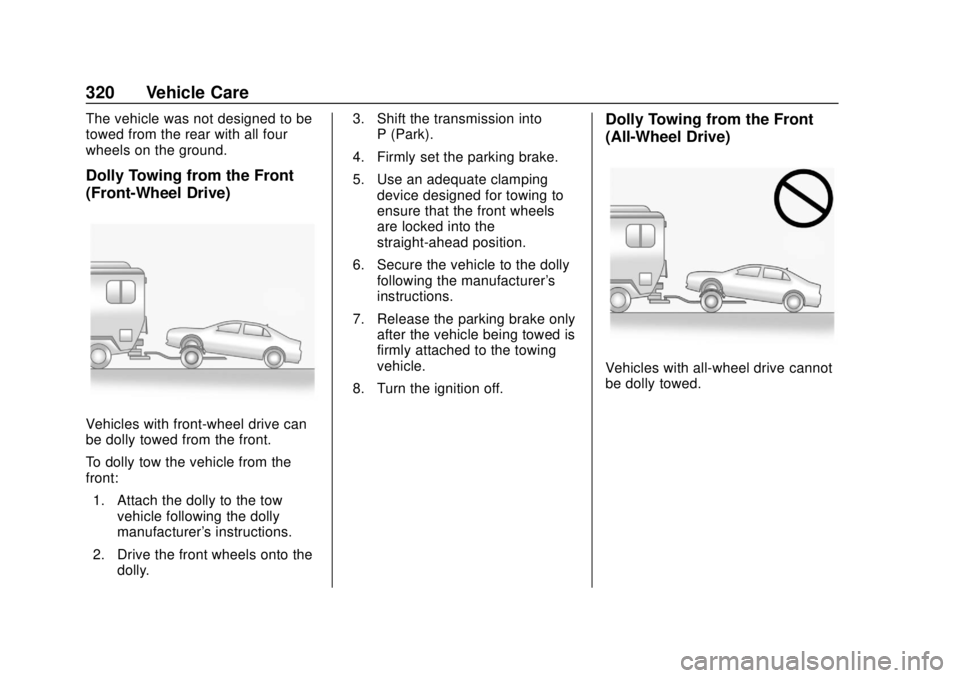
Vehicles with front-wheel drive can
be dolly towed from the front.
To dolly tow the vehicle from the
front:1. Attach the dolly to the tow vehicle following the dolly
manufacturer's instructions.
2. Drive the front wheels onto the dolly. 3. Shift the transmission into
P (Park).
4. Firmly set the parking brake.
5. Use an adequate clamping device designed for towing to
ensure that the front wheels
are locked into the
straight-ahead position.
6. Secure the vehicle to the dolly following the manufacturer's
instructions.
7. Release the parking brake only after the vehicle being towed is
firmly attached to the towing
vehicle.
8. Turn the ignition off.
Dolly Towing from the Front
(All-Wheel Drive)
Vehicles with all-wheel drive cannot
be dolly towed.
Page 363 of 384
Buick Regal Owner Manual (GMNA-Localizing-2nd Timed Print-U.S./Canada-
11486030) - 2018 - crc - 3/23/18
362 OnStar
Security
If equipped, OnStar provides these
services:
.With Stolen Vehicle Assistance,
OnStar Advisors can use GPS to
pinpoint the vehicle and help
authorities quickly recover it.
. With Remote Ignition Block,
if equipped, OnStar can block
the engine from being restarted.
. With Stolen Vehicle Slowdown,
if equipped, OnStar can work
with law enforcement to
gradually slow the vehicle down.
Theft Alarm Notification
If equipped, if the doors are locked
and the vehicle alarm sounds, a
notification by text, e-mail, or phone
call will be sent. If the vehicle is
stolen, an OnStar Advisor can work
with authorities to recover the
vehicle.
Navigation
OnStar navigation requires a
specific OnStar service plan.
Press
Qto receive Turn-by-Turn
directions or have them sent to the
vehicle’s navigation screen,
if equipped.
Turn-by-Turn Navigation
1. PressQto connect to an
Advisor.
2. Request directions to be downloaded to the vehicle.
3. Follow the voice-guided commands.
Using Voice Commands
During a Planned Route
Functionality of the Voice Command
button may vary by vehicle and
region. For some vehicles, press
=
to open the OnStar app on the
infotainment display. For other
vehicles press
=as follows. Cancel Route
1. Press
=. System responds:
“OnStar ready,” then a tone.
2. Say “Cancel route.” System
responds: “Do you want to
cancel directions?”
3. Say “Yes.”System responds:
“OK, request completed, thank
you, goodbye.”
Route Preview
1. Press
=. System responds:
“OnStar ready,” then a tone.
2. Say “Route preview.” System
responds with the next three
maneuvers.
Repeat
1. Press
=. System responds:
“OnStar ready,” then a tone.
2. Say “Repeat.” System
responds with the last direction
given, then responds with
“OnStar ready,” then a tone.
Page 369 of 384
Buick Regal Owner Manual (GMNA-Localizing-2nd Timed Print-U.S./Canada-
11486030) - 2018 - crc - 3/23/18
368 OnStar
change the OnStar PIN, contact an
OnStar Advisor by pressing
Qor
calling 1-888-4ONSTAR.
Warranty
OnStar equipment may be
warranted as part of the vehicle
warranty.
Languages
The vehicle can be programmed to
respond in multiple languages.
Press
Qand ask for an Advisor.
Advisors are available in English,
Spanish, and French. Available
languages may vary by country.
Potential Issues
OnStar cannot perform Remote
Door Unlock or Stolen Vehicle
Assistance after the vehicle has
been off continuously for 10 days
without an ignition cycle. If the
vehicle has not been started for
10 days, OnStar can contact
Roadside Assistance or a locksmith
to help gain access to the vehicle.
Global Positioning
System (GPS)
. Obstruction of the GPS can
occur in a large city with tall
buildings; in parking garages;
around airports; in tunnels and
underpasses; or in an area with
very dense trees. If GPS signals
are not available, the OnStar
system should still operate to
call OnStar. However, OnStar
could have difficulty identifying
the exact location.
. In emergency situations, OnStar
can use the last stored GPS
location to send to emergency
responders.
A temporary loss of GPS can cause
loss of the ability to send a
Turn-by-Turn Navigation route. The
Advisor may give a verbal route or
may ask for a call back after the
vehicle is driven into an open area.
Cellular and GPS Antennas
Cellular reception is required for
OnStar to send remote signals to
the vehicle. Do not place items over or near the antenna to prevent
blocking cellular and GPS signal
reception.
Unable to Connect to OnStar
Message
If there is limited cellular coverage
or the cellular network has reached
maximum capacity, this message
may come on. Press
Qto try the
call again or try again after driving a
few miles into another cellular area.
Vehicle and Power Issues
OnStar services require a vehicle
electrical system, wireless service,
and GPS satellite technologies to be
available and operating for features
to function properly. These systems
may not operate if the battery is
discharged or disconnected.
Add-on Electrical Equipment
The OnStar system is integrated
into the electrical architecture of the
vehicle. Do not add any electrical
equipment. See Add-On Electrical
Equipment 0238. Added electrical
Page 378 of 384

Buick Regal Owner Manual (GMNA-Localizing-2nd Timed Print-U.S./Canada-
11486030) - 2018 - crc - 3/23/18
Index 377
I
Ignition Positions . . . . . . . . . . . . . . . 187
Immobilizer . . . . . . . . . . . . . . . . . . . . . . 51
IndicatorVehicle Ahead . . . . . . . . . . . . . . . . 136
Infants and Young Children, Restraints . . . . . . . . . . . . . . . . . . . . . . 93
Infotainment . . . . . . . . . . . . . . . . . . . . 167
Infotainment System . . . . . . . . . . . . 359
Instrument Cluster . . . . . . . . . . . . . . 124
Interior Rearview Mirrors . . . . . . . . . 54
Introduction . . . . . . . . . . . . . . . . . . . . . . . 2
J
Jump Starting - North America . . . . . . . . . . . . . . . . . . . . . . . 315
K
Keyless EntryRemote (RKE) System . . . . . . . . . 30
Keys . . . . . . . . . . . . . . . . . . . . . . . . . . . . . 29
L
Labeling, Tire Sidewall . . . . . . . . . . 276
Lamps Daytime Running (DRL) . . . . . . 160
Dome . . . . . . . . . . . . . . . . . . . . . . . . . 163
Exterior Controls . . . . . . . . . . . . . . 159 Lamps (cont'd)
Exterior Lamps Off
Reminder . . . . . . . . . . . . . . . . . . . 160
Exterior Lighting Battery
Saver . . . . . . . . . . . . . . . . . . . . . . . 165
Front Turn Signal . . . . . . . . . . . . . 266
Malfunction Indicator (Check Engine) . . . . . . . . . . . . . 133
On Reminder . . . . . . . . . . . . . . . . . 140
Reading . . . . . . . . . . . . . . . . . . . . . . 164
Lane Change Alert (LCA) . . . . . . . 223
Lane Departure Warning (LDW) . . . . . . . . . . . . . . . . 225
Lane Keep Assist (LKA) . . . . . . . . 225
Lane Keep Assist Light . . . . . . . . . 136
Lap-Shoulder Belt . . . . . . . . . . . . . . . 75
LATCH System Replacing Parts after a
Crash . . . . . . . . . . . . . . . . . . . . . . . 104
LATCH, Lower Anchors and Tethers for Children . . . . . . . . . . . . 98
Liftgate . . . . . . . . . . . . . . . . . . . . . . . . . . 42
Lighting Adaptive Forward . . . . . . . . . . . . . 161
Entry . . . . . . . . . . . . . . . . . . . . . . . . . 164
Exit . . . . . . . . . . . . . . . . . . . . . . . . . . . 164
Illumination Control . . . . . . . . . . . 163 Lights
Adaptive Forward Lighting
(AFL) Light . . . . . . . . . . . . . . . . . . 140
Airbag Readiness . . . . . . . . . . . . . 131
Antilock Brake System (ABS) Warning . . . . . . . . . . . . . . 136
Brake System Warning . . . . . . . 135
Charging System . . . . . . . . . . . . . 132
Check Engine (Malfunction
Indicator) . . . . . . . . . . . . . . . . . . . . 133
Cruise Control . . . . . . . . . . . . . . . . 140
Door Ajar . . . . . . . . . . . . . . . . . . . . . 141
Electric Parking Brake . . . . . . . . 135
Engine Coolant
Temperature Warning . . . . . . . 138
Engine Oil Pressure . . . . . . . . . . 139
Flash-to-Pass . . . . . . . . . . . . . . . . . 160
Front Fog Lamp . . . . . . . . . . . . . . 140
High-Beam On . . . . . . . . . . . . . . . . 139
High/Low Beam Changer . . . . . 160
Lane Keep Assist . . . . . . . . . . . . . 136
Low Fuel Warning . . . . . . . . . . . . 139
Seat Belt Reminders . . . . . . . . . . 130
Security . . . . . . . . . . . . . . . . . . . . . . 139
Service Electric Parking
Brake . . . . . . . . . . . . . . . . . . . . . . . 135
StabiliTrak OFF . . . . . . . . . . . . . . . 137
Tire Pressure . . . . . . . . . . . . . . . . . 138