climate control BUICK REGAL 2018 Owner's Manual
[x] Cancel search | Manufacturer: BUICK, Model Year: 2018, Model line: REGAL, Model: BUICK REGAL 2018Pages: 384, PDF Size: 5.67 MB
Page 2 of 384
Buick Regal Owner Manual (GMNA-Localizing-2nd Timed Print-U.S./Canada-
11486030) - 2018 - crc - 3/23/18
ContentsIntroduction . . . . . . . . . . . . . . . . . . . . . . 2
In Brief . . . . . . . . . . . . . . . . . . . . . . . . . . . 5
Keys, Doors, and Windows . . . . . 29
Seats and Restraints . . . . . . . . . . . 59
Storage . . . . . . . . . . . . . . . . . . . . . . . 112
Instruments and Controls . . . . . . 117
Lighting . . . . . . . . . . . . . . . . . . . . . . . 159
Infotainment System . . . . . . . . . . 167
Climate Controls . . . . . . . . . . . . . . 168
Driving and Operating . . . . . . . . . 175
Vehicle Care . . . . . . . . . . . . . . . . . . 240
Service and Maintenance . . . . . 330
Technical Data . . . . . . . . . . . . . . . . 343
Customer Information . . . . . . . . . 346
Reporting Safety Defects . . . . . . 356
OnStar . . . . . . . . . . . . . . . . . . . . . . . . 360
Index . . . . . . . . . . . . . . . . . . . . 372
Page 6 of 384
Buick Regal Owner Manual (GMNA-Localizing-2nd Timed Print-U.S./Canada-
11486030) - 2018 - crc - 3/23/18
In Brief 5
In Brief
Instrument Panel
Instrument Panel . . . . . . . . . . . . . . . . 6
Initial Drive Information
Initial Drive Information . . . . . . . . . . 8
Stop/Start System . . . . . . . . . . . . . . . 8
Remote Keyless Entry (RKE)System . . . . . . . . . . . . . . . . . . . . . . . . 8
Remote Vehicle Start . . . . . . . . . . . 9
Door Locks . . . . . . . . . . . . . . . . . . . . . 9
Liftgate . . . . . . . . . . . . . . . . . . . . . . . . 10
Windows . . . . . . . . . . . . . . . . . . . . . . . 10
Seat Adjustment . . . . . . . . . . . . . . . 11
Memory Features . . . . . . . . . . . . . . 14
Heated and Ventilated Seats . . . 15
Head Restraint Adjustment . . . . 15
Seat Belts . . . . . . . . . . . . . . . . . . . . . 15
Passenger Sensing System . . . 16
Mirror Adjustment . . . . . . . . . . . . . . 16
Steering Wheel Adjustment . . . . 17
Interior Lighting . . . . . . . . . . . . . . . . 17
Exterior Lighting . . . . . . . . . . . . . . . 18
Windshield Wiper/Washer . . . . . . 19
Climate Controls . . . . . . . . . . . . . . . 20
Transmission . . . . . . . . . . . . . . . . . . 21
Vehicle Features
Infotainment System . . . . . . . . . . . 21
Steering Wheel Controls . . . . . . . 21
Cruise Control . . . . . . . . . . . . . . . . . 22
Driver Information Center (DIC) . . . . . . . . . . . . . . . . . 22
Forward Collision Alert (FCA) System . . . . . . . . . . . . . . . . . . . . . . . 23
Forward Automatic Braking (FAB) . . . . . . . . . . . . . . . . 23
Front Pedestrian Braking (FPB) System . . . . . . . . . . . . . . . . . . . . . . . 23
Lane Keep Assist (LKA) . . . . . . . 23
Lane Change Alert (LCA) . . . . . . 23
Rear Vision Camera (RVC) . . . . 24
Rear Cross Traffic Alert (RCTA) System . . . . . . . . . . . . . . . . . . . . . . . 24
Parking Assist . . . . . . . . . . . . . . . . . 24
Power Outlets . . . . . . . . . . . . . . . . . 24
Universal Remote System . . . . . 25
Sunroof . . . . . . . . . . . . . . . . . . . . . . . . 25
Performance and Maintenance
Traction Control/Electronic Stability Control . . . . . . . . . . . . . . 26
Tire Pressure Monitor . . . . . . . . . . 26
Fuel (2.0L Turbo Engine) . . . . . . 27
Fuel (3.6L Engine) . . . . . . . . . . . . . 27
E85 or FlexFuel . . . . . . . . . . . . . . . . 27
Engine Oil Life System . . . . . . . . 27 Driving for Better Fuel
Economy . . . . . . . . . . . . . . . . . . . . . 28
Roadside Assistance Program . . . . . . . . . . . . . . . . . . . . . . 28
Page 8 of 384

Buick Regal Owner Manual (GMNA-Localizing-2nd Timed Print-U.S./Canada-
11486030) - 2018 - crc - 3/23/18
In Brief 7
1.Air Vents 0173.
2. Turn and Lane-Change Signals
0162.
3. Instrument Cluster 0124.
Driver Information Center (DIC)
Display. See Driver Information
Center (DIC) 0141.
4. Windshield Wiper/Washer
0118.
5. Hazard Warning Flashers
0162.
6. Light Sensor. See Automatic
Headlamp System 0160.
7. Infotainment 0167.
8. Traction Control/Electronic
Stability Control 0201.
9. Dual Automatic Climate Control
System 0168.
10. Transmitter Pocket. See Remote Keyless Entry (RKE)
System Operation 030.
11. Lane Keep Assist (LKA) 0225
(If Equipped). Parking Assist Button (If
Equipped). See
Driver
Assistance Systems 0213.
Selective Ride Control (GS
Models Only) 0203.
12. Wireless Charging 0121 (If
Equipped).
13. Shift Lever. See Automatic
Transmission 0194.
14. Electric Parking Brake 0198.
15. ENGINE START/STOP Button (Out of View). See Ignition
Positions 0187.
16. Steering Wheel Controls 0118.
Driver Information Center (DIC)
Controls. See Driver
Information Center (DIC) 0141.
17. Horn 0118.
18. Steering Wheel Adjustment
0118 (Out of View).
19. Cruise Control 0204 (If
Equipped).
Adaptive Cruise Control 0206
(If Equipped). Forward Collision Alert (FCA)
System
0217 (If Equipped).
Heated Steering Wheel 0118
(If Equipped).
20. Hood Release. See Hood
0 243.
21. Exterior Lamp Controls 0159.
Fog Lamps 0162.
22. Instrument Panel Fuse Block Cover. See Instrument Panel
Fuse Block 0272.
23. Data Link Connector (DLC) (Out of View). See Malfunction
Indicator Lamp (Check Engine
Light) 0133.
24. Head-Up Display (HUD) 0145
(If Equipped).
25. Instrument Panel Illumination
Control 0163.
Page 16 of 384
Buick Regal Owner Manual (GMNA-Localizing-2nd Timed Print-U.S./Canada-
11486030) - 2018 - crc - 3/23/18
In Brief 15
Heated and Ventilated
Seats
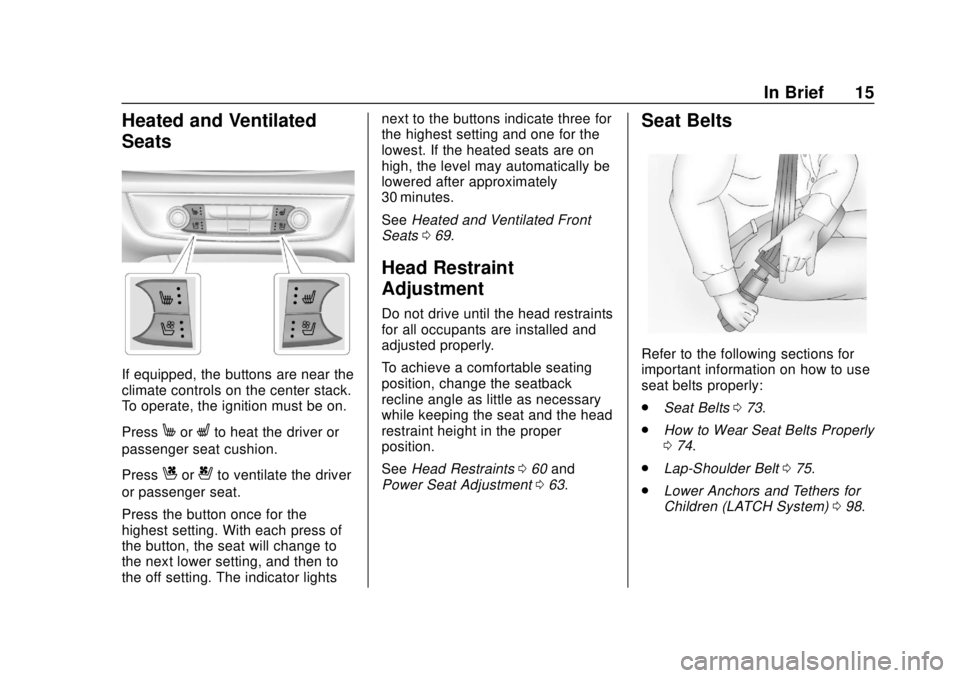
If equipped, the buttons are near the
climate controls on the center stack.
To operate, the ignition must be on.
Press
MorLto heat the driver or
passenger seat cushion.
Press
Cor{to ventilate the driver
or passenger seat.
Press the button once for the
highest setting. With each press of
the button, the seat will change to
the next lower setting, and then to
the off setting. The indicator lights next to the buttons indicate three for
the highest setting and one for the
lowest. If the heated seats are on
high, the level may automatically be
lowered after approximately
30 minutes.
See
Heated and Ventilated Front
Seats 069.
Head Restraint
Adjustment
Do not drive until the head restraints
for all occupants are installed and
adjusted properly.
To achieve a comfortable seating
position, change the seatback
recline angle as little as necessary
while keeping the seat and the head
restraint height in the proper
position.
See Head Restraints 060 and
Power Seat Adjustment 063.
Seat Belts
Refer to the following sections for
important information on how to use
seat belts properly:
.
Seat Belts 073.
. How to Wear Seat Belts Properly
074.
. Lap-Shoulder Belt 075.
. Lower Anchors and Tethers for
Children (LATCH System) 098.
Page 21 of 384
Buick Regal Owner Manual (GMNA-Localizing-2nd Timed Print-U.S./Canada-
11486030) - 2018 - crc - 3/23/18
20 In Brief
Climate Controls
Dual Automatic Climate Control System
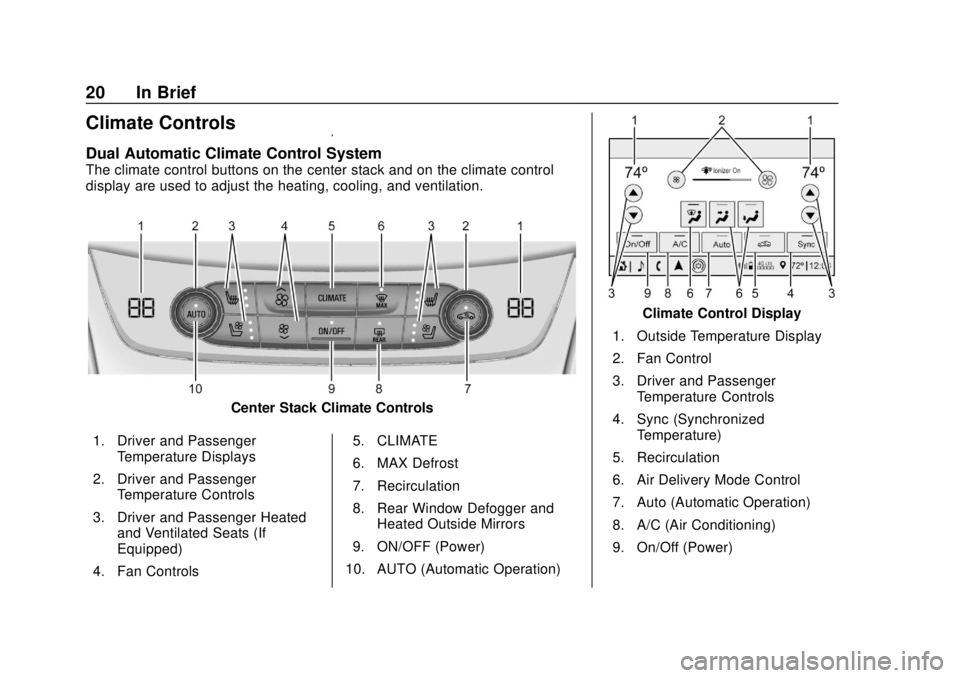
The climate control buttons on the center stack and on the climate control
display are used to adjust the heating, cooling, and ventilation.
Center Stack Climate Controls
1. Driver and Passenger Temperature Displays
2. Driver and Passenger Temperature Controls
3. Driver and Passenger Heated and Ventilated Seats (If
Equipped)
4. Fan Controls 5. CLIMATE
6. MAX Defrost
7. Recirculation
8. Rear Window Defogger and
Heated Outside Mirrors
9. ON/OFF (Power)
10. AUTO (Automatic Operation)
Climate Control Display
1. Outside Temperature Display
2. Fan Control
3. Driver and Passenger Temperature Controls
4. Sync (Synchronized Temperature)
5. Recirculation
6. Air Delivery Mode Control
7. Auto (Automatic Operation)
8. A/C (Air Conditioning)
9. On/Off (Power)
Page 22 of 384
Buick Regal Owner Manual (GMNA-Localizing-2nd Timed Print-U.S./Canada-
11486030) - 2018 - crc - 3/23/18
In Brief 21
SeeDual Automatic Climate Control
System 0168.
Transmission
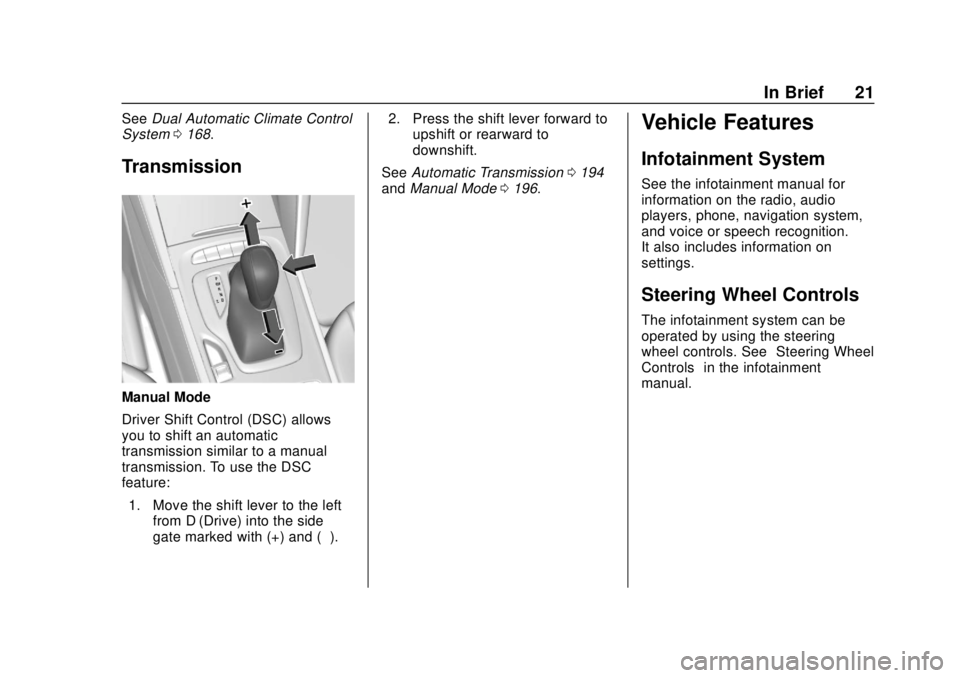
Manual Mode
Driver Shift Control (DSC) allows
you to shift an automatic
transmission similar to a manual
transmission. To use the DSC
feature:
1. Move the shift lever to the left from D (Drive) into the side
gate marked with (+) and (−). 2. Press the shift lever forward to
upshift or rearward to
downshift.
See Automatic Transmission 0194
and Manual Mode 0196.
Vehicle Features
Infotainment System
See the infotainment manual for
information on the radio, audio
players, phone, navigation system,
and voice or speech recognition.
It also includes information on
settings.
Steering Wheel Controls
The infotainment system can be
operated by using the steering
wheel controls. See “Steering Wheel
Controls” in the infotainment
manual.
Page 25 of 384
Buick Regal Owner Manual (GMNA-Localizing-2nd Timed Print-U.S./Canada-
11486030) - 2018 - crc - 3/23/18
24 In Brief
approaching these areas from
behind. The LCA warning display
will light up in the corresponding
outside mirror and will flash if the
turn signal is on. The Side Blind
Zone Alert (SBZA) system is
included as part of the LCA system.
SeeSide Blind Zone Alert (SBZA)
0 223 andLane Change Alert (LCA)
0 223.
Rear Vision
Camera (RVC)
RVC displays a view of the area
behind the vehicle on the
infotainment display when the
vehicle is shifted into R (Reverse) to
aid with parking and low-speed
backing maneuvers.
See Assistance Systems for Parking
or Backing 0214.
Rear Cross Traffic Alert
(RCTA) System
If equipped, the RCTA system uses
a triangle with an arrow on the
infotainment display to warn of traffic behind your vehicle that may
cross your vehicle's path while in
R (Reverse). In addition, beeps will
sound.
See
Assistance Systems for Parking
or Backing 0214.
Parking Assist
If equipped, Rear Parking Assist
(RPA) uses sensors on the rear
bumper to assist with parking and
avoiding objects while in
R (Reverse). It operates at speeds
less than 8 km/h (5 mph). RPA may
show a warning triangle on the
infotainment display and a graphic
on the instrument cluster to provide
the object distance. In addition,
multiple beeps may occur if very
close to an object.
The vehicle may also have the Front
Parking Assist system.
See Assistance Systems for Parking
or Backing 0214.
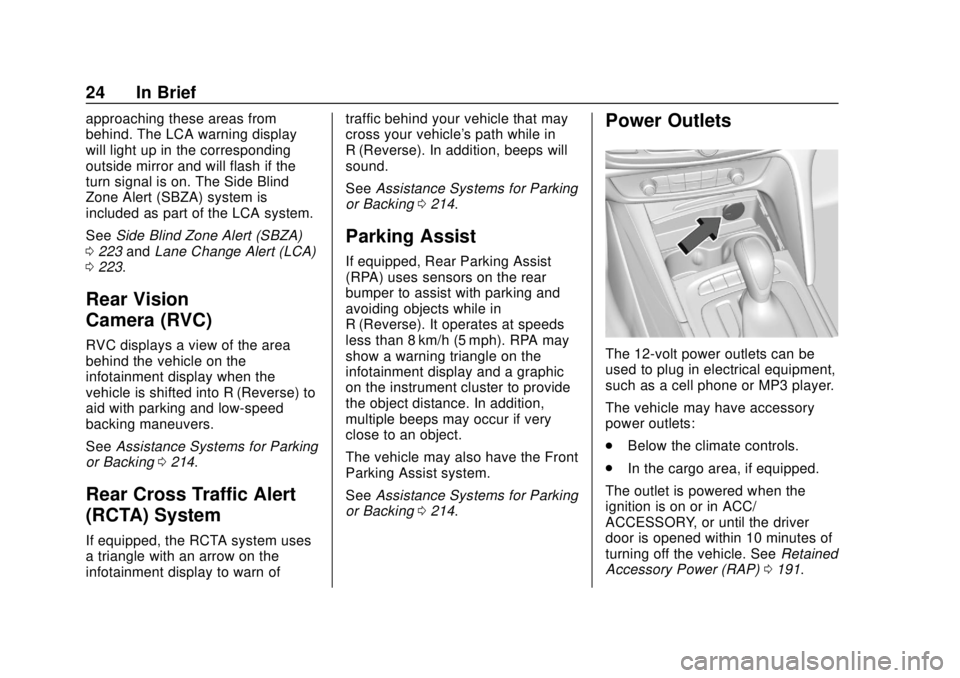
Power Outlets
The 12-volt power outlets can be
used to plug in electrical equipment,
such as a cell phone or MP3 player.
The vehicle may have accessory
power outlets:
.
Below the climate controls.
. In the cargo area, if equipped.
The outlet is powered when the
ignition is on or in ACC/
ACCESSORY, or until the driver
door is opened within 10 minutes of
turning off the vehicle. See Retained
Accessory Power (RAP) 0191.
Page 29 of 384
Buick Regal Owner Manual (GMNA-Localizing-2nd Timed Print-U.S./Canada-
11486030) - 2018 - crc - 3/23/18
28 In Brief
on the DIC. SeeDriver
Information Center (DIC) 0141.
When remaining oil life is low,
the CHANGE ENGINE OIL
SOON message will appear on
the display.
2. Press
Von the DIC controls
and hold down for a few
seconds to clear the CHANGE
ENGINE OIL SOON message
and reset the oil life at 100%.
Be careful not to reset the oil
life display accidentally at any
time other than after the oil is
changed. It cannot be reset
accurately until the next oil
change.
See Engine Oil Life System 0249.
Driving for Better Fuel
Economy
Driving habits can affect fuel
mileage. Here are some driving tips
to get the best fuel economy
possible.
.
Set the climate controls to the
desired temperature after the
engine is started, or turn them
off when not required.
. Avoid fast starts and accelerate
smoothly.
. Brake gradually and avoid
abrupt stops.
. Avoid idling the engine for long
periods of time.
. When road and weather
conditions are appropriate, use
cruise control.
. Always follow posted speed
limits or drive more slowly when
conditions require.
. Keep vehicle tires properly
inflated.
. Combine several trips into a
single trip. .
Replace the vehicle's tires with
the same TPC Spec number
molded into the tire's sidewall
near the size.
. Follow recommended scheduled
maintenance.
Roadside Assistance
Program
U.S.: 1-800-252-1112
TTY Users (U.S. Only):
1-888-889-2438
Canada: 1-800-268-6800
New Buick owners are automatically
enrolled in the Roadside Assistance
Program.
See Roadside Assistance Program
0 350.
Page 37 of 384
Buick Regal Owner Manual (GMNA-Localizing-2nd Timed Print-U.S./Canada-
11486030) - 2018 - crc - 3/23/18
36 Keys, Doors, and Windows
TRANSMITTER POCKET THEN
START YOUR VEHICLE when you
try to start the vehicle. The DIC may
also display REPLACE BATTERY
IN REMOTE KEY.
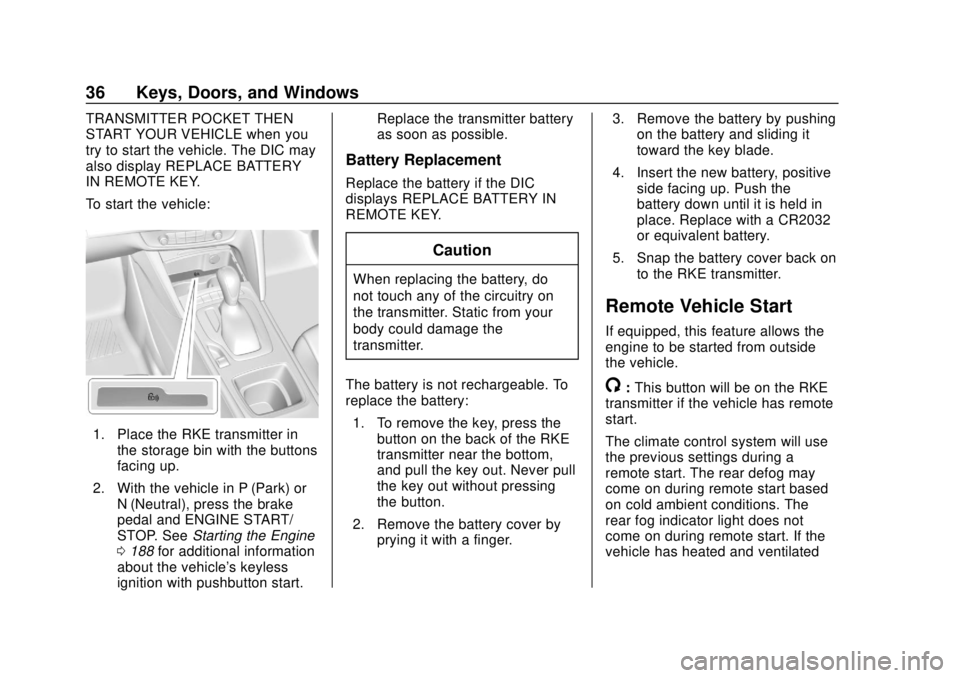
To start the vehicle:
1. Place the RKE transmitter inthe storage bin with the buttons
facing up.
2. With the vehicle in P (Park) or N (Neutral), press the brake
pedal and ENGINE START/
STOP. See Starting the Engine
0 188 for additional information
about the vehicle's keyless
ignition with pushbutton start. Replace the transmitter battery
as soon as possible.
Battery Replacement
Replace the battery if the DIC
displays REPLACE BATTERY IN
REMOTE KEY.
Caution
When replacing the battery, do
not touch any of the circuitry on
the transmitter. Static from your
body could damage the
transmitter.
The battery is not rechargeable. To
replace the battery: 1. To remove the key, press the button on the back of the RKE
transmitter near the bottom,
and pull the key out. Never pull
the key out without pressing
the button.
2. Remove the battery cover by prying it with a finger. 3. Remove the battery by pushing
on the battery and sliding it
toward the key blade.
4. Insert the new battery, positive side facing up. Push the
battery down until it is held in
place. Replace with a CR2032
or equivalent battery.
5. Snap the battery cover back on to the RKE transmitter.
Remote Vehicle Start
If equipped, this feature allows the
engine to be started from outside
the vehicle.
/:This button will be on the RKE
transmitter if the vehicle has remote
start.
The climate control system will use
the previous settings during a
remote start. The rear defog may
come on during remote start based
on cold ambient conditions. The
rear fog indicator light does not
come on during remote start. If the
vehicle has heated and ventilated
Page 38 of 384
Buick Regal Owner Manual (GMNA-Localizing-2nd Timed Print-U.S./Canada-
11486030) - 2018 - crc - 3/23/18
Keys, Doors, and Windows 37
seats, they may come on during a
remote start. SeeHeated and
Ventilated Front Seats 069.
Laws in some local communities
may restrict the use of remote
starters. For example, some laws
require a person using remote start
to have the vehicle in view. Check
local regulations for any
requirements.
Other conditions can affect the
performance of the transmitter. See
Remote Keyless Entry (RKE)
System 030.
Starting the Vehicle
To start the engine using remote
start:
1. Press and release
Qon the
RKE transmitter.
2. Immediately press and hold
/
for at least four seconds or until
the turn signal lamps flash. The
turn signal lamps flashing
confirms the request to remote
start the vehicle has been
received. When the engine starts, the parking
lamps will turn on and remain on as
long as the engine is running. The
doors will be locked and the climate
control system may come on.
The engine will continue to run for
10 minutes. Repeat the steps for a
10-minute time extension. Remote
start can be extended only once.
Turn the vehicle on before driving.
Extending Engine Run Time
The engine run time can also be
extended by another 10 minutes,
if during the first 10 minutes
Steps 1 and 2 are repeated while
the engine is still running. An
extension can be requested,
30 seconds after starting. This
provides a total of 20 minutes.
The remote start can only be
extended once.
When the remote start is extended,
the second 10-minute period is
added to the first 10 minutes and
the engine will run for a total of
20 minutes.
A maximum of two remote starts,
or a remote start with an extension,
are allowed between ignition cycles.
The vehicle's ignition must be
turned on and then back off before
the remote start procedure can be
used again.
Canceling a Remote Start
To cancel a remote start, do one of
the following:
.
Aim the RKE transmitter at the
vehicle and press and hold
/
until the parking lamps turn off.
. Turn on the hazard warning
flashers.
. Turn the vehicle on and then off.
Conditions in Which Remote Start
Will Not Work
. The RKE transmitter is in the
vehicle.
. The hood is not closed.
. The hazard warning flashers
are on.
. The malfunction indicator lamp
is on.