keyless BUICK REGAL SPORTBACK 2019 Owner's Guide
[x] Cancel search | Manufacturer: BUICK, Model Year: 2019, Model line: REGAL SPORTBACK, Model: BUICK REGAL SPORTBACK 2019Pages: 391, PDF Size: 5.95 MB
Page 65 of 391
Buick Regal Owner Manual (GMNA-Localizing-U.S./Canada-12163021) -
2019 - CRC - 11/14/18
64 Seats and Restraints
Memory Seats
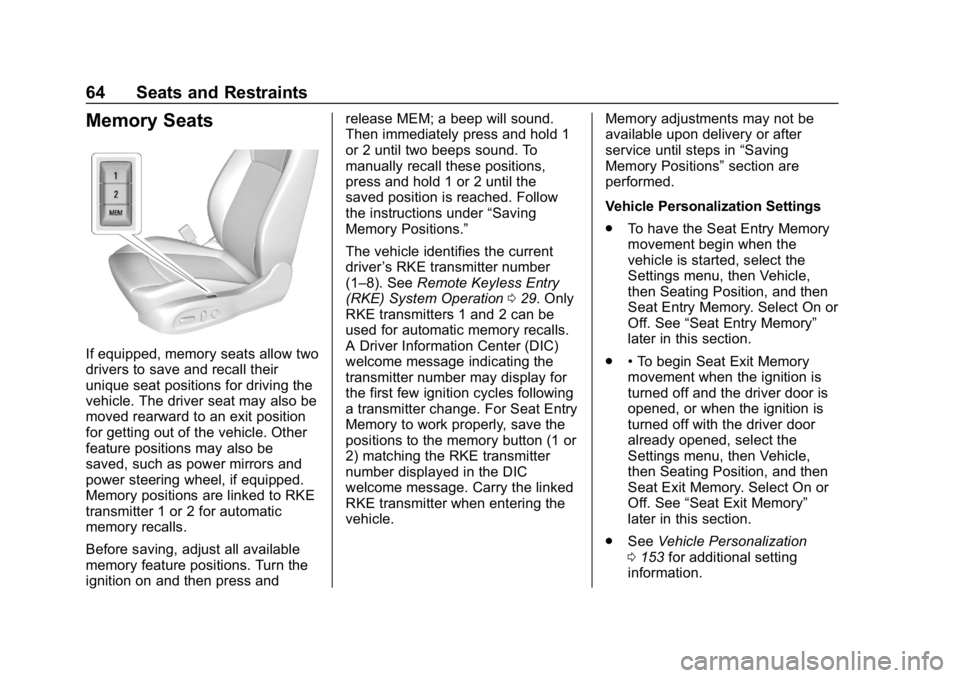
If equipped, memory seats allow two
drivers to save and recall their
unique seat positions for driving the
vehicle. The driver seat may also be
moved rearward to an exit position
for getting out of the vehicle. Other
feature positions may also be
saved, such as power mirrors and
power steering wheel, if equipped.
Memory positions are linked to RKE
transmitter 1 or 2 for automatic
memory recalls.
Before saving, adjust all available
memory feature positions. Turn the
ignition on and then press andrelease MEM; a beep will sound.
Then immediately press and hold 1
or 2 until two beeps sound. To
manually recall these positions,
press and hold 1 or 2 until the
saved position is reached. Follow
the instructions under
“Saving
Memory Positions.”
The vehicle identifies the current
driver ’s RKE transmitter number
(1–8). See Remote Keyless Entry
(RKE) System Operation 029. Only
RKE transmitters 1 and 2 can be
used for automatic memory recalls.
A Driver Information Center (DIC)
welcome message indicating the
transmitter number may display for
the first few ignition cycles following
a transmitter change. For Seat Entry
Memory to work properly, save the
positions to the memory button (1 or
2) matching the RKE transmitter
number displayed in the DIC
welcome message. Carry the linked
RKE transmitter when entering the
vehicle. Memory adjustments may not be
available upon delivery or after
service until steps in
“Saving
Memory Positions” section are
performed.
Vehicle Personalization Settings
. To have the Seat Entry Memory
movement begin when the
vehicle is started, select the
Settings menu, then Vehicle,
then Seating Position, and then
Seat Entry Memory. Select On or
Off. See “Seat Entry Memory”
later in this section.
. •To begin Seat Exit Memory
movement when the ignition is
turned off and the driver door is
opened, or when the ignition is
turned off with the driver door
already opened, select the
Settings menu, then Vehicle,
then Seating Position, and then
Seat Exit Memory. Select On or
Off. See “Seat Exit Memory”
later in this section.
. See Vehicle Personalization
0 153 for additional setting
information.
Page 66 of 391
Buick Regal Owner Manual (GMNA-Localizing-U.S./Canada-12163021) -
2019 - CRC - 11/14/18
Seats and Restraints 65
Identifying Driver Number
To identify the driver number:
To identify the driver number, start
the vehicle with a key or RKE
transmitter. The DIC will display the
driver number, either 1 or 2. The
other key or RKE transmitter will
correspond to the driver number that
was not displayed.
Saving Memory Positions
Read these instructions completely
before saving memory positions.
To save preferred driving positions
1 and 2:1. Turn the ignition on or to ACC/ ACCESSORY.
A DIC welcome message may
be displayed indicating number
1 or 2 for memory recalls.
2. Adjust all available memory features to the desired driving
position.
3. Press and release MEM; a beep will sound. 4. Immediately press and hold the
1 or 2 memory button matching
the above DIC welcome
message until two beeps
sound.
If too much time passes
between releasing MEM and
pressing 1, the memory
position will not be saved and
two beeps will not sound.
Repeat Steps 3 and 4.
1 or 2 corresponds to the driver
number. See “Identifying Driver
Number” previously in this
section.
5. Repeat Steps 1–4 for a second driver using the other 1 or
2 memory button.
Positions are not saved for the Seat
Exit Memory feature, which moves
the driver seat rearward.
Save preferred memory feature
positions to both 1 and 2 if you are
the only driver. Manually Recalling Memory
Positions
Press and hold 1 or 2 to recall the
previously saved memory positions.
To stop Manual Memory Recall
movement, release 1 or 2 or press
any of the following controls:
.
Power seat
. Memory MEM
. Power mirror, with the driver or
passenger side mirror selected
. Power steering wheel,
if equipped
Seat Entry Memory Recall
The vehicle identifies the number of
the current driver ’s RKE transmitter
(1–8). See Remote Keyless Entry
(RKE) System Operation 029. If the
RKE transmitter is 1 or 2, and Seat
Entry Memory is programmed on in
vehicle personalization, the
positions saved to the same
memory button number 1 or 2 are
automatically recalled when the
ignition is turned on, or turned from
Page 157 of 391
Buick Regal Owner Manual (GMNA-Localizing-U.S./Canada-12163021) -
2019 - CRC - 11/14/18
156 Instruments and Controls
Touch Off or On.
Extended Hill Start Assist
This allows the duration of the Hill
Start Assist to be changed. SeeHill
Start Assist (HSA) 0204.
Touch Extended Hold or
Standard Hold.
Lighting
Touch and the following may
display:
. Vehicle Locator Lights
. Exit Lighting
. Left or Right Hand Traffic
. Adaptive Forward Lighting
Vehicle Locator Lights
This feature will flash the exterior
lamps and allows some of the
exterior lamps and most of the
interior lamps to turn on briefly
when
Kon the Remote Keyless
Entry (RKE) transmitter is pressed
to locate the vehicle.
Touch Off or On. Exit Lighting
This allows the selection of how
long the exterior lamps stay on
when leaving the vehicle when it is
dark outside.
Touch Off, 30 Seconds, 60 Seconds,
or 120 Seconds.
Left or Right Hand Traffic
This setting adjusts the behavior of
the Adaptive Forward Lighting
feature based on what side of the
road the vehicle drives on.
Touch Left Hand Traffic or Right
Hand Traffic.
Adaptive Forward Lighting
This feature allows the headlamps
to pivot horizontally to provide
greater road illumination while
turning. See
Adaptive Forward
Lighting (AFL) 0164.
Touch Off, Corner and Curve
Lighting, or Intelligent Light
Distribution.
Power Door Locks
Touch and the following may
display:
. Open Door Anti Lockout
. Auto Door Unlock
. Delayed Door Lock
Open Door Anti Lock Out
When on, this feature will keep the
driver door from locking when the
door is open. If Off is selected, the
Delayed Door Lock menu will be
available.
Touch Off or On.
Auto Door Unlock
This allows selection of which of the
doors will automatically unlock when
the vehicle is shifted into P (Park).
Touch Off, All Doors, or Driver Door.
Delayed Door Lock
When on, this feature will delay the
locking of the doors. To override the
delay, press the power door lock
switch on the door.
Touch Off or On.
Page 158 of 391
Buick Regal Owner Manual (GMNA-Localizing-U.S./Canada-12163021) -
2019 - CRC - 11/14/18
Instruments and Controls 157
Remote Lock, Unlock, Start
Touch and the following may
display:
.Remote Unlock Light Feedback
. Remote Lock Feedback
. Remote Door Unlock
. Remote Start Auto Cool Seats
. Remote Start Auto Heat Seats
. Passive Door Unlock
. Passive Door Lock
. Remote Left in Vehicle Alert
Remote Unlock Light Feedback
When on, the exterior lamps will
flash when unlocking the vehicle
with the RKE transmitter.
Touch Off or Flash Lights.
Remote Lock Feedback
This allows selection of what type of
feedback is given when locking the
vehicle with the RKE transmitter.
Touch Off, Lights and Horn, Lights
Only, or Horn Only. Remote Door Unlock
This allows selection of which doors
will unlock when pressing
Kon the
RKE transmitter.
Touch All Doors or Driver Door.
Remote Start Auto Cool Seats
If equipped and turned on, this
feature will turn on the ventilated
seats when using remote start on
warm days. See Heated and
Ventilated Front Seats 066 and
Remote Vehicle Start 035.
Touch Off or On.
Remote Start Auto Heat Seats
If equipped and turned on, this
feature will turn on the heated seats
when using remote start on
cold days. See Heated and
Ventilated Front Seats 066 and
Remote Vehicle Start 035.
Touch Off or On. Passive Door Unlock
This allows the selection of what
doors will unlock when using the
button on the driver door to unlock
the vehicle.
Touch All Doors or Driver Door.
Passive Door Lock
This allows passive locking to be
turned on or off and selects
feedback. See
Remote Keyless
Entry (RKE) System Operation 029.
Touch Off, On with Horn
Chirp, or On.
Remote Left in Vehicle Alert
This feature sounds an alert when
the RKE transmitter is left in the
vehicle. This menu also enables the
Remote No Longer In Vehicle Alert.
Touch Off or On.
Seating Position
Touch and the following may
display:
. Seat Entry Memory
. Seat Exit Memory
Page 168 of 391
Buick Regal Owner Manual (GMNA-Localizing-U.S./Canada-12163021) -
2019 - CRC - 11/14/18
Lighting 167
+ON/OFF : Press to turn the dome
lamps on manually.
Reading Lamps
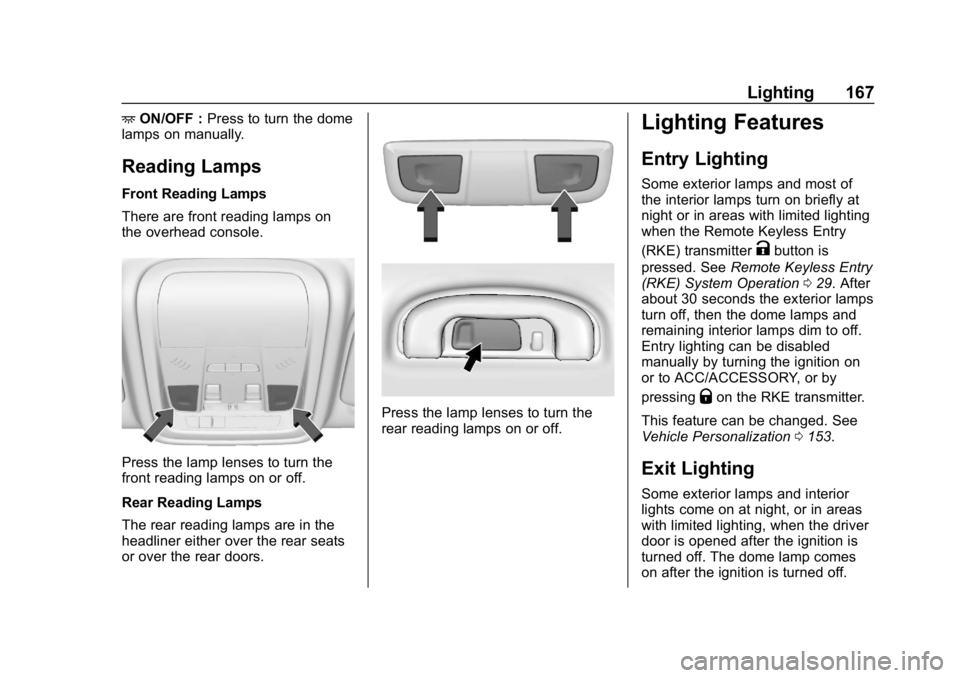
Front Reading Lamps
There are front reading lamps on
the overhead console.
Press the lamp lenses to turn the
front reading lamps on or off.
Rear Reading Lamps
The rear reading lamps are in the
headliner either over the rear seats
or over the rear doors.
Press the lamp lenses to turn the
rear reading lamps on or off.
Lighting Features
Entry Lighting
Some exterior lamps and most of
the interior lamps turn on briefly at
night or in areas with limited lighting
when the Remote Keyless Entry
(RKE) transmitter
Kbutton is
pressed. See Remote Keyless Entry
(RKE) System Operation 029. After
about 30 seconds the exterior lamps
turn off, then the dome lamps and
remaining interior lamps dim to off.
Entry lighting can be disabled
manually by turning the ignition on
or to ACC/ACCESSORY, or by
pressing
Qon the RKE transmitter.
This feature can be changed. See
Vehicle Personalization 0153.
Exit Lighting
Some exterior lamps and interior
lights come on at night, or in areas
with limited lighting, when the driver
door is opened after the ignition is
turned off. The dome lamp comes
on after the ignition is turned off.
Page 191 of 391
Buick Regal Owner Manual (GMNA-Localizing-U.S./Canada-12163021) -
2019 - CRC - 11/14/18
190 Driving and Operating
Starting and
Operating
New Vehicle Break-In
Caution
The vehicle does not need an
elaborate break-in. But it will
perform better in the long run if
you follow these guidelines:. Do not drive at any one
constant speed, fast or slow,
for the first 805 km (500 mi).
Do not make full-throttle
starts. Avoid downshifting to
brake or slow the vehicle.
. Avoid making hard stops for
the first 322 km (200 mi) or
so. During this time the new
brake linings are not yet
broken in. Hard stops with
new linings can mean
premature wear and earlier
replacement. Follow this
(Continued)
Caution (Continued)
breaking-in guideline every
time you get new brake
linings.
Following break-in, engine speed
and load can be gradually
increased.
Ignition Positions
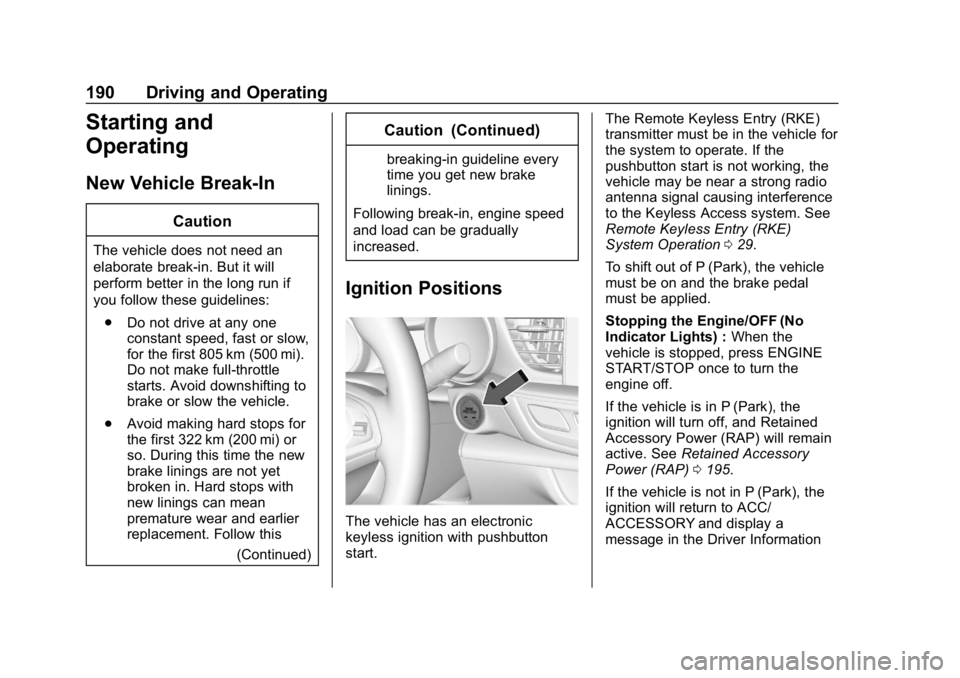
The vehicle has an electronic
keyless ignition with pushbutton
start. The Remote Keyless Entry (RKE)
transmitter must be in the vehicle for
the system to operate. If the
pushbutton start is not working, the
vehicle may be near a strong radio
antenna signal causing interference
to the Keyless Access system. See
Remote Keyless Entry (RKE)
System Operation
029.
To shift out of P (Park), the vehicle
must be on and the brake pedal
must be applied.
Stopping the Engine/OFF (No
Indicator Lights) : When the
vehicle is stopped, press ENGINE
START/STOP once to turn the
engine off.
If the vehicle is in P (Park), the
ignition will turn off, and Retained
Accessory Power (RAP) will remain
active. See Retained Accessory
Power (RAP) 0195.
If the vehicle is not in P (Park), the
ignition will return to ACC/
ACCESSORY and display a
message in the Driver Information
Page 193 of 391
Buick Regal Owner Manual (GMNA-Localizing-U.S./Canada-12163021) -
2019 - CRC - 11/14/18
192 Driving and Operating
will not start in Service Mode. Press
ENGINE START/STOP again to turn
the vehicle off.
Starting the Engine
Place the transmission in the
proper gear.
Caution
If you add electrical parts or
accessories, you could change
the way the engine operates. Any
resulting damage would not be
covered by the vehicle warranty.
SeeAdd-On Electrical Equipment
0 243.
Move the shift lever to P (Park) or
N (Neutral). To restart the vehicle
when it is already moving, use
N (Neutral) only.
Caution
Do not try to shift to P (Park) if the
vehicle is moving. If you do, you
could damage the transmission.
Shift to P (Park) only when the
vehicle is stopped.
Starting Procedure
1. With the Keyless Access system, the RKE transmitter
must be in the vehicle. Press
ENGINE START/STOP with the
brake pedal applied. When the
engine begins cranking, let go
of the button.
The idle speed will go down as
the engine gets warm. Do not
race the engine immediately
after starting it.
If the RKE transmitter is not in
the vehicle, if there is
interference, or if the RKE
battery is low, the Driver
Information Center (DIC) will display a message. See
Remote Keyless Entry (RKE)
System Operation
029.
Caution
Cranking the engine for long
periods of time, by pressing
ENGINE START/STOP
immediately after cranking has
ended, can overheat and damage
the cranking motor, and drain the
battery. Wait at least 15 seconds
between each try, to let the
cranking motor cool down.
2. If the engine does not start after five to 10 seconds,
especially in very cold weather
(below −18 °C or 0 °F), it could
be flooded with too much
gasoline. Try pushing the
accelerator pedal all the way to
the floor and holding it there as
you press ENGINE START/
STOP, for up to a maximum of
15 seconds. Wait at least
15 seconds between each try,
to allow the cranking motor to
Page 247 of 391
Buick Regal Owner Manual (GMNA-Localizing-U.S./Canada-12163021) -
2019 - CRC - 11/14/18
246 Vehicle Care
California Perchlorate
Materials Requirements
Certain types of automotive
applications, such as airbag
initiators, seat belt pretensioners,
and lithium batteries contained in
Remote Keyless Entry transmitters,
may contain perchlorate materials.
Special handling may be necessary.
For additional information, see
www.dtsc.ca.gov/hazardouswaste/
perchlorate.
Accessories and
Modifications
Adding non-dealer accessories or
making modifications to the vehicle
can affect vehicle performance and
safety, including such things as
airbags, braking, stability, ride and
handling, emissions systems,
aerodynamics, durability, and
electronic systems like antilock
brakes, traction control, and stability
control. These accessories or
modifications could even cause
malfunction or damage not covered
by the vehicle warranty.Damage to suspension components
caused by modifying vehicle height
outside of factory settings will not be
covered by the vehicle warranty.
Damage to vehicle components
resulting from modifications or the
installation or use of non-GM
certified parts, including control
module or software modifications, is
not covered under the terms of the
vehicle warranty and may affect
remaining warranty coverage for
affected parts.
GM Accessories are designed to
complement and function with other
systems on the vehicle. See your
dealer to accessorize the vehicle
using genuine GM Accessories
installed by a dealer technician.
Also, see
Adding Equipment to the
Airbag-Equipped Vehicle 088.
Vehicle Checks
Doing Your Own
Service Work
{Warning
It can be dangerous to work on
your vehicle if you do not have
the proper knowledge, service
manual, tools, or parts. Always
follow owner ’s manual procedures
and consult the service manual
for your vehicle before doing any
service work.
If doing some of your own service
work, use the proper service
manual. It tells you much more
about how to service the vehicle
than this manual can. To order the
proper service manual, see
Publication Ordering Information
0 361.
This vehicle has an airbag system.
Before attempting to do your own
service work, see Servicing the
Airbag-Equipped Vehicle 088.
Page 276 of 391
Buick Regal Owner Manual (GMNA-Localizing-U.S./Canada-12163021) -
2019 - CRC - 11/14/18
Vehicle Care 275
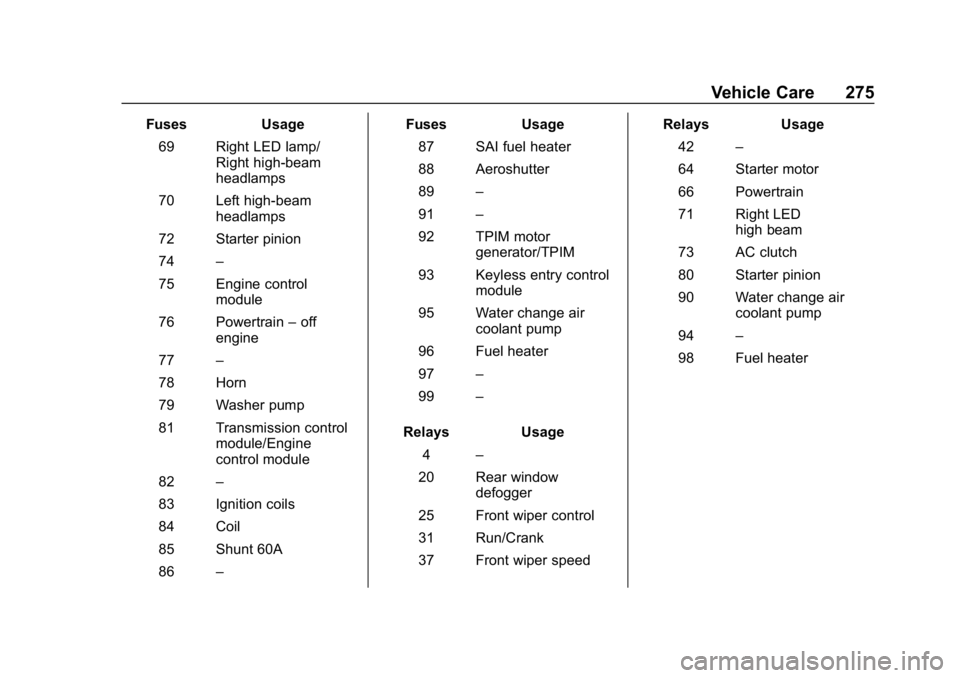
FusesUsage
69 Right LED lamp/ Right high-beam
headlamps
70 Left high-beam headlamps
72 Starter pinion
74 –
75 Engine control module
76 Powertrain –off
engine
77 –
78 Horn
79 Washer pump
81 Transmission control module/Engine
control module
82 –
83 Ignition coils
84 Coil
85 Shunt 60A
86 – Fuses
Usage
87 SAI fuel heater
88 Aeroshutter
89 –
91 –
92 TPIM motor generator/TPIM
93 Keyless entry control module
95 Water change air coolant pump
96 Fuel heater
97 –
99 –
Relays Usage
4 –
20 Rear window defogger
25 Front wiper control
31 Run/Crank
37 Front wiper speed Relays
Usage
42 –
64 Starter motor
66 Powertrain
71 Right LED high beam
73 AC clutch
80 Starter pinion
90 Water change air coolant pump
94 –
98 Fuel heater
Page 384 of 391

Buick Regal Owner Manual (GMNA-Localizing-U.S./Canada-12163021) -
2019 - CRC - 11/14/18
Index 383
High-Speed Operation . . . . . . . . . . 286
Hill and Mountain Roads . . . . . . . . 183
Hill Start Assist (HSA) . . . . . . . . . . 204
Hood . . . . . . . . . . . . . . . . . . . . . . . . . . . 247
Horn . . . . . . . . . . . . . . . . . . . . . . . . . . . . 117
How to Wear Seat BeltsProperly . . . . . . . . . . . . . . . . . . . . . . . . 72
HVAC . . . . . . . . . . . . . . . . . . . . . . . . . . . 171
I
Ignition Positions . . . . . . . . . . . . . . . 190
Immobilizer . . . . . . . . . . . . . . . . . . . . . . 50
Indicator Vehicle Ahead . . . . . . . . . . . . . . . . 139
Infants and Young Children, Restraints . . . . . . . . . . . . . . . . . . . . . . 92
Information
Publication Ordering . . . . . . . . . . 361
Infotainment . . . . . . . . . . . . . . . . . . . . 170
Infotainment System . . . . . . . . . . . . 365
Instrument Cluster . . . . . . . . . . . . . . 124
Interior Rearview Mirrors . . . . . . . . . 52
Introduction . . . . . . . . . . . . . . . . . . . . . . . 2
J
Jump Starting - North America . . . . . . . . . . . . . . . . . . . . . . . 319
K
Keyless Entry
Remote (RKE) System . . . . . . . . . 29
Keys . . . . . . . . . . . . . . . . . . . . . . . . . . . . . 28
L
Labeling, Tire Sidewall . . . . . . . . . . 280
Lamps Daytime Running (DRL) . . . . . . 163
Dome . . . . . . . . . . . . . . . . . . . . . . . . . 166
Exterior Controls . . . . . . . . . . . . . . 162
Exterior Lamps OffReminder . . . . . . . . . . . . . . . . . . . 163
Exterior Lighting Battery Saver . . . . . . . . . . . . . . . . . . . . . . . 168
Front Turn Signal . . . . . . . . . . . . . 270
Malfunction Indicator (Check Engine) . . . . . . . . . . . . . 135
On Reminder . . . . . . . . . . . . . . . . . 143
Reading . . . . . . . . . . . . . . . . . . . . . . 167
Lane Change Alert (LCA) . . . . . . . 227
Lane Departure Warning (LDW) . . . . . . . . . . . . . . . . 229
Lane Keep Assist (LKA) . . . . . . . . 229
Lane Keep Assist Light . . . . . . . . . 139
Lap-Shoulder Belt . . . . . . . . . . . . . . . 74 LATCH System
Replacing Parts after a
Crash . . . . . . . . . . . . . . . . . . . . . . . 102
LATCH, Lower Anchors and Tethers for Children . . . . . . . . . . . . 97
LED Lighting . . . . . . . . . . . . . . . . . . . . 269
Liftgate . . . . . . . . . . . . . . . . . . . . . . . . . . 41
Lighting Adaptive Forward . . . . . . . . . . . . . 164
Entry . . . . . . . . . . . . . . . . . . . . . . . . . 167
Exit . . . . . . . . . . . . . . . . . . . . . . . . . . . 167
Illumination Control . . . . . . . . . . . 166
LED . . . . . . . . . . . . . . . . . . . . . . . . . . 269
Lights Adaptive Forward Lighting(AFL) Light . . . . . . . . . . . . . . . . . . 142
Airbag Readiness . . . . . . . . . . . . . 134
Antilock Brake System (ABS) Warning . . . . . . . . . . . . . . 138
Brake System Warning . . . . . . . 137
Charging System . . . . . . . . . . . . . 135
Check Engine (Malfunction Indicator) . . . . . . . . . . . . . . . . . . . . 135
Cruise Control . . . . . . . . . . . . . . . . 143
Door Ajar . . . . . . . . . . . . . . . . . . . . . 143
Electric Parking Brake . . . . . . . . 138
Engine Coolant Temperature Warning . . . . . . . 140