steering BUICK TERRAZA 2006 User Guide
[x] Cancel search | Manufacturer: BUICK, Model Year: 2006, Model line: TERRAZA, Model: BUICK TERRAZA 2006Pages: 454, PDF Size: 2.7 MB
Page 149 of 454
Cruise Control
{CAUTION:
Cruise control can be dangerous where you
cannot drive safely at a steady speed. So, do
not use your cruise control on winding roads
or in heavy traffic.
Cruise control can be dangerous on slippery
roads. On such roads, fast changes in tire
traction can cause needless wheel spinning,
and you could lose control. Do not use cruise
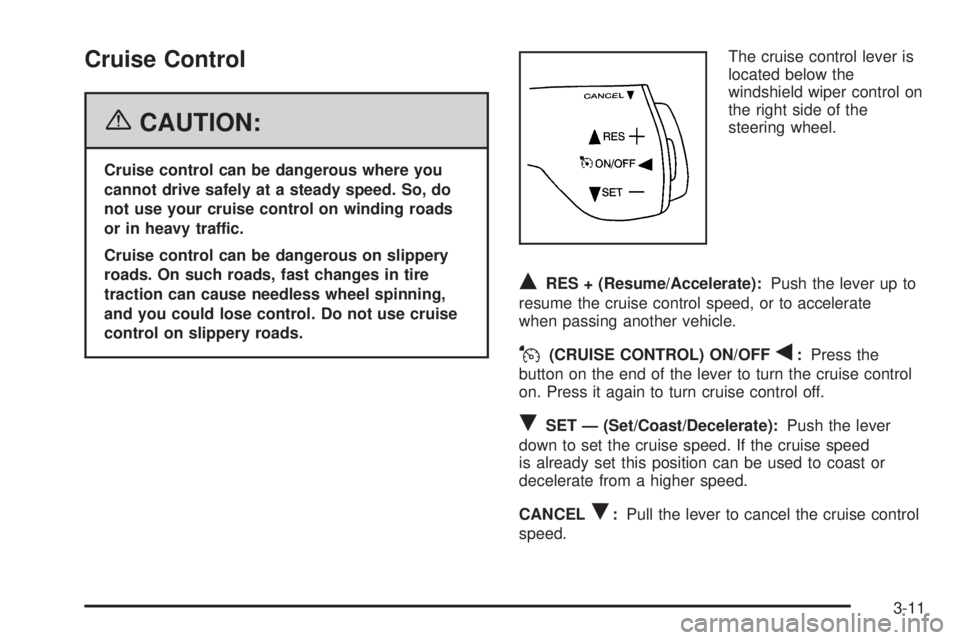
control on slippery roads.The cruise control lever is
located below the
windshield wiper control on
the right side of the
steering wheel.
QRES + (Resume/Accelerate):Push the lever up to
resume the cruise control speed, or to accelerate
when passing another vehicle.
J(CRUISE CONTROL) ON/OFFq:Press the
button on the end of the lever to turn the cruise control
on. Press it again to turn cruise control off.
RSET — (Set/Coast/Decelerate):Push the lever
down to set the cruise speed. If the cruise speed
is already set this position can be used to coast or
decelerate from a higher speed.
CANCEL
R:Pull the lever to cancel the cruise control
speed.
3-11
Page 153 of 454
Exterior Lamps
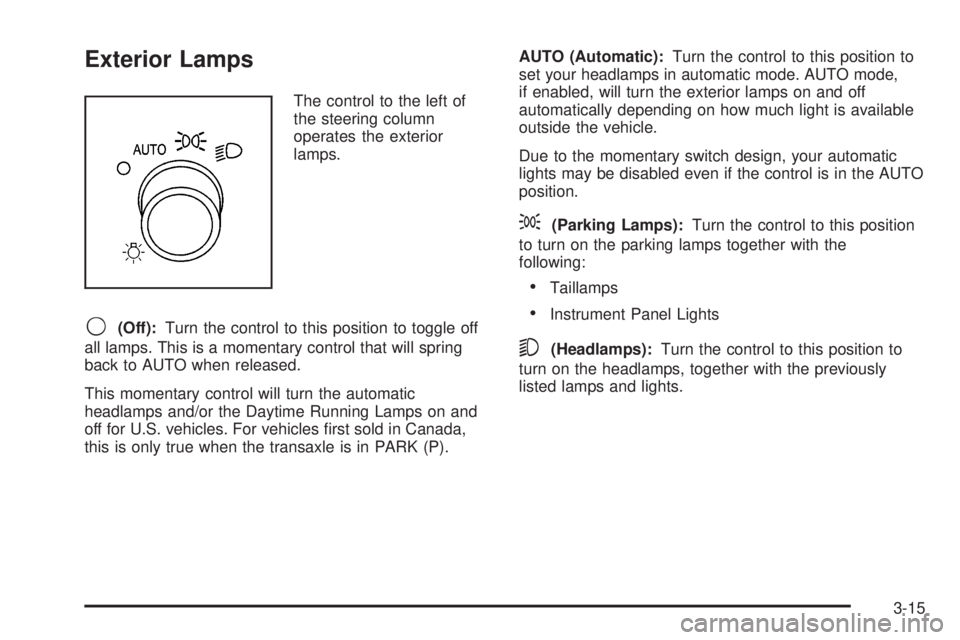
The control to the left of
the steering column
operates the exterior
lamps.
9(Off):Turn the control to this position to toggle off
all lamps. This is a momentary control that will spring
back to AUTO when released.
This momentary control will turn the automatic
headlamps and/or the Daytime Running Lamps on and
off for U.S. vehicles. For vehicles rst sold in Canada,
this is only true when the transaxle is in PARK (P).AUTO (Automatic):Turn the control to this position to
set your headlamps in automatic mode. AUTO mode,
if enabled, will turn the exterior lamps on and off
automatically depending on how much light is available
outside the vehicle.
Due to the momentary switch design, your automatic
lights may be disabled even if the control is in the AUTO
position.
;(Parking Lamps):Turn the control to this position
to turn on the parking lamps together with the
following:
Taillamps
Instrument Panel Lights
5(Headlamps):Turn the control to this position to
turn on the headlamps, together with the previously
listed lamps and lights.
3-15
Page 156 of 454
Interior Lamps Control
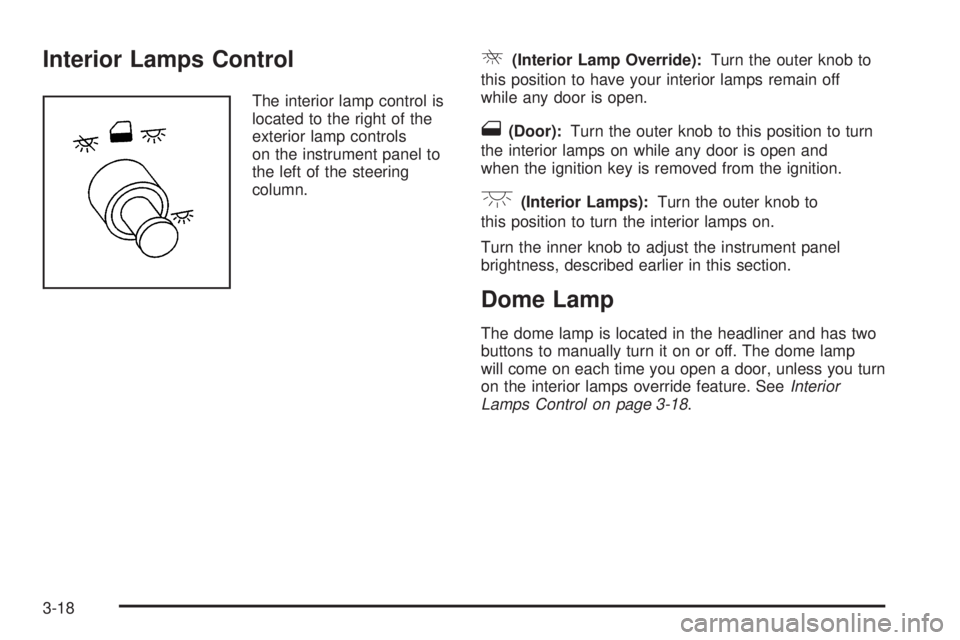
The interior lamp control is
located to the right of the
exterior lamp controls
on the instrument panel to
the left of the steering
column.
R(Interior Lamp Override):Turn the outer knob to
this position to have your interior lamps remain off
while any door is open.
1(Door):Turn the outer knob to this position to turn
the interior lamps on while any door is open and
when the ignition key is removed from the ignition.
+(Interior Lamps):Turn the outer knob to
this position to turn the interior lamps on.
Turn the inner knob to adjust the instrument panel
brightness, described earlier in this section.
Dome Lamp
The dome lamp is located in the headliner and has two
buttons to manually turn it on or off. The dome lamp
will come on each time you open a door, unless you turn
on the interior lamps override feature. SeeInterior
Lamps Control on page 3-18.
3-18
Page 218 of 454
Exiting the Personal Program Menu
The personal program menu will be exited when any of
the following occurs:
The vehicle is shifted out of PARK (P).
The vehicle is no longer in RUN.
The end of the personal program menu is reached.
Audio System(s)
Determine which radio your vehicle has and then read
the pages following to familiarize yourself with its
features.
Driving without distraction is a necessity for a safer
driving experience. SeeDefensive Driving on page 4-2.
By taking a few moments to read this manual and
get familiar with your vehicle’s audio system, you can
use it with less effort, as well as take advantage of
its features. While your vehicle is parked, set up your
audio system by presetting your favorite radio stations,
setting the tone and adjusting the speakers. Then,
when driving conditions permit, you can tune to your
favorite stations using the presets and steering
wheel controls (if equipped).
{CAUTION:
This system provides you with a far greater
access to audio stations and song listings.
Giving extended attention to entertainment
tasks while driving can cause a crash and you
or others can be injured or killed. Always keep
your eyes on the road and your mind on the
drive — avoid engaging in extended searching
while driving.
Keeping your mind on the drive is important for safe
driving. For more information, seeDefensive Driving on
page 4-2. Get familiar with your vehicle’s audio
system so you can use it with less effort and take full
advantage of its features.
3-80
Page 219 of 454
Here are some ways in which you can help avoid
distraction while driving.
While your vehicle is parked:
Familiarize yourself with all of its controls.
Familiarize yourself with its operation.
Set up your audio system by presetting your
favorite radio stations, setting the tone, and
adjusting the speakers. Then, when driving
conditions permit, you can tune to your favorite
radio stations using the presets and steering wheel
controls (if equipped).
Notice:Before adding any sound equipment to
your vehicle, such as an audio system, CD player,
CB radio, mobile telephone, or two-way radio, make
sure that it can be added by checking with your
dealer. Also, check federal rules covering mobile
radio and telephone units. If sound equipment can
be added, it is very important to do it properly.
Added sound equipment may interfere with
the operation of your vehicle’s engine, radio, or
other systems, and even damage them. Your
vehicle’s systems may interfere with the operation
of sound equipment that has been added.Your vehicle has a feature called Retained Accessory
Power (RAP). With RAP, the audio system can be
played even after the ignition is turned off. SeeRetained
Accessory Power (RAP) on page 2-33for more
information.Setting the Time
Press the H or the M button to enter clock mode. Press
and hold H until the correct hour appears on the
display. Press and hold M until the correct minute
appears on the display.
To change the time default setting from 12 hour to
24 hour, press either the H or the M button to enter the
clock mode, then press the tune knob to select
between the 12 or 24 hour display format. The clock
mode will automatically time out with the changed
display format set as the current default setting.
3-81
Page 255 of 454
Theft-Deterrent Feature
THEFTLOCK®is designed to discourage theft of your
vehicle’s radio. The feature works automatically by
learning a portion of the Vehicle Identication Number
(VIN). If the radio is moved to a different vehicle, it
will not operate and LOCKED will appear on the display.
With THEFTLOCK
®activated, the radio will not
operate if stolen.
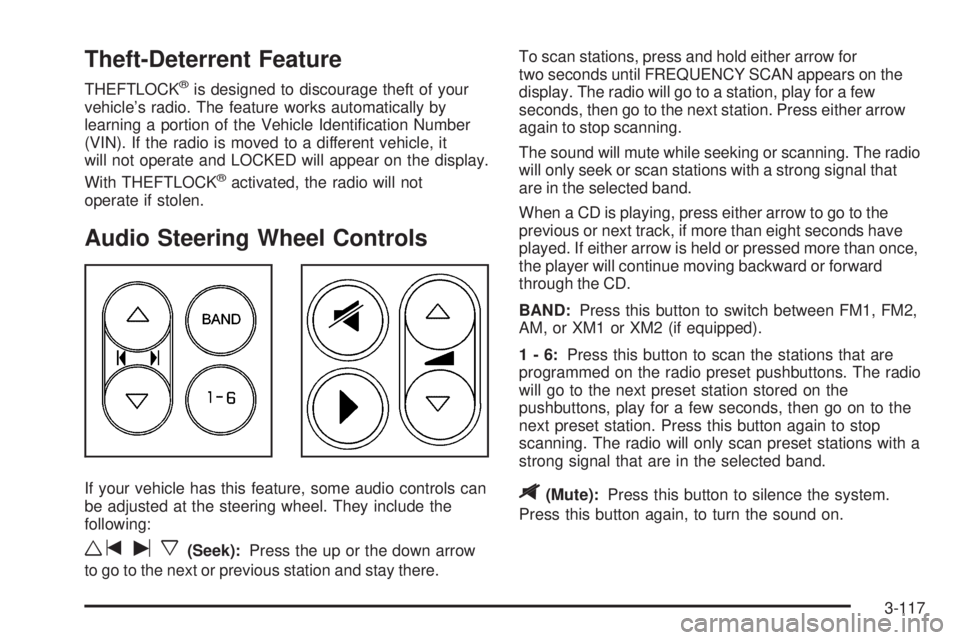
Audio Steering Wheel Controls
If your vehicle has this feature, some audio controls can
be adjusted at the steering wheel. They include the
following:
wtux(Seek):Press the up or the down arrow
to go to the next or previous station and stay there.To scan stations, press and hold either arrow for
two seconds until FREQUENCY SCAN appears on the
display. The radio will go to a station, play for a few
seconds, then go to the next station. Press either arrow
again to stop scanning.
The sound will mute while seeking or scanning. The radio
will only seek or scan stations with a strong signal that
are in the selected band.
When a CD is playing, press either arrow to go to the
previous or next track, if more than eight seconds have
played. If either arrow is held or pressed more than once,
the player will continue moving backward or forward
through the CD.
BAND:Press this button to switch between FM1, FM2,
AM, or XM1 or XM2 (if equipped).
1-6:Press this button to scan the stations that are
programmed on the radio preset pushbuttons. The radio
will go to the next preset station stored on the
pushbuttons, play for a few seconds, then go on to the
next preset station. Press this button again to stop
scanning. The radio will only scan preset stations with a
strong signal that are in the selected band.
$(Mute):Press this button to silence the system.
Press this button again, to turn the sound on.
3-117
Page 259 of 454
Your Driving, the Road, and Your Vehicle..........4-2
Defensive Driving...........................................4-2
Drunken Driving.............................................4-3
Control of a Vehicle........................................4-6
Braking.........................................................4-6
Anti-Lock Brake System (ABS).........................4-7
Braking in Emergencies...................................4-8
Traction Control System (TCS).........................4-9
StabiliTrak
®System......................................4-10
All-Wheel Drive (AWD) System.......................4-12
Steering......................................................4-13
Off-Road Recovery.......................................4-15
Passing.......................................................4-15
Loss of Control.............................................4-17
Driving at Night............................................4-18
Driving in Rain and on Wet Roads..................4-19City Driving..................................................4-21
Freeway Driving...........................................4-22
Before Leaving on a Long Trip.......................4-24
Highway Hypnosis........................................4-25
Hill and Mountain Roads................................4-25
Winter Driving..............................................4-27
If Your Vehicle is Stuck in Sand, Mud,
Ice or Snow..............................................4-31
Rocking Your Vehicle to Get It Out.................4-32
Loading Your Vehicle....................................4-32
Towing..........................................................4-37
Towing Your Vehicle.....................................4-37
Recreational Vehicle Towing...........................4-37
Level Control...............................................4-39
Towing a Trailer...........................................4-39
Section 4 Driving Your Vehicle
4-1
Page 264 of 454
Control of a Vehicle
You have three systems that make your vehicle go where
you want it to go. They are the brakes, the steering, and
the accelerator. All three systems have to do their work at
the places where the tires meet the road.
Sometimes, as when you are driving on snow or ice, it is
easy to ask more of those control systems than the tires
and road can provide. That means you can lose control of
your vehicle. SeeTraction Control System (TCS) on
page 4-9andStabiliTrak
®System on page 4-10.
Adding non-GM accessories can affect your vehicle’s
performance. SeeAccessories and Modications
on page 5-3.
Braking
SeeBrake System Warning Light on page 3-41.
Braking action involves perception time and
reaction time.
First, you have to decide to push on the brake pedal. That
is perception time. Then you have to bring up your foot
and do it. That is reaction time.
Average reaction time is about three-fourths of a second.
But that is only an average. It might be less with one
driver and as long as two or three seconds or more with
another. Age, physical condition, alertness, coordination,
and eyesight all play a part. So do alcohol, drugs, andfrustration. But even in three-fourths of a second, a
vehicle moving at 60 mph (100 km/h) travels 66 feet
(20 m). That could be a lot of distance in an emergency,
so keeping enough space between your vehicle and
others is important.
And, of course, actual stopping distances vary greatly
with the surface of the road, whether it is pavement or
gravel; the condition of the road, whether it is wet, dry, or
icy; tire tread; the condition of your brakes; the weight of
the vehicle; and the amount of brake force applied.
Avoid needless heavy braking. Some people drive in
spurts — heavy acceleration followed by heavy
braking — rather than keeping pace with traffic. This is a
mistake. Your brakes may not have time to cool between
hard stops. Your brakes will wear out much faster if you
do a lot of heavy braking. If you keep pace with the traffic
and allow realistic following distances, you will eliminate a
lot of unnecessary braking. That means better braking
and longer brake life.
If your engine ever stops while you are driving, brake
normally but do not pump your brakes. If you do, the
pedal may get harder to push down. If your engine stops,
you will still have some power brake assist. But you will
use it when you brake. Once the power assist is used up,
it may take longer to stop and the brake pedal will be
harder to push.
Adding non-GM accessories can affect your vehicle’s
performance. SeeAccessories and Modications on
page 5-3.
4-6
Page 266 of 454
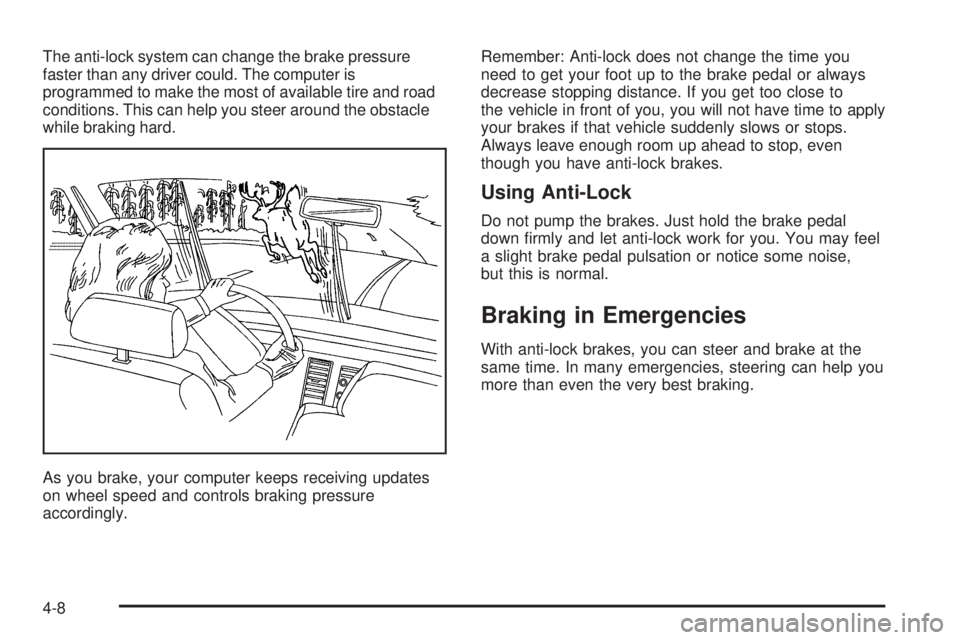
The anti-lock system can change the brake pressure
faster than any driver could. The computer is
programmed to make the most of available tire and road
conditions. This can help you steer around the obstacle
while braking hard.
As you brake, your computer keeps receiving updates
on wheel speed and controls braking pressure
accordingly.Remember: Anti-lock does not change the time you
need to get your foot up to the brake pedal or always
decrease stopping distance. If you get too close to
the vehicle in front of you, you will not have time to apply
your brakes if that vehicle suddenly slows or stops.
Always leave enough room up ahead to stop, even
though you have anti-lock brakes.
Using Anti-Lock
Do not pump the brakes. Just hold the brake pedal
down rmly and let anti-lock work for you. You may feel
a slight brake pedal pulsation or notice some noise,
but this is normal.
Braking in Emergencies
With anti-lock brakes, you can steer and brake at the
same time. In many emergencies, steering can help you
more than even the very best braking.
4-8
Page 269 of 454

The STABILITY CONTROL ACTIVE message will appear
on the DIC only when the system is both on and
activated. It means that an advanced computer-controlled
system has come on to help your vehicle continue to go
in the direction in which you are steering. StabiliTrak
®
activates when the computer senses that your vehicle is
just starting to spin, as it might if you hit a patch of ice or
other slippery spot on the road. When the system
activates, you may hear a noise or feel a vibration in the
brake pedal. This is normal. When the STABILITY
CONTROL ACTIVE message is on, you should continue
to steer in the direction you want to go. The system is
designed to help you in bad weather or other difficult
driving situations by making the most of whatever road
conditions will permit. For more information on the
stability messages, seeDriver Information Center (DIC)
on page 3-49.
If the StabiliTrak
®system turns off, the traction control
system warning light will illuminate, and the STABILITY
CONTROL OFF message will appear on the DIC to
warn the driver that StabiliTrak
®is no longer available
to assist you with directional control of the vehicle.
Adjust your driving accordingly.To limit wheel spin and realize the full benets of the
stability enhancement system, you should normally leave
traction control on, but it may be necessary to turn the
system off if your vehicle is stuck in sand, mud, ice or
snow, and you want to “rock” your vehicle to attempt to
free it. SeeRocking Your Vehicle to Get It Out on
page 4-32andIf Your Vehicle is Stuck in Sand, Mud, Ice
or Snow on page 4-31.
Traction Control Operation
The traction control system is part of the StabiliTrak®
system. Traction control limits wheel spin by reducing
engine power to the wheels (engine speed management)
and by applying brakes.
The traction control system is enabled automatically
when you start your vehicle. It will activate and display the
TRACTION CONTROL ACTIVE message in the DIC if it
senses that one or both of the front wheels are spinning
or beginning to lose traction while driving.
If the brake traction-control system activates constantly or
if the brakes have heated up due to high-speed braking,
brake traction-control will be disabled and the TRACTION
CONTROL ACTIVE message will be displayed. In the
limited mode, the traction control system will only use
engine traction-control and is limited in its ability to
provide optimal performance since the system will not
utilize brake traction-control to control slip on the drive
wheels.
4-11