seats BUICK TERRAZA 2006 Owner's Guide
[x] Cancel search | Manufacturer: BUICK, Model Year: 2006, Model line: TERRAZA, Model: BUICK TERRAZA 2006Pages: 454, PDF Size: 2.7 MB
Page 143 of 454
The main components of the instrument panel are the following:
A. Air Outlets. SeeOutlet Adjustment on page 3-29.
B. Turn Signal/Multifunction Lever. SeeTurn
Signal/Multifunction Lever on page 3-7.
C. Audio Steering Wheel Controls (If Equipped). See
Audio Steering Wheel Controls on page 3-117.
D. Instrument Panel Cluster. SeeInstrument Panel
Cluster on page 3-35.
E. DIC Controls (If Equipped). SeeDriver Information
Center (DIC) on page 3-49.
F. Traction Control System Button. SeeTraction
Control System (TCS) on page 4-9.
G. Hazard Warning Flasher Switch. SeeHazard
Warning Flashers on page 3-6.
H. Passenger Airbag Status Indicator and Passenger
Safety Belt Reminder Light. SeePassenger
Airbag Status Indicator on page 3-39
andPassenger Safety Belt Reminder Light on
page 3-37.I. Audio System. SeeAudio System(s) on page 3-80.
J. Exterior Lamps Control. SeeExterior Lamps on
page 3-15.
K. Interior Lamps Control. SeeInterior Lamps Control
on page 3-18. Instrument Panel Brightness Control.
SeeInstrument Panel Brightness on page 3-17.
L. Hood Release. SeeHood Release on page 5-11.
M. Parking Brake. SeeParking Brake on page 2-39.
N. Horn. SeeHorn on page 3-6.
O. Cruise Controls (If Equipped). SeeCruise Control on
page 3-11.
P. Climate Controls. SeeDual Climate Control System
on page 3-26.
Q. Heated Seat Controls (If Equipped). SeeHeated
Seats on page 1-3.
R. Glove Box. SeeGlove Box on page 2-51.
3-5
Page 163 of 454

Notice:Adding any electrical equipment to your
vehicle may damage it or keep other components
from working as they should. The repairs would not
be covered by your warranty. Do not use equipment
exceeding maximum amperage rating. Check
with your dealer before adding electrical equipment.
When adding electrical equipment, be sure to follow
the proper installation instructions included with
the equipment.
Notice:Improper use of the power outlet can cause
damage not covered by your warranty. Do not
hang any type of accessory or accessory bracket
from the plug because the power outlets are
designed for accessory power plugs only.
Power Outlet 115 Volt Alternating
Current
Your vehicle may have a power outlet that can be used
to plug in auxiliary electrical equipment with a
maximum limit of 150 watts. If you try to use equipment
that requires more than the limit, a protection circuit
will cut the power supply. To reset the outlet, unplug the
item and plug it back in or turn the ignition to OFF or
ACCESSORY and then back on. The power will
automatically restart when equipment that operates
within the limit is plugged in.The power outlet is located
behind the third row seats
on the passenger’s
side rear quarter trim
panel.
The power outlet is not designed for the following
electrical equipment and may not work properly if these
items are plugged into the power outlet:
Equipment with high initial peak wattage such as:
compressor-driven refrigerators and electric
power tools.
Other equipment requiring an extremely stable
power supply such as: microcomputer-controlled
electric blankets, touch sensor lamps, etc.
3-25
Page 165 of 454

To change the current mode, select one of the following:
H(Vent):This mode directs air to the instrument
panel outlets.
)(Bi-Level):This mode directs half of the air to the
instrument panel outlets, then directs the remaining
air to the oor outlets. Cooler air is directed to the upper
outlets and warmer air to the oor outlets.
6(Floor):This mode directs most of the air to the
oor outlets. Use this mode to send air to the rear of the
vehicle. Keep the area under the front seats free of
objects that could obstruct airow to the rear of
the vehicle.
The right knob can also be used to select defog or
defrost mode. For more information, see “Defogging and
Defrosting” later in this section.Outside Air:This mode will be automatically selected
when your vehicle is in any mode except maximum
air conditioning.
9(Fan):Turn the left knob clockwise or
counterclockwise to increase or decrease the fan speed.
Turn the knob to 0 to turn off the fan. The fan must
be turned on for the air conditioning compressor
to operate.
Temperature Control:Use the driver’s and
passenger’s levers to increase or decrease the air
temperature inside your vehicle.
#(Air Conditioning):Press this button to turn the
air conditioning system on or off. When it is pressed, an
indicator light in the button will come on to let you
know that air conditioning is activated.
You may notice a slight change in engine performance
when the air conditioning compressor shuts off and
turns on again. This is normal. The system is designed
to make adjustments to help with fuel economy while
still maintaining the selected temperature.
3-27
Page 166 of 454
On hot days, open the windows to let hot inside air
escape; then close them. This helps to reduce the time
it takes for your vehicle to cool down. It also helps
the system to operate more efficiently.
The air conditioning system removes moisture from the
air, so you may sometimes notice a small amount of
water dripping underneath your vehicle while idling
or after turning off the engine. This is normal.
#MAX (Maximum Air Conditioning):Turn the right
knob to this position for maximum air conditioning.
This will select air conditioning and recirculation
for maximum cooling of your vehicle.
Recirculation:This mode keeps outside air from
coming in the vehicle. It can be used to prevent outside
air and odors from entering your vehicle or help heat
or cool the air inside your vehicle more quickly.
This mode will automatically be selected when you
select maximum air conditioning.
((Heated Seats):Press this button to turn on the
heated seats. The button on the left controls the driver’s
seat and the button on the right controls the passenger’s
seat. SeeHeated Seats on page 1-3for additional
information.
Defogging and Defrosting
Fog on the inside of windows is a result of high humidity,
or moisture, condensing on the cool window glass.
This can be minimized if the climate control system is
used properly. There are two modes to clear fog or frost
from your windshield. Use the defog mode to clear
the windows of fog or moisture and warm the
passengers. Use the defrost mode to remove fog or
frost from the windshield more quickly.
Turn the right knob to select the defog or defrost mode.
-(Defog):This mode directs air to the windshield
and the oor outlets. When you select this mode,
the system runs the air conditioning compressor unless
the outside temperature is at or below freezing. The
recirculation mode cannot be selected while in the
defog mode.
0(Defrost):This mode directs most of the air to the
windshield and the side window outlets, with some air
directed to the oor outlets. In this mode, the system will
automatically run the air conditioning compressor,
unless the outside temperature is at or below freezing.
Recirculation cannot be selected while in the
defrost mode.
Do not drive the vehicle until all the windows are clear.
3-28
Page 167 of 454
Rear Window Defogger
The rear window defogger uses a warming grid to
remove fog from the rear window.
<(Rear Window Defogger):Press this button to
turn the rear window defogger on or off. An indicator
light in the button will come on to let you know that the
rear window defogger is activated.
The rear window defogger will turn off about 10 minutes
after the button is pressed. If turned on again, the
defogger will only run for about ve minutes before
turning off. The defogger can also be turned off
by pressing the button again or by turning off the engine.
Notice:Do not use anything sharp on the inside
of the rear window. If you do, you could cut or
damage the warming grid, and the repairs would not
be covered by your warranty. Do not attach a
temporary vehicle license, tape, a decal or anything
similar to the defogger grid.
Outlet Adjustment
k(Open):Turn the thumbwheel to this position to
open the air outlets.
l(Closed):Turn the thumbwheel to this position to
close the air outlets.
Use the louvers located on the air outlets to change the
direction of the airow.
Operation Tips
Clear away any ice, snow, or leaves from the air
inlets at the base of the vehicle that may block
the ow of air into your vehicle.
Use of non-GM approved hood deectors may
adversely affect the performance of the system.
Keep the path under the front seats clear of objects
to help circulate the air inside of your vehicle more
effectively.
3-29
Page 169 of 454
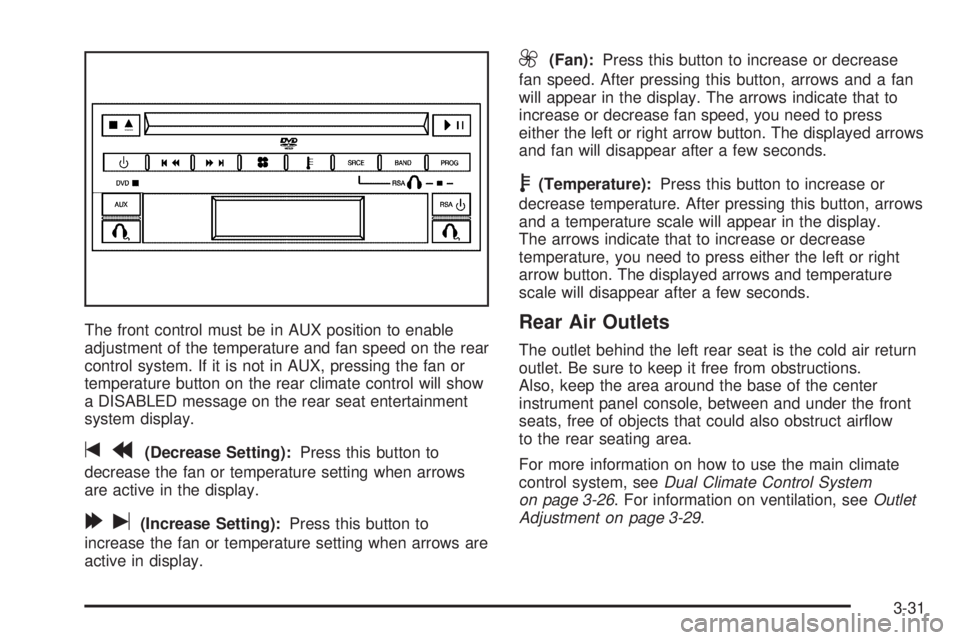
The front control must be in AUX position to enable
adjustment of the temperature and fan speed on the rear
control system. If it is not in AUX, pressing the fan or
temperature button on the rear climate control will show
a DISABLED message on the rear seat entertainment
system display.
tr(Decrease Setting):Press this button to
decrease the fan or temperature setting when arrows
are active in the display.
[u(Increase Setting):Press this button to
increase the fan or temperature setting when arrows are
active in display.
9(Fan):Press this button to increase or decrease
fan speed. After pressing this button, arrows and a fan
will appear in the display. The arrows indicate that to
increase or decrease fan speed, you need to press
either the left or right arrow button. The displayed arrows
and fan will disappear after a few seconds.
b(Temperature):Press this button to increase or
decrease temperature. After pressing this button, arrows
and a temperature scale will appear in the display.
The arrows indicate that to increase or decrease
temperature, you need to press either the left or right
arrow button. The displayed arrows and temperature
scale will disappear after a few seconds.
Rear Air Outlets
The outlet behind the left rear seat is the cold air return
outlet. Be sure to keep it free from obstructions.
Also, keep the area around the base of the center
instrument panel console, between and under the front
seats, free of objects that could also obstruct airow
to the rear seating area.
For more information on how to use the main climate
control system, seeDual Climate Control System
on page 3-26. For information on ventilation, seeOutlet
Adjustment on page 3-29.
3-31
Page 295 of 454
If you put things inside your vehicle — like suitcases,
tools, packages, or anything else, they will go as fast as
the vehicle goes. If you have to stop or turn quickly,
or if there is a crash, they will keep going.
{CAUTION:
Things you put inside your vehicle can strike
and injure people in a sudden stop or turn, or
in a crash.
Put things in the cargo area of your
vehicle. Try to spread the weight evenly.
Never stack heavier things, like suitcases,
inside the vehicle so that some of them
are above the tops of the seats.
Do not leave an unsecured child restraint
in your vehicle.
When you carry something inside the
vehicle, secure it whenever you can.
Do not leave a seat folded down unless
you need to.
Towing
Towing Your Vehicle
Consult your dealer or a professional towing service if
you need to have your disabled vehicle towed. See
Roadside Assistance Program on page 7-6.
If you want to tow your vehicle behind another vehicle
for recreational purposes (such as behind a motorhome),
see “Recreational Vehicle Towing” following.
Recreational Vehicle Towing
Recreational vehicle towing means towing your vehicle
behind another vehicle – such as behind a motorhome.
The two most common types of recreational vehicle
towing are known as “dinghy towing” (towing your vehicle
with all four wheels on the ground) and “dolly towing”
(towing your vehicle with two wheels on the ground and
two wheels up on a device know as a “dolly”).
With the proper preparation and equipment, many
vehicles can be towed in these ways. See “Dinghy
Towing” and “Dolly Towing,” following.
4-37
Page 363 of 454

Tire Size
The following illustration shows an example of a typical
passenger vehicle tire size.
(A) Passenger (P-Metric) Tire:The United States
version of a metric tire sizing system. The letter P as the
rst character in the tire size means a passenger
vehicle tire engineered to standards set by the U.S. Tire
and Rim Association.
(B) Tire Width:The three-digit number indicates the
tire section width in millimeters from sidewall to sidewall.
(C) Aspect Ratio:A two-digit number that indicates
the tire height-to-width measurements. For example, if
the tire size aspect ratio is 60, as shown in item C of the
illustration, it would mean that the tire’s sidewall is
60 percent as high as it is wide.(D) Construction Code:A letter code is used to
indicate the type of ply construction in the tire.
The letter R means radial ply construction; the
letter D means diagonal or bias ply construction;
and the letter B means belted-bias ply construction.
(E) Rim Diameter:Diameter of the wheel in inches.
(F) Service Description:These characters represent
the load range and speed rating of the tire. The load
index represents the load carry capacity a tire is certied
to carry. The load index can range from 1 to 279. The
speed rating is the maximum speed a tire is certied
to carry a load. Speed ratings range from A to Z.
Tire Terminology and Denitions
Air Pressure:The amount of air inside the tire pressing
outward on each square inch of the tire. Air pressure
is expressed in pounds per square inch (psi) or
kilopascal (kPa).
Accessory Weight:This means the combined weight
of optional accessories. Some examples of optional
accessories are, automatic transmission, power steering,
power brakes, power windows, power seats, and air
conditioning.
5-57
Page 403 of 454

Fuses Usage
1 Trunk, Door Locks
2 Electronic Level Control
3 Rear Wiper
4 Radio Amplier
5 Interior Lamps
6 OnStar
®
7 Keyless Entry Module
8Cluster, Heating, Ventilation, Air
Conditioning
9 Cruise Switch
10 Steering Wheel Illumination
11 Power Mirror
12 Stoplamp, Turn Lamps
13 Heated Seats
14 Blank
15 Electronic Level Control
16 Heated Mirror
17Center High-Mounted Stoplamp,
Back-up Lamps
5-97
Page 404 of 454

Fuses Usage
18 Blank
19 Canister Ventilation
20 Park Lamps
21 Power Sliding Door
22 Blank
23 Blank
24 Left Power Sliding Door
25 Right Power Sliding Door
Relays Usage
26 Blank
27 Blank
28 Park Lamps
Relays Usage
29 Retained Accessory Power
30 Rear Defog
PLR Fuse Puller
Circuit
Breakers Usage
31 Power Seats
32 Power Window
Underhood Fuse Block
The underhood fuse block is located in the engine
compartment. For more information on location
seeEngine Compartment Overview on page 5-12.
Your vehicle may not have all the fuses listed.
5-98