ECU BUICK TERRAZA 2006 Owner's Guide
[x] Cancel search | Manufacturer: BUICK, Model Year: 2006, Model line: TERRAZA, Model: BUICK TERRAZA 2006Pages: 454, PDF Size: 2.7 MB
Page 127 of 454
Universal Home Remote
System
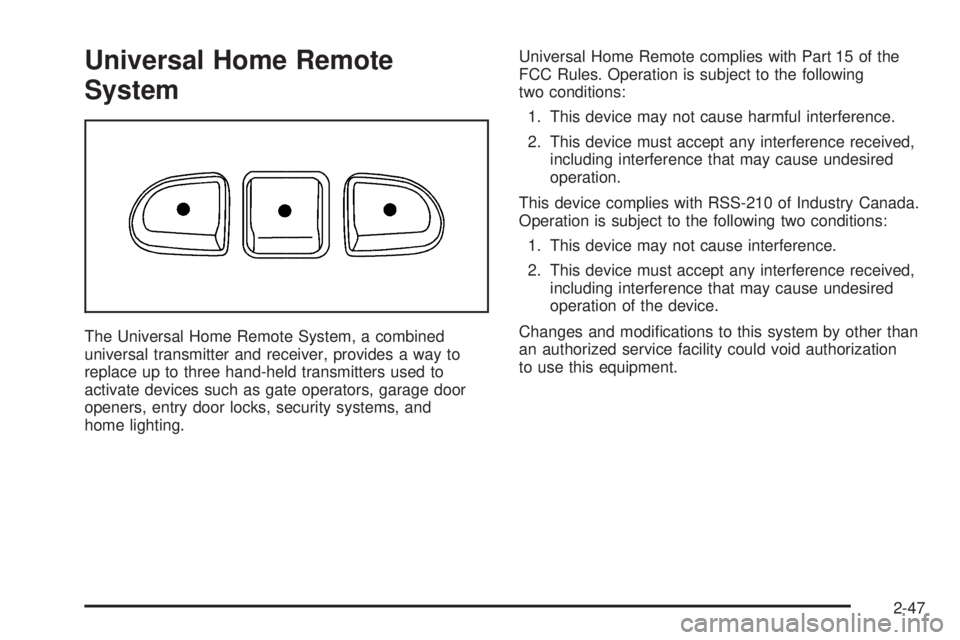
The Universal Home Remote System, a combined
universal transmitter and receiver, provides a way to
replace up to three hand-held transmitters used to
activate devices such as gate operators, garage door
openers, entry door locks, security systems, and
home lighting.Universal Home Remote complies with Part 15 of the
FCC Rules. Operation is subject to the following
two conditions:
1. This device may not cause harmful interference.
2. This device must accept any interference received,
including interference that may cause undesired
operation.
This device complies with RSS-210 of Industry Canada.
Operation is subject to the following two conditions:
1. This device may not cause interference.
2. This device must accept any interference received,
including interference that may cause undesired
operation of the device.
Changes and modications to this system by other than
an authorized service facility could void authorization
to use this equipment.
2-47
Page 128 of 454
Universal Home Remote System
Operation
Do not use the Universal Home Remote with any
garage door opener that does not have the “stop and
reverse” feature. This includes any garage door opener
model manufactured before April 1, 1982. If you
have a newer garage door opener with rolling codes,
please be sure to follow Steps 6 through 8 to complete
the programming of your Universal Home Remote
Transmitter.
Read the instructions completely before attempting to
program the Universal Home Remote. Because of
the steps involved, it may be helpful to have another
person available to assist you in the programming steps.
Keep the original hand-held transmitter for use in
other vehicles as well as for future Universal Home
Remote programming. It is also recommended that upon
the sale of the vehicle, the programmed Universal
Home Remote buttons should be erased for security
purposes. See “Erasing Universal Home Remote
Buttons” later in this section or, for assistance, see
Customer Assistance Offices on page 7-4.Be sure that people and objects are clear of the garage
door or gate operator you are programming. When
programming a garage door, it is advised to park outside
of the garage.
It is recommended that a new battery be installed in
your hand-held transmitter for quicker and more
accurate transmission of the radio-frequency signal.
Programming Universal Home Remote
Follow these steps to program up to three channels:
1. Press and hold down the two outside Universal
Home Remote buttons, releasing only when the
Universal Home Remote indicator light begins
to ash, after 20 seconds. Do not hold down the
buttons for longer than 30 seconds and do not
repeat this step to program a second and/or third
hand-held transmitter to the remaining two Universal
Home Remote buttons.
2. Position the end of your hand-held transmitter
about 1 to 3 inches (3 to 8 cm) away from the
Universal Home Remote buttons while keeping the
indicator light in view.
2-48
Page 131 of 454
Reprogramming a Single Universal
Home Remote Button
To program a device to Universal Home Remote using
a Universal Home Remote button previously trained,
follow these steps:
1. Press and hold the desired Universal Home
Remote button. Do not release the button.
2. The indicator light will begin to ash after
20 seconds. While still holding the Universal Home
Remote button, proceed with Step 2 under
“Programming Universal Home Remote” shown
earlier in this section.
For additional information on Universal Home Remote,
seeCustomer Assistance Offices on page 7-4.
Storage Areas
Your vehicle’s large carrying capacity can store many
items. If the vehicle has an extended wheelbase, it can
carry even larger items. The oor pins that are used
to attach the seats, can be used to secure larger loads.
There may be additional storage areas behind the
seats. Pull the lid towards you to open the storage.
Glove Box
If the glove box has a lock, put your key into the lock
and turn the key counterclockwise. To open the
glove box, pull the latch release.
The glove box door has a detent to prevent the door
from lowering too far. Open the glove box until the door
is partway open, then pull the door down if you need
it fully opened.
To close the glove box, the door must be pushed up
past the detent. To lock the glove box, put your key into
the lock and turn the key clockwise.
Cupholder(s)
There are cupholders located below the center
instrument panel switchbank. The cupholders have a
rubber liner that can be removed, so that larger cups can
t into the cupholders. You can also remove the liner
to clean it.
To use the cupholders, pull the tray out. Push the tray
back when not in use.
Your vehicle may be equipped with cupholders in the
second row.
2-51
Page 134 of 454
Folding Tray
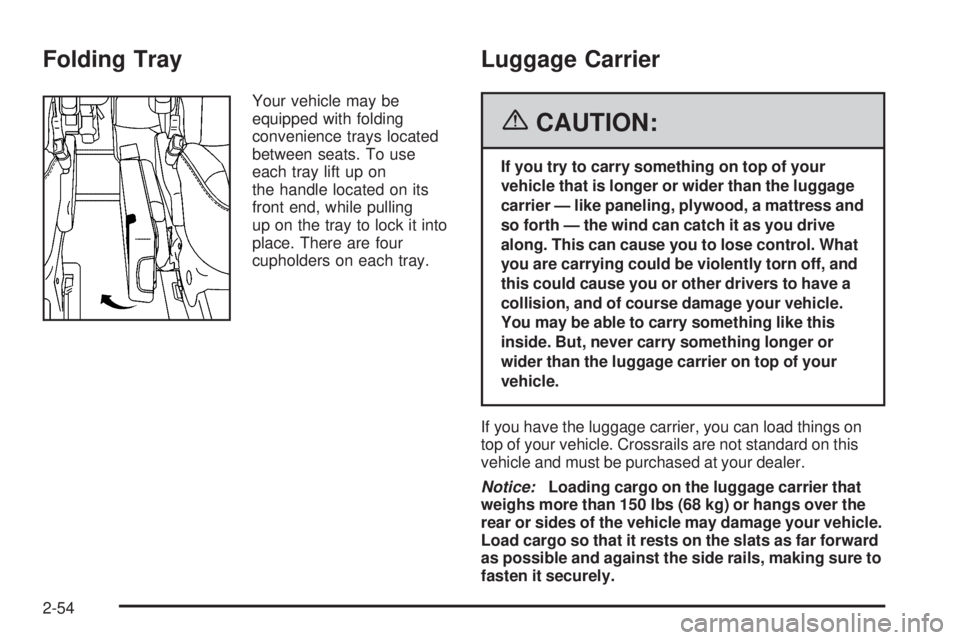
Your vehicle may be
equipped with folding
convenience trays located
between seats. To use
each tray lift up on
the handle located on its
front end, while pulling
up on the tray to lock it into
place. There are four
cupholders on each tray.
Luggage Carrier
{CAUTION:
If you try to carry something on top of your
vehicle that is longer or wider than the luggage
carrier — like paneling, plywood, a mattress and
so forth — the wind can catch it as you drive
along. This can cause you to lose control. What
you are carrying could be violently torn off, and
this could cause you or other drivers to have a
collision, and of course damage your vehicle.
You may be able to carry something like this
inside. But, never carry something longer or
wider than the luggage carrier on top of your
vehicle.
If you have the luggage carrier, you can load things on
top of your vehicle. Crossrails are not standard on this
vehicle and must be purchased at your dealer.
Notice:Loading cargo on the luggage carrier that
weighs more than 150 lbs (68 kg) or hangs over the
rear or sides of the vehicle may damage your vehicle.
Load cargo so that it rests on the slats as far forward
as possible and against the side rails, making sure to
fasten it securely.
2-54
Page 135 of 454
Do not exceed the maximum vehicle capacity when
loading your vehicle. For more information on vehicle
capacity and loading, seeLoading Your Vehicle on
page 4-32.
To prevent damage or loss of cargo as you are driving,
check now and then to make sure the cargo is still
securely fastened.
Convenience Net
(With Rear Convenience Center)
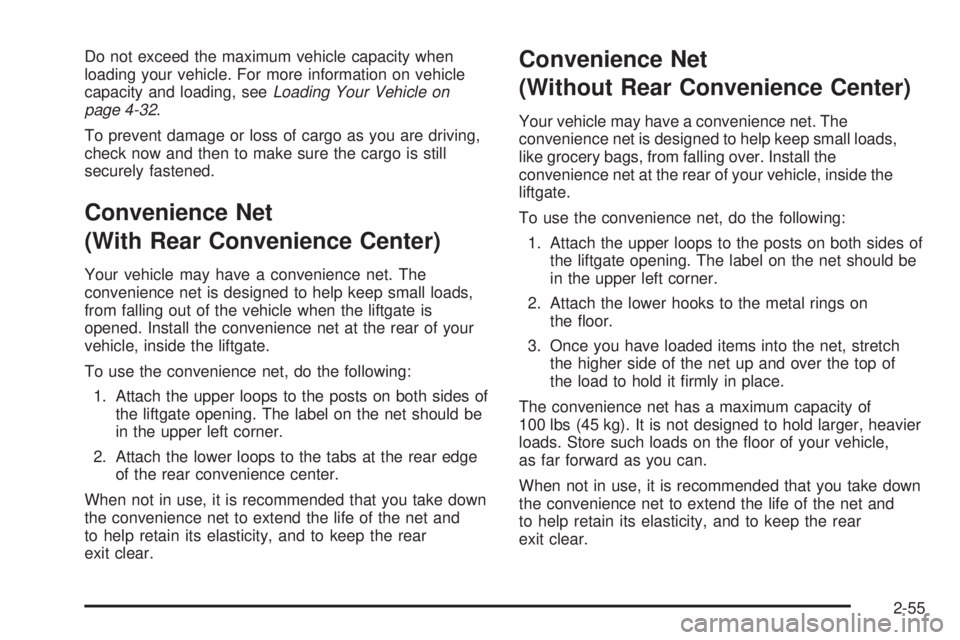
Your vehicle may have a convenience net. The
convenience net is designed to help keep small loads,
from falling out of the vehicle when the liftgate is
opened. Install the convenience net at the rear of your
vehicle, inside the liftgate.
To use the convenience net, do the following:
1. Attach the upper loops to the posts on both sides of
the liftgate opening. The label on the net should be
in the upper left corner.
2. Attach the lower loops to the tabs at the rear edge
of the rear convenience center.
When not in use, it is recommended that you take down
the convenience net to extend the life of the net and
to help retain its elasticity, and to keep the rear
exit clear.
Convenience Net
(Without Rear Convenience Center)
Your vehicle may have a convenience net. The
convenience net is designed to help keep small loads,
like grocery bags, from falling over. Install the
convenience net at the rear of your vehicle, inside the
liftgate.
To use the convenience net, do the following:
1. Attach the upper loops to the posts on both sides of
the liftgate opening. The label on the net should be
in the upper left corner.
2. Attach the lower hooks to the metal rings on
the oor.
3. Once you have loaded items into the net, stretch
the higher side of the net up and over the top of
the load to hold it rmly in place.
The convenience net has a maximum capacity of
100 lbs (45 kg). It is not designed to hold larger, heavier
loads. Store such loads on the oor of your vehicle,
as far forward as you can.
When not in use, it is recommended that you take down
the convenience net to extend the life of the net and
to help retain its elasticity, and to keep the rear
exit clear.
2-55
Page 136 of 454
Convenience Center
{CAUTION:
If any removable convenience item is not
secured properly, it can move around in a
collision or sudden stop. People in the vehicle
could be injured. Be sure to secure any such
item properly.
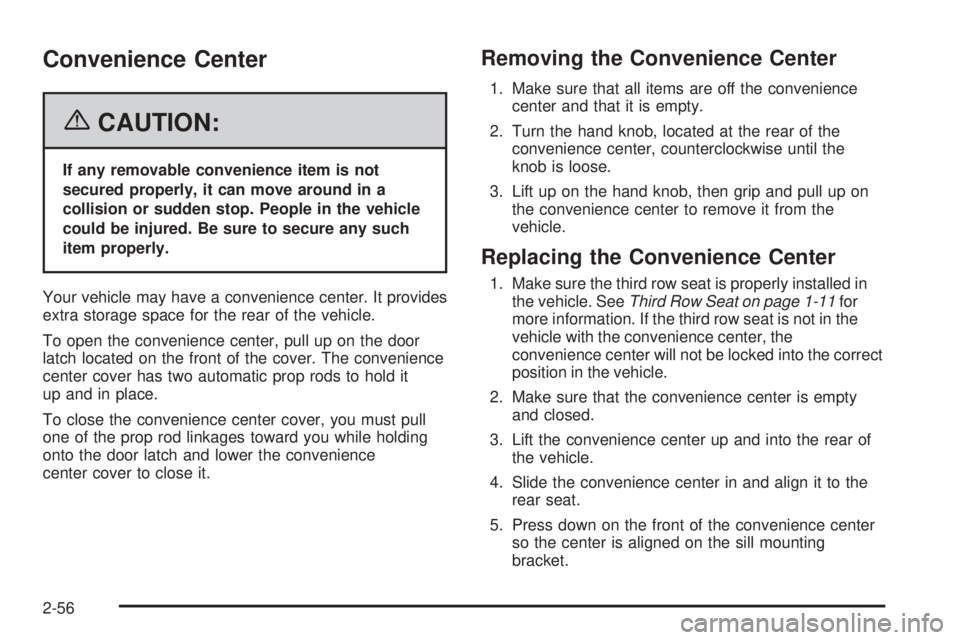
Your vehicle may have a convenience center. It provides
extra storage space for the rear of the vehicle.
To open the convenience center, pull up on the door
latch located on the front of the cover. The convenience
center cover has two automatic prop rods to hold it
up and in place.
To close the convenience center cover, you must pull
one of the prop rod linkages toward you while holding
onto the door latch and lower the convenience
center cover to close it.
Removing the Convenience Center
1. Make sure that all items are off the convenience
center and that it is empty.
2. Turn the hand knob, located at the rear of the
convenience center, counterclockwise until the
knob is loose.
3. Lift up on the hand knob, then grip and pull up on
the convenience center to remove it from the
vehicle.
Replacing the Convenience Center
1. Make sure the third row seat is properly installed in
the vehicle. SeeThird Row Seat on page 1-11for
more information. If the third row seat is not in the
vehicle with the convenience center, the
convenience center will not be locked into the correct
position in the vehicle.
2. Make sure that the convenience center is empty
and closed.
3. Lift the convenience center up and into the rear of
the vehicle.
4. Slide the convenience center in and align it to the
rear seat.
5. Press down on the front of the convenience center
so the center is aligned on the sill mounting
bracket.
2-56
Page 140 of 454
Anti-Lock Brake System Warning Light.............3-42
Traction Control System (TCS) Warning Light . . .3-43
Engine Coolant Temperature Gage..................3-43
Malfunction Indicator Lamp.............................3-44
Oil Pressure Light.........................................3-46
Security Light...............................................3-47
Cruise Control Light......................................3-47
Highbeam On Light.......................................3-48
Fuel Gage...................................................3-48
Low Fuel Warning Light.................................3-48
Driver Information Center (DIC).......................3-49
DIC Operation and Displays...........................3-50
DIC Warnings and Messages.........................3-56
DIC Vehicle Personalization
(Uplevel Only)...........................................3-72Audio System(s).............................................3-80
Setting the Time...........................................3-81
Radio with CD..............................................3-82
Navigation/Radio System..............................3-101
Rear Seat Entertainment System...................3-101
Rear Seat Audio (RSA)................................3-115
Theft-Deterrent Feature................................3-117
Audio Steering Wheel Controls......................3-117
Radio Reception.........................................3-118
Care of Your CDs and DVDs........................3-119
Care of the CD and DVD Player...................3-119
Fixed Mast Antenna....................................3-119
XM™ Satellite Radio Antenna System............3-119
Chime Level Adjustment...............................3-119
Section 3 Instrument Panel
3-2
Page 162 of 454
When the System Does Not Seem to Work
Properly
The light may ash red when the vehicle is in
REVERSE (R) if the ultrasonic sensors are not kept
clean. So be sure to keep your rear bumper free of mud,
dirt, snow, ice and slush. Other conditions that may
affect system performance include things like the
vibrations from a jackhammer or the compression of air
brakes on a very large truck. If after cleaning the
rear bumper and then driving forward at least 15 mph
(25 km/h), the display continues to ash red, see
your dealer.
If a trailer was attached to your vehicle, or a bicycle or
an object was on the back of, or hanging out of your
liftgate during your last drive cycle, the light may
also ash red. The light will continue to ash whenever
in REVERSE (R) until your vehicle is driven forward
at least 15 mph (25 km/h) without any obstructions
behind the vehicle.
Accessory Power Outlet(s)
Your vehicle may be equipped with a front accessory
power outlet located below the climate controls on
the instrument panel. It can be used to plug in electrical
equipment such as a cellular telephone or CB radio.
Pull the cover down to use the accessory power outlet.
When not in use, keep the cover on.
The rear accessory power outlet is located on the rear
compartment on the driver’s side.
To remove the cover, pull the tab on the cover and pull
it off. To put the cover back on, line up the tabs at
the back of the cover and put the cover in place. Push
down the tab to secure the cover. When not in use,
always cover the rear accessory power outlet with the
protective cap.
Notice:Leaving electrical equipment on for
extended periods will drain the battery. Always turn
off electrical equipment when not in use and do
not plug in equipment that exceeds the maximum
amperage rating.
Certain electrical accessories may not be compatible
with the accessory power outlet and could result
in blown vehicle or adapter fuses. If you experience a
problem see your dealer for additional information
on accessory power outlets.
3-24
Page 178 of 454

Your vehicle has a rear seat that will accommodate a
rear-facing child restraint. A label on your sun visor says,
“Never put a rear-facing child seat in the front.” This
is because the risk to the rear-facing child is so great, if
the airbag deploys.
{CAUTION:
Even though the passenger sensing system is
designed to turn off the passenger’s frontal
airbag and side impact airbag (if equipped) if
the system detects a rear-facing child restraint,
no system is fail-safe, and no one can
guarantee that an airbag will not deploy under
some unusual circumstance, even though it is
turned off. We recommend that rear-facing
child restraints be secured in the rear seat,
even if the airbag is off.
If the word OFF or the off symbol is lit on the airbag
status indicator, it means that the passenger sensing
system has turned off the right front passenger’s airbag
or airbags. SeePassenger Sensing System on
page 1-66for more on this, including important safety
information.If, after several seconds, all status indicator lights
remain on, or if there are no lights at all, there may be a
problem with the lights or the passenger sensing
system. See your dealer for service.
{CAUTION:
If the off indicator and the airbag readiness
light ever come on together, it means that
something may be wrong with the airbag
system. If this ever happens, have the vehicle
serviced promptly, because an adult-size
person sitting in the right front passenger seat
may not have the protection of the airbags.
SeeAirbag Readiness Light on page 3-38.
3-40
Page 185 of 454

{CAUTION:
Do not keep driving if the oil pressure is low. If
you do, your engine can become so hot that it
catches re. You or others could be burned.
Check your oil as soon as possible and have
your vehicle serviced.
Notice:Lack of proper engine oil maintenance may
damage the engine. The repairs would not be
covered by your warranty. Always follow the
maintenance schedule in this manual for changing
engine oil.
Security Light
For information regarding
this light, see
Theft-Deterrent Systems
on page 2-28.
Cruise Control Light
This light comes on
whenever you set your
cruise control.
The light will go out when the cruise control is turned
off. SeeCruise Control on page 3-11for more
information.
3-47