instrument panel BUICK TERRAZA 2006 Workshop Manual
[x] Cancel search | Manufacturer: BUICK, Model Year: 2006, Model line: TERRAZA, Model: BUICK TERRAZA 2006Pages: 454, PDF Size: 2.7 MB
Page 308 of 454

Different Size Tires and Wheels......................5-64
Uniform Tire Quality Grading..........................5-65
Wheel Alignment and Tire Balance..................5-66
Wheel Replacement......................................5-66
Tire Chains..................................................5-68
Accessory Inator.........................................5-68
If a Tire Goes Flat........................................5-70
Changing a Flat Tire.....................................5-70
Removing the Spare Tire and Tools................5-72
Removing the Flat Tire and Installing the
Spare Tire................................................5-75
Secondary Latch System...............................5-81
Storing a Flat or Spare Tire and Tools............5-83
Compact Spare Tire......................................5-86
Appearance Care............................................5-87
Cleaning the Inside of Your Vehicle.................5-87
Fabric/Carpet...............................................5-88
Leather.......................................................5-89
Instrument Panel, Vinyl, and Other Plastic
Surfaces..................................................5-89
Care of Safety Belts......................................5-90
Weatherstrips...............................................5-90
Washing Your Vehicle...................................5-90Cleaning Exterior Lamps/Lenses.....................5-90
Finish Care..................................................5-91
Windshield, Backglass, and Wiper Blades.........5-91
Aluminum or Chrome-Plated Wheels................5-92
Tires...........................................................5-92
Sheet Metal Damage.....................................5-93
Finish Damage.............................................5-93
Underbody Maintenance................................5-93
Chemical Paint Spotting.................................5-93
Vehicle Care/Appearance Materials..................5-94
Vehicle Identication......................................5-95
Vehicle Identication Number (VIN).................5-95
Service Parts Identication Label.....................5-95
Electrical System............................................5-95
Add-On Electrical Equipment..........................5-95
Headlamp Wiring..........................................5-96
Windshield Wiper Fuses................................5-96
Power Windows and Other Power Options.......5-96
Fuses and Circuit Breakers............................5-96
Instrument Panel Fuse Block..........................5-96
Underhood Fuse Block..................................5-98
Capacities and Specications........................5-102
Section 5 Service and Appearance Care
5-2
Page 317 of 454
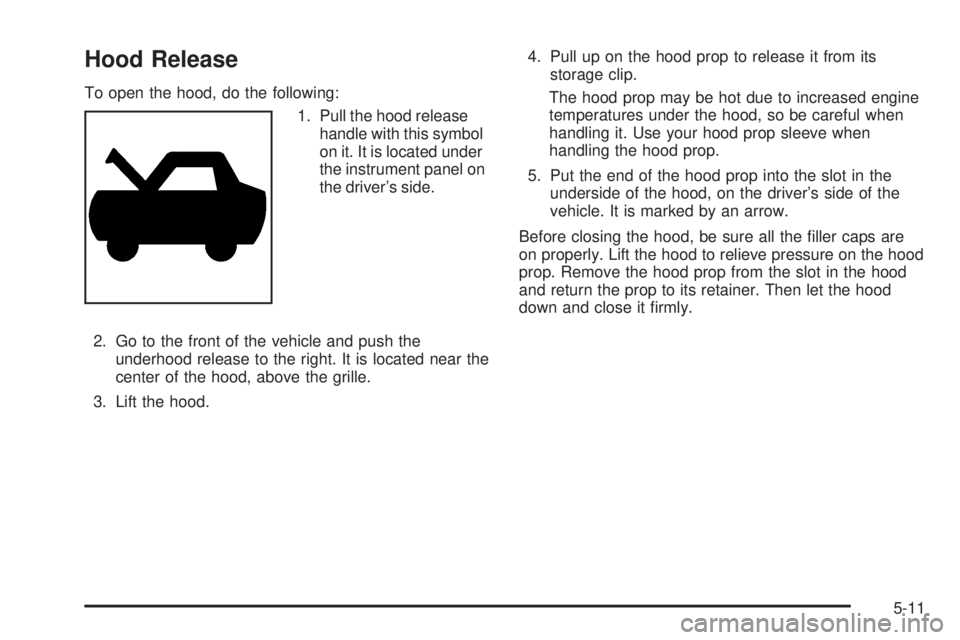
Hood Release
To open the hood, do the following:
1. Pull the hood release
handle with this symbol
on it. It is located under
the instrument panel on
the driver’s side.
2. Go to the front of the vehicle and push the
underhood release to the right. It is located near the
center of the hood, above the grille.
3. Lift the hood.4. Pull up on the hood prop to release it from its
storage clip.
The hood prop may be hot due to increased engine
temperatures under the hood, so be careful when
handling it. Use your hood prop sleeve when
handling the hood prop.
5. Put the end of the hood prop into the slot in the
underside of the hood, on the driver’s side of the
vehicle. It is marked by an arrow.
Before closing the hood, be sure all the ller caps are
on properly. Lift the hood to relieve pressure on the hood
prop. Remove the hood prop from the slot in the hood
and return the prop to its retainer. Then let the hood
down and close it rmly.
5-11
Page 333 of 454
Engine Overheating
You will nd an engine coolant temperature gage on
your vehicle’s instrument panel. SeeEngine Coolant
Temperature Gage on page 3-43.
Your vehicle may also have an ENGINE COOLANT
HOT message displayed in the Driver Information Center
(DIC). SeeDIC Warnings and Messages on page 3-56.
If Steam Is Coming From Your
Engine
{CAUTION:
Steam from an overheated engine can burn
you badly, even if you just open the hood. Stay
away from the engine if you see or hear steam
coming from it. Just turn it off and get
everyone away from the vehicle until it cools
down. Wait until there is no sign of steam or
coolant before you open the hood.
CAUTION: (Continued)
CAUTION: (Continued)
If you keep driving when your engine is
overheated, the liquids in it can catch re. You
or others could be badly burned. Stop your
engine if it overheats, and get out of the
vehicle until the engine is cool.
SeeOverheated Engine Protection Operating
Mode on page 5-29for information on driving
to a safe place in an emergency.
Notice:If your engine catches re because you
keep driving with no coolant, your vehicle can
be badly damaged. The costly repairs would not be
covered by your warranty. SeeOverheated Engine
Protection Operating Mode on page 5-29for
information on driving to a safe place in an
emergency.
5-27
Page 395 of 454
If any of the soil remains, a commercial fabric cleaner or
spot lifter may be necessary. When a commercial
upholstery cleaner or spot lifter is to be used, test a
small hidden area for colorfastness rst. If the locally
cleaned area gives any impression that a ring formation
may result, clean the entire surface.
After the cleaning process has been completed, a paper
towel can be used to blot excess moisture from the
fabric or carpet.
Leather
A soft cloth dampened with water may be used to
remove dust. If a more thorough cleaning is necessary,
a soft cloth dampened with a mild soap solution can
be used. Allow the leather to dry naturally. Do not use
heat to dry. Never use steam to clean leather. Never
use spot lifters or spot removers on leather. Many
commercial leather cleaners and coatings that are sold
to preserve and protect leather may permanently
change the appearance and feel of your leather and are
not recommended. Do not use silicone or wax-based
products, or those containing organic solvents to clean
your vehicle’s interior because they can alter the
appearance by increasing the gloss in a non-uniform
manner. Never use shoe polish on your leather.
Instrument Panel, Vinyl, and Other
Plastic Surfaces
A soft cloth dampened with water may be used to
remove dust. If a more thorough cleaning is necessary,
a clean soft cloth dampened with a mild soap solution
can be used to gently remove dust and dirt. Never use
spot lifters or removers on plastic surfaces. Many
commercial cleaners and coatings that are sold to
preserve and protect soft plastic surfaces may
permanently change the appearance and feel of your
interior and are not recommended. Do not use silicone
or wax-based products, or those containing organic
solvents to clean your vehicle’s interior because
they can alter the appearance by increasing the gloss in
a non-uniform manner.
Some commercial products may increase gloss on your
instrument panel. The increase in gloss may cause
annoying reections in the windshield and even make it
difficult to see through the windshield under certain
conditions.
5-89
Page 401 of 454

Vehicle Identication
Vehicle Identication Number (VIN)
This is the legal identier for your vehicle. It appears on
a plate in the front corner of the instrument panel, on
the driver’s side. You can see it if you look through the
windshield from outside your vehicle. The VIN also
appears on the Vehicle Certication and Service Parts
labels and the certicates of title and registration.
Engine Identication
The eighth character in the VIN is the engine code. This
code will help you identify your vehicle’s engine,
specications, and replacement parts.
Service Parts Identication Label
You will nd this label on the inside of the glove box. It
is very helpful if you ever need to order parts. On
this label, you will nd the following:
VIN
Model designation
Paint information
Production options and special equipment
Be sure that this label is not removed from the vehicle.
Electrical System
Add-On Electrical Equipment
Notice:Don’t add anything electrical to your vehicle
unless you check with your dealer rst. Some
electrical equipment can damage your vehicle and
the damage wouldn’t be covered by your warranty.
Some add-on electrical equipment can keep other
components from working as they should.
Your vehicle has an airbag system. Before attempting to
add anything electrical to your vehicle, seeServicing
Your Airbag-Equipped Vehicle on page 1-70.
5-95
Page 402 of 454

Headlamp Wiring
The headlamp wiring is protected by four internal fuses
in the underhood fuse block. An electrical overload
will cause the lamps to go on and off, or in some cases
to remain off. If this happens, have your headlamp
wiring checked right away.
Windshield Wiper Fuses
The windshield wiper motor is protected by an internal
fuse in the underhood fuse block. If the motor overheats
due to heavy snow, etc., the wiper will stop until the
motor cools. If the overload is caused by some electrical
problem, be sure to get it xed.
The rear washer pump is controlled by a relay located
in the engine compartment, behind the windshield
washer uid reservoir. The rear wiper motor is protected
by a fuse located in the instrument panel fuse block.
Power Windows and Other
Power Options
Circuit breakers in the instrument panel fuse panel
protect the power windows and other power accessories.
When the current load is too heavy, the circuit breaker
opens and closes, protecting the circuit until the
problem is xed.
Fuses and Circuit Breakers
The wiring circuits in your vehicle are protected from
short circuits by a combination of fuses, circuit breakers,
and fusible thermal links.
Look at the silver-colored band inside the fuse. If the
band is broken or melted, replace the fuse. Be sure you
replace a bad fuse with a new one of the identical
size and rating.
If you ever have a problem on the road and do not have
a spare fuse, you can borrow one that has the same
amperage or use one of the spare fuses in the
underhood fuse block. Just pick some feature of your
vehicle that you can get along without – like the radio or
cigarette lighter – and use its fuse, if it is the right
amperage. Replace it as soon as you can.
There are two fuse blocks in your vehicle, the instrument
panel fuse block and the underhood fuse block.
Instrument Panel Fuse Block
The instrument panel fuse block is located at the right
end of the instrument panel, on the passenger’s
side of the vehicle. Open the front passegner’s door,
and remove the cover, to access the fuse block.
Your vehicle may not have all of the fuses listed.
5-96
Page 426 of 454
Customer Assistance and
Information
Customer Satisfaction Procedure
Your satisfaction and goodwill are important to
your dealer and to Buick. Normally, any concerns with
the sales transaction or the operation of your vehicle will
be resolved by your GM dealer’s sales or service
departments. Sometimes, however, despite the best
intentions of all concerned, misunderstandings can
occur. If your concern has not been resolved to your
satisfaction, the following steps should be taken:
STEP ONE:Discuss your concern with a member of
dealership management. Normally, concerns can
be quickly resolved at that level. If the matter has
already been reviewed with the sales, service, or parts
manager, contact the owner of the dealership or the
general manager.STEP TWO:If after contacting a member of dealership
management, it appears your concern cannot be
resolved by the dealership without further help, contact
the Buick Customer Assistance Center by calling
1-800-521-7300. In Canada, contact GM of Canada
Customer Communication Centre by calling
1-800-263-3777 (English) or 1-800-263-7854 (French).
We encourage you to call the toll-free number in
order to give your inquiry prompt attention. Please have
the following information available to give the Customer
Assistance Representative:
Vehicle Identication Number. This is available from
the vehicle registration or title, or the plate at the
top left of the instrument panel.
Dealership name and location
Vehicle delivery date and present mileage
When contacting Buick, please remember that your
concern will likely be resolved at a dealer’s facility. That
is why we suggest you follow Step One rst if you
have a concern.
7-2
Page 441 of 454
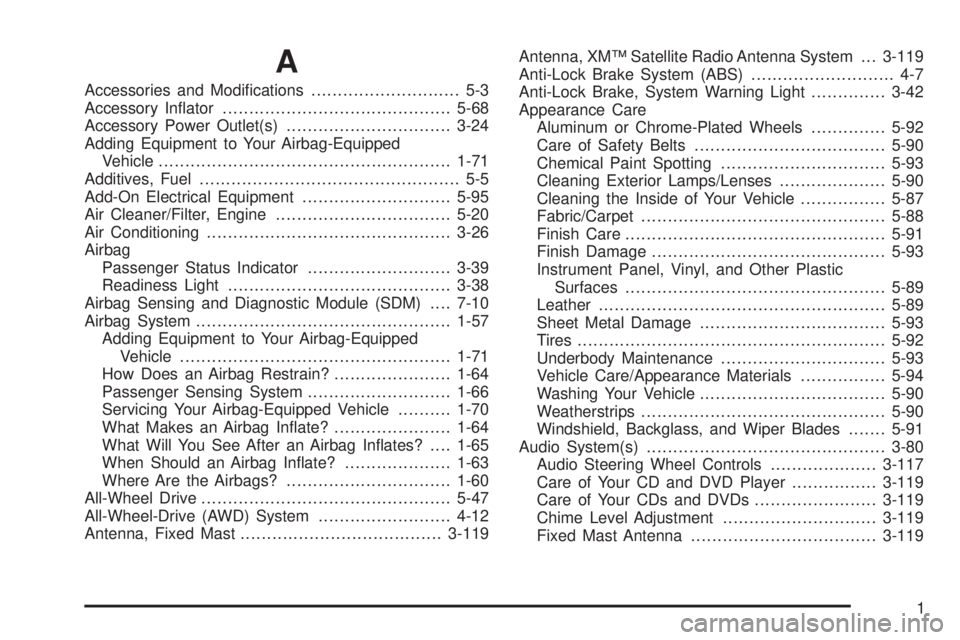
A
Accessories and Modications............................ 5-3
Accessory Inator...........................................5-68
Accessory Power Outlet(s)...............................3-24
Adding Equipment to Your Airbag-Equipped
Vehicle.......................................................1-71
Additives, Fuel................................................. 5-5
Add-On Electrical Equipment............................5-95
Air Cleaner/Filter, Engine.................................5-20
Air Conditioning..............................................3-26
Airbag
Passenger Status Indicator...........................3-39
Readiness Light..........................................3-38
Airbag Sensing and Diagnostic Module (SDM)....7-10
Airbag System................................................1-57
Adding Equipment to Your Airbag-Equipped
Vehicle...................................................1-71
How Does an Airbag Restrain?......................1-64
Passenger Sensing System...........................1-66
Servicing Your Airbag-Equipped Vehicle..........1-70
What Makes an Airbag Inate?......................1-64
What Will You See After an Airbag Inates?....1-65
When Should an Airbag Inate?....................1-63
Where Are the Airbags?...............................1-60
All-Wheel Drive...............................................5-47
All-Wheel-Drive (AWD) System.........................4-12
Antenna, Fixed Mast......................................3-119Antenna, XM™ Satellite Radio Antenna System . . . 3-119
Anti-Lock Brake System (ABS)........................... 4-7
Anti-Lock Brake, System Warning Light..............3-42
Appearance Care
Aluminum or Chrome-Plated Wheels..............5-92
Care of Safety Belts....................................5-90
Chemical Paint Spotting...............................5-93
Cleaning Exterior Lamps/Lenses....................5-90
Cleaning the Inside of Your Vehicle................5-87
Fabric/Carpet..............................................5-88
Finish Care.................................................5-91
Finish Damage............................................5-93
Instrument Panel, Vinyl, and Other Plastic
Surfaces.................................................5-89
Leather......................................................5-89
Sheet Metal Damage...................................5-93
Tires..........................................................5-92
Underbody Maintenance...............................5-93
Vehicle Care/Appearance Materials................5-94
Washing Your Vehicle...................................5-90
Weatherstrips..............................................5-90
Windshield, Backglass, and Wiper Blades.......5-91
Audio System(s).............................................3-80
Audio Steering Wheel Controls....................3-117
Care of Your CD and DVD Player................3-119
Care of Your CDs and DVDs.......................3-119
Chime Level Adjustment.............................3-119
Fixed Mast Antenna...................................3-119
1
Page 443 of 454

Check
Engine Light...............................................3-44
Checking Things Under the Hood......................5-10
Chemical Paint Spotting...................................5-93
Child Restraints
Child Restraint Systems...............................1-40
Infants and Young Children...........................1-37
Lower Anchors and Tethers for Children..........1-45
Older Children.............................................1-34
Securing a Child Restraint in a Rear Seat
Position..................................................1-51
Securing a Child Restraint in the Right
Front Seat Position...................................1-53
Where to Put the Restraint...........................1-44
Chime Level Adjustment.................................3-119
Cigarette Lighter.............................................3-26
Cleaning
Aluminum or Chrome-Plated Wheels..............5-92
Exterior Lamps/Lenses.................................5-90
Fabric/Carpet..............................................5-88
Finish Care.................................................5-91
Inside of Your Vehicle..................................5-87
Instrument Panel, Vinyl, and Other Plastic
Surfaces.................................................5-89
Leather......................................................5-89
Tires..........................................................5-92
Underbody Maintenance...............................5-93Cleaning (cont.)
Washing Your Vehicle...................................5-90
Weatherstrips..............................................5-90
Windshield, Backglass, and Wiper Blades.......5-91
Climate Control System
Air Filter, Passenger Compartment.................3-32
Dual..........................................................3-26
Outlet Adjustment........................................3-29
Rear..........................................................3-30
Collision Damage Repair..................................7-11
Comfort Guides, Rear Safety Belt.....................1-31
Compact Spare Tire........................................5-86
Content Theft-Deterrent....................................2-28
Control of a Vehicle.......................................... 4-6
Convenience Center........................................2-56
Convenience Net............................................2-55
Coolant
Engine Temperature Gage............................3-43
Heater, Engine............................................2-34
Cooling System..............................................5-29
Cruise Control................................................3-11
Cruise Control Light........................................3-47
Cupholder(s)..................................................2-51
Customer Assistance Information
Courtesy Transportation.................................. 7-8
Customer Assistance for Text Telephone (TTY)
Users....................................................... 7-4
3
Page 445 of 454

E
Eight-Way Power Seats..................................... 1-3
Electrical System
Add-On Equipment......................................5-95
Fuses and Circuit Breakers...........................5-96
Headlamp Wiring.........................................5-96
Instrument Panel Fuse Block.........................5-96
Power Windows and Other Power Options......5-96
Underhood Fuse Block.................................5-98
Windshield Wiper Fuses...............................5-96
Engine
Air Cleaner/Filter.........................................5-20
Battery.......................................................5-42
Check and Service Engine Soon Light............3-44
Coolant......................................................5-24
Coolant Heater............................................2-34
Coolant Temperature Gage...........................3-43
Engine Compartment Overview......................5-12
Exhaust.....................................................2-42
Oil .............................................................5-15
Oil Life System...........................................5-18
Overheated Protection Operating Mode...........5-29
Overheating................................................5-27
Starting......................................................2-33Entry Lighting.................................................3-19
Event Data Recorders (EDR)............................7-10
Exit Lighting...................................................3-20
Extender, Safety Belt.......................................1-34
Exterior Lamps...............................................3-15
F
Filter
Engine Air Cleaner......................................5-20
Finish Damage...............................................5-93
Fixed Mast Antenna.......................................3-119
Flash-to-Pass................................................... 3-8
Flat Tire........................................................5-70
Flat Tire, Changing.........................................5-70
Flat Tire, Storing.............................................5-83
Fluid
Automatic Transaxle.....................................5-22
Power Steering...........................................5-37
Windshield Washer......................................5-38
Folding Tray...................................................2-54
Front Console Storage Area.............................2-53
Front Reading Lamps......................................3-20
5