change time BUICK TERRAZA 2006 Owner's Manual
[x] Cancel search | Manufacturer: BUICK, Model Year: 2006, Model line: TERRAZA, Model: BUICK TERRAZA 2006Pages: 454, PDF Size: 2.7 MB
Page 2 of 454
GENERAL MOTORS, GM, the GM Emblem, BUICK,
and the BUICK Emblem are registered trademarks and
the name TERRAZA is a trademark of General
Motors Corporation.
This manual includes the latest information at the time it
was printed. We reserve the right to make changes
after that time without notice. For vehicles rst sold in
Canada, substitute the name “General Motors of Canada
Limited” for Buick Motor Division whenever it appears
in this manual.
Keep this manual in the vehicle, so it will be there if it is
needed while you are on the road. If the vehicle is
sold, leave this manual in the vehicle.
Canadian Owners
A French language copy of this manual can be obtained
from your dealer or from:
Helm, Incorporated
P.O. Box 07130
Detroit, MI 48207
How to Use This Manual
Many people read the owner manual from beginning to
end when they rst receive their new vehicle. If this
is done, it can help you learn about the features
and controls for the vehicle. Pictures and words work
together in the owner manual to explain things.
Index
A good place to quickly locate information about the
vehicle is the Index in the back of the manual. It is an
alphabetical list of what is in the manual and the
page number where it can be found.
Litho in U.S.A.
Part No. 06TERRAZA A First Printing
©2005 General Motors Corporation. All Rights Reserved.
ii
Page 43 of 454
Infants and Young Children
Everyone in a vehicle needs protection! This includes
infants and all other children. Neither the distance
traveled nor the age and size of the traveler changes
the need, for everyone, to use safety restraints. In fact,
the law in every state in the United States and in
every Canadian province says children up to some age
must be restrained while in a vehicle.
Every time infants and young children ride in vehicles,
they should have the protection provided by appropriate
restraints. Young children should not use the vehicle’s
adult safety belts alone, unless there is no other choice.
Instead, they need to use a child restraint.{CAUTION:
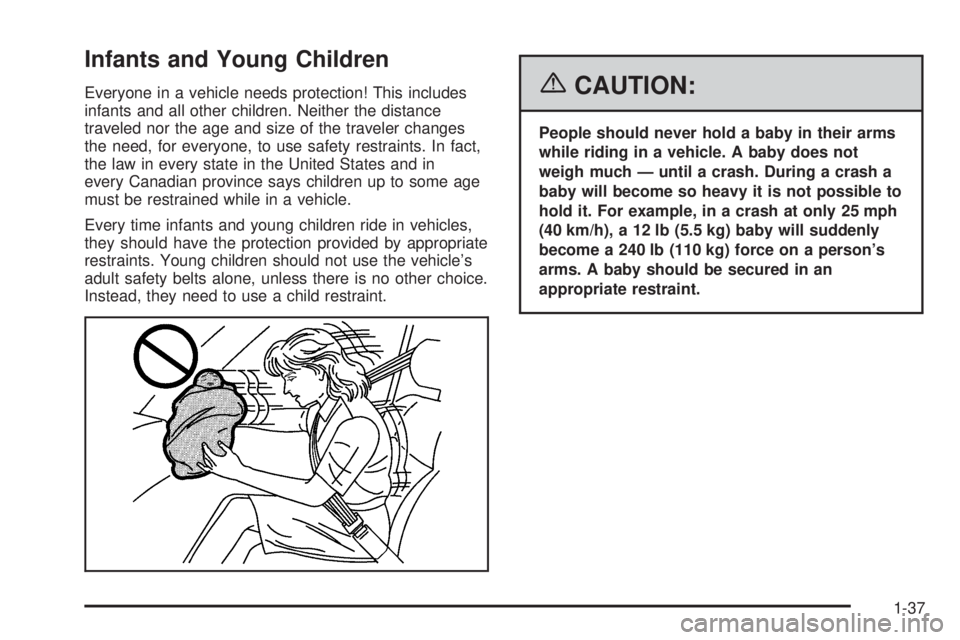
People should never hold a baby in their arms
while riding in a vehicle. A baby does not
weigh much — until a crash. During a crash a
baby will become so heavy it is not possible to
hold it. For example, in a crash at only 25 mph
(40 km/h), a 12 lb (5.5 kg) baby will suddenly
become a 240 lb (110 kg) force on a person’s
arms. A baby should be secured in an
appropriate restraint.
1-37
Page 88 of 454

Battery Replacement
Under normal use, the battery in your remote keyless
entry transmitter should last about three years.
You can tell the battery is weak if the transmitter will not
work at the normal range in any location. If you have
to get close to your vehicle before the transmitter works,
it is probably time to change the battery.
Notice:When replacing the battery, use care not to
touch any of the circuitry. Static from your body
transferred to these surfaces may damage the
transmitter.
1. Insert a at object, such as a coin, into the slot on
the side of the transmitter and twist it to separate
the halves.
2. Gently pry the battery out of the transmitter. Do not
use the metal anges to pop out the battery.
3. Replace the battery.
4. Reassemble the transmitter. Make sure the halves
are snapped together tightly so water will not get in.
5. Press and hold the lock and unlock buttons
for seven seconds to synchronize the transmitter.
6. Check the transmitter operation.
2-8
Page 94 of 454
Automatic Door Lock
All of the doors will lock automatically when you move
the shift lever out of PARK (P). This feature cannot
be disabled.
If someone needs to get out of the vehicle while it is not
in PARK (P), shift into PARK (P), or, have that person
use the manual lever or the power door lock switch.
When the door is closed again, it will lock when
the vehicle exceeds 5 mph (8 km/h).
With automatic door locks, you can lock or unlock the
doors at any time, either manually or by using the power
door lock switches.
Programmable Automatic Door
Unlock
Your vehicle was programmed so that all doors will
unlock automatically when the shift lever is moved into
PARK (P).
To change the way the automatic door unlocking
operates, seeDIC Vehicle Personalization (Uplevel
Only) on page 3-72.
Lockout Protection
The lockout protection feature makes it more difficult to
lock the key in the vehicle. If the driver’s door is
open while the key is in the ignition, the door cannot be
locked with the power door lock switch.
This feature cannot guarantee that you will never be
locked out of the vehicle. If the key is not left in
the ignition, or, if the manual door lock is used, the key
could still be locked inside the vehicle. Always
remember to take the key with you.
Dual Sliding Doors
To open either sliding door from outside the vehicle, pull
the handle out and then pull the door toward the rear.
If you slide the door all the way back, the door will rest in
a detent position.
To move the door forward, you must rst pull the door
past the open detent position.
The driver’s side sliding door is designed to open only a
little if the fuel door is open. If this ever happens, do not
try to force the sliding door. Just close the driver’s side
sliding door. Then when the fuel ller door is closed, the
driver’s side sliding door can be opened normally.
2-14
Page 139 of 454
Instrument Panel Overview...............................3-4
Hazard Warning Flashers................................3-6
Other Warning Devices...................................3-6
Horn.............................................................3-6
Tilt Wheel.....................................................3-6
Turn Signal/Multifunction Lever.........................3-7
Turn and Lane-Change Signals........................3-7
Headlamp High/Low-Beam Changer..................3-8
Flash-to-Pass.................................................3-8
Windshield Wipers..........................................3-9
Windshield Washer.........................................3-9
Rear Window Wiper/Washer...........................3-10
Cruise Control..............................................3-11
Exterior Lamps.............................................3-15
Wiper Activated Headlamps............................3-16
Headlamps on Reminder................................3-16
Daytime Running Lamps (DRL)/Automatic
Headlamp System.....................................3-16
Instrument Panel Brightness...........................3-17
Interior Lamps Control...................................3-18
Dome Lamp.................................................3-18
Entry Lighting...............................................3-19
Delayed Lighting...........................................3-19
Exit Lighting.................................................3-20
Front Reading Lamps....................................3-20Rear Reading Lamps....................................3-20
Cargo Lamp.................................................3-20
Battery Run-Down Protection..........................3-21
Overhead Console Switchbank.......................3-21
Ultrasonic Rear Parking Assist (URPA)............3-22
Accessory Power Outlet(s).............................3-24
Power Outlet 115 Volt Alternating Current........3-25
Cigarette Lighter...........................................3-26
Climate Controls............................................3-26
Dual Climate Control System..........................3-26
Outlet Adjustment.........................................3-29
Rear Climate Control System.........................3-30
Passenger Compartment Air Filter...................3-32
Warning Lights, Gages, and Indicators............3-34
Instrument Panel Cluster................................3-35
Speedometer and Odometer...........................3-36
Trip Odometer..............................................3-36
Tachometer.................................................3-36
Safety Belt Reminder Light.............................3-37
Passenger Safety Belt Reminder Light.............3-37
Airbag Readiness Light..................................3-38
Passenger Airbag Status Indicator...................3-39
Charging System Light..................................3-41
Brake System Warning Light..........................3-41
Section 3 Instrument Panel
3-1
Page 155 of 454
When it is dark enough outside, the exterior lamps will
come on automatically. When it is bright enough
outside, the exterior lamps will turn off and the DRL will
turn on. Of course, you may still turn on the headlamps
any time you need to.
If you start your vehicle in a dark garage, the automatic
headlamp system will come on immediately. Once
you leave the garage, it will take approximately
30 seconds for the automatic headlamp system to
change to DRL if it is light outside. During that delay,
your instrument panel cluster may not be as bright
as usual. Make sure your instrument panel brightness
control is in the full bright position. SeeInstrument Panel
Brightness on page 3-17.
To idle your vehicle with the DRL and automatic
headlamps off, toggle the exterior lamp control to off
after starting the vehicle.
As with any vehicle, you should turn on the regular
headlamp system when you need it.Instrument Panel Brightness
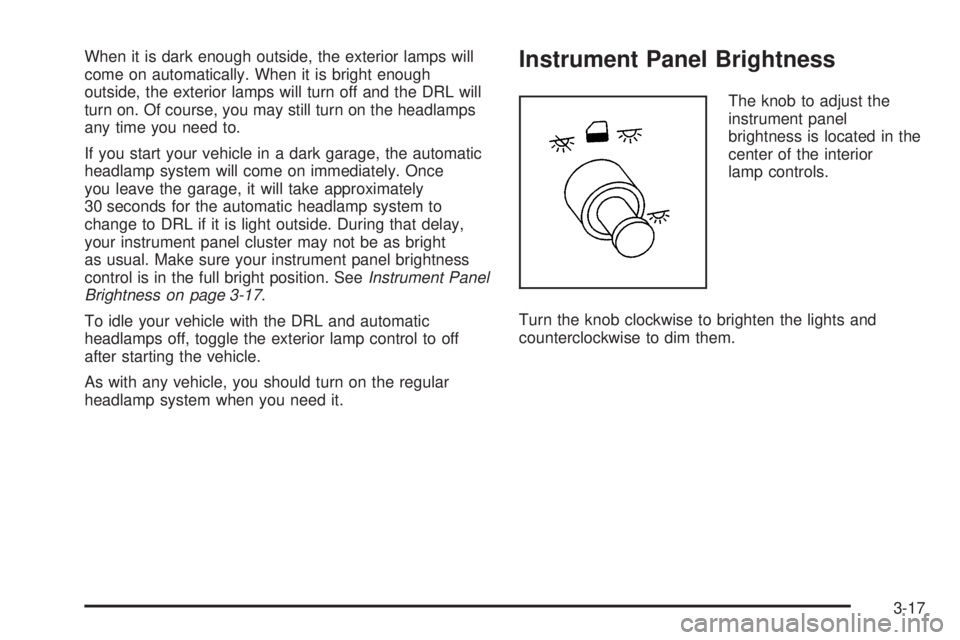
The knob to adjust the
instrument panel
brightness is located in the
center of the interior
lamp controls.
Turn the knob clockwise to brighten the lights and
counterclockwise to dim them.
3-17
Page 190 of 454
Average Speed
Press the information button until AVERAGE SPEED
displays. This mode shows the average speed of the
vehicle in miles per hour (mph) or kilometers per hour
(km/h). This average is calculated based on the various
vehicle speed recorded since the last reset of this value.
To reset the value, press the information button to display
AVERAGE SPEED, then press and hold the set/reset
button. The display will return to zero.
Fuel Range
Press the information button until FUEL RANGE
displays. This mode shows the approximate number of
remaining miles or kilometers the vehicle can be
driven without refueling.
Fuel range is based on several factors, including
distance travelled, fuel used, fuel capacity, etc. This
estimate will change if driving conditions change.
For example, if driving in traffic and making frequent
stops, this mode may read one number, but if the vehicle
is driven on a freeway, the number may change even
though the same amount of fuel is in the fuel tank. This
is because different driving conditions produce
different fuel economies. Generally, freeway driving
produces better fuel economy than city driving.
Fuel range cannot be reset.If your vehicle is low on fuel, FUEL RANGE LOW will
display followed by the LOW FUEL message. See “LOW
FUEL” underDIC Warnings and Messages on
page 3-56for more information.
Average Fuel Economy
Press the information button until AVG ECONOMY
displays. This mode shows the approximate average
miles per gallon (mpg) or liters per 100 kilometers
(L/100 km). This number is calculated based on the
number of mpg (L/100 km) recorded since the last time
this menu item was reset. To reset AVG ECONOMY,
press and hold the set/reset button. The display
will return to zero.
Instantaneous Fuel Economy
Press the information button until INST ECONOMY
displays. This mode shows the current fuel economy at
a particular moment and will change frequently as
driving conditions change. This mode shows the
instantaneous fuel economy in miles per gallon (mpg) or
liters per 100 kilometers (L/100 km). Unlike average
fuel economy, this screen cannot be reset.
3-52
Page 191 of 454
Battery
Press the information button until BATTERY displays.
This mode shows the current battery voltage.
If there is a problem with the battery charging system, a
DIC message will display. SeeDIC Warnings and
Messages on page 3-56for more information.
Your vehicle’s charging system regulates voltage based
on the state of the battery. The battery voltage may
uctuate when viewing this information on the DIC. This
is normal.
Oil Life
Press the information button until OIL LIFE displays.
This mode shows an estimate of the oil’s remaining
useful life. If you see OIL LIFE 99% on the display, that
means 99% of the current oil life remains. The engine
oil life system will alert you to change your oil on a
schedule consistent with your driving conditions.
When the remaining oil life is low, the LOW OIL
PRESSURE message will appear on the display. You
should change your oil as soon as possible. SeeEngine
Oil on page 5-15. In addition to the engine oil life
system monitoring the oil life, additional maintenance is
recommended in the Maintenance Schedule in this
manual. SeeScheduled Maintenance on page 6-4for
more information.Remember, you must reset the OIL LIFE yourself after
each oil change. It will not reset itself. Also, be
careful not to reset the OIL LIFE accidentally at any
time other than when the oil has just been changed. It
cannot be reset accurately until the next oil change.
To reset the engine oil life system, seeEngine Oil Life
System on page 5-18. The display will show 100%
when the system is reset.
Menu Button Items
q
(Menu):Press this button to scroll through the
following items:
Units
Press the menu button until UNITS displays. This mode
allows you to select between English or Metric units
of measurement. Once in this mode, press the set/reset
button to select between ENGLISH or METRIC.
3-53
Page 208 of 454

STABILITY CONTROL ACTIVE
If your vehicle has StabiliTrak®, this message will
display when StabiliTrak®is actively assisting you with
directional control of the vehicle. Slippery road
conditions may exist when this message is displayed,
so adjust your driving accordingly. SeeStabiliTrak
®
System on page 4-10.
This message will display only while the ignition is in
RUN. This message stays on until road conditions
change and StabiliTrak
®is not active.
This message cannot be acknowledged and cleared
from the screen.
STABILITY CONTROL OFF
If your vehicle has StabiliTrak®, this message will
display any time the system turns off. When this
message has been displayed, StabiliTrak
®is no longer
available to assist you with directional control of the
vehicle. Adjust your driving accordingly. SeeStabiliTrak
®
System on page 4-10.
This message will display only while the ignition is
in RUN.
Any of the following conditions may cause the
StabiliTrak
®system to turn off:
The battery is low.
There is a StabiliTrak®system failure. See your
GM dealer for service.
STARTING DISABLED
This message will display if the starting of the engine is
disabled due to the electronic throttle control system
or vehicle theft-deterrent system. Have your vehicle
serviced by your GM dealer immediately.
This message will only appear while the ignition is in
RUN, and will not disappear until the problem is
resolved.
This message cannot be acknowledged.
TRACTION CONTROL ACTIVE
If your vehicle has the traction control system, this
message will display when the system is on. Slippery
road conditions may exist if this message is displayed,
so adjust your driving accordingly. SeeTraction
Control System (TCS) on page 4-9for more information.
This message only displays while the ignition is in
RUN and will not disappear until driving conditions
change and the traction control is no longer active.
This message cannot be acknowledged or cleared from
the screen.
3-70
Page 219 of 454
Here are some ways in which you can help avoid
distraction while driving.
While your vehicle is parked:
Familiarize yourself with all of its controls.
Familiarize yourself with its operation.
Set up your audio system by presetting your
favorite radio stations, setting the tone, and
adjusting the speakers. Then, when driving
conditions permit, you can tune to your favorite
radio stations using the presets and steering wheel
controls (if equipped).
Notice:Before adding any sound equipment to
your vehicle, such as an audio system, CD player,
CB radio, mobile telephone, or two-way radio, make
sure that it can be added by checking with your
dealer. Also, check federal rules covering mobile
radio and telephone units. If sound equipment can
be added, it is very important to do it properly.
Added sound equipment may interfere with
the operation of your vehicle’s engine, radio, or
other systems, and even damage them. Your
vehicle’s systems may interfere with the operation
of sound equipment that has been added.Your vehicle has a feature called Retained Accessory
Power (RAP). With RAP, the audio system can be
played even after the ignition is turned off. SeeRetained
Accessory Power (RAP) on page 2-33for more
information.Setting the Time
Press the H or the M button to enter clock mode. Press
and hold H until the correct hour appears on the
display. Press and hold M until the correct minute
appears on the display.
To change the time default setting from 12 hour to
24 hour, press either the H or the M button to enter the
clock mode, then press the tune knob to select
between the 12 or 24 hour display format. The clock
mode will automatically time out with the changed
display format set as the current default setting.
3-81