parking brake BUICK TERRAZA 2007 User Guide
[x] Cancel search | Manufacturer: BUICK, Model Year: 2007, Model line: TERRAZA, Model: BUICK TERRAZA 2007Pages: 562, PDF Size: 2.96 MB
Page 239 of 562
The brake system warning light also appears on
the instrument panel cluster when this message
appears on the DIC. SeeBrake System Warning
Light on page 214.
A chime sounds continuously while this message
is displayed if driving above 5 mph (8 km/h).
Press any of the DIC buttons to acknowledge this
message and to clear it from the screen.
This message continues to display for two seconds
if it has not been acknowledged when the engine
is turned off. It also re-displays for two seconds if
the message has been acknowledged, but the
condition still exists when the engine is turned off.
If the condition still exists, the message re-appears
when the engine is turned on.
PARK LAMPS ON
This message displays to alert the driver when the
headlamps or parking lamps are on while the
ignition is off and the driver’s door is opened. See
Exterior Lamps on page 181for more information.
A chime sounds continuously while this message
is displayed.
This message cannot be acknowledged.
PASSENGER’S DOOR AJAR
This message displays when the front passenger’s
door is not closed properly. When this message
appears, make sure that the front passenger’s
door is closed completely.
This message displays while the ignition is in
RUN. A chime sounds when the ignition is shifted
out of PARK (P). Press any of the DIC buttons
to acknowledge this message and to clear it from
the screen.
This message continues to display for two seconds
if it has not been acknowledged when the engine
is turned off. It also re-displays for two seconds if
the message has been acknowledged, but the
condition still exists when the engine is turned off.
If the condition still exists, the message re-appears
when the engine is turned on.
239
Page 259 of 562
Notice:Before adding any sound equipment
to your vehicle, such as an audio system,
CD player, CB radio, mobile telephone,
or two-way radio, make sure that it can be
added by checking with your dealer. Also,
check federal rules covering mobile radio and
telephone units. If sound equipment can be
added, it is very important to do it properly.
Added sound equipment may interfere with the
operation of your vehicle’s engine, radio, or
other systems, and even damage them.
Your vehicle’s systems may interfere with the
operation of sound equipment that has
been added.
Notice:The chime signals related to safety
belts, parking brake, and other functions
of your vehicle operate through the
radio/entertainment system. If that equipment
is replaced or additional equipment is added
to your vehicle, the chimes may not work.
Make sure that replacement or additional
equipment is compatible with your vehicle
before installing it. SeeAccessories and
Modifications on page 400.Your vehicle has a feature called Retained
Accessory Power (RAP). With RAP, the audio
system can be played even after the ignition
is turned off. SeeRetained Accessory
Power (RAP) on page 130for more information.
Setting the Time
Press the H or the M button to enter clock mode.
Press and hold H until the correct hour appears
on the display. Press and hold M until the correct
minute appears on the display.
To change the time default setting from 12 hour to
24 hour, press either the H or the M button to
enter the clock mode, then press the tune knob to
select between the 12 or 24 hour display format.
The clock mode will automatically time out with
the changed display format set as the current
default setting.
259
Page 385 of 562
Dinghy Towing
Your vehicle was not designed to be towed with
all of its wheels on the ground. It can be towed
with the two rear wheels on the ground. See “Dolly
Towing” following for more information.
Dolly Towing
To dolly tow your vehicle, do the following:
1. Put the front wheels on a dolly.
2. Put the vehicle in PARK (P).
3. Set the parking brake and then remove
the key.
4. Clamp the steering wheel in a straight-ahead
position with a clamping device designed for
towing.
5. Release the parking brake.
Level Control
With this feature, the rear of the vehicle is
automatically kept level as you load or unload
your vehicle. However, you should still not exceed
the GVWR or the GAWR. SeeLoading Your
Vehicle on page 378.
You may hear the compressor operating when you
load or unload your vehicle, and periodically as
the system self-adjusts. This is normal. The
compressor should operate for brief periods of
time. If the sound continues for an extended period
of time, your vehicle needs service.
Using heavier suspension components to get
added durability might not change your weight
ratings. Ask your dealer to help you load
your vehicle the right way.
385
Page 395 of 562
Parking on Hills
{CAUTION:
You really should not park your vehicle,
with a trailer attached, on a hill. If
something goes wrong, your rig could
start to move. People can be injured, and
both your vehicle and the trailer can be
damaged.
But if you ever have to park your rig on a hill, do
the following:
1. Apply your regular brakes, but do not shift into
PARK (P).
2. Have someone place chocks under the trailer
wheels.
3. When the wheel chocks are in place, release
the regular brakes until the chocks absorb
the load.
4. Reapply the regular brakes. Then apply your
parking brake, and shift into PARK (P).
5. Release the regular brakes.
When You Are Ready to Leave After
Parking on a Hill
1. Apply your regular brakes and hold the pedal
down while you do the following:
Start your engine.
Shift into a gear.
Release the parking brake.
2. Let up on the brake pedal.
3. Drive slowly until the trailer is clear of the
chocks.
4. Stop and have someone pick up and store the
chocks.
395
Page 397 of 562
Service........................................................ 400
Accessories and Modications................... 400
California Proposition 65 Warning.............. 401
Doing Your Own Service Work.................. 401
Adding Equipment to the Outside of Your
Vehicle................................................... 402
Fuel............................................................. 402
Gasoline Octane........................................ 402
Gasoline Specications.............................. 402
California Fuel........................................... 403
Additives................................................... 403
Fuels in Foreign Countries........................ 404
Filling the Tank......................................... 405
Filling a Portable Fuel Container............... 407
Checking Things Under
the Hood.................................................. 408
Hood Release........................................... 409
Engine Compartment Overview.................. 410
Engine Oil................................................. 411
Engine Oil Life System.............................. 414
Engine Air Cleaner/Filter............................ 416Automatic Transaxle Fluid......................... 417
Engine Coolant.......................................... 420
Radiator Pressure Cap.............................. 423
Engine Overheating................................... 423
Overheated Engine Protection
Operating Mode..................................... 425
Cooling System......................................... 426
Power Steering Fluid ................................. 432
Windshield Washer Fluid........................... 433
Brakes...................................................... 434
Battery...................................................... 437
Jump Starting............................................ 438
Bulb Replacement....................................... 443
Halogen Bulbs........................................... 443
Headlamps and Sidemarker Lamps........... 443
Front Turn Signal, Parking and Daytime
Running Lamps (DRL)........................... 445
Taillamps, Turn Signal, Stoplamps and
Back-up Lamps...................................... 445
License Plate Lamp................................... 447
Replacement Bulbs................................... 447
Section 5 Service and Appearance Care
397
Page 418 of 562

How to Check Automatic Transaxle
Fluid
Because this operation can be a little difficult, you
may choose to have this done at the dealership
service department.
If you do it yourself, be sure to follow all the
instructions here, or you could get a false reading
on the dipstick.
Notice:Too much or too little uid can damage
the transaxle. Too much can mean that some of
the uid could come out and fall on hot engine
or exhaust system parts, starting a re. Too
little uid could cause the transaxle to overheat.
Be sure to get an accurate reading if you check
the transaxle uid.
Wait at least 30 minutes before checking the
transaxle uid level if you have been driving:
When outside temperatures are above
90°F (32°C).
At high speed for quite a while.
In heavy traffic — especially in hot weather.
While pulling a trailer.To get the right reading, the uid should be at
normal operating temperature, which is 180°F to
200°F (82°C to 93°C).
Get the vehicle warmed up by driving about
15 miles (24 km) when outside temperatures are
above 50°F (10°C). If it is colder than 50°F (10°C),
you may have to drive longer.
Checking the Fluid Level
Prepare your vehicle as follows:
1. Park your vehicle on a level place. Keep the
engine running.
2. With the parking brake applied, place the shift
lever in PARK (P).
3. With your foot on the brake pedal, move the
shift lever through each gear range, pausing
for about three seconds in each range.
Then, position the shift lever in PARK (P).
4. Let the engine run at idle for three to
ve minutes.
418
Page 439 of 562
To avoid the possibility of the vehicles rolling,
set the parking brake rmly on both vehicles
involved in the jump start procedure. Put
an automatic transaxle in PARK (P) or
a manual transaxle in NEUTRAL before setting
the parking brake.
Notice:If you leave your radio or other
accessories on during the jump starting
procedure, they could be damaged. The repairs
would not be covered by your warranty.
Always turn off your radio and other
accessories when jump starting your vehicle.
3. Turn off the ignition on both vehicles.
Unplug unnecessary accessories plugged into
the cigarette lighter or the accessory power
outlet. Turn off the radio and all lamps that are
not needed. This will avoid sparks and help
save both batteries. And it could save
the radio!
4. Open the hoods and locate the batteries. Find
the positive (+) and negative (−) terminal
locations on each vehicle.
You will not need to access your battery for
jump starting. Your vehicle has a remote
positive (+) jump starting terminal for
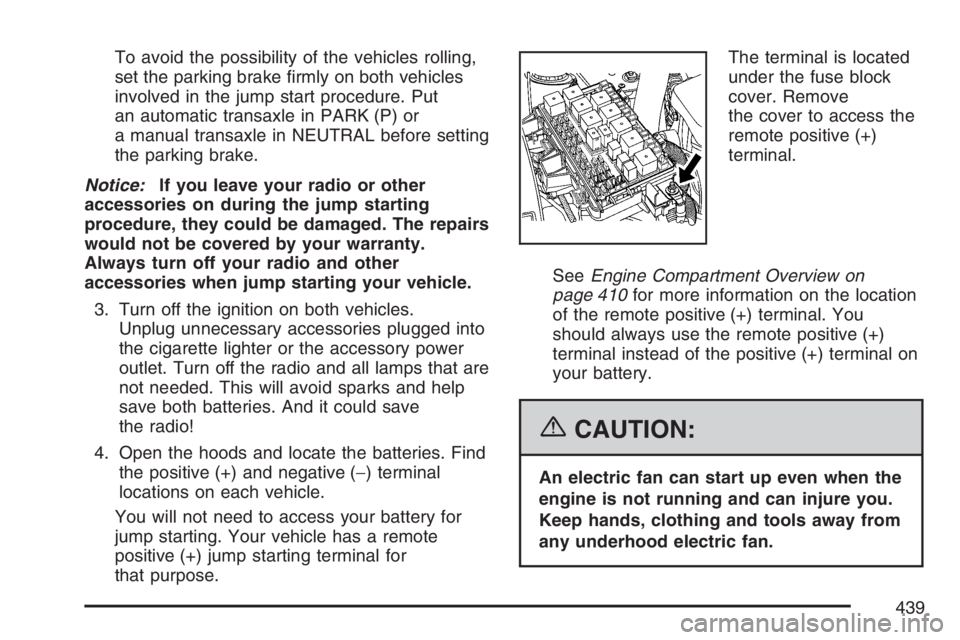
that purpose.The terminal is located
under the fuse block
cover. Remove
the cover to access the
remote positive (+)
terminal.
SeeEngine Compartment Overview on
page 410for more information on the location
of the remote positive (+) terminal. You
should always use the remote positive (+)
terminal instead of the positive (+) terminal on
your battery.
{CAUTION:
An electric fan can start up even when the
engine is not running and can injure you.
Keep hands, clothing and tools away from
any underhood electric fan.
439
Page 471 of 562
{CAUTION:
Changing a tire can be dangerous. The
vehicle can slip off the jack and roll over
or fall on you or other people. You and
they could be badly injured or even killed.
Find a level place to change your tire. To
help prevent the vehicle from moving:
1. Set the parking brake rmly.
2. Put the shift lever in PARK (P).
3. Turn off the engine and do not restart
while the vehicle is raised.
4. Do not allow passengers to remain in
the vehicle.
To be even more certain the vehicle will
not move, you should put blocks at the
front and rear of the tire farthest away
from the one being changed. That would
be the tire, on the other side, at the
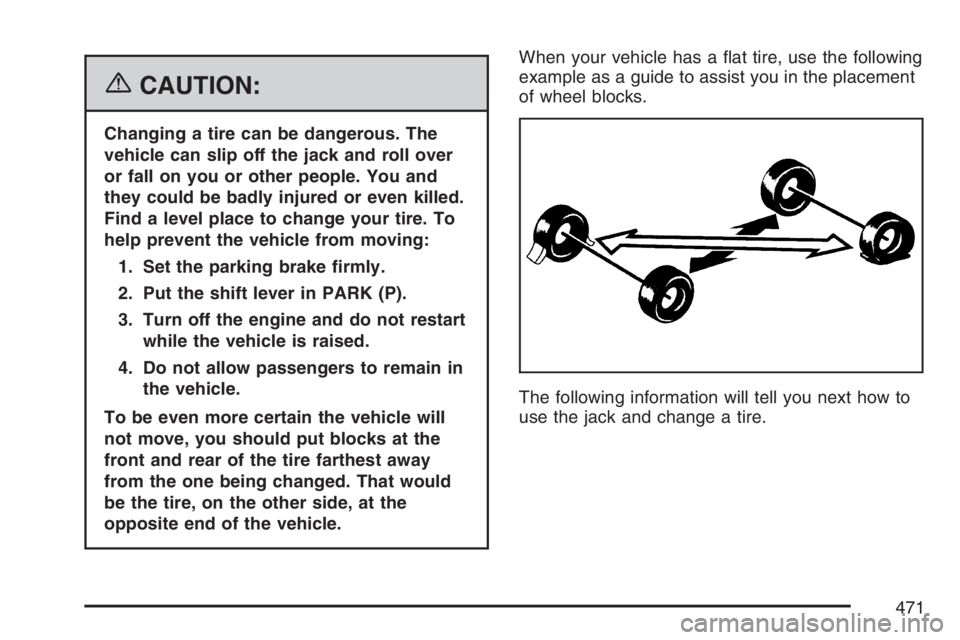
opposite end of the vehicle.When your vehicle has a at tire, use the following
example as a guide to assist you in the placement
of wheel blocks.
The following information will tell you next how to
use the jack and change a tire.
471
Page 513 of 562
Maintenance Footnotes
#Lubricate the suspension, steering linkage,
transaxle shift linkage, and the underbody contact
points and linkage.
(a)Visually inspect brake lines and hoses for
proper hook-up, binding, leaks, cracks, chang,
etc. Inspect disc brake pads for wear and rotors for
surface condition. Inspect other brake parts,
including calipers, parking brake, etc. Check
parking brake adjustment.
(b)Visually inspect front and rear suspension and
steering system for damaged, loose, or missing
parts, signs of wear or lack of lubrication. Inspect
power steering lines and hoses for proper
hook-up, binding, leaks, cracks, chang, etc.
(c)Visually inspect hoses and have them replaced
if they are cracked, swollen, or deteriorated.
Inspect all pipes, ttings and clamps; replace with
genuine GM parts as needed. To help ensure
proper operation, a pressure test of the cooling
system and pressure cap and cleaning the outside
of the radiator and air conditioning condenser is
recommended at least once a year.(d)Visually inspect wiper blades for wear or
cracking. Replace wiper blades that appear worn
or damaged or that streak or miss areas of
the windshield.
(e)Make sure the safety belt reminder light and all
your belts, buckles, latch plates, retractors, and
anchorages are working properly. Look for
any other loose or damaged safety belt system
parts. If you see anything that might keep a safety
belt system from doing its job, have it repaired.
Have any torn or frayed safety belts replaced. Also
look for any opened or broken airbag coverings,
and have them repaired or replaced. The
airbag system does not need regular maintenance.
(f)Lubricate all key lock cylinders, hood latch
assemblies, secondary latches, pivots, spring
anchor and release pawl, hood and door hinges,
rear folding seats, liftgate hinges, fuel door
hinge, power sliding door cable, and sliding door
track(s). More frequent lubrication may be required
when exposed to a corrosive environment.
Applying silicone grease on weatherstrips with a
clean cloth will make them last longer, seal better,
and not stick or squeak.
(g)If you drive regularly under dusty conditions,
inspect the lter at each engine oil change.
513
Page 516 of 562

At Least Once a Year
Starter Switch Check
{CAUTION:
When you are doing this inspection, the
vehicle could move suddenly. If the
vehicle moves, you or others could be
injured.
1. Before you start, be sure you have enough
room around the vehicle.
2. Firmly apply both the parking brake and the
regular brake. SeeParking Brake on
page 137.
Do not use the accelerator pedal, and be
ready to turn off the engine immediately if it
starts.
3. Try to start the engine in each gear. The
vehicle should start only in PARK (P) or
NEUTRAL (N). If the vehicle starts in any
other position, contact your GM Goodwrench
®
dealer for service.
Automatic Transaxle Shift Lock Control
System Check
{CAUTION:
When you are doing this inspection, the
vehicle could move suddenly. If the
vehicle moves, you or others could be
injured.
1. Before you start, be sure you have enough
room around the vehicle. It should be parked
on a level surface.
2. Firmly apply the parking brake. SeeParking
Brake on page 137.
Be ready to apply the regular brake
immediately if the vehicle begins to move.
3. With the engine off, turn the ignition to RUN,
but do not start the engine. Without applying
the regular brake, try to move the shift
lever out of PARK (P) with normal effort. If the
shift lever moves out of PARK (P), contact
your GM Goodwrench
®dealer for service.
516