steering wheel BUICK TERRAZA 2007 User Guide
[x] Cancel search | Manufacturer: BUICK, Model Year: 2007, Model line: TERRAZA, Model: BUICK TERRAZA 2007Pages: 562, PDF Size: 2.96 MB
Page 177 of 562
Cruise Control
{CAUTION:
Cruise control can be dangerous where
you cannot drive safely at a steady speed.
So, do not use your cruise control on
winding roads or in heavy traffic.
Cruise control can be dangerous on
slippery roads. On such roads, fast
changes in tire traction can cause
excessive wheel slip, and you could lose
control. Do not use cruise control on
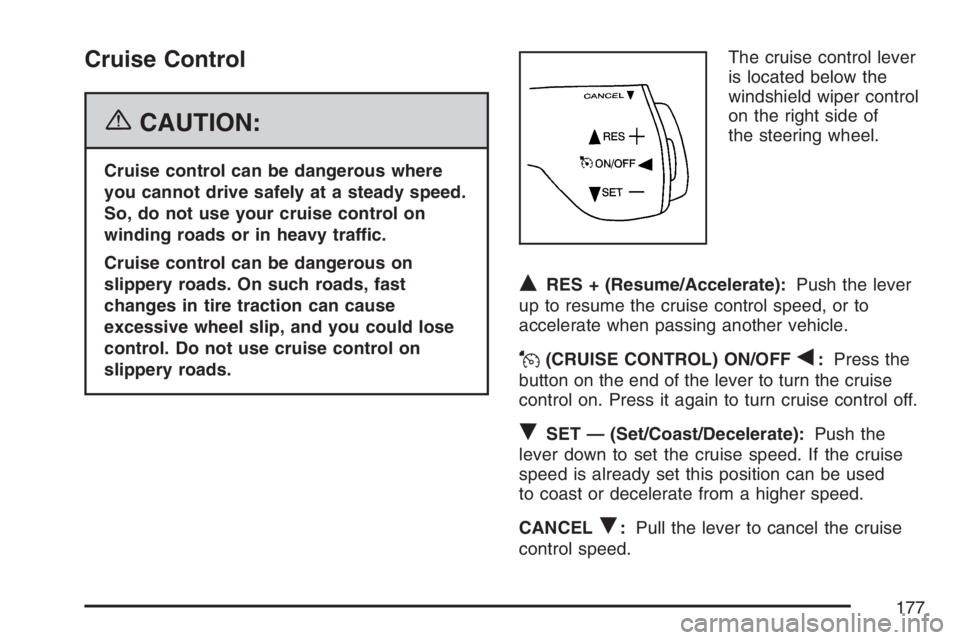
slippery roads.The cruise control lever
is located below the
windshield wiper control
on the right side of
the steering wheel.
QRES + (Resume/Accelerate):Push the lever
up to resume the cruise control speed, or to
accelerate when passing another vehicle.
J(CRUISE CONTROL) ON/OFFq:Press the
button on the end of the lever to turn the cruise
control on. Press it again to turn cruise control off.
RSET — (Set/Coast/Decelerate):Push the
lever down to set the cruise speed. If the cruise
speed is already set this position can be used
to coast or decelerate from a higher speed.
CANCEL
R:Pull the lever to cancel the cruise
control speed.
177
Page 258 of 562
Audio System(s)
Determine which radio your vehicle has and then
read the pages following to familiarize yourself
with its features.
Driving without distraction is a necessity for a
safer driving experience. SeeDefensive Driving on
page 346. By taking a few moments to read this
manual and get familiar with your vehicle’s
audio system, you can use it with less effort, as
well as take advantage of its features. While your
vehicle is parked, set up your audio system by
presetting your favorite radio stations, setting the
tone, and adjusting the speakers. Then, when
driving conditions permit, you can tune to
your favorite stations using the presets and
steering wheel controls if the vehicle has them.{CAUTION:
This system provides you with a far greater
access to audio stations and song listings.
Giving extended attention to entertainment
tasks while driving can cause a crash and
you or others can be injured or killed.
Always keep your eyes on the road and
your mind on the drive — avoid engaging
in extended searching while driving.
Keeping your mind on the drive is important for
safe driving. Here are some ways in which you can
help avoid distraction while driving.
While your vehicle is parked:
Familiarize yourself with all of its controls.
Familiarize yourself with its operation.
Set up your audio system by presetting your
favorite radio stations, setting the tone, and
adjusting the speakers. Then, when driving
conditions permit, you can tune to your favorite
radio stations using the presets and steering
wheel controls if the vehicle has them.
258
Page 319 of 562
Mobile Digital Media System
Your vehicle may have the GM Mobile Digital
Media system which is made up of a digital media
player, a wireless game controller, the digital
media storage (DMS) cartridge, the USB 2.0 cradle
(docking station), and the PhatNoise™ Media
Manager software.
See the following information to learn more about
the components that make up the complete
Digital Media system.
Digital Media Player
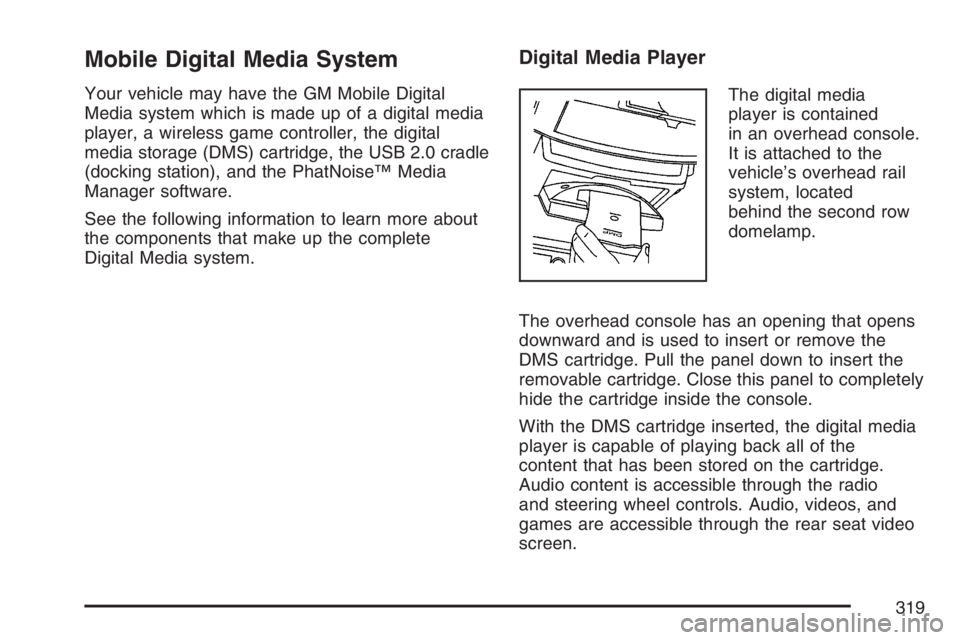
The digital media
player is contained
in an overhead console.
It is attached to the
vehicle’s overhead rail
system, located
behind the second row
domelamp.
The overhead console has an opening that opens
downward and is used to insert or remove the
DMS cartridge. Pull the panel down to insert the
removable cartridge. Close this panel to completely
hide the cartridge inside the console.
With the DMS cartridge inserted, the digital media
player is capable of playing back all of the
content that has been stored on the cartridge.
Audio content is accessible through the radio
and steering wheel controls. Audio, videos, and
games are accessible through the rear seat video
screen.
319
Page 322 of 562
Selecting Your Mobile Digital Media as the
Active Source
Your radio and rear seat entertainment system
communicate with the GM Mobile Digital Media
system, as one compact unit that can be accessed
by everyone seated inside the vehicle. The GM
Mobile Digital Media system can hold thousands of
songs, hours of videos, and hundreds of games.
To help use this system, see the following
“Quick Start” information:
Front seat driver and passenger, use the radio
and steering wheel controls to access the music
collection with PhatNoise Voice Index™
technology. The preset buttons can be used to
select the browsing category. The Next,
Previous, and Seek buttons can be used to
browse within a browsing category. Browse the
music collection by artist, album, genre, or
custom playlist as the system uses the voice
mode to announce these selections. See “Using
the GM Mobile Digital Media System for Front
Seat Audio Entertainment” later in this manual.
Rear seat passengers, use the wireless DVD
remote control to navigate the menu displayed
on the overhead DVD video screen, then selectto play music, videos, or games. A dedicated
game controller is included with the Mobile
Digital Media package. See “Using the GM
Mobile Digital Media System for Rear Seat
Entertainment” later in this manual.
Your vehicle may have audio steering wheel
controls. Some audio controls can be adjusted at
the steering wheel. SeeAudio Steering Wheel
Controls on page 341in your owner manual.
If your vehicle has the OnStar
®/Mute audio
steering wheel control, read the following
instructions.
For vehicles with OnStar
®:
Press and hold the mute button to activate
OnStar®.
Press and release this button once again
to deactivate OnStar®mode and go to
mute mode.
Press this button twice to return to sound from
the GM Mobile Digital Media system.
For vehicles without OnStar
®:
Press the mute button to silence the system,
press and release this button once again to
turn the sound back on.
322
Page 323 of 562
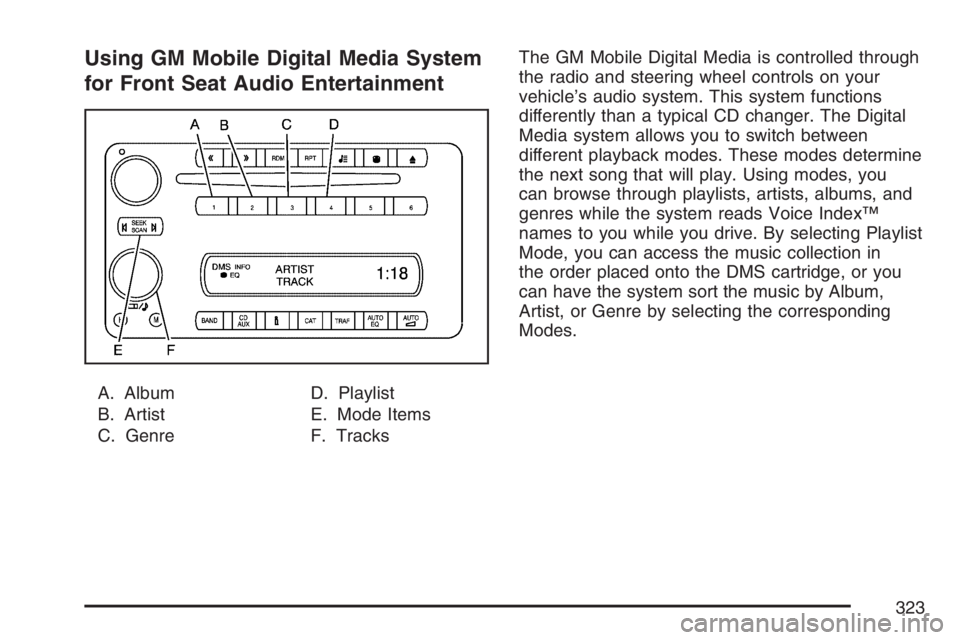
Using GM Mobile Digital Media System
for Front Seat Audio Entertainment
A. Album
B. Artist
C. GenreD. Playlist
E. Mode Items
F. TracksThe GM Mobile Digital Media is controlled through
the radio and steering wheel controls on your
vehicle’s audio system. This system functions
differently than a typical CD changer. The Digital
Media system allows you to switch between
different playback modes. These modes determine
the next song that will play. Using modes, you
can browse through playlists, artists, albums, and
genres while the system reads Voice Index™
names to you while you drive. By selecting Playlist
Mode, you can access the music collection in
the order placed onto the DMS cartridge, or you
can have the system sort the music by Album,
Artist, or Genre by selecting the corresponding
Modes.
323
Page 341 of 562
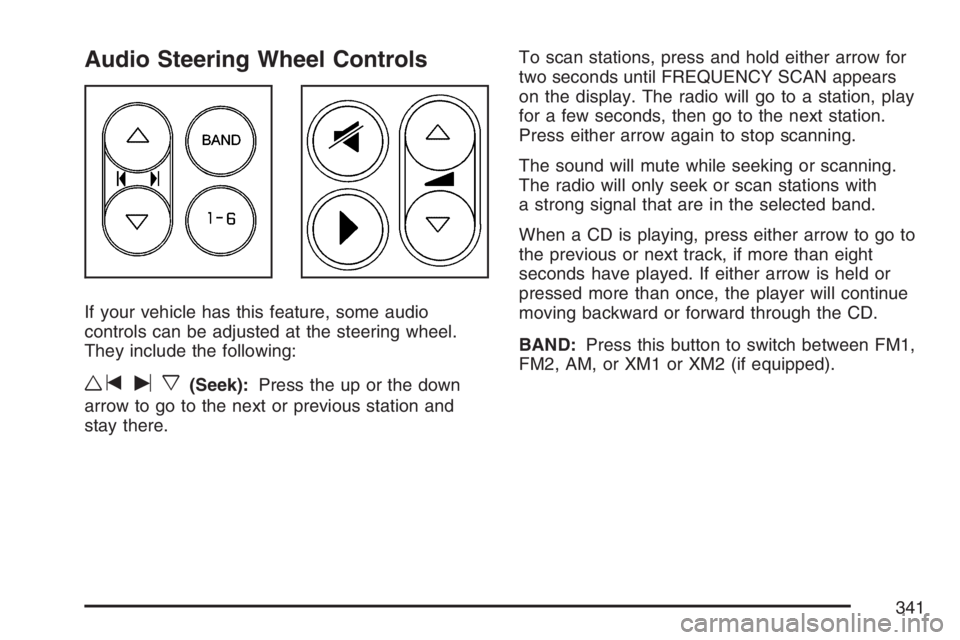
Audio Steering Wheel Controls
If your vehicle has this feature, some audio
controls can be adjusted at the steering wheel.
They include the following:
wtux(Seek):Press the up or the down
arrow to go to the next or previous station and
stay there.To scan stations, press and hold either arrow for
two seconds until FREQUENCY SCAN appears
on the display. The radio will go to a station, play
for a few seconds, then go to the next station.
Press either arrow again to stop scanning.
The sound will mute while seeking or scanning.
The radio will only seek or scan stations with
a strong signal that are in the selected band.
When a CD is playing, press either arrow to go to
the previous or next track, if more than eight
seconds have played. If either arrow is held or
pressed more than once, the player will continue
moving backward or forward through the CD.
BAND:Press this button to switch between FM1,
FM2, AM, or XM1 or XM2 (if equipped).
341
Page 353 of 562
Remember: ABS does not change the time you
need to get your foot up to the brake pedal
or always decrease stopping distance. If you get
too close to the vehicle in front of you, you will not
have time to apply your brakes if that vehicle
suddenly slows or stops. Always leave enough
room up ahead to stop, even though you
have ABS.
Using ABS
Do not pump the brakes. Just hold the brake
pedal down rmly and let anti-lock work for you.
You may feel a slight brake pedal pulsation
or notice some noise, but this is normal.
Braking in Emergencies
With ABS, you can steer and brake at the same
time. In many emergencies, steering can help you
more than even the very best braking.
Traction Control System (TCS)
Your vehicle may have a traction control system
that limits wheel spin. This is especially useful
in slippery road conditions. The system operates if
it senses that one or both of the front wheels
are spinning or beginning to lose traction. When
this happens, the system brakes the spinning
wheel(s) and/or reduces engine power to
limit wheel spin.
The TRACTION CONTROL ACTIVE message will
come on in the Driver Information Center (DIC)
when the traction control system is limiting wheel
spin. You may feel or hear the system working,
but this is normal.
If your vehicle is in cruise control when the
traction control system begins to limit wheel spin,
the cruise control will automatically disengage.
When road conditions allow you to safely
use it again, you may re-engage the cruise control.
353
Page 355 of 562
If the system is limiting wheel spin when you
press the button, the TRACTION CONTROL
ACTIVE message will go off, but the system will
not turn off until there is no longer a current
need to limit wheel spin. The TRACTION
CONTROL OFF message will come on to remind
you the system is off. You can turn the system
back on at any time by pressing the button again.
The traction control system warning message
should go off.
Adding non-GM accessories can affect your
vehicle’s performance. SeeAccessories and
Modications on page 400for more information.
StabiliTrak®System
Your vehicle may be equipped with StabiliTrak®
which combines anti-lock brake, traction and
stability control systems and helps the driver
maintain directional control of the vehicle in most
driving conditions.
When you rst start your vehicle and begin to
drive away, the system performs several diagnostic
checks to insure there are no problems. You
may hear or feel the system working. This
is normal and does not mean there is a problem
with your vehicle.If the system fails to turn on or activate, the
SERVICE STABILITY SYSTEM message will be
displayed on the Driver Information Center (DIC). If
the vehicle has gone through heavy acceleration
or braking or multiple turns during the rst
two miles of driving after starting your vehicle, the
STABILITY CONTROL OFF message may
appear on the DIC. If this is the case, your vehicle
does not need servicing. You will need to turn
the vehicle off and then restart it to initialize
StabiliTrak
®. If either message appears on the
DIC, and your vehicle has not gone through hard
acceleration, braking or multiple turns in the
rst two miles of driving, your vehicle should be
taken in for service.
The STABILITY CONTROL ACTIVE message will
appear on the DIC only when the system is both
on and activated. It means that an advanced
computer-controlled system has come on to help
your vehicle continue to go in the direction in which
you are steering. StabiliTrak
®activates when the
computer senses that your vehicle is just starting to
spin, as it might if you hit a patch of ice or other
slippery spot on the road. When the system
activates, you may hear a noise or feel a vibration in
the brake pedal. This is normal.
355
Page 357 of 562
The traction control system may activate on
dry or rough roads or under conditions such as
heavy acceleration while turning or abrupt
upshifts/downshifts of the transaxle. When
this happens you may notice a reduction in
acceleration, or may hear a noise or vibration.
This is normal.
If your vehicle is in cruise control when the system
activates, the STABILITY CONTROL ACTIVE
message will appear on the DIC and the cruise
control will automatically disengage. When
road conditions allow you to use cruise again, you
may re-engage the cruise control. SeeCruise
Control on page 177.
StabiliTrak
®may also turn off automatically if it
determines that a problem exists with the system.
If the problem does not clear itself after restarting
the vehicle, you should see your dealer for
service.
Steering
Power Steering
If you lose power steering assist because the
engine stops or the system is not functioning, you
can steer but it will take much more effort.
Steering Tips
It is important to take curves at a reasonable
speed.
A lot of the “driver lost control” accidents
mentioned on the news happen on curves.
Here is why:
Experienced driver or beginner, each of us is
subject to the same laws of physics when driving
on curves. The traction of the tires against the
road surface makes it possible for the vehicle to
change its path when you turn the front wheels. If
there is no traction, inertia will keep the vehicle
going in the same direction. If you have ever
tried to steer a vehicle on wet ice, you will
understand this.
357
Page 358 of 562
The traction you can get in a curve depends on
the condition of your tires and the road surface, the
angle at which the curve is banked, and your
speed. While you are in a curve, speed is the one
factor you can control.
Suppose you are steering through a sharp curve.
Then you suddenly apply the brakes. Both
control systems — steering and braking — have
to do their work where the tires meet the road.
Unless you have four-wheel anti-lock brakes,
adding the hard braking can demand too much of
those places. You can lose control.
The same thing can happen if you are steering
through a sharp curve and you suddenly
accelerate. Those two control systems — steering
and acceleration — can overwhelm those
places where the tires meet the road and make
you lose control. SeeTraction Control System
(TCS) on page 353andStabiliTrak
®System on
page 355.What should you do if this ever happens? Ease up
on the brake or accelerator pedal, steer the
vehicle the way you want it to go, and slow down.
Speed limit signs near curves warn that you
should adjust your speed. Of course, the posted
speeds are based on good weather and road
conditions. Under less favorable conditions you will
want to go slower.
If you need to reduce your speed as you approach
a curve, do it before you enter the curve, while
your front wheels are straight ahead.
Try to adjust your speed so you can “drive”
through the curve. Maintain a reasonable, steady
speed. Wait to accelerate until you are out of
the curve, and then accelerate gently into
the straightaway.
Adding non-GM accessories can affect your
vehicle’s performance. SeeAccessories and
Modications on page 400.
358