seats BUICK TERRAZA 2007 Owner's Guide
[x] Cancel search | Manufacturer: BUICK, Model Year: 2007, Model line: TERRAZA, Model: BUICK TERRAZA 2007Pages: 562, PDF Size: 2.96 MB
Page 73 of 562
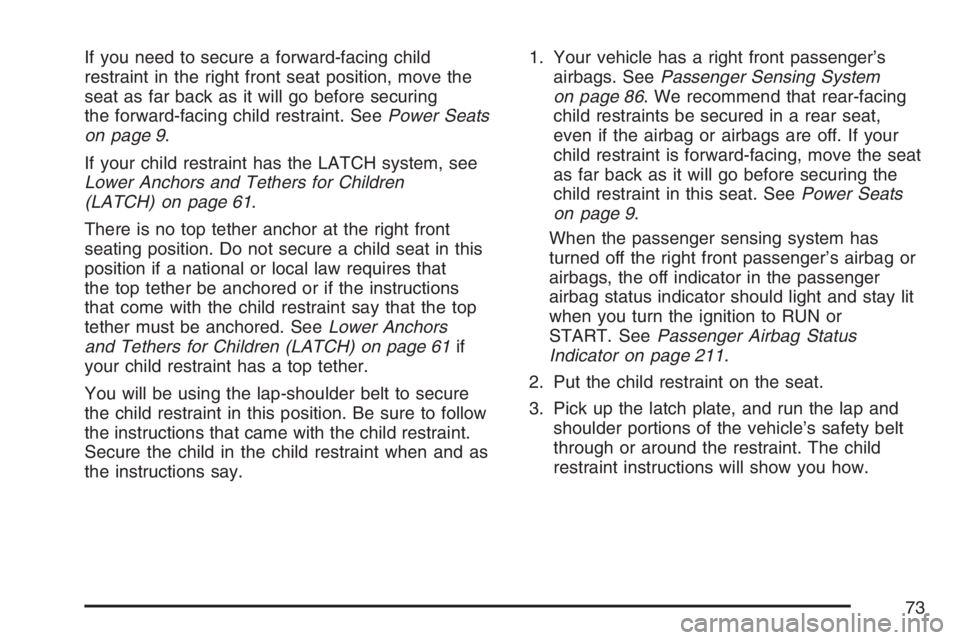
If you need to secure a forward-facing child
restraint in the right front seat position, move the
seat as far back as it will go before securing
the forward-facing child restraint. SeePower Seats
on page 9.
If your child restraint has the LATCH system, see
Lower Anchors and Tethers for Children
(LATCH) on page 61.
There is no top tether anchor at the right front
seating position. Do not secure a child seat in this
position if a national or local law requires that
the top tether be anchored or if the instructions
that come with the child restraint say that the top
tether must be anchored. SeeLower Anchors
and Tethers for Children (LATCH) on page 61if
your child restraint has a top tether.
You will be using the lap-shoulder belt to secure
the child restraint in this position. Be sure to follow
the instructions that came with the child restraint.
Secure the child in the child restraint when and as
the instructions say.1. Your vehicle has a right front passenger’s
airbags. SeePassenger Sensing System
on page 86. We recommend that rear-facing
child restraints be secured in a rear seat,
even if the airbag or airbags are off. If your
child restraint is forward-facing, move the seat
as far back as it will go before securing the
child restraint in this seat. SeePower Seats
on page 9.
When the passenger sensing system has
turned off the right front passenger’s airbag or
airbags, the off indicator in the passenger
airbag status indicator should light and stay lit
when you turn the ignition to RUN or
START. SeePassenger Airbag Status
Indicator on page 211.
2. Put the child restraint on the seat.
3. Pick up the latch plate, and run the lap and
shoulder portions of the vehicle’s safety belt
through or around the restraint. The child
restraint instructions will show you how.
73
Page 92 of 562

Adding Equipment to Your
Airbag-Equipped Vehicle
Q:Is there anything I might add to the front
or sides of the vehicle that could keep the
airbags from working properly?
A:Yes. If you add things that change your
vehicle’s frame, bumper system, height,
front end or side sheet metal, they may keep
the airbag system from working properly.
Also, the airbag system may not work properly
if you relocate any of the airbag sensors. If
you have any questions about this, you should
contact Customer Assistance before you
modify your vehicle. The phone numbers and
addresses for Customer Assistance are in
Step Two of the Customer Satisfaction
Procedure in this manual. SeeCustomer
Satisfaction Procedure on page 526.
Q:Because I have a disability, I have to get
my vehicle modied. How can I nd out
whether this will affect my airbag system?
A:Changing or moving any parts of the
front seats, safety belts, the airbag sensing
and diagnostic module, steering wheel,
the instrument panel, or airbag wiring can
affect the operation of the airbag system. If
you have questions, call Customer Assistance.
The phone numbers and addresses for
Customer Assistance are in Step Two of the
Customer Satisfaction Procedure in this
manual. SeeCustomer Satisfaction Procedure
on page 526.
92
Page 158 of 562
Reprogramming a Single Universal
Home Remote Button
To program a device to Universal Home Remote
using a Universal Home Remote button
previously trained, follow these steps:
1. Press and hold the desired Universal Home
Remote button. Do not release the button.
2. The indicator light will begin to ash after
20 seconds. While still holding the Universal
Home Remote button, proceed with Step
2 under “Programming Universal Home
Remote” shown earlier in this section.
For additional information on Universal Home
Remote, seeCustomer Assistance Offices
on page 530.
Storage Areas
Your vehicle’s large carrying capacity can store
many items. If the vehicle has an extended
wheelbase, it can carry even larger items. The
oor pins that are used to attach the seats, can be
used to secure larger loads.
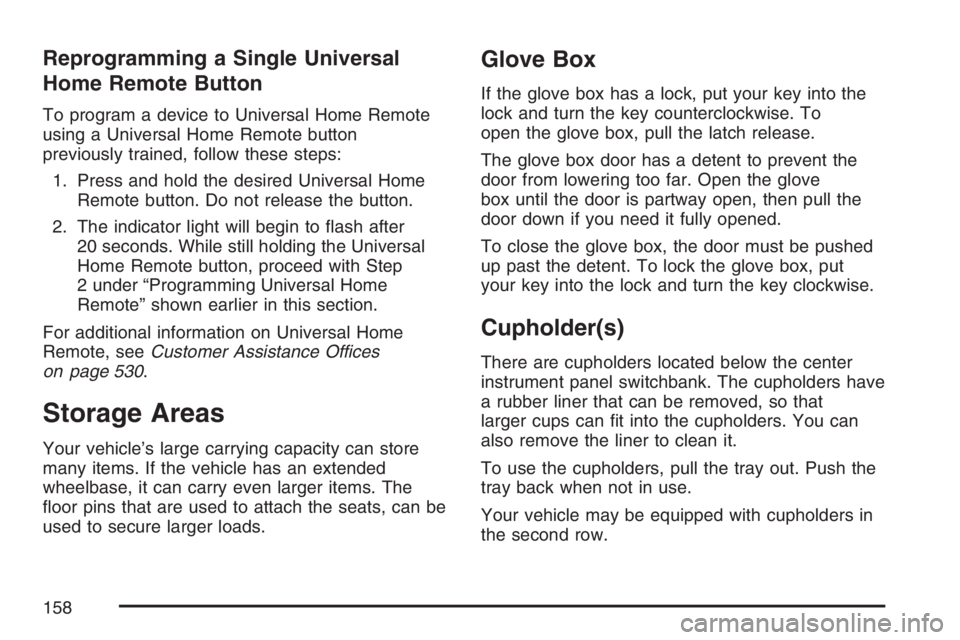
Glove Box
If the glove box has a lock, put your key into the
lock and turn the key counterclockwise. To
open the glove box, pull the latch release.
The glove box door has a detent to prevent the
door from lowering too far. Open the glove
box until the door is partway open, then pull the
door down if you need it fully opened.
To close the glove box, the door must be pushed
up past the detent. To lock the glove box, put
your key into the lock and turn the key clockwise.
Cupholder(s)
There are cupholders located below the center
instrument panel switchbank. The cupholders have
a rubber liner that can be removed, so that
larger cups can t into the cupholders. You can
also remove the liner to clean it.
To use the cupholders, pull the tray out. Push the
tray back when not in use.
Your vehicle may be equipped with cupholders in
the second row.
158
Page 161 of 562
The contents of the bin should never weigh more
than 1.5 lbs (0.7 kg).
Always make sure to close and latch the bin
before driving.
Overhead Console (Without Rail)
If your vehicle has an overhead console without
the rail system, it has two reading lights, a
courtesy light, and a switchbank. SeeOverhead
Console Switchbank on page 188for more
information.
Floor Console Storage Area
If your vehicle has a storage compartment located
on the front console below the front cupholders.
Pull up and then forward on the handle to open the
storage compartment.
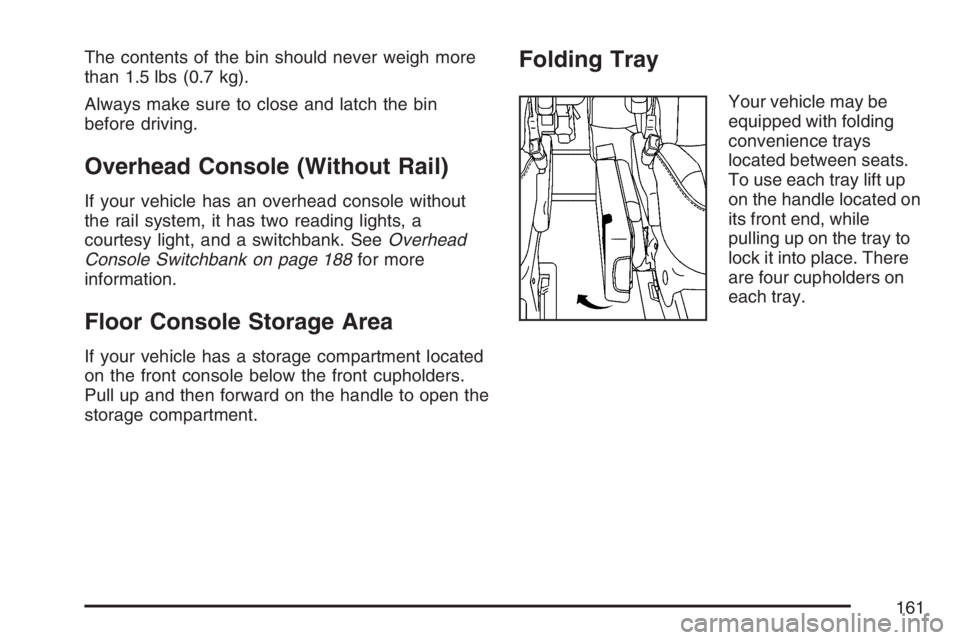
Folding Tray
Your vehicle may be
equipped with folding
convenience trays
located between seats.
To use each tray lift up
on the handle located on
its front end, while
pulling up on the tray to
lock it into place. There
are four cupholders on
each tray.
161
Page 171 of 562
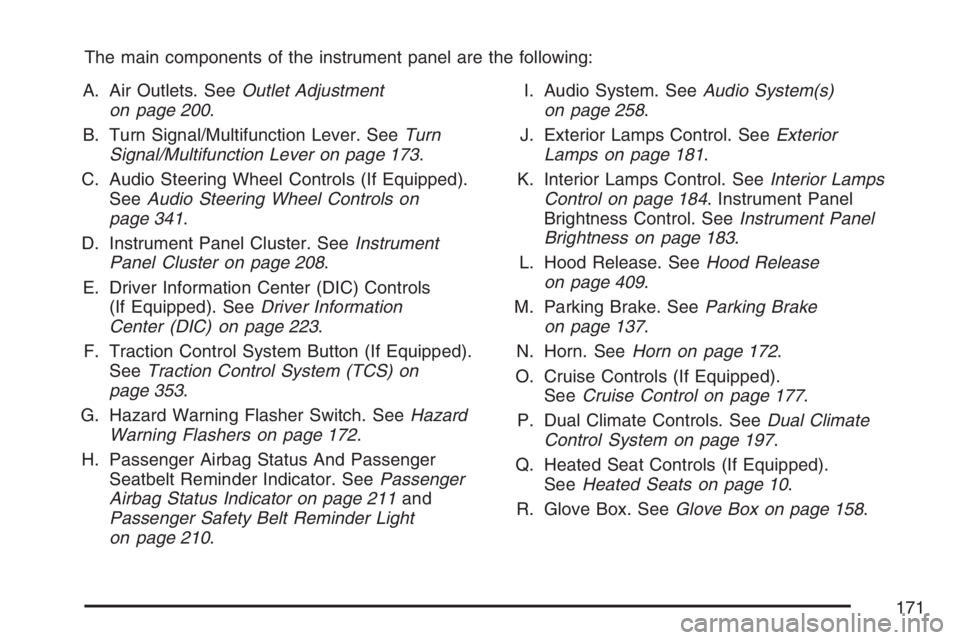
The main components of the instrument panel are the following:
A. Air Outlets. SeeOutlet Adjustment
on page 200.
B. Turn Signal/Multifunction Lever. SeeTurn
Signal/Multifunction Lever on page 173.
C. Audio Steering Wheel Controls (If Equipped).
SeeAudio Steering Wheel Controls on
page 341.
D. Instrument Panel Cluster. SeeInstrument
Panel Cluster on page 208.
E. Driver Information Center (DIC) Controls
(If Equipped). SeeDriver Information
Center (DIC) on page 223.
F. Traction Control System Button (If Equipped).
SeeTraction Control System (TCS) on
page 353.
G. Hazard Warning Flasher Switch. SeeHazard
Warning Flashers on page 172.
H. Passenger Airbag Status And Passenger
Seatbelt Reminder Indicator. SeePassenger
Airbag Status Indicator on page 211and
Passenger Safety Belt Reminder Light
on page 210.I. Audio System. SeeAudio System(s)
on page 258.
J. Exterior Lamps Control. SeeExterior
Lamps on page 181.
K. Interior Lamps Control. SeeInterior Lamps
Control on page 184. Instrument Panel
Brightness Control. SeeInstrument Panel
Brightness on page 183.
L. Hood Release. SeeHood Release
on page 409.
M. Parking Brake. SeeParking Brake
on page 137.
N. Horn. SeeHorn on page 172.
O. Cruise Controls (If Equipped).
SeeCruise Control on page 177.
P. Dual Climate Controls. SeeDual Climate
Control System on page 197.
Q. Heated Seat Controls (If Equipped).
SeeHeated Seats on page 10.
R. Glove Box. SeeGlove Box on page 158.
171
Page 187 of 562
The battery can be discharged at idle if the electrical
loads are very high. This is true for all vehicles. This
is because the generator (alternator) may not be
spinning fast enough at idle to produce all the power
that is needed for very high electrical loads.
A high electrical load occurs when several of the
following loads are on: headlamps, high beams,
fog lamps, rear window defogger, climate
control fan at high speed, heated seats, engine
cooling fans, trailer loads, and loads plugged into
accessory power outlets.
EPM works to prevent excessive discharge of the
battery. It does this by balancing the generator’s
output and the vehicle’s electrical needs. It
can increase engine idle speed to generate more
power, whenever needed. It can temporarily
reduce the power demands of some accessories.
Normally, these actions occur in steps or levels,
without being noticeable. In rare cases at the
highest levels of corrective action, this action
may be noticeable to the driver. If so, a Driver
Information Center (DIC) message might be
displayed, such as Battery Saver Active or Battery
Voltage Low. If this message is displayed, it is
recommended that the driver reduce the electrical
loads as much as possible.Battery Run-Down Protection
Your vehicle has a feature to help prevent you
from draining the battery, in case you accidentally
leave the interior lamps on. If you leave any
interior lamps on while the ignition is in lock or off,
they will automatically turn off after 10 minutes.
The lamps will not come back on again until
you do one of the following:
Turn the ignition to RUN or ACCESSORY
Open a closed door, or close and reopen
a door.
Turn the interior lamps on if they are in the
door or override position.
Turn the interior lamps to the door or override
position and then to on again if the interior
lamp control is in the on position.
If your vehicle has less than 15 miles (25 km)
on the odometer, the battery saver will turn off
the lamps after only three minutes.
187
Page 192 of 562

Power Outlet 115 Volt Alternating
Current
Your vehicle may have a power outlet that can
be used to plug in auxiliary electrical equipment
with a maximum limit of 150 watts. If you try to
use equipment that requires more than the limit,
a protection circuit will cut the power supply.
To reset the outlet, unplug the item and plug it
back in or turn the ignition to LOCK or
ACCESSORY and then back on. The power
will automatically restart when equipment that
operates within the limit is plugged in.The power outlet is
located behind the
third row seats on the
passenger’s side
rear quarter trim panel.
The power outlet is not designed for the following
electrical equipment and may not work properly
if these items are plugged into the power outlet:
Equipment with high initial peak wattage
such as: compressor-driven refrigerators
and electric power tools.
Other equipment requiring an extremely
stable power supply such as:
microcomputer-controlled electric blankets,
touch sensor lamps, etc.
192
Page 194 of 562
To change the current mode, select one of the
following:
H(Vent):This mode directs air to the instrument
panel outlets.
)(Bi-Level):This mode directs half of the air
to the instrument panel outlets, then directs
the remaining air to the oor outlets. Cooler air is
directed to the upper outlets and warmer air to
the oor outlets.
6(Floor):This mode directs most of the air to
the oor outlets. Use this mode to send air to
the rear of the vehicle. Keep the area under the
front seats free of objects that could obstruct
airow to the rear of the vehicle.
The right knob can also be used to select defog
or defrost mode. For more information, see
“Defogging and Defrosting” later in this section.
Outside Air:This mode will be automatically
selected when your vehicle is in any mode except
maximum air conditioning.
A(Fan):Turn the left knob clockwise or
counterclockwise to increase or decrease the fan
speed. Turn the knob to 0 to turn off the fan.
The fan must be turned on for the air conditioning
compressor to operate.
Temperature Control:Turn the center knob
clockwise or counterclockwise to increase or
decrease the air temperature inside your vehicle.
#(Air Conditioning):Press this button to turn
the air-conditioning system on or off. When it is
pressed, an indicator light in the button will come on
to let you know that air conditioning is activated.
You may notice a slight change in engine
performance when the air conditioning compressor
shuts off and turns on again. This is normal.
The system is designed to make adjustments to
help with fuel economy while still maintaining
the selected temperature.
On hot days, open the windows to let hot inside
air escape; then close them. This helps to reduce
the time it takes for your vehicle to cool down.
It also helps the system to operate more efficiently.
194
Page 195 of 562
The air conditioning system removes moisture
from the air, so you may sometimes notice a
small amount of water dripping underneath your
vehicle while idling or after turning off the
engine. This is normal.
@MAX A/C (Maximum Air Conditioning):
Turn the right knob to this position for maximum
air conditioning. This will select air conditioning
and recirculation for maximum cooling of
your vehicle. This mode directs air to the
instrument panel outlets.
Recirculation:This mode keeps outside air from
coming in the vehicle. It can be used to prevent
outside air and odors from entering your vehicle or
help heat or cool the air inside your vehicle more
quickly. This mode will automatically be selected
when you select maximum air conditioning.
((Heated Seats):Press this button to turn on
the heated seats. The button on the left controls
the driver’s seat and the button on the right
controls the passenger’s seat. SeeHeated Seats
on page 10for additional information.
Defogging and Defrosting
Fog on the inside of windows is a result of high
humidity, or moisture, condensing on the cool
window glass. This can be minimized if the
climate control system is used properly. There
are two modes to clear fog or frost from your
windshield. Use the defog mode to clear
the windows of fog or moisture and warm the
passengers. Use the defrost mode to remove fog
or frost from the windshield more quickly.
Turn the right knob to select the defog or
defrost mode.
-(Defog):This mode directs air to the
windshield and the oor outlets. When you select
this mode, the system runs the air-conditioning
compressor unless the outside temperature is at or
below freezing. The recirculation mode cannot
be selected while in the defog mode.
195
Page 198 of 562
)(Bi-Level):This mode directs half of the air
to the instrument panel outlets, then directs
the remaining air to the oor outlets. Cooler air is
directed to the upper outlets and warmer air to
the oor outlets.
6(Floor):This mode directs most of the air to
the oor outlets. Use this mode to send air to
the rear of the vehicle. Keep the area under the
front seats free of objects that could obstruct
airow to the rear of the vehicle.
Outside Air:This mode is automatically selected
when your vehicle is in any mode except
maximum air conditioning.
The right knob can also be used to select defog
or defrost mode. For more information, see
“Defogging and Defrosting” later in this section.
#(Air Conditioning):Press this button to
turn the air conditioning system on or off. When
it is pressed, an indicator light in the button
will come on to let you know that air conditioning
is activated.You may notice a slight change in engine
performance when the air conditioning compressor
shuts off and turns on again. This is normal.
The system is designed to make adjustments to
help with fuel economy while still maintaining
the selected temperature.
On hot days, open the windows to let hot inside
air escape; then close them and switch to
maximum air conditioning mode. This helps to
reduce the time it takes for your vehicle to
cool down. It also helps the system to operate
more efficiently.
The air conditioning system removes moisture
from the air, so you may sometimes notice a small
amount of water dripping underneath your
vehicle while idling or after turning off the engine.
This is normal.((Heated Seats):Press this button to turn on
the heated seats. The button on the left controls
the driver’s seat and the button on the right
controls the passenger’s seat. SeeHeated Seats
on page 10for additional information.
198