brake BUICK TERRAZA 2007 Owner's Guide
[x] Cancel search | Manufacturer: BUICK, Model Year: 2007, Model line: TERRAZA, Model: BUICK TERRAZA 2007Pages: 562, PDF Size: 2.96 MB
Page 355 of 562
If the system is limiting wheel spin when you
press the button, the TRACTION CONTROL
ACTIVE message will go off, but the system will
not turn off until there is no longer a current
need to limit wheel spin. The TRACTION
CONTROL OFF message will come on to remind
you the system is off. You can turn the system
back on at any time by pressing the button again.
The traction control system warning message
should go off.
Adding non-GM accessories can affect your
vehicle’s performance. SeeAccessories and
Modications on page 400for more information.
StabiliTrak®System
Your vehicle may be equipped with StabiliTrak®
which combines anti-lock brake, traction and
stability control systems and helps the driver
maintain directional control of the vehicle in most
driving conditions.
When you rst start your vehicle and begin to
drive away, the system performs several diagnostic
checks to insure there are no problems. You
may hear or feel the system working. This
is normal and does not mean there is a problem
with your vehicle.If the system fails to turn on or activate, the
SERVICE STABILITY SYSTEM message will be
displayed on the Driver Information Center (DIC). If
the vehicle has gone through heavy acceleration
or braking or multiple turns during the rst
two miles of driving after starting your vehicle, the
STABILITY CONTROL OFF message may
appear on the DIC. If this is the case, your vehicle
does not need servicing. You will need to turn
the vehicle off and then restart it to initialize
StabiliTrak
®. If either message appears on the
DIC, and your vehicle has not gone through hard
acceleration, braking or multiple turns in the
rst two miles of driving, your vehicle should be
taken in for service.
The STABILITY CONTROL ACTIVE message will
appear on the DIC only when the system is both
on and activated. It means that an advanced
computer-controlled system has come on to help
your vehicle continue to go in the direction in which
you are steering. StabiliTrak
®activates when the
computer senses that your vehicle is just starting to
spin, as it might if you hit a patch of ice or other
slippery spot on the road. When the system
activates, you may hear a noise or feel a vibration in
the brake pedal. This is normal.
355
Page 356 of 562
When the STABILITY CONTROL ACTIVE
message is on, you should continue to steer in the
direction you want to go. The system is designed to
help you in bad weather or other difficult driving
situations by making the most of whatever road
conditions will permit. For more information on the
stability messages, seeDriver Information Center
(DIC) on page 223.
If the StabiliTrak
®system turns off, the traction
control system warning light will illuminate, and the
STABILITY CONTROL OFF message will
appear on the DIC to warn the driver that
StabiliTrak
®is no longer available to assist you
with directional control of the vehicle. Adjust your
driving accordingly.
To realize the full benets of the stability
enhancement system, you should normally leave
StabiliTrak
®on, but it may be necessary to
turn the system off if your vehicle is stuck in sand,
mud, ice or snow, and you want to “rock” your
vehicle to attempt to free it. SeeRocking
Your Vehicle to Get It Out on page 378andIf
Your Vehicle is Stuck in Sand, Mud, Ice, or Snow
on page 377.
Traction Control Operation
The traction control system is part of the
StabiliTrak®system. Traction control limits wheel
spin by reducing engine power to the wheels
(engine speed management) and by applying
brakes.
The traction control system is enabled
automatically when you start your vehicle. It will
activate and display the TRACTION CONTROL
ACTIVE message in the DIC if it senses that one
or both of the front wheels are spinning or
beginning to lose traction while driving.
If the brake traction-control system activates
constantly or if the brakes have heated up due to
high-speed braking, brake traction-control will
be disabled and the TRACTION CONTROL
ACTIVE message will be displayed. In the limited
mode, the traction control system will only use
engine traction-control and is limited in its ability to
provide optimal performance since the system
will not utilize brake traction-control to control slip
on the drive wheels. The system will return to
normal operation after the brakes have cooled.
This can take up to two minutes or longer
depending on brake usage.
356
Page 358 of 562
The traction you can get in a curve depends on
the condition of your tires and the road surface, the
angle at which the curve is banked, and your
speed. While you are in a curve, speed is the one
factor you can control.
Suppose you are steering through a sharp curve.
Then you suddenly apply the brakes. Both
control systems — steering and braking — have
to do their work where the tires meet the road.
Unless you have four-wheel anti-lock brakes,
adding the hard braking can demand too much of
those places. You can lose control.
The same thing can happen if you are steering
through a sharp curve and you suddenly
accelerate. Those two control systems — steering
and acceleration — can overwhelm those
places where the tires meet the road and make
you lose control. SeeTraction Control System
(TCS) on page 353andStabiliTrak
®System on
page 355.What should you do if this ever happens? Ease up
on the brake or accelerator pedal, steer the
vehicle the way you want it to go, and slow down.
Speed limit signs near curves warn that you
should adjust your speed. Of course, the posted
speeds are based on good weather and road
conditions. Under less favorable conditions you will
want to go slower.
If you need to reduce your speed as you approach
a curve, do it before you enter the curve, while
your front wheels are straight ahead.
Try to adjust your speed so you can “drive”
through the curve. Maintain a reasonable, steady
speed. Wait to accelerate until you are out of
the curve, and then accelerate gently into
the straightaway.
Adding non-GM accessories can affect your
vehicle’s performance. SeeAccessories and
Modications on page 400.
358
Page 359 of 562
Steering in Emergencies
There are times when steering can be more
effective than braking. For example, you come
over a hill and nd a truck stopped in your lane, or
a car suddenly pulls out from nowhere, or a
child darts out from between parked cars and
stops right in front of you. You can avoid these
problems by braking — if you can stop in time. But
sometimes you cannot; there is not room. That
is the time for evasive action — steering around
the problem.
Your vehicle can perform very well in emergencies
like these. First apply your brakes.
SeeBraking on page 350. It is better to remove as
much speed as you can from a possible collision.
Then steer around the problem, to the left or
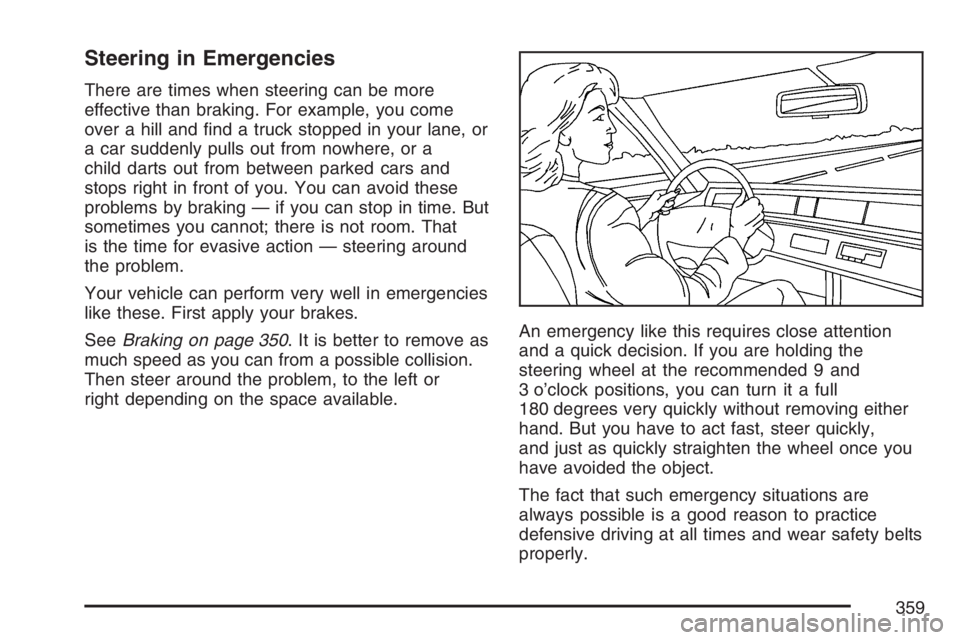
right depending on the space available.An emergency like this requires close attention
and a quick decision. If you are holding the
steering wheel at the recommended 9 and
3 o’clock positions, you can turn it a full
180 degrees very quickly without removing either
hand. But you have to act fast, steer quickly,
and just as quickly straighten the wheel once you
have avoided the object.
The fact that such emergency situations are
always possible is a good reason to practice
defensive driving at all times and wear safety belts
properly.
359
Page 362 of 562
Try not to pass more than one vehicle at a time
on two-lane roads. Reconsider before passing
the next vehicle.
Do not overtake a slowly moving vehicle too
rapidly. Even though the brake lamps are not
ashing, it may be slowing down or starting
to turn.
If you are being passed, make it easy for the
following driver to get ahead of you. Perhaps
you can ease a little to the right.
Loss of Control
Let us review what driving experts say
about what happens when the three control
systems — brakes, steering, and
acceleration — do not have enough friction
where the tires meet the road to do what the driver
has asked.
In any emergency, do not give up. Keep trying to
steer and constantly seek an escape route or
area of less danger.
Skidding
In a skid, a driver can lose control of the vehicle.
Defensive drivers avoid most skids by taking
reasonable care suited to existing conditions, and
by not overdriving those conditions. But skids
are always possible.
The three types of skids correspond to your
vehicle’s three control systems. In the braking skid,
your wheels are not rolling. In the steering or
cornering skid, too much speed or steering in a
curve causes tires to slip and lose cornering force.
And in the acceleration skid, too much throttle
causes the driving wheels to spin.
A cornering skid is best handled by easing your
foot off the accelerator pedal.
Remember: Any traction control system helps
avoid only the acceleration skid. If your traction
control system is off, then an acceleration
skid is also best handled by easing your foot off
the accelerator pedal.
If your vehicle starts to slide, ease your foot off
the accelerator pedal and quickly steer the
way you want the vehicle to go. If you start
362
Page 363 of 562
steering quickly enough, your vehicle may
straighten out. Always be ready for a second skid
if it occurs.
Of course, traction is reduced when water, snow,
ice, gravel, or other material is on the road.
For safety, you will want to slow down and adjust
your driving to these conditions. It is important
to slow down on slippery surfaces because
stopping distance will be longer and vehicle control
more limited.
While driving on a surface with reduced traction,
try your best to avoid sudden steering,
acceleration, or braking, including reducing vehicle
speed by shifting to a lower gear. Any sudden
changes could cause the tires to slide. You may
not realize the surface is slippery until your
vehicle is skidding. Learn to recognize warning
clues — such as enough water, ice, or packed
snow on the road to make a mirrored
surface — and slow down when you have
any doubt.
Remember: Any Anti-Lock Brake System (ABS)
helps avoid only the braking skid.Driving at Night
Night driving is more dangerous than day driving.
One reason is that some drivers are likely to
be impaired — by alcohol or drugs, with night
vision problems, or by fatigue.
Here are some tips on night driving.
Drive defensively.
Do not drink and drive.
Adjust the inside rearview mirror to reduce the
glare from headlamps behind you.
Since you cannot see as well, you may need
to slow down and keep more space between
you and other vehicles.
Slow down, especially on higher speed roads.
Your vehicle’s headlamps can light up only so
much road ahead.
In remote areas, watch for animals.
If you are tired, pull off the road in a safe
place and rest.
363
Page 366 of 562
It is wise to keep your windshield wiper and
washer system in good shape and keep your
windshield washer uid reservoir lled with washer
uid. Replace your windshield wiper inserts
when they show signs of streaking or missing
areas on the windshield, or when strips of rubber
start to separate from the inserts.
{CAUTION:
Wet brakes can cause accidents. They
may not work as well in a quick stop and
may cause pulling to one side. You could
lose control of the vehicle.
After driving through a large puddle of
water or a car wash, apply your brake
pedal lightly until your brakes work
normally.
Driving too fast through large water puddles or
even going through some car washes can cause
problems, too. The water may affect your
brakes. Try to avoid puddles. But if you cannot, try
to slow down before you hit them.
Hydroplaning
Hydroplaning is dangerous. So much water can
build up under your tires that they can actually ride
on the water. This can happen if the road is wet
enough and you are going fast enough. When your
vehicle is hydroplaning, it has little or no contact
with the road.
Hydroplaning does not happen often. But it can if
your tires do not have much tread or if the
pressure in one or more is low. It can happen if a
lot of water is standing on the road. If you can
see reections from trees, telephone poles,
or other vehicles, and raindrops dimple the water’s
surface, there could be hydroplaning.
Hydroplaning usually happens at higher speeds.
There just is not a hard and fast rule about
hydroplaning. The best advice is to slow down
when it is raining.
366
Page 372 of 562
If you drive regularly in steep country, or if you are
planning to visit there, here are some tips that
can make your trips safer and more enjoyable.
Keep your vehicle in good shape. Check
all uid levels and also the brakes, tires,
cooling system, and transaxle. These parts
can work hard on mountain roads.
{CAUTION:
If you do not shift down, your brakes
could get so hot that they would not work
well. You would then have poor braking or
even none going down a hill. You could
crash. Shift down to let your engine assist
your brakes on a steep downhill slope.
{CAUTION:
Coasting downhill in NEUTRAL (N) or with
the ignition off is dangerous. Your brakes
will have to do all the work of slowing
down. They could get so hot that they
would not work well. You would then have
poor braking or even none going down a
hill. You could crash. Always have your
engine running and your vehicle in gear
when you go downhill.
Know how to go down hills. The most important
thing to know is this: let your engine do some of
the slowing down. Shift to a lower gear when
you go down a steep or long hill.
Know how to go uphill. You may want to shift
down to a lower gear. The lower gears help
cool your engine and transaxle, and you can
climb the hill better.
372
Page 375 of 562
Traction control improves your ability to accelerate
when driving on a slippery road. But you can
turn the traction system off if you ever need to.
You should turn the traction system off if your
vehicle ever gets stuck in sand, mud, ice, or snow.
SeeIf Your Vehicle is Stuck in Sand, Mud, Ice,
or Snow on page 377. Even though your vehicle
has a traction system, you will want to slow
down and adjust your driving to the road
conditions. Under certain conditions, you may
want to turn the traction system off, such as when
driving through deep snow and loose gravel, to
help maintain vehicle motion at lower speeds. See
Traction Control System (TCS) on page 353
andStabiliTrak
®System on page 355.
The Anti-Lock Brake System (ABS) improves your
vehicle’s stability when you make a hard stop
on a slippery road. Even though you have ABS,
you will want to begin stopping sooner than
you would on dry pavement. SeeAnti-Lock Brake
System (ABS) on page 351.
Allow greater following distance on any
slippery road.
Watch for slippery spots. The road might be
ne until you hit a spot that is covered with
ice. On an otherwise clear road, ice patchesmay appear in shaded areas where the sun
cannot reach, such as around clumps of trees,
behind buildings, or under bridges. Sometimes
the surface of a curve or an overpass may
remain icy when the surrounding roads
are clear. If you see a patch of ice ahead of
you, brake before you are on it. Try not
to brake while you are actually on the ice, and
avoid sudden steering maneuvers.
If You Are Caught in a Blizzard
If you are stopped by heavy snow, you could be in
a serious situation. You should probably stay
with your vehicle unless you know for sure that you
are near help and you can hike through the
snow. Here are some things to do to summon
help and keep yourself and your passengers safe:
Turn on your hazard ashers.
Tie a red cloth to your vehicle to alert police
that you have been stopped by the snow.
Put on extra clothing or wrap a blanket around
you. If you do not have blankets or extra
clothing, make body insulators from
newspapers, burlap bags, rags, oor
mats — anything you can wrap around yourself
or tuck under your clothing to keep warm.
375
Page 385 of 562
Dinghy Towing
Your vehicle was not designed to be towed with
all of its wheels on the ground. It can be towed
with the two rear wheels on the ground. See “Dolly
Towing” following for more information.
Dolly Towing
To dolly tow your vehicle, do the following:
1. Put the front wheels on a dolly.
2. Put the vehicle in PARK (P).
3. Set the parking brake and then remove
the key.
4. Clamp the steering wheel in a straight-ahead
position with a clamping device designed for
towing.
5. Release the parking brake.
Level Control
With this feature, the rear of the vehicle is
automatically kept level as you load or unload
your vehicle. However, you should still not exceed
the GVWR or the GAWR. SeeLoading Your
Vehicle on page 378.
You may hear the compressor operating when you
load or unload your vehicle, and periodically as
the system self-adjusts. This is normal. The
compressor should operate for brief periods of
time. If the sound continues for an extended period
of time, your vehicle needs service.
Using heavier suspension components to get
added durability might not change your weight
ratings. Ask your dealer to help you load
your vehicle the right way.
385