ECU BUICK TERRAZA 2007 Service Manual
[x] Cancel search | Manufacturer: BUICK, Model Year: 2007, Model line: TERRAZA, Model: BUICK TERRAZA 2007Pages: 562, PDF Size: 2.96 MB
Page 152 of 562
5. After entering the switch settings, press and
release all three buttons at the same time.
The indicator lights will turn on.
6. Press and hold the button you would like to
use to control the garage door until the
garage door moves. The indicator light above
the selected button should slowly blink.
You may need to hold the button from ve to
55 seconds.
7. Immediately release the button when the
garage door moves. The indicator light will
blink rapidly until programming is complete.
8. Press and release the button again. The
garage door should move, conrming that
programming is successful and complete.
To program another device such as an additional
garage door opener, a security device, or
home lighting, repeat Steps 1 through 8, choosing
a different function button in Step 7 than what
you used for the garage door opener.Programming Universal Home
Remote — Rolling Code
Rolling code garage door openers are used for
garage doors produced after 1996 and are
code protected. Rolling code means the coded
signal is changed every time your remote control
garage door opener is used.
Programming a rolling code garage door opener
involves time-sensitive actions, so read the
entire procedure before you begin. If you do not
follow these actions, the device will time out
and you will have to repeat the procedure.
Follow these steps to program up to
three channels:
1. Press the two outside buttons at the same
time for one to two seconds, and immediately
release them.
152
Page 153 of 562
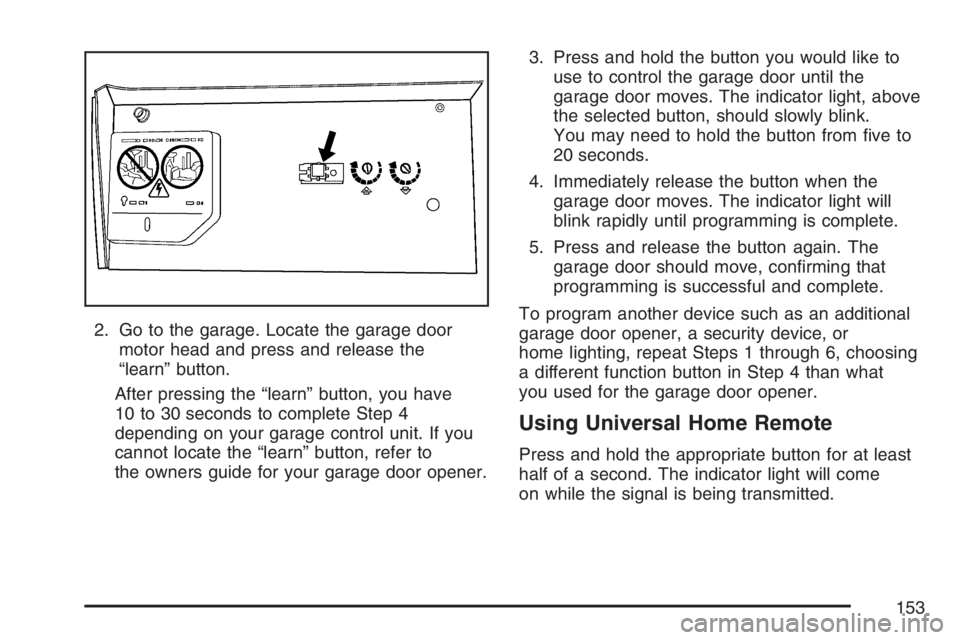
2. Go to the garage. Locate the garage door
motor head and press and release the
“learn” button.
After pressing the “learn” button, you have
10 to 30 seconds to complete Step 4
depending on your garage control unit. If you
cannot locate the “learn” button, refer to
the owners guide for your garage door opener.3. Press and hold the button you would like to
use to control the garage door until the
garage door moves. The indicator light, above
the selected button, should slowly blink.
You may need to hold the button from ve to
20 seconds.
4. Immediately release the button when the
garage door moves. The indicator light will
blink rapidly until programming is complete.
5. Press and release the button again. The
garage door should move, conrming that
programming is successful and complete.
To program another device such as an additional
garage door opener, a security device, or
home lighting, repeat Steps 1 through 6, choosing
a different function button in Step 4 than what
you used for the garage door opener.
Using Universal Home Remote
Press and hold the appropriate button for at least
half of a second. The indicator light will come
on while the signal is being transmitted.
153
Page 154 of 562
Reprogramming Universal Home
Remote Buttons
You can reprogram any of the three buttons by
repeating the instructions.
Erasing Universal Home Remote
Buttons
You should erase the programmed buttons when
you sell the vehicle or terminate your lease.
To erase either rolling code or xed code on the
Universal Home Remote device, do the following:
1. Press and hold the two outside buttons at
the same time for approximately 20 seconds,
until the indicator lights, located directly
above the buttons, begin to blink rapidly.
2. Once the indicator lights begin to blink,
release both buttons. The codes from all
button will be erased.
For additional information on Universal Home
Remote, seeCustomer Assistance Offices
on page 530.
Universal Home Remote System
Operation (With One Triangular LED)
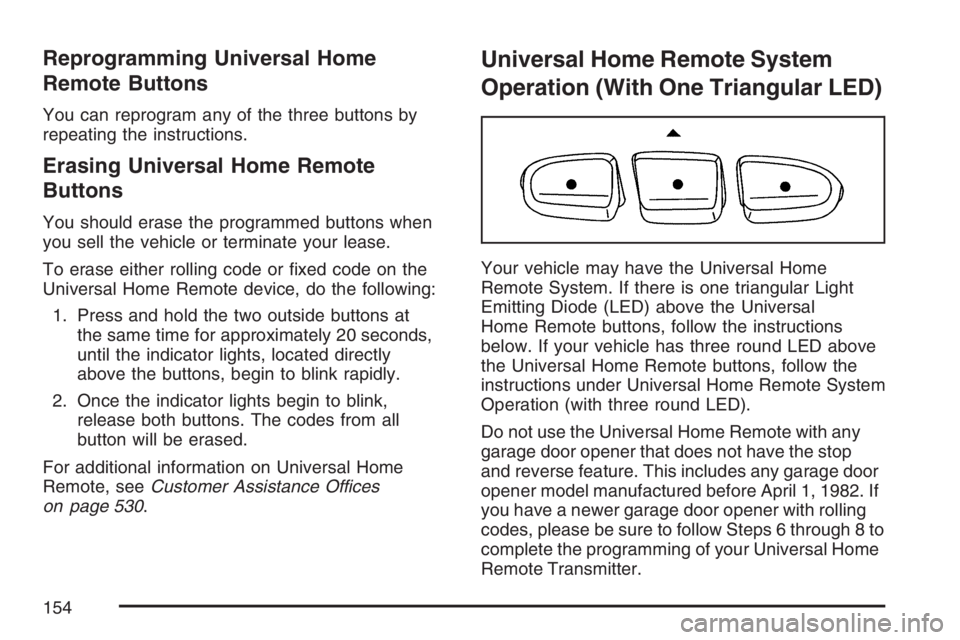
Your vehicle may have the Universal Home
Remote System. If there is one triangular Light
Emitting Diode (LED) above the Universal
Home Remote buttons, follow the instructions
below. If your vehicle has three round LED above
the Universal Home Remote buttons, follow the
instructions under Universal Home Remote System
Operation (with three round LED).
Do not use the Universal Home Remote with any
garage door opener that does not have the stop
and reverse feature. This includes any garage door
opener model manufactured before April 1, 1982. If
you have a newer garage door opener with rolling
codes, please be sure to follow Steps 6 through 8 to
complete the programming of your Universal Home
Remote Transmitter.
154
Page 155 of 562
Read the instructions completely before attempting
to program the Universal Home Remote. Because
of the steps involved, it may be helpful to have
another person available to assist you in the
programming steps.
Keep the original hand-held transmitter for use in
other vehicles as well as for future Universal
Home Remote programming. It is also
recommended that upon the sale of the vehicle,
the programmed Universal Home Remote buttons
should be erased for security purposes. See
“Erasing Universal Home Remote Buttons” later in
this section or, for assistance, seeCustomer
Assistance Offices on page 530.
Be sure that people and objects are clear
of the garage door or gate operator you are
programming. When programming a garage door,
it is advised to park outside of the garage.
It is recommended that a new battery be installed in
your hand-held transmitter for quicker and more
accurate transmission of the radio-frequency signal.Programming Universal Home Remote
Follow these steps to program up to three channels:
1. Press and hold down the two outside
Universal Home Remote buttons, releasing
only when the Universal Home Remote
indicator light begins to ash, after
20 seconds. Do not hold down the buttons for
longer than 30 seconds and do not repeat
this step to program a second and/or
third hand-held transmitter to the remaining
two Universal Home Remote buttons.
2. Position the end of your hand-held transmitter
about 1 to 3 inches (3 to 8 cm) away from the
Universal Home Remote buttons while
keeping the indicator light in view.
3. Simultaneously press and hold both the
desired Universal Home Remote button
and the hand-held transmitter button. Do not
release the buttons until Step 4 has been
completed.
Some entry gates and garage door openers
may require you to substitute Step 3 with
the procedure noted in “Gate Operator and
Canadian Programming” later in this section.
155
Page 158 of 562
Reprogramming a Single Universal
Home Remote Button
To program a device to Universal Home Remote
using a Universal Home Remote button
previously trained, follow these steps:
1. Press and hold the desired Universal Home
Remote button. Do not release the button.
2. The indicator light will begin to ash after
20 seconds. While still holding the Universal
Home Remote button, proceed with Step
2 under “Programming Universal Home
Remote” shown earlier in this section.
For additional information on Universal Home
Remote, seeCustomer Assistance Offices
on page 530.
Storage Areas
Your vehicle’s large carrying capacity can store
many items. If the vehicle has an extended
wheelbase, it can carry even larger items. The
oor pins that are used to attach the seats, can be
used to secure larger loads.
Glove Box
If the glove box has a lock, put your key into the
lock and turn the key counterclockwise. To
open the glove box, pull the latch release.
The glove box door has a detent to prevent the
door from lowering too far. Open the glove
box until the door is partway open, then pull the
door down if you need it fully opened.
To close the glove box, the door must be pushed
up past the detent. To lock the glove box, put
your key into the lock and turn the key clockwise.
Cupholder(s)
There are cupholders located below the center
instrument panel switchbank. The cupholders have
a rubber liner that can be removed, so that
larger cups can t into the cupholders. You can
also remove the liner to clean it.
To use the cupholders, pull the tray out. Push the
tray back when not in use.
Your vehicle may be equipped with cupholders in
the second row.
158
Page 162 of 562
Luggage Carrier
{CAUTION:
If you try to carry something on top of
your vehicle that is longer or wider than
the luggage carrier — like paneling,
plywood, a mattress and so forth — the
wind can catch it as you drive along. This
can cause you to lose control. What you
are carrying could be violently torn off,
and this could cause you or other drivers
to have a collision, and of course damage
your vehicle. You may be able to carry
something like this inside. But, never
carry something longer or wider than the
luggage carrier on top of your vehicle.If you have the luggage carrier, you can load
things on top of your vehicle. Crossrails are not
standard on this vehicle and must be purchased at
your dealer.
Notice:Loading cargo on the luggage carrier
that weighs more than 150 lbs (68 kg) or
hangs over the rear or sides of the vehicle
may damage your vehicle. Load cargo so that
it rests on the slats as far forward as
possible and against the side rails, making
sure to fasten it securely.
Do not exceed the maximum vehicle capacity
when loading your vehicle. For more information
on vehicle capacity and loading, seeLoading Your
Vehicle on page 378.
To prevent damage or loss of cargo as you are
driving, check now and then to make sure
the cargo is still securely fastened.
162
Page 164 of 562
Convenience Center
{CAUTION:
If any removable convenience item is not
secured properly, it can move around in a
collision or sudden stop. People in the
vehicle could be injured. Be sure to
secure any such item properly.
Your vehicle may have a convenience center. It
provides extra storage space for the rear of
the vehicle.To open the convenience center, pull up on the
door latch located on the front of the cover.
The convenience center cover has two automatic
prop rods to hold it up and in place.
To close the convenience center cover, you must
pull one of the prop rod linkages toward you
while holding onto the door latch and lower the
convenience center cover to close it.
Removing the Convenience Center
1. Make sure that all items are off the
convenience center and that it is empty.
2. Turn the hand knob, located at the rear of the
convenience center, counterclockwise until the
knob is loose.
3. Lift up on the hand knob, then grip and pull
up on the convenience center to remove it
from the vehicle.
164
Page 168 of 562
Tachometer............................................... 209
Safety Belt Reminder Light........................ 209
Passenger Safety Belt Reminder Light....... 210
Airbag Readiness Light............................. 210
Passenger Airbag Status Indicator............. 211
Charging System Light.............................. 213
Brake System Warning Light..................... 214
Anti-Lock Brake System Warning Light...... 215
Traction Control System (TCS)
Warning Light........................................ 216
Engine Coolant Temperature Gage............ 217
Malfunction Indicator Lamp........................ 217
Oil Pressure Light..................................... 220
Security Light............................................ 221
Cruise Control Light.................................. 221
Highbeam On Light................................... 221
Fuel Gage................................................. 222
Low Fuel Warning Light............................ 222
Driver Information Center (DIC).................. 223
DIC Operation and Displays...................... 224
DIC Compass (Uplevel Only)..................... 228
DIC Warnings and Messages.................... 230
DIC Vehicle Personalization
(Uplevel Only)........................................ 249Audio System(s)......................................... 258
Setting the Time........................................ 259
Radio with CD........................................... 260
Using an MP3........................................... 274
XM Radio Messages................................. 280
Navigation/Radio System........................... 282
Rear Seat Entertainment System
(Option A, Uplevel)................................ 282
Rear Seat Entertainment System
(Option B, Uplevel)................................ 298
Rear Seat Audio (RSA)
(Option A, Uplevel)................................ 314
Rear Seat Audio (RSA)
(Option B, Uplevel)................................ 316
Mobile Digital Media System..................... 319
Theft-Deterrent Feature............................. 340
Audio Steering Wheel Controls.................. 341
Radio Reception........................................ 342
Care of Your CDs and DVDs.................... 343
Care of the CD and DVD Player............... 343
Fixed Mast Antenna.................................. 344
XM™ Satellite Radio Antenna System....... 344
Chime Level Adjustment............................ 344
Section 3 Instrument Panel
168
Page 191 of 562
Accessory Power Outlet(s)
Your vehicle may be equipped with a front
accessory power outlet located below the climate
controls on the instrument panel. It can be
used to plug in electrical equipment such as a
cellular telephone or CB radio.
Pull the cover down to use the accessory power
outlet. When not in use, keep the cover on.
The rear accessory power outlet is located on the
rear compartment on the driver’s side.
To remove the cover, pull the tab on the cover
and pull it off. To put the cover back on, line up
the tabs at the back of the cover and put the
cover in place. Push down the tab to secure the
cover. When not in use, always cover the rear
accessory power outlet with the protective cap.
Notice:Leaving electrical equipment on
for extended periods will drain the battery.
Always turn off electrical equipment when
not in use and do not plug in equipment that
exceeds the maximum amperage rating of
20 amperes.Certain electrical accessories may not be
compatible with the accessory power outlet and
could result in blown vehicle or adapter fuses.
If you experience a problem see your dealer for
additional information on accessory power outlets.
Notice:Adding any electrical equipment to
your vehicle may damage it or keep other
components from working as they should.
The repairs would not be covered by your
warranty. Do not use equipment exceeding
maximum amperage rating of 20 amperes.
Check with your dealer before adding electrical
equipment.
When adding electrical equipment, be sure to
follow the proper installation instructions included
with the equipment.
Notice:Improper use of the power outlet can
cause damage not covered by your warranty.
Do not hang any type of accessory or
accessory bracket from the plug because the
power outlets are designed for accessory
power plugs only.
191
Page 212 of 562
If the word ON or the on symbol is lit on the
passenger airbag status indicator, it means that
the right front passenger’s airbag or airbags
are enabled (may inate).
{CAUTION:
If the on indicator comes on when you
have a rear-facing child restraint installed
in the right front passenger’s seat, it means
that the passenger sensing system has not
turned off the passenger’s frontal airbag
and seat-mounted side impact airbag
(if equipped). A child in a rear-facing child
restraint can be seriously injured or killed if
the right front passenger’s airbag inates.
This is because the back of the rear-facing
child restraint would be very close to the
inating airbag. Do not use a rear-facing
child restraint in the right front passenger’s
seat if the airbag is turned on.Your vehicle has a rear seat that will accommodate
a rear-facing child restraint. A label on your sun
visor says, “Never put a rear-facing child seat
in the front.” This is because the risk to the
rear-facing child is so great, if the airbag deploys.
{CAUTION:
Even though the passenger sensing
system is designed to turn off the
passenger’s frontal airbag and side impact
airbag (if equipped) if the system detects
a rear-facing child restraint, no system is
fail-safe, and no one can guarantee that an
airbag will not deploy under some unusual
circumstance, even though it is turned off.
We recommend that rear-facing child
restraints be secured in the rear seat,
even if the airbag is off.
212