light BUICK VERANO 2016 Service Manual
[x] Cancel search | Manufacturer: BUICK, Model Year: 2016, Model line: VERANO, Model: BUICK VERANO 2016Pages: 355, PDF Size: 5.16 MB
Page 109 of 355
Buick Verano Owner Manual (GMNA-Localizing-U.S./Canada/Mexico-
9085356) - 2016 - crc - 10/19/15
108 Instruments and Controls
not used to perform an Emissions
Inspection/Maintenance test or to
service the vehicle may affect
vehicle operation SeeAdd-On
Electrical Equipment 0226. See
your dealer if assistance is needed.
The vehicle may not pass
inspection if:
. The light is on when the engine
is running.
. The light does not come on
when the ignition is in ON/RUN
with the engine not running for
Key Access or in Service Only
Mode for Keyless Access.
. Critical emission control systems
have not been completely
diagnosed. If this happens, the
vehicle would not be ready for
inspection and might require
several days of routine driving
before the system is ready for
inspection. This can happen if
the 12-volt battery has recently
been replaced or run down, or if
the vehicle has been recently
serviced. See your dealer if the vehicle will
not pass or cannot be made ready
for the test.
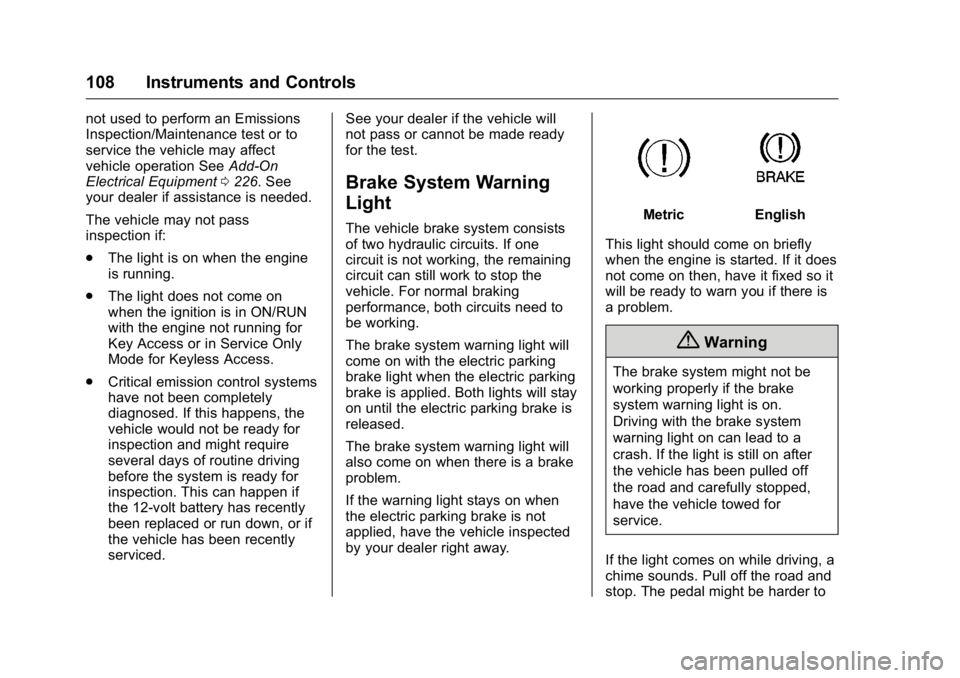
Brake System Warning
Light
The vehicle brake system consists
of two hydraulic circuits. If one
circuit is not working, the remaining
circuit can still work to stop the
vehicle. For normal braking
performance, both circuits need to
be working.
The brake system warning light will
come on with the electric parking
brake light when the electric parking
brake is applied. Both lights will stay
on until the electric parking brake is
released.
The brake system warning light will
also come on when there is a brake
problem.
If the warning light stays on when
the electric parking brake is not
applied, have the vehicle inspected
by your dealer right away.MetricEnglish
This light should come on briefly
when the engine is started. If it does
not come on then, have it fixed so it
will be ready to warn you if there is
a problem.
{Warning
The brake system might not be
working properly if the brake
system warning light is on.
Driving with the brake system
warning light on can lead to a
crash. If the light is still on after
the vehicle has been pulled off
the road and carefully stopped,
have the vehicle towed for
service.
If the light comes on while driving, a
chime sounds. Pull off the road and
stop. The pedal might be harder to
Page 110 of 355
Buick Verano Owner Manual (GMNA-Localizing-U.S./Canada/Mexico-
9085356) - 2016 - crc - 10/19/15
Instruments and Controls 109
push or go closer to the floor.
It might also take longer to stop.
If the light is still on, have the
vehicle towed for service. See
Towing the Vehicle0292.
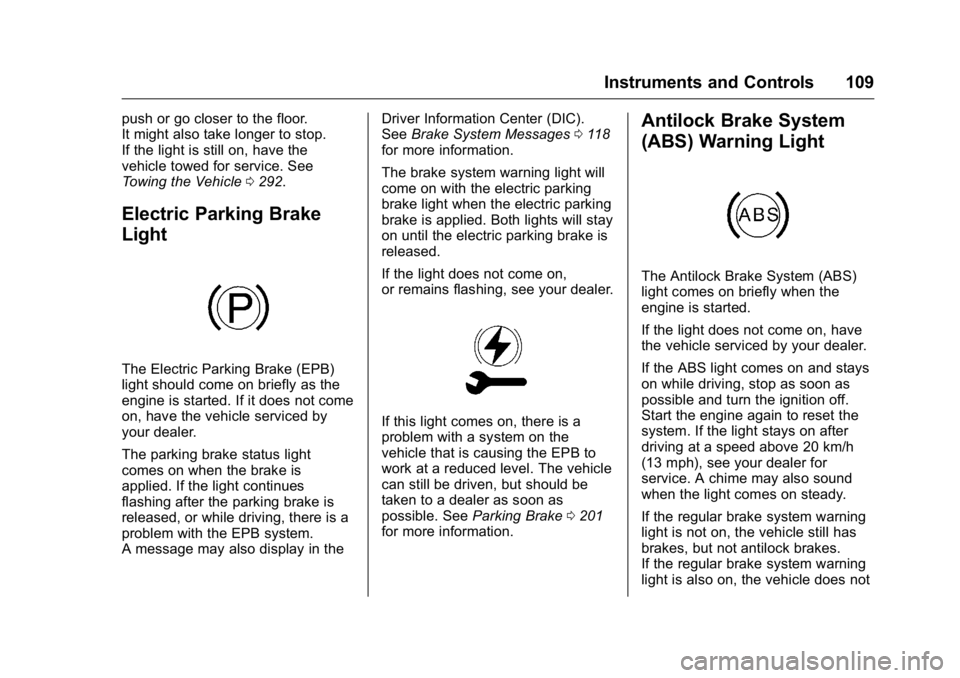
Electric Parking Brake
Light
The Electric Parking Brake (EPB)
light should come on briefly as the
engine is started. If it does not come
on, have the vehicle serviced by
your dealer.
The parking brake status light
comes on when the brake is
applied. If the light continues
flashing after the parking brake is
released, or while driving, there is a
problem with the EPB system.
A message may also display in the Driver Information Center (DIC).
See
Brake System Messages 0118
for more information.
The brake system warning light will
come on with the electric parking
brake light when the electric parking
brake is applied. Both lights will stay
on until the electric parking brake is
released.
If the light does not come on,
or remains flashing, see your dealer.
If this light comes on, there is a
problem with a system on the
vehicle that is causing the EPB to
work at a reduced level. The vehicle
can still be driven, but should be
taken to a dealer as soon as
possible. See Parking Brake 0201
for more information.
Antilock Brake System
(ABS) Warning Light
The Antilock Brake System (ABS)
light comes on briefly when the
engine is started.
If the light does not come on, have
the vehicle serviced by your dealer.
If the ABS light comes on and stays
on while driving, stop as soon as
possible and turn the ignition off.
Start the engine again to reset the
system. If the light stays on after
driving at a speed above 20 km/h
(13 mph), see your dealer for
service. A chime may also sound
when the light comes on steady.
If the regular brake system warning
light is not on, the vehicle still has
brakes, but not antilock brakes.
If the regular brake system warning
light is also on, the vehicle does not
Page 111 of 355
Buick Verano Owner Manual (GMNA-Localizing-U.S./Canada/Mexico-
9085356) - 2016 - crc - 10/19/15
110 Instruments and Controls
have antilock brakes and there is a
problem with the regular brakes.
SeeBrake System Warning
Light 0108.
See Brake System Messages 0118
for all brake‐related DIC messages.
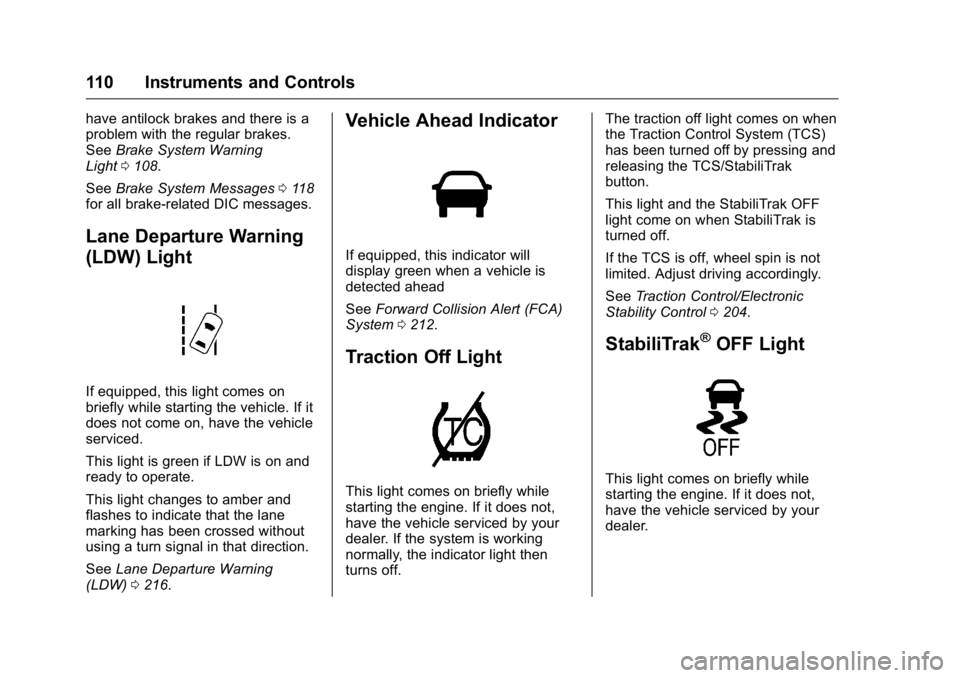
Lane Departure Warning
(LDW) Light
If equipped, this light comes on
briefly while starting the vehicle. If it
does not come on, have the vehicle
serviced.
This light is green if LDW is on and
ready to operate.
This light changes to amber and
flashes to indicate that the lane
marking has been crossed without
using a turn signal in that direction.
See Lane Departure Warning
(LDW) 0216.
Vehicle Ahead Indicator
If equipped, this indicator will
display green when a vehicle is
detected ahead
See Forward Collision Alert (FCA)
System 0212.
Traction Off Light
This light comes on briefly while
starting the engine. If it does not,
have the vehicle serviced by your
dealer. If the system is working
normally, the indicator light then
turns off. The traction off light comes on when
the Traction Control System (TCS)
has been turned off by pressing and
releasing the TCS/StabiliTrak
button.
This light and the StabiliTrak OFF
light come on when StabiliTrak is
turned off.
If the TCS is off, wheel spin is not
limited. Adjust driving accordingly.
See
Traction Control/Electronic
Stability Control 0204.
StabiliTrak®OFF Light
This light comes on briefly while
starting the engine. If it does not,
have the vehicle serviced by your
dealer.
Page 112 of 355
Buick Verano Owner Manual (GMNA-Localizing-U.S./Canada/Mexico-
9085356) - 2016 - crc - 10/19/15
Instruments and Controls 111
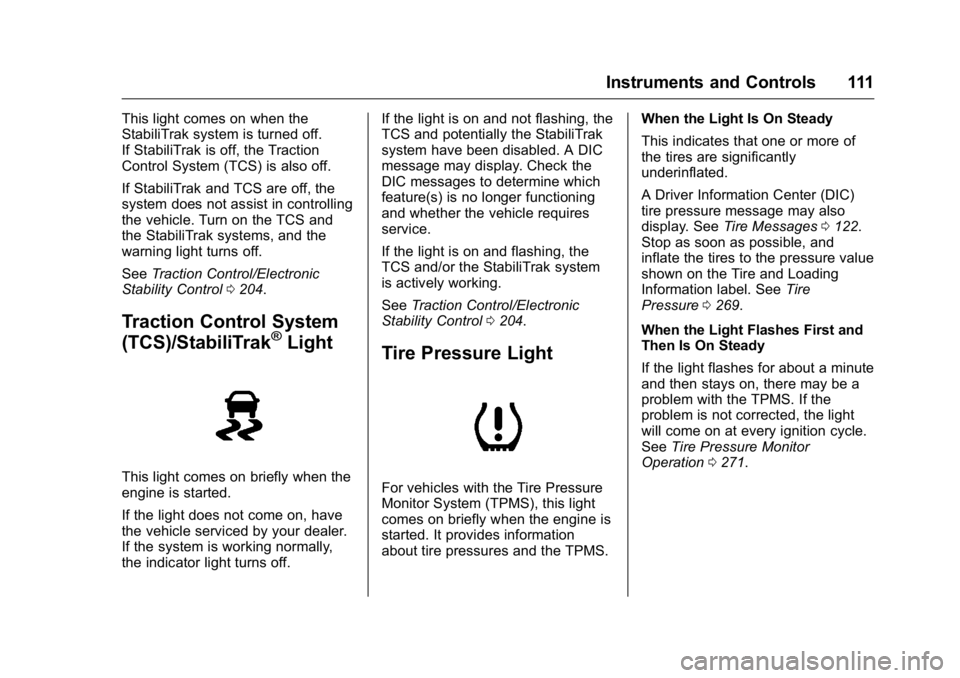
This light comes on when the
StabiliTrak system is turned off.
If StabiliTrak is off, the Traction
Control System (TCS) is also off.
If StabiliTrak and TCS are off, the
system does not assist in controlling
the vehicle. Turn on the TCS and
the StabiliTrak systems, and the
warning light turns off.
SeeTraction Control/Electronic
Stability Control 0204.
Traction Control System
(TCS)/StabiliTrak®Light
This light comes on briefly when the
engine is started.
If the light does not come on, have
the vehicle serviced by your dealer.
If the system is working normally,
the indicator light turns off. If the light is on and not flashing, the
TCS and potentially the StabiliTrak
system have been disabled. A DIC
message may display. Check the
DIC messages to determine which
feature(s) is no longer functioning
and whether the vehicle requires
service.
If the light is on and flashing, the
TCS and/or the StabiliTrak system
is actively working.
See
Traction Control/Electronic
Stability Control 0204.
Tire Pressure Light
For vehicles with the Tire Pressure
Monitor System (TPMS), this light
comes on briefly when the engine is
started. It provides information
about tire pressures and the TPMS. When the Light Is On Steady
This indicates that one or more of
the tires are significantly
underinflated.
A Driver Information Center (DIC)
tire pressure message may also
display. See
Tire Messages 0122.
Stop as soon as possible, and
inflate the tires to the pressure value
shown on the Tire and Loading
Information label. See Tire
Pressure 0269.
When the Light Flashes First and
Then Is On Steady
If the light flashes for about a minute
and then stays on, there may be a
problem with the TPMS. If the
problem is not corrected, the light
will come on at every ignition cycle.
See Tire Pressure Monitor
Operation 0271.
Page 113 of 355

Buick Verano Owner Manual (GMNA-Localizing-U.S./Canada/Mexico-
9085356) - 2016 - crc - 10/19/15
112 Instruments and Controls
Engine Oil Pressure Light
Caution
Lack of proper engine oil
maintenance can damage the
engine. Driving with the engine oil
low can also damage the engine.
The repairs would not be covered
by the vehicle warranty. Check
the oil level as soon as possible.
Add oil if required, but if the oil
level is within the operating range
and the oil pressure is still low,
have the vehicle serviced. Always
follow the maintenance schedule
for changing engine oil.
This light should come on briefly as
the engine is started. If it does not
come on, have the vehicle serviced
by your dealer.If the light comes on and stays on, it
means that oil is not flowing through
the engine properly. The vehicle
could be low on oil and might have
some other system problem. See
your dealer.
Low Fuel Warning Light
This light comes on for a few
seconds when the ignition is turned
on as a check to indicate it is
working. If it does not come on,
have it fixed.
The low fuel warning light comes on
and a chime sounds when the
vehicle is low on fuel. The light turns
off when fuel is added to the
fuel tank.
For more information on the Driver
Information Center (DIC), see
Fuel
System Messages 0120.
Security Light
The security light should come on
briefly as the engine is started. If it
does not come on, have the vehicle
serviced by your dealer. If the
system is working normally, the
indicator light turns off.
If the light stays on and the engine
does not start, there could be a
problem with the theft-deterrent
system. See Immobilizer Operation
(Key Access) 040 orImmobilizer
Operation (Keyless Access) 041.
Page 114 of 355
Buick Verano Owner Manual (GMNA-Localizing-U.S./Canada/Mexico-
9085356) - 2016 - crc - 10/19/15
Instruments and Controls 113
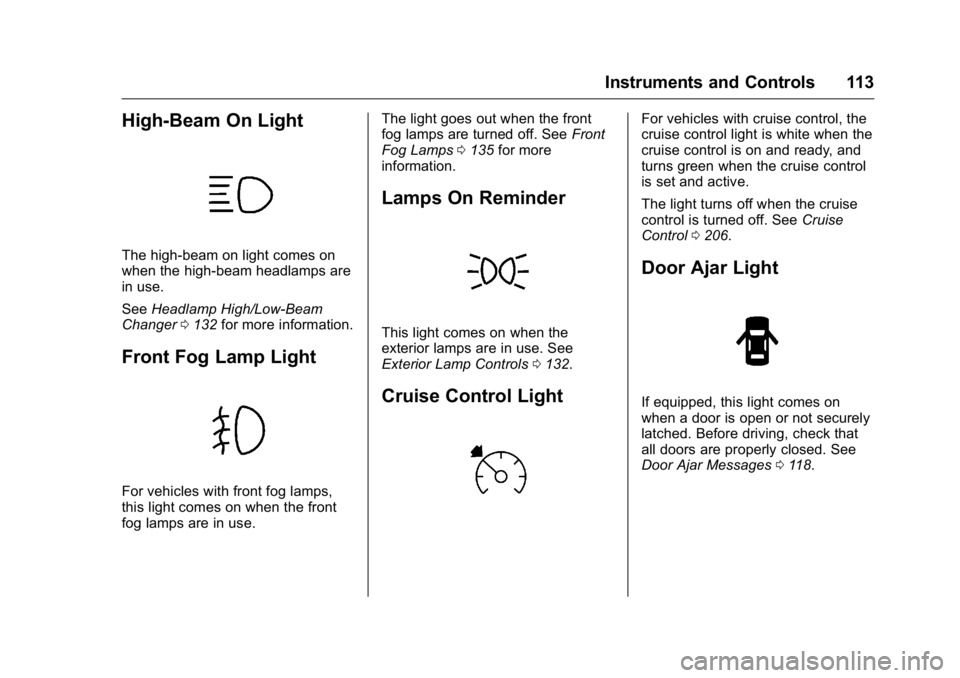
High-Beam On Light
The high‐beam on light comes on
when the high-beam headlamps are
in use.
SeeHeadlamp High/Low-Beam
Changer 0132 for more information.
Front Fog Lamp Light
For vehicles with front fog lamps,
this light comes on when the front
fog lamps are in use. The light goes out when the front
fog lamps are turned off. See
Front
Fog Lamps 0135 for more
information.
Lamps On Reminder
This light comes on when the
exterior lamps are in use. See
Exterior Lamp Controls 0132.
Cruise Control Light
For vehicles with cruise control, the
cruise control light is white when the
cruise control is on and ready, and
turns green when the cruise control
is set and active.
The light turns off when the cruise
control is turned off. See Cruise
Control 0206.
Door Ajar Light
If equipped, this light comes on
when a door is open or not securely
latched. Before driving, check that
all doors are properly closed. See
Door Ajar Messages 0118.
Page 115 of 355
Buick Verano Owner Manual (GMNA-Localizing-U.S./Canada/Mexico-
9085356) - 2016 - crc - 10/19/15
114 Instruments and Controls
Information Displays
Driver Information
Center (DIC)
The Driver Information Center (DIC)
displays information about the
vehicle. It also displays warning
messages if a system problem is
detected. SeeVehicle Messages
0 117. All messages appear in the
DIC display in the center of the
instrument cluster.
On some models, the DIC may have
some warning lights or indicators
shown in the top portion of the
display. See Warning Lights,
Gauges, and Indicators 0101.
The vehicle may also have features
that can be customized through the
controls on the radio. See Vehicle
Personalization 0123.
DIC Operation and Displays
The DIC has different displays
which can be accessed by using the
DIC buttons on the turn signal lever.
The DIC displays trip, fuel, and vehicle system information, and
warning messages if a system
problem is detected.
The bottom of the DIC display
shows the position of the shift lever
and the odometer. It may also show
the direction the vehicle is driving.
In cold weather the DIC display may
change slowly. This is normal and
will move more quickly as the
vehicle's interior temperature rises.
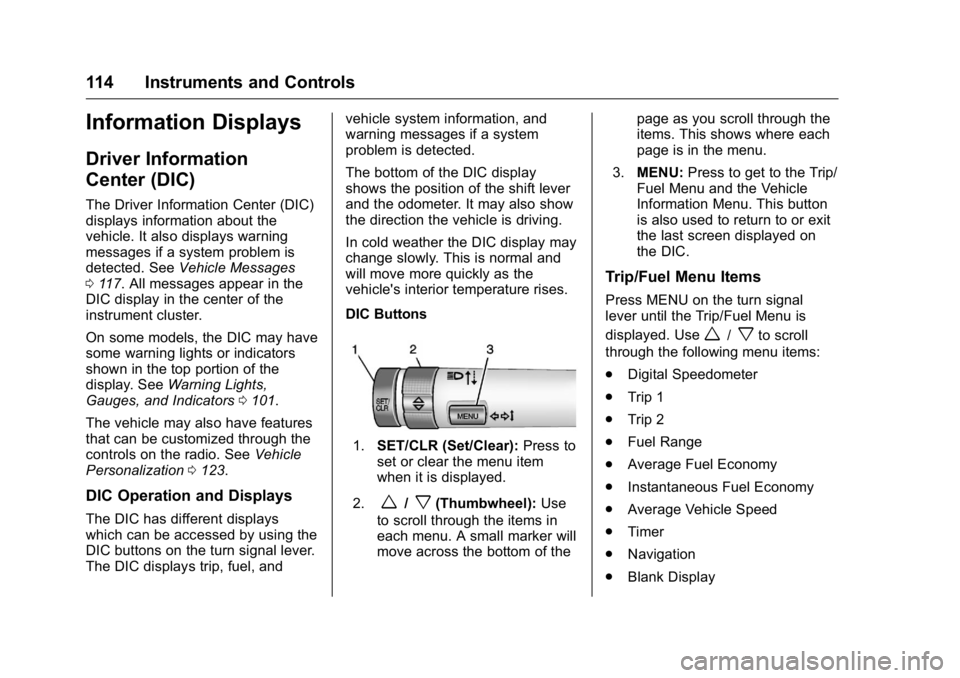
DIC Buttons
1.
SET/CLR (Set/Clear): Press to
set or clear the menu item
when it is displayed.
2.
w/x(Thumbwheel): Use
to scroll through the items in
each menu. A small marker will
move across the bottom of the page as you scroll through the
items. This shows where each
page is in the menu.
3. MENU: Press to get to the Trip/
Fuel Menu and the Vehicle
Information Menu. This button
is also used to return to or exit
the last screen displayed on
the DIC.
Trip/Fuel Menu Items
Press MENU on the turn signal
lever until the Trip/Fuel Menu is
displayed. Use
w/xto scroll
through the following menu items:
. Digital Speedometer
. Trip 1
. Trip 2
. Fuel Range
. Average Fuel Economy
. Instantaneous Fuel Economy
. Average Vehicle Speed
. Timer
. Navigation
. Blank Display
Page 117 of 355
Buick Verano Owner Manual (GMNA-Localizing-U.S./Canada/Mexico-
9085356) - 2016 - crc - 10/19/15
116 Instruments and Controls
Navigation
This display is used for the
Navigation System Turn-by-Turn
guidance. See the infotainment
manual, if the vehicle has
navigation, for more information.
Blank Display
This display shows no information.
Vehicle Information Menu
Items
Press MENU on the turn signal
lever until the Vehicle Information
Menu is displayed. Use
w/xto
scroll through the following menu
items:
. Unit
. Tire Pressure
. Remaining Oil Life
. Battery Voltage
Unit
Press SET/CLR to set. Move
w/
xto switch between metric or US
when the set Unit display is active.
Press SET/CLR to confirm the
setting. This will change the displays on the cluster and DIC to
either metric or English (US)
measurements.
Tire Pressure
The display will show a vehicle with
the approximate pressures of all
four tires. Tire pressure is displayed
in either kilopascal (kPa) or pounds
per square inch (psi). See
Tire
Pressure Monitor System 0270 and
Tire Pressure Monitor Operation
0 271 for more information.
Remaining Oil Life
This display shows an estimate of
the oil's remaining useful life.
If REMAINING OIL LIFE 99% is
displayed, that means 99% of the
current oil life remains.
When the remaining oil life is low,
the CHANGE ENGINE OIL SOON
message will appear on the display.
See Engine Oil Messages 0119.
The oil should be changed as soon
as possible. See Engine Oil0235.
In addition to the Engine Oil Life
System monitoring the oil life,
additional maintenance is
recommended in the Maintenance Schedule in this manual. See
Maintenance Schedule
0305 for
more information.
Remember, the Remaining Oil Life
display must be reset after each oil
change. It will not reset itself. Also,
be careful not to reset the
Remaining Oil Life display
accidentally at any time other than
when the oil has just been changed.
It cannot be reset accurately until
the next oil change. To reset the
Engine Oil Life System, press SET/
CLR while the Remaining Oil Life
display is active. See Engine Oil
Life System 0237.
Battery Voltage
This display shows the current
battery voltage. If the voltage is in
the normal range, the value will
display. For example, the display
may read Battery Voltage 15.0
Volts. The vehicle's charging system
regulates voltage based on the state
of the battery. The battery voltage
can fluctuate while viewing this
information on the DIC. This is
normal. See Charging System Light
0 106 for more information. If there
Page 123 of 355
Buick Verano Owner Manual (GMNA-Localizing-U.S./Canada/Mexico-
9085356) - 2016 - crc - 10/19/15
122 Instruments and Controls
TRACTION CONTROL OFF
This message displays when the
Traction Control System (TCS) is
turned off. Adjust your driving
accordingly.
TRACTION CONTROL ON
This message displays when the
Traction Control System (TCS) is
turned on.
Security Messages
THEFT ATTEMPTED
This message displays if the vehicle
detects a tamper condition.
Tire Messages
SERVICE TIRE MONITOR
SYSTEM
This message displays if there is a
problem with the Tire Pressure
Monitor System (TPMS). SeeTire
Pressure Monitor Operation 0271.
TIRE LEARNING ACTIVE
This message displays when the
system is learning new tires. See
Tire Pressure Monitor
Operation 0271.
TIRE PRESSURE LOW ADD
AIR TO TIRE
On vehicles with the Tire Pressure
Monitor System (TPMS), this
message displays when the
pressure in one or more of the
vehicle's tires is low.
The low tire pressure warning light
will also come on. See Tire
Pressure Light 0111.
If a tire pressure message displays,
inflate the tires until the tire pressure
is equal to the values shown on the
Tire and Loading Information label.
See Tires 0262, Vehicle Load
Limits 0269, and Tire
Pressure 0269.
More than one tire pressure
message can be received at a time.
The DIC also shows the tire
pressure values. See Driver
Information Center (DIC) 0114.
Transmission Messages
SERVICE TRANSMISSION
This message displays if there is a
problem with the transmission. See
your dealer.
SHIFT TO PARK
This message displays when the
transmission needs to be shifted to
P (Park). This may appear when
attempting to remove the key from
the ignition or from the vehicle if the
vehicle is not in P (Park).
TRANSMISSION HOT —IDLE
ENGINE
This message displays and a chime
sounds if the transmission fluid in
the vehicle gets hot. Driving with the
transmission fluid temperature high
can cause damage to the vehicle.
Stop the vehicle and let it idle to
allow the transmission to cool. This
message clears when the fluid
temperature reaches a safe level.
Page 124 of 355
Buick Verano Owner Manual (GMNA-Localizing-U.S./Canada/Mexico-
9085356) - 2016 - crc - 10/19/15
Instruments and Controls 123
Washer Fluid Messages
WASHER FLUID LOW ADD
FLUID
This message may display when the
washer fluid level is low. Fill the
windshield washer reservoir as soon
as possible. SeeEngine
Compartment Overview 0232 for
the location of the windshield
washer reservoir. Also, see Washer
Fluid 0245.
Window Messages
OPEN, THEN CLOSE DRIVER/
PASSENGER WINDOW
This message is displayed when the
window needs to be reprogrammed.
If the vehicle's battery has been
recharged or disconnected, you will
need to program each front window
for the express-up feature to work.
See Power Windows 044.
Vehicle
Personalization
Use the audio system controls to
access the personalization menus
for customizing vehicle features.
The following are all possible
personalization features. Depending
on the vehicle, some may not be
available.
Infotainment System Audio
System Controls
Using the Faceplate
MENU/SELECT Knob
.
Press to enter, select, or activate
a highlighted menu option.
. Turn to highlight a menu option.
. Press to enable or disable a
system setting.
/BACK
. Press to exit a menu.
. Press to return to a previous
screen. Using the Touch Screen
Press a screen feature to:
.
View more feature options.
. Enable or disable the feature.
w:Press to scroll up.
x:Press to scroll down.
Back : Press to return to the
previous menu.
To access the
personalization menu:
1. Press Config on the Home page on the infotainment
system display or CONFIG on
the faceplate.
2. Select the desired feature to display a list of available
options.
3. Select the desired feature setting.
Personalization Menus
The following list of menu items may
be available:
. Languages
. Time and Date