infotainment BUICK VERANO 2016 Owner's Manual
[x] Cancel search | Manufacturer: BUICK, Model Year: 2016, Model line: VERANO, Model: BUICK VERANO 2016Pages: 355, PDF Size: 5.16 MB
Page 2 of 355

Buick Verano Owner Manual (GMNA-Localizing-U.S./Canada/Mexico-
9085356) - 2016 - crc - 10/19/15
ContentsIntroduction . . . . . . . . . . . . . . . . . . . . . . 2
In Brief . . . . . . . . . . . . . . . . . . . . . . . . . . . 5
Keys, Doors, and Windows . . . . . 25
Seats and Restraints . . . . . . . . . . . 48
Storage . . . . . . . . . . . . . . . . . . . . . . . . . 93
Instruments and Controls . . . . . . . 96
Lighting . . . . . . . . . . . . . . . . . . . . . . . 132
Infotainment System . . . . . . . . . . 139
Climate Controls . . . . . . . . . . . . . . 170
Driving and Operating . . . . . . . . . 175
Vehicle Care . . . . . . . . . . . . . . . . . . 227
Service and Maintenance . . . . . 304
Technical Data . . . . . . . . . . . . . . . . 317
Customer Information . . . . . . . . . 320
Reporting Safety Defects . . . . . . 330
OnStar . . . . . . . . . . . . . . . . . . . . . . . . 334
Index . . . . . . . . . . . . . . . . . . . . 344
Page 6 of 355
Buick Verano Owner Manual (GMNA-Localizing-U.S./Canada/Mexico-
9085356) - 2016 - crc - 10/19/15
In Brief 5
In Brief
Instrument Panel
Instrument Panel Overview . . . . . . 6
Initial Drive Information
Initial Drive Information . . . . . . . . . . 8
Remote Keyless Entry (RKE)System . . . . . . . . . . . . . . . . . . . . . . . . 8
Remote Vehicle Start . . . . . . . . . . . 8
Door Locks . . . . . . . . . . . . . . . . . . . . . 9
Trunk Release . . . . . . . . . . . . . . . . . . 9
Windows . . . . . . . . . . . . . . . . . . . . . . . 10
Seat Adjustment . . . . . . . . . . . . . . . 10
Heated Seats . . . . . . . . . . . . . . . . . . 12
Head Restraint Adjustment . . . . 12
Safety Belts . . . . . . . . . . . . . . . . . . . . 13
Passenger Sensing System . . . 13
Mirror Adjustment . . . . . . . . . . . . . . 13
Steering Wheel Adjustment . . . . 14
Interior Lighting . . . . . . . . . . . . . . . . 14
Exterior Lighting . . . . . . . . . . . . . . . 15
Windshield Wiper/Washer . . . . . . 15
Climate Controls . . . . . . . . . . . . . . . 16
Transmission . . . . . . . . . . . . . . . . . . 17
Vehicle Features
Infotainment System . . . . . . . . . . . 17
Radio(s) . . . . . . . . . . . . . . . . . . . . . . . 17
Satellite Radio . . . . . . . . . . . . . . . . . 18 Portable Audio Devices . . . . . . . . 19
Bluetooth
®. . . . . . . . . . . . . . . . . . . . . 19
Steering Wheel Controls . . . . . . . 19
Cruise Control . . . . . . . . . . . . . . . . . 19
Driver Information Center (DIC) . . . . . . . . . . . . . . . . . 20
Forward Collision Alert (FCA) System . . . . . . . . . . . . . . . . . . . . . . . 20
Lane Departure Warning (LDW) . . . . . . . . . . . . . . . 20
Side Blind Zone Alert (SBZA) . . . . . . . . . . . . . . . . . . 20
Rear Vision Camera (RVC) . . . . 21
Rear Cross Traffic Alert (RCTA) System . . . . . . . . . . . . . . . . . . . . . . . 21
Parking Assist . . . . . . . . . . . . . . . . . 21
Power Outlets . . . . . . . . . . . . . . . . . 21
Universal Remote System . . . . . 21
Sunroof . . . . . . . . . . . . . . . . . . . . . . . . 22
Performance and Maintenance
Traction Control/Electronic Stability Control . . . . . . . . . . . . . . 22
Tire Pressure Monitor . . . . . . . . . . 23
Engine Oil Life System . . . . . . . . 23
Driving for Better Fuel Economy . . . . . . . . . . . . . . . . . . . . . 23
Roadside Assistance Program . . . . . . . . . . . . . . . . . . . . . . 24
Page 8 of 355

Buick Verano Owner Manual (GMNA-Localizing-U.S./Canada/Mexico-
9085356) - 2016 - crc - 10/19/15
In Brief 7
1.Air Vents 0173.
2. Headlamp High/Low-Beam
Changer 0132.
Turn Signal Lever. See Turn
and Lane-Change
Signals 0135.
Driver Information Center (DIC)
Buttons. See Driver Information
Center (DIC) 0114.
3. Instrument Cluster 0102.
4. Windshield Wiper/Washer 098.
5. Traction Control/Electronic
Stability Control 0204.
Lane Departure Warning
(LDW) 0216 (If Equipped).
6. Light Sensor. See Automatic
Headlamp System 0133.
7. Hazard Warning
Flashers 0134.
8. Passenger Airbag Status
Indicator 0105.
Trunk Release Button. See
Trunk 037.
9. Infotainment 0139. 10.
Dual Automatic Climate Control
System 0170 (If Equipped).
Heated Front Seats 053 (If
Equipped).
Heated Steering Wheel 098 (If
Equipped).
11. Electric Parking Brake. See Parking Brake 0201.
12. Shift Lever. See Automatic
Transmission 0196 orManual
Transmission 0199 (If
Equipped).
13. ENGINE START/STOP Button. SeeIgnition Positions (Keyless
Access) 0186 orIgnition
Positions (Key Access) 0188.
14. Steering Wheel Controls 097.
15. Horn 098.
16. Steering Wheel
Adjustment 097.
17. Cruise Control 0206.
Forward Collision Alert (FCA)
System 0212 (If Equipped). 18. Data Link Connector (DLC)
(Out of View). See Malfunction
Indicator Lamp (Check Engine
Light) 0106.
19. Instrument Panel Fuse
Block 0258.
20. Exterior Lamp Controls 0132.
Front Fog Lamps 0135 (If
Equipped).
Instrument Panel Illumination
Control 0136.
21. Hood Release. See Hood 0230.
Page 18 of 355
Buick Verano Owner Manual (GMNA-Localizing-U.S./Canada/Mexico-
9085356) - 2016 - crc - 10/19/15
In Brief 17
Transmission
Driver Shift Control (DSC)
DSC allows you to shift an
automatic transmission similar to a
manual transmission. To use the
DSC feature:1. Move the shift lever from D (Drive) to the left into the (+)
or (−) manual position.
2. Press the shift lever forward (+) to upshift or rearward (−) to
downshift. An M and the
current gear will be displayed
in the Driver Information
Center (DIC).
See Manual Mode 0198.
While using the DSC feature, the
vehicle will have firmer, quicker
shifting. You can use this for sport
driving or when climbing or
descending hills, to stay in gear
longer, or to downshift for more
power or engine braking.
Vehicle Features
Infotainment System
See the infotainment manual for
information on the radio, audio
players, phone, navigation system,
and voice or speech recognition.
There is also information on settings
and downloadable applications (if
equipped).
Radio(s)
O
/VOL : Press to turn the system
on and off. Turn to increase or
decrease the volume.
RADIO/BAND : Press to choose
between FM, AM, or SiriusXM
®,
if equipped.
TUNE/MENU : Turn to select radio
stations. Press to select a menu.
s ©:Press to seek the previous
station or track.
¨ \:Press to seek the next
station or track.
Buttons 1 to 6 : Press to save and
select favorite stations. INFO (Information) :
Press to show
available information about the
current station or track.
For more information about these
and other radio features, see
Operation 0142.
Storing a Station as a Favorite
Stations from all bands can be
stored in the favorite lists in any
order. Up to six stations can be
stored in each favorite page and the
number of available favorite pages
can be set.
To store the station to a position in
the list, press the FAV 1-2-3 button,
then press the corresponding
numeric button 1 to 6 for more than
two seconds.
For more information, see “Storing a
Station as a Favorite” inAM-FM
Radio 0145.
Setting the Clock (Radio
with CD)
The clock menu can be only be
used with the radio on while in ON/
RUN or ACC/ACCESSORY.
Page 20 of 355

Buick Verano Owner Manual (GMNA-Localizing-U.S./Canada/Mexico-
9085356) - 2016 - crc - 10/19/15
In Brief 19
SeeSatellite Radio 0148.
Portable Audio Devices
Some vehicles have a 3.5 mm
(1/8 in) auxiliary input and a USB
port in the center console. External
devices such as iPods
®, laptop
computers, MP3 players, CD
changers, and USB drives may be
connected, depending on the audio
system.
See Auxiliary Devices 0153.
Bluetooth®
The Bluetooth®system allows users
with a Bluetooth-enabled mobile
phone to make and receive
hands-free calls using the vehicle
audio system and controls.
The Bluetooth-enabled mobile
phone must be paired with the
in-vehicle Bluetooth system before it
can be used in the vehicle. Not all
phones will support all functions.
See Bluetooth (Voice Recognition)
0 161 orBluetooth (Infotainment
Controls) 0158 orBluetooth
(Overview) 0156.
Steering Wheel Controls
For vehicles with audio steering
wheel controls, some audio controls
can be adjusted at the steering
wheel.
b/g: Press to interact with the
available Bluetooth, OnStar,
or navigation system.
$/i: Press to silence the
vehicle speakers only. Press again
to turn the sound on. For vehicles
with OnStar or Bluetooth systems,
press to reject an incoming call,
or to end a current call.
_SRC^: Press the thumbwheel to
select an audio source.
Move the thumbwheel up or down to
select the next or previous favorite
radio station, CD, or MP3 track.
+
x− : Press + to increase or −to
decrease the volume.
For more information, see Steering
Wheel Controls 097.
Cruise Control
Page 98 of 355
Buick Verano Owner Manual (GMNA-Localizing-U.S./Canada/Mexico-
9085356) - 2016 - crc - 10/19/15
Instruments and Controls 97
Universal Remote System
Universal Remote System . . . . 129
Universal Remote SystemProgramming . . . . . . . . . . . . . . . 129
Universal Remote System Operation . . . . . . . . . . . . . . . . . . . 131Controls
Steering Wheel
Adjustment
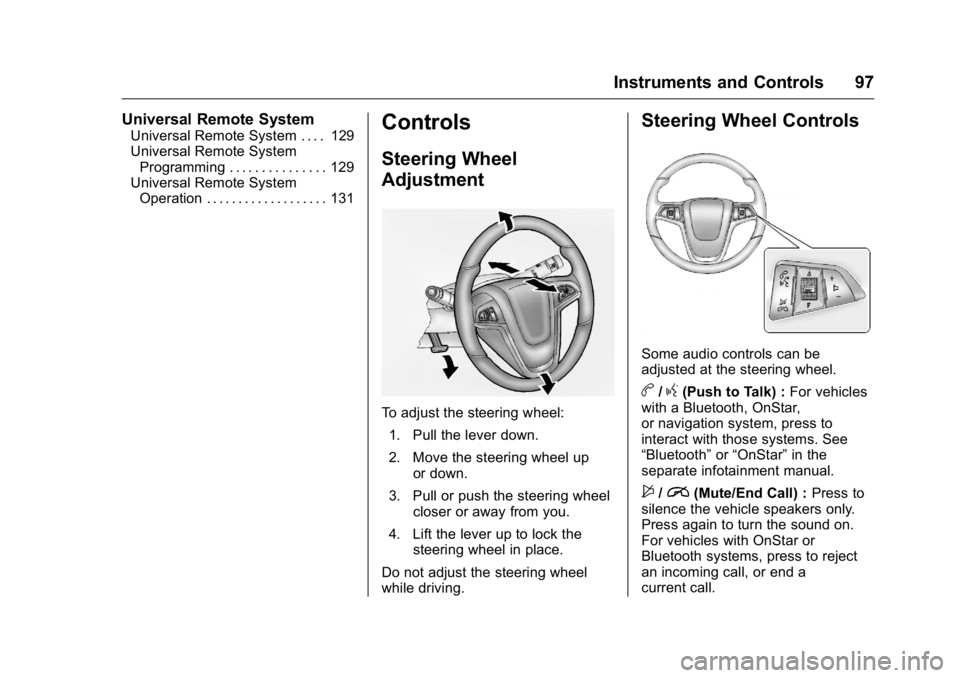
To adjust the steering wheel:
1. Pull the lever down.
2. Move the steering wheel up or down.
3. Pull or push the steering wheel closer or away from you.
4. Lift the lever up to lock the steering wheel in place.
Do not adjust the steering wheel
while driving.
Steering Wheel Controls
Some audio controls can be
adjusted at the steering wheel.
b/g(Push to Talk) : For vehicles
with a Bluetooth, OnStar,
or navigation system, press to
interact with those systems. See
“Bluetooth” or“OnStar” in the
separate infotainment manual.
$/i(Mute/End Call) : Press to
silence the vehicle speakers only.
Press again to turn the sound on.
For vehicles with OnStar or
Bluetooth systems, press to reject
an incoming call, or end a
current call.
Page 100 of 355
Buick Verano Owner Manual (GMNA-Localizing-U.S./Canada/Mexico-
9085356) - 2016 - crc - 10/19/15
Instruments and Controls 99
activated. SeeWasher Fluid0245
for information on filling the
windshield washer fluid reservoir.
{Warning
In freezing weather, do not use
the washer until the windshield is
warmed. Otherwise the washer
fluid can form ice on the
windshield, blocking your vision.
Clear snow and ice from the wiper
blades and windshield before using
them. If frozen to the windshield,
carefully loosen or thaw them.
Damaged blades should be
replaced. See Wiper Blade
Replacement 0250.
Heavy snow or ice can overload the
wiper motor.
Wiper Parking
If the ignition is turned to LOCK/
OFF while the wipers are on LO, HI,
or INT, they will immediately stop. If the windshield wiper lever is then
moved to off before the driver door
is opened or within 10 minutes, the
wipers will restart and move to the
base of the windshield.
If the ignition is turned to LOCK/
OFF while the wipers are performing
wipes due to windshield washing,
the wipers continue to run until they
reach the base of the windshield.
Compass
The vehicle may have a compass
display on the Driver Information
Center (DIC). The compass receives
its heading and other information
from the Global Positioning
System (GPS) antenna,
StabiliTrak
®, and vehicle speed
information.
The compass system is designed to
operate for a certain number of
miles or degrees of turn before
needing a signal from the GPS
satellites. When the compass
display shows CAL, drive the
vehicle for a short distance in an
open area where it can receive a
GPS signal. The compass system will automatically determine when a
GPS signal is restored and provide
a heading again. See
Compass
Messages 0118 for the messages
that may be displayed for the
compass.
Clock
The infotainment system controls
are used to access the time and
date settings through the menu
system. The clock menu can be
only be used with the radio on while
in ON/RUN or ACC/ACCESSORY.
See Operation 0142 for information
about how to use the menu system.
Setting the Clock (Radio
with CD)
To set the time:
1. Press the CONFIG button and select Time and Date or
press
H.
2. Select Set Time.
3. Turn the TUNE/MENU knob to adjust the highlighted number.
4. Press TUNE/MENU to select the next number.
Page 117 of 355
Buick Verano Owner Manual (GMNA-Localizing-U.S./Canada/Mexico-
9085356) - 2016 - crc - 10/19/15
116 Instruments and Controls
Navigation
This display is used for the
Navigation System Turn-by-Turn
guidance. See the infotainment
manual, if the vehicle has
navigation, for more information.
Blank Display
This display shows no information.
Vehicle Information Menu
Items
Press MENU on the turn signal
lever until the Vehicle Information
Menu is displayed. Use
w/xto
scroll through the following menu
items:
. Unit
. Tire Pressure
. Remaining Oil Life
. Battery Voltage
Unit
Press SET/CLR to set. Move
w/
xto switch between metric or US
when the set Unit display is active.
Press SET/CLR to confirm the
setting. This will change the displays on the cluster and DIC to
either metric or English (US)
measurements.
Tire Pressure
The display will show a vehicle with
the approximate pressures of all
four tires. Tire pressure is displayed
in either kilopascal (kPa) or pounds
per square inch (psi). See
Tire
Pressure Monitor System 0270 and
Tire Pressure Monitor Operation
0 271 for more information.
Remaining Oil Life
This display shows an estimate of
the oil's remaining useful life.
If REMAINING OIL LIFE 99% is
displayed, that means 99% of the
current oil life remains.
When the remaining oil life is low,
the CHANGE ENGINE OIL SOON
message will appear on the display.
See Engine Oil Messages 0119.
The oil should be changed as soon
as possible. See Engine Oil0235.
In addition to the Engine Oil Life
System monitoring the oil life,
additional maintenance is
recommended in the Maintenance Schedule in this manual. See
Maintenance Schedule
0305 for
more information.
Remember, the Remaining Oil Life
display must be reset after each oil
change. It will not reset itself. Also,
be careful not to reset the
Remaining Oil Life display
accidentally at any time other than
when the oil has just been changed.
It cannot be reset accurately until
the next oil change. To reset the
Engine Oil Life System, press SET/
CLR while the Remaining Oil Life
display is active. See Engine Oil
Life System 0237.
Battery Voltage
This display shows the current
battery voltage. If the voltage is in
the normal range, the value will
display. For example, the display
may read Battery Voltage 15.0
Volts. The vehicle's charging system
regulates voltage based on the state
of the battery. The battery voltage
can fluctuate while viewing this
information on the DIC. This is
normal. See Charging System Light
0 106 for more information. If there
Page 124 of 355
Buick Verano Owner Manual (GMNA-Localizing-U.S./Canada/Mexico-
9085356) - 2016 - crc - 10/19/15
Instruments and Controls 123
Washer Fluid Messages
WASHER FLUID LOW ADD
FLUID
This message may display when the
washer fluid level is low. Fill the
windshield washer reservoir as soon
as possible. SeeEngine
Compartment Overview 0232 for
the location of the windshield
washer reservoir. Also, see Washer
Fluid 0245.
Window Messages
OPEN, THEN CLOSE DRIVER/
PASSENGER WINDOW
This message is displayed when the
window needs to be reprogrammed.
If the vehicle's battery has been
recharged or disconnected, you will
need to program each front window
for the express-up feature to work.
See Power Windows 044.
Vehicle
Personalization
Use the audio system controls to
access the personalization menus
for customizing vehicle features.
The following are all possible
personalization features. Depending
on the vehicle, some may not be
available.
Infotainment System Audio
System Controls
Using the Faceplate
MENU/SELECT Knob
.
Press to enter, select, or activate
a highlighted menu option.
. Turn to highlight a menu option.
. Press to enable or disable a
system setting.
/BACK
. Press to exit a menu.
. Press to return to a previous
screen. Using the Touch Screen
Press a screen feature to:
.
View more feature options.
. Enable or disable the feature.
w:Press to scroll up.
x:Press to scroll down.
Back : Press to return to the
previous menu.
To access the
personalization menu:
1. Press Config on the Home page on the infotainment
system display or CONFIG on
the faceplate.
2. Select the desired feature to display a list of available
options.
3. Select the desired feature setting.
Personalization Menus
The following list of menu items may
be available:
. Languages
. Time and Date
Page 125 of 355
Buick Verano Owner Manual (GMNA-Localizing-U.S./Canada/Mexico-
9085356) - 2016 - crc - 10/19/15
124 Instruments and Controls
.Radio Settings
. Phone Settings
. Navigation Settings
. Display Settings
. Vehicle Settings
Each menu is detailed in the
following information.
Languages
Select Language, then select from
the available language(s).
Time and Date
Manually set the time and date. See
Clock 099.
Radio Settings
Select and depending on the radio
the following may display:
.
Auto Volume
. Gracenote Options
. XM Channel Art
. Max Startup Volume
. Maximum Startup Volume
. Number of Favorites Pages .
Radio Favorites
. RDS Options
. XM Categories
. Software Versions Menu
Auto Volume
This feature adjusts the volume to
minimize the effects of unwanted
background noise that can result
from changing road surfaces, driving
speeds, or open windows. This
feature works best at lower volume
settings where background noise is
typically louder than the sound
system volume.
Select Off, Low, Medium, or High.
Gracenote Options
Select and the following may
display:
. Normalization
Normalization
This feature improves voice
recognition and media groupings.
See “CD Player,” “USB,” “Auxiliary
Devices,” and“Bluetooth Audio” in
the infotainment manual. Select to enable or disable.
XM Channel Art
This feature turns the XM Audio
page background on the XM
Channel display on and off.
Select to enable or disable.
Max Startup Volume or Maximum
Startup Volume
This feature sets the maximum
startup volume. If the vehicle is
started and the volume is greater
than this level, the volume is
adjusted to this level.
Press + or
−to increase or
decrease the volume.
Number of Favorites Pages or
Radio Favorites
Press to set the number of favorites
to display.
Select the desired number.
RDS Options
Select and the following may
display:
. RDS