set BUICK VERANO 2017 Get To Know Guide
[x] Cancel search | Manufacturer: BUICK, Model Year: 2017, Model line: VERANO, Model: BUICK VERANO 2017Pages: 20, PDF Size: 2.34 MB
Page 2 of 20
2
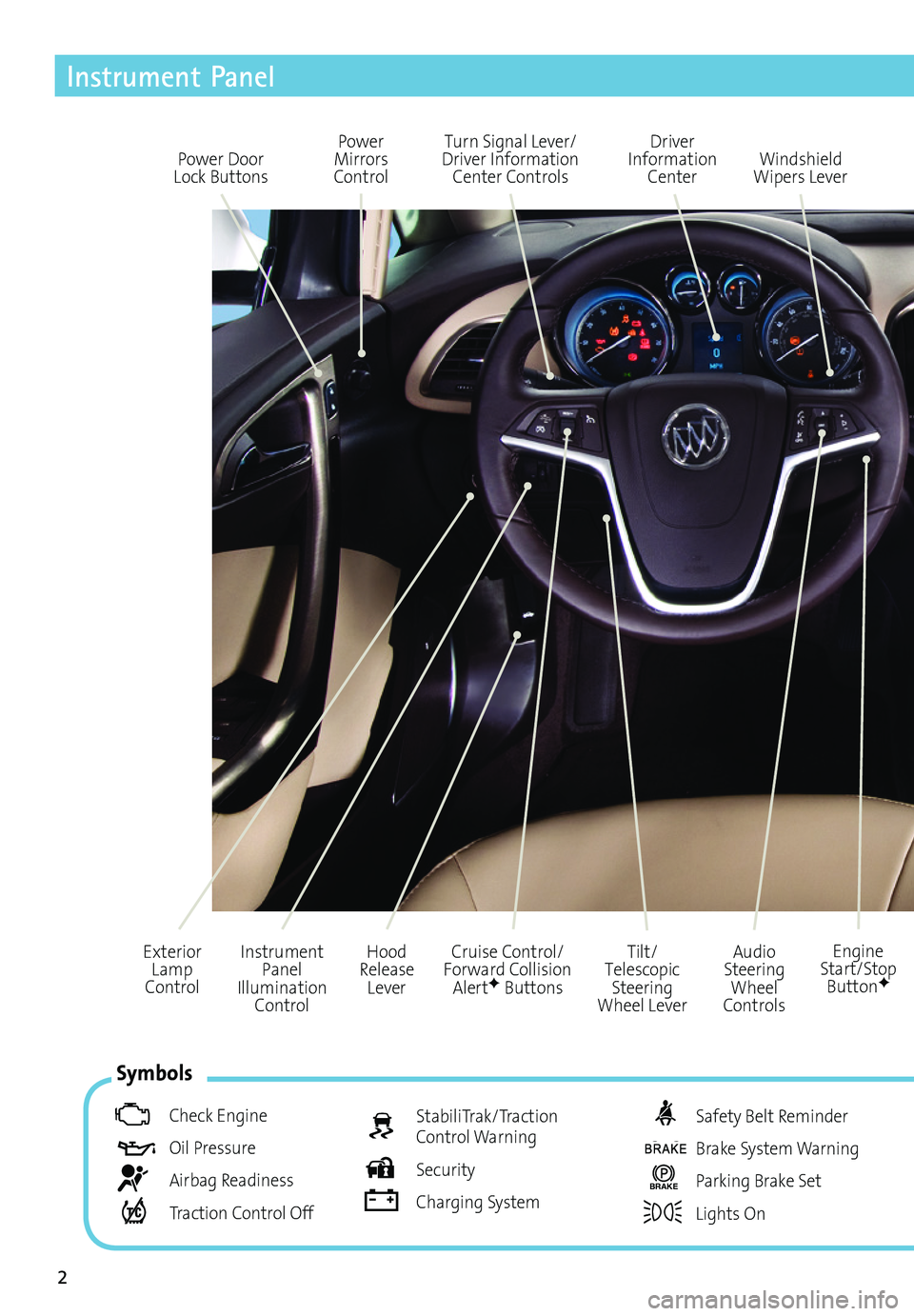
Power Door Lock Buttons
Power Mirrors Control
Turn Signal Lever/ Driver Information Center Controls
Driver Information Center
Tilt/Telescopic Steering Wheel Lever
Instrument Panel Illumination Control
Cruise Control/Forward Collision AlertF Buttons
Windshield Wipers Lever
Hood Release Lever
Exterior Lamp Control
Instrument Panel
Audio Steering Wheel Controls
Engine Start/Stop ButtonF
Symbols
Check Engine
Oil Pressure
Airbag Readiness
Traction Control Off
StabiliTrak/Traction Control Warning
Security
Charging System
Safety Belt Reminder
Brake System Warning
BRAKE Parking Brake Set
Lights On
Page 4 of 20
4
Remote Keyless Entry Transmitter
The Keyless Access System enables operation of the doors and ignition without removing the transmitter from a pocket or purse. The system will recognize the transmitter when it is within 3 feet of the door being opened.
Keyless Unlocking/Locking
With the transmitter within range of the vehicle, press the button on the driver’s door handle to unlock the driver’s door or all doors, depending on the selected vehicle
settings. Press the button on a passenger door handle to unlock all doors.
Press the button on a door handle and all doors will lock if the ignition is off, the transmitter is removed from the vehicle, and all doors are closed.
Note: Open Vehicle Settings in the Configuration menu to change the unlock and lock settings.
See Keys, Doors and Windows in your Owner Manual.
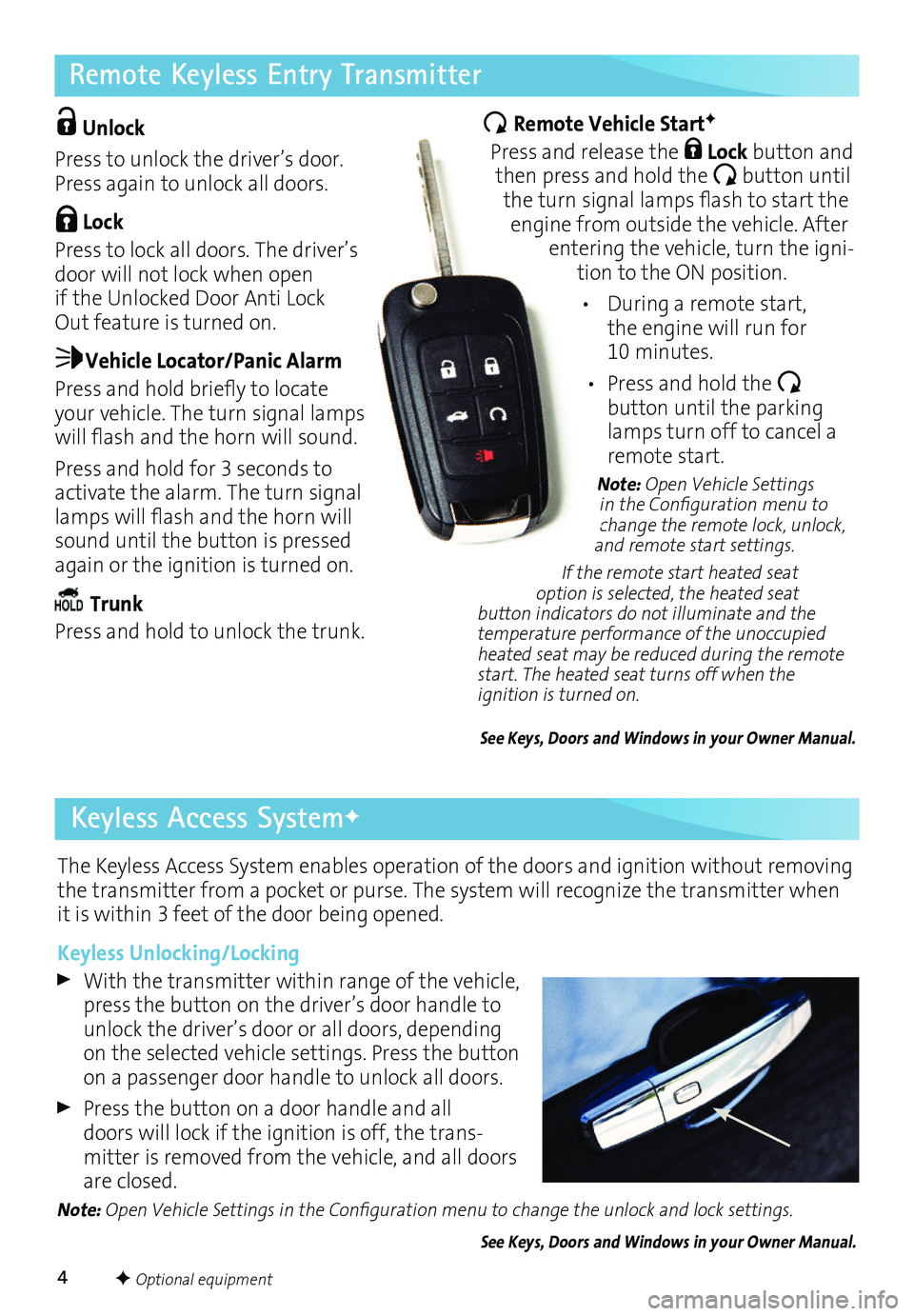
Unlock
Press to unlock the driver’s door. Press again to unlock all doors.
Lock
Press to lock all doors. The driver’s door will not lock when open if the Unlocked Door Anti Lock Out feature is turned on.
Vehicle Locator/Panic Alarm
Press and hold briefly to locate your vehicle. The turn signal lamps will flash and the horn will sound.
Press and hold for 3 seconds to activate the alarm. The turn signal lamps will flash and the horn will sound until the button is pressed again or the ignition is turned on.
Trunk
Press and hold to unlock the trunk.
Remote Vehicle StartF
Press and release the Lock button and then press and hold the button until the turn signal lamps flash to start the engine from outside the vehicle. After entering the vehicle, turn the ignition to the ON position.
• During a remote start, the engine will run for 10 minutes.
• Press and hold the
button until the parking lamps turn off to cancel a remote start.
Note: Open Vehicle Settings in the Configuration menu to change the remote lock, unlock, and remote start settings.
If the remote start heated seat option is selected, the heated seat button indicators do not illuminate and the temperature performance of the unoccupied heated seat may be reduced during the remote start. The heated seat turns off when the ignition is turned on.
See Keys, Doors and Windows in your Owner Manual.
F Optional equipment
Keyless Access SystemF
Page 7 of 20
7
Climate Controls
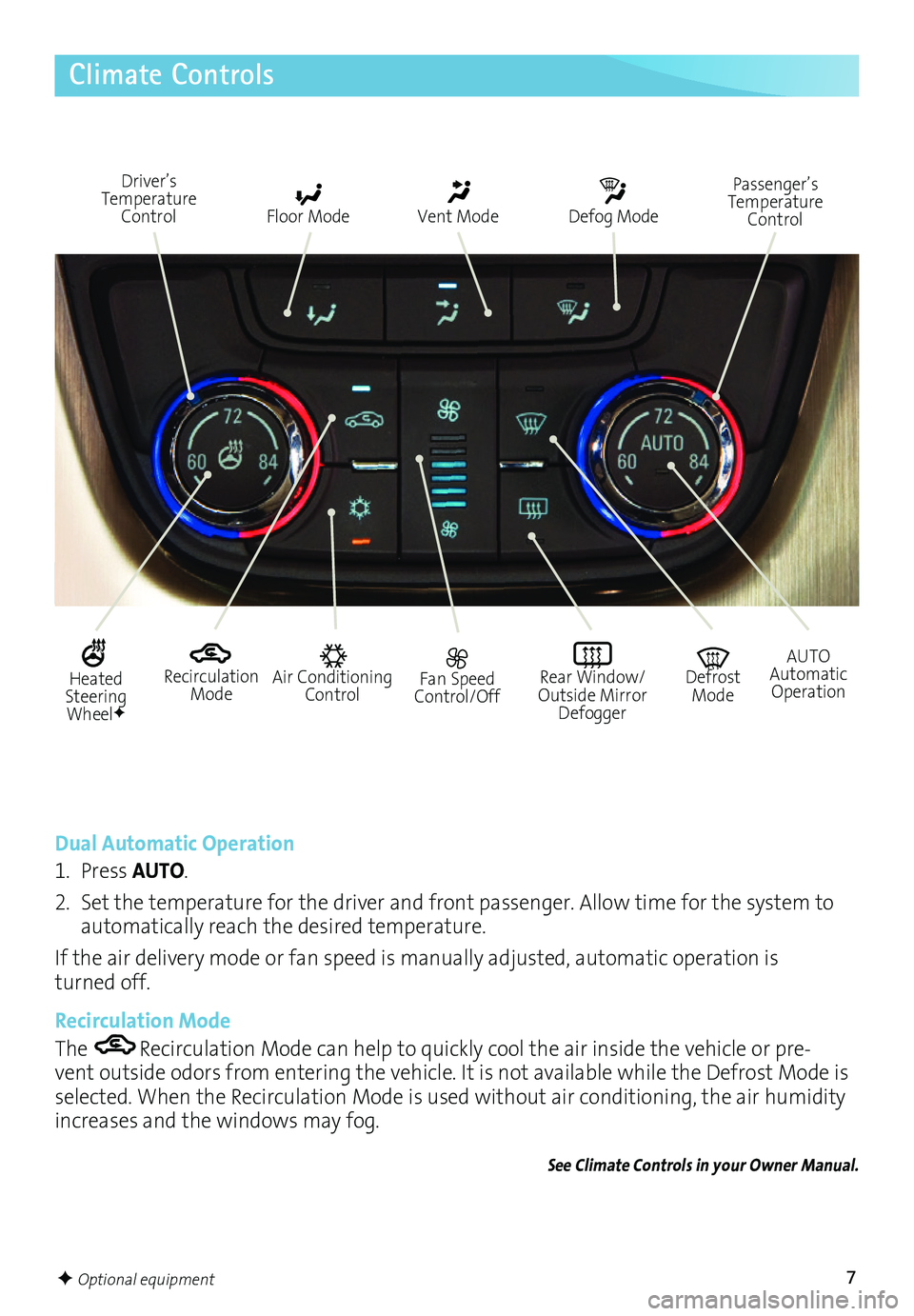
Recirculation Mode
Driver’s Temperature Control Floor Mode Vent Mode Defog Mode
Fan Speed Control/Off
Rear Window/ Outside Mirror Defogger
Air Conditioning Control
AUTO Automatic Operation
Defrost Mode
Dual Automatic Operation
1. Press AUTO.
2. Set the temperature for the driver and front passenger. Allow time for the system to automatically reach the desired temperature.
If the air delivery mode or fan speed is manually adjusted, automatic operation is turned off.
Recirculation Mode
The Recirculation Mode can help to quickly cool the air inside the vehicle or prevent outside odors from entering the vehicle. It is not available while the Defrost Mode is selected. When the Recirculation Mode is used without air conditioning, the air humidity increases and the windows may fog.
See Climate Controls in your Owner Manual.
Passenger’s Temperature Control
Heated Steering WheelF
F Optional equipment
Page 8 of 20
8
Audio System
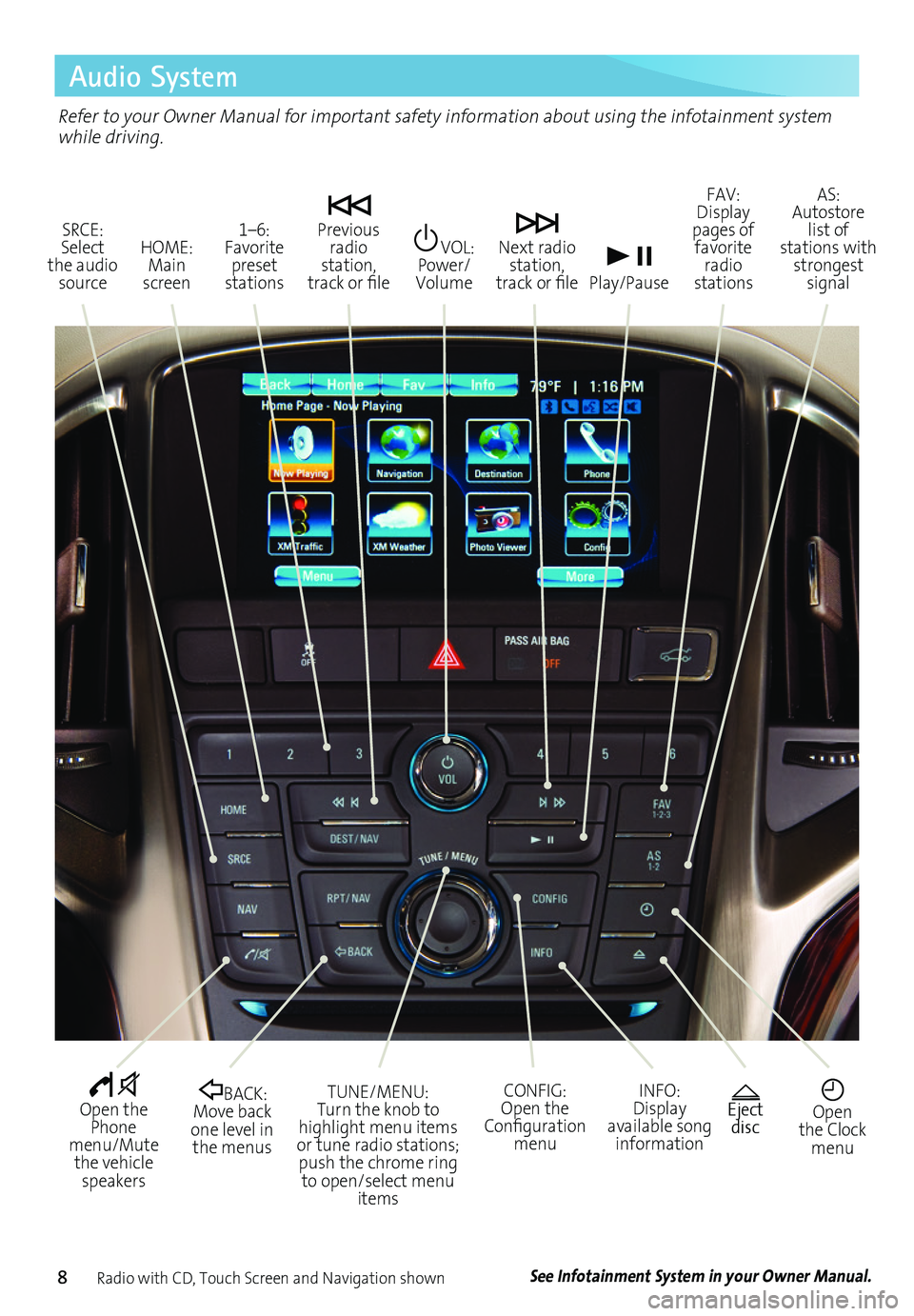
Radio with CD, Touch Screen and Navigation shown
SRCE: Select the audio source
VOL: Power/ Volume
Next radio station, track or file
1–6: Favorite preset stations
HOME: Main screen
Previous radio station, track or file Play/Pause
Open the Phone menu/Mute the vehicle speakers
INFO: Display available song information
CONFIG: Open the Configuration menu
TUNE/MENU: Turn the knob to highlight menu items or tune radio stations; push the chrome ring to open/select menu items
See Infotainment System in your Owner Manual.
Open the Clock menu
BACK: Move back one level in the menus
FAV: Display pages of favorite radio stations
AS: Autostore list of stations with strongest signal
Eject disc
Refer to your Owner Manual for important safety information about using the infotainment system while driving.
Page 9 of 20
9
Audio System
Setting the Time
1. Turn on the audio system.
2. Press the Clock button.
3. Press the MENU knob chrome ring to highlight the desired time.
4. Turn the MENU knob to change the value; press the chrome ring to confirm the set value. Press the BACK button to return to the Time Settings menu.
Note: Open the Time and Date Settings in the Configuration menu to make other time and date adjustments.
Storing Favorite Stations
Radio stations from all bands (AM, FM or XMF) can be stored, in any order, on up to six pages of favorites.
1. Tune in the desired radio station.
2. Press the FAV button to display the page where the station is to be stored.
3. Press and hold one of the six numeric pushbuttons for more than two seconds.
4. Repeat the steps for each pushbutton on each page.
Portable Audio Devices
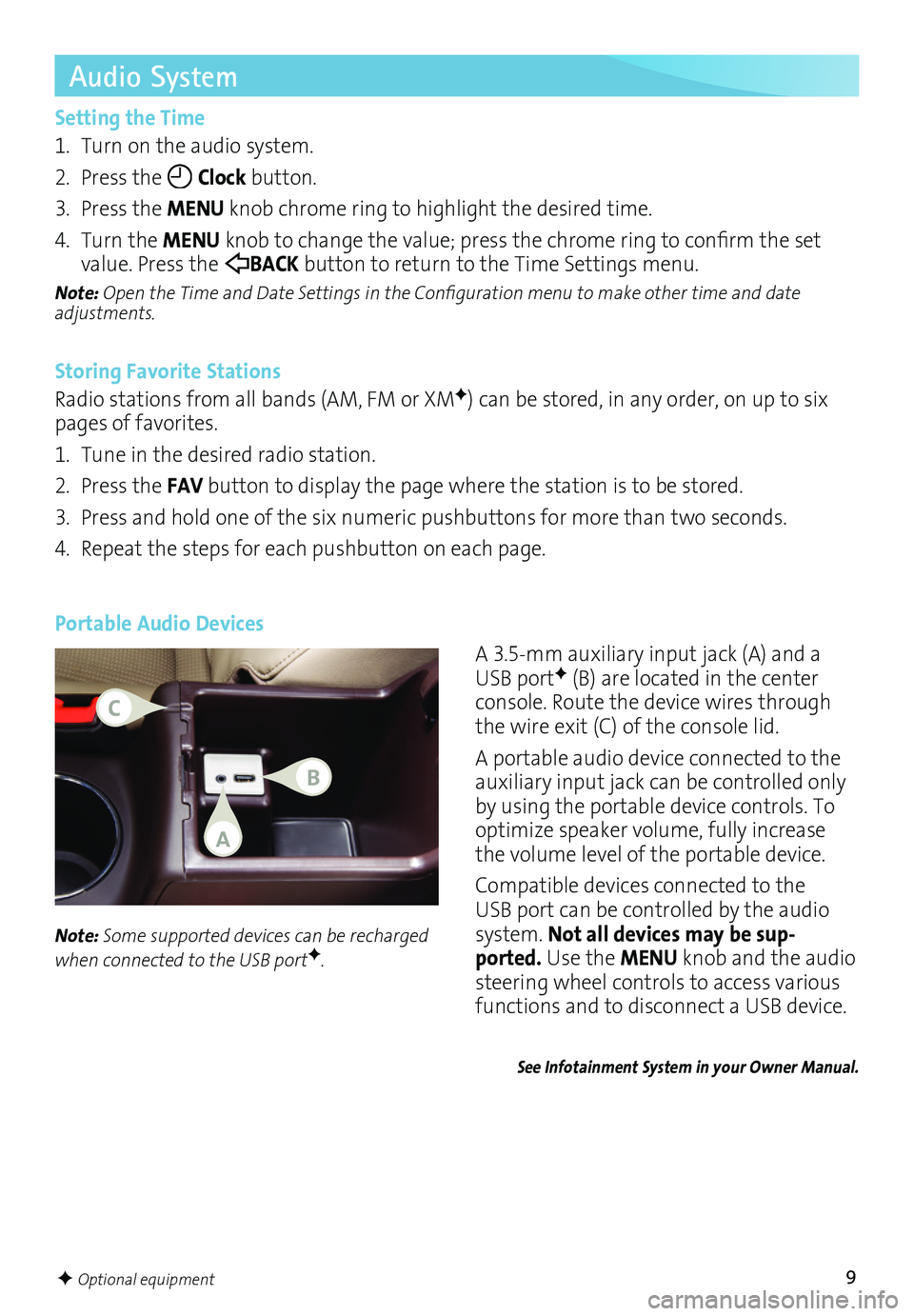
A 3.5mm auxiliary input jack (A) and a USB portF (B) are located in the center console. Route the device wires through the wire exit (C) of the console lid.
A portable audio device connected to the auxiliary input jack can be controlled only by using the portable device controls. To optimize speaker volume, fully increase the volume level of the portable device.
Compatible devices connected to the USB port can be controlled by the audio system. Not all devices may be sup-ported. Use the MENU knob and the audio
steering wheel controls to access various
functions and to disconnect a USB device.
Note: Some supported devices can be recharged when connected to the USB portF.
See Infotainment System in your Owner Manual.
F Optional equipment
A
C
B
Page 10 of 20
10
IntelliLink System
IntelliLink uses a Bluetooth or USB connection to link to a compatible mobile device, such as a smartphone, cell phone, USB flash drive or portable audio player/iPod®. IntelliLink enables streaming audio through a smartphone and handsfree voice control. For assistance with the IntelliLink system, contact Customer Assistance at 18554SUPPORT (18554787767) or go to www.buick.com and click the Owners link.
Pair a Phone
Before using a Bluetoothenabled device in the vehicle, it must be paired with the IntelliLink system. Not all devices will support all functions. The pairing process is disabled when the vehicle is moving. For more information, visit my.buick.com/learn.
Pair a Phone using Voice Recognition
1. Press the Push to Talk button.
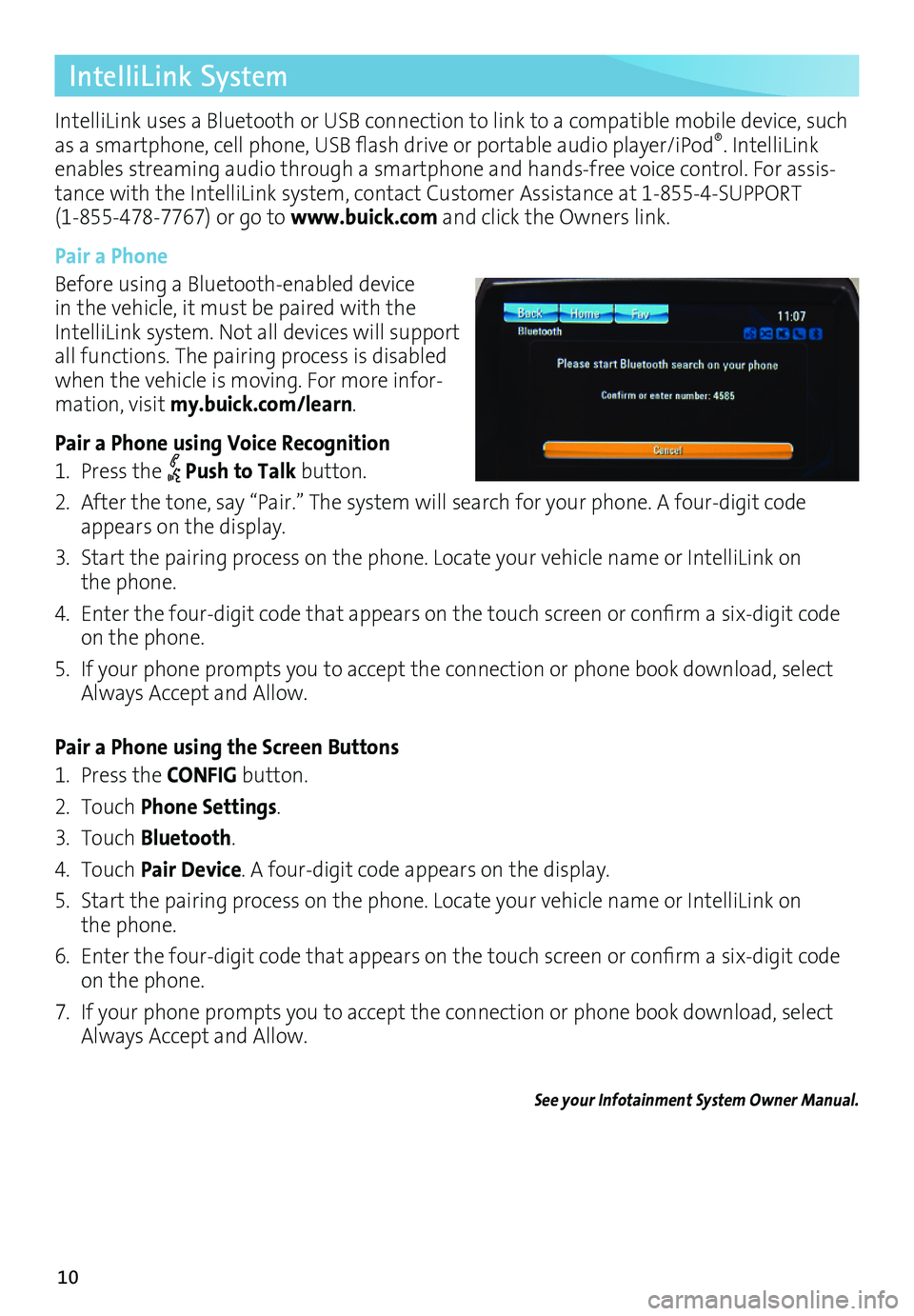
2. After the tone, say “Pair.” The system will search for your phone. A fourdigit code appears on the display.
3. Start the pairing process on the phone. Locate your vehicle name or IntelliLink on the phone.
4. Enter the four-digit code that appears on the touch screen or confirm a six-digit code on the phone.
5. If your phone prompts you to accept the connection or phone book download, select Always Accept and Allow.
Pair a Phone using the Screen Buttons
1. Press the CONFIG button.
2. Touch Phone Settings.
3. Touch Bluetooth.
4. Touch Pair Device. A fourdigit code appears on the display.
5. Start the pairing process on the phone. Locate your vehicle name or IntelliLink on the phone.
6. Enter the four-digit code that appears on the touch screen or confirm a six-digit code on the phone.
7. If your phone prompts you to accept the connection or phone book download, select Always Accept and Allow.
See your Infotainment System Owner Manual.
Page 11 of 20
11
IntelliLink System
Voice Recognition
Control the music source and make phone calls handsfree (after pairing your Bluetoothenabled phone) using the enhanced voice recognition system.
1. Press the Push to Talk button on the steering wheel.
2. The radio will say “Ready,” followed by a beep.
3. After the beep, say what you want it to do.
• Phone (using your paired phone):
– “Pair” or “Connect”
– “Dial” or “Call [number]”
– “Dial” or “Call [phone book name]”
Example command: “Call Amanda” or “Dial 5551212”
• Media Music Device Search:
– “Play CD”
– “Play USB”
– “Play Bluetooth audio”
Example command: “Play artist [name]”
Example command: “Play song [name]”
• Radio Control:
Example command: “Tune FM 104.3” or “Tune Classic Vinyl”
Example command: “Tune Pandora” (Pandora app required)
Example command: “Thumbs up” or “Thumbs down” (Pandora app required)
• Help:
– Say “Help” for voice recognition assistance.
Device List
To switch devices, select from the list of paired phones/devices.
See your Infotainment System Owner Manual.
Listing all Paired Phones using Voice Recognition
1. Press the Push to Talk button.
2. Say “Device list” or “Select device.”
Listing all Paired Phones using the Screen Buttons
1. Press the CONFIG button.
2. Touch Phone Settings.
3. Touch Bluetooth.
4. Touch Device List.
Page 13 of 20
13
Navigation Controls
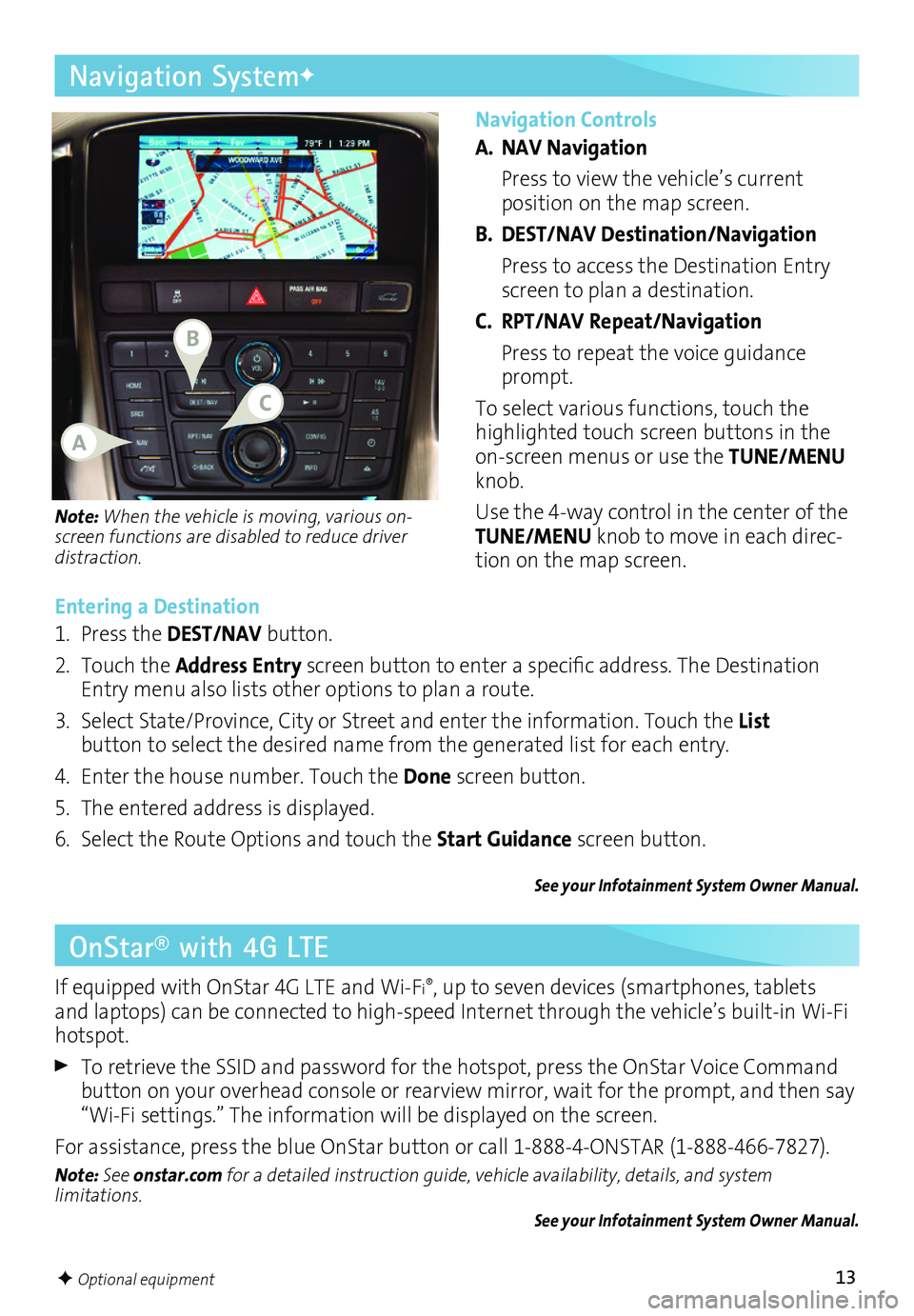
A. NAV Navigation
Press to view the vehicle’s current
position on the map screen.
B. DEST/NAV Destination/Navigation
Press to access the Destination Entry screen to plan a destination.
C. RPT/NAV Repeat/Navigation
Press to repeat the voice guidance prompt.
To select various functions, touch the highlighted touch screen buttons in the onscreen menus or use the TUNE/MENU knob.
Use the 4way control in the center of the TUNE/MENU knob to move in each direction on the map screen.
Navigation SystemF
Note: When the vehicle is moving, various
on-screen functions are disabled to reduce driver distraction.
Entering a Destination
1. Press the DEST/NAV button.
2. Touch the Address Entry screen button to enter a specific address. The Destination Entry menu also lists other options to plan a route.
3. Select State/Province, City or Street and enter the information. Touch the List
button to select the desired name from the generated list for each entry.
4. Enter the house number. Touch the Done screen button.
5. The entered address is displayed.
6. Select the Route Options and touch the Start Guidance screen button.
See your Infotainment System Owner Manual.
OnStar® with 4G LTE
If equipped with OnStar 4G LTE and WiFi®, up to seven devices (smartphones, tablets and laptops) can be connected to highspeed Internet through the vehicle’s builtin WiFi hotspot.
To retrieve the SSID and password for the hotspot, press the OnStar Voice Command button on your overhead console or rearview mirror, wait for the prompt, and then say “WiFi settings.” The information will be displayed on the screen.
For assistance, press the blue OnStar button or call 18884ONSTAR (18884667827).
Note: See onstar.com for a detailed instruction guide, vehicle availability, details, and system limitations. See your Infotainment System Owner Manual.
F Optional equipment
B
A
C
Page 14 of 20
14
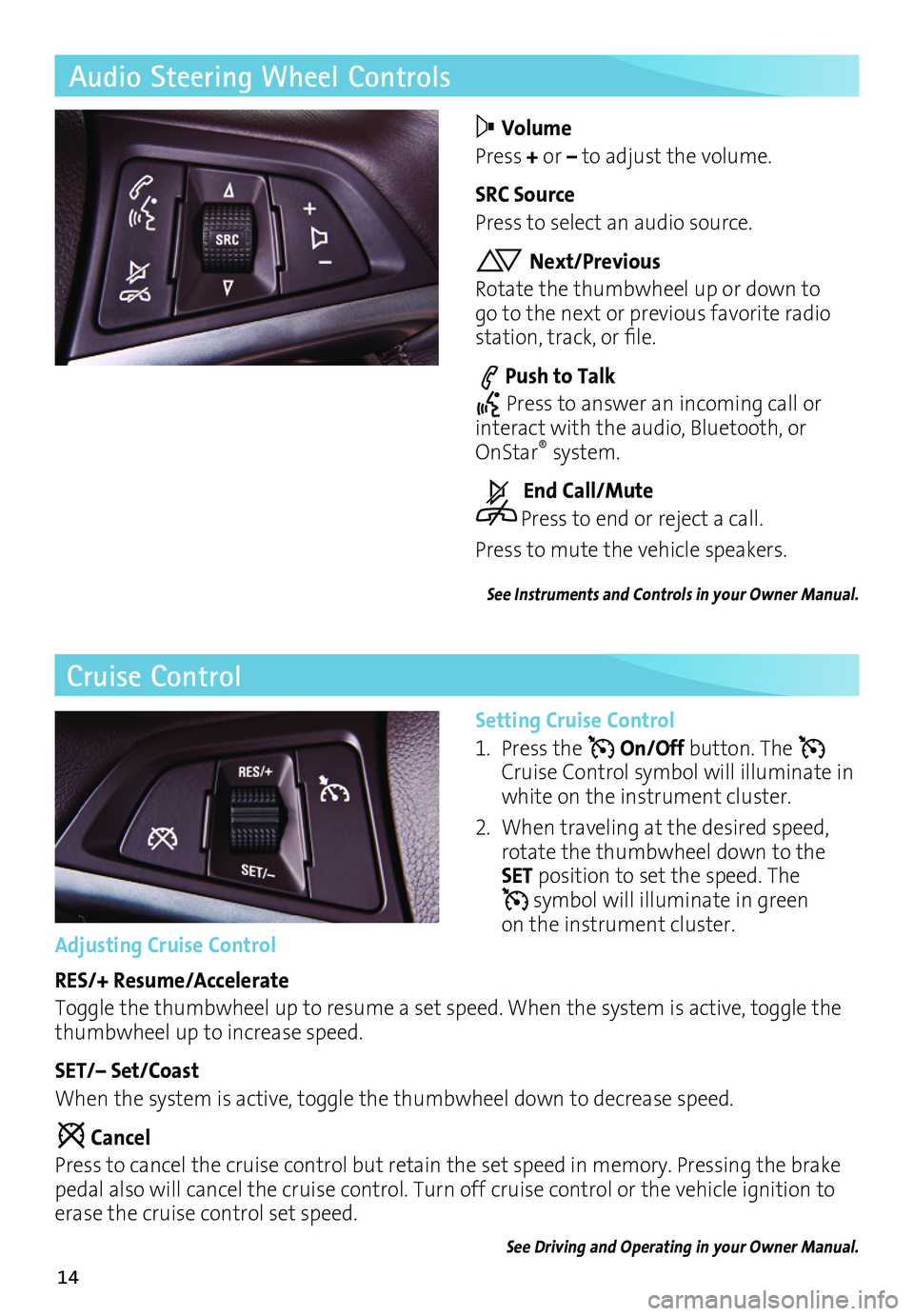
Audio Steering Wheel Controls
Volume
Press + or – to adjust the volume.
SRC Source
Press to select an audio source.
Next/Previous
Rotate the thumbwheel up or down to go to the next or previous favorite radio station, track, or file.
Push to Talk
Press to answer an incoming call or interact with the audio, Bluetooth, or OnStar® system.
End Call/Mute
Press to end or reject a call.
Press to mute the vehicle speakers.
See Instruments and Controls in your Owner Manual.
Cruise Control
Setting Cruise Control
1. Press the On/Off button. The Cruise Control symbol will illuminate in white on the instrument cluster.
2. When traveling at the desired speed, rotate the thumbwheel down to the SET position to set the speed. The symbol will illuminate in green on the instrument cluster.Adjusting Cruise Control
RES/+ Resume/Accelerate
Toggle the thumbwheel up to resume a set speed. When the system is active, toggle the thumbwheel up to increase speed.
SET/– Set/Coast
When the system is active, toggle the thumbwheel down to decrease speed.
Cancel
Press to cancel the cruise control but retain the set speed in memory. Pressing the brake pedal also will cancel the cruise control. Turn off cruise control or the vehicle ignition to erase the cruise control set speed.
See Driving and Operating in your Owner Manual.
Page 15 of 20
15
Vehicle Personalization
Customize Settings
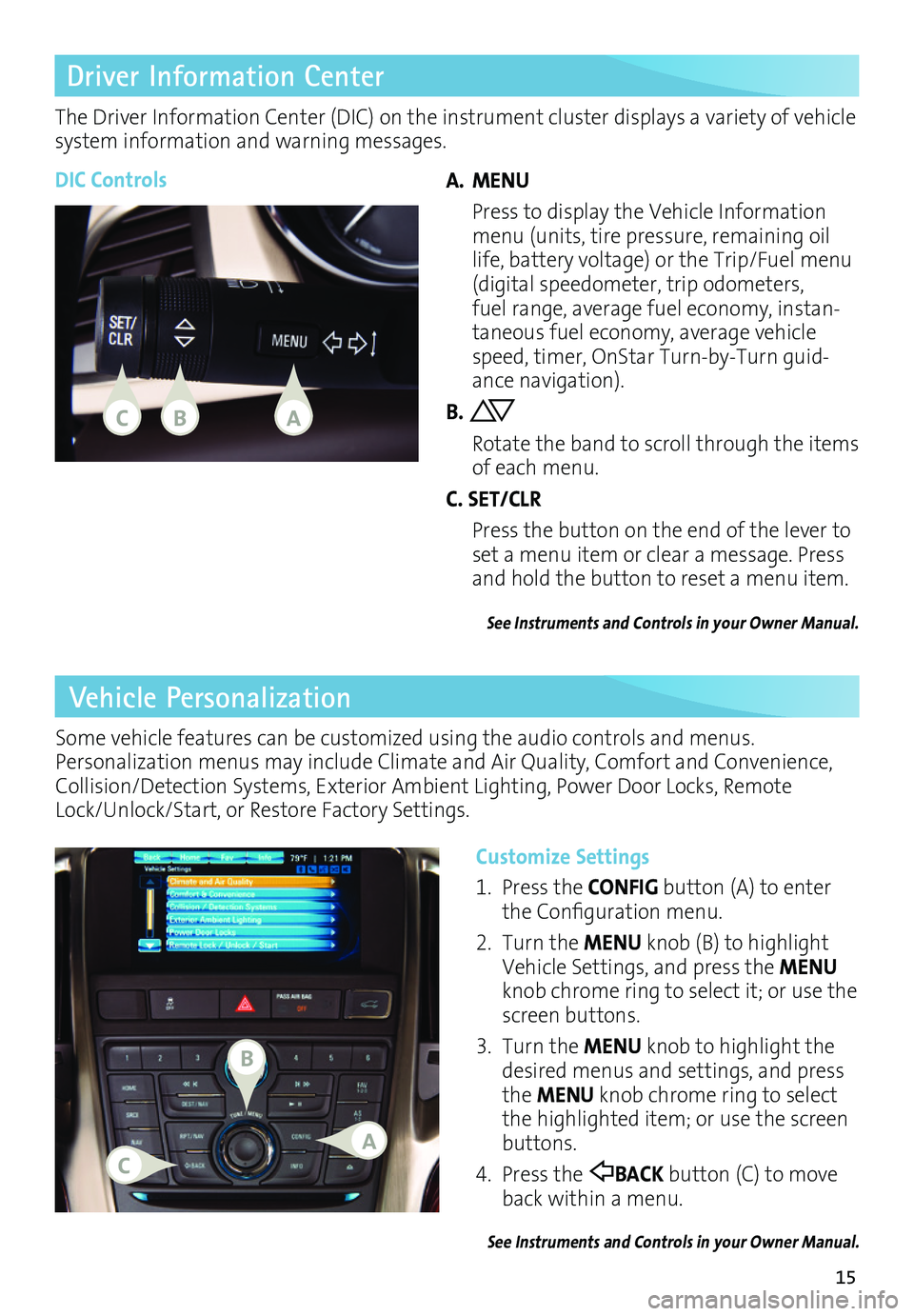
1. Press the CONFIG button (A) to enter the Configuration menu.
2. Turn the MENU knob (B) to highlight Vehicle Settings, and press the MENU knob chrome ring to select it; or use the screen buttons.
3. Turn the MENU knob to highlight the desired menus and settings, and press the MENU knob chrome ring to select the highlighted item; or use the screen buttons.
4. Press the BACK button (C) to move back within a menu.
See Instruments and Controls in your Owner Manual.
Some vehicle features can be customized using the audio controls and menus. Personalization menus may include Climate and Air Quality, Comfort and Convenience, Collision/Detection Systems, Exterior Ambient Lighting, Power Door Locks, Remote Lock/Unlock/Start, or Restore Factory Settings.
Driver Information Center
The Driver Information Center (DIC) on the instrument cluster displays a variety of vehicle system information and warning messages.
DIC ControlsA. MENU
Press to display the Vehicle Information menu (units, tire pressure, remaining oil life, battery voltage) or the Trip/Fuel menu (digital speedometer, trip odometers, fuel range, average fuel economy, instantaneous fuel economy, average vehicle speed, timer, OnStar TurnbyTurn guidance navigation).
B.
Rotate the band to scroll through the items of each menu.
C. SET/CLR
Press the button on the end of the lever to set a menu item or clear a message. Press and hold the button to reset a menu item.
See Instruments and Controls in your Owner Manual.
CAB
B
CA