mirror CADILLAC ATS 2013 1.G Owner's Manual
[x] Cancel search | Manufacturer: CADILLAC, Model Year: 2013, Model line: ATS, Model: CADILLAC ATS 2013 1.GPages: 450, PDF Size: 6.98 MB
Page 227 of 450
Black plate (9,1)Cadillac ATS Owner Manual - 2013 - CRC - 10/5/12
Driving and Operating 9-9
.Pay attention to special road
signs (falling rocks area, winding
roads, long grades, passing or
no-passing zones) and take
appropriate action.
Winter Driving
Driving on Snow or Ice
Drive carefully when there is snow
or ice between the tires and the
road, creating less traction or grip.
Wet ice can occur at about 0°C
(32°F) when freezing rain begins to
fall, resulting in even less traction.
Avoid driving on wet ice or in
freezing rain until roads can be
treated with salt or sand.
Drive with caution, whatever the
condition. Accelerate gently so
traction is not lost. Accelerating too
quickly causes the wheels to spin
and makes the surface under the
tires slick, so there is even less
traction.Try not to break the fragile traction.
If you accelerate too fast, the drive
wheels will spin and polish the
surface under the tires even more.
The Antilock Brake System (ABS)
improves vehicle stability during
hard stops on slippery roads, but
apply the brakes sooner than when
on dry pavement.
Allow greater following distance on
any slippery road and watch for
slippery spots. Icy patches can
occur on otherwise clear roads in
shaded areas. The surface of a
curve or an overpass can remain icy
when the surrounding roads are
clear. Avoid sudden steering
maneuvers and braking while
on ice.
See
Antilock Brake System (ABS)
on page 9‑29.
Turn off cruise control, on slippery
surfaces.
Blizzard Conditions
Being stuck in snow can be a
serious situation. Stay with the
vehicle unless there is help nearby.
If possible, use Roadside Service.
See Roadside Service (Mexico) on
page 13‑7 orRoadside Service
(U.S. and Canada) on page 13‑10.
To get help and keep everyone in
the vehicle safe:
.Turn on the hazard warning
flashers.
.Tie a red cloth to an outside
mirror.
Page 268 of 450
![CADILLAC ATS 2013 1.G Owners Manual Black plate (50,1)Cadillac ATS Owner Manual - 2013 - CRC - 10/5/12
9-50 Driving and Operating
Ending ACC
There are three ways to
disengage ACC:
.Step lightly on the brake pedal.
.Press*.
.Press].
Eras](/img/23/7841/w960_7841-267.png "CADILLAC ATS 2013 1.G Owners Manual Black plate (50,1)Cadillac ATS Owner Manual - 2013 - CRC - 10/5/12
9-50 Driving and Operating
Ending ACC
There are three ways to
disengage ACC:
.Step lightly on the brake pedal.
.Press*.
.Press].
Eras")
Black plate (50,1)Cadillac ATS Owner Manual - 2013 - CRC - 10/5/12
9-50 Driving and Operating
Ending ACC
There are three ways to
disengage ACC:
.Step lightly on the brake pedal.
.Press*.
.Press].
Erasing Speed Memory
The cruise control set speed is
erased from memory if
]is
pressed or if the ignition is
turned off. Cleaning the Sensing System
The camera sensor on the back of
the rearview mirror and the radar
sensors on the front of the vehicle
can become blocked by snow, ice,
dirt, or mud. These areas need to
be cleaned for ACC to operate
properly.
For cleaning instructions, see
“Washing the Vehicle”
under
Exterior Care on page 10‑81.
System operation may also be
limited under snow, heavy rain,
or road spray conditions.
Driver Assistance
Systems
This vehicle may have features that
work together to help avoid crashes
or reduce crash damage while
driving, backing, and parking. Read
this entire section before using
these systems.
{WARNING
Do not rely on the Driver
Assistance Systems. These
systems do not replace the need
for paying attention and driving
safely. You may not hear or feel
alerts or warnings provided by
these systems. Failure to use
proper care when driving may
result in injury, death, or vehicle
damage. See Defensive Driving
on page 9‑3.
(Continued)
Page 271 of 450
Black plate (53,1)Cadillac ATS Owner Manual - 2013 - CRC - 10/5/12
Driving and Operating 9-53
Use caution while backing up when
towing a trailer, as the RCTA
detection zones that extend out
from the back of the vehicle do not
move further back when a trailer is
towed.
With URPA, as the vehicle backs up
at speeds of less than 8 km/h
(5 mph), the sensors on the rear
bumper detect objects up to 2.5 m
(8 ft) behind the vehicle that are
within a zone 25 cm (10 in) high off
the ground and below bumper level.
{WARNING
The parking assist system does
not detect children, pedestrians,
bicyclists, animals, or objects
located below the bumper or that
are too close or too far from the
vehicle. It is not available at
speeds greater than 8 km/h
(5 mph). To prevent injury, death,
or vehicle damage, even with
parking assist, always check the(Continued)
WARNING (Continued)
area around the vehicle and
check all mirrors before moving
forward or backing.
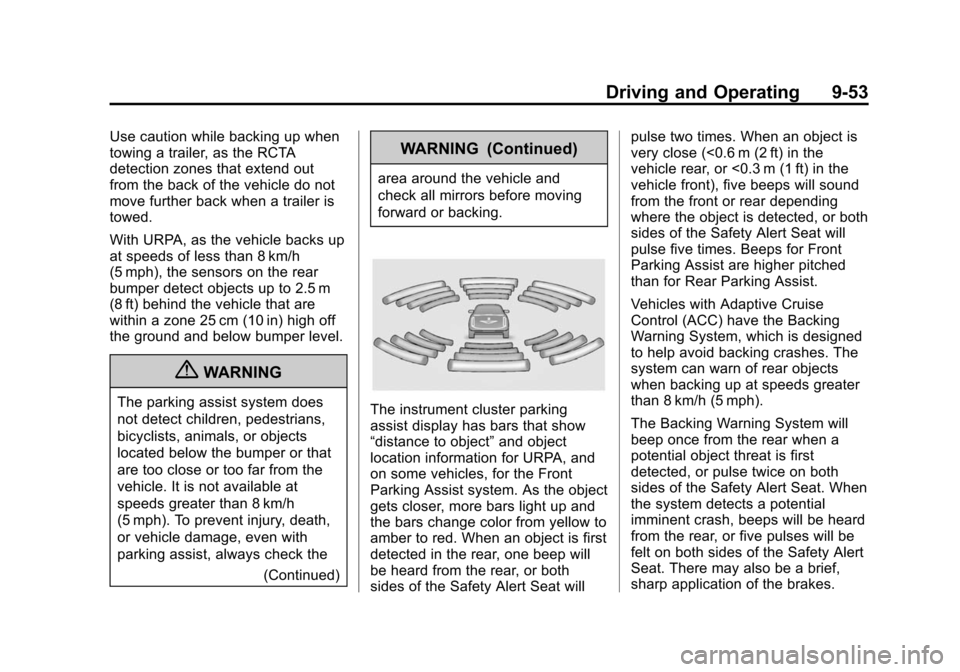
The instrument cluster parking
assist display has bars that show
“distance to object”and object
location information for URPA, and
on some vehicles, for the Front
Parking Assist system. As the object
gets closer, more bars light up and
the bars change color from yellow to
amber to red. When an object is first
detected in the rear, one beep will
be heard from the rear, or both
sides of the Safety Alert Seat will pulse two times. When an object is
very close (<0.6 m (2 ft) in the
vehicle rear, or <0.3 m (1 ft) in the
vehicle front), five beeps will sound
from the front or rear depending
where the object is detected, or both
sides of the Safety Alert Seat will
pulse five times. Beeps for Front
Parking Assist are higher pitched
than for Rear Parking Assist.
Vehicles with Adaptive Cruise
Control (ACC) have the Backing
Warning System, which is designed
to help avoid backing crashes. The
system can warn of rear objects
when backing up at speeds greater
than 8 km/h (5 mph).
The Backing Warning System will
beep once from the rear when a
potential object threat is first
detected, or pulse twice on both
sides of the Safety Alert Seat. When
the system detects a potential
imminent crash, beeps will be heard
from the rear, or five pulses will be
felt on both sides of the Safety Alert
Seat. There may also be a brief,
sharp application of the brakes.
Page 272 of 450
Black plate (54,1)Cadillac ATS Owner Manual - 2013 - CRC - 10/5/12
9-54 Driving and Operating
{WARNING
The Backing Warning System
only operates at speeds greater
than 8 km/h (5 mph). It does not
detect children, pedestrians,
bicyclists, animals, or objects
below the bumper or that are too
close or too far from the vehicle.
In some situations, such as at
higher backing speeds, there may
not be enough time for the short,
sharp application of the vehicle
brake system to occur. To prevent
injury, death, or vehicle damage,
even with the Backing Warning
System, always check the area
around the vehicle and check all
mirrors before backing.
Vehicles with Adaptive Cruise
Control (ACC) also have the Rear
Automatic Braking system, which is
designed to help avoid or reduce
the harm caused by backing
crashes. If the system detects the vehicle is backing too fast to avoid a
crash with a detected object, it may
automatically brake hard to a stop.
{WARNING
Rear Automatic Braking may not
avoid many types of backing
crashes. Do not wait for the
automatic braking to apply. This
system is not designed to replace
driver braking, but only acts when
the vehicle may not stop in time.
The system, in some situations or
environments, may not brake or
may not brake in time to avoid a
crash. It does not detect children,
pedestrians, bicyclists, animals,
or objects below the bumper or
that are too close or too far from
the vehicle. To prevent injury,
death, or vehicle damage, even
with Rear Automatic Braking,
always check the area around the
vehicle before and while backing.
Pressing the brake pedal after the
vehicle comes to a stop will release
the Rear Automatic Braking. If the
brake pedal is not pressed within
two seconds after the stop, the
electric parking brake is set. When it
is safe, pressing the accelerator
pedal firmly at any time will override
the Rear Automatic Braking.
{WARNING
There may be instances where
unexpected or undesired
automatic braking occurs. If this
happens, either press the brake
pedal or firmly press the
accelerator pedal to release the
brakes from the Rear Automatic
Braking system. Check the RVC
screen and check the area
around the vehicle before
proceeding.
Page 278 of 450
Black plate (60,1)Cadillac ATS Owner Manual - 2013 - CRC - 10/5/12
9-60 Driving and Operating
{WARNING
Using the Automatic Collision
Preparation System while towing
a trailer could cause you to lose
control of the vehicle and crash.
Turn the system off when towing
a trailer.
Side Blind Zone
Alert (SBZA)
If available, the Side Blind Zone
Alert system is a lane-changing aid
that assists drivers with avoiding
crashes that occur with vehicles in
the side blind zone (or spot) areas.
{WARNING
SBZA does not detect vehicles
rapidly approaching outside of the
side blind zones, pedestrians,
bicyclists, or animals. Failure to
use proper care when changing(Continued)
WARNING (Continued)
lanes may result in injury, death,
or vehicle damage. Before
making a lane change, always
check mirrors, glance over your
shoulder, and use the turn
signals.
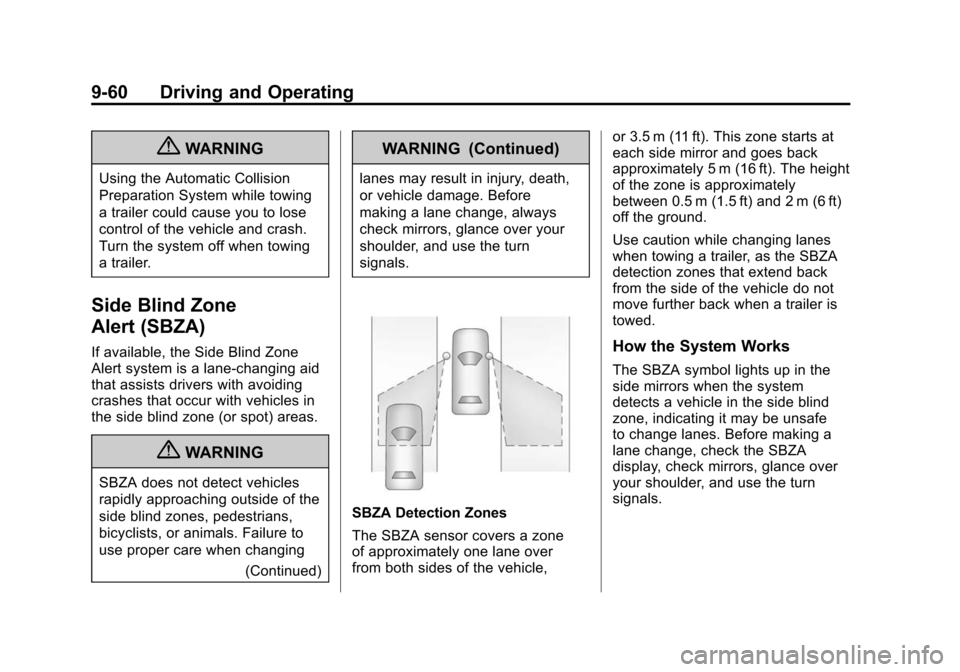
SBZA Detection Zones
The SBZA sensor covers a zone
of approximately one lane over
from both sides of the vehicle, or 3.5 m (11 ft). This zone starts at
each side mirror and goes back
approximately 5 m (16 ft). The height
of the zone is approximately
between 0.5 m (1.5 ft) and 2 m (6 ft)
off the ground.
Use caution while changing lanes
when towing a trailer, as the SBZA
detection zones that extend back
from the side of the vehicle do not
move further back when a trailer is
towed.
How the System Works
The SBZA symbol lights up in the
side mirrors when the system
detects a vehicle in the side blind
zone, indicating it may be unsafe
to change lanes. Before making a
lane change, check the SBZA
display, check mirrors, glance over
your shoulder, and use the turn
signals.
Page 279 of 450
Black plate (61,1)Cadillac ATS Owner Manual - 2013 - CRC - 10/5/12
Driving and Operating 9-61
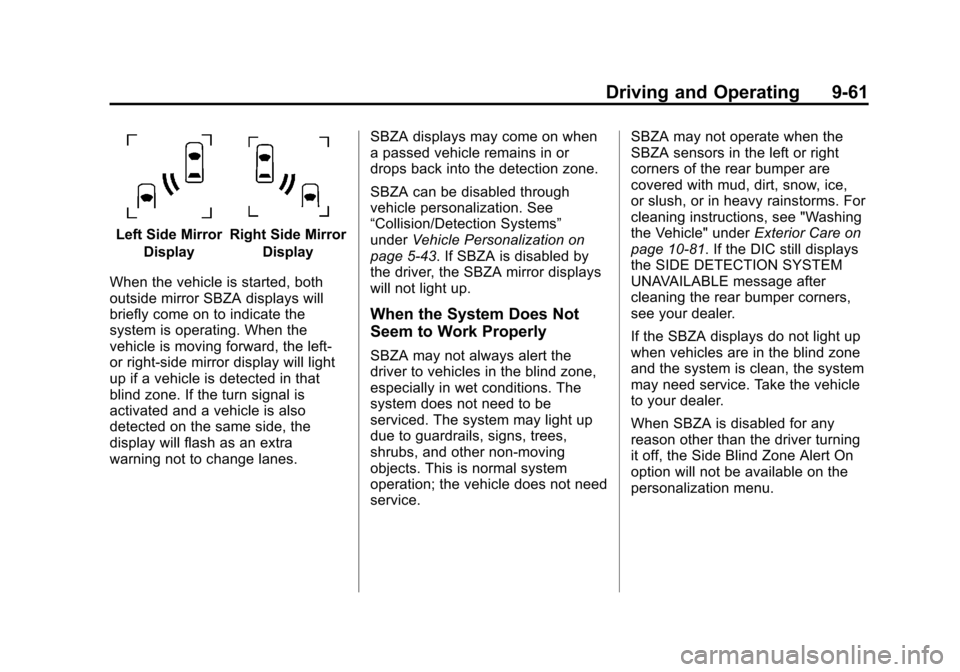
Left Side MirrorDisplayRight Side Mirror Display
When the vehicle is started, both
outside mirror SBZA displays will
briefly come on to indicate the
system is operating. When the
vehicle is moving forward, the left-
or right-side mirror display will light
up if a vehicle is detected in that
blind zone. If the turn signal is
activated and a vehicle is also
detected on the same side, the
display will flash as an extra
warning not to change lanes. SBZA displays may come on when
a passed vehicle remains in or
drops back into the detection zone.
SBZA can be disabled through
vehicle personalization. See
“Collision/Detection Systems”
under
Vehicle Personalization on
page 5‑43. If SBZA is disabled by
the driver, the SBZA mirror displays
will not light up.
When the System Does Not
Seem to Work Properly
SBZA may not always alert the
driver to vehicles in the blind zone,
especially in wet conditions. The
system does not need to be
serviced. The system may light up
due to guardrails, signs, trees,
shrubs, and other non-moving
objects. This is normal system
operation; the vehicle does not need
service. SBZA may not operate when the
SBZA sensors in the left or right
corners of the rear bumper are
covered with mud, dirt, snow, ice,
or slush, or in heavy rainstorms. For
cleaning instructions, see "Washing
the Vehicle" under
Exterior Care on
page 10‑81. If the DIC still displays
the SIDE DETECTION SYSTEM
UNAVAILABLE message after
cleaning the rear bumper corners,
see your dealer.
If the SBZA displays do not light up
when vehicles are in the blind zone
and the system is clean, the system
may need service. Take the vehicle
to your dealer.
When SBZA is disabled for any
reason other than the driver turning
it off, the Side Blind Zone Alert On
option will not be available on the
personalization menu.
Page 280 of 450
Black plate (62,1)Cadillac ATS Owner Manual - 2013 - CRC - 10/5/12
9-62 Driving and Operating
FCC Information
SeeRadio Frequency Statement on
page 13‑21 for information
regarding Part 15 of the Federal
Communications Commission (FCC)
rules and Industry Canada
Standards RSS-GEN/210/220/310.
Lane Departure
Warning (LDW)
LDW may help avoid crashes due to
unintentional lane departures. It may
provide a warning if the vehicle is
crossing a lane without using a turn
signal. LDW uses a camera sensor
to detect the lane markings. It only
operates at speeds of 56 km/h
(35 mph) or greater.
When the vehicle crosses a
detected lane marking, the LDW
indicator will flash and either three
beeps will be sounded from the left
or right, or three Safety Alert Seat
pulses will occur on the left or right
side of the seat, depending on the lane departure direction. LDW will
not warn if the turn signal is on or if
a sharp maneuver is made.
{WARNING
The LDW system is an aid to help
the vehicle stay in the driving
lane. It does not steer the vehicle.
The LDW system may not:
.Provide enough time to avoid
a crash.
.Detect lane markings under
bad weather conditions or if
the windshield is dirty.
.Detect lane markings and will
not detect road edges.
.Warn that the vehicle is
crossing a lane marking if the
system does not detect the
lane marking.
If LDW only detects lane
markings on one side of the
road, it will only warn you when (Continued)
WARNING (Continued)
departing the lane on the side
where it has detected a lane
marker. Even with LDW, always
keep your attention on the road
and maintain proper vehicle
position within the lane, or vehicle
damage, injury, or death could
occur. Always keep the
windshield clean and do not use
LDW in bad weather conditions.
How the System Works
The LDW camera sensor is on the
windshield ahead of the rearview
mirror.
To turn LDW on and off, press
@to
the left of the steering wheel. The
control indicator will light when LDW
is on.
Page 289 of 450
Black plate (71,1)Cadillac ATS Owner Manual - 2013 - CRC - 10/5/12
Driving and Operating 9-71
Towing a trailer requires a certain
amount of experience. The
combination you are driving is
longer and not as responsive as the
vehicle itself. Get acquainted with
the handling and braking of the rig
before setting out for the open road.
Before starting, check all trailer hitch
parts and attachments, safety
chains, electrical connectors, lamps,
tires, and mirrors. If the trailer
has electric brakes, start the
combination moving and then apply
the trailer brake controller by hand
to be sure the brakes work.
During the trip, check occasionally
to be sure that the load is secure
and the lamps and any trailer
brakes still work.
Following Distance
Stay at least twice as far behind the
vehicle ahead as you would when
driving the vehicle without a trailer.
This can help to avoid heavy
braking and sudden turns.
Passing
More passing distance is needed
when towing a trailer. The
combination will not accelerate
as quickly and is longer so it is
necessary to go much farther
beyond the passed vehicle before
returning to the lane.
Backing Up
Hold the bottom of the steering
wheel with one hand. To move the
trailer to the left, move that hand to
the left. To move the trailer to the
right, move your hand to the right.
Always back up slowly and,
if possible, have someone
guide you.
Making Turns
Notice:Making very sharp turns
while trailering could cause the
trailer to come in contact with the
vehicle. The vehicle could be
damaged. Avoid making very
sharp turns while trailering. When turning with a trailer, make
wider turns than normal. Do this
so the trailer will not strike soft
shoulders, curbs, road signs, trees,
or other objects. Avoid jerky or
sudden maneuvers. Signal well in
advance.
If the trailer turn signal bulbs burn
out, the arrows on the instrument
cluster will still flash for turns. It is
important to check occasionally to
be sure the trailer bulbs are still
working.
Driving on Grades
Reduce speed and shift to a
lower gear
beforestarting down a
long or steep downgrade. If the
transmission is not shifted down, the
brakes might get hot and no longer
work well.
Vehicles can tow in D (Drive). Shift
the transmission to a lower gear if
the transmission shifts too often
under heavy loads and/or hilly
conditions.
Page 335 of 450
Black plate (41,1)Cadillac ATS Owner Manual - 2013 - CRC - 10/5/12
Vehicle Care 10-41
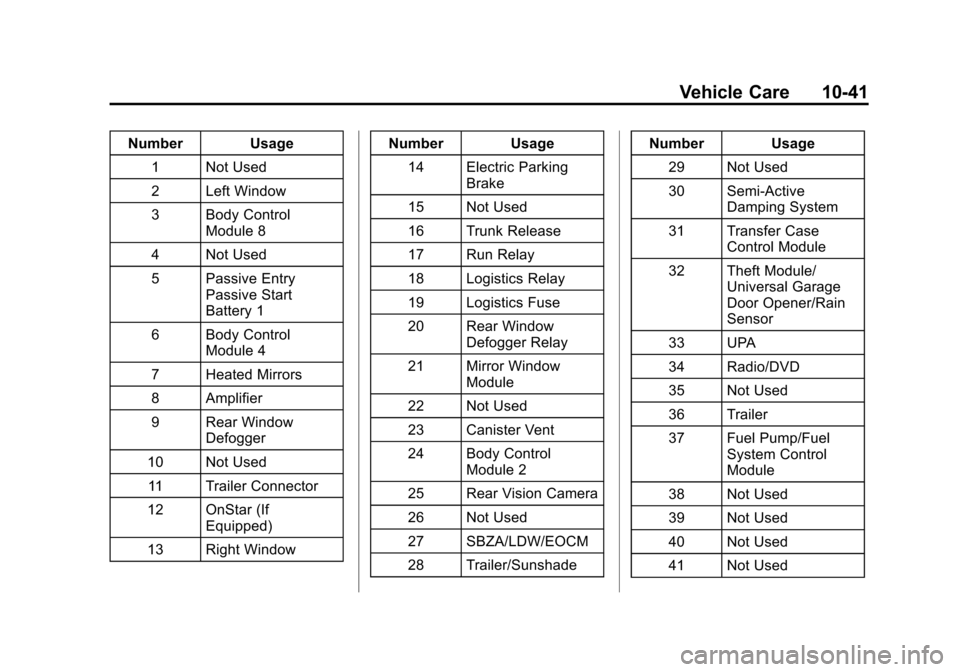
Number Usage1 Not Used
2 Left Window
3 Body Control Module 8
4 Not Used
5 Passive Entry Passive Start
Battery 1
6 Body Control Module 4
7 Heated Mirrors
8 Amplifier
9 Rear Window Defogger
10 Not Used 11 Trailer Connector
12 OnStar (If Equipped)
13 Right Window Number Usage
14 Electric Parking Brake
15 Not Used
16 Trunk Release
17 Run Relay
18 Logistics Relay
19 Logistics Fuse
20 Rear Window Defogger Relay
21 Mirror Window Module
22 Not Used
23 Canister Vent
24 Body Control Module 2
25 Rear Vision Camera
26 Not Used
27 SBZA/LDW/EOCM
28 Trailer/Sunshade Number Usage
29 Not Used
30 Semi-Active Damping System
31 Transfer Case Control Module
32 Theft Module/ Universal Garage
Door Opener/Rain
Sensor
33 UPA
34 Radio/DVD
35 Not Used
36 Trailer
37 Fuel Pump/Fuel System Control
Module
38 Not Used
39 Not Used
40 Not Used
41 Not Used
Page 439 of 450

Black plate (3,1)Cadillac ATS Owner Manual - 2013 - CRC - 10/5/12
INDEX i-3
Chains, Tire . . . . . . . . . . . . . . . . . . 10-65
Charging System Light . . . . . . . . 5-15
CheckEngine Light . . . . . . . . . . . . . . . . . . 5-16
IgnitionTransmission Lock . . . . . . . . 10-29
Child Restraints
Infants and YoungChildren . . . . . . . . . . . . . . . . . . . . . 3-35
Lower Anchors and Tethers for Children . . . . . . . . . 3-41
Older Children . . . . . . . . . . . . . . . . 3-33
Securing . . . . . . . . . . . . . . . . 3-47, 3-50
Systems . . . . . . . . . . . . . . . . . . . . . . 3-38
Circuit Breakers . . . . . . . . . . . . . . 10-34
Cleaning Exterior Care . . . . . . . . . . . . . . . 10-81
Interior Care . . . . . . . . . . . . . . . . 10-84
Climate Control Systems Dual Automatic . . . . . . . . . . . 8-1, 8-5
Clock . . . . . . . . . . . . . . . . . . . . . . . . . . . 5-6
Cluster, Instrument . . . . . . . . . . . . . 5-9
Clutch, Hydraulic . . . . . . . . . . . . . 10-15
Collision Damage Repair . . . . . 13-14 Compass . . . . . . . . . . . . . . . . . . . . . . . 5-5
Messages . . . . . . . . . . . . . . . . . . . . 5-34
Competitive Driving, Racing or Other . . . . . . . . . . . . . . . . . . . . . . . 9-6
Compressor Kit, Tire Sealant . . . . . . . . . . . . . . . . . . . . . . 10-67
Connections
OnStar
®. . . . . . . . . . . . . . . . . . . . . . 14-4
Control of a Vehicle . . . . . . . . . . . . . 9-3
Convex Mirrors . . . . . . . . . . . . . . . . 2-19
Coolant Engine . . . . . . . . . . . . . . . . . . . . . . 10-18
Engine TemperatureGauge . . . . . . . . . . . . . . . . . . . . . . 5-12
Engine Temperature Warning Light . . . . . . . . . . . . . . . 5-22
Cooling System . . . . . . . . . . . . . . . 10-17 Engine Messages . . . . . . . . . . . . 5-35
Courtesy Lamps . . . . . . . . . . . . . . . . 6-7
Courtesy Transportation Program . . . . . . . . . . . . . . . . . . . . . 13-13
Cruise Control . . . . . . . . . . . . . . . . . 9-39 Light . . . . . . . . . . . . . . . . . . . . . . . . . . 5-25
Messages . . . . . . . . . . . . . . . . . . . . 5-34 Cruise Control, Active . . . . . . . . . 9-42
Customer Assistance . . . . . . . . . . 13-5
Offices . . . . . . . . . . . . . . . . . . 13-4, 13-5
Text Telephone (TTY)Users . . . . . . . . . . . . . . . . . . . . . . . 13-5
Customer Information Service Publications
Ordering Information . . . . . . 13-17
Customer Satisfaction Procedure . . . . . . . . . . . . . . 13-1, 13-3
D
Damage Repair, Collision . . . . . 13-14
Danger, Warnings, andCautions . . . . . . . . . . . . . . . . . . . . . . . . iv
Data Recorders, Event . . . . . . . 13-19
Daytime Running Lamps (DRL) . . . . . . . . . . . . . . . . . . 6-4
Defensive Driving . . . . . . . . . . . . . . . 9-3
Delayed Locking . . . . . . . . . . . . . . . 2-13
Diagnostics OnStar
®. . . . . . . . . . . . . . . . . . . . . . 14-5
Distracted Driving . . . . . . . . . . . . . . . 9-2
Dome Lamps . . . . . . . . . . . . . . . . . . . 6-7