seats CADILLAC ATS 2013 1.G Repair Manual
[x] Cancel search | Manufacturer: CADILLAC, Model Year: 2013, Model line: ATS, Model: CADILLAC ATS 2013 1.GPages: 450, PDF Size: 6.98 MB
Page 105 of 450
Black plate (51,1)Cadillac ATS Owner Manual - 2013 - CRC - 10/5/12
Seats and Restraints 3-51
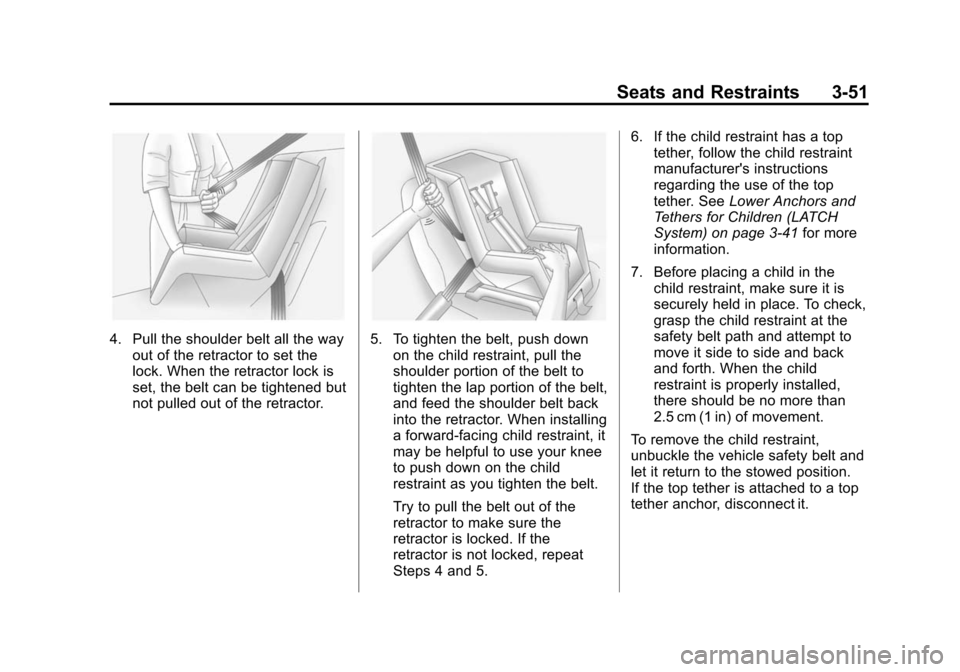
4. Pull the shoulder belt all the wayout of the retractor to set the
lock. When the retractor lock is
set, the belt can be tightened but
not pulled out of the retractor.5. To tighten the belt, push downon the child restraint, pull the
shoulder portion of the belt to
tighten the lap portion of the belt,
and feed the shoulder belt back
into the retractor. When installing
a forward-facing child restraint, it
may be helpful to use your knee
to push down on the child
restraint as you tighten the belt.
Try to pull the belt out of the
retractor to make sure the
retractor is locked. If the
retractor is not locked, repeat
Steps 4 and 5. 6. If the child restraint has a top
tether, follow the child restraint
manufacturer's instructions
regarding the use of the top
tether. See Lower Anchors and
Tethers for Children (LATCH
System) on page 3‑41 for more
information.
7. Before placing a child in the child restraint, make sure it is
securely held in place. To check,
grasp the child restraint at the
safety belt path and attempt to
move it side to side and back
and forth. When the child
restraint is properly installed,
there should be no more than
2.5 cm (1 in) of movement.
To remove the child restraint,
unbuckle the vehicle safety belt and
let it return to the stowed position.
If the top tether is attached to a top
tether anchor, disconnect it.
Page 106 of 450

Black plate (52,1)Cadillac ATS Owner Manual - 2013 - CRC - 10/5/12
3-52 Seats and Restraints
2NOTES
Page 158 of 450

Black plate (48,1)Cadillac ATS Owner Manual - 2013 - CRC - 10/5/12
5-48 Instruments and Controls
Delayed Door Lock
When on, this feature will delay the
locking of the doors. To override the
delay, press the power door lock
switch on the doors.
Select Off or On.
Remote Lock, Unlock, and
Start
Select Remote Lock/Unlock and the
following may be displayed:
.Remote Unlock Light Feedback
.Remote Lock Feedback
.Remote Door Unlock
.Relock Remotely Unlocked
Doors
.Remote Start
.Remote Start Auto Heat Seats
.Passive Door Unlock
.Passive Door Lock
.Remote Left in Vehicle ReminderRemote Unlock Light Feedback
When on, the exterior lamps will
flash when unlocking the vehicle
with the RKE transmitter.
Select Off or Flash Lights.
Remote Lock Feedback
This allows selection of what type of
feedback is given when locking the
vehicle with the RKE transmitter.
Select Off, Lights and Horn, Lights
Only, or Horn Only.
Remote Door Unlock
This allows selection of which doors
will unlock when pressing the unlock
button on the RKE transmitter.
Select All Doors or Driver
Door Only.
Relock Remotely Unlocked Doors
When on, if the doors are unlocked
from the RKE transmitter and a door
is not opened, the doors will
automatically relock.
Select Off or On. Remote Start
This allows the remote start feature
to be turned on or off.
Select Off or On.
Remote Start Auto Heat Seats
If equipped and turned on, this
feature will turn the heated seats on
when using remote start on
cold days.
Select Off or On. On some vehicles
select Off, On - Driver and
Passenger, or On - Driver.
Passive Door Unlock
This allows passive unlocking to be
turned on or off and selects what
doors will unlock.
Select All Doors or Driver
Door Only.
Passive Door Lock
This allows passive locking to be
turned on or off and selects
feedback.
Page 207 of 450
Black plate (1,1)Cadillac ATS Owner Manual - 2013 - CRC - 10/5/12
Climate Controls 8-1
Climate Controls
Climate Control Systems
Dual Automatic Climate ControlSystem (Base) . . . . . . . . . . . . . . . 8-1
Dual Automatic Climate Control System (Uplevel) . . . . . . . . . . . . 8-5
Air Vents
Air Vents . . . . . . . . . . . . . . . . . . . . . 8-10
Maintenance
Passenger Compartment AirFilter . . . . . . . . . . . . . . . . . . . . . . . . 8-11
Service . . . . . . . . . . . . . . . . . . . . . . 8-11
Climate Control Systems
Dual Automatic Climate Control System (Base)
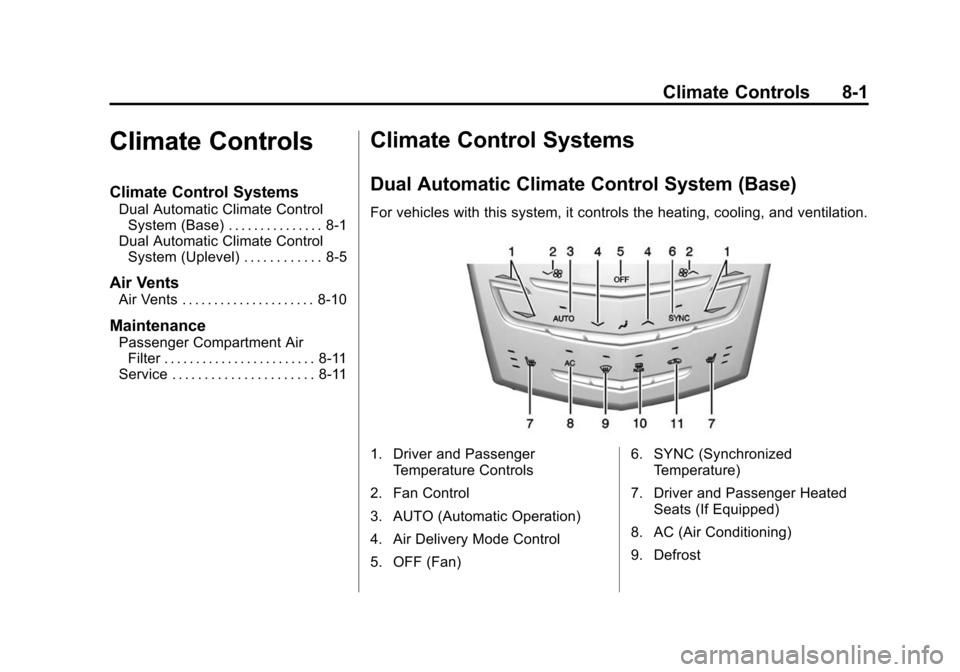
For vehicles with this system, it controls the heating, cooling, and ventilation.
1. Driver and Passenger
Temperature Controls
2. Fan Control
3. AUTO (Automatic Operation)
4. Air Delivery Mode Control
5. OFF (Fan) 6. SYNC (Synchronized
Temperature)
7. Driver and Passenger Heated Seats (If Equipped)
8. AC (Air Conditioning)
9. Defrost
Page 210 of 450
Black plate (4,1)Cadillac ATS Owner Manual - 2013 - CRC - 10/5/12
8-4 Climate Controls
Rear Window Defogger
=REAR (Rear Window
Defogger): Press to turn the rear
window defogger on or off.
The rear window defogger turns
off automatically after about
10 minutes. If turned on again it
runs for about five minutes before
turning off. At higher vehicle
speeds, the rear window defogger
may stay on continuously.
The rear window defogger can be
set to automatic operation. See
“Climate and Air Quality” under
Vehicle Personalization on
page 5‑43. When Auto Rear Defog
is selected, the rear window
defogger turns on automatically
when the interior temperature is cold
and the outside temperature is
about 4°C (40°F) and below. The
auto rear defogger turns off
automatically after about
10 minutes. At higher vehicle
speeds, the rear window defogger
may stay on continuously. The upper region of gridlines on the
rear window are antenna lines and
are not intended to heat when the
defogger is activated.
The heated outside mirrors turn on
when the rear window defogger
button is on. They help to clear fog
or frost from the surface of the
mirrors.
Notice:
Do not try to clear frost
or other material from the inside
of the front windshield and rear
window with a razor blade or
anything else that is sharp. This
may damage the rear window
defogger grid and affect the
radio's ability to pick up stations
clearly. The repairs would not be
covered by the vehicle warranty. Driver and Passenger Heated
Seats (If Equipped):
PressMorL
to heat the driver or passenger seat.
SeeHeated Front Seats on
page 3‑8.
Remote Start Climate Control
Operation: For vehicles with the
remote vehicle start feature, the
climate control system may run
when the vehicle is started remotely.
The system uses the driver's
previous settings to heat or cool the
inside of the vehicle. See Remote
Vehicle Start on page 2‑9.
The rear window defogger turns on
if it is cold outside.
Page 211 of 450
Black plate (5,1)Cadillac ATS Owner Manual - 2013 - CRC - 10/5/12
Climate Controls 8-5
Sensors
The solar sensor monitors the
solar heat.
The climate control system uses the
sensor information to adjust the
temperature, fan speed,
recirculation, and air delivery mode
for best comfort.
If the sensor is covered, the
automatic climate control system
may not work properly.
Dual Automatic Climate Control System (Uplevel)
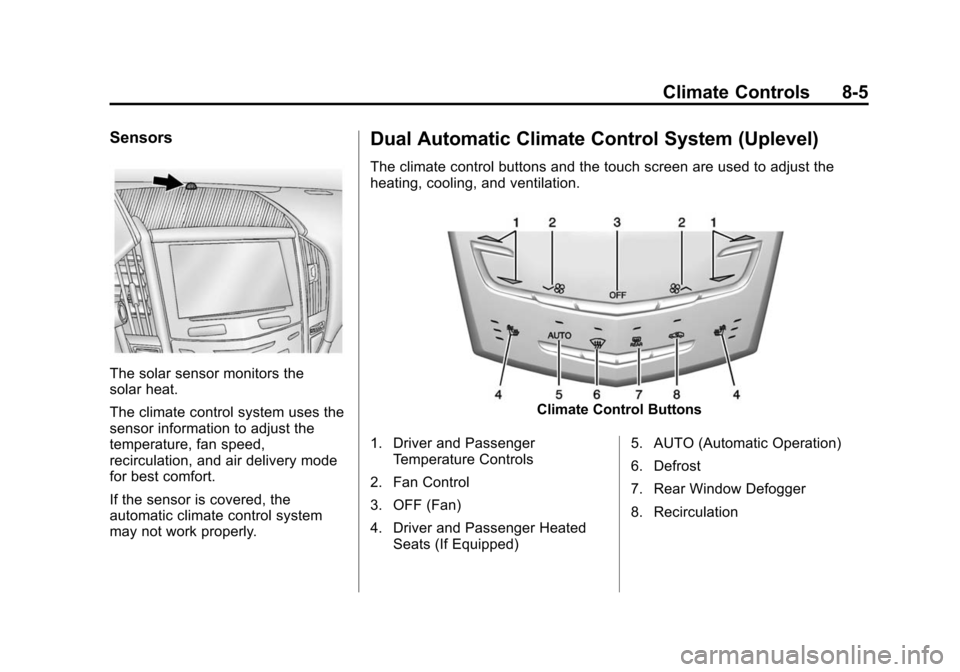
The climate control buttons and the touch screen are used to adjust the
heating, cooling, and ventilation.
Climate Control Buttons
1. Driver and Passenger Temperature Controls
2. Fan Control
3. OFF (Fan)
4. Driver and Passenger Heated Seats (If Equipped) 5. AUTO (Automatic Operation)
6. Defrost
7. Rear Window Defogger
8. Recirculation
Page 215 of 450
Black plate (9,1)Cadillac ATS Owner Manual - 2013 - CRC - 10/5/12
Climate Controls 8-9
The rear window defogger can be
set to automatic operation. See
“Climate and Air Quality”under
Vehicle Personalization on
page 5‑43. When Auto Rear Defog
is selected, the rear window
defogger turns on automatically
when the interior temperature is cold
and the outside temperature is
about 4°C (40°F) and below. The
auto rear defogger turns off
automatically after about
10 minutes. At higher vehicle
speeds, the rear window defogger
may stay on continuously.
The upper gridlines on the rear
window are antenna lines and are
not intended to heat when the
defogger is activated.
The heated outside mirrors turn on
when the rear window defogger
button is on. They help to clear fog
or frost from the surface of the
mirrors. Notice:
Do not try to clear frost
or other material from the inside
of the front windshield and rear
window with a razor blade or
anything else that is sharp. This
may damage the rear window
defogger grid and affect the
radio's ability to pick up stations
clearly. The repairs would not be
covered by the vehicle warranty.
Driver and Passenger Heated
Seats (If Equipped): Press
Jor
zto heat the driver or passenger
seat cushion and seatback. See
Heated Front Seats on page 3‑8.
Remote Start Climate Control
Operation: For vehicles with the
remote vehicle start feature, the
climate control system may run
when the vehicle is started remotely.
The system uses the driver's
previous settings to heat or cool the
inside of the vehicle. See Remote
Vehicle Start on page 2‑9.
The rear window defogger turns on
if it is cold outside.
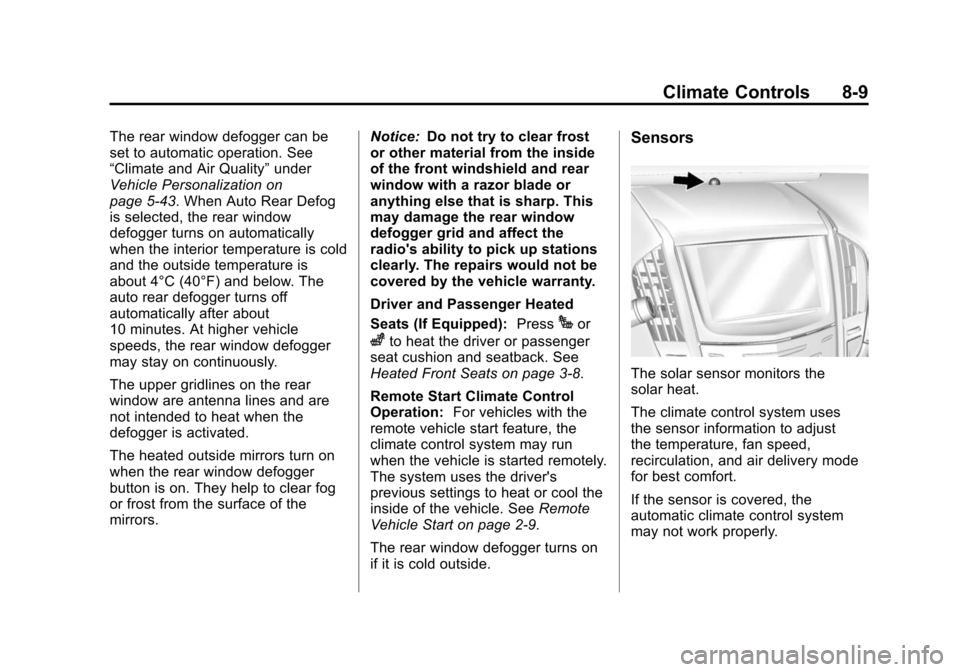
Sensors
The solar sensor monitors the
solar heat.
The climate control system uses
the sensor information to adjust
the temperature, fan speed,
recirculation, and air delivery mode
for best comfort.
If the sensor is covered, the
automatic climate control system
may not work properly.
Page 216 of 450
Black plate (10,1)Cadillac ATS Owner Manual - 2013 - CRC - 10/5/12
8-10 Climate Controls
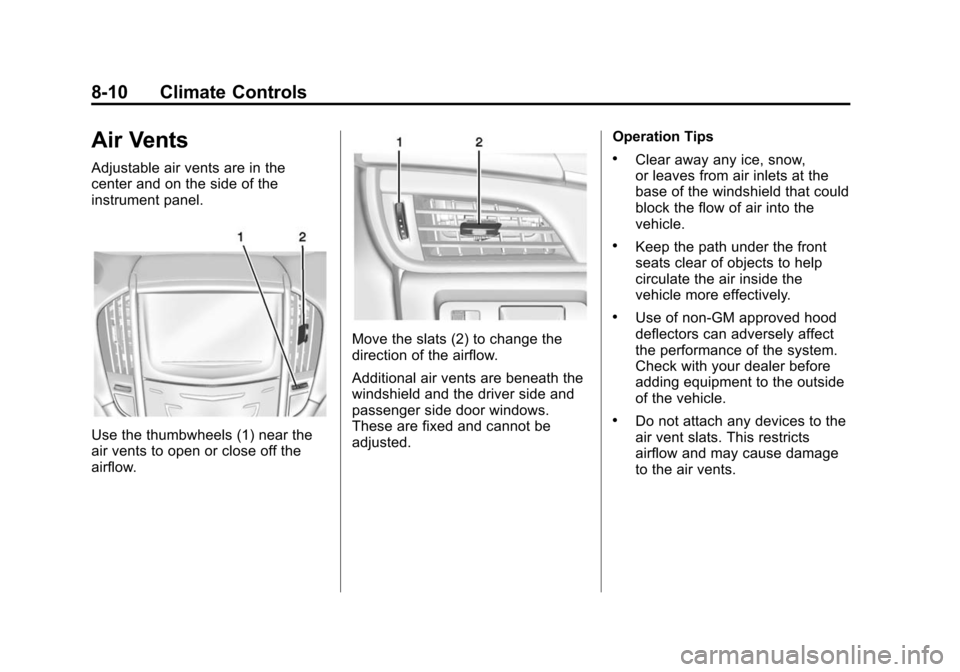
Air Vents
Adjustable air vents are in the
center and on the side of the
instrument panel.
Use the thumbwheels (1) near the
air vents to open or close off the
airflow.
Move the slats (2) to change the
direction of the airflow.
Additional air vents are beneath the
windshield and the driver side and
passenger side door windows.
These are fixed and cannot be
adjusted.Operation Tips
.Clear away any ice, snow,
or leaves from air inlets at the
base of the windshield that could
block the flow of air into the
vehicle.
.Keep the path under the front
seats clear of objects to help
circulate the air inside the
vehicle more effectively.
.Use of non-GM approved hood
deflectors can adversely affect
the performance of the system.
Check with your dealer before
adding equipment to the outside
of the vehicle.
.Do not attach any devices to the
air vent slats. This restricts
airflow and may cause damage
to the air vents.
Page 233 of 450
Black plate (15,1)Cadillac ATS Owner Manual - 2013 - CRC - 10/5/12
Driving and Operating 9-15
fuel, and cargo. Never exceed
the GVWR for the vehicle, or the
Gross Axle Weight Rating
(GAWR) for either the front or
rear axle.
And, if there is a heavy load, it
should be spread out. See
“Steps for Determining Correct
Load Limit”earlier in this
section.
{WARNING
Do not load the vehicle any
heavier than the Gross
Vehicle Weight Rating
(GVWR), or either the
maximum front or rear Gross
Axle Weight Rating (GAWR).
This can cause systems to
break and change the way the
vehicle handles. This could
cause loss of control and a
crash. Overloading can also
shorten the life of the vehicle. If you put things inside the
vehicle
—like suitcases, tools,
packages, or anything
else —they will go as fast as the
vehicle goes. If you have to stop
or turn quickly, or if there is a
crash, they will keep going.
{WARNING
Things inside the vehicle can
strike and injure people in a
sudden stop or turn, or in a
crash.
.Put things in the cargo
area of the vehicle. In the
cargo area, put them as
far forward as possible.
Try to spread the weight
evenly.
(Continued)
WARNING (Continued)
.Never stack heavier
things, like suitcases,
inside the vehicle so that
some of them are above
the tops of the seats.
.Do not leave an
unsecured child restraint
in the vehicle.
.Secure loose items in the
vehicle.
.Do not leave a seat folded
down unless needed.
Page 246 of 450
Black plate (28,1)Cadillac ATS Owner Manual - 2013 - CRC - 10/5/12
9-28 Driving and Operating
The transmission will only allow
shifting into gears appropriate for
the vehicle speed and engine
revolutions per minute (rpm). The
transmission will not automatically
shift to the next lower or higher gear
if the engine rpm is too high or
too low.
If shifting is prevented for any
reason, a DIC message will appear.
SeeTransmission Messages on
page 5‑42.
When accelerating the vehicle from
a stop in snowy and icy conditions,
it is suggested to shift into second
gear. A higher gear allows the
vehicle to gain more traction on
slippery surfaces. See Driver Mode
Control on page 9‑37.Manual Transmission
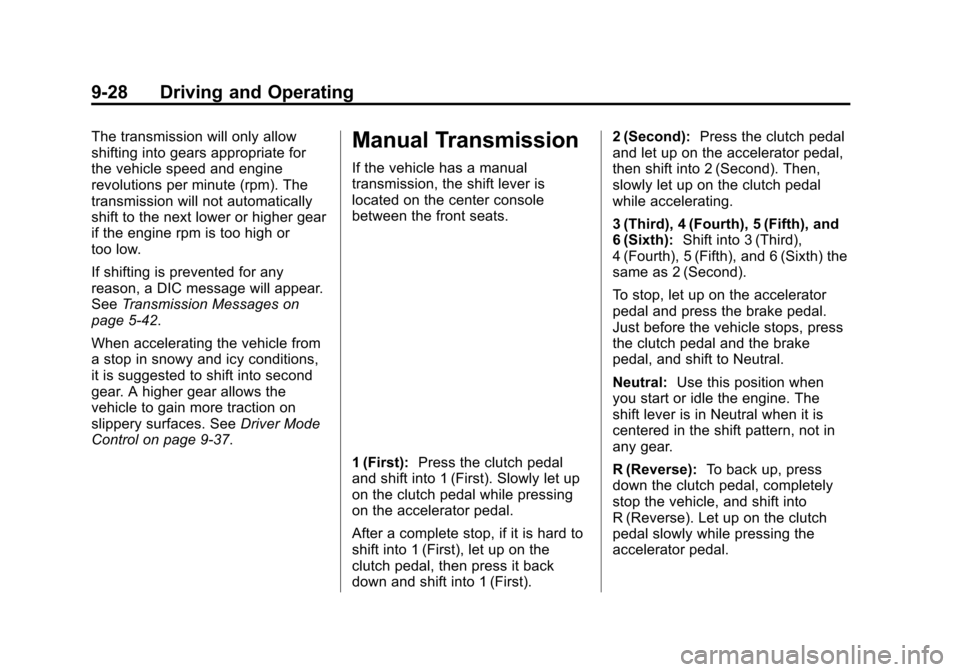
If the vehicle has a manual
transmission, the shift lever is
located on the center console
between the front seats.
1 (First): Press the clutch pedal
and shift into 1 (First). Slowly let up
on the clutch pedal while pressing
on the accelerator pedal.
After a complete stop, if it is hard to
shift into 1 (First), let up on the
clutch pedal, then press it back
down and shift into 1 (First). 2 (Second):
Press the clutch pedal
and let up on the accelerator pedal,
then shift into 2 (Second). Then,
slowly let up on the clutch pedal
while accelerating.
3 (Third), 4 (Fourth), 5 (Fifth), and
6 (Sixth): Shift into 3 (Third),
4 (Fourth), 5 (Fifth), and 6 (Sixth) the
same as 2 (Second).
To stop, let up on the accelerator
pedal and press the brake pedal.
Just before the vehicle stops, press
the clutch pedal and the brake
pedal, and shift to Neutral.
Neutral: Use this position when
you start or idle the engine. The
shift lever is in Neutral when it is
centered in the shift pattern, not in
any gear.
R (Reverse): To back up, press
down the clutch pedal, completely
stop the vehicle, and shift into
R (Reverse). Let up on the clutch
pedal slowly while pressing the
accelerator pedal.