ignition CADILLAC ATS 2013 1.G Owners Manual
[x] Cancel search | Manufacturer: CADILLAC, Model Year: 2013, Model line: ATS, Model: CADILLAC ATS 2013 1.GPages: 450, PDF Size: 6.98 MB
Page 9 of 450

Black plate (3,1)Cadillac ATS Owner Manual - 2013 - CRC - 10/5/12
In Brief 1-3
1.Air Vents on page 8‑10.
2. Exterior Lamp Controls on
page 6‑1.
Turn Signal Lever. See Turn and
Lane-Change Signals on
page 6‑6.
3. Cruise Control on page 9‑39.
Adaptive Cruise Control on
page 9‑42 (If Equipped).
Forward Collision Alert (FCA)
System on page 9‑55 (If
Equipped).
Heated Steering Wheel on
page 5‑3.
Steering Wheel Controls on
page 5‑2.
4. Instrument Cluster on page 5‑9.
Driver Information Center (DIC)
Display. See Driver Information
Center (DIC) on page 5‑26.
5. Steering Wheel Controls on
page 5‑2.
6. Windshield Wiper/Washer on
page 5‑4. 7. Infotainment Display.
Infotainment System. See the
infotainment manual.
8. Light Sensor. See Automatic
Headlamp System on page 6‑5.
9. Dual Automatic Climate Control
System (Base) on page 8‑1 or
Dual Automatic Climate Control
System (Uplevel) on page 8‑5.
10. Instrument Panel Illumination
Control on page 6‑7.
11. Hood Release (Out of View). SeeHood on page 10‑5.
12. Data Link Connector (DLC) (Out of View). See Malfunction
Indicator Lamp on page 5‑16.
13. Parking Assist Button. See Driver Assistance Systems on
page 9‑50.
Lane Departure Warning
(LDW) on page 9‑62.
14. Tap Shift Controls (If Equipped). See Manual Mode
on page 9‑26. 15. Electric Parking Brake (If
Equipped, Automatic
Transmission). See Parking
Brake (Electric) on page 9‑30
or Parking Brake (Manual) on
page 9‑33.
16. Head-Up Display (HUD) on
page 5‑29 (If Equipped).
17. Steering Wheel Adjustment on
page 5‑2.
18. Horn on page 5‑4.
19. Engine START/STOP Button. SeeIgnition Positions on
page 9‑16.
20. Heated Front Seats on
page 3‑8 (If Equipped).
21. Storage Bin. See Instrument
Panel Storage on page 4‑1.
22. Shift Lever. See Automatic
Transmission on page 9‑25 or
Manual Transmission on
page 9‑28 (If Equipped).
Page 11 of 450
Black plate (5,1)Cadillac ATS Owner Manual - 2013 - CRC - 10/5/12
In Brief 1-5
SeeKeys on page 2‑2 andRemote
Keyless Entry (RKE) System
Operation on page 2‑3.
Remote Vehicle Start
With this feature the engine can be
started from outside of the vehicle.
Starting the Vehicle
1. Press and releaseQon the
RKE transmitter.
2. Immediately press and hold
/
for at least two seconds or until
the turn signal lamps flash.
3. Press the brake pedal and select the ON/RUN/START ignition
mode to drive the vehicle. When the vehicle starts, the parking
lamps will turn on and remain on as
long as the engine is running. The
doors will be locked and the climate
control system may come on.
The engine will continue to run for
10 minutes. Repeat the steps for a
10-minute time extension. Remote
start can be extended only once.
Canceling a Remote Start
To cancel a remote start, do any of
the following:
.Press and hold/until the
parking lamps turn off.
.Turn on the hazard warning
flashers.
.Turn the vehicle on and then off.
See Remote Vehicle Start on
page 2‑9.
Door Locks
To lock or unlock a door manually:
.From the outside, if the vehicle
is equipped with keyless access,
press the button on the door
handle and pull the handle when
the Remote Keyless Entry (RKE)
transmitter is within range. See
Remote Keyless Entry (RKE)
System Operation on page 2‑3.
.Use the key in the front doors.
The key cylinder is covered by a
cap. See Door Locks on
page 2‑11.
.From the inside, to lock a rear
door push down on the door lock
knob on top of the door. To
unlock a door, pull once on the
door handle to unlock it, and
again to open it.
Page 12 of 450
Black plate (6,1)Cadillac ATS Owner Manual - 2013 - CRC - 10/5/12
1-6 In Brief
Power Door Locks
From the outside, pressQorKon
the RKE transmitter. See Remote
Keyless Entry (RKE) System
Operation on page 2‑3.
From the inside, pressQorK. The
indicator light in the switch will
illuminate when activated. See
Power Door Locks on page 2‑12.
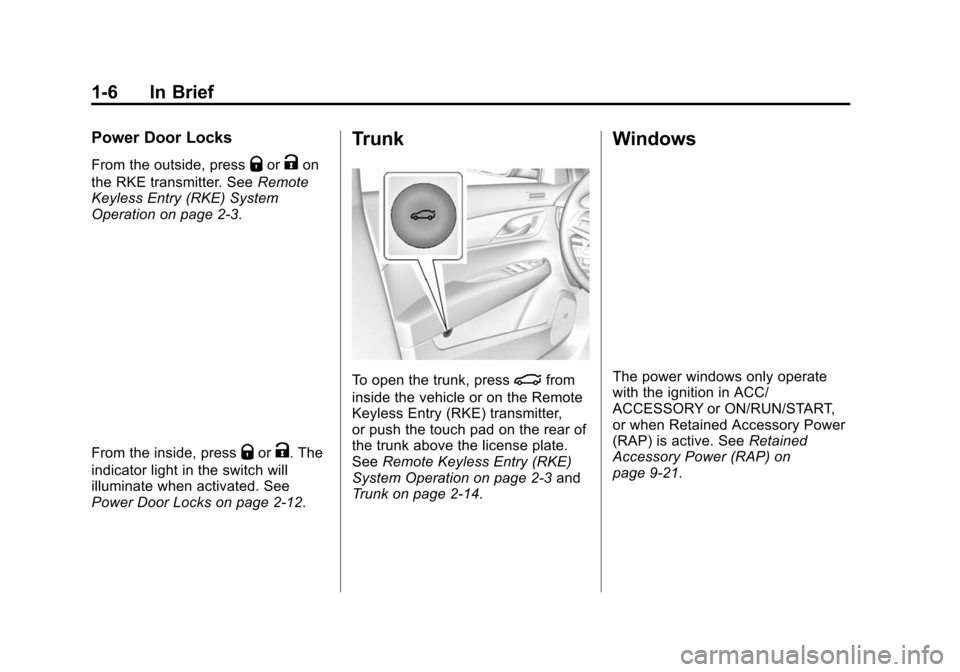
Trunk
To open the trunk, press|from
inside the vehicle or on the Remote
Keyless Entry (RKE) transmitter,
or push the touch pad on the rear of
the trunk above the license plate.
See Remote Keyless Entry (RKE)
System Operation on page 2‑3 and
Trunk on page 2‑14.
Windows
The power windows only operate
with the ignition in ACC/
ACCESSORY or ON/RUN/START,
or when Retained Accessory Power
(RAP) is active. See Retained
Accessory Power (RAP) on
page 9‑21.
Page 14 of 450
Black plate (8,1)Cadillac ATS Owner Manual - 2013 - CRC - 10/5/12
1-8 In Brief
SeeLumbar Adjustment on
page 3‑4.
Reclining Seatbacks
To adjust the seatback:
.Tilt the top of the control
rearward to recline.
.Tilt the top of the control forward
to raise.
See Reclining Seatbacks on
page 3‑5.
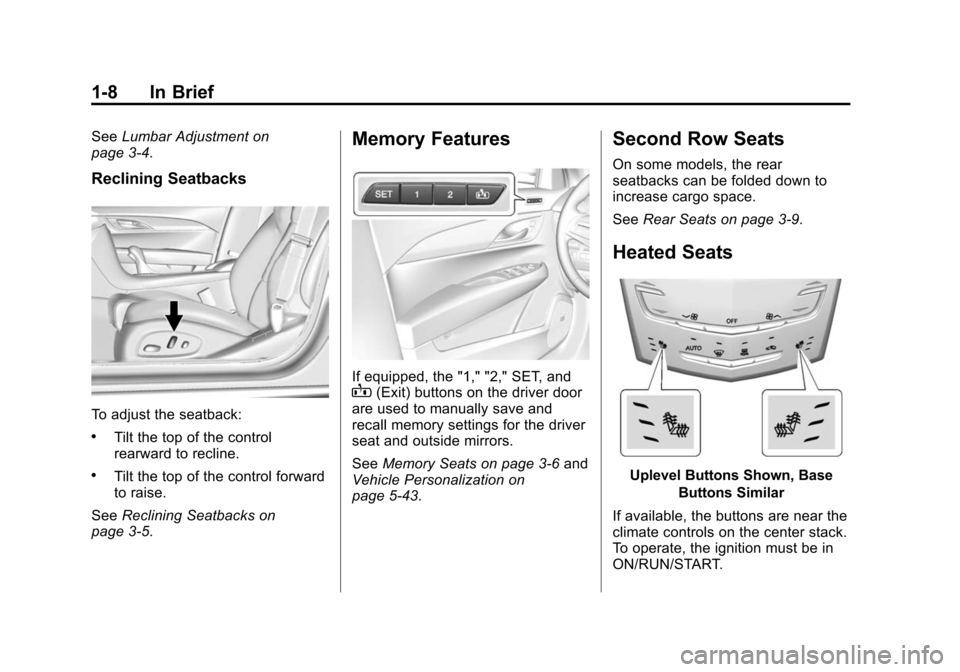
Memory Features
If equipped, the "1," "2," SET, andB(Exit) buttons on the driver door
are used to manually save and
recall memory settings for the driver
seat and outside mirrors.
See Memory Seats on page 3‑6 and
Vehicle Personalization on
page 5‑43.
Second Row Seats
On some models, the rear
seatbacks can be folded down to
increase cargo space.
See Rear Seats on page 3‑9.
Heated Seats
Uplevel Buttons Shown, Base
Buttons Similar
If available, the buttons are near the
climate controls on the center stack.
To operate, the ignition must be in
ON/RUN/START.
Page 18 of 450
Black plate (12,1)Cadillac ATS Owner Manual - 2013 - CRC - 10/5/12
1-12 In Brief
Press the lamp lens to turn the rear
passenger reading lamps on or off.
For more information on interior
lighting, seeInstrument Panel
Illumination Control on page 6‑7.
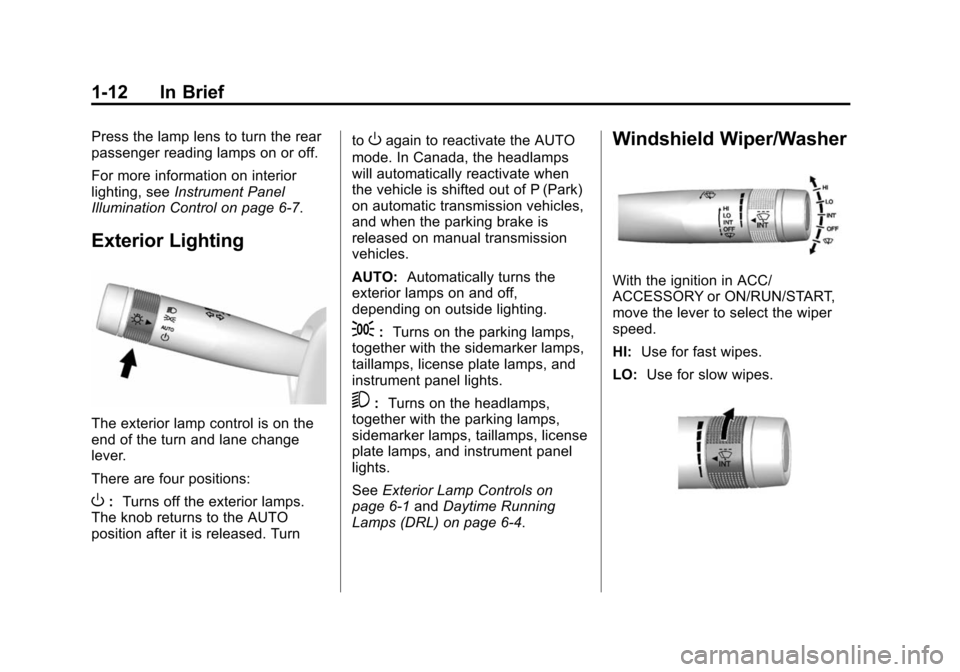
Exterior Lighting
The exterior lamp control is on the
end of the turn and lane change
lever.
There are four positions:
O: Turns off the exterior lamps.
The knob returns to the AUTO
position after it is released. Turn to
Oagain to reactivate the AUTO
mode. In Canada, the headlamps
will automatically reactivate when
the vehicle is shifted out of P (Park)
on automatic transmission vehicles,
and when the parking brake is
released on manual transmission
vehicles.
AUTO: Automatically turns the
exterior lamps on and off,
depending on outside lighting.
;: Turns on the parking lamps,
together with the sidemarker lamps,
taillamps, license plate lamps, and
instrument panel lights.
5: Turns on the headlamps,
together with the parking lamps,
sidemarker lamps, taillamps, license
plate lamps, and instrument panel
lights.
See Exterior Lamp Controls on
page 6‑1 andDaytime Running
Lamps (DRL) on page 6‑4.
Windshield Wiper/Washer
With the ignition in ACC/
ACCESSORY or ON/RUN/START,
move the lever to select the wiper
speed.
HI: Use for fast wipes.
LO: Use for slow wipes.
Page 27 of 450
Black plate (21,1)Cadillac ATS Owner Manual - 2013 - CRC - 10/5/12
In Brief 1-21
Read the instructions completely
before attempting to program the
Universal Remote system. Because
of the steps involved, it may be
helpful to have another person
available to assist you with
programming the Universal Remote
system.
SeeUniversal Remote System on
page 5‑49.
Sunroof
For vehicles equipped with a
sunroof, the ignition must be in
ON/RUN or ACC/ACCESSORY,
or Retained Accessory Power (RAP)
must be active, to operate the
sunroof. See Ignition Positions on
page 9‑16 andRetained Accessory
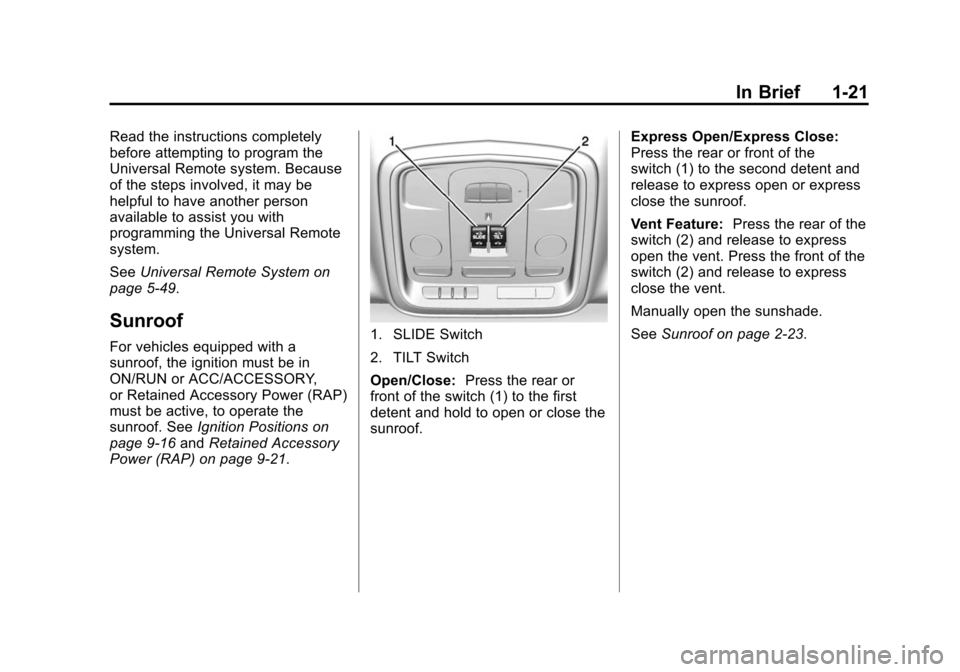
Power (RAP) on page 9‑21.1. SLIDE Switch
2. TILT Switch
Open/Close: Press the rear or
front of the switch (1) to the first
detent and hold to open or close the
sunroof. Express Open/Express Close:
Press the rear or front of the
switch (1) to the second detent and
release to express open or express
close the sunroof.
Vent Feature:
Press the rear of the
switch (2) and release to express
open the vent. Press the front of the
switch (2) and release to express
close the vent.
Manually open the sunshade.
See Sunroof on page 2‑23.
Page 29 of 450
Black plate (23,1)Cadillac ATS Owner Manual - 2013 - CRC - 10/5/12
In Brief 1-23
The low tire pressure warning light
may come on in cool weather when
the vehicle is first started, and then
turn off as the vehicle is driven. This
may be an early indicator that the
tire pressures are getting low and
the tires need to be inflated to the
proper pressure.
The TPMS does not replace normal
monthly tire maintenance. Maintain
the correct tire pressures.
SeeTire Pressure Monitor System
on page 10‑52.
Tire Sealant and
Compressor Kit
This vehicle may have a tire sealant
and compressor kit that can be used
to seal small punctures in the tread
area of the tire. Significant sidewall
damage will require the tire to be
replaced.
See Tire Sealant and Compressor
Kit on page 10‑67 for complete
operating information.
Engine Oil Life System
The engine oil life system calculates
engine oil life based on vehicle use
and displays the CHANGE ENGINE
OIL SOON message when it is time
to change the engine oil and filter.
The oil life system should be reset
to 100% only following an oil
change.
Resetting the Oil Life System
1. Using the DIC controls on the right side of the steering wheel,
display REMAINING OIL LIFE
on the DIC. See Driver
Information Center (DIC) on
page 5‑26. When remaining
oil life is low, the CHANGE
ENGINE OIL SOON message
will appear on the display. See
Engine Oil Messages on
page 5‑35. 2. Press SEL on the DIC controls
and hold SEL down for a few
seconds to clear the CHANGE
ENGINE OIL SOON message
and reset the oil life at 100%.
Be careful not to reset the oil life
display accidentally at any time
other than after the oil is
changed. It cannot be reset
accurately until the next oil
change.
The oil life system can also be reset
as follows:
1. Turn the ignition on with the engine off.
2. Fully press and release the accelerator pedal three times
within five seconds.
If the CHANGE ENGINE OIL
SOON message is not on, the
system is reset.
See Engine Oil Life System on
page 10‑13.
Page 40 of 450
Black plate (10,1)Cadillac ATS Owner Manual - 2013 - CRC - 10/5/12
2-10 Keys, Doors, and Windows
If your vehicle is low on fuel, do not
use the remote start feature. The
vehicle may run out of fuel.
The RKE transmitter range may be
less while the vehicle is running.
Other conditions can affect the
performance of the transmitter. See
Remote Keyless Entry (RKE)
System on page 2‑3.
Starting the Engine Using Remote
Start
1. Press and release
Qon the
RKE transmitter.
2. Immediately press and hold
/
for at least two seconds or until
the turn signal lamps flash. This
confirms the request to remote
start the vehicle has been
received. If the vehicle's lamps
are not visible, press and
hold
/for at least two seconds. During the remote start, the
doors will be locked and the
parking lamps will remain on as
long as the engine is running.
The engine will shut off after
10 minutes unless a time
extension is done or the ignition
is put in ON/RUN/START.
3. Press the brake pedal and select the ON/RUN/START ignition
mode to drive the vehicle.
Extending Engine Run Time
For a 10-minute extension, repeat
Steps 1 and 2 while the engine is
still running. The remote start can
only be extended once.
When the remote start is extended,
the second 10-minute period will
start immediately. For example, if the vehicle has
been running for five minutes, and
10 minutes are added, the engine
will run for a total of 15 minutes.
A maximum of two remote starts,
or a remote start with an extension,
are allowed between ignition cycles.
The vehicle's ignition must be
changed to ON/RUN/START and
then back to OFF before the remote
start procedure can be used again.
Canceling a Remote Start
To cancel a remote start, do any of
the following:
.Press and hold/until the
parking lamps turn off.
.Turn on the hazard warning
flashers.
.Turn the vehicle on and then
back off.
Page 41 of 450
Black plate (11,1)Cadillac ATS Owner Manual - 2013 - CRC - 10/5/12
Keys, Doors, and Windows 2-11
Conditions in Which Remote Start
Will Not Work
The remote start will not operate if
any of the following occur:
.The ignition is in any mode other
than OFF.
.The transmitter is in the vehicle.
.The hood is not closed.
.The hazard warning flashers
are on.
.There is an emission control
system malfunction.
.The engine coolant temperature
is too high.
.The oil pressure is low.
.Two remote vehicle starts have
already been used.
.The vehicle is not in P (Park).
Door Locks
{WARNING
Unlocked doors can be
dangerous.
.Passengers, especially
children, can easily open the
doors and fall out of a moving
vehicle. When a door is
locked, the handle will not
open it. The chance of being
thrown out of the vehicle in a
crash is increased if the
doors are not locked. So, all
passengers should wear
safety belts properly and the
doors should be locked
whenever the vehicle is
driven.
.Young children who get into
unlocked vehicles may be
unable to get out. A child can
be overcome by extreme heat
and can suffer permanent(Continued)
WARNING (Continued)
injuries or even death from
heat stroke. Always lock the
vehicle whenever leaving it.
.Outsiders can easily enter
through an unlocked door
when you slow down or stop
the vehicle. Locking the doors
can help prevent this from
happening.
.From the outside, if the vehicle
is equipped with keyless access,
press the button on the door
handle and pull the handle when
the Remote Keyless Entry (RKE)
transmitter is within range. See
Remote Keyless Entry (RKE)
System Operation on page 2‑3.
.From the inside, to lock a rear
door push down on the door lock
knob on top of the door. To
unlock a door, pull once on the
door handle to unlock it, and
again to open it.
Page 43 of 450
Black plate (13,1)Cadillac ATS Owner Manual - 2013 - CRC - 10/5/12
Keys, Doors, and Windows 2-13
Delayed Locking
This feature delays the actual
locking of the doors.
When
Qis pressed on the power
door lock switch, while the door is
open, a chime will sound three
times indicating that delayed locking
is active.
When all the doors are closed, the
doors will lock automatically after
five seconds. If a door is reopened
before five seconds have elapsed,
the five-second timer will reset once
all the doors are closed again.
Press
Qon the door lock switch
again or press
Qon the RKE
transmitter to override this feature
and lock the doors immediately.
This feature can also be
programmed. See Vehicle
Personalization on page 5‑43.
Automatic Door Locks
The doors will lock automatically
when all doors are closed, the
ignition is on, and the shift lever is
moved out of P (Park). The doors
will automatically unlock when the
vehicle is stopped and the shift
lever is moved into P (Park).
Use the manual or power door locks
to unlock the doors if someone
needs to exit, and to lock the doors
again.
The power door locks can be
programmed through the Driver
Information Center (DIC). See
Vehicle Personalization on
page 5‑43.
Lockout Protection
If the vehicle is in ACC/
ACCESSORY or ON/RUN/START
with the Remote Keyless
Entry (RKE) transmitter in the
vehicle and the power door lock switch is pressed with the driver
door open, all the doors will lock
and only the driver door will unlock.
If the vehicle is off with the RKE
transmitter in the vehicle and the
power door lock switch is pressed
with the driver door open, all the
doors will lock and only the driver
door will unlock after closing all of
the doors.
This feature can be manually
overridden with the driver door open
by pressing and holding
Qon the
power door lock switch.
Unlocked Door Anti Lock Out
When this feature is on and door
locking is requested with the driver
door open, all doors will lock and
only the driver door will unlock. The
driver door must be closed before
locking is requested for all doors to
remain locked. When this feature is
off, the Delayed Door Lock menu
will be available.