dic CADILLAC ATS 2014 User Guide
[x] Cancel search | Manufacturer: CADILLAC, Model Year: 2014, Model line: ATS, Model: CADILLAC ATS 2014Pages: 434, PDF Size: 5.61 MB
Page 27 of 434
Black plate (21,1)Cadillac ATS Owner Manual (GMNA-Localizing-U.S./Canada/Mexico-
6014430) - 2014 - 2nd Edition - 8/23/13
In Brief 1-21
Performance and
Maintenance
Traction Control/
Electronic Stability
Control
The traction control system limits
wheel spin. The system is on when
the vehicle is started.
The StabiliTrak system assists with
directional control of the vehicle in
difficult driving conditions. The
system is on when the vehicle is
started.
.To turn off traction control, press
and release
gon the center
console.
iilluminates in the
instrument cluster and the
appropriate DIC message
displays. See Ride Control
System Messages on page 5-39.
.Press and releasegagain to
turn traction control back on.
.To turn off both Traction Control
and StabiliTrak, press and hold
guntilgandiilluminate in the
instrument cluster. The
appropriate DIC message
displays. See Ride Control
System Messages on page 5-39.
.Press and releasegagain to
turn on both systems.
See Traction Control/Electronic
Stability Control on page 9-33.
Tire Pressure Monitor
This vehicle may have a Tire
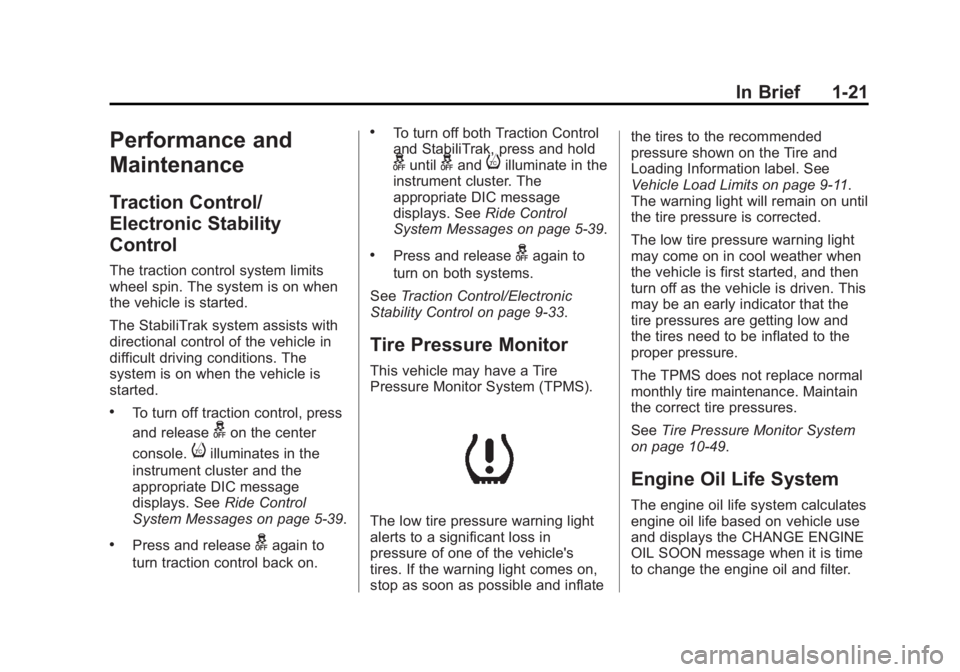
Pressure Monitor System (TPMS).
The low tire pressure warning light
alerts to a significant loss in
pressure of one of the vehicle's
tires. If the warning light comes on,
stop as soon as possible and inflate the tires to the recommended
pressure shown on the Tire and
Loading Information label. See
Vehicle Load Limits on page 9-11.
The warning light will remain on until
the tire pressure is corrected.
The low tire pressure warning light
may come on in cool weather when
the vehicle is first started, and then
turn off as the vehicle is driven. This
may be an early indicator that the
tire pressures are getting low and
the tires need to be inflated to the
proper pressure.
The TPMS does not replace normal
monthly tire maintenance. Maintain
the correct tire pressures.
See
Tire Pressure Monitor System
on page 10-49.
Engine Oil Life System
The engine oil life system calculates
engine oil life based on vehicle use
and displays the CHANGE ENGINE
OIL SOON message when it is time
to change the engine oil and filter.
Page 28 of 434
Black plate (22,1)Cadillac ATS Owner Manual (GMNA-Localizing-U.S./Canada/Mexico-
6014430) - 2014 - 2nd Edition - 8/23/13
1-22 In Brief
The oil life system should be reset
to 100% only following an oil
change.
Resetting the Oil Life System
1. Using the DIC controls on theright side of the steering wheel,
display REMAINING OIL LIFE
on the DIC. See Driver
Information Center (DIC) on
page 5-25. When remaining oil
life is low, the CHANGE
ENGINE OIL SOON message
will appear on the display. See
Engine Oil Messages on
page 5-35.
2. Press SEL on the DIC controls and hold SEL down for a few
seconds to clear the CHANGE
ENGINE OIL SOON message
and reset the oil life at 100%.
Be careful not to reset the oil life
display accidentally at any time
other than after the oil is
changed. It cannot be reset
accurately until the next oil
change. The oil life system can also be reset
as follows:
1. Turn the ignition on with the
engine off.
2. Fully press and release the accelerator pedal three times
within five seconds.
If the CHANGE ENGINE OIL
SOON message is not on, the
system is reset.
See Engine Oil Life System on
page 10-12.
E85 or FlexFuel
Vehicles with a yellow fuel cap can
use either unleaded gasoline or
ethanol fuel containing up to 85%
ethanol (E85). See E85 or FlexFuel
on page 9-64. For all other vehicles,
use only the unleaded gasoline
described under Recommended
Fuel on page 9-62.
Driving for Better Fuel
Economy
Driving habits can affect fuel
mileage. Here are some driving tips
to get the best fuel economy
possible.
.Avoid fast starts and accelerate
smoothly.
.Brake gradually and avoid
abrupt stops.
.Avoid idling the engine for long
periods of time.
.When road and weather
conditions are appropriate, use
cruise control.
.Always follow posted speed
limits or drive more slowly when
conditions require.
.Keep vehicle tires properly
inflated.
.Combine several trips into a
single trip.
Page 33 of 434
Black plate (3,1)Cadillac ATS Owner Manual (GMNA-Localizing-U.S./Canada/Mexico-
6014430) - 2014 - 2nd Edition - 8/23/13
Keys, Doors, and Windows 2-3
Remote Keyless Entry
(RKE) System Operation
The RKE transmitter functions may
work up to 60 m (197 ft) away from
the vehicle.
Keep in mind that other conditions,
such as those previously stated, can
impact the performance of the
transmitter.
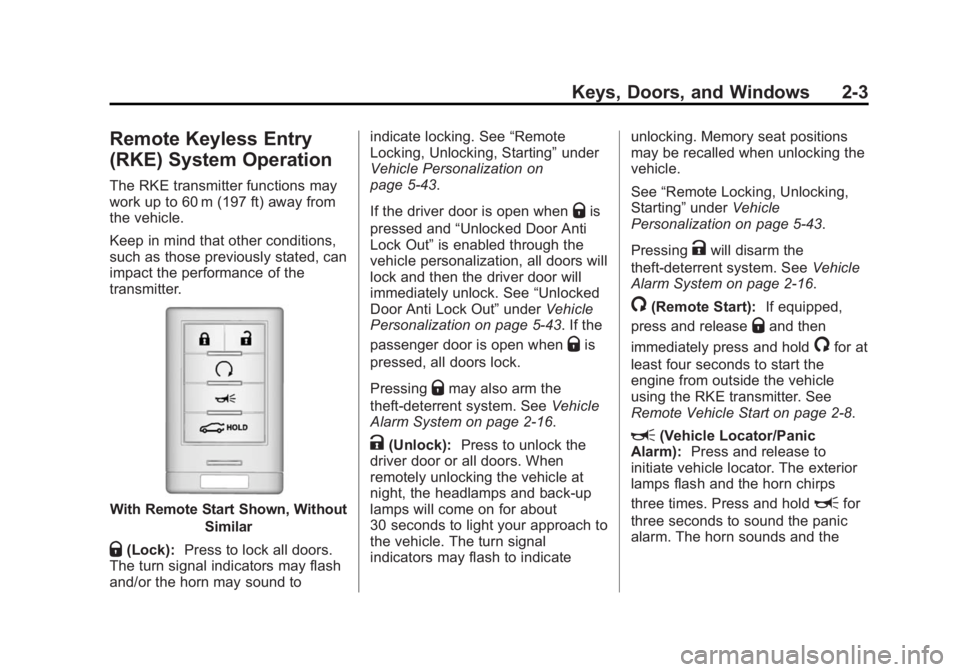
With Remote Start Shown, WithoutSimilar
Q(Lock):Press to lock all doors.
The turn signal indicators may flash
and/or the horn may sound to indicate locking. See
“Remote
Locking, Unlocking, Starting” under
Vehicle Personalization on
page 5-43.
If the driver door is open when
Qis
pressed and “Unlocked Door Anti
Lock Out” is enabled through the
vehicle personalization, all doors will
lock and then the driver door will
immediately unlock. See “Unlocked
Door Anti Lock Out” underVehicle
Personalization on page 5-43. If the
passenger door is open when
Qis
pressed, all doors lock.
Pressing
Qmay also arm the
theft-deterrent system. See Vehicle
Alarm System on page 2-16.
K(Unlock): Press to unlock the
driver door or all doors. When
remotely unlocking the vehicle at
night, the headlamps and back-up
lamps will come on for about
30 seconds to light your approach to
the vehicle. The turn signal
indicators may flash to indicate unlocking. Memory seat positions
may be recalled when unlocking the
vehicle.
See
“Remote Locking, Unlocking,
Starting” underVehicle
Personalization on page 5-43.
Pressing
Kwill disarm the
theft-deterrent system. See Vehicle
Alarm System on page 2-16.
/(Remote Start): If equipped,
press and release
Qand then
immediately press and hold
/for at
least four seconds to start the
engine from outside the vehicle
using the RKE transmitter. See
Remote Vehicle Start on page 2-8.
L(Vehicle Locator/Panic
Alarm): Press and release to
initiate vehicle locator. The exterior
lamps flash and the horn chirps
three times. Press and hold
Lfor
three seconds to sound the panic
alarm. The horn sounds and the
Page 35 of 434
Black plate (5,1)Cadillac ATS Owner Manual (GMNA-Localizing-U.S./Canada/Mexico-
6014430) - 2014 - 2nd Edition - 8/23/13
Keys, Doors, and Windows 2-5
Passive Locking
If equipped with Keyless Access,
this feature will lock the vehicle
several seconds after all doors are
closed, if the vehicle is off and at
least one RKE transmitter has been
removed from the interior or none
remain in the interior.
Temporary Disable Passive
Locking Feature
Temporarily disable the passive
locking by pressing and holding
K
on the interior door switch with a
door open for at least four seconds,
or until three chimes are heard.
Passive locking will then remain
disabled until
Qon the interior door
is pressed, or until the vehicle is
turned on.
To customize the doors to
automatically lock when exiting the
vehicle, see “Remote Lock, Unlock,
Start” under Vehicle Personalization
on page 5-43. Keyless Trunk Opening
Press the touch pad on the trunk
handle to open the trunk if the RKE
transmitter is within 1 m (3 ft).
Programming Transmitters to
the Vehicle
Only RKE transmitters programmed
to the vehicle will work. If a
transmitter is lost or stolen, a
replacement can be purchased and
programmed through your dealer.
The vehicle can be reprogrammed
so that lost or stolen transmitters no
longer work. Each vehicle can have
up to eight transmitters matched
to it.
Programming with a Recognized
Transmitter
A new transmitter can be
programmed to the vehicle when
there is one recognized transmitter.
To program, the vehicle must be off
and all transmitters, both currently
recognized and new, must be
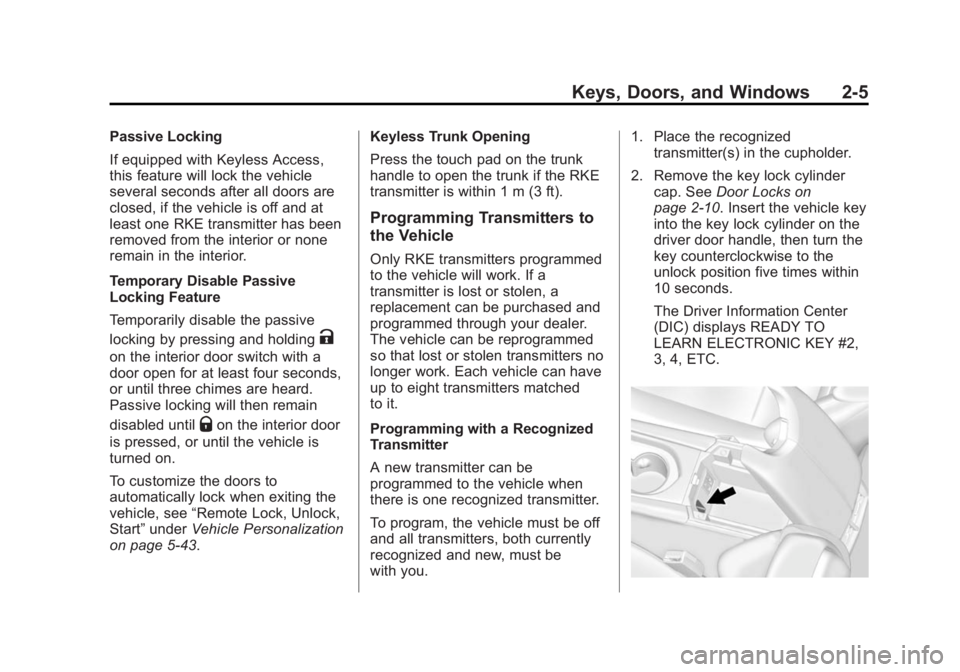
with you.1. Place the recognized
transmitter(s) in the cupholder.
2. Remove the key lock cylinder cap. See Door Locks on
page 2-10. Insert the vehicle key
into the key lock cylinder on the
driver door handle, then turn the
key counterclockwise to the
unlock position five times within
10 seconds.
The Driver Information Center
(DIC) displays READY TO
LEARN ELECTRONIC KEY #2,
3, 4, ETC.
Page 36 of 434
Black plate (6,1)Cadillac ATS Owner Manual (GMNA-Localizing-U.S./Canada/Mexico-
6014430) - 2014 - 2nd Edition - 8/23/13
2-6 Keys, Doors, and Windows
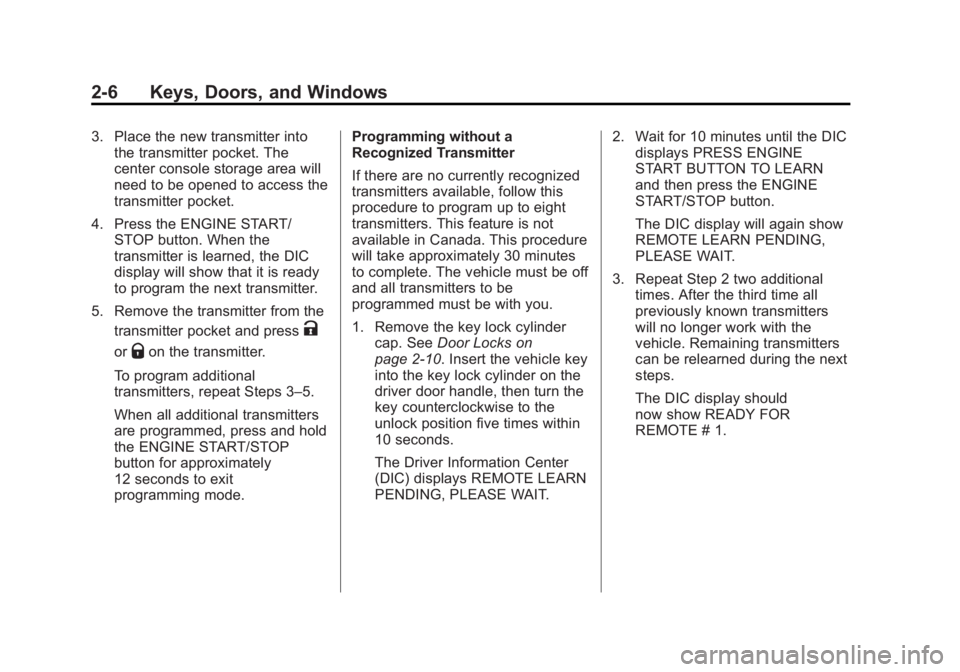
3. Place the new transmitter intothe transmitter pocket. The
center console storage area will
need to be opened to access the
transmitter pocket.
4. Press the ENGINE START/ STOP button. When the
transmitter is learned, the DIC
display will show that it is ready
to program the next transmitter.
5. Remove the transmitter from the transmitter pocket and press
K
orQon the transmitter.
To program additional
transmitters, repeat Steps 3–5.
When all additional transmitters
are programmed, press and hold
the ENGINE START/STOP
button for approximately
12 seconds to exit
programming mode. Programming without a
Recognized Transmitter
If there are no currently recognized
transmitters available, follow this
procedure to program up to eight
transmitters. This feature is not
available in Canada. This procedure
will take approximately 30 minutes
to complete. The vehicle must be off
and all transmitters to be
programmed must be with you.
1. Remove the key lock cylinder
cap. See Door Locks on
page 2-10. Insert the vehicle key
into the key lock cylinder on the
driver door handle, then turn the
key counterclockwise to the
unlock position five times within
10 seconds.
The Driver Information Center
(DIC) displays REMOTE LEARN
PENDING, PLEASE WAIT. 2. Wait for 10 minutes until the DIC
displays PRESS ENGINE
START BUTTON TO LEARN
and then press the ENGINE
START/STOP button.
The DIC display will again show
REMOTE LEARN PENDING,
PLEASE WAIT.
3. Repeat Step 2 two additional times. After the third time all
previously known transmitters
will no longer work with the
vehicle. Remaining transmitters
can be relearned during the next
steps.
The DIC display should
now show READY FOR
REMOTE # 1.
Page 37 of 434
Black plate (7,1)Cadillac ATS Owner Manual (GMNA-Localizing-U.S./Canada/Mexico-
6014430) - 2014 - 2nd Edition - 8/23/13
Keys, Doors, and Windows 2-7
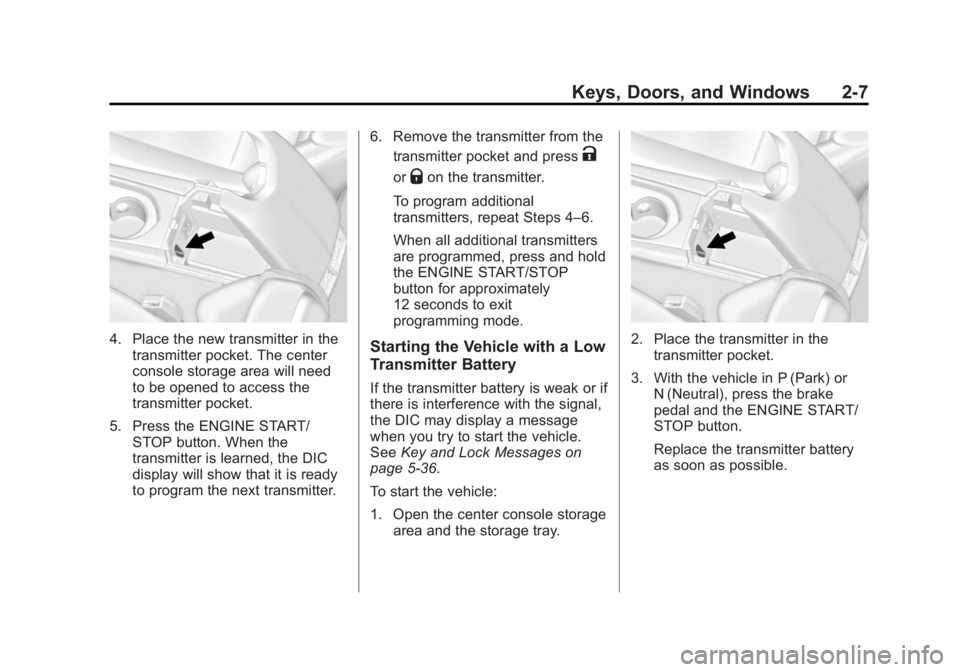
4. Place the new transmitter in thetransmitter pocket. The center
console storage area will need
to be opened to access the
transmitter pocket.
5. Press the ENGINE START/ STOP button. When the
transmitter is learned, the DIC
display will show that it is ready
to program the next transmitter. 6. Remove the transmitter from the
transmitter pocket and press
K
orQon the transmitter.
To program additional
transmitters, repeat Steps 4–6.
When all additional transmitters
are programmed, press and hold
the ENGINE START/STOP
button for approximately
12 seconds to exit
programming mode.
Starting the Vehicle with a Low
Transmitter Battery
If the transmitter battery is weak or if
there is interference with the signal,
the DIC may display a message
when you try to start the vehicle.
See Key and Lock Messages on
page 5-36.
To start the vehicle:
1. Open the center console storage
area and the storage tray.
2. Place the transmitter in thetransmitter pocket.
3. With the vehicle in P (Park) or N (Neutral), press the brake
pedal and the ENGINE START/
STOP button.
Replace the transmitter battery
as soon as possible.
Page 38 of 434
Black plate (8,1)Cadillac ATS Owner Manual (GMNA-Localizing-U.S./Canada/Mexico-
6014430) - 2014 - 2nd Edition - 8/23/13
2-8 Keys, Doors, and Windows
Battery Replacement
{Caution
When replacing the battery, do
not touch any of the circuitry on
the transmitter. Static from your
body could damage the
transmitter.
Replace the battery if the REPLACE
BATTERY IN REMOTE KEY
message displays in the DIC.
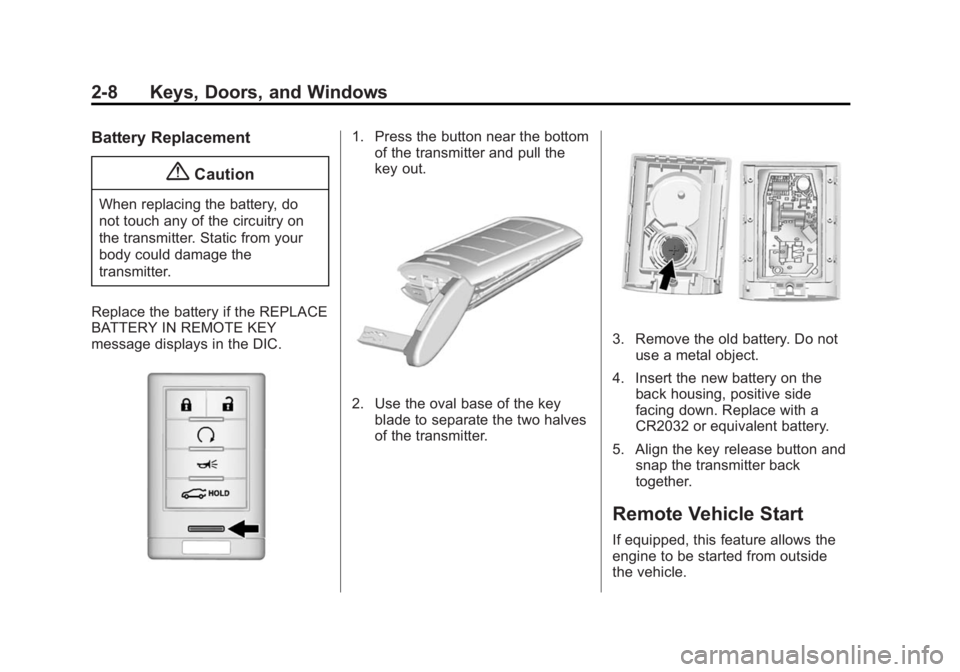
1. Press the button near the bottom of the transmitter and pull the
key out.
2. Use the oval base of the key
blade to separate the two halves
of the transmitter.
3. Remove the old battery. Do notuse a metal object.
4. Insert the new battery on the back housing, positive side
facing down. Replace with a
CR2032 or equivalent battery.
5. Align the key release button and snap the transmitter back
together.
Remote Vehicle Start
If equipped, this feature allows the
engine to be started from outside
the vehicle.
Page 39 of 434
Black plate (9,1)Cadillac ATS Owner Manual (GMNA-Localizing-U.S./Canada/Mexico-
6014430) - 2014 - 2nd Edition - 8/23/13
Keys, Doors, and Windows 2-9
/(Remote Vehicle Start):This
button will be on the RKE
transmitter if the vehicle has remote
start.
The climate control system will use
the previous settings during a
remote start. The rear window
defogger may come on during
remote start based on cold ambient
conditions. The rear defog indicator
light does not come on during
remote start.
If the vehicle has heated seats, they
may come on during a remote start.
See Heated Front Seats on
page 3-8.
Laws in some local communities
may restrict the use of remote
starters. For example, some laws
may require a person using remote
start to have the vehicle in view.
Check local regulations for any
requirements.
If your vehicle is low on fuel, do not
use the remote start feature. The
vehicle may run out of fuel. The RKE transmitter range may be
less while the vehicle is running.
Other conditions can affect the
performance of the transmitter. See
Remote Keyless Entry (RKE)
System on page 2-2.
Starting the Engine Using Remote
Start
1. Press and release
Qon the
RKE transmitter.
2. Immediately press and hold
/
for at least four seconds or until
the turn signal lamps flash. This
confirms the request to remote
start the vehicle has been
received. If the vehicle's lamps
are not visible, press and hold
/for at least four seconds.
During the remote start, the
doors will be locked and the
parking lamps will remain on as
long as the engine is running. The engine will shut off after
10 minutes unless a time
extension is done or the ignition
is put in ON/RUN/START.
3. Press the brake pedal and select the ON/RUN/START ignition
mode to drive the vehicle.
Extending Engine Run Time
The engine run time can also be
extended by another 10 minutes,
if during the first 10 minutes
Steps 1–2 are repeated while the
engine is still running. This provides
a total of 20 minutes.
The remote start can only be
extended once.
A maximum of two remote starts,
or a remote start with an extension,
are allowed between ignition cycles.
The vehicle's ignition must be
changed to ON/RUN/START and
then back to OFF before the remote
start procedure can be used again.
Page 42 of 434
Black plate (12,1)Cadillac ATS Owner Manual (GMNA-Localizing-U.S./Canada/Mexico-
6014430) - 2014 - 2nd Edition - 8/23/13
2-12 Keys, Doors, and Windows
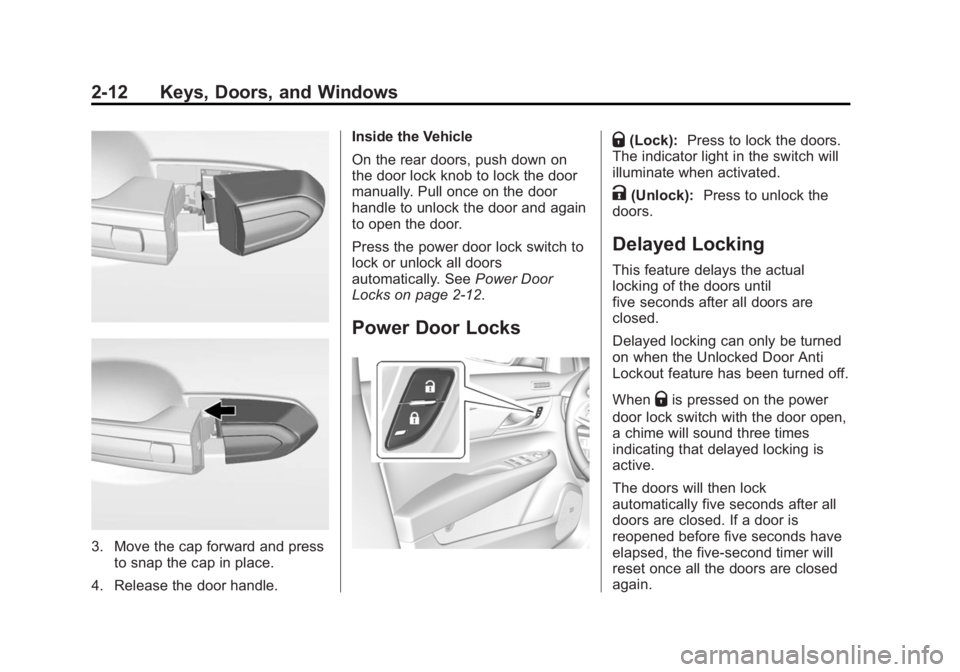
3. Move the cap forward and pressto snap the cap in place.
4. Release the door handle. Inside the Vehicle
On the rear doors, push down on
the door lock knob to lock the door
manually. Pull once on the door
handle to unlock the door and again
to open the door.
Press the power door lock switch to
lock or unlock all doors
automatically. See
Power Door
Locks on page 2-12.
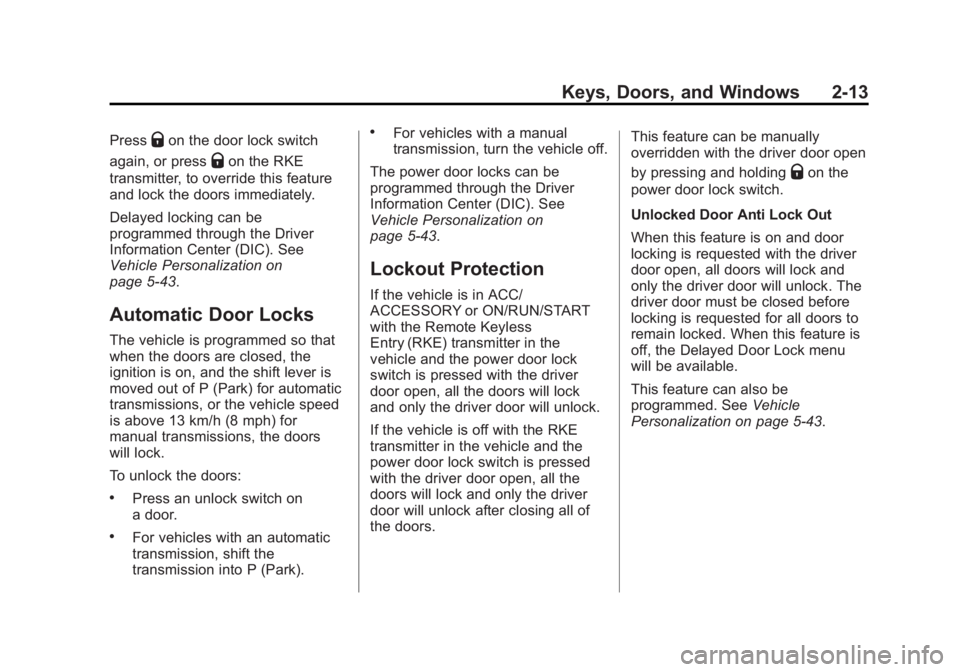
Power Door Locks
Q(Lock): Press to lock the doors.
The indicator light in the switch will
illuminate when activated.
K(Unlock): Press to unlock the
doors.
Delayed Locking
This feature delays the actual
locking of the doors until
five seconds after all doors are
closed.
Delayed locking can only be turned
on when the Unlocked Door Anti
Lockout feature has been turned off.
When
Qis pressed on the power
door lock switch with the door open,
a chime will sound three times
indicating that delayed locking is
active.
The doors will then lock
automatically five seconds after all
doors are closed. If a door is
reopened before five seconds have
elapsed, the five-second timer will
reset once all the doors are closed
again.
Page 43 of 434
Black plate (13,1)Cadillac ATS Owner Manual (GMNA-Localizing-U.S./Canada/Mexico-
6014430) - 2014 - 2nd Edition - 8/23/13
Keys, Doors, and Windows 2-13
PressQon the door lock switch
again, or press
Qon the RKE
transmitter, to override this feature
and lock the doors immediately.
Delayed locking can be
programmed through the Driver
Information Center (DIC). See
Vehicle Personalization on
page 5-43.
Automatic Door Locks
The vehicle is programmed so that
when the doors are closed, the
ignition is on, and the shift lever is
moved out of P (Park) for automatic
transmissions, or the vehicle speed
is above 13 km/h (8 mph) for
manual transmissions, the doors
will lock.
To unlock the doors:
.Press an unlock switch on
a door.
.For vehicles with an automatic
transmission, shift the
transmission into P (Park).
.For vehicles with a manual
transmission, turn the vehicle off.
The power door locks can be
programmed through the Driver
Information Center (DIC). See
Vehicle Personalization on
page 5-43.
Lockout Protection
If the vehicle is in ACC/
ACCESSORY or ON/RUN/START
with the Remote Keyless
Entry (RKE) transmitter in the
vehicle and the power door lock
switch is pressed with the driver
door open, all the doors will lock
and only the driver door will unlock.
If the vehicle is off with the RKE
transmitter in the vehicle and the
power door lock switch is pressed
with the driver door open, all the
doors will lock and only the driver
door will unlock after closing all of
the doors. This feature can be manually
overridden with the driver door open
by pressing and holding
Qon the
power door lock switch.
Unlocked Door Anti Lock Out
When this feature is on and door
locking is requested with the driver
door open, all doors will lock and
only the driver door will unlock. The
driver door must be closed before
locking is requested for all doors to
remain locked. When this feature is
off, the Delayed Door Lock menu
will be available.
This feature can also be
programmed. See Vehicle
Personalization on page 5-43.