Stabi CADILLAC ATS 2014 Owner's Guide
[x] Cancel search | Manufacturer: CADILLAC, Model Year: 2014, Model line: ATS, Model: CADILLAC ATS 2014Pages: 434, PDF Size: 5.61 MB
Page 249 of 434
Black plate (35,1)Cadillac ATS Owner Manual (GMNA-Localizing-U.S./Canada/Mexico-
6014430) - 2014 - 2nd Edition - 8/23/13
Driving and Operating 9-35
Turning the Systems Off
and On
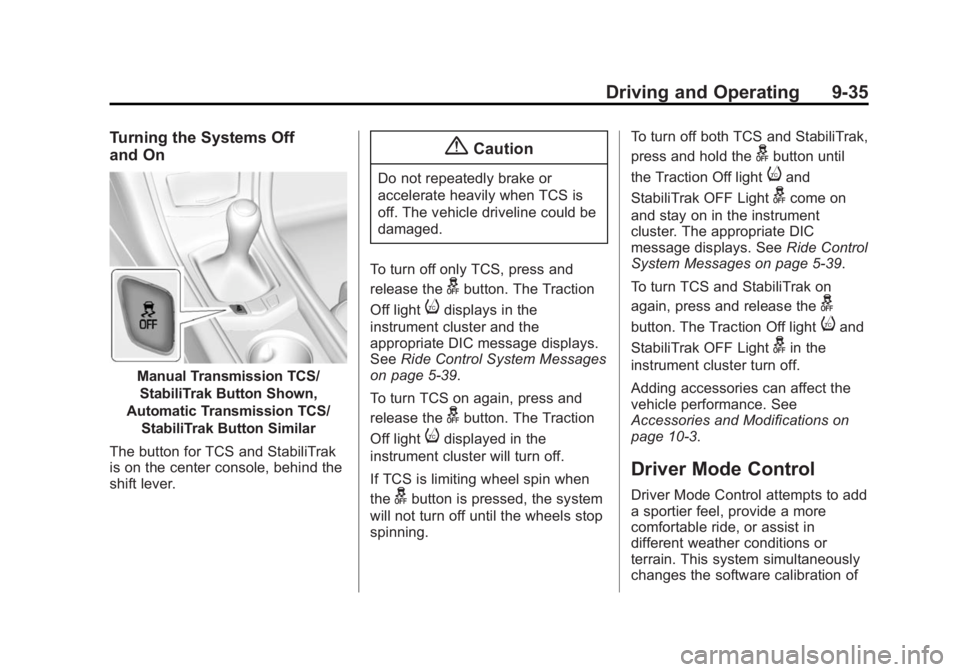
Manual Transmission TCS/StabiliTrak Button Shown,
Automatic Transmission TCS/ StabiliTrak Button Similar
The button for TCS and StabiliTrak
is on the center console, behind the
shift lever.
{Caution
Do not repeatedly brake or
accelerate heavily when TCS is
off. The vehicle driveline could be
damaged.
To turn off only TCS, press and
release the
gbutton. The Traction
Off light
idisplays in the
instrument cluster and the
appropriate DIC message displays.
See Ride Control System Messages
on page 5-39.
To turn TCS on again, press and
release the
gbutton. The Traction
Off light
idisplayed in the
instrument cluster will turn off.
If TCS is limiting wheel spin when
the
gbutton is pressed, the system
will not turn off until the wheels stop
spinning. To turn off both TCS and StabiliTrak,
press and hold the
gbutton until
the Traction Off light
iand
StabiliTrak OFF Light
gcome on
and stay on in the instrument
cluster. The appropriate DIC
message displays. See Ride Control
System Messages on page 5-39.
To turn TCS and StabiliTrak on
again, press and release the
g
button. The Traction Off lightiand
StabiliTrak OFF Light
gin the
instrument cluster turn off.
Adding accessories can affect the
vehicle performance. See
Accessories and Modifications on
page 10-3.
Driver Mode Control
Driver Mode Control attempts to add
a sportier feel, provide a more
comfortable ride, or assist in
different weather conditions or
terrain. This system simultaneously
changes the software calibration of
Page 252 of 434
Black plate (38,1)Cadillac ATS Owner Manual (GMNA-Localizing-U.S./Canada/Mexico-
6014430) - 2014 - 2nd Edition - 8/23/13
9-38 Driving and Operating
If equipped with a manual
transmission, the cruise control will
remain active when the gears are
shifted. The cruise is deactivated if
the clutch is depressed for several
seconds.
If the StabiliTrak
®system begins to
limit wheel spin while using cruise
control, the cruise control
automatically disengages. See
Traction Control/Electronic Stability
Control on page 9-33. If a collision
alert occurs when cruise control is
activated, cruise control is
disengaged. See Forward Collision
Alert (FCA) System on page 9-53.
When road conditions allow the
cruise control to be safely used, you
can apply the cruise control again.
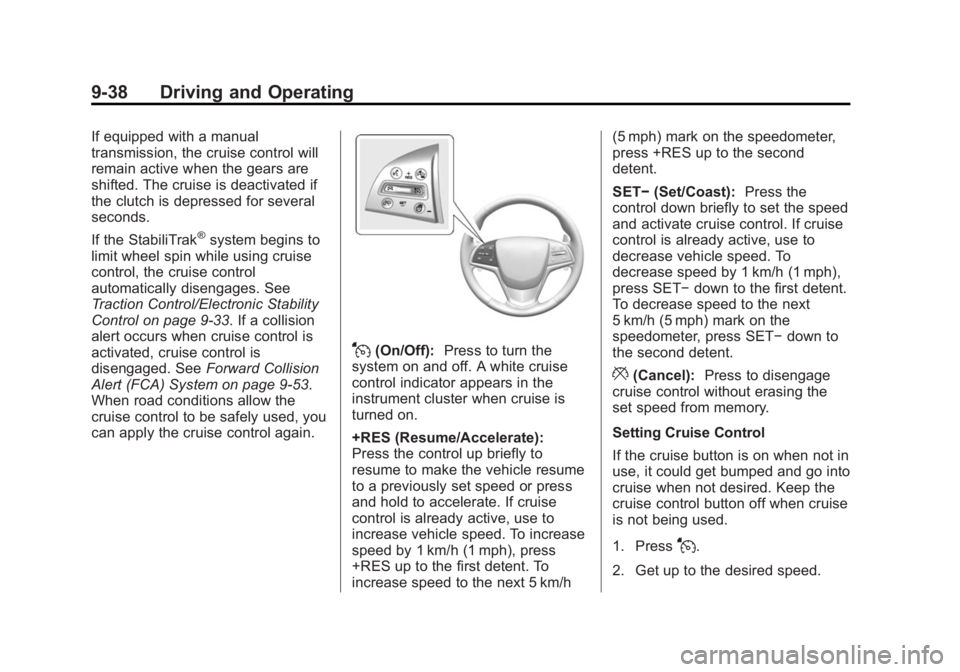
J(On/Off): Press to turn the
system on and off. A white cruise
control indicator appears in the
instrument cluster when cruise is
turned on.
+RES (Resume/Accelerate):
Press the control up briefly to
resume to make the vehicle resume
to a previously set speed or press
and hold to accelerate. If cruise
control is already active, use to
increase vehicle speed. To increase
speed by 1 km/h (1 mph), press
+RES up to the first detent. To
increase speed to the next 5 km/h (5 mph) mark on the speedometer,
press +RES up to the second
detent.
SET−
(Set/Coast): Press the
control down briefly to set the speed
and activate cruise control. If cruise
control is already active, use to
decrease vehicle speed. To
decrease speed by 1 km/h (1 mph),
press SET− down to the first detent.
To decrease speed to the next
5 km/h (5 mph) mark on the
speedometer, press SET− down to
the second detent.
*(Cancel): Press to disengage
cruise control without erasing the
set speed from memory.
Setting Cruise Control
If the cruise button is on when not in
use, it could get bumped and go into
cruise when not desired. Keep the
cruise control button off when cruise
is not being used.
1. Press
J.
2. Get up to the desired speed.
Page 254 of 434

Black plate (40,1)Cadillac ATS Owner Manual (GMNA-Localizing-U.S./Canada/Mexico-
6014430) - 2014 - 2nd Edition - 8/23/13
9-40 Driving and Operating
page 5-10. The increment value
used depends on the units
displayed.
Passing Another Vehicle While
Using Cruise Control
Use the accelerator pedal to
increase the vehicle speed. When
you take your foot off the pedal, the
vehicle will slow down to the
previously set cruise speed. While
pressing the accelerator pedal or
shortly following the release to
override cruise control, briefly
applying the SET–switch will result
in cruise control set to the current
vehicle speed.
Using Cruise Control on Hills
How well the cruise control will work
on hills depends upon the vehicle
speed, load, and the steepness of
the hills. When going up steep hills,
you might have to step on the
accelerator pedal to maintain the
vehicle speed. When going
downhill, the cruise control system
may automatically brake to slow the
vehicle down. Also, you may have to brake or shift to a lower gear to
keep the vehicle speed down. If the
brake is applied, the cruise control
disengages.
Ending Cruise Control
There are four ways to end cruise
control:
.Step lightly on the brake pedal
(manual and automatic
transmissions).
.Depress the clutch pedal for
several seconds or shift to
Neutral (manual transmissions).
.Press*.
.PressJ.
Erasing Speed Memory
The cruise control set speed is
erased from memory if
Jis
pressed or if the ignition is
turned off.
Adaptive Cruise Control
If equipped with Adaptive Cruise
Control (ACC), it allows the driver to
select the cruise control set speed
and following gap. Read this entire
section before using this system.
The following gap is the following
time between your vehicle and a
vehicle detected directly ahead in
your path moving in the same
direction. If no vehicle is detected in
your path, ACC works like regular
cruise control. ACC uses camera
and radar sensors. See Radio
Frequency Statement on
page 13-15.
If a vehicle is detected in your path,
ACC can apply acceleration or
limited, moderate braking to
maintain the selected following gap.
To disengage ACC, apply the brake.
If ACC is controlling your vehicle
speed when the Traction Control
System (TCS) or StabiliTrak System
activates, the ACC may
automatically disengage. See
Traction Control/Electronic Stability
Page 255 of 434

Black plate (41,1)Cadillac ATS Owner Manual (GMNA-Localizing-U.S./Canada/Mexico-
6014430) - 2014 - 2nd Edition - 8/23/13
Driving and Operating 9-41
Control on page 9-33. When road
conditions allow ACC to be safely
used, the ACC can be turned
back on.
ACC will not engage if the TCS or
StabiliTrak electronic stability control
system is disabled.
{Warning
ACC has limited braking ability
and may not have time to slow
the vehicle down enough to avoid
a collision with another vehicle
you are following. This can occur
when vehicles suddenly slow or
stop ahead, or enter your lane.
Also see“Alerting the Driver” in
this section. Complete attention is
always required while driving and
you should be ready to take
action and apply the brakes. See
Defensive Driving on page 9-3.
{Warning
Adaptive Cruise Control will not
detect or brake for children,
pedestrians, animals, or other
objects.
Do not use Adaptive Cruise
Control when:
.On winding and hilly roads or
when the sensors are
blocked by snow, ice, or dirt.
The system may not detect a
vehicle ahead. Keep the
entire front of the vehicle
clean.
.Visibility is low, such as in
fog, rain, or snow conditions.
Adaptive Cruise Control
performance is limited under
these conditions.
.On slippery roads where fast
changes in tire traction can
cause excessive wheel slip.
](On/Off): Press to turn the
system on or off. The indicator turns
white on the instrument cluster
when ACC is turned on.
+RES (Resume/Accelerate):
Press the control up briefly to
resume the previous set speed or to
increase vehicle speed if ACC is
already activated. To increase
speed by 1 km/h (1 mph), press
+RES up to the first detent. To
increase speed to the next 5 km/h
(5 mph) mark on the speedometer,
press +RES up to the second
detent.
Page 259 of 434

Black plate (45,1)Cadillac ATS Owner Manual (GMNA-Localizing-U.S./Canada/Mexico-
6014430) - 2014 - 2nd Edition - 8/23/13
Driving and Operating 9-45
lamps will come on. The automatic
braking may feel or sound different
than if the brakes were applied
manually. This is normal.
Stationary or Very Slow-Moving
Objects
{Warning
Adaptive Cruise Control (ACC)
may not detect and react to
stopped or slow-moving vehicles
ahead of you. For example, the
system may not brake for a
vehicle that it has never detected
moving. This can occur in
stop-and-go traffic or when a
vehicle suddenly appears due to
a vehicle ahead changing lanes.
Your vehicle may not stop and
could cause a crash. Use caution
when using ACC. Your complete
attention is always required while
driving and you should be ready
to take action and apply the
brakes.ACC Automatically Disengages
ACC may automatically disengage
and the driver will need to manually
apply the brakes to slow the
vehicle when:
.The sensors are blocked.
.The Traction Control System
(TCS) or electronic stability
control system has activated or
been disabled.
.No traffic or other objects are
being detected.
.There is a fault in the system.
The ACC active symbol will not be
displayed when ACC is no longer
active.
Notification to Resume ACC
ACC will maintain a follow gap
behind a detected vehicle and slow
your vehicle to a stop behind that
vehicle.
If the stopped vehicle ahead has
driven away and ACC has not
resumed, the vehicle ahead symbol
will flash as a reminder to check traffic before proceeding. In
addition, the left and right sides of
the Safety Alert Seat will pulse three
times, or three beeps will sound.
See
”Alert Type” and“Go Notifier” in
“Collision/Detection Systems” under
Vehicle Personalization on
page 5-43.
When the vehicle ahead drives
away, press RES+ or the
accelerator pedal to resume ACC.
If stopped for more than
two minutes or if the driver door is
opened and the driver safety belt is
unbuckled, the ACC automatically
applies the electric parking brake to
hold the vehicle. The electric
parking brake status light will turn
on. See Parking Brake (Electric) on
page 9-30 orParking Brake
(Manual) on page 9-32. To resume
ACC and release the electric
parking brake, press the accelerator
pedal. ACC can be resumed when
the vehicle is traveling greater than
25 km/h (16 mph).
Page 289 of 434
Black plate (3,1)Cadillac ATS Owner Manual (GMNA-Localizing-U.S./Canada/Mexico-
6014430) - 2014 - 2nd Edition - 8/23/13
Vehicle Care 10-3
cause cancer and birth defects or
other reproductive harm. Engine
exhaust, many parts and systems,
many fluids, and some component
wear by-products contain and/or
emit these chemicals.
California Perchlorate
Materials Requirements
Certain types of automotive
applications, such as airbag
initiators, safety belt pretensioners,
and lithium batteries contained in
Remote Keyless Entry transmitters,
may contain perchlorate materials.
Special handling may be necessary.
For additional information, see
www.dtsc.ca.gov/hazardouswaste/
perchlorate.
Accessories and
Modifications
Adding non‐dealer accessories or
making modifications to the vehicle
can affect vehicle performance and
safety, including such things as
airbags, braking, stability, ride andhandling, emissions systems,
aerodynamics, durability, and
electronic systems like antilock
brakes, traction control, and stability
control. These accessories or
modifications could even cause
malfunction or damage not covered
by the vehicle warranty.
Damage to vehicle components
resulting from modifications or the
installation or use of non‐GM
certified parts, including control
module or software modifications, is
not covered under the terms of the
vehicle warranty and may affect
remaining warranty coverage for
affected parts.
GM Accessories are designed to
complement and function with other
systems on the vehicle. See your
dealer to accessorize the vehicle
using genuine GM Accessories
installed by a dealer technician.
Also, see
Adding Equipment to the
Airbag-Equipped Vehicle on
page 3-30.
Vehicle Checks
Doing Your Own
Service Work
{Warning
It can be dangerous to work on
your vehicle if you do not have
the proper knowledge, service
manual, tools, or parts. Always
follow owner manual procedures
and consult the service manual
for your vehicle before doing any
service work.
If doing some of your own service
work, use the proper service
manual. It tells you much more
about how to service the vehicle
than this manual can. To order the
proper service manual, see Service
Publications Ordering Information
on page 13-11.
Page 344 of 434
Black plate (58,1)Cadillac ATS Owner Manual (GMNA-Localizing-U.S./Canada/Mexico-
6014430) - 2014 - 2nd Edition - 8/23/13
10-58 Vehicle Care
{Warning
Using bias-ply tires on the
vehicle may cause the wheel
rim flanges to develop cracks
after many miles of driving.
A tire and/or wheel could fail
suddenly and cause a crash.
Use only radial-ply tires with
the wheels on the vehicle.
If the vehicle tires must be
replaced with a tire that does not
have a TPC Spec number, make
sure they are the same size,
load range, speed rating, and
construction (radial) as the
original tires.
Vehicles that have a tire
pressure monitoring system
could give an inaccurate
low-pressure warning if non-TPC
Spec rated tires are installed.
See Tire Pressure Monitor
Operation on page 10-50. The Tire and Loading
Information label indicates the
original equipment tires on the
vehicle. See
Vehicle Load Limits
on page 9-11, for the label
location and more information
about the Tire and Loading
Information label.
Different Size Tires and
Wheels
If wheels or tires are installed that
are a different size than the original
equipment wheels and tires, vehicle
performance, including its braking,
ride and handling characteristics,
stability, and resistance to rollover
may be affected. If the vehicle has
electronic systems such as antilock
brakes, rollover airbags, traction
control, electronic stability control,
or All-Wheel Drive, the performance
of these systems can also be
affected.
{Warning
If different sized wheels are used,
there may not be an acceptable
level of performance and safety if
tires not recommended for those
wheels are selected. This
increases the chance of a crash
and serious injury. Only use GM
specific wheel and tire systems
developed for the vehicle, and
have them properly installed by a
GM certified technician.
See Buying New Tires on
page 10-56 andAccessories and
Modifications on page 10-3.
Page 423 of 434
Black plate (3,1)Cadillac ATS Owner Manual (GMNA-Localizing-U.S./Canada/Mexico-
6014430) - 2014 - 2nd Edition - 8/23/13
INDEX i-3
CleaningExterior Care . . . . . . . . . . . . . . . 10-77
Interior Care . . . . . . . . . . . . . . . . 10-82
Climate Control Systems Dual Automatic . . . . . . . . . . . 8-1, 8-5
Clock . . . . . . . . . . . . . . . . . . . . . . . . . . . 5-6
Cluster, Instrument . . . . . . . . . . . . 5-10
Clutch, Hydraulic . . . . . . . . . . . . . 10-14
Collision Damage Repair . . . . . . 13-9
Compartments Storage . . . . . . . . . . . . . . . . . . . . . . . . 4-1
Compass . . . . . . . . . . . . . . . . . . . . . . . 5-5 Messages . . . . . . . . . . . . . . . . . . . . 5-33
Compressor Kit, Tire Sealant . . . . . . . . . . . . . . . . . . . . . . 10-64
Connections
OnStar
®. . . . . . . . . . . . . . . . . . . . . . 14-3
Control Traction and ElectronicStability . . . . . . . . . . . . . . . . . . . . . 9-33
Control of a Vehicle . . . . . . . . . . . . . 9-3
Convex Mirrors . . . . . . . . . . . . . . . . 2-19 Coolant
Engine . . . . . . . . . . . . . . . . . . . . . . 10-17
Engine Temperature
Gauge . . . . . . . . . . . . . . . . . . . . . . 5-13
Engine Temperature Warning Light . . . . . . . . . . . . . . . 5-22
Cooling System . . . . . . . . . . . . . . . 10-16
Engine Messages . . . . . . . . . . . . 5-34
Courtesy Lamps . . . . . . . . . . . . . . . . 6-7
Courtesy Transportation Program . . . . . . . . . . . . . . . . . . . . . . 13-7
Cruise Control . . . . . . . . . . . . . . . . . 9-37 Light . . . . . . . . . . . . . . . . . . . . . . . . . . 5-24
Messages . . . . . . . . . . . . . . . . . . . . 5-33
Cruise Control, Active . . . . . . . . . 9-40
Customer Assistance . . . . . . . . . . 13-4 Offices . . . . . . . . . . . . . . . . . . . . . . . . 13-3
Text Telephone (TTY)Users . . . . . . . . . . . . . . . . . . . . . . . 13-4
Customer Information Service Publications
Ordering Information . . . . . . .13-11
Customer Satisfaction Procedure . . . . . . . . . . . . . . . . . . . . 13-1
D
Damage Repair, Collision . . . . . . 13-9
Danger, Warnings, andCautions . . . . . . . . . . . . . . . . . . . . . . . . iii
Data Recorders, Event . . . . . . . 13-13
Daytime Running Lamps (DRL) . . . . . . . . . . . . . . . . . . 6-4
Defensive Driving . . . . . . . . . . . . . . . 9-3
Delayed Locking . . . . . . . . . . . . . . . 2-12
Diagnostics OnStar
®. . . . . . . . . . . . . . . . . . . . . . 14-5
Distracted Driving . . . . . . . . . . . . . . . 9-2
Dome Lamps . . . . . . . . . . . . . . . . . . . 6-7
Door Ajar Messages . . . . . . . . . . . . . . . 5-34
Delayed Locking . . . . . . . . . . . . . . 2-12
Locks . . . . . . . . . . . . . . . . . . . . . . . . . 2-10
Power Locks . . . . . . . . . . . . . . . . . . 2-12
Rear Seat Pass-Through . . . . . 3-11
Drive Belt Routing, Engine . . . . . 12-4
Drive Systems
All-Wheel Drive . . . . . . . 9-29, 10-26
Driver Assistance Systems . . . . 9-48
Driver Information Center (DIC) . . . . . . . . . . . . . . . . . 5-25
Driver Mode Control . . . . . . . . . . . 9-35
Page 427 of 434
Black plate (7,1)Cadillac ATS Owner Manual (GMNA-Localizing-U.S./Canada/Mexico-
6014430) - 2014 - 2nd Edition - 8/23/13
INDEX i-7
LightingAdaptive Forward . . . . . . . . . . . . . . 6-5
Entry . . . . . . . . . . . . . . . . . . . . . . . . . . 6-8
Exit . . . . . . . . . . . . . . . . . . . . . . . . . . . . 6-8
Illumination Control . . . . . . . . . . . . 6-6
LED . . . . . . . . . . . . . . . . . . . . . . . . 10-29
Lights
Airbag Readiness . . . . . . . . . . . . . 5-14
Antilock Brake System(ABS) Warning . . . . . . . . . . . . . . 5-20
Brake System Warning . . . . . . . 5-18
Charging System . . . . . . . . . . . . . 5-15
Cruise Control . . . . . . . . . . . . . . . . 5-24
Engine Coolant
Temperature Warning . . . . . . . 5-22
Engine Oil Pressure . . . . . . . . . . 5-23
Flash-to-Pass . . . . . . . . . . . . . . . . . . 6-4
High-Beam On . . . . . . . . . . . . . . . . 5-24
High/Low Beam Changer . . . . . . 6-3
Lane Departure Warning . . . . . . 5-20
Low Fuel Warning . . . . . . . . . . . . 5-23
Safety Belt Reminders . . . . . . . . 5-13
Security . . . . . . . . . . . . . . . . . . . . . . 5-23 Lights (cont'd)
Service Electric Parking
Brake . . . . . . . . . . . . . . . . . . . . . . . 5-19
StabiliTrak
®OFF . . . . . . . . . . . . . 5-21
Tire Pressure . . . . . . . . . . . . . . . . . 5-22
Traction Control System (TCS)/StabiliTrak
®. . . . . . . . . . 5-21
Traction Off . . . . . . . . . . . . . . . . . . . 5-21
Limited-Slip Rear Axle . . . . . . . . . 9-37
Locks
Automatic Door . . . . . . . . . . . . . . . 2-13
Delayed Locking . . . . . . . . . . . . . . 2-12
Door . . . . . . . . . . . . . . . . . . . . . . . . . . 2-10
Lockout Protection . . . . . . . . . . . . 2-13
Power Door . . . . . . . . . . . . . . . . . . . 2-12
Safety . . . . . . . . . . . . . . . . . . . . . . . . 2-14
Loss of Control . . . . . . . . . . . . . . . . . 9-5
Low Fuel Warning Light . . . . . . . . 5-23
Lower Anchors and Tethers for Children (LATCH
System) . . . . . . . . . . . . . . . . . . . . . . 3-40
Lumbar Adjustment . . . . . . . . . . . . . 3-4 Front Seats . . . . . . . . . . . . . . . . . . . . 3-4
M
Maintenance
Records . . . . . . . . . . . . . . . . . . . . .11-16
Maintenance Schedule Recommended Fluidsand Lubricants . . . . . . . . . . . . .11-13
Malfunction Indicator Lamp . . . . 5-16
Manual Mode . . . . . . . . . . . . . . . . . . 9-26
Manual Transmission . . . . . . . . . . 9-28
Fluid . . . . . . . . . . . . . . . . . . . . . . . . 10-14
Memory Features . . . . . . . . . . . . . . . 1-7
Memory Seats . . . . . . . . . . . . . . . . . . 3-6
Messages
Airbag System . . . . . . . . . . . . . . . . 5-40
Battery Voltage andCharging . . . . . . . . . . . . . . . . . . . . 5-32
Brake System . . . . . . . . . . . . . . . . 5-32
Compass . . . . . . . . . . . . . . . . . . . . . 5-33
Door Ajar . . . . . . . . . . . . . . . . . . . . . 5-34
Engine Cooling System . . . . . . . 5-34
Engine Oil . . . . . . . . . . . . . . . . . . . . 5-35
Engine Power . . . . . . . . . . . . . . . . 5-35
Fuel System . . . . . . . . . . . . . . . . . . 5-35
Key and Lock . . . . . . . . . . . . . . . . . 5-36
Lamp . . . . . . . . . . . . . . . . . . . . . . . . . 5-36
Object Detection System . . . . . 5-37
Page 431 of 434

Black plate (11,1)Cadillac ATS Owner Manual (GMNA-Localizing-U.S./Canada/Mexico-
6014430) - 2014 - 2nd Edition - 8/23/13
INDEX i-11
Software Updates . . . . . . . . . . . . . . 7-7
Specifications andCapacities . . . . . . . . . . . . . . . . . . . . 12-2
Speedometer . . . . . . . . . . . . . . . . . . 5-11
StabiliTrak OFF Light . . . . . . . . . . . . . . . . . . . . . 5-21
Start Assist, Hills . . . . . . . . . . . . . . 9-33
Start Vehicle, Remote . . . . . . . . . . 2-8
Starter Switch Check . . . . . . . . . 10-26
Starting the Engine . . . . . . . . . . . . 9-18
Starting the Vehicle
Messages . . . . . . . . . . . . . . . . . . . . 5-40
Steering . . . . . . . . . . . . . . . . . . . . . . . . 9-4 Heated Wheel . . . . . . . . . . . . . . . . . 5-3
Wheel Adjustment . . . . . . . . . . . . . 5-2
Wheel Controls . . . . . . . . . . . . . . . . 5-2
Storage Areas Armrest . . . . . . . . . . . . . . . . . . . . . . . . 4-2
Glove Box . . . . . . . . . . . . . . . . . . . . . 4-2
Instrument Panel . . . . . . . . . . . . . . 4-1
Storage Compartments . . . . . . . . . 4-1
Storing the Tire Sealant
and Compressor Kit . . . . . . . . . 10-71
Stuck Vehicle . . . . . . . . . . . . . . . . . . 9-11
Sun Visors . . . . . . . . . . . . . . . . . . . . . 2-24
Sunroof . . . . . . . . . . . . . . . . . . . . . . . . 2-24 Symbols . . . . . . . . . . . . . . . . . . . . . . . . . . iv
System
Active Emergency Braking . . . . 9-56
Forward CollisionAlert (FCA) . . . . . . . . . . . . . . . . . . 9-53
Infotainment . . . . . . . . . . . . 7-1, 13-14
Systems
Driver Assistance . . . . . . . . . . . . . 9-48
T
Tachometer . . . . . . . . . . . . . . . . . . . . 5-12
Text Telephone (TTY) Users . . . 13-4
Theft-Deterrent Systems . . . . . . . 2-18Immobilizer . . . . . . . . . . . . . . . . . . . 2-18
Thigh Support Adjustment . . . . . . 3-4
Time . . . . . . . . . . . . . . . . . . . . . . . . . . . . 5-6
Tires Buying New Tires . . . . . . . . . . . 10-56
Chains . . . . . . . . . . . . . . . . . . . . . . 10-62
Designations . . . . . . . . . . . . . . . 10-44
Different Size . . . . . . . . . . . . . . . 10-58
If a Tire Goes Flat . . . . . . . . . . 10-62
Inflation Monitor System . . . . 10-50
Inspection . . . . . . . . . . . . . . . . . . 10-54
Messages . . . . . . . . . . . . . . . . . . . . 5-41
Pressure . . . . . . . . . . . . . . . . . . . . 10-49 Tires (cont'd)
Pressure Light . . . . . . . . . . . . . . . . 5-22
Pressure Monitor System . . . 10-49
Rotation . . . . . . . . . . . . . . . . . . . . 10-54
Run-Flat . . . . . . . . . . . . . . . . . . . . 10-42
Sealant and
Compressor Kit . . . . . . . . . . . 10-64
Sealant and Compressor Kit, Storing . . . . . . . . . . . . . . . . 10-71
Sidewall Labeling . . . . . . . . . . . 10-43
Terminology and Definitions . . . . . . . . . . . . . . . . . 10-45
Uniform Tire Quality Grading . . . . . . . . . . . . . . . . . . . 10-59
Wheel Alignment and Tire Balance . . . . . . . . . . . . . . . . . . . 10-60
Wheel Replacement . . . . . . . . 10-60
When It Is Time for New Tires . . . . . . . . . . . . . . . . . . . . . . 10-56
Winter . . . . . . . . . . . . . . . . . . . . . . 10-41
Towing Driving Characteristics . . . . . . . . 9-67
Equipment . . . . . . . . . . . . . . . . . . . . 9-71
General Information . . . . . . . . . . 9-67
Recreational Vehicle . . . . . . . . 10-75
Trailer . . . . . . . . . . . . . . . . . . 9-70, 9-71
Vehicle . . . . . . . . . . . . . . . . . . . . . 10-74