9-32 CADILLAC ATS 2014 Owner's Manual
[x] Cancel search | Manufacturer: CADILLAC, Model Year: 2014, Model line: ATS, Model: CADILLAC ATS 2014Pages: 434, PDF Size: 5.61 MB
Page 9 of 434
Black plate (3,1)Cadillac ATS Owner Manual (GMNA-Localizing-U.S./Canada/Mexico-
6014430) - 2014 - 2nd Edition - 8/23/13
In Brief 1-3
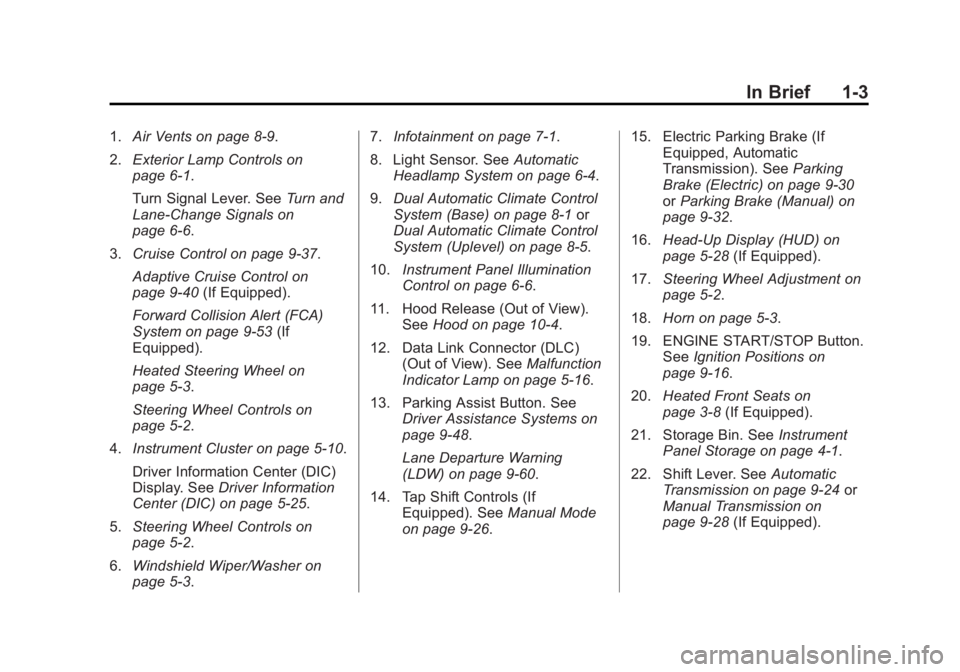
1.Air Vents on page 8-9.
2. Exterior Lamp Controls on
page 6-1.
Turn Signal Lever. See Turn and
Lane-Change Signals on
page 6-6.
3. Cruise Control on page 9-37.
Adaptive Cruise Control on
page 9-40 (If Equipped).
Forward Collision Alert (FCA)
System on page 9-53 (If
Equipped).
Heated Steering Wheel on
page 5-3.
Steering Wheel Controls on
page 5-2.
4. Instrument Cluster on page 5-10.
Driver Information Center (DIC)
Display. See Driver Information
Center (DIC) on page 5-25.
5. Steering Wheel Controls on
page 5-2.
6. Windshield Wiper/Washer on
page 5-3. 7.
Infotainment on page 7-1.
8. Light Sensor. See Automatic
Headlamp System on page 6-4.
9. Dual Automatic Climate Control
System (Base) on page 8-1 or
Dual Automatic Climate Control
System (Uplevel) on page 8-5.
10. Instrument Panel Illumination
Control on page 6-6.
11. Hood Release (Out of View). SeeHood on page 10-4.
12. Data Link Connector (DLC) (Out of View). See Malfunction
Indicator Lamp on page 5-16.
13. Parking Assist Button. See Driver Assistance Systems on
page 9-48.
Lane Departure Warning
(LDW) on page 9-60.
14. Tap Shift Controls (If Equipped). See Manual Mode
on page 9-26. 15. Electric Parking Brake (If
Equipped, Automatic
Transmission). See Parking
Brake (Electric) on page 9-30
or Parking Brake (Manual) on
page 9-32.
16. Head-Up Display (HUD) on
page 5-28 (If Equipped).
17. Steering Wheel Adjustment on
page 5-2.
18. Horn on page 5-3.
19. ENGINE START/STOP Button. SeeIgnition Positions on
page 9-16.
20. Heated Front Seats on
page 3-8 (If Equipped).
21. Storage Bin. See Instrument
Panel Storage on page 4-1.
22. Shift Lever. See Automatic
Transmission on page 9-24 or
Manual Transmission on
page 9-28 (If Equipped).
Page 10 of 434
Black plate (4,1)Cadillac ATS Owner Manual (GMNA-Localizing-U.S./Canada/Mexico-
6014430) - 2014 - 2nd Edition - 8/23/13
1-4 In Brief
23.Traction Control/Electronic
Stability Control on page 9-33.
Electric Parking Brake (If
Equipped, Manual
Transmission). See Parking
Brake (Electric) on page 9-30
or Parking Brake (Manual) on
page 9-32.
24. MODE Button. See Driver
Mode Control on page 9-35.
25. Instrument Panel Storage on
page 4-1.
26. Hazard Warning Flashers on
page 6-5.Initial Drive
Information
This section provides a brief
overview about some of the
important features that may or may
not be on your specific vehicle.
For more detailed information, refer
to each of the features which can be
found later in this owner manual.
Remote Keyless Entry
(RKE) System
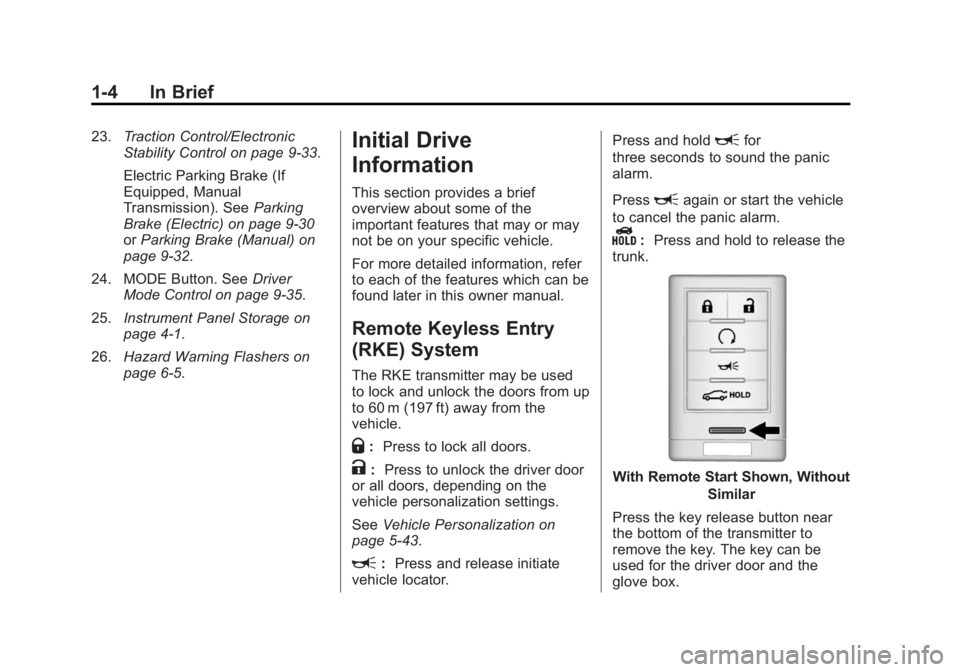
The RKE transmitter may be used
to lock and unlock the doors from up
to 60 m (197 ft) away from the
vehicle.
Q:Press to lock all doors.
K: Press to unlock the driver door
or all doors, depending on the
vehicle personalization settings.
See Vehicle Personalization on
page 5-43.
L: Press and release initiate
vehicle locator. Press and hold
Lfor
three seconds to sound the panic
alarm.
Press
Lagain or start the vehicle
to cancel the panic alarm.
Y: Press and hold to release the
trunk.
With Remote Start Shown, Without
Similar
Press the key release button near
the bottom of the transmitter to
remove the key. The key can be
used for the driver door and the
glove box.
Page 127 of 434
Black plate (19,1)Cadillac ATS Owner Manual (GMNA-Localizing-U.S./Canada/Mexico-
6014430) - 2014 - 2nd Edition - 8/23/13
Instruments and Controls 5-19
This light comes on briefly when the
vehicle is turned on. If it does not
come on then, have it fixed so it will
be ready to warn if there is a
problem.
If the light comes on and stays on,
there is a base brake problem.
{Warning
The brake system might not be
working properly if the brake
system warning light is on.
Driving with the brake system
warning light on can lead to a
crash. If the light is still on after
the vehicle has been pulled off
the road and carefully stopped,
have the vehicle towed for
service.
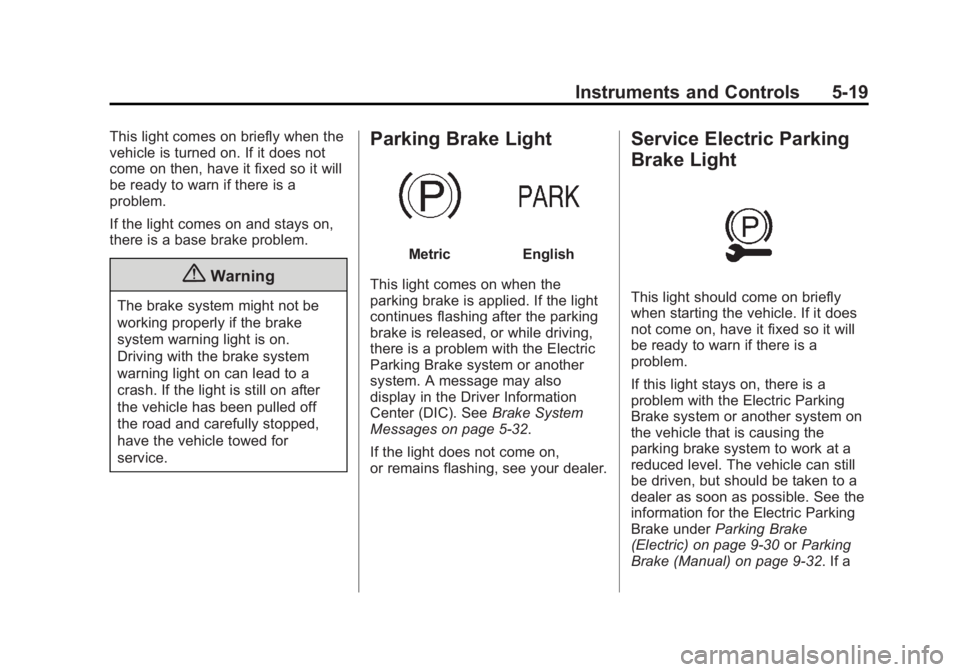
Parking Brake Light
MetricEnglish
This light comes on when the
parking brake is applied. If the light
continues flashing after the parking
brake is released, or while driving,
there is a problem with the Electric
Parking Brake system or another
system. A message may also
display in the Driver Information
Center (DIC). See Brake System
Messages on page 5-32.
If the light does not come on,
or remains flashing, see your dealer.
Service Electric Parking
Brake Light
This light should come on briefly
when starting the vehicle. If it does
not come on, have it fixed so it will
be ready to warn if there is a
problem.
If this light stays on, there is a
problem with the Electric Parking
Brake system or another system on
the vehicle that is causing the
parking brake system to work at a
reduced level. The vehicle can still
be driven, but should be taken to a
dealer as soon as possible. See the
information for the Electric Parking
Brake under Parking Brake
(Electric) on page 9-30 orParking
Brake (Manual) on page 9-32. If a
Page 140 of 434
Black plate (32,1)Cadillac ATS Owner Manual (GMNA-Localizing-U.S./Canada/Mexico-
6014430) - 2014 - 2nd Edition - 8/23/13
5-32 Instruments and Controls
Vehicle Messages
Messages displayed on the DIC
indicate the status of the vehicle or
some action that may be needed to
correct a condition. Multiple
messages may display one after the
other.
The messages that do not require
immediate action can be
acknowledged and cleared by
pressing SEL. The messages that
require immediate action cannot be
cleared until that action is
performed. All messages should be
taken seriously and clearing the
messages does not correct the
problem.
The following are some of the
vehicle messages that may be
displayed depending on the vehicle
content.
Battery Voltage and
Charging Messages
BATTERY SAVER ACTIVE
This message displays when the
vehicle has detected that the battery
voltage is dropping beyond a
reasonable point. The battery saver
system starts reducing features of
the vehicle that may be noticed. At
the point that features are disabled,
this message displays. Turn off
unnecessary accessories to allow
the battery to recharge.
LOW BATTERY
This message is displayed when the
battery voltage is low. SeeBattery
on page 10-25.
SERVICE BATTERY
CHARGING SYSTEM
This message is displayed when
there is a fault in the battery
charging system. Take the vehicle to
your dealer for service.
TRANSPORT MODE ON
This message is displayed when the
vehicle is in transport mode. Some
features can be disabled while in
this mode, including Remote
Keyless Entry (RKE), remote start,
and the vehicle alarm system. Take
the vehicle to your dealer for service
to turn transport mode off.
Brake System Messages
BRAKE FLUID LOW
This message is displayed when the
brake fluid level is low. See Brake
Fluid on page 10-23.
STEP ON BRAKE TO
RELEASE PARK BRAKE
This message is displayed if you
attempt to release the Electric
Parking Brake without the brake
pedal applied. See Parking Brake
(Electric) on page 9-30 orParking
Brake (Manual) on page 9-32.
Page 141 of 434

Black plate (33,1)Cadillac ATS Owner Manual (GMNA-Localizing-U.S./Canada/Mexico-
6014430) - 2014 - 2nd Edition - 8/23/13
Instruments and Controls 5-33
RELEASE PARKING BRAKE
This message is displayed if the
Electric Parking Brake is on while
the vehicle is in motion. SeeParking
Brake (Electric) on page 9-30 or
Parking Brake (Manual) on
page 9-32.
SERVICE BRAKE ASSIST
This message may be displayed
when there is a problem with the
brake boost assist system. When
this message is displayed, the brake
boost assist motor might be heard
operating and you might notice
pulsation in the brake pedal. This is
normal under these conditions. Take
the vehicle to your dealer for
service.
SERVICE PARKING BRAKE
This message is displayed when
there is a problem with the parking
brake. Take the vehicle to your
dealer for service.
Compass Messages
Dashes may be displayed if the
vehicle temporarily loses
communication with the Global
Positioning System (GPS).
Cruise Control Messages
ADAPTIVE CRUISE SET
TO XXX
This message displays when the
Adaptive Cruise Control (ACC)
speed is set. See Adaptive Cruise
Control on page 9-40.
ADAPTIVE CRUISE
TEMPORARILY UNAVAILABLE
This message displays when
attempting to activate Adaptive
Cruise Control (ACC) when it is
temporarily unavailable. The ACC
system does not need service. This can occur under the following
conditions:
.The radar is not clean. Keep the
radar sensors free of mud, dirt,
snow, ice, and slush. Clean the
entire front and/or rear of the
vehicle. For cleaning
instructions, see
Exterior Care
on page 10-77.
.Heavy rain or snow is interfering
with the radar object detection or
camera performance.
CRUISE SET TO XXX
This message displays when the
cruise control speed is set. See
Cruise Control on page 9-37.
NO CRUISE BRAKING GAS
PEDAL APPLIED
This message displays when
Adaptive Cruise Control (ACC) is
active and the driver is pressing the
gas pedal. When this occurs, ACC
will not brake. See Adaptive Cruise
Control on page 9-40.
Page 215 of 434
Black plate (1,1)Cadillac ATS Owner Manual (GMNA-Localizing-U.S./Canada/Mexico-
6014430) - 2014 - 2nd Edition - 8/23/13
Driving and Operating 9-1
Driving and
Operating
Driving Information
Distracted Driving . . . . . . . . . . . . . 9-2
Defensive Driving . . . . . . . . . . . . . 9-3
Drunk Driving . . . . . . . . . . . . . . . . . 9-3
Control of a Vehicle . . . . . . . . . . . 9-3
Braking . . . . . . . . . . . . . . . . . . . . . . . 9-3
Steering . . . . . . . . . . . . . . . . . . . . . . . 9-4
Off-Road Recovery . . . . . . . . . . . . 9-5
Loss of Control . . . . . . . . . . . . . . . . 9-5
Track Events and CompetitiveDriving . . . . . . . . . . . . . . . . . . . . . . . 9-6
Driving on Wet Roads . . . . . . . . . 9-7
Highway Hypnosis . . . . . . . . . . . . 9-8
Hill and Mountain Roads . . . . . . 9-8
Winter Driving . . . . . . . . . . . . . . . . . 9-9
If the Vehicle Is Stuck . . . . . . . . 9-11
Vehicle Load Limits . . . . . . . . . . 9-11
Starting and Operating
New Vehicle Break-In . . . . . . . . 9-16
Ignition Positions . . . . . . . . . . . . 9-16
Starting the Engine . . . . . . . . . . 9-18
Engine Heater . . . . . . . . . . . . . . . 9-20 Retained Accessory
Power (RAP) . . . . . . . . . . . . . . . 9-21
Shifting Into Park (Automatic Transmission) . . . . . . . . . . . . . . 9-21
Shifting out of Park . . . . . . . . . . 9-22
Parking . . . . . . . . . . . . . . . . . . . . . . 9-22
Parking over Things
That Burn . . . . . . . . . . . . . . . . . . 9-23
Engine Exhaust
Engine Exhaust . . . . . . . . . . . . . . 9-23
Running the Vehicle WhileParked . . . . . . . . . . . . . . . . . . . . . 9-24
Automatic Transmission
Automatic Transmission . . . . . 9-24
Manual Mode . . . . . . . . . . . . . . . . 9-26
Manual Transmission
Manual Transmission . . . . . . . . 9-28
Drive Systems
All-Wheel Drive . . . . . . . . . . . . . . 9-29
Brakes
Antilock BrakeSystem (ABS) . . . . . . . . . . . . . . 9-29
Parking Brake (Electric) . . . . . . 9-30 Parking Brake (Manual) . . . . . . 9-32
Brake Assist . . . . . . . . . . . . . . . . . 9-33
Hill Start Assist (HSA) . . . . . . . 9-33
Ride Control Systems
Traction Control/Electronic
Stability Control . . . . . . . . . . . . 9-33
Driver Mode Control . . . . . . . . . 9-35
Limited-Slip Rear Axle . . . . . . . 9-37
Cruise Control
Cruise Control . . . . . . . . . . . . . . . 9-37
Adaptive Cruise Control . . . . . 9-40
Driver Assistance Systems
Driver Assistance Systems . . . . . . . . . . . . . . . . . . . . 9-48
Assistance Systems for Parking or Backing . . . . . . . . . 9-49
Assistance Systems for Driving . . . . . . . . . . . . . . . . . . . . . 9-53
Forward Collision Alert (FCA) System . . . . . . . . . . . . . . . . . . . . . 9-53
Active Emergency Braking System . . . . . . . . . . . . . . . . . . . . . 9-56
Side Blind Zone Alert (SBZA) . . . . . . . . . . . . . . . 9-58
Lane Departure Warning (LDW) . . . . . . . . . . . . . 9-60
Page 231 of 434
Black plate (17,1)Cadillac ATS Owner Manual (GMNA-Localizing-U.S./Canada/Mexico-
6014430) - 2014 - 2nd Edition - 8/23/13
Driving and Operating 9-17
to the Keyless Access system. See
Remote Keyless Entry (RKE)
System Operation on page 2-3.
To shift out of P (Park), the vehicle
must be in ON/RUN/START and the
brake pedal must be applied.
Stopping the Engine/OFF (No
Indicator Lights):When the
vehicle is stopped, press the
ENGINE START/STOP button once
to turn the engine off.
If the vehicle is in P (Park), the
ignition will turn off, and Retained
Accessory Power (RAP) will remain
active. See Retained Accessory
Power (RAP) on page 9-21.
Automatic Transmission
If the vehicle is not in P (Park), the
ignition will return to ACC/
ACCESSORY and display a
message in the Driver Information
Center (DIC). See Transmission
Messages on page 5-41. When the
vehicle is shifted into P (Park), the
ignition system will switch to OFF. Manual Transmission
If the vehicle is stationary, the
ignition will turn OFF, and Retained
Accessory Power (RAP) will remain
active. See
Retained Accessory
Power (RAP) on page 9-21.
The vehicle may have an electric
steering column lock. The lock is
activated when the vehicle is
switched to OFF and either front
door is opened. A sound may be
heard as the lock actuates or
releases. The steering column lock
may not release with the wheels
turned off center. If this happens,
the vehicle may not start. Move the
steering wheel from left to right
while attempting to start the vehicle.
If this does not work, the vehicle
needs service.
Do not turn the engine off when the
vehicle is moving. This will cause a
loss of power assist in the brake
and steering systems and disable
the airbags. If the vehicle must be shut off in an
emergency:
1. Brake using a firm and steady
pressure. Do not pump the
brakes repeatedly. This may
deplete power assist, requiring
increased brake pedal force.
2. Shift the vehicle to N (Neutral). This can be done while the
vehicle is moving. After shifting
to N (Neutral), firmly apply the
brakes and steer the vehicle to a
safe location.
3. Come to a complete stop. Shift to P (Park) with an automatic
transmission, or Neutral with a
manual transmission. Turn the
ignition to LOCK/OFF.
4. Set the parking brake. See Parking Brake (Electric) on
page 9-30 orParking Brake
(Manual) on page 9-32.
Page 235 of 434

Black plate (21,1)Cadillac ATS Owner Manual (GMNA-Localizing-U.S./Canada/Mexico-
6014430) - 2014 - 2nd Edition - 8/23/13
Driving and Operating 9-21
Retained Accessory
Power (RAP)
These accessories can be used
after the engine is turned off:
.Audio system (up to 10 minutes
or driver door is opened).
.Power windows, sunroof (if
equipped), and power outlets (up
to 10 minutes or any door is
opened).
Shifting Into Park
(Automatic Transmission)
Use this procedure to shift into
P (Park):
1. Hold the brake pedal down andset the parking brake.
See Parking Brake (Electric) on
page 9-30 orParking Brake
(Manual) on page 9-32. 2. Move the shift lever into P (Park)
by holding in the button on the
shift lever and pushing the lever
all the way toward the front of
the vehicle.
3. Turn the ignition to LOCK/OFF.
4. Take the Remote Keyless Access (RKE) transmitter
with you.
Leaving the Vehicle with the
Engine Running (Automatic
Transmission)
{Warning
It can be dangerous to leave the
vehicle with the engine running.
It could overheat and catch fire.
It is dangerous to get out of the
vehicle if the shift lever is not fully
in P (Park) with the parking brake
firmly set. The vehicle can roll.
(Continued)
Warning (Continued)
Do not leave the vehicle when the
engine is running. If you have left
the engine running, the vehicle
can move suddenly. You or others
could be injured. To be sure the
vehicle will not move, even when
you are on fairly level ground,
always set the parking brake and
move the shift lever to P (Park).
SeeShifting Into Park (Automatic
Transmission) on page 9-21.
If you are towing a trailer, see
Driving Characteristics and
Towing Tips on page 9-67.
If you have to leave the vehicle with
the engine running, the vehicle must
be in P (Park) and the parking brake
set. After shifting into P (Park), try to
move the shift lever without first
pushing the button on the shift lever.
If you can, the shift lever was not
fully locked into P (Park).
Page 236 of 434
Black plate (22,1)Cadillac ATS Owner Manual (GMNA-Localizing-U.S./Canada/Mexico-
6014430) - 2014 - 2nd Edition - 8/23/13
9-22 Driving and Operating
Torque Lock (Automatic
Transmission)
Torque lock is when the weight of
the vehicle puts too much force on
the parking pawl in the
transmission. This happens when
parking on a hill and shifting the
transmission into P (Park) is not
done properly and then it is difficult
to shift out of P (Park). To prevent
torque lock, set the parking brake
and then shift into P (Park). To find
out how, see "Shifting Into Park"
listed previously.
If torque lock does occur, the
vehicle may need to be pushed
uphill by another vehicle to relieve
the parking pawl pressure, so you
can shift out of P (Park).
Shifting out of Park
This vehicle is equipped with an
electronic shift lock release system.
The shift lock release is designed to
prevent movement of the shift leverout of P (Park), unless the ignition is
in ON/RUN/START and the brake
pedal is applied.
The shift lock release is always
functional except in the case of an
uncharged or low voltage (less than
9 volt) battery.
If the vehicle has an uncharged
battery or a battery with low voltage,
try charging or jump starting the
battery. See
Jump Starting on
page 10-72.
To shift out of P (Park):
1. Apply the brake pedal.
2. Turn the ignition to ON/RUN/ START.
3. Release the parking brake. See Parking Brake (Electric) on
page 9-30 orParking Brake
(Manual) on page 9-32.
4. Press the shift lever button.
5. Move the shift lever. If unable to shift out of P (Park):
1. Fully release the shift lever
button.
2. While holding down the brake pedal, press the shift lever
button again.
3. Move the shift lever.
If the shift lever will not move from
P (Park), consult your dealer or a
professional towing service.
Parking
If the vehicle has a manual
transmission, before getting out of
the vehicle, move the shift lever into
R (Reverse) if parking on a downhill
slope. On a level surface or an
uphill slope, use 1 (First) gear. Apply
the parking brake. Turn the wheels
toward the curb for a downhill slope,
or away from the curb for an uphill
slope. Once the shift lever has been
placed into gear with the clutch
pedal pressed in, turn the ignition to
LOCK/OFF, and release the clutch.
Page 246 of 434
Black plate (32,1)Cadillac ATS Owner Manual (GMNA-Localizing-U.S./Canada/Mexico-
6014430) - 2014 - 2nd Edition - 8/23/13
9-32 Driving and Operating
Automatic EPB Release
The EPB will automatically release if
the vehicle is running, placed into
gear, and an attempt is made to
drive away. Avoid rapid acceleration
when the EPB is applied, to
preserve parking brake lining life.
The EPB can also be used to
prevent roll back for vehicles with a
manual transmission taking off on a
hill. When no roll back is desired, an
applied EPB will allow both feet to
be used for the clutch and
accelerator pedals in preparation for
starting the vehicle moving in the
intended direction. In this case,
there is no need to push the switch
to release the EPB.
If parking on a hill, or if the vehicle
is pulling a trailer, seeDriving
Characteristics and Towing Tips on
page 9-67.
Parking Brake (Manual)
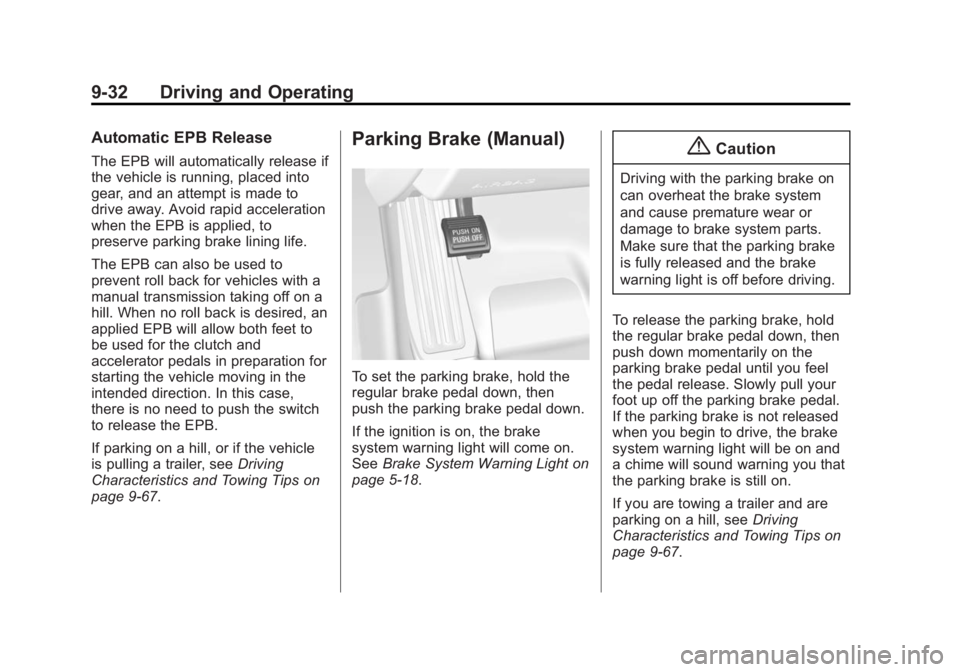
To set the parking brake, hold the
regular brake pedal down, then
push the parking brake pedal down.
If the ignition is on, the brake
system warning light will come on.
See Brake System Warning Light on
page 5-18.
{Caution
Driving with the parking brake on
can overheat the brake system
and cause premature wear or
damage to brake system parts.
Make sure that the parking brake
is fully released and the brake
warning light is off before driving.
To release the parking brake, hold
the regular brake pedal down, then
push down momentarily on the
parking brake pedal until you feel
the pedal release. Slowly pull your
foot up off the parking brake pedal.
If the parking brake is not released
when you begin to drive, the brake
system warning light will be on and
a chime will sound warning you that
the parking brake is still on.
If you are towing a trailer and are
parking on a hill, see Driving
Characteristics and Towing Tips on
page 9-67.