front of engine CADILLAC ATS 2014 Owner's Manual
[x] Cancel search | Manufacturer: CADILLAC, Model Year: 2014, Model line: ATS, Model: CADILLAC ATS 2014Pages: 434, PDF Size: 5.61 MB
Page 1 of 434
Black plate (1,1)Cadillac ATS Owner Manual (GMNA-Localizing-U.S./Canada/Mexico-
6014430) - 2014 - 2nd Edition - 8/23/13
2014 Cadillac ATS Owner ManualM
In Brief. . . . . . . . . . . . . . . . . . . . . . . . 1-1
Instrument Panel . . . . . . . . . . . . . . 1-2
Initial Drive Information . . . . . . . . 1-4
Vehicle Features . . . . . . . . . . . . . 1-15
Performance and Maintenance . . . . . . . . . . . . . . . . 1-21
Keys, Doors, and Windows . . . . . . . . . . . . . . . . . . . . 2-1
Keys and Locks . . . . . . . . . . . . . . . 2-1
Doors . . . . . . . . . . . . . . . . . . . . . . . . 2-14
Vehicle Security . . . . . . . . . . . . . . 2-16
Exterior Mirrors . . . . . . . . . . . . . . . 2-19
Interior Mirrors . . . . . . . . . . . . . . . . 2-21
Windows . . . . . . . . . . . . . . . . . . . . . 2-21
Roof . . . . . . . . . . . . . . . . . . . . . . . . . . 2-24
Seats and Restraints . . . . . . . . . 3-1
Head Restraints . . . . . . . . . . . . . . . 3-2
Front Seats . . . . . . . . . . . . . . . . . . . . 3-3
Rear Seats . . . . . . . . . . . . . . . . . . . . 3-9
Safety Belts . . . . . . . . . . . . . . . . . . 3-11
Airbag System . . . . . . . . . . . . . . . . 3-19
Child Restraints . . . . . . . . . . . . . . 3-32 Storage
. . . . . . . . . . . . . . . . . . . . . . . 4-1
Storage Compartments . . . . . . . . 4-1
Additional Storage Features . . . 4-2
Instruments and Controls . . . . 5-1
Controls . . . . . . . . . . . . . . . . . . . . . . . 5-2
Warning Lights, Gauges, and
Indicators . . . . . . . . . . . . . . . . . . . . 5-8
Information Displays . . . . . . . . . . 5-25
Vehicle Messages . . . . . . . . . . . . 5-32
Vehicle Personalization . . . . . . . 5-43
Universal Remote System . . . . 5-50
Lighting . . . . . . . . . . . . . . . . . . . . . . . 6-1
Exterior Lighting . . . . . . . . . . . . . . . 6-1
Interior Lighting . . . . . . . . . . . . . . . . 6-6
Lighting Features . . . . . . . . . . . . . . 6-8
Infotainment System . . . . . . . . . 7-1
Introduction . . . . . . . . . . . . . . . . . . . . 7-1
Radio . . . . . . . . . . . . . . . . . . . . . . . . . . 7-8
Audio Players . . . . . . . . . . . . . . . . 7-12
Phone . . . . . . . . . . . . . . . . . . . . . . . . 7-20
Trademarks and License Agreements . . . . . . . . . . . . . . . . . 7-31 Climate Controls
. . . . . . . . . . . . . 8-1
Climate Control Systems . . . . . . 8-1
Air Vents . . . . . . . . . . . . . . . . . . . . . . . 8-9
Maintenance . . . . . . . . . . . . . . . . . 8-10
Driving and Operating . . . . . . . . 9-1
Driving Information . . . . . . . . . . . . . 9-2
Starting and Operating . . . . . . . 9-16
Engine Exhaust . . . . . . . . . . . . . . 9-23
Automatic Transmission . . . . . . 9-24
Manual Transmission . . . . . . . . . 9-28
Drive Systems . . . . . . . . . . . . . . . . 9-29
Brakes . . . . . . . . . . . . . . . . . . . . . . . 9-29
Ride Control Systems . . . . . . . . 9-33
Cruise Control . . . . . . . . . . . . . . . . 9-37
Driver Assistance Systems . . . 9-48
Fuel . . . . . . . . . . . . . . . . . . . . . . . . . . 9-62
Trailer Towing . . . . . . . . . . . . . . . . 9-67
Conversions and Add-Ons . . . 9-72
Page 9 of 434
Black plate (3,1)Cadillac ATS Owner Manual (GMNA-Localizing-U.S./Canada/Mexico-
6014430) - 2014 - 2nd Edition - 8/23/13
In Brief 1-3
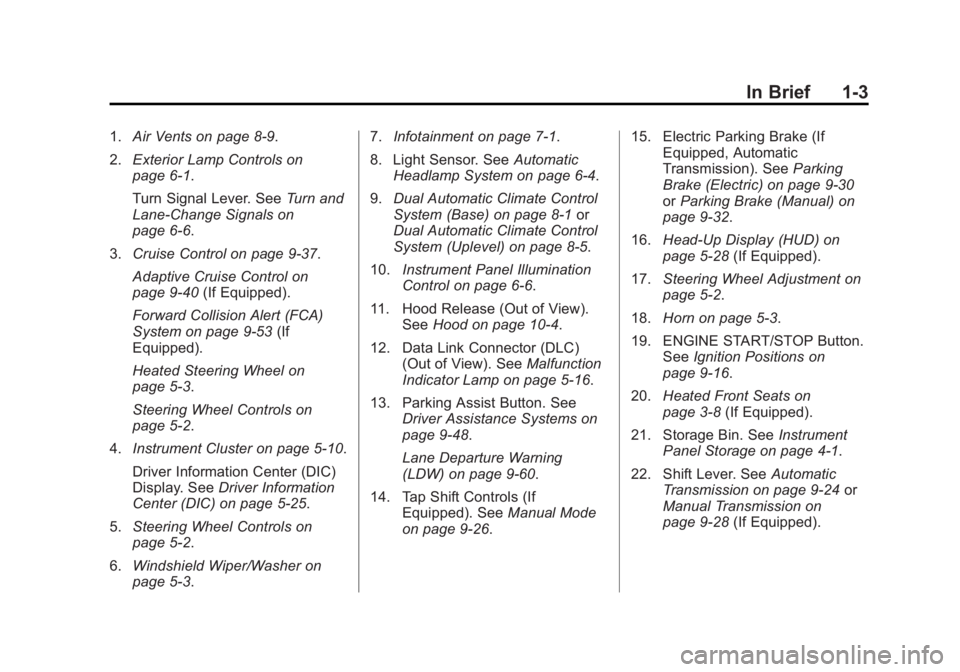
1.Air Vents on page 8-9.
2. Exterior Lamp Controls on
page 6-1.
Turn Signal Lever. See Turn and
Lane-Change Signals on
page 6-6.
3. Cruise Control on page 9-37.
Adaptive Cruise Control on
page 9-40 (If Equipped).
Forward Collision Alert (FCA)
System on page 9-53 (If
Equipped).
Heated Steering Wheel on
page 5-3.
Steering Wheel Controls on
page 5-2.
4. Instrument Cluster on page 5-10.
Driver Information Center (DIC)
Display. See Driver Information
Center (DIC) on page 5-25.
5. Steering Wheel Controls on
page 5-2.
6. Windshield Wiper/Washer on
page 5-3. 7.
Infotainment on page 7-1.
8. Light Sensor. See Automatic
Headlamp System on page 6-4.
9. Dual Automatic Climate Control
System (Base) on page 8-1 or
Dual Automatic Climate Control
System (Uplevel) on page 8-5.
10. Instrument Panel Illumination
Control on page 6-6.
11. Hood Release (Out of View). SeeHood on page 10-4.
12. Data Link Connector (DLC) (Out of View). See Malfunction
Indicator Lamp on page 5-16.
13. Parking Assist Button. See Driver Assistance Systems on
page 9-48.
Lane Departure Warning
(LDW) on page 9-60.
14. Tap Shift Controls (If Equipped). See Manual Mode
on page 9-26. 15. Electric Parking Brake (If
Equipped, Automatic
Transmission). See Parking
Brake (Electric) on page 9-30
or Parking Brake (Manual) on
page 9-32.
16. Head-Up Display (HUD) on
page 5-28 (If Equipped).
17. Steering Wheel Adjustment on
page 5-2.
18. Horn on page 5-3.
19. ENGINE START/STOP Button. SeeIgnition Positions on
page 9-16.
20. Heated Front Seats on
page 3-8 (If Equipped).
21. Storage Bin. See Instrument
Panel Storage on page 4-1.
22. Shift Lever. See Automatic
Transmission on page 9-24 or
Manual Transmission on
page 9-28 (If Equipped).
Page 11 of 434
Black plate (5,1)Cadillac ATS Owner Manual (GMNA-Localizing-U.S./Canada/Mexico-
6014430) - 2014 - 2nd Edition - 8/23/13
In Brief 1-5
SeeKeys on page 2-1 andRemote
Keyless Entry (RKE) System
Operation on page 2-3.
Remote Vehicle Start
If equipped with this feature, the
engine can be started from outside
of the vehicle.
Starting the Vehicle
1. Press and releaseQon the
RKE transmitter.
2. Immediately press and hold
/
for at least four seconds or until
the turn signal lamps flash.
3. Press the brake pedal and select the ON/RUN/START ignition
mode to drive the vehicle.
Canceling a Remote Start
To cancel a remote start, do any of
the following:
.Press and hold/until the
parking lamps turn off.
.Turn on the hazard warning
flashers.
.Turn the vehicle on and then off.
See Remote Vehicle Start on
page 2-8.
Door Locks
To lock or unlock a door manually:
.From the outside, if the vehicle
is equipped with keyless access,
press the button on the door
handle when the Remote
Keyless Entry (RKE) transmitter
is within range. See Remote
Keyless Entry (RKE) System
Operation on page 2-3.
.Use the key in the front driver
door. The key cylinder is
covered by a cap. See Door
Locks on page 2-10.
.From the inside, to lock a rear
door push down on the door lock
knob on top of the door. To
unlock a door, pull once on the
door handle to unlock it, and
again to open it.
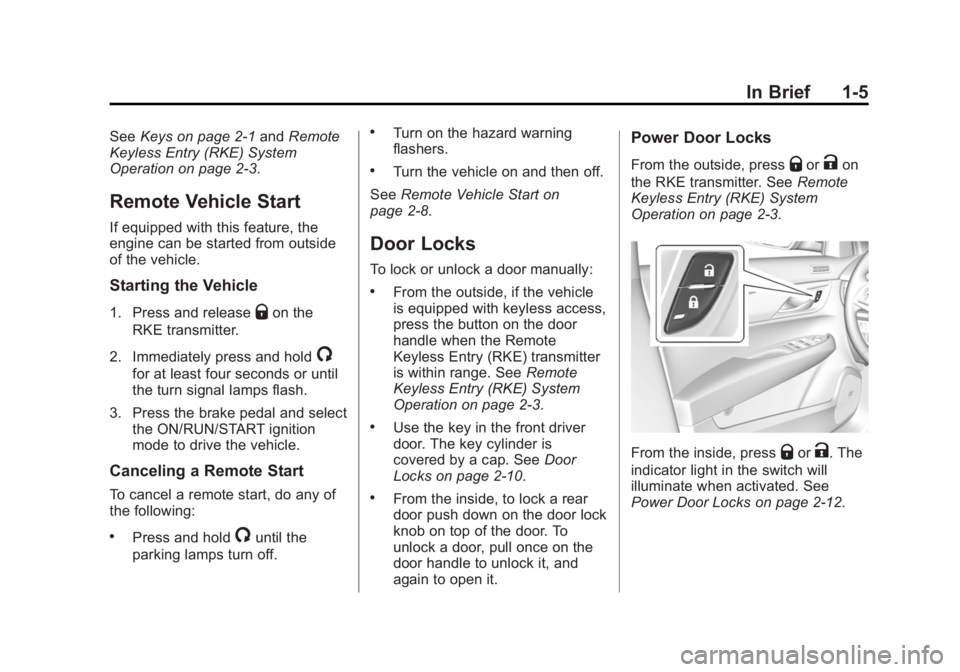
Power Door Locks
From the outside, pressQorKon
the RKE transmitter. See Remote
Keyless Entry (RKE) System
Operation on page 2-3.
From the inside, pressQorK. The
indicator light in the switch will
illuminate when activated. See
Power Door Locks on page 2-12.
Page 39 of 434
Black plate (9,1)Cadillac ATS Owner Manual (GMNA-Localizing-U.S./Canada/Mexico-
6014430) - 2014 - 2nd Edition - 8/23/13
Keys, Doors, and Windows 2-9
/(Remote Vehicle Start):This
button will be on the RKE
transmitter if the vehicle has remote
start.
The climate control system will use
the previous settings during a
remote start. The rear window
defogger may come on during
remote start based on cold ambient
conditions. The rear defog indicator
light does not come on during
remote start.
If the vehicle has heated seats, they
may come on during a remote start.
See Heated Front Seats on
page 3-8.
Laws in some local communities
may restrict the use of remote
starters. For example, some laws
may require a person using remote
start to have the vehicle in view.
Check local regulations for any
requirements.
If your vehicle is low on fuel, do not
use the remote start feature. The
vehicle may run out of fuel. The RKE transmitter range may be
less while the vehicle is running.
Other conditions can affect the
performance of the transmitter. See
Remote Keyless Entry (RKE)
System on page 2-2.
Starting the Engine Using Remote
Start
1. Press and release
Qon the
RKE transmitter.
2. Immediately press and hold
/
for at least four seconds or until
the turn signal lamps flash. This
confirms the request to remote
start the vehicle has been
received. If the vehicle's lamps
are not visible, press and hold
/for at least four seconds.
During the remote start, the
doors will be locked and the
parking lamps will remain on as
long as the engine is running. The engine will shut off after
10 minutes unless a time
extension is done or the ignition
is put in ON/RUN/START.
3. Press the brake pedal and select the ON/RUN/START ignition
mode to drive the vehicle.
Extending Engine Run Time
The engine run time can also be
extended by another 10 minutes,
if during the first 10 minutes
Steps 1–2 are repeated while the
engine is still running. This provides
a total of 20 minutes.
The remote start can only be
extended once.
A maximum of two remote starts,
or a remote start with an extension,
are allowed between ignition cycles.
The vehicle's ignition must be
changed to ON/RUN/START and
then back to OFF before the remote
start procedure can be used again.
Page 45 of 434
Black plate (15,1)Cadillac ATS Owner Manual (GMNA-Localizing-U.S./Canada/Mexico-
6014430) - 2014 - 2nd Edition - 8/23/13
Keys, Doors, and Windows 2-15
Warning (Continued)
.Adjust the climate control
system to a setting that
brings in only outside air and
set the fan speed to the
highest setting. See“Climate
Control Systems” in the
Index.
.If the vehicle is equipped with
a power liftgate, disable the
power liftgate function.
See Engine Exhaust on
page 9-23.
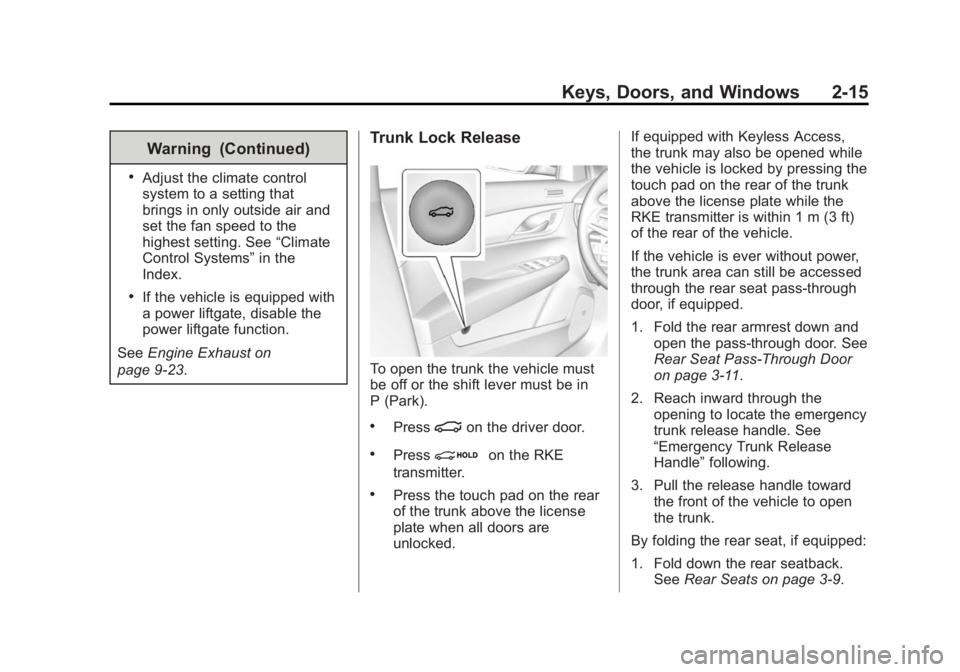
Trunk Lock Release
To open the trunk the vehicle must
be off or the shift lever must be in
P (Park).
.Press|on the driver door.
.Pression the RKE
transmitter.
.Press the touch pad on the rear
of the trunk above the license
plate when all doors are
unlocked. If equipped with Keyless Access,
the trunk may also be opened while
the vehicle is locked by pressing the
touch pad on the rear of the trunk
above the license plate while the
RKE transmitter is within 1 m (3 ft)
of the rear of the vehicle.
If the vehicle is ever without power,
the trunk area can still be accessed
through the rear seat pass-through
door, if equipped.
1. Fold the rear armrest down and
open the pass-through door. See
Rear Seat Pass-Through Door
on page 3-11.
2. Reach inward through the opening to locate the emergency
trunk release handle. See
“Emergency Trunk Release
Handle” following.
3. Pull the release handle toward the front of the vehicle to open
the trunk.
By folding the rear seat, if equipped:
1. Fold down the rear seatback. See Rear Seats on page 3-9.
Page 81 of 434

Black plate (25,1)Cadillac ATS Owner Manual (GMNA-Localizing-U.S./Canada/Mexico-
6014430) - 2014 - 2nd Edition - 8/23/13
Seats and Restraints 3-25
be some smoke and dust coming
from the vents in the deflated
airbags. Airbag inflation does not
prevent the driver from seeing out of
the windshield or being able to steer
the vehicle, nor does it prevent
people from leaving the vehicle.
{Warning
When an airbag inflates, there
may be dust in the air. This dust
could cause breathing problems
for people with a history of
asthma or other breathing trouble.
To avoid this, everyone in the
vehicle should get out as soon as
it is safe to do so. If you have
breathing problems but cannot
get out of the vehicle after an
airbag inflates, then get fresh air
by opening a window or a door.
If you experience breathing
problems following an airbag
deployment, you should seek
medical attention.The vehicle has a feature that may
automatically unlock the doors, turn
on the interior lamps, turn on the
hazard warning flashers, and shut
off the fuel system after the airbags
inflate. You can lock the doors, turn
off the interior lamps, and turn off
the hazard warning flashers by
using the controls for those
features.
{Warning
A crash severe enough to inflate
the airbags may have also
damaged important functions in
the vehicle, such as the fuel
system, brake and steering
systems, etc. Even if the vehicle
appears to be drivable after a
moderate crash, there may be
concealed damage that could
make it difficult to safely operate
the vehicle.
Use caution if you should attempt
to restart the engine after a crash
has occurred.In many crashes severe enough to
inflate the airbag, windshields are
broken by vehicle deformation.
Additional windshield breakage may
also occur from the front outboard
passenger airbag.
.Airbags are designed to inflate
only once. After an airbag
inflates, you will need some new
parts for the airbag system.
If you do not get them, the
airbag system will not be there
to help protect you in another
crash. A new system will include
airbag modules and possibly
other parts. The service manual
for the vehicle covers the need
to replace other parts.
.The vehicle has a crash sensing
and diagnostic module which
records information after a
crash. See
Vehicle Data
Recording and Privacy on
page 13-13 andEvent Data
Recorders on page 13-13.
Page 123 of 434
Black plate (15,1)Cadillac ATS Owner Manual (GMNA-Localizing-U.S./Canada/Mexico-
6014430) - 2014 - 2nd Edition - 8/23/13
Instruments and Controls 5-15
Passenger Airbag Status
Indicator
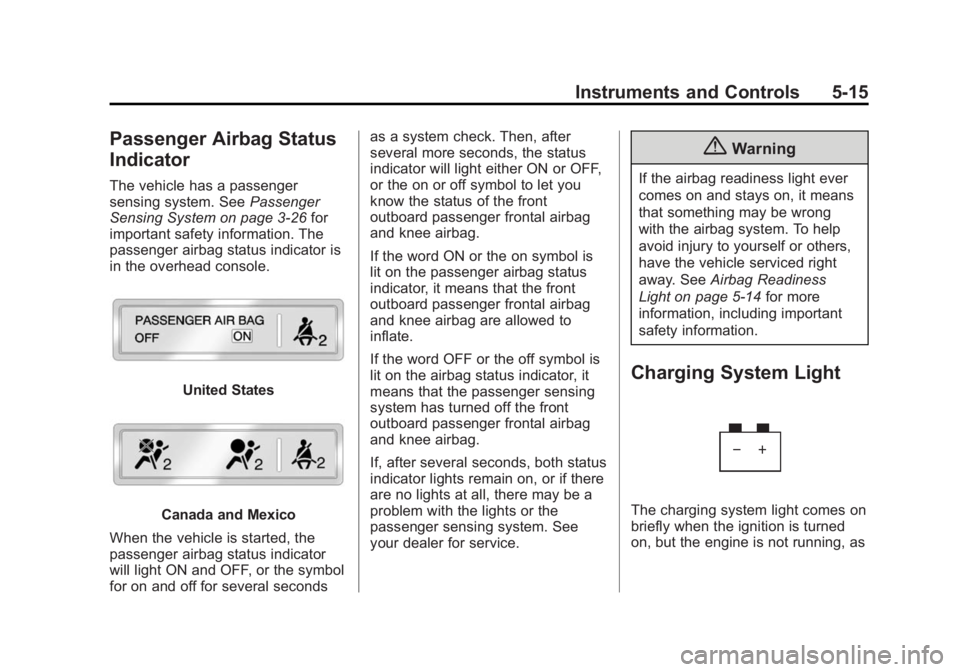
The vehicle has a passenger
sensing system. SeePassenger
Sensing System on page 3-26 for
important safety information. The
passenger airbag status indicator is
in the overhead console.
United States
Canada and Mexico
When the vehicle is started, the
passenger airbag status indicator
will light ON and OFF, or the symbol
for on and off for several seconds as a system check. Then, after
several more seconds, the status
indicator will light either ON or OFF,
or the on or off symbol to let you
know the status of the front
outboard passenger frontal airbag
and knee airbag.
If the word ON or the on symbol is
lit on the passenger airbag status
indicator, it means that the front
outboard passenger frontal airbag
and knee airbag are allowed to
inflate.
If the word OFF or the off symbol is
lit on the airbag status indicator, it
means that the passenger sensing
system has turned off the front
outboard passenger frontal airbag
and knee airbag.
If, after several seconds, both status
indicator lights remain on, or if there
are no lights at all, there may be a
problem with the lights or the
passenger sensing system. See
your dealer for service.
{Warning
If the airbag readiness light ever
comes on and stays on, it means
that something may be wrong
with the airbag system. To help
avoid injury to yourself or others,
have the vehicle serviced right
away. See
Airbag Readiness
Light on page 5-14 for more
information, including important
safety information.
Charging System Light
The charging system light comes on
briefly when the ignition is turned
on, but the engine is not running, as
Page 136 of 434
Black plate (28,1)Cadillac ATS Owner Manual (GMNA-Localizing-U.S./Canada/Mexico-
6014430) - 2014 - 2nd Edition - 8/23/13
5-28 Instruments and Controls
seconds while the Oil Life display is
active. SeeEngine Oil Life System
on page 10-12.
Tire Pressure: Shows the
approximate pressures of all four
tires. Tire pressure is displayed in
either kilopascal (kPa) or in pounds
per square inch (psi). If the pressure
is low, the value for that tire is
shown in amber. See Tire Pressure
Monitor System on page 10-49 and
Tire Pressure Monitor Operation on
page 10-50.
Vehicle Odometer (Base
Cluster): Shows the odometer.
Blank Page: The Blank Page
display allows for no information to
be displayed in the DIC display
zone(s).Head-Up Display (HUD)
{Warning
If the HUD image is too bright or
too high in your field of view, it
may take you more time to see
things you need to see when it is
dark outside. Be sure to keep the
HUD image dim and placed low in
your field of view.
If equipped with HUD, some
information concerning the
operation of the vehicle is projected
onto the windshield. The information
is projected through the HUD lens
on the driver side of the instrument
panel and focused out toward the
front of the vehicle.
{Caution
If you try to use the HUD image
as a parking aid, you may
misjudge the distance and
damage your vehicle. Do not use
the HUD image as a parking aid.
The HUD information can be
displayed in various languages. The
speedometer reading and other
numerical values can be displayed
in either English or metric units.
The language selection is changed
through the radio and the units of
measurement is changed through
the instrument cluster. See Vehicle
Personalization on page 5-43 and
“Settings” underInstrument Cluster
on page 5-10.
Page 167 of 434
Black plate (5,1)Cadillac ATS Owner Manual (GMNA-Localizing-U.S./Canada/Mexico-
6014430) - 2014 - 2nd Edition - 8/23/13
Lighting 6-5
The system may also turn on the
headlamps when driving through a
parking garage or tunnel.
When it is bright enough outside,
the headlamps will turn off or may
change to Daytime Running
Lamps (DRL).
The automatic headlamp system
turns off when the exterior lamp
control is turned to
Oor the ignition
is off.
Lights On with Wipers
If the windshield wipers are
activated in daylight with the engine
on, and the exterior lamp control is
in AUTO, the headlamps, parking
lamps, and other exterior lamps
come on. The transition time for the
lamps coming on varies based on
wiper speed. When the wipers are
not operating, these lamps turn off.
Move the exterior lamp control to
P
or;to disable this feature.
Adaptive Forward
Lighting (AFL)
On vehicles with the AFL system,
the headlamps pivot horizontally to
provide greater road illumination
while turning. To enable AFL, set
the exterior lamp control on the turn
signal lever to the AUTO position.
Moving the control out of the AUTO
position will deactivate the system.
AFL will operate when the vehicle
speed is greater than 3 km/h
(2 mph). AFL will not operate when
the transmission is in R (Reverse).
AFL is not immediately operable
after starting the vehicle; driving a
short distance is required to
calibrate the AFL. See Exterior
Lamp Controls on page 6-1.
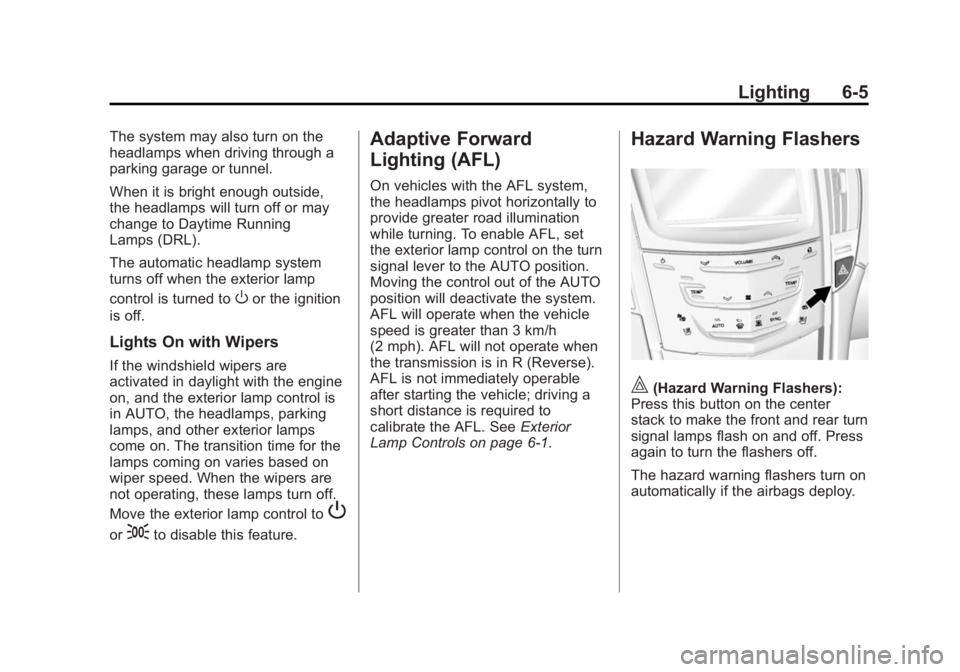
Hazard Warning Flashers
|(Hazard Warning Flashers):
Press this button on the center
stack to make the front and rear turn
signal lamps flash on and off. Press
again to turn the flashers off.
The hazard warning flashers turn on
automatically if the airbags deploy.
Page 216 of 434

Black plate (2,1)Cadillac ATS Owner Manual (GMNA-Localizing-U.S./Canada/Mexico-
6014430) - 2014 - 2nd Edition - 8/23/13
9-2 Driving and Operating
Fuel
Fuel . . . . . . . . . . . . . . . . . . . . . . . . . 9-62
Recommended Fuel . . . . . . . . . 9-62
Gasoline Specifications . . . . . . 9-63
California FuelRequirements . . . . . . . . . . . . . . 9-63
Fuels in Foreign Countries . . . 9-63
Fuel Additives . . . . . . . . . . . . . . . 9-64
E85 or FlexFuel . . . . . . . . . . . . . . 9-64
Filling the Tank . . . . . . . . . . . . . . 9-65
Filling a Portable Fuel Container . . . . . . . . . . . . . . . . . . . 9-66
Trailer Towing
General TowingInformation . . . . . . . . . . . . . . . . . 9-67
Driving Characteristics and Towing Tips . . . . . . . . . . . . . . . . 9-67
Trailer Towing (With V6 Engine) . . . . . . . . . . . . . . . . . 9-70
Trailer Towing (With L4 Engine) . . . . . . . . . . . . . . . . . . . . . 9-71
Towing Equipment . . . . . . . . . . . 9-71
Conversions and Add-Ons
Add-On Electrical Equipment . . . . . . . . . . . . . . . . . 9-72
Driving Information
Distracted Driving
Distraction comes in many forms
and can take your focus from the
task of driving. Exercise good
judgment and do not let other
activities divert your attention away
from the road. Many local
governments have enacted laws
regarding driver distraction. Become
familiar with the local laws in
your area.
To avoid distracted driving, always
keep your eyes on the road, hands
on the wheel, and mind on the drive.
.Do not use a phone in
demanding driving situations.
Use a hands-free method to
place or receive necessary
phone calls.
.Watch the road. Do not read,
take notes, or look up
information on phones or other
electronic devices.
.Designate a front seat
passenger to handle potential
distractions.
.Become familiar with vehicle
features before driving, such as
programming favorite radio
stations and adjusting climate
control and seat settings.
Program all trip information into
any navigation device prior to
driving.
.Wait until the vehicle is parked
to retrieve items that have fallen
to the floor.
.Stop or park the vehicle to tend
to children.
.Keep pets in an appropriate
carrier or restraint.
.Avoid stressful conversations
while driving, whether with a
passenger or on a cell phone.