Heat CADILLAC ATS 2016 1.G User Guide
[x] Cancel search | Manufacturer: CADILLAC, Model Year: 2016, Model line: ATS, Model: CADILLAC ATS 2016 1.GPages: 348, PDF Size: 3.38 MB
Page 46 of 348
Cadillac ATS/ATS-V Owner Manual (GMNA-Localizing-MidEast-9369639) -
2016 - crc - 12/9/15
Keys, Doors, and Windows 45
Heated Mirrors
=
(Rear Window Defogger) :
Press to heat the mirrors.
See Dual Automatic Climate Control
System (Base) 0164 orDual
Automatic Climate Control System
(Uplevel) 0168.
Reverse Tilt Mirrors
If equipped with memory seats, the
passenger and/or driver mirror tilts
to a preselected position when the
vehicle is in R (Reverse). This
allows the curb to be seen when
parallel parking.
The mirror(s) return to the original
position when:
.
The vehicle is shifted out of
R (Reverse), or remains in
R (Reverse) for about
30 seconds.
. The ignition is turned off.
. The vehicle is driven in
R (Reverse) above a set speed.
To turn this feature on or off, see
Vehicle Personalization 0142.
Interior Mirrors
Interior Rearview Mirrors
Adjust the rearview mirror for a clear
view of the area behind the vehicle.
Do not spray glass cleaner directly
on the mirror. Use a soft towel
dampened with water.
Automatic Dimming
Rearview Mirror
The rearview mirror automatically
dims to reduce the glare of the
headlamps from behind. This
feature comes on when the vehicle
is started.
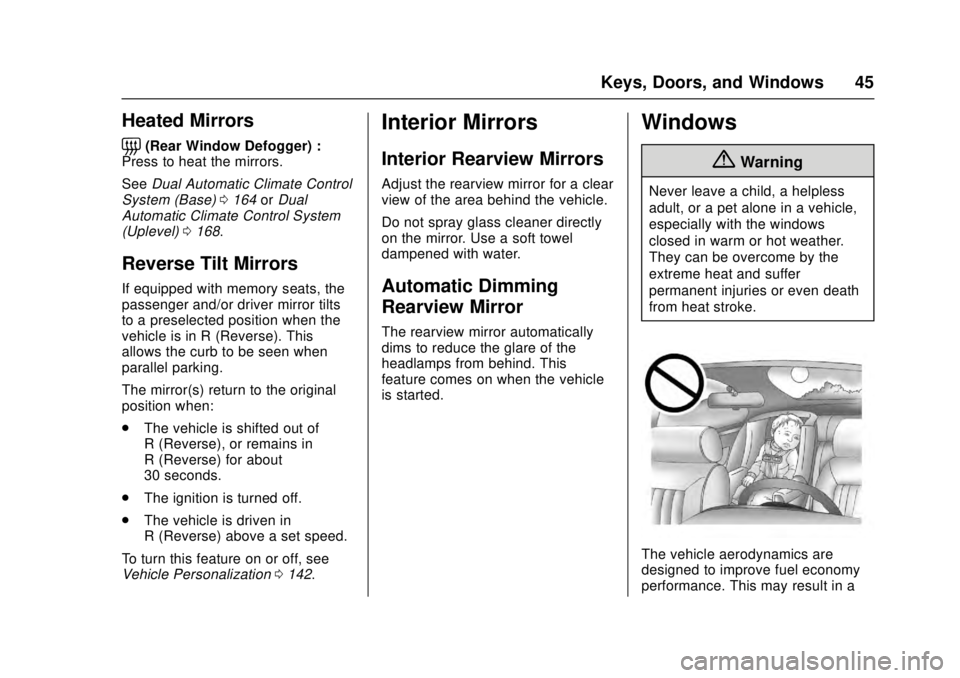
Windows
{Warning
Never leave a child, a helpless
adult, or a pet alone in a vehicle,
especially with the windows
closed in warm or hot weather.
They can be overcome by the
extreme heat and suffer
permanent injuries or even death
from heat stroke.
The vehicle aerodynamics are
designed to improve fuel economy
performance. This may result in a
Page 51 of 348
Cadillac ATS/ATS-V Owner Manual (GMNA-Localizing-MidEast-9369639) -
2016 - crc - 12/9/15
50 Seats and Restraints
Seats and
Restraints
Head Restraints
Head Restraints . . . . . . . . . . . . . . . 51
Front Seats
Easy Entry Seat . . . . . . . . . . . . . . . 53
Power Seat Adjustment . . . . . . . . 53
Lumbar Adjustment . . . . . . . . . . . . 56
Thigh Support Adjustment . . . . . 56
Reclining Seatbacks . . . . . . . . . . . 57
Memory Seats . . . . . . . . . . . . . . . . . 58
Heated Front Seats . . . . . . . . . . . . 59
Rear Seats
Rear Seats . . . . . . . . . . . . . . . . . . . . 61
Rear Seats . . . . . . . . . . . . . . . . . . . . 62
Rear SeatPass-Through Door . . . . . . . . . . 64
Safety Belts
Safety Belts . . . . . . . . . . . . . . . . . . . . 64
How to Wear Safety BeltsProperly . . . . . . . . . . . . . . . . . . . . . . 65
Lap-Shoulder Belt . . . . . . . . . . . . . 66
Safety Belt Use During Pregnancy . . . . . . . . . . . . . . . . . . . . 69
Safety System Check . . . . . . . . . . 69 Safety Belt Care . . . . . . . . . . . . . . . 69
Replacing Safety Belt System
Parts after a Crash . . . . . . . . . . . 70
Airbag System
Airbag System . . . . . . . . . . . . . . . . . 70
Where Are the Airbags? . . . . . . . 72
When Should an AirbagInflate? . . . . . . . . . . . . . . . . . . . . . . . 73
What Makes an Airbag Inflate? . . . . . . . . . . . . . . . . . . . . . . . 75
How Does an Airbag Restrain? . . . . . . . . . . . . . . . . . . . . . 75
What Will You See after an Airbag Inflates? . . . . . . . . . . . . . . 75
Passenger Sensing System . . . 76
Servicing the Airbag-Equipped Vehicle . . . . . . . . . . . . . . . . . . . . . . . 81
Adding Equipment to the Airbag-Equipped Vehicle . . . . . 81
Airbag System Check . . . . . . . . . . 82
Replacing Airbag System Parts after a Crash . . . . . . . . . . . . . . . . . 82
Child Restraints
Older Children . . . . . . . . . . . . . . . . . 83
Infants and Young Children . . . . 84
Child Restraint Systems . . . . . . . 86
Where to Put the Restraint . . . . . 88
Lower Anchors and Tethers forChildren (LATCH System) . . . . 89 Replacing LATCH System Parts
After a Crash . . . . . . . . . . . . . . . . . 95
Securing Child Restraints (Rear Seat) . . . . . . . . . . . . . . . . . . . 95
Securing Child Restraints (Front
Passenger Seat) . . . . . . . . . . . . . 96
Page 60 of 348
Cadillac ATS/ATS-V Owner Manual (GMNA-Localizing-MidEast-9369639) -
2016 - crc - 12/9/15
Seats and Restraints 59
recalling, then store your positions
to the other button or switch RKE
transmitters with the other driver.
Easy Exit Recall
If programmed on in the vehicle
personalization menu, the Easy Exit
feature recalls the previously stored
B(Exit) positions when leaving the
vehicle. See “Storing Memory
Positions” listed previously. See
also Vehicle Personalization 0142.
Easy Exit Recall automatically
activates when one of the following
occurs:
. The vehicle is turned off and the
driver door is opened within a
short time.
. The vehicle is turned off with the
driver door open.
If the vehicle’s driver has changed,
in some vehicles the Driver ID may
be displayed for the first few ignition
cycles.
RKE transmitters are not labeled
with a number. If your memory seat
position is stored to 1 or 2, but this
position is not automatically recalling, then store your positions
to the other button or switch RKE
transmitters with the other driver.
Obstructions
If something has blocked the driver
seat while recalling a memory
position, the recall may stop.
Remove the obstruction. Then do
one of the following:
.
If automatically or manually
recalling the stored memory
position, press and hold the
appropriate manual control for
two seconds. Try recalling again
by pressing the appropriate
memory button, then try recalling
again by opening the driver door
and pressing
Kon the RKE
transmitter.
. If recalling the exit position,
press and hold the appropriate
manual control for the exit
feature not recalling for
two seconds. Then try recalling
the exit position again.
If the memory position is still not
recalling, see your dealer for
service.
Heated Front Seats
{Warning
If you cannot feel temperature
change or pain to the skin, the
seat heater may cause burns. To
reduce the risk of burns, people
with such a condition should use
care when using the seat heater,
especially for long periods of
time. Do not place anything on
the seat that insulates against
heat, such as a blanket, cushion,
cover, or similar item. This may
cause the seat heater to
overheat. An overheated seat
heater may cause a burn or may
damage the seat.
Page 61 of 348
Cadillac ATS/ATS-V Owner Manual (GMNA-Localizing-MidEast-9369639) -
2016 - crc - 12/9/15
60 Seats and Restraints
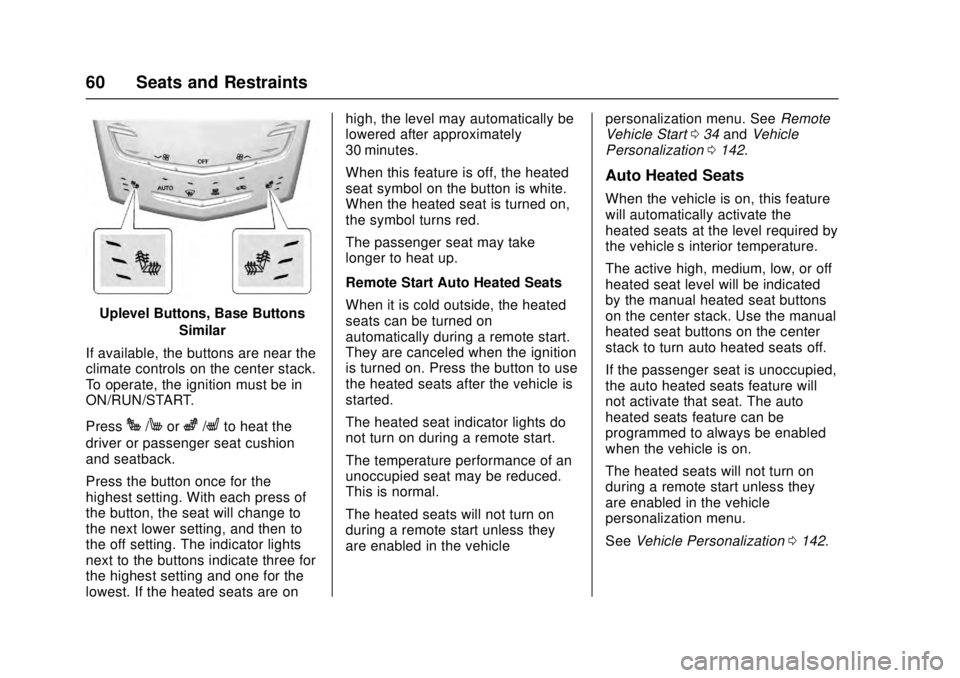
Uplevel Buttons, Base ButtonsSimilar
If available, the buttons are near the
climate controls on the center stack.
To operate, the ignition must be in
ON/RUN/START.
Press
J/Morz/Lto heat the
driver or passenger seat cushion
and seatback.
Press the button once for the
highest setting. With each press of
the button, the seat will change to
the next lower setting, and then to
the off setting. The indicator lights
next to the buttons indicate three for
the highest setting and one for the
lowest. If the heated seats are on high, the level may automatically be
lowered after approximately
30 minutes.
When this feature is off, the heated
seat symbol on the button is white.
When the heated seat is turned on,
the symbol turns red.
The passenger seat may take
longer to heat up.
Remote Start Auto Heated Seats
When it is cold outside, the heated
seats can be turned on
automatically during a remote start.
They are canceled when the ignition
is turned on. Press the button to use
the heated seats after the vehicle is
started.
The heated seat indicator lights do
not turn on during a remote start.
The temperature performance of an
unoccupied seat may be reduced.
This is normal.
The heated seats will not turn on
during a remote start unless they
are enabled in the vehicle
personalization menu. See
Remote
Vehicle Start 034 and Vehicle
Personalization 0142.
Auto Heated Seats
When the vehicle is on, this feature
will automatically activate the
heated seats at the level required by
the vehicle’ s interior temperature.
The active high, medium, low, or off
heated seat level will be indicated
by the manual heated seat buttons
on the center stack. Use the manual
heated seat buttons on the center
stack to turn auto heated seats off.
If the passenger seat is unoccupied,
the auto heated seats feature will
not activate that seat. The auto
heated seats feature can be
programmed to always be enabled
when the vehicle is on.
The heated seats will not turn on
during a remote start unless they
are enabled in the vehicle
personalization menu.
See Vehicle Personalization 0142.
Page 80 of 348
Cadillac ATS/ATS-V Owner Manual (GMNA-Localizing-MidEast-9369639) -
2016 - crc - 12/9/15
Seats and Restraints 79
3. Remove any additional itemsfrom the seat such as blankets,
cushions, seat covers, seat
heaters, or seat massagers.
4. Reinstall the child restraint following the directions
provided by the child restraint
manufacturer and refer to
Securing Child Restraints
(Rear Seat) 095 orSecuring
Child Restraints (Front
Passenger Seat) 096.
5. If, after reinstalling the child restraint and restarting the
vehicle, the on indicator is still
lit, turn the vehicle off. Then
slightly recline the vehicle
seatback and adjust the seat
cushion, if adjustable, to make
sure that the vehicle seatback
is not pushing the child
restraint into the seat cushion.
Also make sure the child
restraint is not trapped under
the vehicle head restraint.
If this happens, adjust the head
restraint. See Head
Restraints 051.
6. Restart the vehicle. The passenger sensing system
may or may not turn off the
airbags for a child in a child
restraint depending upon the
child’s size. It is better to
secure the child restraint in a
rear seat. Never put a
rear-facing child restraint in the
front seat, even if the on
indicator is not lit.
If the Off Indicator Is Lit for an
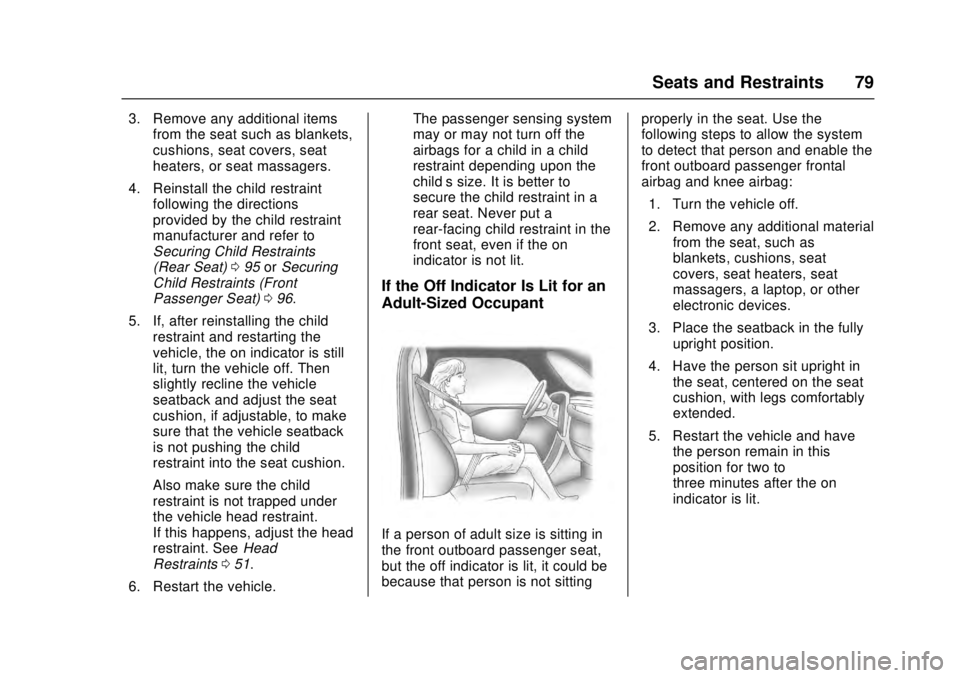
Adult-Sized Occupant
If a person of adult size is sitting in
the front outboard passenger seat,
but the off indicator is lit, it could be
because that person is not sitting
properly in the seat. Use the
following steps to allow the system
to detect that person and enable the
front outboard passenger frontal
airbag and knee airbag:
1. Turn the vehicle off.
2. Remove any additional material from the seat, such as
blankets, cushions, seat
covers, seat heaters, seat
massagers, a laptop, or other
electronic devices.
3. Place the seatback in the fully upright position.
4. Have the person sit upright in the seat, centered on the seat
cushion, with legs comfortably
extended.
5. Restart the vehicle and have the person remain in this
position for two to
three minutes after the on
indicator is lit.
Page 81 of 348
Cadillac ATS/ATS-V Owner Manual (GMNA-Localizing-MidEast-9369639) -
2016 - crc - 12/9/15
80 Seats and Restraints
{Warning
If the front outboard passenger
airbag is turned off for an
adult-sized occupant, the airbag
will not be able to inflate and help
protect that person in a crash,
resulting in an increased risk of
serious injury or even death. An
adult-sized occupant should not
ride in the front outboard
passenger seat, if the passenger
airbag off indicator is lit.
Additional Factors Affecting
System Operation
Safety belts help keep the
passenger in position on the seat
during vehicle maneuvers and
braking, which helps the passenger
sensing system maintain the
passenger airbag status. See
“Safety Belts”and“Child Restraints”
in the Index for additional
information about the importance of
proper restraint use. A thick layer of additional material,
such as a blanket or cushion,
or aftermarket equipment such as
seat covers, seat heaters, and seat
massagers can affect how well the
passenger sensing system
operates. We recommend that you
not use seat covers or other
aftermarket equipment except when
approved by GM for your specific
vehicle. See
Adding Equipment to
the Airbag-Equipped Vehicle 081
for more information about
modifications that can affect how
the system operates.
A wet seat can affect the
performance of the passenger
sensing system. Here is how:
. The passenger sensing system
may turn off the passenger
frontal airbag and passenger
knee airbag when liquid is
soaked into the seat. If this
happens, the off indicator will be
lit, and the airbag readiness light
on the instrument cluster will
also be lit. .
Liquid pooled on the seat that
has not soaked in may make it
more likely that the passenger
sensing system will turn on the
passenger frontal airbag and
passenger knee airbag while a
child restraint or child occupant
is on the seat. If the passenger
frontal airbag and passenger
knee airbag are turned on, the
on indicator will be lit.
If the passenger seat gets wet, dry
the seat immediately. If the airbag
readiness light is lit, do not install a
child restraint or allow anyone to
occupy the seat. See Airbag
Readiness Light 0116 for important
safety information.
The on indicator may be lit if an
object, such as a briefcase,
handbag, grocery bag, laptop,
or other electronic device, is put on
an unoccupied seat. If this is not
desired, remove the object from
the seat.
Page 82 of 348
Cadillac ATS/ATS-V Owner Manual (GMNA-Localizing-MidEast-9369639) -
2016 - crc - 12/9/15
Seats and Restraints 81
{Warning
Stowing of articles under the
passenger seat or between the
passenger seat cushion and
seatback may interfere with the
proper operation of the passenger
sensing system.
Servicing the
Airbag-Equipped Vehicle
Airbags affect how the vehicle
should be serviced. There are parts
of the airbag system in several
places around the vehicle. Your
dealer and the service manual have
information about servicing the
vehicle and the airbag system.
{Warning
For up to 10 seconds after the
vehicle is turned off and the
battery is disconnected, an airbag
can still inflate during improper
service. You can be injured if you(Continued)
Warning (Continued)
are close to an airbag when it
inflates. Avoid yellow connectors.
They are probably part of the
airbag system. Be sure to follow
proper service procedures, and
make sure the person performing
work for you is qualified to do so.
Adding Equipment to the
Airbag-Equipped Vehicle
Adding accessories that change the
vehicle's frame, bumper system,
height, front end, or side sheet
metal, may keep the airbag system
from working properly. The
operation of the airbag system can
also be affected by changing or
moving any parts of the front seats,
safety belts, the airbag sensing and
diagnostic module, steering wheel,
instrument panel, any airbag
module, ceiling or pillar garnish trim,
overhead console, front sensors,
side impact sensors, or airbag
wiring. Your dealer and the service manual
have information about the location
of the airbag sensors, sensing and
diagnostic module, and airbag
wiring.
In addition, the vehicle has a
passenger sensing system for the
front outboard passenger position,
which includes sensors that are part
of the passenger seat. The
passenger sensing system may not
operate properly if the original seat
trim is replaced with non-GM
covers, upholstery, or trim; or with
GM covers, upholstery, or trim
designed for a different vehicle. Any
object, such as an aftermarket seat
heater or a comfort-enhancing pad
or device, installed under or on top
of the seat fabric, could also
interfere with the operation of the
passenger sensing system. This
could either prevent proper
deployment of the passenger
airbag(s) or prevent the passenger
sensing system from properly
turning off the passenger airbag(s).
See
Passenger Sensing
System 076.
Page 104 of 348
Cadillac ATS/ATS-V Owner Manual (GMNA-Localizing-MidEast-9369639) -
2016 - crc - 12/9/15
Instruments and Controls 103
Instruments and
Controls
Controls
Steering Wheel Adjustment . . . 104
Steering Wheel Controls . . . . . . 105
Heated Steering Wheel . . . . . . . 105
Horn . . . . . . . . . . . . . . . . . . . . . . . . . . 105
Windshield Wiper/Washer . . . . 105
Clock . . . . . . . . . . . . . . . . . . . . . . . . . 107
Power Outlets . . . . . . . . . . . . . . . . 107
Wireless Charging . . . . . . . . . . . . 109
Warning Lights, Gauges, and
Indicators
Warning Lights, Gauges, andIndicators . . . . . . . . . . . . . . . . . . . 110
Instrument Cluster . . . . . . . . . . . . 111
Speedometer . . . . . . . . . . . . . . . . . 113
Odometer . . . . . . . . . . . . . . . . . . . . . 113
Trip Odometer . . . . . . . . . . . . . . . . 114
Tachometer . . . . . . . . . . . . . . . . . . . 114
Fuel Gauge . . . . . . . . . . . . . . . . . . . 114
Engine Coolant Temperature Gauge . . . . . . . . . . . . . . . . . . . . . . 115
Safety Belt Reminders . . . . . . . . 116
Airbag Readiness Light . . . . . . . 116
Passenger Airbag Status Indicator . . . . . . . . . . . . . . . . . . . . . 117 Charging System Light . . . . . . . 117
Malfunction Indicator Lamp
(Check Engine Light) . . . . . . . . 118
Brake System Warning Light . . . . . . . . . . . . . . . . . . . . . . . . 120
Parking Brake Light . . . . . . . . . . 120
Service Electric Parking Brake Light . . . . . . . . . . . . . . . . . . . . . . . . 121
Antilock Brake System (ABS) Warning Light . . . . . . . . . . . . . . . 121
Lane Keep Assist (LKA) Light . . . . . . . . . . . . . . . . . . . . . . . . 121
Vehicle Ahead Indicator . . . . . . 122
Traction Off Light . . . . . . . . . . . . . 122
StabiliTrak
®OFF Light . . . . . . . . 122
Traction Control System (TCS)/ StabiliTrak
®Light . . . . . . . . . . . 123
Engine Coolant Temperature Warning Light . . . . . . . . . . . . . . . 123
Tire Pressure Light . . . . . . . . . . . 123
Engine Oil Pressure Light . . . . 124
Low Fuel Warning Light . . . . . . 124
Security Light . . . . . . . . . . . . . . . . . 125
High-Beam On Light . . . . . . . . . . 125
Adaptive Forward Lighting (AFL) Light . . . . . . . . . . . . . . . . . . 125
Lamps On Reminder . . . . . . . . . 125
Cruise Control Light . . . . . . . . . . 126
Information Displays
Driver Information Center (DIC) . . . . . . . . . . . . . . . . 126
Head-Up Display (HUD) . . . . . . 128
Vehicle Messages
Vehicle Messages . . . . . . . . . . . . 131
Battery Voltage and Charging Messages . . . . . . . . . . . . . . . . . . . 132
Brake System Messages . . . . . 132
Cruise Control Messages . . . . . 133
Door Ajar Messages . . . . . . . . . . 133
Engine Cooling System Messages . . . . . . . . . . . . . . . . . . . 134
Engine Oil Messages . . . . . . . . . 134
Engine Power Messages . . . . . 135
Fuel System Messages . . . . . . . 135
Key and Lock Messages . . . . . 135
Lamp Messages . . . . . . . . . . . . . . 136
Object Detection System Messages . . . . . . . . . . . . . . . . . . . 136
Ride Control System Messages . . . . . . . . . . . . . . . . . . . 139
Airbag System Messages . . . . 139
Safety Belt Messages . . . . . . . . 139
Security Messages . . . . . . . . . . . 139
Service Vehicle Messages . . . . 139
Starting the Vehicle Messages . . . . . . . . . . . . . . . . . . . 140
Tire Messages . . . . . . . . . . . . . . . . 140
Transmission Messages . . . . . . 141
Page 106 of 348
Cadillac ATS/ATS-V Owner Manual (GMNA-Localizing-MidEast-9369639) -
2016 - crc - 12/9/15
Instruments and Controls 105
Steering Wheel Controls
The infotainment system can be
operated by using the steering
wheel controls. See "Steering
Wheel Controls" in the infotainment
manual.
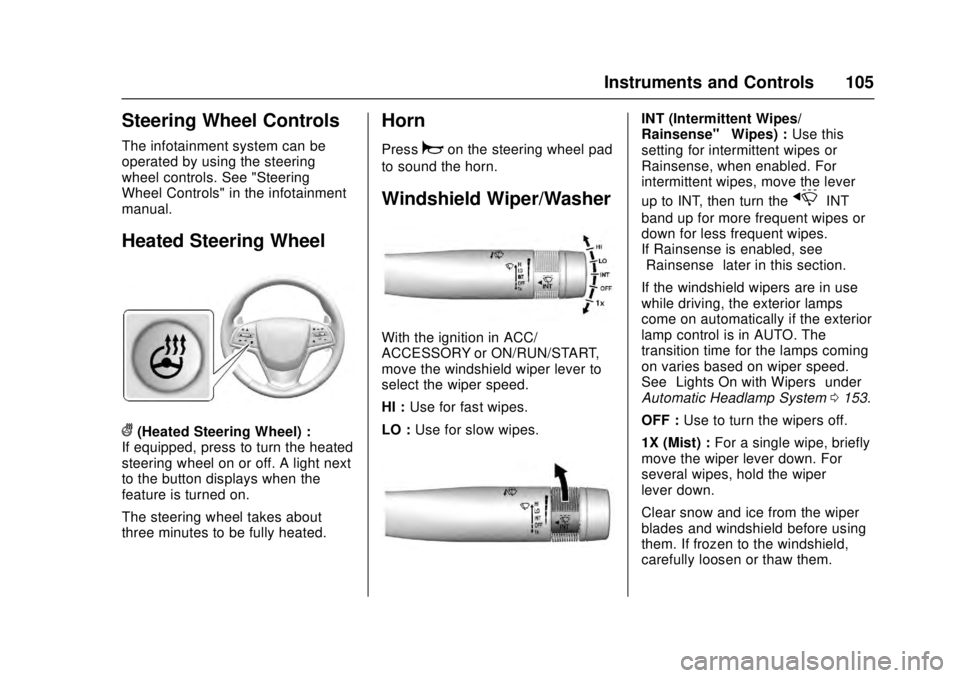
Heated Steering Wheel
((Heated Steering Wheel) :
If equipped, press to turn the heated
steering wheel on or off. A light next
to the button displays when the
feature is turned on.
The steering wheel takes about
three minutes to be fully heated.
Horn
Pressaon the steering wheel pad
to sound the horn.
Windshield Wiper/Washer
With the ignition in ACC/
ACCESSORY or ON/RUN/START,
move the windshield wiper lever to
select the wiper speed.
HI : Use for fast wipes.
LO : Use for slow wipes.
INT (Intermittent Wipes/
Rainsense™ Wipes) :Use this
setting for intermittent wipes or
Rainsense, when enabled. For
intermittent wipes, move the lever
up to INT, then turn the
xINT
band up for more frequent wipes or
down for less frequent wipes.
If Rainsense is enabled, see
“Rainsense” later in this section.
If the windshield wipers are in use
while driving, the exterior lamps
come on automatically if the exterior
lamp control is in AUTO. The
transition time for the lamps coming
on varies based on wiper speed.
See “Lights On with Wipers” under
Automatic Headlamp System 0153.
OFF : Use to turn the wipers off.
1X (Mist) : For a single wipe, briefly
move the wiper lever down. For
several wipes, hold the wiper
lever down.
Clear snow and ice from the wiper
blades and windshield before using
them. If frozen to the windshield,
carefully loosen or thaw them.
Page 109 of 348
Cadillac ATS/ATS-V Owner Manual (GMNA-Localizing-MidEast-9369639) -
2016 - crc - 12/9/15
108 Instruments and Controls
reconnecting devices or turning
RAP back on. If the problem
continues, the issue could be within
your device. Try another known
good device to make sure the circuit
breaker is operating properly. If this
does not resolve your problem, see
your dealer.
It is possible to replace the factory
power outlet with a cigar lighter
receptacle, if desired. This requires
the factory installed circuit breaker
to be replaced with a standard
minifuse by the dealer. A minifuse
will not reset and will have to be
replace if blown.
Caution
Failure to replace the circuit
breaker with the minifuse could
overheat the cigar lighter and
damage the vehicle.
When adding electrical equipment,
be sure to follow the proper
installation instructions included with
the equipment. See Add-On
Electrical Equipment 0243.
Caution
Hanging heavy equipment from
the power outlet can cause
damage not covered by the
vehicle warranty. The power
outlets are designed for
accessory power plugs only, such
as cell phone charge cords.
Always unplug electrical equipment
when not in use and do not plug in
equipment that exceeds the
maximum 15 amps rating.
Power Outlet 220/230 Volt
Alternating Current
If equipped, this power outlet is on
the rear of the center floor console.
It can be used to plug in electrical
equipment that uses a maximum
limit of 150 watts.
An indicator light on the outlet turns
on to show it is in use. The light
comes on when the ignition is in
ON/RUN/START, equipment
requiring less than 150 watts is
plugged into the outlet, and no
system fault is detected. The indicator light does not come on
when the ignition is in LOCK/OFF or
if the equipment is not fully seated
into the outlet.
If equipment is connected using
more than 150 watts or a system
fault is detected, a protection circuit
shuts off the power supply and the
indicator light turns off. To reset the
circuit, unplug the item and plug it
back in or turn the Retained
Accessory Power (RAP) off and
then back on. See
Retained
Accessory Power (RAP) 0195. The
power restarts when equipment
using 150 watts or less is plugged
into the outlet and a system fault is
not detected.
The power outlet is not designed for
the following and may not work
properly, if this equipment is
plugged in:
. Equipment with high initial peak
wattage such as:
compressor-driven refrigerators
and electric power tools.