climate control CADILLAC ATS 2016 1.G User Guide
[x] Cancel search | Manufacturer: CADILLAC, Model Year: 2016, Model line: ATS, Model: CADILLAC ATS 2016 1.GPages: 348, PDF Size: 3.38 MB
Page 61 of 348
Cadillac ATS/ATS-V Owner Manual (GMNA-Localizing-MidEast-9369639) -
2016 - crc - 12/9/15
60 Seats and Restraints
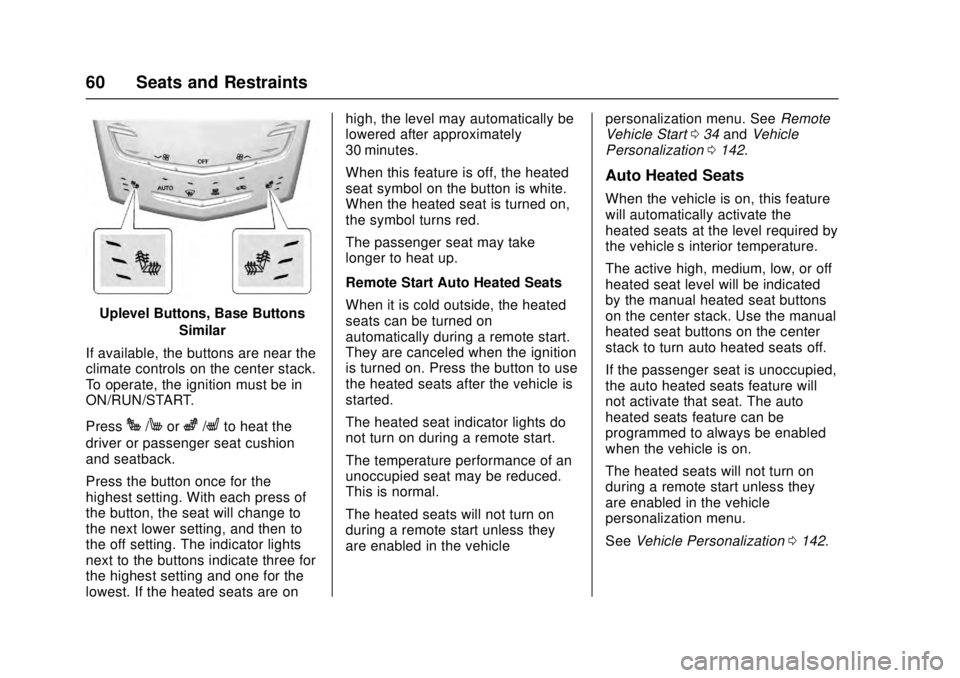
Uplevel Buttons, Base ButtonsSimilar
If available, the buttons are near the
climate controls on the center stack.
To operate, the ignition must be in
ON/RUN/START.
Press
J/Morz/Lto heat the
driver or passenger seat cushion
and seatback.
Press the button once for the
highest setting. With each press of
the button, the seat will change to
the next lower setting, and then to
the off setting. The indicator lights
next to the buttons indicate three for
the highest setting and one for the
lowest. If the heated seats are on high, the level may automatically be
lowered after approximately
30 minutes.
When this feature is off, the heated
seat symbol on the button is white.
When the heated seat is turned on,
the symbol turns red.
The passenger seat may take
longer to heat up.
Remote Start Auto Heated Seats
When it is cold outside, the heated
seats can be turned on
automatically during a remote start.
They are canceled when the ignition
is turned on. Press the button to use
the heated seats after the vehicle is
started.
The heated seat indicator lights do
not turn on during a remote start.
The temperature performance of an
unoccupied seat may be reduced.
This is normal.
The heated seats will not turn on
during a remote start unless they
are enabled in the vehicle
personalization menu. See
Remote
Vehicle Start 034 and Vehicle
Personalization 0142.
Auto Heated Seats
When the vehicle is on, this feature
will automatically activate the
heated seats at the level required by
the vehicle’ s interior temperature.
The active high, medium, low, or off
heated seat level will be indicated
by the manual heated seat buttons
on the center stack. Use the manual
heated seat buttons on the center
stack to turn auto heated seats off.
If the passenger seat is unoccupied,
the auto heated seats feature will
not activate that seat. The auto
heated seats feature can be
programmed to always be enabled
when the vehicle is on.
The heated seats will not turn on
during a remote start unless they
are enabled in the vehicle
personalization menu.
See Vehicle Personalization 0142.
Page 101 of 348
Cadillac ATS/ATS-V Owner Manual (GMNA-Localizing-MidEast-9369639) -
2016 - crc - 12/9/15
100 Storage
Storage
Storage Compartments
Storage Compartments . . . . . . . 100
Instrument Panel Storage . . . . 100
Glove Box . . . . . . . . . . . . . . . . . . . . 101
Cupholders . . . . . . . . . . . . . . . . . . . 101
Armrest Storage . . . . . . . . . . . . . . 101
Additional Storage Features
Cargo Tie-Downs . . . . . . . . . . . . . 102
Storage
Compartments
{Warning
Do not store heavy or sharp
objects in storage compartments.
In a crash, these objects may
cause the cover to open and
could result in injury.
Instrument Panel Storage
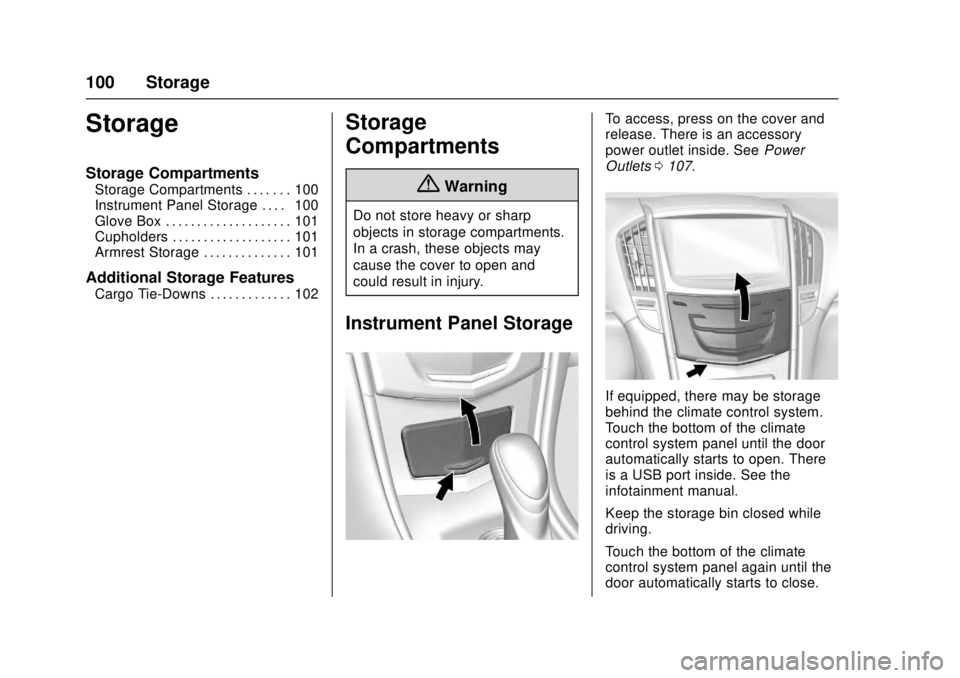
To access, press on the cover and
release. There is an accessory
power outlet inside. SeePower
Outlets 0107.
If equipped, there may be storage
behind the climate control system.
Touch the bottom of the climate
control system panel until the door
automatically starts to open. There
is a USB port inside. See the
infotainment manual.
Keep the storage bin closed while
driving.
Touch the bottom of the climate
control system panel again until the
door automatically starts to close.
Page 108 of 348
Cadillac ATS/ATS-V Owner Manual (GMNA-Localizing-MidEast-9369639) -
2016 - crc - 12/9/15
Instruments and Controls 107
{Warning
In freezing weather, do not use
the washer until the windshield is
warmed. Otherwise the washer
fluid can form ice on the
windshield, blocking your vision.
Clock
The infotainment system controls
are used to access the time and
date settings through the menu
system. See“Overview”in the
infotainment manual for information
about how to use the menu system.
Setting the Time
To set the time:
1. Press the SETTINGS screen button and press Time
and Date.
2. Press Set Time and press + or −to increase or decrease
hours, minutes, and AM or PM.
Press 12Hr or 24Hr for 12 or
24 hour clock. 3. Press
}to go back to the
previous menu.
If auto timing is set, the time
displayed on the clock may not
update immediately when driving
into a new time zone.
To set the date: 1. Press the SETTINGS screen button and press Time
and Date.
2. Press Set Date and press + or −to increase or decrease
month, day, or year.
3. Press
}to go back to the
previous menu.
To set the clock display: 1. Press the SETTINGS screen button and press Time
and Date.
2. Press Clock Display and press OFF or ON to turn the clock
display off or on.
3. Press
}to go back to the
previous menu.
Power Outlets
Power Outlet 12 Volt Direct
Current
The accessory power outlets can be
used to plug in electrical equipment,
such as a cell phone or MP3 player.
The vehicle has two accessory
power outlets:
. Inside the front storage bin
below the climate control
system.
. On the rear of the center floor
console.
Lift the cover to access the
accessory power outlet.
Certain electrical accessories may
not be compatible with the
accessory power outlet and could
overload a vehicle circuit breaker or
adapter fuse. If overloaded, the
circuit breaker will reset after all
devices are disconnected or if
Retained Accessory Power (RAP) is
turned off and then back on. See
Retained Accessory Power (RAP)
0 195. Wait one minute to allow the
circuit breaker to reset before
Page 110 of 348
Cadillac ATS/ATS-V Owner Manual (GMNA-Localizing-MidEast-9369639) -
2016 - crc - 12/9/15
Instruments and Controls 109
.Other equipment requiring an
extremely stable power supply
such as:
microcomputer-controlled
electric blankets, touch sensor
lamps, etc.
. Medical equipment.
Wireless Charging
The vehicle may have wireless
charging in the storage behind the
climate control system. See
Instrument Panel Storage 0100.
The system wirelessly charges one
PMA or Qi compatible mobile
device. To check for phone or other
device compatibility, see your dealer
for details.
{Warning
Wireless charging can affect the
operation of an implanted
pacemaker or other medical
devices. If you have one, it is
recommended to consult with
your doctor before using the
wireless charging system. The vehicle must be in ON/RUN/
START, ACC/ACCESSORY,
or Retained Accessory Power
(RAP). The wireless charging
feature may not correctly indicate
charging when the vehicle is in RAP.
See
Retained Accessory Power
(RAP) 0195.
The operating temperature is −20 °C
(−4 °F) to 60 °C (140 °F) for the
charging system and 0 °C (32 °F) to
35 °C (95 °F) for the phone.
{Warning
Remove all metal objects from the
charging pad before charging
your mobile device. Metal objects,
such as coins, keys, rings,
or paper clips, between the phone
and charging pad will become
very hot. On the rare occasion
that the charging system does not
detect a metal object, and the
object gets wedged between the
phone and charger, remove the
phone and allow the metallic
(Continued)
Warning (Continued)
object to cool before removing it
from the charging pad, to prevent
burns.
Page 111 of 348
Cadillac ATS/ATS-V Owner Manual (GMNA-Localizing-MidEast-9369639) -
2016 - crc - 12/9/15
110 Instruments and Controls
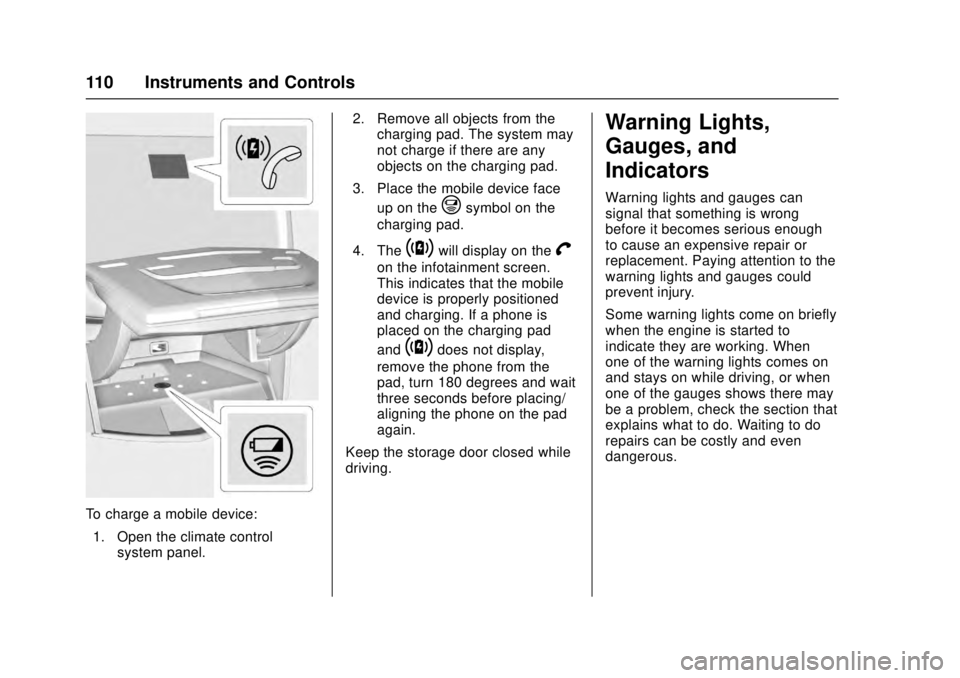
To charge a mobile device:1. Open the climate control system panel. 2. Remove all objects from the
charging pad. The system may
not charge if there are any
objects on the charging pad.
3. Place the mobile device face up on the
@symbol on the
charging pad.
4. The
~will display on theV
on the infotainment screen.
This indicates that the mobile
device is properly positioned
and charging. If a phone is
placed on the charging pad
and
~does not display,
remove the phone from the
pad, turn 180 degrees and wait
three seconds before placing/
aligning the phone on the pad
again.
Keep the storage door closed while
driving.
Warning Lights,
Gauges, and
Indicators
Warning lights and gauges can
signal that something is wrong
before it becomes serious enough
to cause an expensive repair or
replacement. Paying attention to the
warning lights and gauges could
prevent injury.
Some warning lights come on briefly
when the engine is started to
indicate they are working. When
one of the warning lights comes on
and stays on while driving, or when
one of the gauges shows there may
be a problem, check the section that
explains what to do. Waiting to do
repairs can be costly and even
dangerous.
Page 144 of 348
Cadillac ATS/ATS-V Owner Manual (GMNA-Localizing-MidEast-9369639) -
2016 - crc - 12/9/15
Instruments and Controls 143
2. Select Enter to go to theconfirmation screen.
3. Re-enter the four-digit code.
Press LOCK or UNLOCK to lock or
unlock the system. Press Back to go
back to the previous menu.
Radio
Press to display the Radio Menu
and the following may display:
. Manage Favorites
. Number of Favorites Pages
. Audible Touch Feedback
. Auto Volume
. Bose AudioPilot
. Maximum Startup Volume
. Audio Cue Volume
Manage Favorites
This allows favorites to be edited.
Select a displayed Favorite to select
that favorite to edit. Select Rename
to rename the favorite or Delete to
delete it. Number of Favorites Pages
Select to set the number of favorites
to display.
Select the desired number or select
Auto and the infotainment system
will automatically adjust the number
of favorites shown.
Audible Touch Feedback
This allows Audible Touch
Feedback to be turned on or off.
Select Off or On.
Auto Volume
If equipped, this feature adjusts the
volume based on the vehicle speed.
Bose
®AudioPilot®
This feature adjusts the volume
based on the noise in the vehicle
and speed. See
“Bose AudioPilot
Noise Compensation Technology”
under “Infotainment System
Settings” in the infotainment
manual. Maximum Startup Volume
This feature sets the maximum
startup volume. If the vehicle is
started and the volume is greater
than this level, the volume is
adjusted to this level. To set the
maximum startup volume, select +
or
−to increase or decrease.
Audio Cue Volume
If equipped, this feature adjusts the
startup and shutdown sounds. To
adjust the volume, select + or −to
increase or decrease.
Vehicle
Select and the following may
display:
. Climate and Air Quality
. Collision/Detection Systems
. Comfort and Convenience
. Lighting
. Power Door Locks
. Remote Lock, Unlock, Start
Page 145 of 348
Cadillac ATS/ATS-V Owner Manual (GMNA-Localizing-MidEast-9369639) -
2016 - crc - 12/9/15
144 Instruments and Controls
Climate and Air Quality
Select the Climate and Air Quality
menu and the following may display:
.Auto Fan Max Speed
. Auto Heated Seats
. Auto Defog
. Auto Rear Defog
Auto Fan Max Speed
This feature will set the maximum
auto fan speed.
Select Low, Medium, or High.
Auto Heated Seats
When enabled, this feature will
automatically activate heated seats
at the level required by the interior
temperature. The auto heated seats
can be turned off by using the
heated seat buttons on the center
stack.
Select Off or On.
Auto Defog
This will turn auto defog on or off.
Only vehicles with the uplevel dual
automatic climate control system will
have this option. Select Off or On.
Auto Rear Defog
If equipped, this allows the auto rear
defog to be turned on or off. This
feature will automatically turn on the
rear defog.
Select Off or On.
Collision/Detection Systems
Select the Collision/Detection
Systems menu and the following
may display (if equipped):
.
Alert Type
. Auto Collision Preparation
. Go Notifier
. Lane Change Alert
Alert Type
This feature will set crash alerts to
beeps or seat vibrations. This
setting affects all crash alerts
including Forward Collision, Lane
Departure Warning, Adaptive Cruise
Control, Parking Assist, and
Backing Warning alerts.
Select Beeps or Safety Alert Seat. Auto Collision Preparation
This feature will turn on or off the
Forward Collision Alert (FCA) and
Front Automatic Braking (FAB). The
Off setting disables all FCA and
FAB functions. With the Alert and
Brake setting, both FCA and FAB
are available. The Alert setting
disables FAB, but some last-second
automatic braking capability is still
provided, though less likely to occur.
See
Front Automatic Braking (FAB)
System 0229.
Select Off, Alert and Brake, or Alert.
Go Notifier
This feature will give a reminder that
Adaptive Cruise Control provides
when it has brought the vehicle to a
complete stop behind another
stopping vehicle, and then that
vehicle drives on.
Select Off or On.
Lane Change Alert
This allows the Lane Change Alert
feature to be turned on or off. See
Lane Change Alert (LCA) 0230.
Select Off or On.
Page 165 of 348
Cadillac ATS/ATS-V Owner Manual (GMNA-Localizing-MidEast-9369639) -
2016 - crc - 12/9/15
164 Climate Controls
Climate Controls
Climate Control Systems
Dual Automatic ClimateControl System (Base) . . . . . . 164
Dual Automatic Climate Control System (Uplevel) . . . . 168
Air Vents
Air Vents . . . . . . . . . . . . . . . . . . . . . 173
Maintenance
Passenger Compartment AirFilter . . . . . . . . . . . . . . . . . . . . . . . . 174
Service . . . . . . . . . . . . . . . . . . . . . . . 174
Climate Control Systems
Dual Automatic Climate Control System (Base)
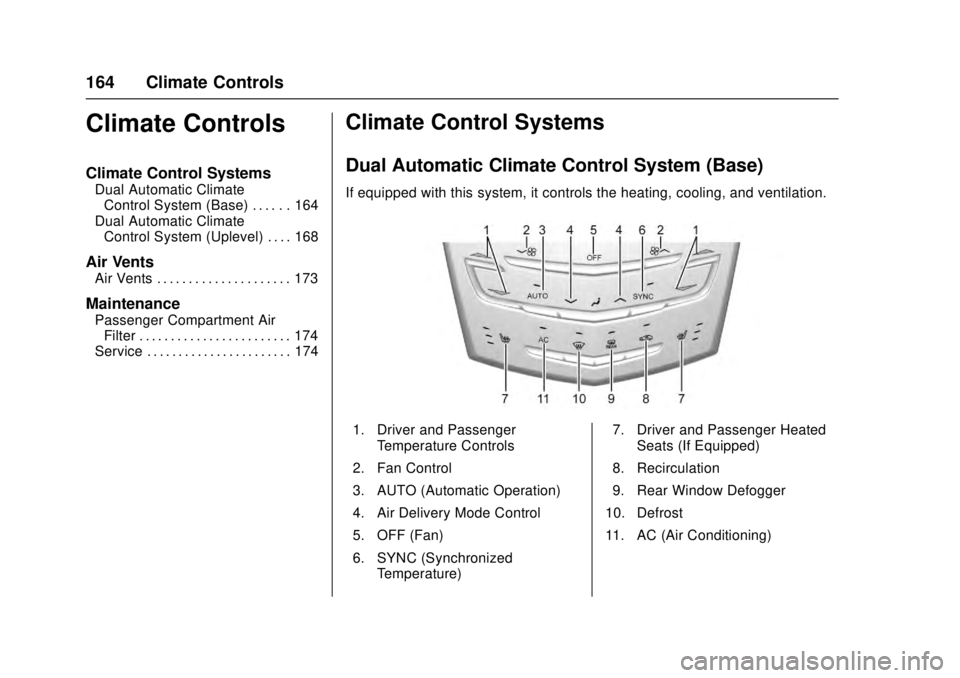
If equipped with this system, it controls the heating, cooling, and ventilation.
1. Driver and Passenger
Temperature Controls
2. Fan Control
3. AUTO (Automatic Operation)
4. Air Delivery Mode Control
5. OFF (Fan)
6. SYNC (Synchronized Temperature) 7. Driver and Passenger Heated
Seats (If Equipped)
8. Recirculation
9. Rear Window Defogger
10. Defrost
11. AC (Air Conditioning)
Page 166 of 348
Cadillac ATS/ATS-V Owner Manual (GMNA-Localizing-MidEast-9369639) -
2016 - crc - 12/9/15
Climate Controls 165
Climate Control Function With
Stop/Start (If Equipped)
The climate control system depends
on other vehicle systems for heat
and power input. The climate control
system will balance stop/start
efficiency with air conditioning
comfort and defog operation.
Certain climate control settings can
result in fewer auto stops.
The following are climate control
settings that result in fewer auto
stops:
.The defrost mode.
. High fan speed settings.
. Extreme temperature settings.
Automatic Operation
The system automatically controls
the fan speed, air delivery, air
conditioning, and recirculation in
order to heat or cool the vehicle to
the desired temperature.
When the indicator light is on or
AUTO is displayed on the screen,
the system is in full automatic
operation. If the air delivery mode or
fan setting is manually adjusted, the auto indicator turns off and the
display will show the selected
settings.
For automatic operation:
1. Press AUTO.
2. Set the temperature. Allow the system time to stabilize. Then
adjust the temperature as
needed for best comfort.
To improve fuel efficiency and to
cool the vehicle faster, recirculation
may be automatically selected in
warm weather. The recirculation
light will not come on. Press
@to
select recirculation; press it again to
select outside air.
English units can be changed to
metric units through the instrument
cluster. See “Settings”under
Instrument Cluster 0111.
OFF (Fan) : Press to turn the fan on
or off. The temperature control and
air delivery mode can still be
adjusted.
worx(Driver and Passenger
Temperature Controls) : The
temperature can be adjusted separately for the driver and the
passenger. Press to increase or
decrease the temperature. Press
and hold to rapidly increase or
decrease the temperature.
SYNC (Synchronized
Temperature) :
Press SYNC to link
all climate zone settings to the
driver settings. The SYNC indicator
will be lit. Adjust the driver side
temperature control to change the
linked temperature. When the
passenger settings are adjusted, the
temperatures are unlinked and the
SYNC indicator turns off.
Manual Operation
z 9or9y(Fan Control) :
Press the fan control buttons to
increase or decrease the fan speed.
Press and hold the buttons to adjust
speed more quickly. The fan speed
setting displays. Pressing either
button cancels automatic fan control
and the fan can be controlled
manually. Press AUTO to return to
automatic operation. To turn off the
fan, press OFF.
Page 167 of 348
Cadillac ATS/ATS-V Owner Manual (GMNA-Localizing-MidEast-9369639) -
2016 - crc - 12/9/15
166 Climate Controls
zNy(Air Delivery Mode
Control) : Press the air delivery
mode buttons to change the
direction of the airflow. Selecting
any of the air delivery modes
cancels automatic air delivery
control and the direction of the
airflow can be controlled manually.
Press AUTO to return to automatic
operation.
To change the current mode, select
one of the following:
Y(Vent) : Air is directed to the
instrument panel outlets.
\(Bi-Level) : Air is divided
between the instrument panel
outlets and the floor outlets.
[(Floor) : Air is directed to the
floor outlets, with some air to the
windshield and side windows.
-(Defog) : Clears the windows of
fog or moisture. Air is directed to the
windshield, side windows and floor
outlets. Some air may go to the rear
floor outlets.
0(Defrost) : Press the0button
to turn on or off. This clears the
windshield of fog or frost more
quickly. Air is directed to the
windshield, and side windows.
A/C (Air Conditioning) : Press to
turn the air conditioning on or off.
If the fan is turned off, the air
conditioner will not run. Outside
temperatures below freezing may
also prevent the air conditioner from
running.
Press AUTO to return to automatic
operation and the air conditioner
runs as needed. When the indicator
light is on, the air conditioner runs
automatically to cool the air inside
the vehicle or to dry the air needed
to defog the windshield faster.
Automatic Air Recirculation :
When the AUTO indicator light is
on, the air is automatically
recirculated as needed to help
quickly cool the inside of the
vehicle.
@(Recirculation) : Press to
alternate between recirculating air
inside the vehicle or pulling in
outside air. The indicator light on the button is lit when recirculation mode
is active. This helps to quickly cool
the air inside the vehicle or reduce
the outside air and odors that may
enter.
Pressing this button cancels
automatic recirculation. Press AUTO
to return to automatic operation;
recirculation runs automatically as
needed.
Manual recirculation mode is not
available when in Defrost or Defog
modes.
Auto Defog :
The climate control
system may have a sensor to
automatically detect high humidity
inside the vehicle. When high
humidity is detected, the climate
control system may adjust to
outside air supply and turn on the
air conditioner. If the climate control
system does not detect possible
window fogging, it returns to normal
operation. To turn Auto Defog off or
on, see “Climate and Air Quality”
under Vehicle
Personalization 0142.