brake light CADILLAC ATS 2016 1.G Owner's Manual
[x] Cancel search | Manufacturer: CADILLAC, Model Year: 2016, Model line: ATS, Model: CADILLAC ATS 2016 1.GPages: 348, PDF Size: 3.38 MB
Page 215 of 348
Cadillac ATS/ATS-V Owner Manual (GMNA-Localizing-MidEast-9369639) -
2016 - crc - 12/9/15
214 Driving and Operating
Also, you may have to brake or shift
to a lower gear to keep the vehicle
speed down. If the brake pedal is
applied, cruise control will
disengage.
Ending Cruise Control
There are four ways to end cruise
control:
.Step lightly on the brake pedal.
. Shift the transmission to
N (Neutral).
. Press
*.
. Press
J.
Erasing Speed Memory
The cruise control set speed is
erased from memory if
Jis
pressed or if the ignition is
turned off.
Adaptive Cruise Control
If equipped with Adaptive Cruise
Control (ACC), it allows the driver to
select the cruise control set speed
and following gap. Read this entire
section before using this system. The following gap is the following
time between your vehicle and a
vehicle detected directly ahead in
your path moving in the same
direction. If no vehicle is detected in
your path, ACC works like regular
cruise control. ACC uses camera
and radar sensors.
If a vehicle is detected in your path,
ACC can apply acceleration or
limited, moderate braking to
maintain the selected following gap.
To disengage ACC, apply the brake.
If ACC is controlling your vehicle
speed when the Traction Control
System (TCS) or StabiliTrak System
activates, the ACC may
automatically disengage. See
Traction Control/Electronic Stability
Control
0205. When road
conditions allow ACC to be safely
used, the ACC can be turned
back on.
ACC will not engage if the TCS or
StabiliTrak electronic stability control
system is disabled.
{Warning
ACC has limited braking ability
and may not have time to slow
the vehicle down enough to avoid
a collision with another vehicle
you are following. This can occur
when vehicles suddenly slow or
stop ahead, or enter your lane.
Also see “Alerting the Driver” in
this section. Complete attention is
always required while driving and
you should be ready to take
action and apply the brakes. See
Defensive Driving 0177.
{Warning
ACC will not detect or brake for
children, pedestrians, animals,
or other objects.
Do not use ACC when:
. On winding and hilly roads
or when the sensors are
blocked by snow, ice, or dirt.
(Continued)
Page 220 of 348
Cadillac ATS/ATS-V Owner Manual (GMNA-Localizing-MidEast-9369639) -
2016 - crc - 12/9/15
Driving and Operating 219
the Safety Alert Seat will pulse three
times, or three beeps will sound.
See”Alert Type” and“Go Notifier” in
“Collision/Detection Systems” under
Vehicle Personalization 0142.
When the vehicle ahead drives
away, press +RES or the
accelerator pedal to resume ACC.
If stopped for more than
two minutes or if the driver door is
opened and the driver safety belt is
unbuckled, the ACC automatically
applies the electric parking brake to
hold the vehicle. The electric
parking brake status light will turn
on. See Parking Brake (Manual)
0 202 orParking Brake (Electric)
0 203. To release the electric
parking brake, press the accelerator
pedal.
A DIC warning message may
display indicating to shift to P (Park)
before exiting the vehicle. See
Vehicle Messages 0131.{Warning
If ACC has stopped the vehicle,
and if ACC is disengaged, turned
off, or canceled, the vehicle will
no longer be held at a stop. The
vehicle can move. When ACC is
holding the vehicle at a stop,
always be prepared to manually
apply the brakes.
{Warning
Leaving the vehicle without
placing it in P (Park) can be
dangerous. Do not leave the
vehicle while it is being held at a
stop by ACC. Always place the
vehicle in P (Park) and turn off
the ignition before leaving the
vehicle.
ACC Override
If using the accelerator pedal while
ACC is active, a warning message
on the DIC and in the HUD will
indicate that automatic braking will not occur. See
Vehicle Messages
0 131. ACC will resume operation
when the accelerator pedal is not
being pressed.
{Warning
The ACC will not automatically
apply the brakes if your foot is
resting on the accelerator pedal.
You could crash into a vehicle
ahead of you.
Curves in the Road
{Warning
On curves, ACC may not detect a
vehicle ahead in your lane. You
could be startled if the vehicle
accelerates up to the set speed,
especially when following a
vehicle exiting or entering exit
ramps. You could lose control of
the vehicle or crash. Do not use
ACC while driving on an entrance
or exit ramp. Always be ready to
use the brakes if necessary.
Page 222 of 348
Cadillac ATS/ATS-V Owner Manual (GMNA-Localizing-MidEast-9369639) -
2016 - crc - 12/9/15
Driving and Operating 221
lane while driving on steep hills. The
driver will often need to take over
acceleration and braking on steep
hills, especially when towing a
trailer. If the brakes are applied, the
ACC disengages.
Ending ACC
There are three ways to
disengage ACC:
.Step lightly on the brake pedal.
. Press
*.
. Press
J.
Erasing Speed Memory
The cruise control set speed is
erased from memory if
]is
pressed or if the ignition is
turned off. Cleaning the Sensing System
The camera sensor on the
windshield behind the rearview
mirror and the radar sensors on the
front of the vehicle can become
blocked by snow, ice, dirt, or mud.
These areas need to be cleaned for
ACC to operate properly.
For cleaning instructions, see
“Washing the Vehicle”
under
Exterior Care 0313.
System operation may also be
limited under snow, heavy rain or
road spray conditions.
Driver Assistance
Systems
This vehicle may have features that
work together to help avoid crashes
or reduce crash damage while
driving, backing, and parking. Read
this entire section before using
these systems.
{Warning
Do not rely on the Driver
Assistance Systems. These
systems do not replace the need
for paying attention and driving
safely. You may not hear or feel
alerts or warnings provided by
these systems. Failure to use
proper care when driving may
result in injury, death, or vehicle
damage. See Defensive
Driving 0177.
(Continued)
Page 225 of 348
Cadillac ATS/ATS-V Owner Manual (GMNA-Localizing-MidEast-9369639) -
2016 - crc - 12/9/15
224 Driving and Operating
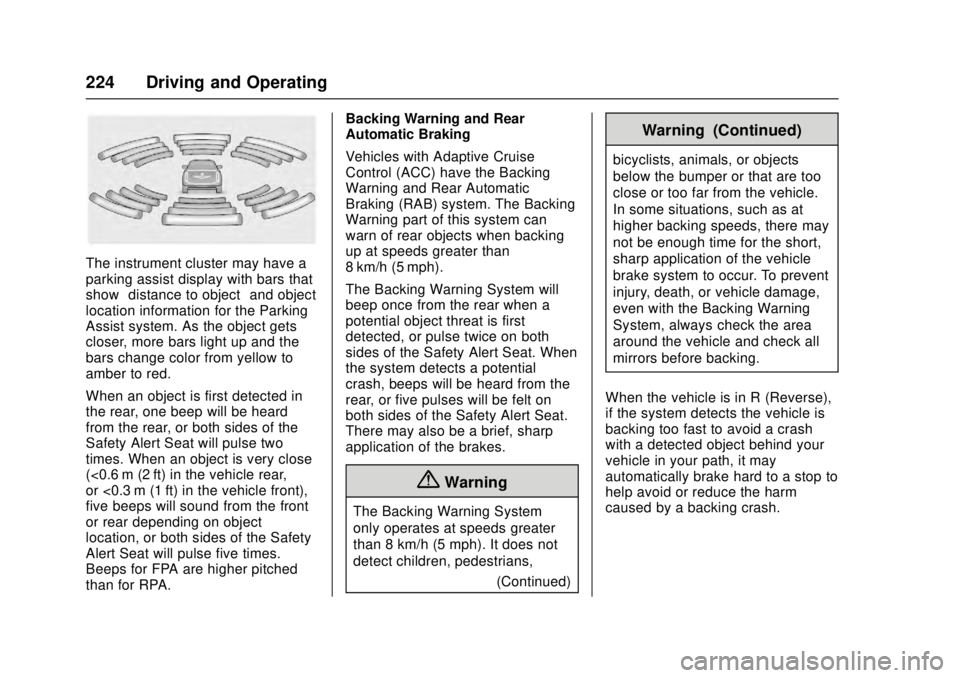
The instrument cluster may have a
parking assist display with bars that
show“distance to object” and object
location information for the Parking
Assist system. As the object gets
closer, more bars light up and the
bars change color from yellow to
amber to red.
When an object is first detected in
the rear, one beep will be heard
from the rear, or both sides of the
Safety Alert Seat will pulse two
times. When an object is very close
(<0.6 m (2 ft) in the vehicle rear,
or <0.3 m (1 ft) in the vehicle front),
five beeps will sound from the front
or rear depending on object
location, or both sides of the Safety
Alert Seat will pulse five times.
Beeps for FPA are higher pitched
than for RPA. Backing Warning and Rear
Automatic Braking
Vehicles with Adaptive Cruise
Control (ACC) have the Backing
Warning and Rear Automatic
Braking (RAB) system. The Backing
Warning part of this system can
warn of rear objects when backing
up at speeds greater than
8 km/h (5 mph).
The Backing Warning System will
beep once from the rear when a
potential object threat is first
detected, or pulse twice on both
sides of the Safety Alert Seat. When
the system detects a potential
crash, beeps will be heard from the
rear, or five pulses will be felt on
both sides of the Safety Alert Seat.
There may also be a brief, sharp
application of the brakes.
{Warning
The Backing Warning System
only operates at speeds greater
than 8 km/h (5 mph). It does not
detect children, pedestrians,
(Continued)
Warning (Continued)
bicyclists, animals, or objects
below the bumper or that are too
close or too far from the vehicle.
In some situations, such as at
higher backing speeds, there may
not be enough time for the short,
sharp application of the vehicle
brake system to occur. To prevent
injury, death, or vehicle damage,
even with the Backing Warning
System, always check the area
around the vehicle and check all
mirrors before backing.
When the vehicle is in R (Reverse),
if the system detects the vehicle is
backing too fast to avoid a crash
with a detected object behind your
vehicle in your path, it may
automatically brake hard to a stop to
help avoid or reduce the harm
caused by a backing crash.
Page 226 of 348
Cadillac ATS/ATS-V Owner Manual (GMNA-Localizing-MidEast-9369639) -
2016 - crc - 12/9/15
Driving and Operating 225
{Warning
RAB may not avoid many types of
backing crashes. Do not wait for
the automatic braking to apply.
This system is not designed to
replace driver braking and only
works in R (Reverse) when an
object is detected directly behind
the vehicle. It may not brake or
stop in time to avoid a crash.
It will not brake for objects when
the vehicle is moving at very low
speeds. It does not detect
children, pedestrians, bicyclists,
animals, or objects below the
bumper or that are too close or
too far from the vehicle. To
prevent injury, death, or vehicle
damage, even with RAB, always
check the area around the vehicle
before and while backing.
Pressing the brake pedal after the
vehicle comes to a stop will release
the Rear Automatic Braking. If the
brake pedal is not pressed soon
after the stop, the Electric Parking Brake (EPB) may be set. When it is
safe, press the accelerator pedal
firmly at any time to override the
Rear Automatic Braking.
{Warning
There may be instances where
unexpected or undesired
automatic braking occurs. If this
happens, either press the brake
pedal or firmly press the
accelerator pedal to release the
brakes from the RAB system.
Before releasing the brakes,
check the RVC screen and check
the area around the vehicle to
make sure it is safe to proceed.
Rear Cross Traffic Alert (RCTA)
If equipped, RCTA displays a red
warning triangle with a left or right
pointing arrow on the RVC screen to
warn of traffic coming from the left
or right. This system detects objects
coming from up to 20 m (65 ft) from
the left or right side of the vehicle.
When an object is detected, either
three beeps sound from the left or right or three Safety Alert Seat
pulses occur on the left or right side,
depending on the direction of the
detected vehicle.
Use caution while backing up when
towing a trailer, as the RCTA
detection zones that extend out
from the back of the vehicle do not
move further back when a trailer is
towed.
Turning the Features On or Off
TheXbutton to the left of the
steering wheel is used to turn on or
off the Front and Rear Parking
Assist, Rear Cross Traffic Alert
(RCTA), Rear Automatic Braking,
and Backing Warning System at the
same time. The indicator light next
to the button comes on when the
features are on and turns off when
the features have been disabled.
Page 227 of 348
Cadillac ATS/ATS-V Owner Manual (GMNA-Localizing-MidEast-9369639) -
2016 - crc - 12/9/15
226 Driving and Operating
Turn off parking assist and Rear
Automatic Braking when towing a
trailer.
To turn the RPA symbols and rear
guidance lines on or off, see“Rear
Camera” underVehicle
Personalization 0142.
RCTA can be turned on or off
through vehicle personalization. See
“Collision/Detection Systems” under
Vehicle Personalization 0142.
Assistance Systems for
Driving
If equipped, when driving the
vehicle in a forward gear, Forward
Collision Alert (FCA), Lane
Departure Warning (LDW), Lane
Keep Assist (LKA), Side Blind Zone
Alert (SBZA), Lane Change Alert
(LCA), and/or the Front Automatic
Braking (FAB) System can help to
avoid a crash or reduce crash
damage.
Forward Collision Alert
(FCA) System
If equipped, the FCA system may
help to avoid or reduce the harm
caused by front-end crashes. When
approaching a vehicle ahead too
quickly, FCA provides a flashing red
alert on the windshield and rapidly
beeps or pulses the Safety Alert
Seat. FCA also lights an amber
visual alert if following another
vehicle much too closely.
FCA detects vehicles within a
distance of approximately 60 m
(197 ft) and operates at speeds
above 40 km/h (25 mph). If the
vehicle has Adaptive Cruise Control
(ACC), it can detect vehicles to
distances of approximately 110 m
(360 ft) and operates at all speeds.
See Adaptive Cruise Control 0214.
{Warning
FCA is a warning system and
does not apply the brakes. When
approaching a slower-moving or
(Continued)
Warning (Continued)
stopped vehicle ahead too rapidly,
or when following a vehicle too
closely, FCA may not provide a
warning with enough time to help
avoid a crash. It also may not
provide any warning at all. FCA
does not warn of pedestrians,
animals, signs, guardrails,
bridges, construction barrels,
or other objects. Be ready to take
action and apply the brakes. See
Defensive Driving0177.
FCA can be disabled with the FCA
steering wheel control, or if your
vehicle is equipped with Adaptive
Cruise Control (ACC), through
vehicle personalization. See the
“Auto Collision Preparation” portion
of “Collision/Detection Systems”
under Vehicle
Personalization 0142.
Page 231 of 348
Cadillac ATS/ATS-V Owner Manual (GMNA-Localizing-MidEast-9369639) -
2016 - crc - 12/9/15
230 Driving and Operating
Intelligent Brake Assist (IBA)
IBA may activate when the brake
pedal is applied quickly by providing
a boost to braking based on the
speed of approach and distance to
a vehicle ahead.
Minor brake pedal pulsations or
pedal movement during this time is
normal and the brake pedal should
continue to be applied as needed.
IBA will automatically disengage
only when the brake pedal is
released.
{Warning
IBA may increase vehicle braking
in situations when it may not be
necessary. You could block the
flow of traffic. If this occurs, take
your foot off the brake pedal and
then apply the brakes as needed.
FAB and IBA can be disabled
through vehicle personalization. See
“Auto Collision Preparation” in
“Collision/Detection Systems” under
Vehicle Personalization 0142.
{Warning
Using FAB or IBA while towing a
trailer could cause you to lose
control of the vehicle and crash.
Turn the system to Off when
towing a trailer.
Side Blind Zone
Alert (SBZA)
If equipped, the SBZA system is a
lane-changing aid that assists
drivers with avoiding crashes that
occur with moving vehicles in the
side blind zone (or spot) areas.
When the vehicle is in a forward
gear, the left or right side mirror
display will light up if a moving
vehicle is detected in that blind
zone. If the turn signal is activated
and a vehicle is also detected on
the same side, the display will flash
as an extra warning not to change
lanes. Since this system is part of
the Lane Change Alert (LCA)
system, read the entire LCA section
before using this feature.
Lane Change Alert (LCA)
If equipped, the LCA system is a
lane-changing aid that assists
drivers with avoiding lane change
crashes that occur with moving
vehicles in the side blind zone (or
spot) areas or with vehicles rapidly
approaching these areas from
behind. The LCA warning display
will light up in the corresponding
outside side mirror and will flash if
the turn signal is on.
{Warning
LCA does not alert the driver to
vehicles outside of the system
detection zones, pedestrians,
bicyclists, or animals. It may not
provide alerts when changing
lanes under all driving conditions.
Failure to use proper care when
changing lanes may result in
injury, death, or vehicle damage.
Before making a lane change,
always check mirrors, glance over
your shoulder, and use the turn
signals.
Page 244 of 348
Cadillac ATS/ATS-V Owner Manual (GMNA-Localizing-MidEast-9369639) -
2016 - crc - 12/9/15
Driving and Operating 243
Safety Chains
Always attach chains between the
vehicle and the trailer. Cross the
safety chains under the tongue of
the trailer to help prevent the tongue
from contacting the road if it
becomes separated from the hitch.
Leave enough slack so the rig can
turn. Never allow safety chains to
drag on the ground.
Trailer Brakes
Does the trailer have its own
brakes? Be sure to read and follow
the instructions for the trailer brakes
so they are installed, adjusted, and
maintained properly.
Because the vehicle has antilock
brakes, do not tap into the vehicle's
brake system. If this is done, both
brake systems will not work well or
at all.
Conversions and
Add-Ons
Add-On Electrical
Equipment
{Warning
The Data Link Connector (DLC) is
used for vehicle service and
Emission Inspection/Maintenance
testing. SeeMalfunction Indicator
Lamp (Check Engine Light) 0118.
A device connected to the DLC —
such as an aftermarket fleet or
driver-behavior tracking device —
may interfere with vehicle
systems. This could affect vehicle
operation and cause a crash.
Such devices may also access
information stored in the vehicle’s
systems.
Caution
Some electrical equipment can
damage the vehicle or cause
components to not work and
would not be covered by the
vehicle warranty. Always check
with your dealer before adding
electrical equipment.
Add-on equipment can drain the
vehicle's 12-volt battery, even if the
vehicle is not operating.
The vehicle has an airbag system.
Before attempting to add anything
electrical to the vehicle, see
Servicing the Airbag-Equipped
Vehicle 081 and Adding Equipment
to the Airbag-Equipped
Vehicle 081.
Page 245 of 348
Cadillac ATS/ATS-V Owner Manual (GMNA-Localizing-MidEast-9369639) -
2016 - crc - 12/9/15
244 Vehicle Care
Vehicle Care
General Information
General Information . . . . . . . . . . 245
Accessories andModifications . . . . . . . . . . . . . . . . 245
Vehicle Checks
Doing Your OwnService Work . . . . . . . . . . . . . . . 246
Hood . . . . . . . . . . . . . . . . . . . . . . . . . 246
Engine Compartment Overview . . . . . . . . . . . . . . . . . . . . 247
Engine Oil . . . . . . . . . . . . . . . . . . . . 254
Engine Oil Life System . . . . . . . 256
Automatic Transmission Fluid . . . . . . . . . . . . . . . . . . . . . . . . 257
Engine Air Cleaner/Filter . . . . . . 258
Cooling System (Engine) . . . . . 259
Cooling System (Intercooler) . . . . . . . . . . . . . . . . . 261
Engine Coolant . . . . . . . . . . . . . . . 261
Engine Overheating . . . . . . . . . . 264
Washer Fluid . . . . . . . . . . . . . . . . . 266
Brakes . . . . . . . . . . . . . . . . . . . . . . . 266
Brake Fluid . . . . . . . . . . . . . . . . . . . 267
Battery . . . . . . . . . . . . . . . . . . . . . . . . 268
Starter Switch Check . . . . . . . . . 270 Automatic Transmission Shift
Lock Control Function
Check . . . . . . . . . . . . . . . . . . . . . . . 270
Park Brake and P (Park) Mechanism Check . . . . . . . . . . 270
Wiper Blade Replacement . . . . 271
Windshield Replacement . . . . . 271
Headlamp Aiming
Headlamp Aiming . . . . . . . . . . . . 272
Bulb Replacement
Bulb Replacement . . . . . . . . . . . . 272
Halogen Bulbs . . . . . . . . . . . . . . . . 272
High Intensity Discharge (HID) Lighting . . . . . . . . . . . . . . . . . . . . . 272
LED Lighting . . . . . . . . . . . . . . . . . 272
Back-Up Lamps . . . . . . . . . . . . . . 273
License Plate Lamp . . . . . . . . . . 273
Replacement Bulbs . . . . . . . . . . . 274
Electrical System
Electrical System Overload . . . 274
Fuses and Circuit Breakers . . . 275
Engine Compartment Fuse Block . . . . . . . . . . . . . . . . . . . . . . . . 275
Instrument Panel Fuse Block . . . . . . . . . . . . . . . . . . . . . . . . 278
Rear Compartment Fuse Block . . . . . . . . . . . . . . . . . . . . . . . . 281
Wheels and Tires
Tires . . . . . . . . . . . . . . . . . . . . . . . . . . 283
All-Season Tires . . . . . . . . . . . . . . 284
Winter Tires . . . . . . . . . . . . . . . . . . 284
Run-Flat Tires . . . . . . . . . . . . . . . . 285
Summer Tires . . . . . . . . . . . . . . . . 286
Tire Pressure . . . . . . . . . . . . . . . . . 286
Tire Pressure for High-SpeedOperation . . . . . . . . . . . . . . . . . . . 287
Tire Pressure Monitor System . . . . . . . . . . . . . . . . . . . . . . 288
Tire Pressure Monitor Operation . . . . . . . . . . . . . . . . . . . 289
Tire Inspection . . . . . . . . . . . . . . . . 292
Tire Rotation . . . . . . . . . . . . . . . . . 292
When It Is Time for New Tires . . . . . . . . . . . . . . . . . . . . . . . . 294
Buying New Tires . . . . . . . . . . . . . 294
Different Size Tires and Wheels . . . . . . . . . . . . . . . . . . . . . . 296
Wheel Alignment and Tire Balance . . . . . . . . . . . . . . . . . . . . . 296
Wheel Replacement . . . . . . . . . . 297
Tire Chains . . . . . . . . . . . . . . . . . . . 298
If a Tire Goes Flat . . . . . . . . . . . . 299
Tire Sealant and Compressor Kit . . . . . . . . . . . . . 300
Storing the Tire Sealant and Compressor Kit . . . . . . . . . . . . . 307
Page 268 of 348
Cadillac ATS/ATS-V Owner Manual (GMNA-Localizing-MidEast-9369639) -
2016 - crc - 12/9/15
Vehicle Care 267
heard all the time when the vehicle
is moving, except when applying the
brake pedal firmly.
{Warning
The brake wear warning sound
means that soon the brakes will
not work well. That could lead to
a crash. When the brake wear
warning sound is heard, have the
vehicle serviced.
Caution
Continuing to drive with worn-out
brake pads could result in costly
brake repair.
Some driving conditions or climates
can cause a brake squeal when the
brakes are first applied or lightly
applied. This does not mean
something is wrong with the brakes. If equipped with high performance
brake linings, there could be an
increased build-up of brake dust as
well as minor noises as compared
to standard brake linings.
Properly torqued wheel nuts are
necessary to help prevent brake
pulsation. When tires are rotated,
inspect brake pads for wear and
evenly tighten wheel nuts in the
proper sequence to torque
specifications. See
Capacities and
Specifications 0332.
Brake pads should be replaced as
complete sets.Brake Pedal Travel
See your dealer if the brake pedal
does not return to normal height,
or if there is a rapid increase in
pedal travel. This could be a sign
that brake service may be required.
Replacing Brake System Parts
Always replace brake system parts
with new, approved replacement
parts. If this is not done, the brakes
may not work properly. The braking
performance expected can change
in many other ways if the wrong replacement brake parts are
installed or parts are improperly
installed.
Brake Fluid
The brake master cylinder reservoir
is filled with GM approved DOT 3
brake fluid as indicated on the
reservoir cap. See
Engine
Compartment Overview 0247 for
the location of the reservoir.
Checking Brake Fluid
With the vehicle in P (Park) on a
level surface, the brake fluid level
should be between the minimum
and maximum marks on the brake
fluid reservoir.