instrument cluster CADILLAC ATS 2019 Owner's Guide
[x] Cancel search | Manufacturer: CADILLAC, Model Year: 2019, Model line: ATS, Model: CADILLAC ATS 2019Pages: 384, PDF Size: 6.11 MB
Page 164 of 384
Cadillac ATS/ATS-V Owner Manual (GMNA-Localizing-U.S./Canada/Mexico-
12460272) - 2019 - crc - 5/8/18
CLIMATE CONTROLS 163
The fan, air delivery mode, A/C mode,
driver and passenger temperatures,
and SYNC settings can be controlled
by touching CLIMATE on the
infotainment Home Page or the
climate button in the display
application tray. A selection can then
be made on the front climate control
page displayed. See the infotainment
manual.
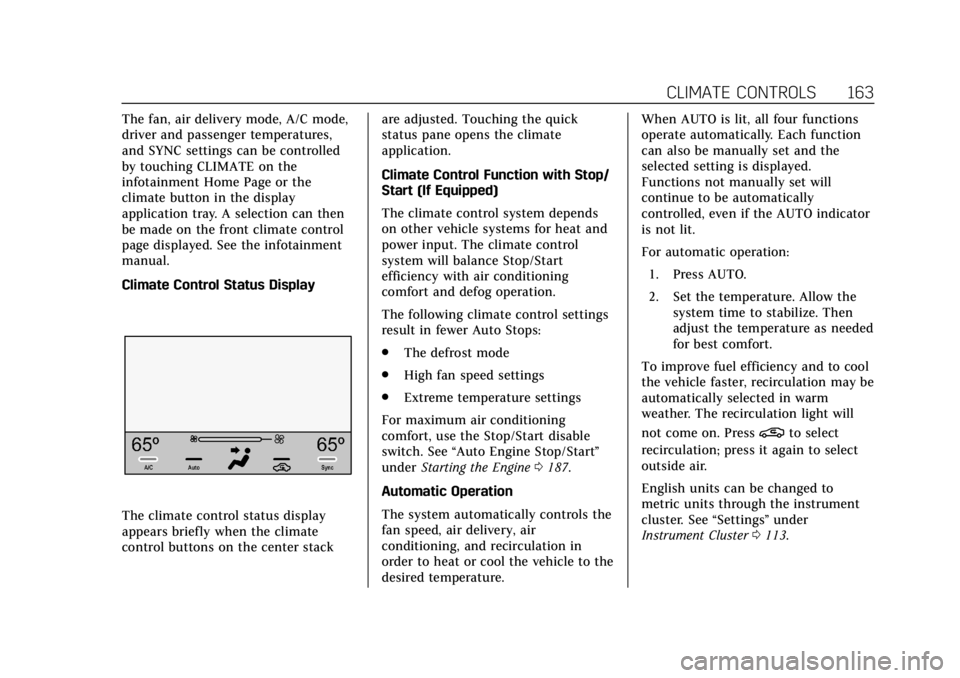
Climate Control Status Display
The climate control status display
appears briefly when the climate
control buttons on the center stackare adjusted. Touching the quick
status pane opens the climate
application.
Climate Control Function with Stop/
Start (If Equipped)
The climate control system depends
on other vehicle systems for heat and
power input. The climate control
system will balance Stop/Start
efficiency with air conditioning
comfort and defog operation.
The following climate control settings
result in fewer Auto Stops:
.
The defrost mode
. High fan speed settings
. Extreme temperature settings
For maximum air conditioning
comfort, use the Stop/Start disable
switch. See “Auto Engine Stop/Start ”
under Starting the Engine 0187.
Automatic Operation
The system automatically controls the
fan speed, air delivery, air
conditioning, and recirculation in
order to heat or cool the vehicle to the
desired temperature. When AUTO is lit, all four functions
operate automatically. Each function
can also be manually set and the
selected setting is displayed.
Functions not manually set will
continue to be automatically
controlled, even if the AUTO indicator
is not lit.
For automatic operation:
1. Press AUTO.
2. Set the temperature. Allow the system time to stabilize. Then
adjust the temperature as needed
for best comfort.
To improve fuel efficiency and to cool
the vehicle faster, recirculation may be
automatically selected in warm
weather. The recirculation light will
not come on. Press
@to select
recirculation; press it again to select
outside air.
English units can be changed to
metric units through the instrument
cluster. See “Settings”under
Instrument Cluster 0113.
Page 200 of 384

Cadillac ATS/ATS-V Owner Manual (GMNA-Localizing-U.S./Canada/Mexico-
12460272) - 2019 - crc - 5/8/18
DRIVING AND OPERATING 199
R (Reverse) :To back up, press down
the clutch pedal, completely stop the
vehicle, and shift into R (Reverse). On
ATS models, apply additional pressure
to get the lever past 1 (First) and
2 (Second) into R (Reverse). Let up on
the clutch pedal slowly while pressing
the accelerator pedal.
{Warning
If you skip a gear when
downshifting, you could lose
control of the vehicle. You could
injure yourself or others. Do not
shift down more than one gear at a
time when downshifting.
Caution
When downshifting, if more than
one gear is skipped, or the engine is
racing when the clutch pedal is
released, the engine, clutch,
driveshaft or transmission could be
damaged.
No Lift-Shift
On ATS-V vehicles equipped with a
manual transmission, the vehicle can
be shifted up a gear when the
accelerator pedal is pressed to the
floor without being released. This
allows for less power interruption and
will improve acceleration times. This
feature is available in all vehicle
modes and is only active when the
engine speed is greater than 2500 rpm.
Active Rev Match
ATS-V vehicles equipped with a
manual transmission have Active Rev
Match (ARM). ARM aids in smoother
shifting by matching the engine speed
to the next selected gear. By
monitoring shift lever and clutch
operation, ARM adjusts engine speed
to match a calibrated value based on
gear selection. On upshifts and
downshifts, engine speed will be
increased and decreased to match
vehicle road speed and transmission
gear position. ARM is maintained
while the clutch pedal is pressed, but
will deactivate if the shift lever is left
in the Neutral position.
The system is activated and
deactivated by pressing either of the
paddles on the steering wheel. The
system must be activated with each
new ignition cycle.
A gear indicator in the instrument
cluster displays the current gear
selected. ARM is also shown in the
Performance View of the HUD:
. When ARM is activated, the gear
number is amber.
. When ARM is deactivated, the
gear number is white.
Page 206 of 384

Cadillac ATS/ATS-V Owner Manual (GMNA-Localizing-U.S./Canada/Mexico-
12460272) - 2019 - crc - 5/8/18
DRIVING AND OPERATING 205
The indicator light for both systems is
in the instrument cluster. This
light will:
.Flash when TCS is limiting
wheel spin.
. Flash when StabiliTrak/ESC is
activated.
. Turn on and stay on when either
system is not working.
If either system fails to turn on or to
activate, a message may display in the
Driver Information Center (DIC), and
dcomes on and stays on to indicate
that the system is inactive and is not
assisting the driver in maintaining
control. The vehicle is safe to drive,
but driving should be adjusted
accordingly.
If
dcomes on and stays on:
1. Stop the vehicle.
2. Turn the engine off and wait 15 seconds.
3. Start the engine.
4. Drive the vehicle. If
dcomes on and stays on, the
vehicle may need more time to
diagnose the problem. If the condition
persists, see your dealer.
Turning the Systems Off and On
Thegbutton for TCS and StabiliTrak/
ESC is on the center console (ATS) or
the steering wheel (ATS-V).
Caution
Do not repeatedly brake or
accelerate heavily when TCS is off.
The vehicle driveline could be
damaged.
To turn off only TCS, press and
release
g. The traction off lighti
displays in the instrument cluster and
a DIC message may display.
To turn TCS on again, press and
release
g. The traction off lighti
displayed in the instrument cluster
will turn off. If TCS is limiting wheel spin when
g
is pressed, the system will not turn off
until the wheels stop spinning.
To turn off both TCS and StabiliTrak/
ESC, press and hold
guntil the
traction off light
iand StabiliTrak/
ESC OFF light
gcome on and stay on
in the instrument cluster. A DIC
message may display.
To turn TCS and StabiliTrak/ESC on
again, press and release
g. The
traction off light
iand StabiliTrak/
ESC OFF light
gin the instrument
cluster turn off.
Adding accessories can affect the
vehicle performance. See Accessories
and Modifications 0244.
Driver Mode Control
Driver Mode Control attempts to add
a sportier feel, provide a more
comfortable ride, or assist in different
weather conditions or terrain. This
system simultaneously changes the
software settings of various
sub-systems. Depending on the option
Page 211 of 384

Cadillac ATS/ATS-V Owner Manual (GMNA-Localizing-U.S./Canada/Mexico-
12460272) - 2019 - crc - 5/8/18
210 DRIVING AND OPERATING
and StabiliTrak/ESC OFF lightgwill
come on in the instrument cluster.
TCS does not limit wheel spin, the
Electronic Limited-Slip Differential
(eLSD) allows increased vehicle agility,
and more effort is required to turn the
steering wheel. See “Limited-Slip Axle
(V-Series Only)” later in this section.
Adjust your driving accordingly.
Press
Yagain, or turn the ignition to
ACC/ACCESSORY and restart the
vehicle, to turn TCS back on. The
traction off light
iand StabiliTrak/
ESC OFF light
gwill go out in the
instrument cluster.
Caution
When traction control is turned off,
or Competitive Driving Mode is
active, it is possible to lose traction.
Performance Traction
Management (V-Series Only)
Performance Traction Management
(PTM) integrates the Traction Control,
StabiliTrak/Electronic Stability Control (ESC), and Magnetic Ride Control
systems to provide improved and
consistent performance when
cornering. The amount of available
engine power is based on the mode
selected, track conditions, driver skill,
and the radius of each corner.
This light is on when the vehicle is in
the PTM mode.
To select this optional handling mode,
the vehicle mode must be Track. Then
quickly press
Yon the steering
wheel two times. PERF TRAC 1 - WET
ACTIVE HANDLING ON displays in
the DIC.
When PTM is active, the up and down
buttons will no longer change Drive
Modes, but instead change PTM
modes. To select a mode while in PTM, press
the Driver Mode Control/PTM buttons
on the center console.
To experience the performance benefit
of this system, after entering a curve
and at the point where normal
acceleration occurs, fully push the
accelerator pedal. The PTM system
will modify the level of engine power
for a smooth and consistent
corner exit.
The PTM system contains five modes.
These modes are selected by pressing
the Driver Mode Control/PTM buttons
on the center console. Scroll up or
down through modes 1-5 by pressing
the MODE up and down button. The
following is a DIC display description
and the recommended usage of
each mode:
PERF TRAC 1
–WET ACTIVE
HANDLING ON
. Intended for all driver skill levels.
. Wet or damp conditions only —
not intended for use in heavy rain
or standing water.
. StabiliTrak/ESC is on.
Page 212 of 384

Cadillac ATS/ATS-V Owner Manual (GMNA-Localizing-U.S./Canada/Mexico-
12460272) - 2019 - crc - 5/8/18
DRIVING AND OPERATING 211
PERF TRAC 2–DRY ACTIVE
HANDLING ON
. For use by less experienced drivers
or while learning a new track.
. Dry conditions only.
. StabiliTrak/ESC is on.
PERF TRAC 3 –SPORT ACTIVE
HANDLING ON
. For use by drivers who are familiar
with the track.
. Dry conditions only.
. Requires more driving skill than
mode 2.
. StabiliTrak/ESC is on.
PERF TRAC 4 –SPORT ACTIVE
HANDLING OFF
. For use by drivers who are familiar
with the track.
. Dry conditions only.
. Requires more driving skill than
modes 2 or 3.
. StabiliTrak/ESC is off.
PERF TRAC 5 –RACE ACTIVE
HANDLING OFF
. For use by experienced drivers
who are familiar with the track.
. Dry conditions only.
. Requires more driving skill than in
other modes.
. StabiliTrak/ESC is off.
Press and release
Yto turn off PTM
and return to the traction control and
StabiliTrak/ESC systems. The traction
off light
iand StabiliTrak/ESC OFF
light
gwill go out.
Launch Control (V-Series Only)
A Launch Control feature is available,
within Competitive Driving Mode
(V-Series) or Performance Traction
Management (V-Series), to allow the
driver to achieve high levels of vehicle
acceleration in a straight line. Launch
Control is a form of traction control
that manages tire spin while
launching the vehicle. This feature is
intended for use during closed course race events where consistent zero to
60 and quarter mile times are
desirable.
Launch Control is only available when
the following criteria are met:
.
Competitive Driving Mode is
selected (V-Series) or any of the
Performance Traction
Management modes are selected
(V-Series). The TCS light comes on
in the instrument cluster and the
appropriate DIC message displays.
. The vehicle is not moving.
. The steering wheel is pointing
straight.
Manual Transmissions
. The clutch is pressed and the
vehicle is in 1 (First) gear.
. The accelerator pedal is rapidly
applied to wide open throttle.
The Launch Control feature will
initially limit engine speed as the
driver rapidly applies the accelerator
pedal to wide open throttle. Allow the
engine rpm to stabilize. A smooth,
quick release of the clutch, while
Page 214 of 384

Cadillac ATS/ATS-V Owner Manual (GMNA-Localizing-U.S./Canada/Mexico-
12460272) - 2019 - crc - 5/8/18
DRIVING AND OPERATING 213
Cruise Control
With cruise control, a speed of about
40 km/h (25 mph) or more can be
maintained without keeping your foot
on the accelerator. Cruise control does
not work at speeds below about
40 km/h (25 mph).
{Warning
Cruise control can be dangerous
where you cannot drive safely at a
steady speed. Do not use cruise
control on winding roads or in
heavy traffic.
Cruise control can be dangerous on
slippery roads. On such roads, fast
changes in tire traction can cause
excessive wheel slip, and you could
lose control. Do not use cruise
control on slippery roads.If equipped with a manual
transmission and 2.0L L4 engine
(LTG), the cruise control will remain
active when the gears are shifted. The
cruise is deactivated if the clutch is
pressed for several seconds. In an
ATS-V Series vehicle, cruise control is
canceled immediately with the
activation of the clutch pedal.
If the StabiliTrak/Electronic Stability
Control (ESC) system begins to limit
wheel spin while using cruise control,
the cruise control automatically
disengages. See
Traction Control/
Electronic Stability Control 0204. If a
collision alert occurs when cruise
control is activated, cruise control is
disengaged. See Forward Collision Alert
(FCA) System 0228. When road
conditions allow you to safely use it
again, cruise control can be turned
back on.
Turning off the TCS or StabiliTrak/
ESC system will disengage cruise
control.
If the brakes are applied, cruise
control disengages.
J: Press to turn the system on and
off. A white cruise control indicator
appears in the instrument cluster
when cruise is turned on.
+RES : If there is a set speed in
memory, press the control up briefly
to resume that speed or hold to
accelerate. If cruise control is already
active, use to increase vehicle speed.
To increase speed by 1 km/h (1 mph),
press +RES up to the first detent. To
increase speed to the next 5 km/h
(5 mph) mark on the speedometer,
press +RES up to the second detent.
Page 215 of 384
Cadillac ATS/ATS-V Owner Manual (GMNA-Localizing-U.S./Canada/Mexico-
12460272) - 2019 - crc - 5/8/18
214 DRIVING AND OPERATING
SET−:Press the control down briefly
to set the speed and activate cruise
control. If cruise control is already
active, use to decrease vehicle speed.
To decrease speed by 1 km/h (1 mph),
press SET− down to the first detent.
To decrease speed to the next 5 km/h
(5 mph) mark on the speedometer,
press SET− down to the second detent.
*:Press to disengage cruise control
without erasing the set speed from
memory.
Setting Cruise Control
If
Jis on when not in use, SET− or
+RES could get bumped and go into
cruise when not desired. Keep
Joff
when cruise is not being used.
1. Press
J.
2. Get up to the desired speed.
3. Press and release SET−.
4. Remove your foot from the accelerator.
When the cruise control has been set
to the desired speed, the cruise
control indicator appears green on the instrument cluster and a cruise set
speed message appears on the
Head-Up Display (HUD), if equipped.
Resuming a Set Speed
If the cruise control is set at a desired
speed and then the brakes are applied
or
*is pressed, the cruise control is
disengaged without erasing the set
speed from memory.
Once the vehicle speed reaches about
40 km/h (25 mph) or more, briefly
press +RES up to the first detent. The
vehicle returns to the previous set
speed.
Increasing Speed While Cruise
Control is at a Set Speed
If the cruise control system is already
activated:
. Press and hold +RES up until the
desired speed is reached, then
release it.
. To increase vehicle speed in small
increments, briefly press +RES up
to the first detent. For each press,
the vehicle goes about 1 km/h
(1 mph) faster. .
To increase vehicle speed in larger
increments, briefly press +RES up
to the second detent. For each
press, the vehicle speed increases
to the next 5 km/h (5 mph) mark
on the speedometer.
The speedometer reading can be
displayed in either English or metric
units. See Instrument Cluster 0113.
The increment value used depends on
the units displayed.
Reducing Speed While Cruise
Control is at a Set Speed
If the cruise control system is already
activated:
. Press and hold SET− down until
the desired lower speed is reached,
then release it.
. To decrease the vehicle speed in
small increments, briefly press
SET− down to the first detent. For
each press, the vehicle goes about
1 km/h (1 mph) slower.
. To decrease the vehicle speed in
larger increments, briefly press
SET− down to the second detent.
Page 216 of 384
Cadillac ATS/ATS-V Owner Manual (GMNA-Localizing-U.S./Canada/Mexico-
12460272) - 2019 - crc - 5/8/18
DRIVING AND OPERATING 215
For each press, the vehicle speed
decreases to the next 5 km/h
(5 mph) mark on the speedometer.
The cruise control system may
automatically brake to slow the
vehicle down (ATS model only).
The speedometer reading can be
displayed in either English or metric
units. See Instrument Cluster 0113.
The increment value used depends on
the units displayed.
Passing Another Vehicle While
Using Cruise Control
Use the accelerator pedal to increase
the vehicle speed. When you take your
foot off the pedal, the vehicle will slow
down to the previously set cruise
speed. While pressing the accelerator
pedal or shortly following the release
to override cruise control, briefly
applying the SET– control will result
in cruise control set to the current
vehicle speed.
Using Cruise Control on Hills
How well cruise control will work on
hills depends upon the vehicle speed,
load, and the steepness of the hills. When going up steep hills, you might
have to step on the accelerator pedal
to maintain the vehicle speed. When
going downhill, the cruise control
system may automatically brake (ATS
only), and the transmission may
downshift to a lower gear, to slow the
vehicle down. Also, you may have to
brake or shift to a lower gear to keep
the vehicle speed down. If the brake
pedal is applied, cruise control will
disengage.
Ending Cruise Control
There are five ways to end cruise
control:
.
Step lightly on the brake pedal
(manual and automatic
transmissions).
. Press the clutch pedal for several
seconds or shift to Neutral
(manual transmissions).
. Shift the transmission to
N (Neutral).
. Press
*.
. Press
J. Erasing Speed Memory
The cruise control set speed is erased
from memory if
Jis pressed or if
the ignition is turned off.
Adaptive Cruise Control
If equipped with Adaptive Cruise
Control (ACC), it allows for selecting
the cruise control set speed and
following gap. Read this entire section
before using this system. ACC uses a
camera and radar sensors to detect
other vehicles. See Radio Frequency
Statement 0356. The following gap is
the following time (or distance)
between your vehicle and a vehicle
detected directly ahead in your path,
moving in the same direction. If no
vehicle is detected in your path, ACC
works like regular cruise control.
If a vehicle is detected in your path,
ACC can speed up the vehicle or apply
limited, moderate braking to maintain
the selected following gap. To
disengage ACC, apply the brake. If the
Traction Control System (TCS) or
StabiliTrak/Electronic Stability Control
(ESC) system activates while ACC is
Page 217 of 384
Cadillac ATS/ATS-V Owner Manual (GMNA-Localizing-U.S./Canada/Mexico-
12460272) - 2019 - crc - 5/8/18
216 DRIVING AND OPERATING
engaged, ACC may automatically
disengage. SeeTraction Control/
Electronic Stability Control 0204. When
road conditions allow ACC to be safely
used, ACC can be turned back on. ACC
will not engage if the TCS or
StabiliTrak/ESC system is disabled.
{Warning
ACC has limited braking ability and
may not have time to slow the
vehicle down enough to avoid a
collision with another vehicle you
are following. This can occur when
vehicles suddenly slow or stop
ahead, or enter your lane. Also see
“Alerting the Driver” in this section.
Complete attention is always
required while driving and you
should be ready to take action and
apply the brakes. See Defensive
Driving 0171.
{Warning
ACC will not detect or brake for
children, pedestrians, animals,
or other objects.
Do not use ACC when:
. On winding and hilly roads or
when the sensors are blocked
by snow, ice, or dirt. The
system may not detect a
vehicle ahead. Keep the entire
front of the vehicle clean.
. Visibility is low, such as in
fog, rain, or snow conditions.
ACC performance is limited
under these conditions.
. On slippery roads where fast
changes in tire traction can
cause excessive wheel slip.
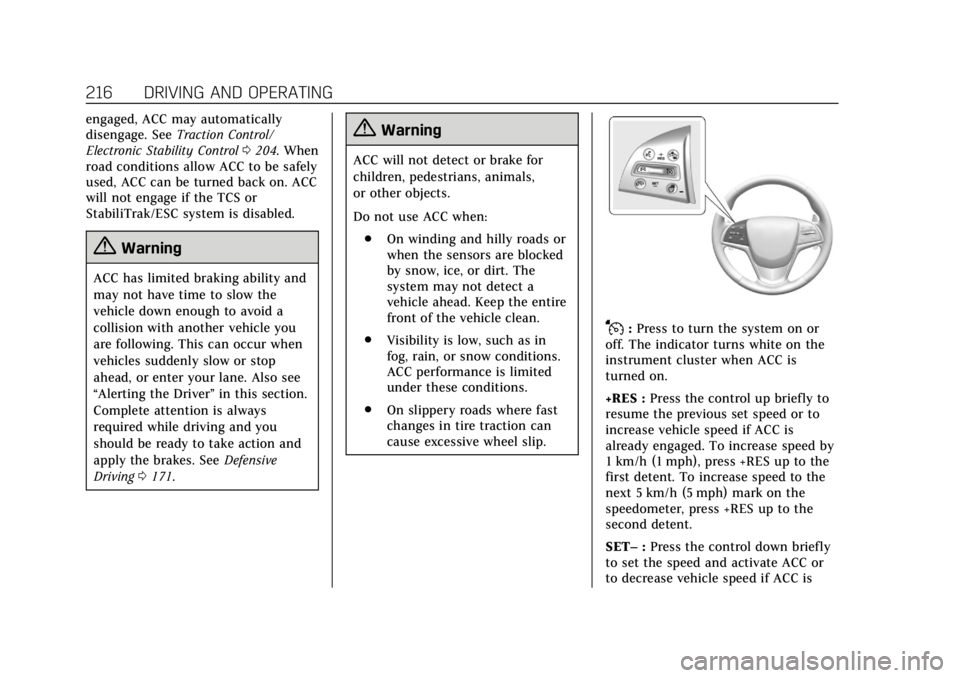
J:Press to turn the system on or
off. The indicator turns white on the
instrument cluster when ACC is
turned on.
+RES : Press the control up briefly to
resume the previous set speed or to
increase vehicle speed if ACC is
already engaged. To increase speed by
1 km/h (1 mph), press +RES up to the
first detent. To increase speed to the
next 5 km/h (5 mph) mark on the
speedometer, press +RES up to the
second detent.
SET– :Press the control down briefly
to set the speed and activate ACC or
to decrease vehicle speed if ACC is
Page 218 of 384

Cadillac ATS/ATS-V Owner Manual (GMNA-Localizing-U.S./Canada/Mexico-
12460272) - 2019 - crc - 5/8/18
DRIVING AND OPERATING 217
already engaged. To decrease speed by
1 km/h (1 mph), press SET−down to
the first detent. To decrease speed to
the next 5 km/h (5 mph) mark on the
speedometer, press SET− down to the
second detent.
*: Press to disengage ACC without
erasing the set speed from memory.
[: Press to select a following gap
time (or distance) setting for ACC of
Far, Medium, or Near.
The speedometer reading can be
displayed in either English or metric
units. See Instrument Cluster 0113.
The increment value used depends on
the units displayed.
Switching Between ACC and
Regular Cruise Control
To switch between ACC and regular
cruise control, press and hold
*.
A Driver Information Display (DIC)
message displays. See Vehicle Messages
0 134.
ACC IndicatorRegular Cruise
Control Indicator
When ACC is engaged, a green
\
indicator will be lit on the instrument
cluster. When the regular cruise
control is engaged, a green
J
indicator will be lit on the instrument
cluster.
When the vehicle is turned on, the
cruise control mode will be set to the
last mode used before the vehicle was
turned off.
{Warning
Always check the cruise control
indicator on the instrument cluster
to determine which mode cruise
control is in before using the
feature. If ACC is not active, the (Continued)
Warning (Continued)
vehicle will not automatically brake
for other vehicles, which could
cause a crash if the brakes are not
applied manually. You and others
could be seriously injured or killed.
Setting Adaptive Cruise Control
If
Jis on when not in use, it could
get pressed and go into ACC when not
desired. Keep
Joff when cruise is
not being used.
Select the set speed desired for ACC.
This is the vehicle speed when no
vehicle is detected in its path.
ACC will not set at a speed less than
25 km/h (16 mph), although it can be
resumed when driving at lower
speeds.
To set ACC:
1. Press
J.
2. Get up to the desired speed.
3. Press and release SET–.