traction control CADILLAC ATS 2019 Owner's Guide
[x] Cancel search | Manufacturer: CADILLAC, Model Year: 2019, Model line: ATS, Model: CADILLAC ATS 2019Pages: 384, PDF Size: 6.11 MB
Page 209 of 384

Cadillac ATS/ATS-V Owner Manual (GMNA-Localizing-U.S./Canada/Mexico-
12460272) - 2019 - crc - 5/8/18
208 DRIVING AND OPERATING
Modes:TOUR
Default SPORT SNOW/ICE TRACK
Throttle Progression TourTour Snow/Ice Track
Transmission Shift Mode TourSport TourTrack
Steering (Assist Effort) TourSport TourTrack
Magnetic Ride Control (if equipped) TourSport TourTrack
Launch Control (V-Series Only) NANANAAvailable
Stability Control TourTourTourTrack
Performance Traction Management (if
equipped) (V-Series Only) NA
NANAAvailable
Engine Sound Management NANANAAvailable
Driver Mode Selector Attributes
Affected
The Gauge Cluster Display is
configured for each mode when linked
(default):
Throttle Progression
Adjusts throttle sensitivity by
selecting how quick or slow the
throttle reacts to input. .
Snow/Ice - The accelerator pedal
will reduce engine torque at small
pedal inputs. This allows better
wheel control on slippery surfaces.
. Track - The accelerator pedal is
adjusted to give maximum control
during the highest level of spirited
driving. Transmission Shift Mode
Sport or Track
–Performance Mode
Lift Foot (PMLF) allows the
transmission to hold the current gear
after a quick release of a heavily
applied accelerator pedal. This
provides greater engine braking and
enhanced vehicle control without
using the paddles. Performance
Algorithm Shift (PAS) recognizes
aggressive cornering, heavy braking,
and high acceleration to select and
Page 210 of 384

Cadillac ATS/ATS-V Owner Manual (GMNA-Localizing-U.S./Canada/Mexico-
12460272) - 2019 - crc - 5/8/18
DRIVING AND OPERATING 209
hold lower gears when not using
paddles. The shifts are also firmer to
increase the quickness of shifting.
Steering (Assist Effort)
Adjusts from a lighter steering feel in
Tour mode to reduced assist in Sport
and Track mode for more
steering feel.
Magnetic Ride Control (If Equipped)
Adjusts the shock dampening
firmness from a comfort tune in Tour
mode to an optimized responsiveness
tune in Sport and Track.
Launch Control (V-Series Only)
Available only in Track mode for
maximum“off-the-line ”acceleration
when in Competitive Driving Mode
or PTM.
Stability Control
. Competitive Driving Mode allows
less computer control to permit
some slide and drift and is
selected with the button –only
available in Track mode. .
StabiliTrak/ESC can be turned off
by pressing and holding the
button for five seconds.
PTM (Performance Traction
Management) (If equipped)
(V-Series Only)
. Available in Track mode.
. There are five selectable settings.
Driver Mode Customization
The Engine Sound Management,
steering, and suspension drive modes
can be set to the driver’s preference.
See “Driving Mode ”under Vehicle
Personalization 0135.
When in the Track main vehicle mode,
you cannot overwrite the Steering or
Suspension settings. These settings
are designed to interact with the
advanced functions in the Track Mode
and cannot be overwritten.
The selections made in the Driving
Mode menu overwrite the main
vehicle mode selection via the buttons
or switch on the center console. In
order to customize and overwrite,
select one of the three settings by
touching the infotainment display. When in the customization screen for
each system, select one of four
options:
.
Auto (follows the MODE button)
. Tour
. Sport
. Track
The default will be to follow the
vehicle MODE button switch settings,
but the main vehicle mode selection
for the currently selected system can
be overwritten using this menu. The
settings selected in this menu will set
the vehicle behavior in all selected
vehicle modes, and will be retained
over each ignition cycle. They do not
have to be reset each time the vehicle
is started.
Competitive Driving Mode
(FE3 Only)
To select this optional handling mode,
press
Yquickly two times and the
DIC will display the appropriate
message. While in the Competitive
Driving Mode, the traction off light
i
Page 211 of 384

Cadillac ATS/ATS-V Owner Manual (GMNA-Localizing-U.S./Canada/Mexico-
12460272) - 2019 - crc - 5/8/18
210 DRIVING AND OPERATING
and StabiliTrak/ESC OFF lightgwill
come on in the instrument cluster.
TCS does not limit wheel spin, the
Electronic Limited-Slip Differential
(eLSD) allows increased vehicle agility,
and more effort is required to turn the
steering wheel. See “Limited-Slip Axle
(V-Series Only)” later in this section.
Adjust your driving accordingly.
Press
Yagain, or turn the ignition to
ACC/ACCESSORY and restart the
vehicle, to turn TCS back on. The
traction off light
iand StabiliTrak/
ESC OFF light
gwill go out in the
instrument cluster.
Caution
When traction control is turned off,
or Competitive Driving Mode is
active, it is possible to lose traction.
Performance Traction
Management (V-Series Only)
Performance Traction Management
(PTM) integrates the Traction Control,
StabiliTrak/Electronic Stability Control (ESC), and Magnetic Ride Control
systems to provide improved and
consistent performance when
cornering. The amount of available
engine power is based on the mode
selected, track conditions, driver skill,
and the radius of each corner.
This light is on when the vehicle is in
the PTM mode.
To select this optional handling mode,
the vehicle mode must be Track. Then
quickly press
Yon the steering
wheel two times. PERF TRAC 1 - WET
ACTIVE HANDLING ON displays in
the DIC.
When PTM is active, the up and down
buttons will no longer change Drive
Modes, but instead change PTM
modes. To select a mode while in PTM, press
the Driver Mode Control/PTM buttons
on the center console.
To experience the performance benefit
of this system, after entering a curve
and at the point where normal
acceleration occurs, fully push the
accelerator pedal. The PTM system
will modify the level of engine power
for a smooth and consistent
corner exit.
The PTM system contains five modes.
These modes are selected by pressing
the Driver Mode Control/PTM buttons
on the center console. Scroll up or
down through modes 1-5 by pressing
the MODE up and down button. The
following is a DIC display description
and the recommended usage of
each mode:
PERF TRAC 1
–WET ACTIVE
HANDLING ON
. Intended for all driver skill levels.
. Wet or damp conditions only —
not intended for use in heavy rain
or standing water.
. StabiliTrak/ESC is on.
Page 212 of 384

Cadillac ATS/ATS-V Owner Manual (GMNA-Localizing-U.S./Canada/Mexico-
12460272) - 2019 - crc - 5/8/18
DRIVING AND OPERATING 211
PERF TRAC 2–DRY ACTIVE
HANDLING ON
. For use by less experienced drivers
or while learning a new track.
. Dry conditions only.
. StabiliTrak/ESC is on.
PERF TRAC 3 –SPORT ACTIVE
HANDLING ON
. For use by drivers who are familiar
with the track.
. Dry conditions only.
. Requires more driving skill than
mode 2.
. StabiliTrak/ESC is on.
PERF TRAC 4 –SPORT ACTIVE
HANDLING OFF
. For use by drivers who are familiar
with the track.
. Dry conditions only.
. Requires more driving skill than
modes 2 or 3.
. StabiliTrak/ESC is off.
PERF TRAC 5 –RACE ACTIVE
HANDLING OFF
. For use by experienced drivers
who are familiar with the track.
. Dry conditions only.
. Requires more driving skill than in
other modes.
. StabiliTrak/ESC is off.
Press and release
Yto turn off PTM
and return to the traction control and
StabiliTrak/ESC systems. The traction
off light
iand StabiliTrak/ESC OFF
light
gwill go out.
Launch Control (V-Series Only)
A Launch Control feature is available,
within Competitive Driving Mode
(V-Series) or Performance Traction
Management (V-Series), to allow the
driver to achieve high levels of vehicle
acceleration in a straight line. Launch
Control is a form of traction control
that manages tire spin while
launching the vehicle. This feature is
intended for use during closed course race events where consistent zero to
60 and quarter mile times are
desirable.
Launch Control is only available when
the following criteria are met:
.
Competitive Driving Mode is
selected (V-Series) or any of the
Performance Traction
Management modes are selected
(V-Series). The TCS light comes on
in the instrument cluster and the
appropriate DIC message displays.
. The vehicle is not moving.
. The steering wheel is pointing
straight.
Manual Transmissions
. The clutch is pressed and the
vehicle is in 1 (First) gear.
. The accelerator pedal is rapidly
applied to wide open throttle.
The Launch Control feature will
initially limit engine speed as the
driver rapidly applies the accelerator
pedal to wide open throttle. Allow the
engine rpm to stabilize. A smooth,
quick release of the clutch, while
Page 213 of 384
Cadillac ATS/ATS-V Owner Manual (GMNA-Localizing-U.S./Canada/Mexico-
12460272) - 2019 - crc - 5/8/18
212 DRIVING AND OPERATING
maintaining the fully pressed
accelerator pedal, will manage wheel
slip. Complete shifts as described in
Manual Transmission0198.
Automatic Transmissions
. The brake pedal must be firmly
pressed to the floor, equivalent to
a panic brake event.
. The accelerator pedal is rapidly
applied to wide open throttle. (If
the vehicle rolls due to wide open
throttle, release the throttle, press
the brake pedal more firmly, and
re-apply the accelerator to wide
open throttle.)
The Launch Control feature will
initially limit engine speed as the
driver rapidly applies the accelerator
pedal to wide open throttle. Allow the
engine rpm to stabilize. A smooth,
quick release of the brake pedal, while
maintaining the fully pressed
accelerator pedal, will manage
wheel slip.
After the vehicle is launched, the
system continues in Performance
Traction Management (V-Series). Competitive Driving Mode, PTM, and
Launch Control are systems designed
for a closed course race track and not
intended for use on public roads. The
systems are not intended to
compensate for lack of driver
experience or familiarity with the race
track.
Limited-Slip Rear Axle
(Except V-Series)
If equipped, the mechanical
limited-slip differential can give more
traction on snow, mud, ice, sand,
or gravel. It works like a standard axle
most of the time, but when traction is
low, this feature allows the drive
wheel with the most traction to move
the vehicle. For vehicles with
limited-slip differential, driven under
severe conditions, the rear axle fluid
should be changed.
See
Competitive Driving Mode (FE3
Only) 0209 and Maintenance Schedule
0 327.
Limited-Slip Rear Axle
(V-Series Only)
If equipped, the Electronic
Limited-Slip Differential (eLSD) is
automatically activated. eLSD actively
monitors vehicle sensors and driver
inputs to determine the amount of
change for the conditions. With eLSD,
the vehicle has:
.
Enhanced high-speed control.
. Improved traction through
corners, allowing more
acceleration.
. More precise steering.
. Increased vehicle agility.
. Integration with StabiliTrak/
Electronic Stability Control (ESC).
For vehicles with eLSD, driven under
severe conditions, the rear axle fluid
should be changed.
See Competitive Driving Mode (FE3
Only) 0209 and Maintenance Schedule
0 327.
Page 214 of 384

Cadillac ATS/ATS-V Owner Manual (GMNA-Localizing-U.S./Canada/Mexico-
12460272) - 2019 - crc - 5/8/18
DRIVING AND OPERATING 213
Cruise Control
With cruise control, a speed of about
40 km/h (25 mph) or more can be
maintained without keeping your foot
on the accelerator. Cruise control does
not work at speeds below about
40 km/h (25 mph).
{Warning
Cruise control can be dangerous
where you cannot drive safely at a
steady speed. Do not use cruise
control on winding roads or in
heavy traffic.
Cruise control can be dangerous on
slippery roads. On such roads, fast
changes in tire traction can cause
excessive wheel slip, and you could
lose control. Do not use cruise
control on slippery roads.If equipped with a manual
transmission and 2.0L L4 engine
(LTG), the cruise control will remain
active when the gears are shifted. The
cruise is deactivated if the clutch is
pressed for several seconds. In an
ATS-V Series vehicle, cruise control is
canceled immediately with the
activation of the clutch pedal.
If the StabiliTrak/Electronic Stability
Control (ESC) system begins to limit
wheel spin while using cruise control,
the cruise control automatically
disengages. See
Traction Control/
Electronic Stability Control 0204. If a
collision alert occurs when cruise
control is activated, cruise control is
disengaged. See Forward Collision Alert
(FCA) System 0228. When road
conditions allow you to safely use it
again, cruise control can be turned
back on.
Turning off the TCS or StabiliTrak/
ESC system will disengage cruise
control.
If the brakes are applied, cruise
control disengages.
J: Press to turn the system on and
off. A white cruise control indicator
appears in the instrument cluster
when cruise is turned on.
+RES : If there is a set speed in
memory, press the control up briefly
to resume that speed or hold to
accelerate. If cruise control is already
active, use to increase vehicle speed.
To increase speed by 1 km/h (1 mph),
press +RES up to the first detent. To
increase speed to the next 5 km/h
(5 mph) mark on the speedometer,
press +RES up to the second detent.
Page 216 of 384
Cadillac ATS/ATS-V Owner Manual (GMNA-Localizing-U.S./Canada/Mexico-
12460272) - 2019 - crc - 5/8/18
DRIVING AND OPERATING 215
For each press, the vehicle speed
decreases to the next 5 km/h
(5 mph) mark on the speedometer.
The cruise control system may
automatically brake to slow the
vehicle down (ATS model only).
The speedometer reading can be
displayed in either English or metric
units. See Instrument Cluster 0113.
The increment value used depends on
the units displayed.
Passing Another Vehicle While
Using Cruise Control
Use the accelerator pedal to increase
the vehicle speed. When you take your
foot off the pedal, the vehicle will slow
down to the previously set cruise
speed. While pressing the accelerator
pedal or shortly following the release
to override cruise control, briefly
applying the SET– control will result
in cruise control set to the current
vehicle speed.
Using Cruise Control on Hills
How well cruise control will work on
hills depends upon the vehicle speed,
load, and the steepness of the hills. When going up steep hills, you might
have to step on the accelerator pedal
to maintain the vehicle speed. When
going downhill, the cruise control
system may automatically brake (ATS
only), and the transmission may
downshift to a lower gear, to slow the
vehicle down. Also, you may have to
brake or shift to a lower gear to keep
the vehicle speed down. If the brake
pedal is applied, cruise control will
disengage.
Ending Cruise Control
There are five ways to end cruise
control:
.
Step lightly on the brake pedal
(manual and automatic
transmissions).
. Press the clutch pedal for several
seconds or shift to Neutral
(manual transmissions).
. Shift the transmission to
N (Neutral).
. Press
*.
. Press
J. Erasing Speed Memory
The cruise control set speed is erased
from memory if
Jis pressed or if
the ignition is turned off.
Adaptive Cruise Control
If equipped with Adaptive Cruise
Control (ACC), it allows for selecting
the cruise control set speed and
following gap. Read this entire section
before using this system. ACC uses a
camera and radar sensors to detect
other vehicles. See Radio Frequency
Statement 0356. The following gap is
the following time (or distance)
between your vehicle and a vehicle
detected directly ahead in your path,
moving in the same direction. If no
vehicle is detected in your path, ACC
works like regular cruise control.
If a vehicle is detected in your path,
ACC can speed up the vehicle or apply
limited, moderate braking to maintain
the selected following gap. To
disengage ACC, apply the brake. If the
Traction Control System (TCS) or
StabiliTrak/Electronic Stability Control
(ESC) system activates while ACC is
Page 217 of 384
Cadillac ATS/ATS-V Owner Manual (GMNA-Localizing-U.S./Canada/Mexico-
12460272) - 2019 - crc - 5/8/18
216 DRIVING AND OPERATING
engaged, ACC may automatically
disengage. SeeTraction Control/
Electronic Stability Control 0204. When
road conditions allow ACC to be safely
used, ACC can be turned back on. ACC
will not engage if the TCS or
StabiliTrak/ESC system is disabled.
{Warning
ACC has limited braking ability and
may not have time to slow the
vehicle down enough to avoid a
collision with another vehicle you
are following. This can occur when
vehicles suddenly slow or stop
ahead, or enter your lane. Also see
“Alerting the Driver” in this section.
Complete attention is always
required while driving and you
should be ready to take action and
apply the brakes. See Defensive
Driving 0171.
{Warning
ACC will not detect or brake for
children, pedestrians, animals,
or other objects.
Do not use ACC when:
. On winding and hilly roads or
when the sensors are blocked
by snow, ice, or dirt. The
system may not detect a
vehicle ahead. Keep the entire
front of the vehicle clean.
. Visibility is low, such as in
fog, rain, or snow conditions.
ACC performance is limited
under these conditions.
. On slippery roads where fast
changes in tire traction can
cause excessive wheel slip.
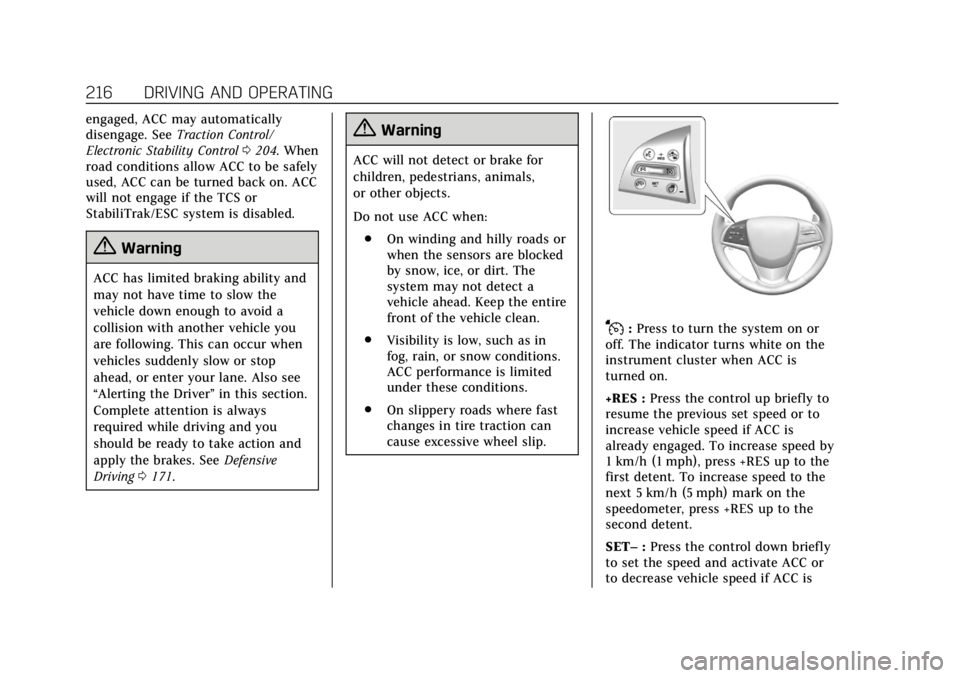
J:Press to turn the system on or
off. The indicator turns white on the
instrument cluster when ACC is
turned on.
+RES : Press the control up briefly to
resume the previous set speed or to
increase vehicle speed if ACC is
already engaged. To increase speed by
1 km/h (1 mph), press +RES up to the
first detent. To increase speed to the
next 5 km/h (5 mph) mark on the
speedometer, press +RES up to the
second detent.
SET– :Press the control down briefly
to set the speed and activate ACC or
to decrease vehicle speed if ACC is
Page 221 of 384
Cadillac ATS/ATS-V Owner Manual (GMNA-Localizing-U.S./Canada/Mexico-
12460272) - 2019 - crc - 5/8/18
220 DRIVING AND OPERATING
vehicle in front of you, but will not
exceed the set speed. It may apply
limited braking, if necessary. When
braking is active, the brake lamps will
come on. The automatic braking may
feel or sound different than if the
brakes were applied manually. This is
normal.
Stationary or Very Slow-Moving
Objects
{Warning
ACC may not detect and react to
stopped or slow-moving vehicles
ahead of you. For example, the
system may not brake for a vehicle
it has never detected moving. This
can occur in stop-and-go traffic or
when a vehicle suddenly appears
due to a vehicle ahead changing
lanes. Your vehicle may not stop
and could cause a crash. Use
caution when using ACC. Your
complete attention is always
required while driving and you
should be ready to take action and
apply the brakes.ACC Automatically Disengages
ACC may automatically disengage and
the driver will need to manually apply
the brakes to slow the vehicle if:
.
The sensors are blocked.
. The Traction Control System (TCS)
or StabiliTrak/ESC system has
activated or been disabled.
. There is a fault in the system.
. The radar falsely reports a
blockage when driving in a desert
or remote area with no other
vehicles or roadside objects. A DIC
message may display to indicate
that ACC is temporarily
unavailable.
The ACC active symbol will turn white
when ACC is no longer active.
Notification to Resume ACC
ACC will maintain a follow gap behind
a detected vehicle and slow your
vehicle to a stop behind that vehicle.
If the stopped vehicle ahead has
driven away and ACC has not
resumed, the vehicle ahead indicator
will flash as a reminder to check traffic before proceeding. In addition,
the left and right sides of the Safety
Alert Seat will pulse three times,
or three beeps will sound. See
“Switching Between ACC and Regular
Cruise Control
”previously in this
section. See “Alert Type”and
“Adaptive Cruise Go Notifier” in
“Collision/Detection Systems” under
Vehicle Personalization 0135.
When the vehicle ahead drives away,
press +RES or the accelerator pedal to
resume ACC. If stopped for more than
two minutes or if the driver door is
opened and the driver seat belt is
unbuckled, the ACC automatically
applies the Electric Parking Brake
(EPB) to hold the vehicle. The EPB
status light will turn on.
See Parking Brake (Electric) 0201 or
Parking Brake (Manual) 0203. To
resume ACC and release the EPB,
press the accelerator pedal. ACC can
be resumed when the vehicle is
traveling greater than 5 km/h (3 mph).
A DIC warning message may display
indicating to shift to P (Park) before
exiting the vehicle. See Vehicle
Messages 0134.
Page 245 of 384
Cadillac ATS/ATS-V Owner Manual (GMNA-Localizing-U.S./Canada/Mexico-
12460272) - 2019 - crc - 5/8/18
244 VEHICLE CARE
California Perchlorate
Materials Requirements
Certain types of automotive
applications, such as airbag initiators,
seat belt pretensioners, and lithium
batteries contained in Remote Keyless
Entry transmitters, may contain
perchlorate materials. Special
handling may be necessary. For
additional information, see
www.dtsc.ca.gov/hazardouswaste/
perchlorate.
Accessories and
Modifications
Adding non-dealer accessories or
making modifications to the vehicle
can affect vehicle performance and
safety, including such things as
airbags, braking, stability, ride and
handling, emissions systems,
aerodynamics, durability, and
electronic systems like antilock
brakes, traction control, and stability
control. These accessories or
modifications could even cause
malfunction or damage not covered by
the vehicle warranty.Damage to suspension components
caused by modifying vehicle height
outside of factory settings will not be
covered by the vehicle warranty.
Damage to vehicle components
resulting from modifications or the
installation or use of non-GM certified
parts, including control module or
software modifications, is not covered
under the terms of the vehicle
warranty and may affect remaining
warranty coverage for affected parts.
GM Accessories are designed to
complement and function with other
systems on the vehicle. See your
dealer to accessorize the vehicle using
genuine GM Accessories installed by a
dealer technician.
Also, see
Adding Equipment to the
Airbag-Equipped Vehicle 082.
Vehicle Checks
Doing Your Own
Service Work
{Warning
It can be dangerous to work on
your vehicle if you do not have the
proper knowledge, service manual,
tools, or parts. Always follow
owner’s manual procedures and
consult the service manual for your
vehicle before doing any
service work.
If doing some of your own service
work, use the proper service manual.
It tells you much more about how to
service the vehicle than this manual
can. To order the proper service
manual, see Publication Ordering
Information 0355.
This vehicle has an airbag system.
Before attempting to do your own
service work, see Servicing the
Airbag-Equipped Vehicle 082.