seats CADILLAC ATS 2019 Repair Manual
[x] Cancel search | Manufacturer: CADILLAC, Model Year: 2019, Model line: ATS, Model: CADILLAC ATS 2019Pages: 384, PDF Size: 6.11 MB
Page 100 of 384
Cadillac ATS/ATS-V Owner Manual (GMNA-Localizing-U.S./Canada/Mexico-
12460272) - 2019 - crc - 5/8/18
SEATS AND RESTRAINTS 99
When using the lap-shoulder belt to
secure the child restraint in this
position, follow the instructions that
came with the child restraint and the
following instructions:1. Move the seat as far back as it will go before securing the
forward-facing child restraint.
Move the seat upward or the
seatback to an upright position,
if needed, to get a tight
installation of the child restraint.
When the passenger sensing
system has turned off the front
outboard passenger frontal
airbag and knee airbag, the OFF
indicator on the passenger airbag
status indicator should light and
stay lit when you start the
vehicle. See Passenger Airbag
Status Indicator 0119.
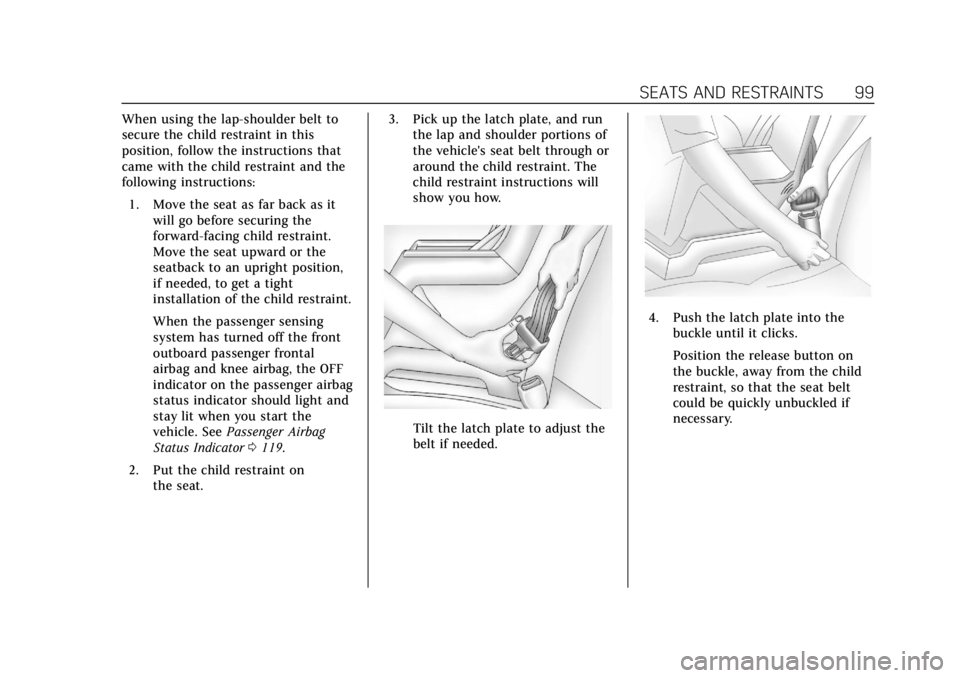
2. Put the child restraint on the seat. 3. Pick up the latch plate, and run
the lap and shoulder portions of
the vehicle's seat belt through or
around the child restraint. The
child restraint instructions will
show you how.
Tilt the latch plate to adjust the
belt if needed.
4. Push the latch plate into the
buckle until it clicks.
Position the release button on
the buckle, away from the child
restraint, so that the seat belt
could be quickly unbuckled if
necessary.
Page 101 of 384
Cadillac ATS/ATS-V Owner Manual (GMNA-Localizing-U.S./Canada/Mexico-
12460272) - 2019 - crc - 5/8/18
100 SEATS AND RESTRAINTS
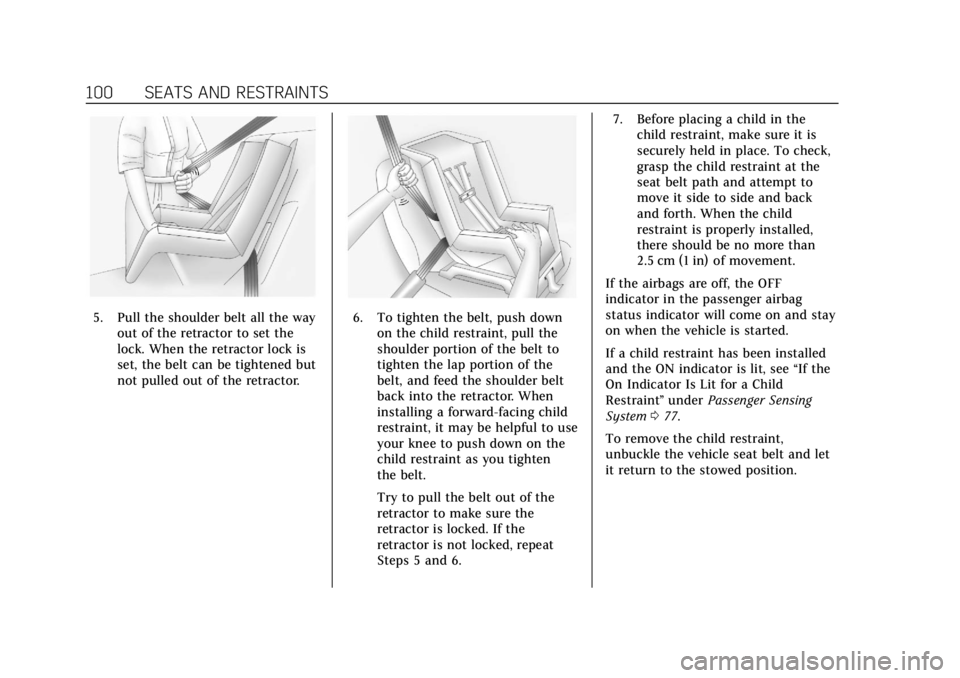
5. Pull the shoulder belt all the wayout of the retractor to set the
lock. When the retractor lock is
set, the belt can be tightened but
not pulled out of the retractor.6. To tighten the belt, push downon the child restraint, pull the
shoulder portion of the belt to
tighten the lap portion of the
belt, and feed the shoulder belt
back into the retractor. When
installing a forward-facing child
restraint, it may be helpful to use
your knee to push down on the
child restraint as you tighten
the belt.
Try to pull the belt out of the
retractor to make sure the
retractor is locked. If the
retractor is not locked, repeat
Steps 5 and 6. 7. Before placing a child in the
child restraint, make sure it is
securely held in place. To check,
grasp the child restraint at the
seat belt path and attempt to
move it side to side and back
and forth. When the child
restraint is properly installed,
there should be no more than
2.5 cm (1 in) of movement.
If the airbags are off, the OFF
indicator in the passenger airbag
status indicator will come on and stay
on when the vehicle is started.
If a child restraint has been installed
and the ON indicator is lit, see “If the
On Indicator Is Lit for a Child
Restraint ”under Passenger Sensing
System 077.
To remove the child restraint,
unbuckle the vehicle seat belt and let
it return to the stowed position.
Page 106 of 384
Cadillac ATS/ATS-V Owner Manual (GMNA-Localizing-U.S./Canada/Mexico-
12460272) - 2019 - crc - 5/8/18
INSTRUMENTS AND CONTROLS 105
Controls
Steering Wheel Adjustment
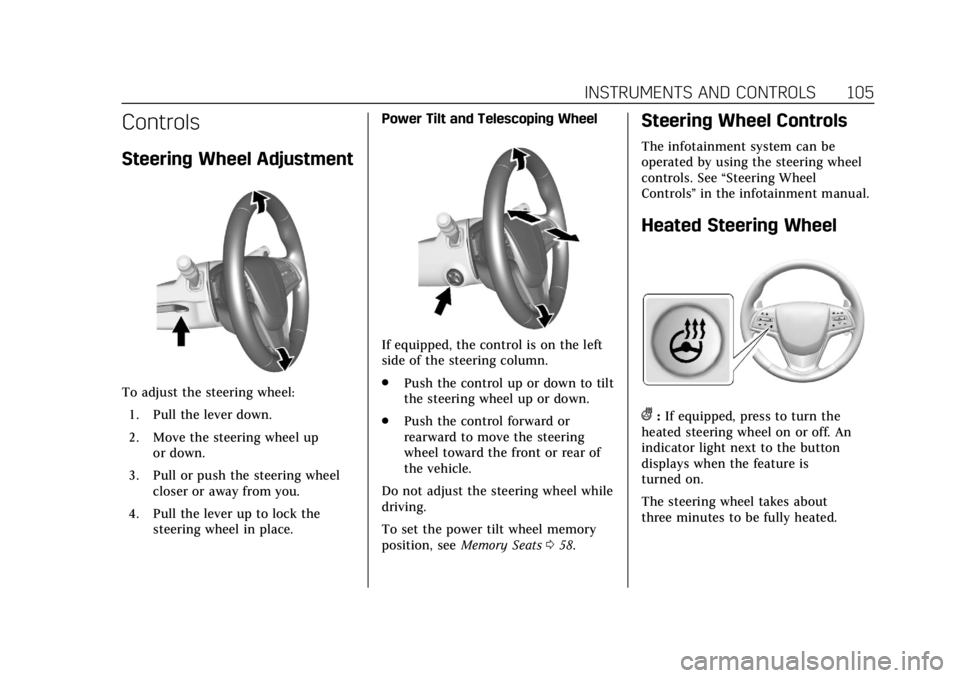
To adjust the steering wheel:1. Pull the lever down.
2. Move the steering wheel up or down.
3. Pull or push the steering wheel closer or away from you.
4. Pull the lever up to lock the steering wheel in place. Power Tilt and Telescoping Wheel
If equipped, the control is on the left
side of the steering column.
.
Push the control up or down to tilt
the steering wheel up or down.
. Push the control forward or
rearward to move the steering
wheel toward the front or rear of
the vehicle.
Do not adjust the steering wheel while
driving.
To set the power tilt wheel memory
position, see Memory Seats 058.
Steering Wheel Controls
The infotainment system can be
operated by using the steering wheel
controls. See “Steering Wheel
Controls ”in the infotainment manual.
Heated Steering Wheel
(:If equipped, press to turn the
heated steering wheel on or off. An
indicator light next to the button
displays when the feature is
turned on.
The steering wheel takes about
three minutes to be fully heated.
Page 107 of 384
Cadillac ATS/ATS-V Owner Manual (GMNA-Localizing-U.S./Canada/Mexico-
12460272) - 2019 - crc - 5/8/18
106 INSTRUMENTS AND CONTROLS
If equipped with a remote start heated
steering wheel, the heated steering
wheel will turn on automatically in
remote start along with the heated
seats when it is cold outside. The
heated steering wheel indicator light
may not come on. SeeHeated Front
Seats 061.
Horn
Pressaon the steering wheel pad to
sound the horn.
Windshield Wiper/Washer
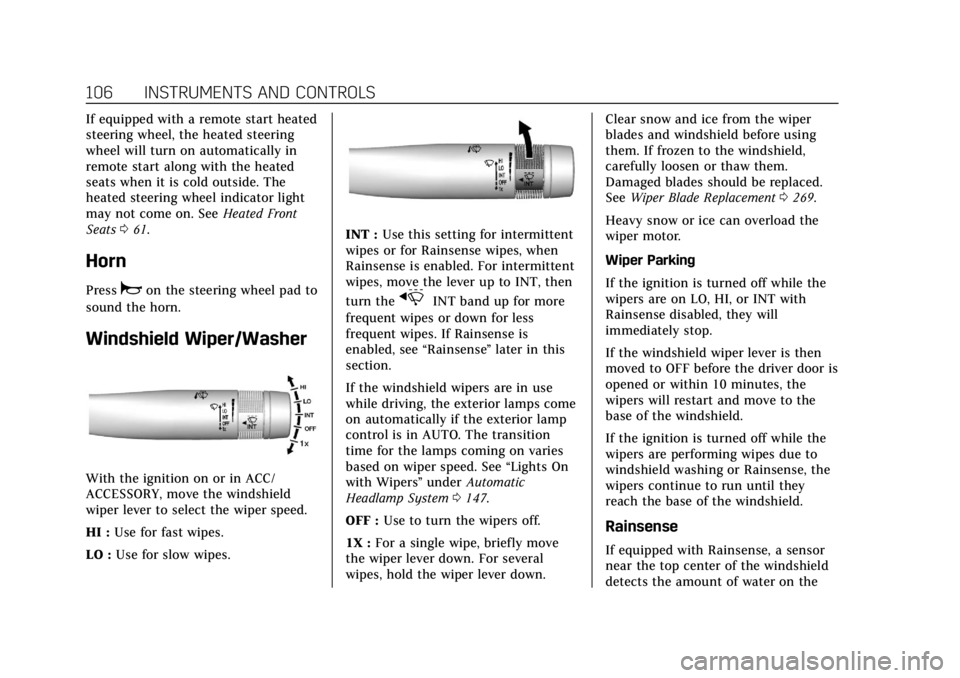
With the ignition on or in ACC/
ACCESSORY, move the windshield
wiper lever to select the wiper speed.
HI : Use for fast wipes.
LO : Use for slow wipes.
INT : Use this setting for intermittent
wipes or for Rainsense wipes, when
Rainsense is enabled. For intermittent
wipes, move the lever up to INT, then
turn the
xINT band up for more
frequent wipes or down for less
frequent wipes. If Rainsense is
enabled, see “Rainsense”later in this
section.
If the windshield wipers are in use
while driving, the exterior lamps come
on automatically if the exterior lamp
control is in AUTO. The transition
time for the lamps coming on varies
based on wiper speed. See “Lights On
with Wipers ”under Automatic
Headlamp System 0147.
OFF : Use to turn the wipers off.
1X : For a single wipe, briefly move
the wiper lever down. For several
wipes, hold the wiper lever down. Clear snow and ice from the wiper
blades and windshield before using
them. If frozen to the windshield,
carefully loosen or thaw them.
Damaged blades should be replaced.
See
Wiper Blade Replacement 0269.
Heavy snow or ice can overload the
wiper motor.
Wiper Parking
If the ignition is turned off while the
wipers are on LO, HI, or INT with
Rainsense disabled, they will
immediately stop.
If the windshield wiper lever is then
moved to OFF before the driver door is
opened or within 10 minutes, the
wipers will restart and move to the
base of the windshield.
If the ignition is turned off while the
wipers are performing wipes due to
windshield washing or Rainsense, the
wipers continue to run until they
reach the base of the windshield.
Rainsense
If equipped with Rainsense, a sensor
near the top center of the windshield
detects the amount of water on the
Page 137 of 384

Cadillac ATS/ATS-V Owner Manual (GMNA-Localizing-U.S./Canada/Mexico-
12460272) - 2019 - crc - 5/8/18
136 INSTRUMENTS AND CONTROLS
The menu may contain the following:
Driving Mode
These settings will overwrite the main
Vehicle Mode selections made with
the MODE button on the console.
Touch and the following may display:
.Engine Sound Management
. Steering
. Suspension
Engine Sound Management
This setting adjusts the sound of the
engine exhaust from a quiet to a loud
exhaust volume.
Touch Auto (follows the MODE
button), Tour, Sport, or Track.
Steering
This setting adjusts how the steering
feels from a lighter to a reduced assist
for more steering feel.
Touch Auto (follows the MODE
button), Tour, Sport, or Track. Suspension
This setting adjusts the suspension
from a comfortable to a more
responsive tune.
Touch Auto (follows the MODE
button), Tour, Sport, or Track.
Climate and Air Quality
Touch and the following may display:
.
Auto Fan Speed
. Air Quality Sensor
. Auto Heated Seats
. Auto Defog
. Auto Rear Defog
Auto Fan Speed
This setting specifies the amount of
airf low when the climate control fan
setting is Auto Fan.
Touch Low, Medium, or High.
Air Quality Sensor
This setting switches the system into
Recirculation Mode based on the
quality of the outside air. Touch Off, Low Sensitivity, or High
Sensitivity.
Auto Heated Seats
This setting automatically turns on
and regulates the heated seats when
the cabin temperature is cool. The
auto heated seats can be turned off by
using the heated seat buttons on the
center stack. See
Heated Front Seats
0 61.
If equipped with auto heated steering
wheel, this feature will turn on when
the auto heated seats turn on.
Touch Off or On.
Auto Defog
This setting automatically turns the
front defogger on when the engine is
started.
Touch Off or On.
Auto Rear Defog
This setting automatically turns the
rear defogger on when the engine is
started.
Touch Off or On.
Page 138 of 384

Cadillac ATS/ATS-V Owner Manual (GMNA-Localizing-U.S./Canada/Mexico-
12460272) - 2019 - crc - 5/8/18
INSTRUMENTS AND CONTROLS 137
Collision/Detection Systems
Touch and the following may display:
.Alert Type
. Forward Collision System
. Adaptive Cruise Go Notifier
. Lane Change Alert
. Rear Camera Park Assist Symbols
. Rear Cross Traffic Alert
Alert Type
This setting specifies the type of
vehicle feedback provided, either a
beep or seat vibration, when you are
in danger of colliding with an object.
Touch Beeps or Safety Alert Seat.
Forward Collision System
This setting controls the vehicle
response when detecting a vehicle
ahead of you. The Off setting disables
all FCA and FAB functions. With the
Alert and Brake setting, both FCA and
FAB are available. The Alert setting
disables FAB. See Forward Automatic
Braking (FAB) 0231.
Touch Off, Alert, or Alert and Brake. Adaptive Cruise Go Notifier
This setting determines if an alert will
appear when Adaptive Cruise Control
brings the vehicle to a complete stop
and the vehicle ahead of you starts
moving again. See
Adaptive Cruise
Control 0215.
Touch Off or On.
Lane Change Alert
This setting specifies if an alert will
display on the outside mirror to help
you avoid crashing into a vehicle in
your blind spot, or rapidly
approaching your blind spot, during a
lane change maneuver. See Lane
Change Alert (LCA) 0232.
Touch Off or On.
Rear Camera Park Assist Symbols
This setting enables the Rear Camera
Park Assist Symbols. See Assistance
Systems for Parking or Backing 0224.
Touch Off or On. Rear Cross Traffic Alert
This setting specifies if an alert will
display when the vehicle detects
approaching rear cross traffic when in
R (Reverse). See
Assistance Systems for
Parking or Backing 0224.
Touch Off or On.
Comfort and Convenience
Touch and the following may display:
. Auto Memory Recall
. Easy Exit Options
. Chime Volume
. Reverse Tilt Mirror
. Rain Sense Wipers
Auto Memory Recall
This feature automatically recalls the
current driver’s previously stored 1 or
2 button positions when the ignition
is changed from off to on or ACC/
ACCESSORY. See Memory Seats058.
Touch Off or On.
Page 139 of 384

Cadillac ATS/ATS-V Owner Manual (GMNA-Localizing-U.S./Canada/Mexico-
12460272) - 2019 - crc - 5/8/18
138 INSTRUMENTS AND CONTROLS
Easy Exit Options
This feature automatically recalls the
previously stored exit button position
when exiting the vehicle. SeeMemory
Seats 058.
Touch Off or On.
Chime Volume
This setting determines the chime
volume level.
Touch the controls on the
infotainment system to adjust the
volume.
Reverse Tilt Mirror
When on, both the driver and
passenger, driver, or passenger outside
mirrors will tilt downward when the
vehicle is shifted to R (Reverse) to
improve visibility of the ground near
the rear wheels. They will return to
their previous driving position when
the vehicle is shifted out of
R (Reverse) or the engine is turned off.
Touch Off, On - Driver and Passenger,
On - Driver, or On - Passenger. Rain Sense Wipers
This setting automatically turns on
the wipers when moisture is detected
and the wiper switch is in
intermittent mode.
Touch Disabled or Enabled.
Lighting
Touch and the following may display:
.
Vehicle Locator Lights
. Exit Lighting
. Adaptive Forward Lighting
Vehicle Locator Lights
This setting flashes the vehicle’s
headlamps when
Kis pressed on the
Remote Keyless Entry (RKE)
transmitter.
Touch Off or On.
Exit Lighting
This setting specifies how long the
headlamps stay on after the vehicle is
turned off and exited.
Touch Off, 30 Seconds, 60 Seconds,
or 120 Seconds. Adaptive Forward Lighting
This setting automatically adjusts the
headlamps to provide greater road
illumination based on driving
conditions.
Touch Off or Corner and Curve
Lighting.
Power Door Locks
Touch and the following may display:
.
Open Door Anti Lock Out
. Auto Door Unlock
. Delayed Door Lock
Open Door Anti Lock Out
This setting prevents the driver door
from locking when the door is open.
If this setting is on, the Delayed Door
Lock menu will not be available.
Touch Off or On.
Auto Door Unlock
This setting allows selection of which
doors will automatically unlock when
the vehicle is shifted into P (Park).
Touch Off, All Doors, or Driver Door.
Page 140 of 384

Cadillac ATS/ATS-V Owner Manual (GMNA-Localizing-U.S./Canada/Mexico-
12460272) - 2019 - crc - 5/8/18
INSTRUMENTS AND CONTROLS 139
Delayed Door Lock
This setting delays the locking of the
vehicle’s doors.
Touch Off or On.
Remote Lock, Unlock, Start
Touch and the following may display:
.Remote Unlock Light Feedback
. Remote Lock Feedback
. Remote Door Unlock
. Remote Start Auto Heat Seats
. Remote Window Operation
. Passive Door Unlock
. Passive Door Lock
. Remote Left in Vehicle Alert
Remote Unlock Light Feedback
This setting flashes the exterior lamps
when the vehicle is unlocked with the
RKE transmitter.
Touch Off or Flash Lights. Remote Lock Feedback
This setting specifies how the vehicle
responds when the vehicle is locked
with the RKE transmitter.
Touch Off, Lights and Horn, Lights
Only, or Horn Only.
Remote Door Unlock
This setting specifies whether all
doors, or just the driver door, unlock
when pressing
Kon the RKE
transmitter.
Touch All Doors or Driver Door.
Remote Start Auto Heat Seats
This setting automatically turns on
the heated seats when using the
remote start function on cold days.
See Heated Front Seats 061 and
Remote Vehicle Start 035.
If equipped with Auto Heated Steering
Wheel, this feature will turn on when
the Remote Start Auto Heated Seats
turn on.
Touch Off or On. Remote Window Operation
If equipped, this feature enables
remote operation of the windows with
the RKE transmitter. See
Remote
Keyless Entry (RKE) System Operation
0 29.
Touch Off or On.
Passive Door Unlock
This setting specifies which doors
unlock when using the button on the
driver door handle to unlock the
vehicle.
Touch All Doors or Driver Door Only.
Passive Door Lock
This setting specifies if the vehicle will
automatically lock, or lock and
provide an alert after all the doors are
closed, and you walk away from the
vehicle with the RKE transmitter. See
Remote Keyless Entry (RKE) System
Operation 029.
Touch Off, On with Horn Chirp, or On.
Page 159 of 384
Cadillac ATS/ATS-V Owner Manual (GMNA-Localizing-U.S./Canada/Mexico-
12460272) - 2019 - crc - 5/8/18
158 CLIMATE CONTROLS
Climate Controls
Climate Control Systems
Dual Automatic Climate ControlSystem (Base) . . . . . . . . . . . . . . . . . . . 158
Dual Automatic Climate Control System (Uplevel) . . . . . . . . . . . . . . . . 162
Air Vents
Air Vents . . . . . . . . . . . . . . . . . . . . . . . . . . 166
Maintenance
Passenger Compartment AirFilter . . . . . . . . . . . . . . . . . . . . . . . . . . . . . 167
Service . . . . . . . . . . . . . . . . . . . . . . . . . . . . 167
Climate Control Systems
Dual Automatic Climate Control System (Base)
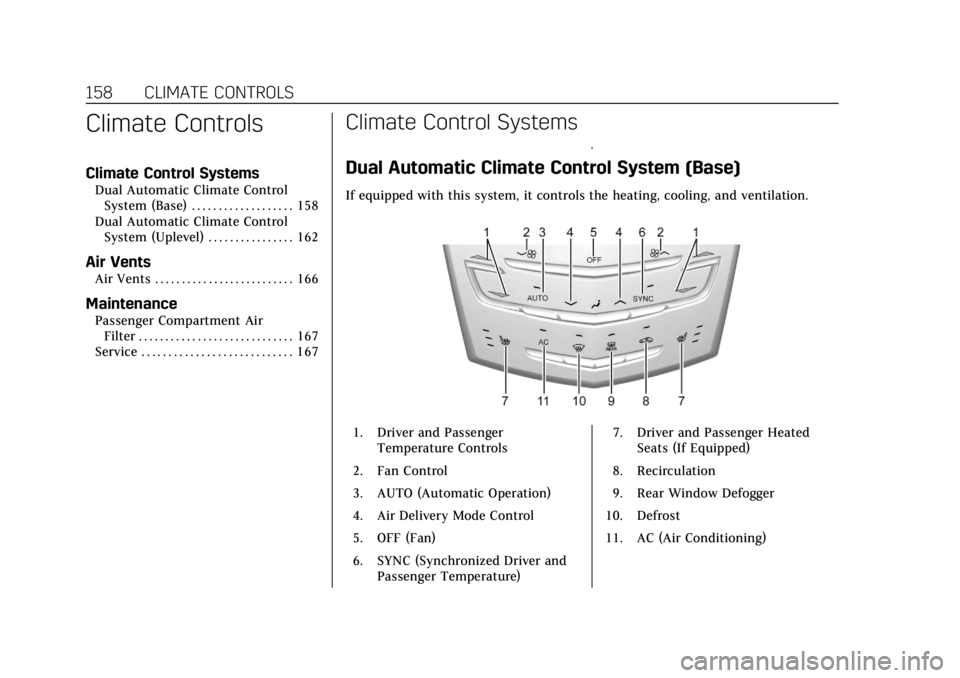
If equipped with this system, it controls the heating, cooling, and ventilation.
1. Driver and Passenger
Temperature Controls
2. Fan Control
3. AUTO (Automatic Operation)
4. Air Delivery Mode Control
5. OFF (Fan)
6. SYNC (Synchronized Driver and Passenger Temperature) 7. Driver and Passenger Heated
Seats (If Equipped)
8. Recirculation
9. Rear Window Defogger
10. Defrost
11. AC (Air Conditioning)
Page 162 of 384
Cadillac ATS/ATS-V Owner Manual (GMNA-Localizing-U.S./Canada/Mexico-
12460272) - 2019 - crc - 5/8/18
CLIMATE CONTROLS 161
The rear window defogger turns off
automatically after about 15 minutes.
At higher vehicle speeds, the rear
window defogger may stay on
continuously.
The upper gridlines on the rear
window are antenna lines and are not
intended to heat when the defogger is
activated.
The heated outside mirrors turn on
when the rear window defogger
button is on. They help to clear fog or
frost from the surface of the mirrors.
Caution
Do not try to clear frost or other
material from the inside of the
front windshield and rear window
with a razor blade or anything else
that is sharp. This may damage the
rear window defogger grid and
affect the radio's ability to pick up
stations clearly. The repairs would
not be covered by the vehicle
warranty.
J/Morz/L:If equipped, press to
heat the driver or passenger seat
cushion and seatback.
The vehicle may also have auto heated
seats that turn on when the vehicle is
on. The seats will activate at the level
required by the vehicle’s interior
temperature. Use the manual heated
seat buttons to turn auto heated seats
off. The auto heated seats feature can
be turned on or off.
See Vehicle Personalization 0135 and
Heated Front Seats 061.
Remote Start Climate Control
Operation : If equipped with the
remote vehicle start feature, the
climate control system may run when
the vehicle is started remotely. The
system uses the driver's previous
settings to heat or cool the inside of
the vehicle. See Remote Vehicle Start
0 35.
The rear window defogger turns on if
it is cold outside.
If equipped, the heated seats will turn
on if it is cold outside. The heated
seat indicator lights may not come on
during a remote start. If equipped, the heated steering wheel will come on in
a remote start if it is cold outside. The
heated steering wheel indicator light
may not come on.
Sensors
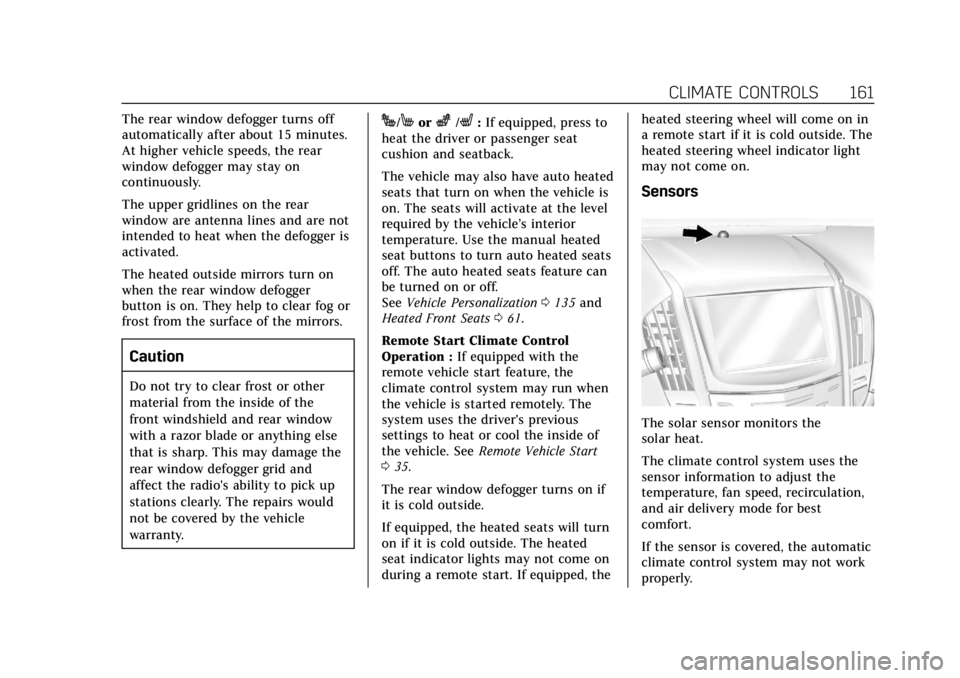
The solar sensor monitors the
solar heat.
The climate control system uses the
sensor information to adjust the
temperature, fan speed, recirculation,
and air delivery mode for best
comfort.
If the sensor is covered, the automatic
climate control system may not work
properly.