mirror controls CADILLAC ATS 2019 Owner's Manual
[x] Cancel search | Manufacturer: CADILLAC, Model Year: 2019, Model line: ATS, Model: CADILLAC ATS 2019Pages: 384, PDF Size: 6.11 MB
Page 6 of 384
Cadillac ATS/ATS-V Owner Manual (GMNA-Localizing-U.S./Canada/Mexico-
12460272) - 2019 - crc - 5/8/18
IN BRIEF 5
In Brief
Instrument Panel
Instrument Panel Overview . . . . . . . . . 6
Initial Drive Information
Initial Drive Information . . . . . . . . . . . 8
Stop/Start System . . . . . . . . . . . . . . . . . . . 8
Remote Keyless Entry (RKE)System . . . . . . . . . . . . . . . . . . . . . . . . . . . . . 8
Remote Vehicle Start . . . . . . . . . . . . . . . 9
Door Locks . . . . . . . . . . . . . . . . . . . . . . . . . . 9
Trunk . . . . . . . . . . . . . . . . . . . . . . . . . . . . . . . 10
Windows . . . . . . . . . . . . . . . . . . . . . . . . . . . 10
Seat Adjustment . . . . . . . . . . . . . . . . . . . 10
Memory Features . . . . . . . . . . . . . . . . . . 12
Second Row Seats . . . . . . . . . . . . . . . . . 12
Heated Seats . . . . . . . . . . . . . . . . . . . . . . . 12
Head Restraint Adjustment . . . . . . . 13
Seat Belts . . . . . . . . . . . . . . . . . . . . . . . . . . . 13
Passenger Sensing System . . . . . . . . 14
Mirror Adjustment . . . . . . . . . . . . . . . . 14
Steering Wheel Adjustment . . . . . . . 15
Interior Lighting . . . . . . . . . . . . . . . . . . . 15
Exterior Lighting . . . . . . . . . . . . . . . . . . . 16
Windshield Wiper/Washer . . . . . . . . 17
Climate Controls . . . . . . . . . . . . . . . . . . . 17
Transmission . . . . . . . . . . . . . . . . . . . . . . . 19
Vehicle Features
Infotainment System . . . . . . . . . . . . . . 19
Steering Wheel Controls . . . . . . . . . . 19
Cruise Control . . . . . . . . . . . . . . . . . . . . . 20
Driver Information Center (DIC) . . . . . . . . . . . . . . . . . . . . . . 20
Forward Collision Alert (FCA) System . . . . . . . . . . . . . . . . . . . . . . . . . . . . 21
Forward Automatic Braking (FAB) . . . . . . . . . . . . . . . . . . . . 21
Lane Keep Assist (LKA) . . . . . . . . . . . 21
Lane Change Alert (LCA) . . . . . . . . . . 21
Rear Vision Camera (RVC) . . . . . . . . 21
Rear Cross Traffic Alert (RCTA) System . . . . . . . . . . . . . . . . . . . . . . . . . . . . 22
Park Assist . . . . . . . . . . . . . . . . . . . . . . . . . 22
Reverse Automatic Braking (RAB) . . . . . . . . . . . . . . . . . . . . 22
Power Outlets . . . . . . . . . . . . . . . . . . . . . . 22
Universal Remote System . . . . . . . . . 22
Sunroof . . . . . . . . . . . . . . . . . . . . . . . . . . . . . 23
Performance and Maintenance
Traction Control/Electronic Stability Control . . . . . . . . . . . . . . . . . . 24
Tire Pressure Monitor . . . . . . . . . . . . . 24
Fuel (LTG 2.0L L4 Turbo Engine) . . . . . . . . . . . . . . . . . . . . . . . . . . . 25
Fuel (LGX 3.6L V6 Engine) . . . . . . . . 25 Fuel (LF4 3.6L Twin Turbo
V6 Engine) . . . . . . . . . . . . . . . . . . . . . . . . 25
E85 or FlexFuel . . . . . . . . . . . . . . . . . . . . 26
Engine Oil Life System . . . . . . . . . . . . 26
Driving for Better Fuel Economy . . . . . . . . . . . . . . . . . . . . . . . . . . 26
Roadside Service . . . . . . . . . . . . . . . . . . . 27
Page 13 of 384
Cadillac ATS/ATS-V Owner Manual (GMNA-Localizing-U.S./Canada/Mexico-
12460272) - 2019 - crc - 5/8/18
12 IN BRIEF
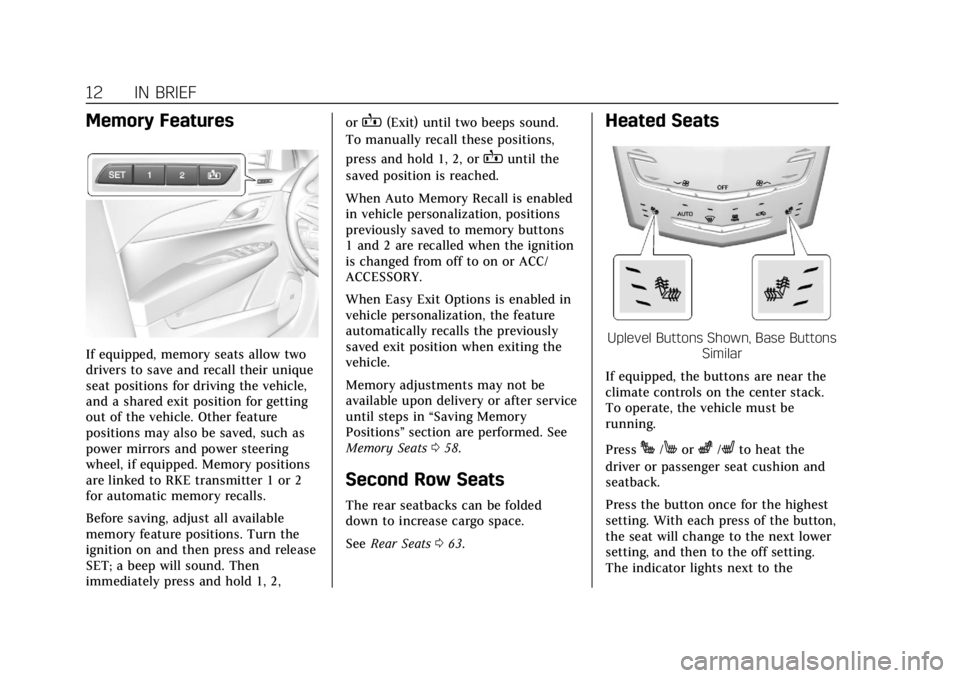
Memory Features
If equipped, memory seats allow two
drivers to save and recall their unique
seat positions for driving the vehicle,
and a shared exit position for getting
out of the vehicle. Other feature
positions may also be saved, such as
power mirrors and power steering
wheel, if equipped. Memory positions
are linked to RKE transmitter 1 or 2
for automatic memory recalls.
Before saving, adjust all available
memory feature positions. Turn the
ignition on and then press and release
SET; a beep will sound. Then
immediately press and hold 1, 2,or
B(Exit) until two beeps sound.
To manually recall these positions,
press and hold 1, 2, or
Buntil the
saved position is reached.
When Auto Memory Recall is enabled
in vehicle personalization, positions
previously saved to memory buttons
1 and 2 are recalled when the ignition
is changed from off to on or ACC/
ACCESSORY.
When Easy Exit Options is enabled in
vehicle personalization, the feature
automatically recalls the previously
saved exit position when exiting the
vehicle.
Memory adjustments may not be
available upon delivery or after service
until steps in “Saving Memory
Positions” section are performed. See
Memory Seats 058.
Second Row Seats
The rear seatbacks can be folded
down to increase cargo space.
See Rear Seats 063.
Heated Seats
Uplevel Buttons Shown, Base Buttons
Similar
If equipped, the buttons are near the
climate controls on the center stack.
To operate, the vehicle must be
running.
Press
J/Morz/Lto heat the
driver or passenger seat cushion and
seatback.
Press the button once for the highest
setting. With each press of the button,
the seat will change to the next lower
setting, and then to the off setting.
The indicator lights next to the
Page 29 of 384
Cadillac ATS/ATS-V Owner Manual (GMNA-Localizing-U.S./Canada/Mexico-
12460272) - 2019 - crc - 5/8/18
28 KEYS, DOORS, AND WINDOWS
Keys, Doors, and
Windows
Keys and Locks
Keys . . . . . . . . . . . . . . . . . . . . . . . . . . . . . . . . 28
Remote Keyless Entry (RKE)System . . . . . . . . . . . . . . . . . . . . . . . . . . . . 29
Remote Keyless Entry (RKE) System Operation . . . . . . . . . . . . . . . . 29
Remote Vehicle Start . . . . . . . . . . . . . . 35
Door Locks . . . . . . . . . . . . . . . . . . . . . . . . . 37
Power Door Locks . . . . . . . . . . . . . . . . . 39
Delayed Locking . . . . . . . . . . . . . . . . . . . 39
Automatic Door Locks . . . . . . . . . . . . 40
Lockout Protection . . . . . . . . . . . . . . . . 40
Doors
Trunk . . . . . . . . . . . . . . . . . . . . . . . . . . . . . . . 41
Vehicle Security
Vehicle Security . . . . . . . . . . . . . . . . . . . . 43
Vehicle Alarm System . . . . . . . . . . . . . 43
Immobilizer . . . . . . . . . . . . . . . . . . . . . . . . 44
Immobilizer Operation . . . . . . . . . . . . 44
Exterior Mirrors
Convex Mirrors . . . . . . . . . . . . . . . . . . . . 45
Power Mirrors . . . . . . . . . . . . . . . . . . . . . . 45
Folding Mirrors . . . . . . . . . . . . . . . . . . . . 46 Heated Mirrors . . . . . . . . . . . . . . . . . . . . . 46
Reverse Tilt Mirrors . . . . . . . . . . . . . . . 46
Interior Mirrors
Interior Rearview Mirrors . . . . . . . . . 46
Manual Rearview Mirror . . . . . . . . . . 46
Automatic Dimming Rearview
Mirror . . . . . . . . . . . . . . . . . . . . . . . . . . . . . 46
Windows
Windows . . . . . . . . . . . . . . . . . . . . . . . . . . . 47
Power Windows . . . . . . . . . . . . . . . . . . . . 47
Sun Visors . . . . . . . . . . . . . . . . . . . . . . . . . . 49
Roof
Sunroof . . . . . . . . . . . . . . . . . . . . . . . . . . . . . 49
Keys and Locks
Keys
{Warning
Leaving children in a vehicle with a
Remote Keyless Entry (RKE)
transmitter is dangerous and
children or others could be
seriously injured or killed. They
could operate the power windows
or other controls or make the
vehicle move. The windows will
function with the RKE transmitter
in the vehicle, and children or
others could be caught in the path
of a closing window. Do not leave
children in a vehicle with an RKE
transmitter.
Page 61 of 384
Cadillac ATS/ATS-V Owner Manual (GMNA-Localizing-U.S./Canada/Mexico-
12460272) - 2019 - crc - 5/8/18
60 SEATS AND RESTRAINTS
Save preferred memory feature
positions to both 1 and 2 if you are
the only driver.
Manually Recalling Memory
Positions
Press and hold 1, 2, or
Bto recall
the previously saved memory
positions.
To stop Manual Memory Recall
movement, release 1, 2, or
Bor press
any of the following controls:
. Power seat
. Memory SET
. Power mirror, with the driver or
passenger side mirror selected
. Power steering wheel, if equipped
Auto Memory Recall
The vehicle identifies the number of
the current driver’s RKE transmitter
(1–8). See Remote Keyless Entry (RKE)
System Operation 029. If the RKE
transmitter is 1 or 2, and Auto
Memory Recall is programmed on in
vehicle personalization, the positions
saved to the same memory button number 1 or 2 are automatically
recalled when the ignition is turned
on, or turned from off to ACC/
ACCESSORY. RKE transmitters 3–8
will not provide automatic memory
recalls.
To turn Auto Memory Recall on or off,
see "Vehicle Personalization Settings"
previously in this section and
Vehicle
Personalization 0135.
The shift lever must be in P (Park) to
start Auto Memory Recall. Auto
Memory Recall will complete if the
vehicle is shifted out of P (Park) prior
to reaching the saved memory
position.
To stop Auto Memory Recall
movement, turn the ignition off or
press any of the following controls:
. Power seat
. Memory SET, 1, 2, or
B
.Power mirror, with the driver or
passenger side mirror selected
. Power steering wheel, if equipped If the saved memory seat position
does not automatically recall or recalls
to the wrong positions, the driver’s
RKE transmitter number (1 or 2) may
not match the memory button
number that positions were saved to.
Try saving the position to the other
memory button or try the other RKE
transmitter.
Easy Exit Recall
Easy Exit Recall is not linked to an
RKE transmitter. The position saved to
Bis used for all drivers. To turn
Easy Exit Recall on or off, see "Vehicle
Personalization Settings" previously in
this section and Vehicle Personalization
0 135.
If turned on, the position saved to
B
is automatically recalled when one of
the following occurs:
. The vehicle is turned off and the
driver door is opened within a
short time.
. The vehicle is turned off with the
driver door open.
Page 62 of 384
Cadillac ATS/ATS-V Owner Manual (GMNA-Localizing-U.S./Canada/Mexico-
12460272) - 2019 - crc - 5/8/18
SEATS AND RESTRAINTS 61
To stop Easy Exit Recall movement,
press any of the following memory
controls:
.Power seat
. Memory SET, 1, 2, or
B
.Power mirror, with the driver or
passenger side mirror selected
. Power steering wheel, if equipped
Obstructions
If something has blocked the driver
seat and/or power steering wheel
while recalling a memory position, the
recall may stop. Remove the
obstruction and try the recall again.
If the memory position still does not
recall, see your dealer for service.
Heated Front Seats
{Warning
If temperature change or pain to
the skin cannot be felt, the seat
heater may cause burns. To reduce
the risk of burns, use care when
using the seat heater, especially for
long periods of time. Do not place
anything on the seat that insulates
against heat, such as a blanket,
cushion, cover, or similar item. This
may cause the seat heater to
overheat. An overheated seat heater
may cause a burn or may damage
the seat.
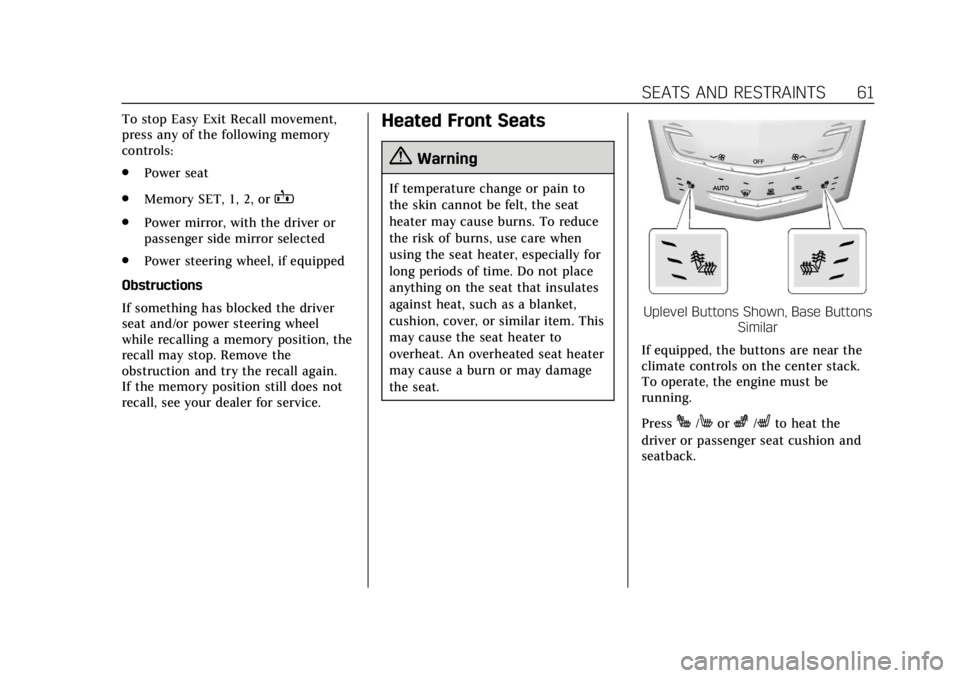
Uplevel Buttons Shown, Base Buttons Similar
If equipped, the buttons are near the
climate controls on the center stack.
To operate, the engine must be
running.
Press
J/Morz/Lto heat the
driver or passenger seat cushion and
seatback.
Page 138 of 384
Cadillac ATS/ATS-V Owner Manual (GMNA-Localizing-U.S./Canada/Mexico-
12460272) - 2019 - crc - 5/8/18
INSTRUMENTS AND CONTROLS 137
Collision/Detection Systems
Touch and the following may display:
.Alert Type
. Forward Collision System
. Adaptive Cruise Go Notifier
. Lane Change Alert
. Rear Camera Park Assist Symbols
. Rear Cross Traffic Alert
Alert Type
This setting specifies the type of
vehicle feedback provided, either a
beep or seat vibration, when you are
in danger of colliding with an object.
Touch Beeps or Safety Alert Seat.
Forward Collision System
This setting controls the vehicle
response when detecting a vehicle
ahead of you. The Off setting disables
all FCA and FAB functions. With the
Alert and Brake setting, both FCA and
FAB are available. The Alert setting
disables FAB. See Forward Automatic
Braking (FAB) 0231.
Touch Off, Alert, or Alert and Brake. Adaptive Cruise Go Notifier
This setting determines if an alert will
appear when Adaptive Cruise Control
brings the vehicle to a complete stop
and the vehicle ahead of you starts
moving again. See
Adaptive Cruise
Control 0215.
Touch Off or On.
Lane Change Alert
This setting specifies if an alert will
display on the outside mirror to help
you avoid crashing into a vehicle in
your blind spot, or rapidly
approaching your blind spot, during a
lane change maneuver. See Lane
Change Alert (LCA) 0232.
Touch Off or On.
Rear Camera Park Assist Symbols
This setting enables the Rear Camera
Park Assist Symbols. See Assistance
Systems for Parking or Backing 0224.
Touch Off or On. Rear Cross Traffic Alert
This setting specifies if an alert will
display when the vehicle detects
approaching rear cross traffic when in
R (Reverse). See
Assistance Systems for
Parking or Backing 0224.
Touch Off or On.
Comfort and Convenience
Touch and the following may display:
. Auto Memory Recall
. Easy Exit Options
. Chime Volume
. Reverse Tilt Mirror
. Rain Sense Wipers
Auto Memory Recall
This feature automatically recalls the
current driver’s previously stored 1 or
2 button positions when the ignition
is changed from off to on or ACC/
ACCESSORY. See Memory Seats058.
Touch Off or On.
Page 139 of 384
Cadillac ATS/ATS-V Owner Manual (GMNA-Localizing-U.S./Canada/Mexico-
12460272) - 2019 - crc - 5/8/18
138 INSTRUMENTS AND CONTROLS
Easy Exit Options
This feature automatically recalls the
previously stored exit button position
when exiting the vehicle. SeeMemory
Seats 058.
Touch Off or On.
Chime Volume
This setting determines the chime
volume level.
Touch the controls on the
infotainment system to adjust the
volume.
Reverse Tilt Mirror
When on, both the driver and
passenger, driver, or passenger outside
mirrors will tilt downward when the
vehicle is shifted to R (Reverse) to
improve visibility of the ground near
the rear wheels. They will return to
their previous driving position when
the vehicle is shifted out of
R (Reverse) or the engine is turned off.
Touch Off, On - Driver and Passenger,
On - Driver, or On - Passenger. Rain Sense Wipers
This setting automatically turns on
the wipers when moisture is detected
and the wiper switch is in
intermittent mode.
Touch Disabled or Enabled.
Lighting
Touch and the following may display:
.
Vehicle Locator Lights
. Exit Lighting
. Adaptive Forward Lighting
Vehicle Locator Lights
This setting flashes the vehicle’s
headlamps when
Kis pressed on the
Remote Keyless Entry (RKE)
transmitter.
Touch Off or On.
Exit Lighting
This setting specifies how long the
headlamps stay on after the vehicle is
turned off and exited.
Touch Off, 30 Seconds, 60 Seconds,
or 120 Seconds. Adaptive Forward Lighting
This setting automatically adjusts the
headlamps to provide greater road
illumination based on driving
conditions.
Touch Off or Corner and Curve
Lighting.
Power Door Locks
Touch and the following may display:
.
Open Door Anti Lock Out
. Auto Door Unlock
. Delayed Door Lock
Open Door Anti Lock Out
This setting prevents the driver door
from locking when the door is open.
If this setting is on, the Delayed Door
Lock menu will not be available.
Touch Off or On.
Auto Door Unlock
This setting allows selection of which
doors will automatically unlock when
the vehicle is shifted into P (Park).
Touch Off, All Doors, or Driver Door.
Page 162 of 384
Cadillac ATS/ATS-V Owner Manual (GMNA-Localizing-U.S./Canada/Mexico-
12460272) - 2019 - crc - 5/8/18
CLIMATE CONTROLS 161
The rear window defogger turns off
automatically after about 15 minutes.
At higher vehicle speeds, the rear
window defogger may stay on
continuously.
The upper gridlines on the rear
window are antenna lines and are not
intended to heat when the defogger is
activated.
The heated outside mirrors turn on
when the rear window defogger
button is on. They help to clear fog or
frost from the surface of the mirrors.
Caution
Do not try to clear frost or other
material from the inside of the
front windshield and rear window
with a razor blade or anything else
that is sharp. This may damage the
rear window defogger grid and
affect the radio's ability to pick up
stations clearly. The repairs would
not be covered by the vehicle
warranty.
J/Morz/L:If equipped, press to
heat the driver or passenger seat
cushion and seatback.
The vehicle may also have auto heated
seats that turn on when the vehicle is
on. The seats will activate at the level
required by the vehicle’s interior
temperature. Use the manual heated
seat buttons to turn auto heated seats
off. The auto heated seats feature can
be turned on or off.
See Vehicle Personalization 0135 and
Heated Front Seats 061.
Remote Start Climate Control
Operation : If equipped with the
remote vehicle start feature, the
climate control system may run when
the vehicle is started remotely. The
system uses the driver's previous
settings to heat or cool the inside of
the vehicle. See Remote Vehicle Start
0 35.
The rear window defogger turns on if
it is cold outside.
If equipped, the heated seats will turn
on if it is cold outside. The heated
seat indicator lights may not come on
during a remote start. If equipped, the heated steering wheel will come on in
a remote start if it is cold outside. The
heated steering wheel indicator light
may not come on.
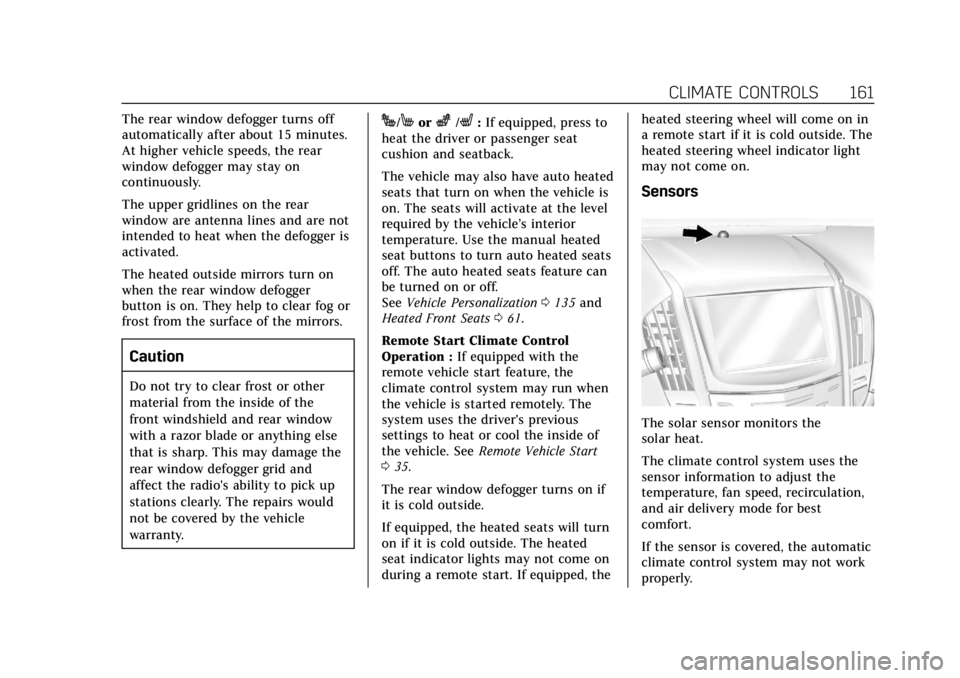
Sensors
The solar sensor monitors the
solar heat.
The climate control system uses the
sensor information to adjust the
temperature, fan speed, recirculation,
and air delivery mode for best
comfort.
If the sensor is covered, the automatic
climate control system may not work
properly.
Page 166 of 384
Cadillac ATS/ATS-V Owner Manual (GMNA-Localizing-U.S./Canada/Mexico-
12460272) - 2019 - crc - 5/8/18
CLIMATE CONTROLS 165
Automatic Air Recirculation :When
the AUTO indicator light is on, the air
is automatically recirculated as
needed to help quickly cool the inside
of the vehicle.
@: Press to alternate between
recirculating air inside the vehicle or
pulling in outside air. The indicator
light on the button is lit when
recirculation mode is active. This
helps to quickly cool the air inside the
vehicle or reduce the outside air and
odors that may enter.
Pressing this button cancels automatic
recirculation. Press AUTO to return to
automatic operation; recirculation
runs automatically as needed.
Manual recirculation mode is not
available when in Defrost or Defog
modes.
Auto Defog : The climate control
system may have a sensor to
automatically detect high humidity
inside the vehicle. When high
humidity is detected, the climate
control system may adjust to outside
air supply and turn on the air
conditioner. If the climate control system does not detect possible
window fogging, it returns to normal
operation. To turn Auto Defog off or
on, see
“Climate and Air Quality”
under Vehicle Personalization 0135.Rear Window Defogger
K:Press to turn the rear window
defogger on or off. An indicator light
on the button comes on to show that
the rear window defogger is on. The
rear window defogger only works
when the engine is running.
The rear window defogger turns off
automatically after about 15 minutes.
At higher vehicle speeds, the rear
window defogger may stay on
continuously.
The upper gridlines on the rear
window are antenna lines and are not
intended to heat when the defogger is
activated.
The heated outside mirrors turn on
when the rear window defogger
button is on. They help to clear fog or
frost from the surface of the mirrors. The rear window defogger can be set
to automatic operation. See
“Climate
and Air Quality” underVehicle
Personalization 0135. When auto rear
defog is selected, the rear window
defogger turns on automatically when
the interior temperature is cold and
the outside temperature is about 4 °C
(40 °F) and below. The auto rear
defogger turns off automatically.
Caution
Do not try to clear frost or other
material from the inside of the
front windshield and rear window
with a razor blade or anything else
that is sharp. This may damage the
rear window defogger grid and
affect the radio's ability to pick up
stations clearly. The repairs would
not be covered by the vehicle
warranty.
Jorz: If equipped, pressJorzto heat the driver or passenger seat
cushion and seatback.
Page 376 of 384

Cadillac ATS/ATS-V Owner Manual (GMNA-Localizing-U.S./Canada/Mexico-
12460272) - 2019 - crc - 5/8/18
INDEX 375
E
Easy Entry Seat . . . . . . . . . . . . . . . . . . . . . . 53
Electrical Equipment, Add-On . . . . . 240
Electrical SystemEngine Compartment Fuse
Block . . . . . . . . . . . . . . . . . . . . . . . . . . . . . 274
Fuses and Circuit Breakers . . . . . . . 274
Instrument Panel Fuse Block . . . . 277
Overload . . . . . . . . . . . . . . . . . . . . . . . . . . . 273
Rear Compartment Fuse Block . . . . . . . . . . . . . . . . . . . . . . . . . . . . . 280
Emergency OnStar . . . . . . . . . . . . . . . . . . . . . . . . . . . . . 361
Engine
Air Cleaner/Filter . . . . . . . . . . . . . . . . . 256
Check Light (MalfunctionIndicator) . . . . . . . . . . . . . . . . . . . . . . . . 120
Compartment Overview . . . . . . . . . . 246
Coolant Temperature Gauge . . . . . 117
Coolant Temperature Warning Light . . . . . . . . . . . . . . . . . . . 125
Cooling System . . . . . . . . . . . . . . 257, 262
Drive Belt Routing . . . . . . . . . . . . . . . . 345
Exhaust . . . . . . . . . . . . . . . . . . . . . . . . . . . . 193
Heater . . . . . . . . . . . . . . . . . . . . . . . . . . . . . 189
Oil Life System . . . . . . . . . . . . . . . . . . . . 253
Oil Pressure Light . . . . . . . . . . . . . . . . . 126
Overheating . . . . . . . . . . . . . . . . . . . . . . . 262 Engine (cont'd)
Power Messages . . . . . . . . . . . . . . . . . . 135
Running While Parked . . . . . . . . . . . 194
Starting . . . . . . . . . . . . . . . . . . . . . . . . . . . . 187
Entry Lighting . . . . . . . . . . . . . . . . . . . . . . 150
Event Data Recorders . . . . . . . . . . . . . . 357
Exit Lighting . . . . . . . . . . . . . . . . . . . . . . . . 151
Extended Parking . . . . . . . . . . . . . . . . . . . 192
Extender, Seat Belt . . . . . . . . . . . . . . . . . . 70
Exterior Lamp Controls . . . . . . . . . . . . 144
Exterior Lamps Off Reminder . . . . . . 146
Exterior Lighting Battery Saver . . . . 151
F
Features Memory . . . . . . . . . . . . . . . . . . . . . . . . . . . . . 12
Filter, Engine Air Cleaner . . . . . . . . . . . . . . . . 256
Flash-to-Pass . . . . . . . . . . . . . . . . . . . . . . . . 146
Flashers, Hazard Warning . . . . . . . . . . 148
Flat Tire . . . . . . . . . . . . . . . . . . . . . . . . . . . . . 303
Floor Mats . . . . . . . . . . . . . . . . . . . . . . . . . . . 325
Fluid Automatic Transmission . . . . . . . . . 255
Brakes . . . . . . . . . . . . . . . . . . . . . . . . . . . . . 265
Washer . . . . . . . . . . . . . . . . . . . . . . . . . . . . 263
Folding Mirrors . . . . . . . . . . . . . . . . . . . . . . 46
Forward Automatic Braking . . . . . . . . 231 Forward Collision Alert (FCA)
System . . . . . . . . . . . . . . . . . . . . . . . . . . . . . 228
Frequency Statement Radio . . . . . . . . . . . . . . . . . . . . . . . . . . . . . . 356
Front Seats Heated . . . . . . . . . . . . . . . . . . . . . . . . . . . . . . . 61
Fuel
Additives . . . . . . . . . . . . . . . . . . . . . . . . . . 238
Economy Driving . . . . . . . . . . . . . . . . . . . 26
Filling a Portable FuelContainer . . . . . . . . . . . . . . . . . . . . . . . . 239
Filling the Tank . . . . . . . . . . . . . . . . . . . 238
Foreign Countries . . . . . . . . . . . . . . . . . 237
Gauge . . . . . . . . . . . . . . . . . . . . . . . . . . . . . . 116
Low Fuel Warning Light . . . . . . . . . 126
Prohibited Fuels . . . . . . . . . . . . . . . . . . 237
Recommended . . . . . . . . . . . . . . . 236, 237
Top Tier . . . . . . . . . . . . . . . . . . . . . . . . . . . 236
Fuses Engine Compartment FuseBlock . . . . . . . . . . . . . . . . . . . . . . . . . . . . . 274
Fuses and Circuit Breakers . . . . . . . 274
Instrument Panel Fuse Block . . . . 277
Rear Compartment Fuse Block . . . . . . . . . . . . . . . . . . . . . . . . . . . . . 280