towing CADILLAC ATS 2019 Owner's Manual
[x] Cancel search | Manufacturer: CADILLAC, Model Year: 2019, Model line: ATS, Model: CADILLAC ATS 2019Pages: 384, PDF Size: 6.11 MB
Page 82 of 384
Cadillac ATS/ATS-V Owner Manual (GMNA-Localizing-U.S./Canada/Mexico-
12460272) - 2019 - crc - 5/8/18
SEATS AND RESTRAINTS 81
{Warning
If the front outboard passenger
airbag is turned off for an
adult-sized occupant, the airbag will
not be able to inflate and help
protect that person in a crash,
resulting in an increased risk of
serious injury or even death. An
adult-sized occupant should not
ride in the front outboard passenger
seat, if the passenger airbag OFF
indicator is lit.
Additional Factors Affecting
System Operation
Seat belts help keep the passenger in
position on the seat during vehicle
maneuvers and braking, which helps
the passenger sensing system
maintain the passenger airbag status.
See“Seat Belts” and“Child Restraints”
in the Index for additional
information about the importance of
proper restraint use. A thick layer of additional material,
such as a blanket or cushion,
or aftermarket equipment such as seat
covers, seat heaters, and seat
massagers can affect how well the
passenger sensing system operates.
We recommend that you not use seat
covers or other aftermarket equipment
except when approved by GM for your
specific vehicle. See
Adding Equipment
to the Airbag-Equipped Vehicle 082 for
more information about modifications
that can affect how the system
operates.
A wet seat can affect the performance
of the passenger sensing system. Here
is how:
. The passenger sensing system may
turn off the passenger frontal
airbag and passenger knee airbag
when liquid is soaked into the
seat. If this happens, the OFF
indicator will be lit, and the airbag
readiness light on the instrument
panel will also be lit.
. Liquid pooled on the seat that has
not soaked in may make it more
likely that the passenger sensing
system will turn on the passenger frontal airbag and passenger knee
airbag while a child restraint or
child occupant is on the seat.
If the passenger frontal airbag and
passenger knee airbag are turned
on, the ON indicator will be lit.
If the passenger seat gets wet, dry the
seat immediately. If the airbag
readiness light is lit, do not install a
child restraint or allow anyone to
occupy the seat. See Airbag Readiness
Light 0118 for important safety
information.
The ON indicator may be lit if an
object, such as a briefcase, handbag,
grocery bag, laptop, or other electronic
device, is put on an unoccupied seat.
If this is not desired, remove the
object from the seat.
{Warning
Stowing articles under the
passenger seat or between the
passenger seat cushion and
seatback may interfere with the
proper operation of the passenger
sensing system.
Page 122 of 384
Cadillac ATS/ATS-V Owner Manual (GMNA-Localizing-U.S./Canada/Mexico-
12460272) - 2019 - crc - 5/8/18
INSTRUMENTS AND CONTROLS 121
Caution (Continued)
covered by the vehicle warranty.
This could also affect the vehicle’s
ability to pass an Emissions
Inspection/Maintenance test. See
Accessories and Modifications0244.
If the light is f lashing : A
malfunction has been detected that
could damage the emission control
system and increase vehicle
emissions. Diagnosis and service may
be required.
To help prevent damage, reduce
vehicle speed and avoid hard
accelerations and uphill grades.
If towing a trailer, reduce the amount
of cargo being hauled as soon as
possible.
If the light continues to flash, find a
safe place to park. Turn the vehicle off
and wait at least 10 seconds before
restarting the engine. If the light is
still flashing, follow the previous
guidelines and see your dealer for
service as soon as possible. If the light is on steady :
A
malfunction has been detected.
Diagnosis and service may be
required.
Check the following:
. If fuel has been added to the
vehicle using the capless fuel
funnel adapter, make sure that it
has been removed. See “Filling the
Tank with a Portable Gas Can ”
under Filling the Tank 0238. The
diagnostic system can detect if the
adapter has been left installed in
the vehicle, allowing fuel to
evaporate into the atmosphere.
A few driving trips with the
adapter removed may turn off the
light.
. Poor fuel quality can cause
inefficient engine operation and
poor driveability, which may go
away once the engine is warmed
up. If this occurs, change the fuel
brand. It may require at least one
full tank of the proper fuel to turn the light off. See
Recommended
Fuel (LGX 3.6L V6 Engine) 0237 or
Recommended Fuel (LTG 2.0L L4
Turbo Engine) 0236 or
Recommended Fuel (LF4 3.6L Twin
Turbo V6 Engine) 0237.
If the light remains on, see your
dealer.
Emissions Inspection and
Maintenance Programs
If the vehicle requires an Emissions
Inspection/Maintenance test, the test
equipment will likely connect to the
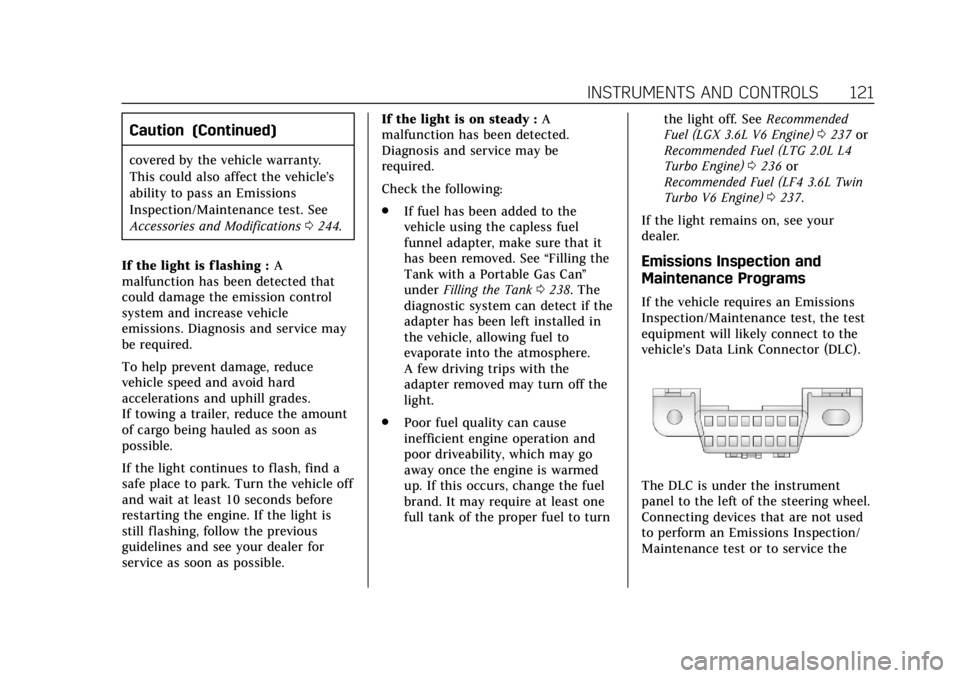
vehicle's Data Link Connector (DLC).
The DLC is under the instrument
panel to the left of the steering wheel.
Connecting devices that are not used
to perform an Emissions Inspection/
Maintenance test or to service the
Page 171 of 384

Cadillac ATS/ATS-V Owner Manual (GMNA-Localizing-U.S./Canada/Mexico-
12460272) - 2019 - crc - 5/8/18
170 DRIVING AND OPERATING
Lane Keep Assist (LKA) . . . . . . . . . . 234
Fuel
Top Tier Fuel . . . . . . . . . . . . . . . . . . . . . 236
Recommended Fuel (LTG 2.0L L4Turbo Engine) . . . . . . . . . . . . . . . . . . . 236
Recommended Fuel (LGX 3.6L V6 Engine) . . . . . . . . . . . . . . . . . . . . . . 237
Recommended Fuel (LF4 3.6L Twin Turbo V6 Engine) . . . . . . . . 237
Prohibited Fuels . . . . . . . . . . . . . . . . . . 237
Fuels in Foreign Countries . . . . . . . 237
Fuel Additives . . . . . . . . . . . . . . . . . . . . 238
Filling the Tank . . . . . . . . . . . . . . . . . . 238
Filling a Portable Fuel Container . . . . . . . . . . . . . . . . . . . . . . . . 239
Trailer Towing
General Towing Information . . . . 240
Conversions and Add-Ons
Add-On Electrical Equipment . . . 240
Driving Information
Distracted Driving
Distraction comes in many forms and
can take your focus from the task of
driving. Exercise good judgment and
do not let other activities divert your
attention away from the road. Many
local governments have enacted laws
regarding driver distraction. Become
familiar with the local laws in
your area.
To avoid distracted driving, keep your
eyes on the road, keep your hands on
the steering wheel, and focus your
attention on driving.
. Do not use a phone in demanding
driving situations. Use a
hands-free method to place or
receive necessary phone calls.
. Watch the road. Do not read, take
notes, or look up information on
phones or other electronic devices.
. Designate a front seat passenger
to handle potential distractions. .
Become familiar with vehicle
features before driving, such as
programming favorite radio
stations and adjusting climate
control and seat settings. Program
all trip information into any
navigation device prior to driving.
. Wait until the vehicle is parked to
retrieve items that have fallen to
the floor.
. Stop or park the vehicle to tend to
children.
. Keep pets in an appropriate carrier
or restraint.
. Avoid stressful conversations
while driving, whether with a
passenger or on a cell phone.
{Warning
Taking your eyes off the road too
long or too often could cause a
crash resulting in injury or death.
Focus your attention on driving.
Page 182 of 384

Cadillac ATS/ATS-V Owner Manual (GMNA-Localizing-U.S./Canada/Mexico-
12460272) - 2019 - crc - 5/8/18
DRIVING AND OPERATING 181
If the Vehicle Is Stuck
Slowly and cautiously spin the wheels
to free the vehicle when stuck in sand,
mud, ice, or snow.
If stuck too severely for the traction
system to free the vehicle, turn the
traction system off and use the
rocking method. SeeTraction Control/
Electronic Stability Control 0204.
{Warning
If the vehicle's tires spin at high
speed, they can explode, and you or
others could be injured. The vehicle
can overheat, causing an engine
compartment fire or other damage.
Spin the wheels as little as possible
and avoid going above 56 km/h
(35 mph).
Rocking the Vehicle to Get it Out
Turn the steering wheel left and right
to clear the area around the front
wheels. Turn off any traction system.
Shift back and forth between
R (Reverse) and a low forward gear, spinning the wheels as little as
possible. To prevent transmission
wear, wait until the wheels stop
spinning before shifting gears. Release
the accelerator pedal while shifting,
and press lightly on the accelerator
pedal when the transmission is in
gear. Slowly spinning the wheels in
the forward and reverse directions
causes a rocking motion that could
free the vehicle. If that does not get
the vehicle out after a few tries, it
might need to be towed out. If the
vehicle does need to be towed out, see
Towing the Vehicle
0314.
Vehicle Load Limits
It is very important to know how
much weight the vehicle can carry.
This weight is called the vehicle
capacity weight and includes the
weight of all occupants, cargo, and
all nonfactory-installed options.
Two labels on the vehicle may
show how much weight it may
properly carry: the Tire and
Loading Information label and the
Certification label.
{Warning
Do not load the vehicle any
heavier than the Gross Vehicle
Weight Rating (GVWR),
or either the maximum front or
rear Gross Axle Weight Rating
(GAWR). This can cause
systems to break and change
the way the vehicle handles.
This could cause loss of control
and a crash. Overloading can
also reduce stopping distance,
damage the tires, and shorten
the life of the vehicle.
Page 183 of 384
Cadillac ATS/ATS-V Owner Manual (GMNA-Localizing-U.S./Canada/Mexico-
12460272) - 2019 - crc - 5/8/18
182 DRIVING AND OPERATING
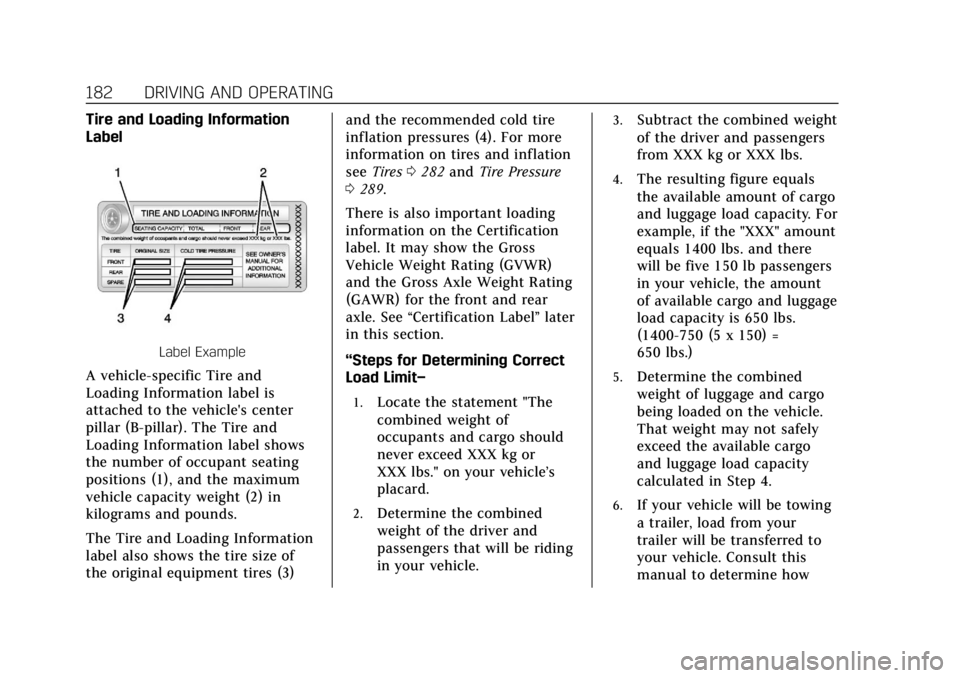
Tire and Loading Information
Label
Label Example
A vehicle-specific Tire and
Loading Information label is
attached to the vehicle's center
pillar (B-pillar). The Tire and
Loading Information label shows
the number of occupant seating
positions (1), and the maximum
vehicle capacity weight (2) in
kilograms and pounds.
The Tire and Loading Information
label also shows the tire size of
the original equipment tires (3)and the recommended cold tire
inflation pressures (4). For more
information on tires and inflation
see
Tires 0282 and Tire Pressure
0 289.
There is also important loading
information on the Certification
label. It may show the Gross
Vehicle Weight Rating (GVWR)
and the Gross Axle Weight Rating
(GAWR) for the front and rear
axle. See “Certification Label” later
in this section.
“Steps for Determining Correct
Load Limit–
1.Locate the statement "The
combined weight of
occupants and cargo should
never exceed XXX kg or
XXX lbs." on your vehicle’s
placard.
2.Determine the combined
weight of the driver and
passengers that will be riding
in your vehicle.
3.Subtract the combined weight
of the driver and passengers
from XXX kg or XXX lbs.
4.The resulting figure equals
the available amount of cargo
and luggage load capacity. For
example, if the "XXX" amount
equals 1400 lbs. and there
will be five 150 lb passengers
in your vehicle, the amount
of available cargo and luggage
load capacity is 650 lbs.
(1400-750 (5 x 150) =
650 lbs.)
5.Determine the combined
weight of luggage and cargo
being loaded on the vehicle.
That weight may not safely
exceed the available cargo
and luggage load capacity
calculated in Step 4.
6.If your vehicle will be towing
a trailer, load from your
trailer will be transferred to
your vehicle. Consult this
manual to determine how
Page 193 of 384
Cadillac ATS/ATS-V Owner Manual (GMNA-Localizing-U.S./Canada/Mexico-
12460272) - 2019 - crc - 5/8/18
192 DRIVING AND OPERATING
To shift out of P (Park):1. Apply the brake pedal.
2. Turn the ignition on.
3. Release the parking brake. See Parking Brake (Electric) 0201
or Parking Brake (Manual) 0203.
4. Press the shift lever button.
5. Move the shift lever.
If unable to shift out of P (Park):
1. Fully release the shift lever button.
2. While holding down the brake pedal, press the shift lever
button again.
3. Move the shift lever.
If the shift lever will not move from
P (Park), consult your dealer or a
professional towing service.Parking (Manual
Transmission)
{Warning
If the vehicle has a manual
transmission, never get out of the
vehicle without first moving the
shift lever into 1st or R (Reverse),
setting the parking brake and
turning the ignition off. The vehicle
can roll, which could cause serious
injury or death.
Parking over Things
That Burn
{Warning
Things that can burn could touch
hot exhaust parts under the vehicle
and ignite. Do not park over papers,
leaves, dry grass, or other things
that can burn.
Extended Parking
It is best not to park with the vehicle
running. If the vehicle is left running,
be sure it will not move and there is
adequate ventilation.
See Shifting Into Park (Automatic
Transmission) 0190 and Engine
Exhaust 0193.
If the vehicle is left parked and
running with the Remote Keyless
Entry (RKE) transmitter outside the
vehicle, it will continue to run for up
to half an hour.
If the vehicle is left parked and
running with the RKE transmitter
inside the vehicle, it will continue to
run for up to an hour.
The vehicle could turn off sooner if it
is parked on a hill, due to lack of
available fuel.
Page 223 of 384
Cadillac ATS/ATS-V Owner Manual (GMNA-Localizing-U.S./Canada/Mexico-
12460272) - 2019 - crc - 5/8/18
222 DRIVING AND OPERATING
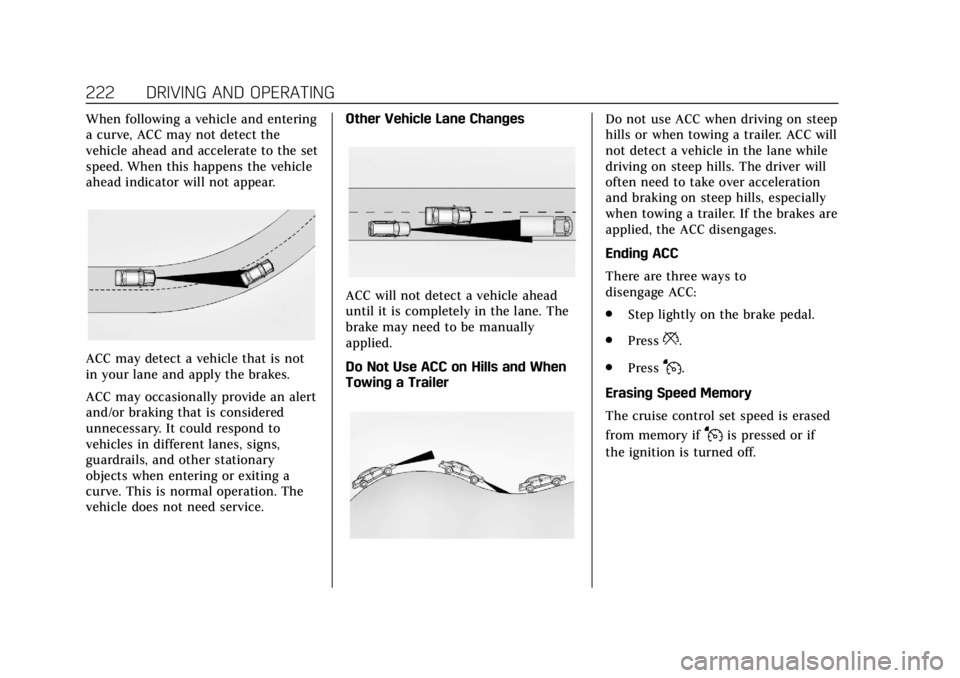
When following a vehicle and entering
a curve, ACC may not detect the
vehicle ahead and accelerate to the set
speed. When this happens the vehicle
ahead indicator will not appear.
ACC may detect a vehicle that is not
in your lane and apply the brakes.
ACC may occasionally provide an alert
and/or braking that is considered
unnecessary. It could respond to
vehicles in different lanes, signs,
guardrails, and other stationary
objects when entering or exiting a
curve. This is normal operation. The
vehicle does not need service.Other Vehicle Lane Changes
ACC will not detect a vehicle ahead
until it is completely in the lane. The
brake may need to be manually
applied.
Do Not Use ACC on Hills and When
Towing a Trailer
Do not use ACC when driving on steep
hills or when towing a trailer. ACC will
not detect a vehicle in the lane while
driving on steep hills. The driver will
often need to take over acceleration
and braking on steep hills, especially
when towing a trailer. If the brakes are
applied, the ACC disengages.
Ending ACC
There are three ways to
disengage ACC:
.
Step lightly on the brake pedal.
. Press
*.
. Press
J.
Erasing Speed Memory
The cruise control set speed is erased
from memory if
Jis pressed or if
the ignition is turned off.
Page 229 of 384
Cadillac ATS/ATS-V Owner Manual (GMNA-Localizing-U.S./Canada/Mexico-
12460272) - 2019 - crc - 5/8/18
228 DRIVING AND OPERATING
pulses occur on the left or right side,
depending on the direction of the
detected vehicle.
Use caution while backing up when
towing a trailer, as the RCTA
detection zones that extend out from
the back of the vehicle do not move
further back when a trailer is towed.
Turning the Features On or Off
TheXbutton to the left of the
steering wheel is used to turn on or
off the Front and Rear Park Assist,
Rear Cross Traffic Alert (RCTA),
Reverse Automatic Braking, and
Backing Warning System at the same
time. The indicator light next to the
button comes on when the features
are on and turns off when the features
have been disabled.
Turn off Park Assist and Reverse
Automatic Braking when towing a
trailer.
To turn the RPA symbols and rear
guidance lines on or off, see Vehicle
Personalization 0135. RCTA can be turned on or off. See
“Collision/Detection Systems”
under
Vehicle Personalization 0135.
Assistance Systems for
Driving
If equipped, when driving the vehicle
in a forward gear, Forward Collision
Alert (FCA), Lane Departure Warning
(LDW), Lane Keep Assist (LKA), Side
Blind Zone Alert (SBZA), Lane Change
Alert (LCA), and/or Forward
Automatic Braking (FAB) can help to
avoid a crash or reduce crash damage.
Forward Collision Alert
(FCA) System
If equipped, the FCA system may help
to avoid or reduce the harm caused by
front-end crashes. When approaching
a vehicle ahead too quickly, FCA
provides a flashing red alert on the
windshield and rapidly beeps or pulses
the Safety Alert Seat. FCA also lights
an amber visual alert if following
another vehicle much too closely. FCA detects vehicles within a distance
of approximately 60 m (197 ft) and
operates at speeds above 40 km/h
(25 mph). If the vehicle has Adaptive
Cruise Control (ACC), it can detect
vehicles to distances of approximately
110 m (360 ft) and operates at all
speeds. See
Adaptive Cruise Control
0 215.
{Warning
FCA is a warning system and does
not apply the brakes. When
approaching a slower-moving or
stopped vehicle ahead too rapidly,
or when following a vehicle too
closely, FCA may not provide a
warning with enough time to help
avoid a crash. It also may not
provide any warning at all. FCA
does not warn of pedestrians,
animals, signs, guardrails, bridges,
construction barrels, or other
objects. Be ready to take action and
apply the brakes. See Defensive
Driving 0171.
Page 233 of 384
Cadillac ATS/ATS-V Owner Manual (GMNA-Localizing-U.S./Canada/Mexico-
12460272) - 2019 - crc - 5/8/18
232 DRIVING AND OPERATING
Minor brake pedal pulsations or pedal
movement during this time is normal
and the brake pedal should continue
to be applied as needed. IBA will
automatically disengage only when
the brake pedal is released.
{Warning
IBA may increase vehicle braking in
situations when it may not be
necessary. You could block the flow
of traffic. If this occurs, take your
foot off the brake pedal and then
apply the brakes as needed.
FAB and IBA can be disabled through
vehicle personalization. See “Collision/
Detection Systems” underVehicle
Personalization 0135.
{Warning
Using FAB or IBA while towing a
trailer could cause you to lose
control of the vehicle and crash.
Turn the system to Off when
towing a trailer.
Side Blind Zone
Alert (SBZA)
If equipped, the SBZA system is a
lane-changing aid that assists drivers
with avoiding crashes that occur with
moving vehicles in the side blind zone
(or spot) areas. When the vehicle is in
a forward gear, the left or right side
mirror display will light up if a moving
vehicle is detected in that blind zone.
If the turn signal is activated and a
vehicle is also detected on the same
side, the display will flash as an extra
warning not to change lanes. Since
this system is part of the Lane Change
Alert (LCA) system, read the entire
LCA section before using this feature.
Lane Change Alert (LCA)
If equipped, the LCA system is a
lane-changing aid that assists drivers
with avoiding lane change crashes
that occur with moving vehicles in the
side blind zone (or spot) areas or with
vehicles rapidly approaching these
areas from behind. The LCA warning display will light up in the
corresponding outside side mirror and
will flash if the turn signal is on.
{Warning
LCA does not alert the driver to
vehicles outside of the system
detection zones, pedestrians,
bicyclists, or animals. It may not
provide alerts when changing lanes
under all driving conditions. Failure
to use proper care when changing
lanes may result in injury, death,
or vehicle damage. Before making a
lane change, always check mirrors,
glance over your shoulder, and use
the turn signals.
Page 234 of 384

Cadillac ATS/ATS-V Owner Manual (GMNA-Localizing-U.S./Canada/Mexico-
12460272) - 2019 - crc - 5/8/18
DRIVING AND OPERATING 233
LCA Detection Zones
1. SBZA Detection Zone
2. LCA Detection Zone
The LCA sensor covers a zone of
approximately one lane over from
both sides of the vehicle, or 3.5 m
(11 ft). The height of the zone is
approximately between 0.5 m (1.5 ft)
and 2 m (6 ft) off the ground. The Side
Blind Zone Alert (SBZA) warning area
starts at approximately the middle of
the vehicle and goes back 5 m (16 ft).
Drivers are also warned of vehicles
rapidly approaching from up to 25 m
(82 ft) behind the vehicle.
How the System Works
The LCA symbol lights up in the side
mirrors when the system detects a
moving vehicle in the next lane over
that is in the side blind zone or
rapidly approaching that zone from
behind. A lit LCA symbol indicates it
may be unsafe to change lanes. Before
making a lane change, check the LCA
display, check mirrors, glance over
your shoulder, and use the turn
signals.
Left Side MirrorDisplayRight Side Mirror Display
When the vehicle is started, both
outside mirror LCA displays will
briefly come on to indicate the system
is operating. When the vehicle is in a
forward gear, the left or right side
mirror display will light up if a moving
vehicle is detected in the next lane
over in that blind zone or rapidly
approaching that zone. If the turn signal is activated in the same
direction as a detected vehicle, this
display will flash as an extra warning
not to change lanes.
LCA can be disabled through vehicle
personalization. See
“Collision/
Detection Systems” underVehicle
Personalization 0135. If LCA is
disabled by the driver, the LCA mirror
displays will not light up.
When the System Does Not
Seem to Work Properly
The LCA system requires some driving
for the system to calibrate to
maximum performance. This
calibration may occur more quickly if
the vehicle is driven on a straight
highway road with traffic and roadside
objects (e.g., guardrails, barriers).
During a trip, the LCA system is not
operational until the vehicle first
reaches a speed of 24 km/h (15 mph).
LCA displays may not come on when
passing a vehicle quickly, for a
stopped vehicle, or when towing a
trailer. The LCA detection zones that
extend back from the side of the
vehicle do not move further back