turn signal CADILLAC ATS COUPE 2017 1.G Owner's Manual
[x] Cancel search | Manufacturer: CADILLAC, Model Year: 2017, Model line: ATS COUPE, Model: CADILLAC ATS COUPE 2017 1.GPages: 335, PDF Size: 3.73 MB
Page 224 of 335
Cadillac ATS/ATS-V Owner Manual (GMNA-Localizing-MidEast-10287885) -
2017 - crc - 6/16/16
DRIVING AND OPERATING 223
The LCA sensor covers a zone of
approximately one lane over from
both sides of the vehicle, or 3.5 m
(11 ft). The height of the zone is
approximately between 0.5 m (1.5 ft)
and 2 m (6 ft) off the ground. The Side
Blind Zone Alert (SBZA) warning area
starts at approximately the middle of
the vehicle and goes back 5 m (16 ft).
Drivers are also warned of vehicles
rapidly approaching from up to 25 m
(82 ft) behind the vehicle.
How the System Works
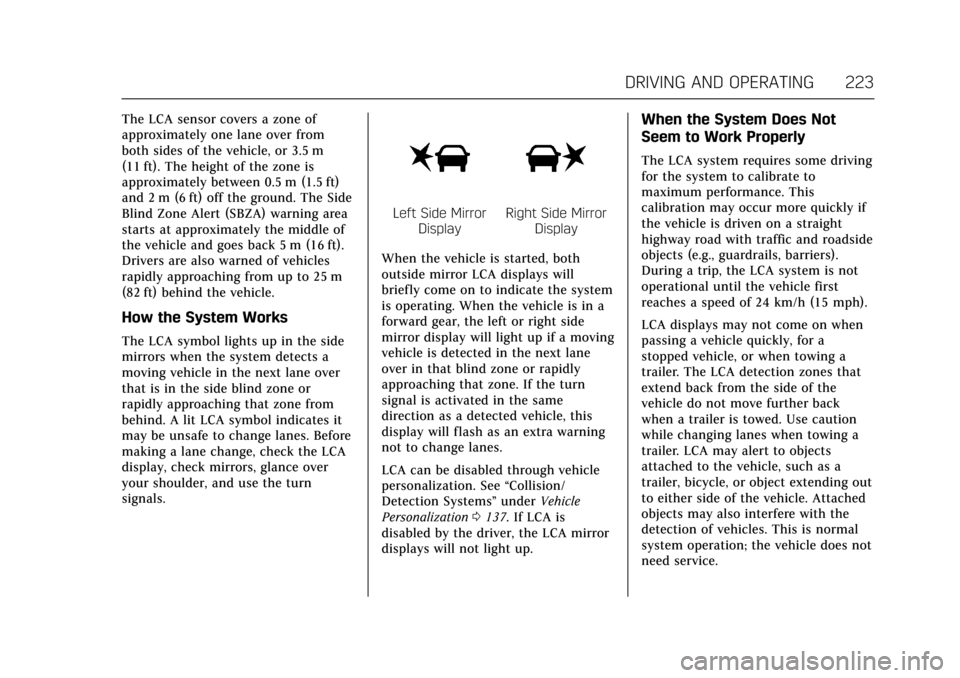
The LCA symbol lights up in the side
mirrors when the system detects a
moving vehicle in the next lane over
that is in the side blind zone or
rapidly approaching that zone from
behind. A lit LCA symbol indicates it
may be unsafe to change lanes. Before
making a lane change, check the LCA
display, check mirrors, glance over
your shoulder, and use the turn
signals.
Left Side MirrorDisplayRight Side Mirror Display
When the vehicle is started, both
outside mirror LCA displays will
briefly come on to indicate the system
is operating. When the vehicle is in a
forward gear, the left or right side
mirror display will light up if a moving
vehicle is detected in the next lane
over in that blind zone or rapidly
approaching that zone. If the turn
signal is activated in the same
direction as a detected vehicle, this
display will flash as an extra warning
not to change lanes.
LCA can be disabled through vehicle
personalization. See “Collision/
Detection Systems” underVehicle
Personalization 0137. If LCA is
disabled by the driver, the LCA mirror
displays will not light up.
When the System Does Not
Seem to Work Properly
The LCA system requires some driving
for the system to calibrate to
maximum performance. This
calibration may occur more quickly if
the vehicle is driven on a straight
highway road with traffic and roadside
objects (e.g., guardrails, barriers).
During a trip, the LCA system is not
operational until the vehicle first
reaches a speed of 24 km/h (15 mph).
LCA displays may not come on when
passing a vehicle quickly, for a
stopped vehicle, or when towing a
trailer. The LCA detection zones that
extend back from the side of the
vehicle do not move further back
when a trailer is towed. Use caution
while changing lanes when towing a
trailer. LCA may alert to objects
attached to the vehicle, such as a
trailer, bicycle, or object extending out
to either side of the vehicle. Attached
objects may also interfere with the
detection of vehicles. This is normal
system operation; the vehicle does not
need service.
Page 225 of 335
Cadillac ATS/ATS-V Owner Manual (GMNA-Localizing-MidEast-10287885) -
2017 - crc - 6/16/16
224 DRIVING AND OPERATING
LCA may not always alert the driver to
vehicles in the next lane over,
especially in wet conditions or when
driving on sharp curves. The system
does not need to be serviced. The
system may light up due to guardrails,
signs, trees, shrubs, and other
non-moving objects. This is normal
system operation; the vehicle does not
need service.
LCA may not operate when the LCA
sensors in the left or right corners of
the rear bumper are covered with
mud, dirt, snow, ice, or slush, or in
heavy rainstorms. For cleaning
instructions, see "Washing the
Vehicle" underExterior Care0298.
If the DIC still displays the system
unavailable message after cleaning
both sides of the vehicle toward the
rear corners of the vehicle, see your
dealer.
If the LCA displays do not light up
when moving vehicles are in the side
blind zone or rapidly approaching this
zone and the system is clean, the
system may need service. Take the
vehicle to your dealer.Lane Departure
Warning (LDW)
If equipped, LDW may help avoid
crashes due to unintentional lane
departures. It may provide a warning
if the vehicle is crossing a detected
lane marking without using a turn
signal in the lane departure direction.
Since this system is part of the Lane
Keep Assist (LKA) system, read the
entire LKA section before using this
feature.
Lane Keep Assist (LKA)
If equipped, LKA may help avoid
crashes due to unintentional lane
departures. It may assist by gently
turning the steering wheel if the
vehicle approaches a detected lane
marking without using a turn signal in
that direction. It may also provide a
Lane Departure Warning (LDW)
system alert as the lane marking is
crossed. The LKA system will not
assist or provide an LDW alert if it
detects that you are actively steering.
Override LKA by turning the steering wheel. LKA uses a camera to detect
lane markings between 60 km/h (37
mph) and 180 km/h (112 mph).
{Warning
The LKA system does not
continuously steer the vehicle.
It may not keep the vehicle in the
lane or give a Lane Departure
Warning (LDW) alert, even if a lane
marking is detected.
The LKA and LDW systems
may not:
. Provide an alert or enough
steering assist to avoid a lane
departure or crash.
. Detect lane markings under
poor weather or visibility
conditions. This can occur if
the windshield or headlamps
are blocked by dirt, snow,
or ice, if they are not in
proper condition, or if the sun
shines directly into the
camera.
. Detect road edges.
(Continued)
Page 226 of 335
Cadillac ATS/ATS-V Owner Manual (GMNA-Localizing-MidEast-10287885) -
2017 - crc - 6/16/16
DRIVING AND OPERATING 225
Warning (Continued)
.Detect lanes on winding or
hilly roads.
If LKA only detects lane markings
on one side of the road, it will only
assist or provide an LDW alert
when approaching the lane on the
side where it has detected a lane
marking. Even with LKA and LDW,
you must steer the vehicle. Always
keep your attention on the road and
maintain proper vehicle position
within the lane, or vehicle damage,
injury, or death could occur. Always
keep the windshield, headlamps,
and camera sensors clean and in
good repair. Do not use LKA in bad
weather conditions.
{Warning
Using LKA while towing a trailer or
on slippery roads could cause loss
of control of the vehicle and a
crash. Turn the system off.
How the System Works
The LKA camera sensor is on the
windshield ahead of the rearview
mirror.
To turn LKA on and off, press
Ato
the left of the steering wheel.
When on,
Ais green if LKA is
available to assist and provide LDW
alerts. It may assist by gently turning
the steering wheel and display
A
as amber if the vehicle approaches a
detected lane marking without
using a turn signal in that direction.
It may also provide an LDW alert by
flashing
Aamber as the lane
marking is crossed. Additionally, there
will be three beeps, or the driver seat
will pulse three times, on the right or
left, depending on the lane departure
direction.
The LKA system does not
continuously steer the vehicle. If LKA
does not detect active driver steering,
an alert and chime may be provided.
Steer the vehicle to dismiss.
When the System Does Not
Seem to Work Properly
The system performance may be
affected by:
. Close vehicles ahead.
. Sudden lighting changes, such as
when driving through tunnels.
. Banked roads.
. Roads with poor lane markings,
such as two-lane roads.
If the LKA system is not functioning
properly when lane markings are
clearly visible, cleaning the windshield
may help.
LKA assistance and/or LDW alerts
may occur due to tar marks, shadows,
cracks in the road, temporary or
construction lane markings, or other
road imperfections. This is normal
system operation; the vehicle does not
need service. Turn LKA off if these
conditions continue.
Page 278 of 335
Cadillac ATS/ATS-V Owner Manual (GMNA-Localizing-MidEast-10287885) -
2017 - crc - 6/16/16
VEHICLE CARE 277
performed successfully. See“TPMS
Sensor Matching Process ”later in
this section.
. The TPMS sensor matching
process was not done or not
completed successfully after
rotating the tires. The malfunction
light and the DIC message should
go off after successfully
completing the sensor matching
process. See "TPMS Sensor
Matching Process" later in this
section.
. One or more TPMS sensors are
missing or damaged. The
malfunction light and the DIC
message should go off when the
TPMS sensors are installed and
the sensor matching process is
performed successfully. See your
dealer for service.
. Replacement tires or wheels do
not match the original equipment
tires or wheels. Tires and wheels
other than those recommended
could prevent the TPMS from
functioning properly. See Buying
New Tires 0280. .
Operating electronic devices or
being near facilities using radio
wave frequencies similar to the
TPMS could cause the TPMS
sensors to malfunction.
If the TPMS is not functioning
properly it cannot detect or signal a
low tire condition. See your dealer for
service if the TPMS malfunction light
and DIC message comes on and
stays on.
TPMS Sensor Matching Process
Each TPMS sensor has a unique
identification code. The identification
code needs to be matched to a new
tire/wheel position after rotating the
vehicle’s tires or replacing one or more
of the TPMS sensors. The TPMS
sensor matching process should also
be performed after replacing a spare
tire with a road tire containing the
TPMS sensor. The malfunction light
and the DIC message should go off at
the next ignition cycle. The sensors
are matched to the tire/wheel
positions, using a TPMS relearn tool,
in the following order: driver side
front tire, passenger side front tire, passenger side rear tire, and driver
side rear. See your dealer for service or
to purchase a relearn tool.
There are two minutes to match the
first tire/wheel position, and
five minutes overall to match all four
tire/wheel positions. If it takes longer,
the matching process stops and must
be restarted.
The TPMS sensor matching process is:
1. Set the parking brake.
2. Place the vehicle power mode in ON/RUN/START. See Ignition
Positions 0185.
3. Make sure the Tire Pressure info display option is turned on. The
info displays on the DIC can be
turned on and off through the
Settings menu. See Driver
Information Center (DIC) 0122.
4. Use the five-way DIC control on the right side of the steering
wheel to scroll to the Tire
Pressure screen under the DIC
info page. See Driver Information
Center (DIC) 0122.
Page 333 of 335

Cadillac ATS/ATS-V Owner Manual (GMNA-Localizing-MidEast-10287885) -
2017 - crc - 6/16/16
332 INDEX
Routing, Engine Drive Belt . . . . . . . . . 322
Run-Flat Tires . . . . . . . . . . . . . . . . . . . . . . . 271
Running the Vehicle WhileParked . . . . . . . . . . . . . . . . . . . . . . . . . . . . . 191
S
Safety Belts . . . . . . . . . . . . . . . . . . . . . . . . . . . 61Care . . . . . . . . . . . . . . . . . . . . . . . . . . . . . . . . . . 66
How to Wear Safety BeltsProperly . . . . . . . . . . . . . . . . . . . . . . . . . . . . 62
Lap-Shoulder Belt . . . . . . . . . . . . . . . . . . . 63
Messages . . . . . . . . . . . . . . . . . . . . . . . . . . 134
Reminders . . . . . . . . . . . . . . . . . . . . . . . . . 112
Replacing after a Crash . . . . . . . . . . . . . 67
Use During Pregnancy . . . . . . . . . . . . . . 66
Safety Kit . . . . . . . . . . . . . . . . . . . . . . . . . . . . . 98
Safety Locks . . . . . . . . . . . . . . . . . . . . . . . . . . 37
Safety System Check . . . . . . . . . . . . . . . . 66
Sealant Kit, Tire . . . . . . . . . . . . . . . . . . . . . 286
Seats Easy Entry Seat . . . . . . . . . . . . . . . . . . . . . 51
Head Restraints . . . . . . . . . . . . . . . . . . . . . 50
Heated and Ventilated Front . . . . . . . 58
Lumbar Adjustment, Front . . . . . . . . . 54
Memory . . . . . . . . . . . . . . . . . . . . . . . . . . . . . 56
Power Adjustment, Front . . . . . . . . . . 52
Rear . . . . . . . . . . . . . . . . . . . . . . . . . . . . . . . . . . 59
Reclining Seatbacks . . . . . . . . . . . . . . . . 55
Securing Child Restraints . . . . . . . 91, 93 Security
Light . . . . . . . . . . . . . . . . . . . . . . . . . . . . . . . 120
Messages . . . . . . . . . . . . . . . . . . . . . . . . . . 135
Vehicle . . . . . . . . . . . . . . . . . . . . . . . . . . . . . . . 40
Vehicle Alarm . . . . . . . . . . . . . . . . . . . . . . . 40
Service . . . . . . . . . . . . . . . . . . . . . . . . . . . . . . . 169 Accessories and
Modifications . . . . . . . . . . . . . . . . . . . . 232
Doing Your Own Work . . . . . . . . . . . 233
Engine Soon Light . . . . . . . . . . . . . . . . 114
Maintenance Records . . . . . . . . . . . . 317
Maintenance, General Information . . . . . . . . . . . . . . . . . . . . . . 306
Parts Identification Label . . . . . . . . 318
Vehicle Messages . . . . . . . . . . . . . . . . . 135
Service Electric Parking Brake
Light . . . . . . . . . . . . . . . . . . . . . . . . . . . . . . . 117
Services Special Application . . . . . . . . . . . . . . . 312
Servicing the Airbag . . . . . . . . . . . . . . . . . 77
Shift Lock Control Function Check, Automatic
Transmission . . . . . . . . . . . . . . . . . . . . . . 257
Shifting Into Park . . . . . . . . . . . . . . . . . . . . . . . . . . 188
Out of Park . . . . . . . . . . . . . . . . . . . . . . . . 189
Side Blind Zone Alert (SBZA) . . . . . . 222
Signals, Turn and Lane-Change . . . . 149 Special Application Services . . . . . . . 312
Specifications and Capacities . . . . . . 319
Speedometer . . . . . . . . . . . . . . . . . . . . . . . . 110
StabiliTrak
OFF Light . . . . . . . . . . . . . . . . . . . . . . . . . . 118
Start Assist, Hill . . . . . . . . . . . . . . . . . . . . 198
Start Vehicle, Remote . . . . . . . . . . . . . . . 33
Starter Switch Check . . . . . . . . . . . . . . . 256
Starting the Engine . . . . . . . . . . . . . . . . . 186
Starting the Vehicle Messages . . . . . 135
Steering . . . . . . . . . . . . . . . . . . . . . . . . . . . . . . 172 Heated Wheel . . . . . . . . . . . . . . . . . . . . . 100
Wheel Adjustment . . . . . . . . . . . . . . . . 100
Wheel Controls . . . . . . . . . . . . . . . . . . . 100
Storage Areas Armrest . . . . . . . . . . . . . . . . . . . . . . . . . . . . . . 97
Center Console . . . . . . . . . . . . . . . . . . . . . . 97
Glove Box . . . . . . . . . . . . . . . . . . . . . . . . . . . 96
Instrument Panel . . . . . . . . . . . . . . . . . . . 96
Storage Compartments . . . . . . . . . . . . . . 96
Storing the Tire Sealant and Compressor Kit . . . . . . . . . . . . . . . . . . . . 292
Stuck Vehicle . . . . . . . . . . . . . . . . . . . . . . . 180
Summer Tires . . . . . . . . . . . . . . . . . . . . . . . 272
Sun Visors . . . . . . . . . . . . . . . . . . . . . . . . . . . . 47
Sunroof . . . . . . . . . . . . . . . . . . . . . . . . . . . . . . . 48
Symbols . . . . . . . . . . . . . . . . . . . . . . . . . . . . . . . . 2
Page 334 of 335

Cadillac ATS/ATS-V Owner Manual (GMNA-Localizing-MidEast-10287885) -
2017 - crc - 6/16/16
INDEX 333
SystemForward Collision Alert (FCA) . . . . 218
Infotainment . . . . . . . . . . . . . . . . . 153, 324
Systems Driver Assistance . . . . . . . . . . . . . . . . . 214
T
Tachometer . . . . . . . . . . . . . . . . . . . . . . . . . 110
Theft-Deterrent Systems . . . . . . . . . . . . 41
Thigh Support Adjustment . . . . . . . . . . 55
Time . . . . . . . . . . . . . . . . . . . . . . . . . . . . . . . . . 102
Tires . . . . . . . . . . . . . . . . . . . . . . . . . . . . . . . . . 270All-Season . . . . . . . . . . . . . . . . . . . . . . . . . 271
Buying New Tires . . . . . . . . . . . . . . . . . 280
Chains . . . . . . . . . . . . . . . . . . . . . . . . . . . . . 284
Different Size . . . . . . . . . . . . . . . . . . . . . . 282
If a Tire Goes Flat . . . . . . . . . . . . . . . . 284
Inspection . . . . . . . . . . . . . . . . . . . . . . . . . 278
Messages . . . . . . . . . . . . . . . . . . . . . . . . . . 135
Pressure . . . . . . . . . . . . . . . . . . . . . . 273, 274
Pressure Light . . . . . . . . . . . . . . . . . . . . . 119
Pressure Monitor Operation . . . . . . 275
Pressure Monitor System . . . . . . . . 274
Rotation . . . . . . . . . . . . . . . . . . . . . . . . . . . 278
Run-Flat . . . . . . . . . . . . . . . . . . . . . . . . . . . 271
Sealant and Compressor Kit . . . . . 286
Sealant and Compressor Kit,Storing . . . . . . . . . . . . . . . . . . . . . . . . . . . 292 Tires (cont'd)
Wheel Alignment and Tire
Balance . . . . . . . . . . . . . . . . . . . . . . . . . . 282
Wheel Replacement . . . . . . . . . . . . . . 282
When It Is Time for New
Tires . . . . . . . . . . . . . . . . . . . . . . . . . . . . . 280
Winter . . . . . . . . . . . . . . . . . . . . . . . . . . . . . 271
Towing General Information . . . . . . . . . . . . . . 230
Recreational Vehicle . . . . . . . . . . . . . . 296
Vehicle . . . . . . . . . . . . . . . . . . . . . . . . . . . . . 295
Track Events and Competitive Driving . . . . . . . . . . . . . . . . . . . . . . . . . . . . . 174
Traction
Control System (TCS)/StabiliTrak
®Light . . . . . . . . . . . . . . . 119
Limited-Slip Rear Axle . . . . . . . . . . . 204
Off Light . . . . . . . . . . . . . . . . . . . . . . . . . . . 118
Traction Control/Electronic Stability Control . . . . . . . . . . . . . . . . . . . 198
Transmission Automatic . . . . . . . . . . . . . . . . . . . . . . . . . 191
Fluid, Automatic . . . . . . . . . . . . . . . . . . 244
Messages . . . . . . . . . . . . . . . . . . . . . . . . . . 136
Trip Odometer . . . . . . . . . . . . . . . . . . . . . . 110
Trunk . . . . . . . . . . . . . . . . . . . . . . . . . . . . . . . . . 38
Turn and Lane-Change Signals . . . . 149
V
Vehicle Alarm System . . . . . . . . . . . . . . . . . . . . . . . 40
Control . . . . . . . . . . . . . . . . . . . . . . . . . . . . 171
Identification Number (VIN) . . . . . 318
Load Limits . . . . . . . . . . . . . . . . . . . . . . . 181
Messages . . . . . . . . . . . . . . . . . . . . . . . . . . 127
Personalization . . . . . . . . . . . . . . . . . . . 137
Reminder Messages . . . . . . . . . . . . . . 136
Remote Start . . . . . . . . . . . . . . . . . . . . . . . . 33
Security . . . . . . . . . . . . . . . . . . . . . . . . . . . . . . 40
Speed Messages . . . . . . . . . . . . . . . . . . . 136
Towing . . . . . . . . . . . . . . . . . . . . . . . . . . . . 295
Vehicle Ahead Indicator . . . . . . . . . . . . 118
Vehicle Care
Storing the Tire Sealant andCompressor Kit . . . . . . . . . . . . . . . . . . 292
Tire Pressure . . . . . . . . . . . . . . . . . . . . . . 273
Vehicle Data Recording and
Privacy . . . . . . . . . . . . . . . . . . . . . . . . . . . . . 323
Ventilation, Air . . . . . . . . . . . . . . . . . . . . . 168
Visors . . . . . . . . . . . . . . . . . . . . . . . . . . . . . . . . . 47
W
Warning Brake System Light . . . . . . . . . . . . . . . 116
Caution and Danger . . . . . . . . . . . . . . . . . 2