instrument panel CADILLAC ATS V 2017 1.G User Guide
[x] Cancel search | Manufacturer: CADILLAC, Model Year: 2017, Model line: ATS V, Model: CADILLAC ATS V 2017 1.GPages: 335, PDF Size: 3.73 MB
Page 70 of 335
Cadillac ATS/ATS-V Owner Manual (GMNA-Localizing-MidEast-10287885) -
2017 - crc - 6/16/16
SEATS AND RESTRAINTS 69
{Warning
Children who are up against,
or very close to, any airbag when it
inflates can be seriously injured or
killed. Always secure children
properly in the vehicle. To read
how, seeOlder Children 079 or
Infants and Young Children 081.
There is an airbag readiness light on
the instrument cluster, which shows
the airbag symbol. The system checks
the airbag electrical system for
malfunctions. The light tells you if
there is an electrical problem. See
Airbag Readiness Light 0113.
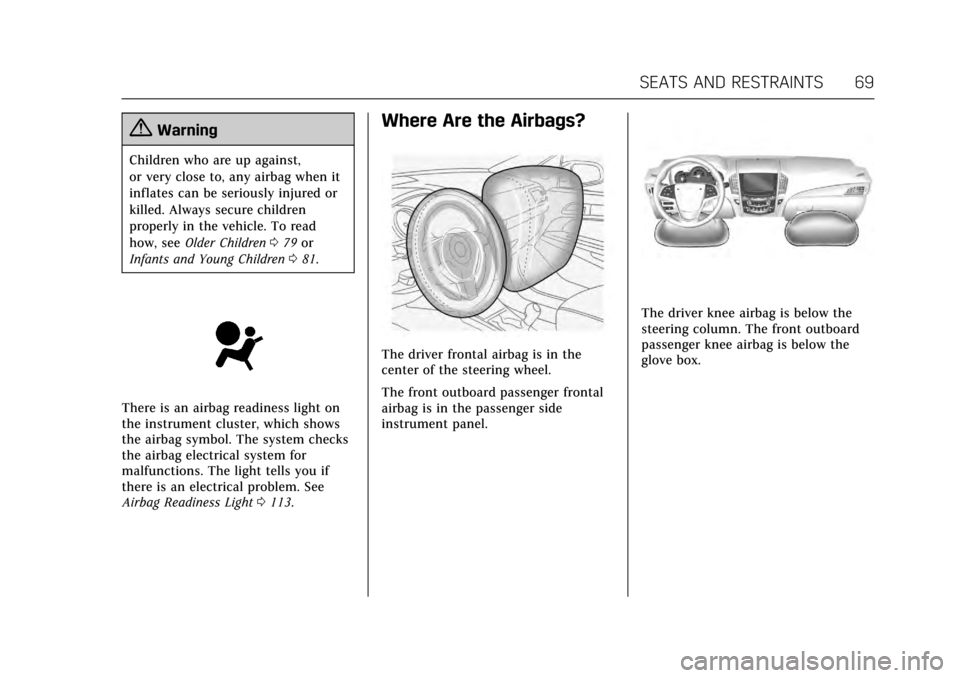
Where Are the Airbags?
The driver frontal airbag is in the
center of the steering wheel.
The front outboard passenger frontal
airbag is in the passenger side
instrument panel.
The driver knee airbag is below the
steering column. The front outboard
passenger knee airbag is below the
glove box.
Page 73 of 335
Cadillac ATS/ATS-V Owner Manual (GMNA-Localizing-MidEast-10287885) -
2017 - crc - 6/16/16
72 SEATS AND RESTRAINTS
For airbag locations, seeWhere Are the
Airbags? 069.
How Does an Airbag
Restrain?
In moderate to severe frontal or near
frontal collisions, even belted
occupants can contact the steering
wheel or the instrument panel. In
moderate to severe side collisions,
even belted occupants can contact the
inside of the vehicle.
Airbags supplement the protection
provided by safety belts by
distributing the force of the impact
more evenly over the occupant's body.
Rollover capable roof-rail airbags are
designed to help contain the head and
chest of occupants in the outboard
seating positions in the first and
second rows. The rollover capable
roof-rail airbags are designed to help
reduce the risk of full or partial
ejection in rollover events, although
no system can prevent all such
ejections. But airbags would not help in many
types of collisions, primarily because
the occupant's motion is not toward
those airbags. See
When Should an
Airbag Inflate? 070.
Airbags should never be regarded as
anything more than a supplement to
safety belts.
What Will You See after an
Airbag Inflates?
After the frontal, knee, and
seat-mounted side impact airbags
inflate, they quickly deflate, so quickly
that some people may not even realize
an airbag inflated. Roof-rail airbags
may still be at least partially inflated
for some time after they inflate. Some
components of the airbag module may
be hot for several minutes. For
location of the airbags, see Where Are
the Airbags? 069.
The parts of the airbag that come into
contact with you may be warm, but
not too hot to touch. There may be
some smoke and dust coming from
the vents in the deflated airbags.
Airbag inflation does not prevent the
driver from seeing out of the windshield or being able to steer the
vehicle, nor does it prevent people
from leaving the vehicle.
{Warning
When an airbag inflates, there may
be dust in the air. This dust could
cause breathing problems for
people with a history of asthma or
other breathing trouble. To avoid
this, everyone in the vehicle should
get out as soon as it is safe to do
so. If you have breathing problems
but cannot get out of the vehicle
after an airbag inflates, then get
fresh air by opening a window or a
door. If you experience breathing
problems following an airbag
deployment, you should seek
medical attention.
The vehicle has a feature that may
automatically unlock the doors, turn
on the interior lamps and hazard
warning flashers, and shut off the fuel
system after the airbags inflate. The
feature may also activate, without
airbag inflation, after an event that
Page 78 of 335
Cadillac ATS/ATS-V Owner Manual (GMNA-Localizing-MidEast-10287885) -
2017 - crc - 6/16/16
SEATS AND RESTRAINTS 77
more information about modifications
that can affect how the system
operates.
A wet seat can affect the performance
of the passenger sensing system. Here
is how:
.The passenger sensing system may
turn off the passenger frontal
airbag and passenger knee airbag
when liquid is soaked into the
seat. If this happens, the off
indicator will be lit, and the airbag
readiness light on the instrument
panel will also be lit.
. Liquid pooled on the seat that has
not soaked in may make it more
likely that the passenger sensing
system will turn on the passenger
frontal airbag and passenger knee
airbag while a child restraint or
child occupant is on the seat.
If the passenger frontal airbag and
passenger knee airbag are turned
on, the on indicator will be lit.
If the passenger seat gets wet, dry the
seat immediately. If the airbag
readiness light is lit, do not install a
child restraint or allow anyone to occupy the seat. See
Airbag Readiness
Light 0113 for important safety
information.
The on indicator may be lit if an
object, such as a briefcase, handbag,
grocery bag, laptop, or other electronic
device, is put on an unoccupied seat.
If this is not desired, remove the
object from the seat.
{Warning
Stowing of articles under the
passenger seat or between the
passenger seat cushion and
seatback may interfere with the
proper operation of the passenger
sensing system.
Servicing the
Airbag-Equipped Vehicle
Airbags affect how the vehicle should
be serviced. There are parts of the
airbag system in several places around
the vehicle. Your dealer and the
service manual have information
about servicing the vehicle and the
airbag system.
{Warning
For up to 10 seconds after the
vehicle is turned off and the battery
is disconnected, an airbag can still
inflate during improper service. You
can be injured if you are close to an
airbag when it inflates. Avoid
yellow connectors. They are
probably part of the airbag system.
Be sure to follow proper service
procedures, and make sure the
person performing work for you is
qualified to do so.
Adding Equipment to the
Airbag-Equipped Vehicle
Adding accessories that change the
vehicle's frame, bumper system,
height, front end, or side sheet metal,
may keep the airbag system from
working properly. The operation of the
airbag system can also be affected by
changing any parts of the front seats,
safety belts, airbag sensing and
diagnostic module, steering wheel,
instrument panel, any of the airbag
Page 97 of 335
Cadillac ATS/ATS-V Owner Manual (GMNA-Localizing-MidEast-10287885) -
2017 - crc - 6/16/16
96 STORAGE
Storage
Storage Compartments
Storage Compartments . . . . . . . . . . . . 96
Instrument Panel Storage . . . . . . . . . 96
Glove Box . . . . . . . . . . . . . . . . . . . . . . . . . . 96
Cupholders . . . . . . . . . . . . . . . . . . . . . . . . . 97
Armrest Storage . . . . . . . . . . . . . . . . . . . 97
Center Console Storage . . . . . . . . . . . . 97
Additional Storage Features
Cargo Tie-Downs . . . . . . . . . . . . . . . . . . . 98
Safety Kit . . . . . . . . . . . . . . . . . . . . . . . . . . . 98
Storage Compartments
{Warning
Do not store heavy or sharp objects
in storage compartments. In a
crash, these objects may cause the
cover to open and could result in
injury.
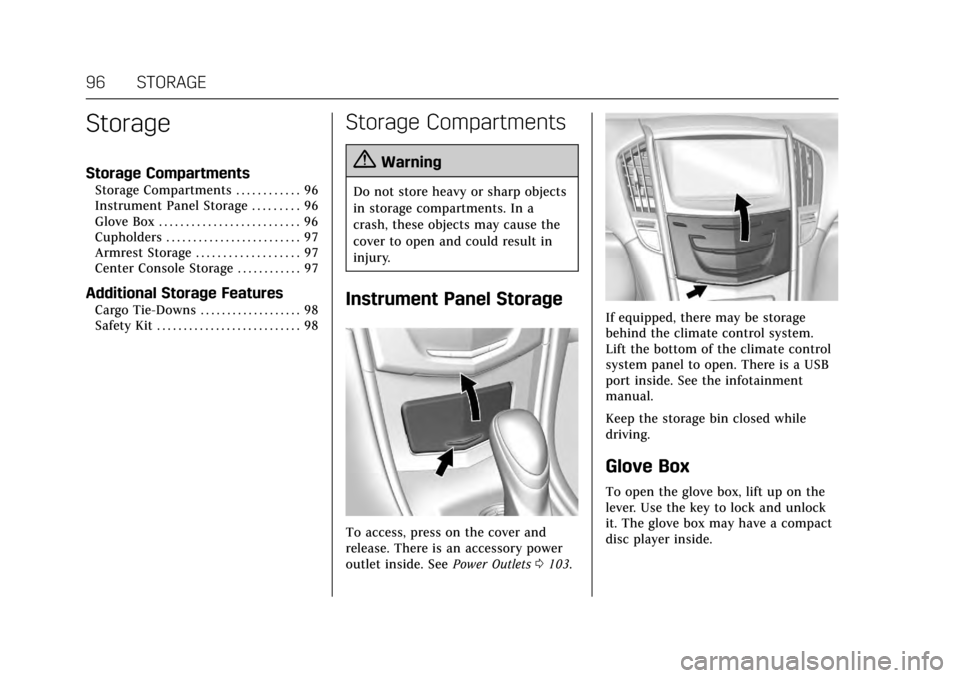
Instrument Panel Storage
To access, press on the cover and
release. There is an accessory power
outlet inside. SeePower Outlets0103.
If equipped, there may be storage
behind the climate control system.
Lift the bottom of the climate control
system panel to open. There is a USB
port inside. See the infotainment
manual.
Keep the storage bin closed while
driving.
Glove Box
To open the glove box, lift up on the
lever. Use the key to lock and unlock
it. The glove box may have a compact
disc player inside.
Page 104 of 335
Cadillac ATS/ATS-V Owner Manual (GMNA-Localizing-MidEast-10287885) -
2017 - crc - 6/16/16
INSTRUMENTS AND CONTROLS 103
3. Touch}to go back to the
previous menu.
To set the clock display: 1. Touch the SETTINGS screen button and touch Time and Date.
2. Touch Clock Display and touch OFF or ON to turn the clock
display off or on.
3. Touch
}to go back to the
previous menu.
Power Outlets
Power Outlet 12 Volt Direct Current
The accessory power outlets can be
used to plug in electrical equipment,
such as a cell phone or MP3 player.
The vehicle has two accessory power
outlets:
. Inside the instrument panel
storage area below the climate
control system.
. On the rear of the center floor
console.
Lift the cover to access the accessory
power outlet. Certain electrical accessories may not
be compatible with the accessory
power outlet and could overload a
vehicle circuit breaker or adapter fuse.
If overloaded, the circuit breaker will
reset after all devices are disconnected
or if Retained Accessory Power (RAP)
is turned off and then back on. See
Retained Accessory Power (RAP)
0188.
Wait one minute to allow the circuit
breaker to reset before reconnecting
devices or turning RAP back on. If the
problem continues, the issue could be
within your device. Try another
known good device to make sure the
circuit breaker is operating properly.
If this does not resolve your problem,
see your dealer.
It is possible to replace the factory
power outlet with a cigar lighter
receptacle, if desired. This requires the
factory installed circuit breaker to be
replaced with a standard minifuse by
the dealer. A minifuse will not reset
and will have to be replace if blown.
Caution
Failure to replace the circuit
breaker with the minifuse could
overheat the cigar lighter and
damage the vehicle.
When adding electrical equipment, be
sure to follow the proper installation
instructions included with the
equipment. See Add-On Electrical
Equipment 0230.
Caution
Hanging heavy equipment from the
power outlet can cause damage not
covered by the vehicle warranty.
The power outlets are designed for
accessory power plugs only, such as
cell phone charge cords.
Always unplug electrical equipment
when not in use and do not plug in
equipment that exceeds the maximum
15 amps rating.
Page 105 of 335
Cadillac ATS/ATS-V Owner Manual (GMNA-Localizing-MidEast-10287885) -
2017 - crc - 6/16/16
104 INSTRUMENTS AND CONTROLS
Power Outlet 220/230 Volt
Alternating Current
If equipped, this power outlet is on
the rear of the center floor console.
It can be used to plug in electrical
equipment that uses a maximum limit
of 150 watts.
An indicator light on the outlet turns
on to show it is in use. The light
comes on when the ignition is in ON/
RUN/START, equipment requiring less
than 150 watts is plugged into the
outlet, and no system fault is
detected.
The indicator light does not come on
when the ignition is in LOCK/OFF or if
the equipment is not fully seated into
the outlet.
If equipment is connected using more
than 150 watts or a system fault is
detected, a protection circuit shuts off
the power supply and the indicator
light turns off. To reset the circuit,
unplug the item and plug it back in or
turn the Retained Accessory Power
(RAP) off and then back on. See
Retained Accessory Power (RAP)0188.
The power restarts when equipment using 150 watts or less is plugged into
the outlet and a system fault is not
detected.
The power outlet is not designed for
the following and may not work
properly, if this equipment is
plugged in:
.
Equipment with high initial peak
wattage such as:
compressor-driven refrigerators
and electric power tools.
. Other equipment requiring an
extremely stable power supply
such as: microcomputer-controlled
electric blankets, touch sensor
lamps, etc.
. Medical equipment.
Wireless Charging
The vehicle may have wireless
charging in the storage behind the
climate control system. See Instrument
Panel Storage 096. The system
wirelessly charges one PMA or Qi
compatible mobile device. To check
for phone or other device
compatibility, see your dealer for
details.
{Warning
Wireless charging can affect the
operation of an implanted
pacemaker or other medical devices.
If you have one, it is recommended
to consult with your doctor before
using the wireless charging system.
The vehicle must be in ON/RUN/
START, ACC/ACCESSORY, or Retained
Accessory Power (RAP). The wireless
charging feature may not correctly
indicate charging when the vehicle is
in RAP. See Retained Accessory Power
(RAP) 0188.
The operating temperature is −20 °C
(−4 °F) to 60 °C (140 °F) for the
charging system and 0 °C (32 °F) to
35 °C (95 °F) for the phone.
{Warning
Remove all metal objects from the
charging pad before charging your
mobile device. Metal objects, such
as coins, keys, rings, or paper clips,
(Continued)
Page 106 of 335
Cadillac ATS/ATS-V Owner Manual (GMNA-Localizing-MidEast-10287885) -
2017 - crc - 6/16/16
INSTRUMENTS AND CONTROLS 105
Warning (Continued)
between the phone and charging
pad will become very hot. On the
rare occasion that the charging
system does not detect a metal
object, and the object gets wedged
between the phone and charger,
remove the phone and allow the
metallic object to cool before
removing it from the charging pad,
to prevent burns.
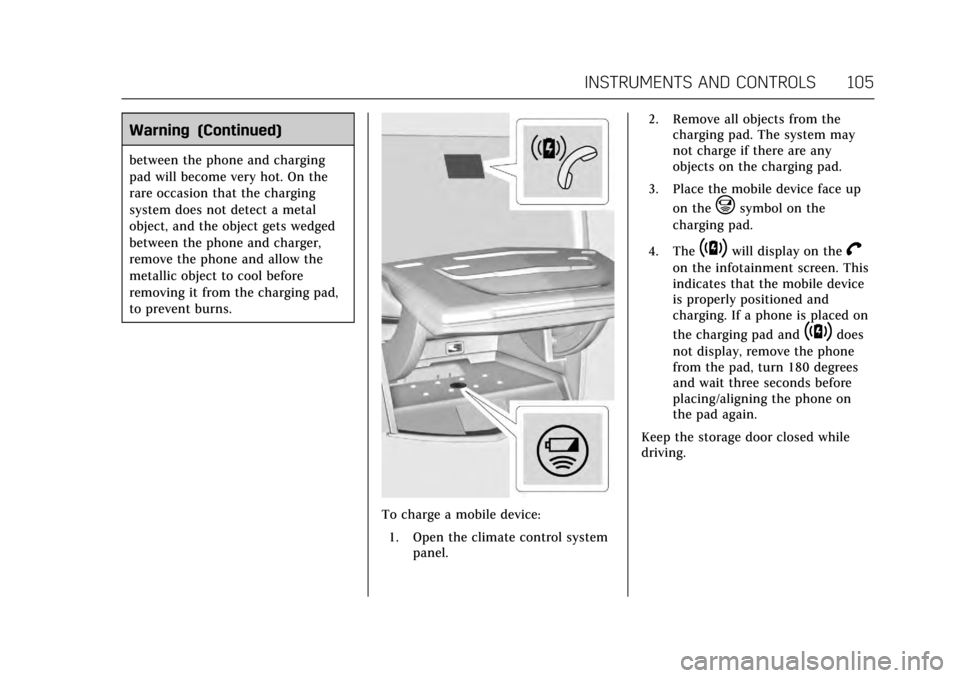
To charge a mobile device:1. Open the climate control system panel. 2. Remove all objects from the
charging pad. The system may
not charge if there are any
objects on the charging pad.
3. Place the mobile device face up on the
@symbol on the
charging pad.
4. The
~will display on theV
on the infotainment screen. This
indicates that the mobile device
is properly positioned and
charging. If a phone is placed on
the charging pad and
~does
not display, remove the phone
from the pad, turn 180 degrees
and wait three seconds before
placing/aligning the phone on
the pad again.
Keep the storage door closed while
driving.
Page 117 of 335
Cadillac ATS/ATS-V Owner Manual (GMNA-Localizing-MidEast-10287885) -
2017 - crc - 6/16/16
116 INSTRUMENTS AND CONTROLS
The DLC is under the instrument
panel to the left of the steering wheel.
Connecting devices that are not used
to perform an Emissions Inspection/
Maintenance test or to service the
vehicle may affect vehicle operation.
SeeAdd-On Electrical Equipment 0230.
See your dealer if assistance is needed.
The vehicle may not pass
inspection if:
. The light is on when the engine is
running.
. The light does not come on when
the ignition is in Service
Only Mode.
. Critical emission control systems
have not been completely
diagnosed. If this happens, the
vehicle would not be ready for
inspection and might require
several days of routine driving
before the system is ready for
inspection. This can happen if the
12-volt battery has recently been
replaced or run down, or if the
vehicle has been recently serviced. See your dealer if the vehicle will not
pass or cannot be made ready for
the test.
Brake System Warning
Light
The vehicle brake system consists of
two hydraulic circuits. If one circuit is
not working, the remaining circuit can
still work to stop the vehicle. For
normal braking performance, both
circuits need to be working.
If the warning light comes on, there is
a problem with the braking system.
Have the brake system inspected
right away.
This light should come on briefly
when the engine is started. If it does
not come on then, have it fixed so it
will be ready to warn you if there is a
problem. If the light comes on and stays on,
there is a base brake problem.
{Warning
The brake system might not be
working properly if the brake
system warning light is on. Driving
with the brake system warning light
on can lead to a crash. If the light is
still on after the vehicle has been
pulled off the road and carefully
stopped, have the vehicle towed for
service.
Parking Brake Light
The parking brake status light comes
on when the parking brake is applied.
If the light continues flashing after
the parking brake is released, or while
driving, there is a problem with the
electric parking brake system or
Page 125 of 335
Cadillac ATS/ATS-V Owner Manual (GMNA-Localizing-MidEast-10287885) -
2017 - crc - 6/16/16
124 INSTRUMENTS AND CONTROLS
value. This feature can be turned off
by pressing and holding SEL while
viewing this page. If the selected
speed limit is exceeded, a pop-up
warning is displayed and a chime may
sound.
Cruise Set Speed :Shows the speed
the cruise control or Adaptive Cruise
Control is set to.
Battery Voltage : Shows the current
battery voltage.
Oil Life : Shows an estimate of the
oil's remaining useful life.
If REMAINING OIL LIFE 99% is
displayed, that means 99% of the
current oil life remains.
When the remaining oil life is low, the
CHANGE ENGINE OIL SOON message
will appear on the display. See Engine
Oil Messages 0130. The oil should be
changed as soon as possible. See
Engine Oil 0241. In addition to the
engine oil life system monitoring the
oil life, additional maintenance is
recommended in the Maintenance
Schedule. See Maintenance
Schedule 0307. Remember, the Oil Life display must
be reset after each oil change. It will
not reset itself. Also, be careful not to
reset the Oil Life display accidentally
at any time other than when the oil
has just been changed. It cannot be
reset accurately until the next oil
change. To reset the engine oil life
system, press and hold SEL for several
seconds while the Oil Life display is
active. See
Engine Oil Life
System 0243.
Oil Pressure : Shows the oil pressure
in either kilopascals (kPa) or pounds
per square inch (psi).
Tire Pressure : Shows the
approximate pressures of all four tires.
Tire pressure is displayed in either
kilopascal (kPa) or in pounds per
square inch (psi). If the pressure is
low, the value for that tire is shown in
amber. See Tire Pressure Monitor
System 0274 and Tire Pressure
Monitor Operation 0275.
Blank Page : Allows for no
information to be displayed in the DIC
display zone(s).Head-Up Display (HUD)
{Warning
If the HUD image is too bright or
too high in your field of view, it
may take you more time to see
things you need to see when it is
dark outside. Be sure to keep the
HUD image dim and placed low in
your field of view.
If equipped with HUD, some
information concerning the operation
of the vehicle is projected onto the
windshield. The image is projected
through the HUD lens on top of the
instrument panel. The information
appears as an image focused out
toward the front of the vehicle.
Caution
If you try to use the HUD image as
a parking aid, you may misjudge
the distance and damage your
vehicle. Do not use the HUD image
as a parking aid.
Page 146 of 335
Cadillac ATS/ATS-V Owner Manual (GMNA-Localizing-MidEast-10287885) -
2017 - crc - 6/16/16
LIGHTING 145
Lighting
Exterior Lighting
Exterior Lamp Controls . . . . . . . . . . 145
Exterior Lamps Off Reminder . . . 146
Headlamp High/Low-BeamChanger . . . . . . . . . . . . . . . . . . . . . . . . . . 147
Flash-to-Pass . . . . . . . . . . . . . . . . . . . . . 147
Daytime Running Lamps (DRL) . . . . . . . . . . . . . . . . . . . . 147
Automatic Headlamp System . . . 147
Adaptive Forward Lighting (AFL) . . . . . . . . . . . . . . . . . . 148
Hazard Warning Flashers . . . . . . . . 148
Turn and Lane-Change Signals . . . . . . . . . . . . . . . . . . . . . . . . . . . 149
Interior Lighting
Instrument Panel IlluminationControl . . . . . . . . . . . . . . . . . . . . . . . . . . 149
Courtesy Lamps . . . . . . . . . . . . . . . . . . 150
Dome Lamps . . . . . . . . . . . . . . . . . . . . . 150
Reading Lamps . . . . . . . . . . . . . . . . . . . 150
Lighting Features
Entry Lighting . . . . . . . . . . . . . . . . . . . . 151
Exit Lighting . . . . . . . . . . . . . . . . . . . . . . 151
Battery Power Protection . . . . . . . . 151
Exterior Lighting Battery Saver . . . . . . . . . . . . . . . . . . . . . . . . . . . . . 152
Exterior Lighting
Exterior Lamp Controls
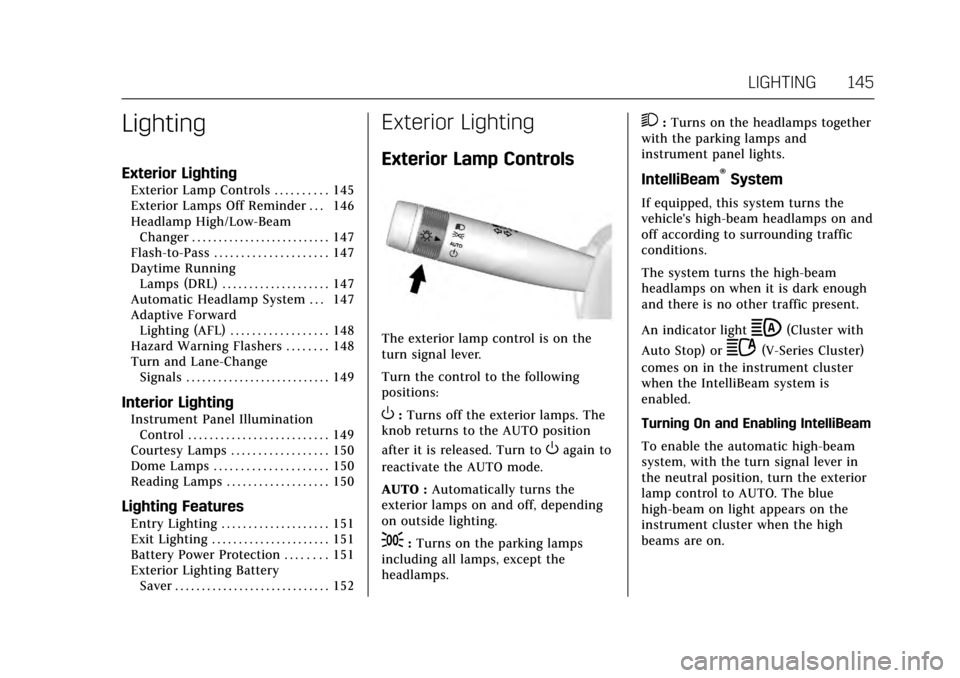
The exterior lamp control is on the
turn signal lever.
Turn the control to the following
positions:
O:Turns off the exterior lamps. The
knob returns to the AUTO position
after it is released. Turn to
Oagain to
reactivate the AUTO mode.
AUTO : Automatically turns the
exterior lamps on and off, depending
on outside lighting.
;: Turns on the parking lamps
including all lamps, except the
headlamps.
2: Turns on the headlamps together
with the parking lamps and
instrument panel lights.
IntelliBeam®System
If equipped, this system turns the
vehicle's high-beam headlamps on and
off according to surrounding traffic
conditions.
The system turns the high-beam
headlamps on when it is dark enough
and there is no other traffic present.
An indicator light
b(Cluster with
Auto Stop) or
2(V-Series Cluster)
comes on in the instrument cluster
when the IntelliBeam system is
enabled.
Turning On and Enabling IntelliBeam
To enable the automatic high-beam
system, with the turn signal lever in
the neutral position, turn the exterior
lamp control to AUTO. The blue
high-beam on light appears on the
instrument cluster when the high
beams are on.