climate control CADILLAC ATS V 2017 1.G Owner's Manual
[x] Cancel search | Manufacturer: CADILLAC, Model Year: 2017, Model line: ATS V, Model: CADILLAC ATS V 2017 1.GPages: 335, PDF Size: 3.73 MB
Page 165 of 335
Cadillac ATS/ATS-V Owner Manual (GMNA-Localizing-MidEast-10287885) -
2017 - crc - 6/16/16
164 CLIMATE CONTROLS
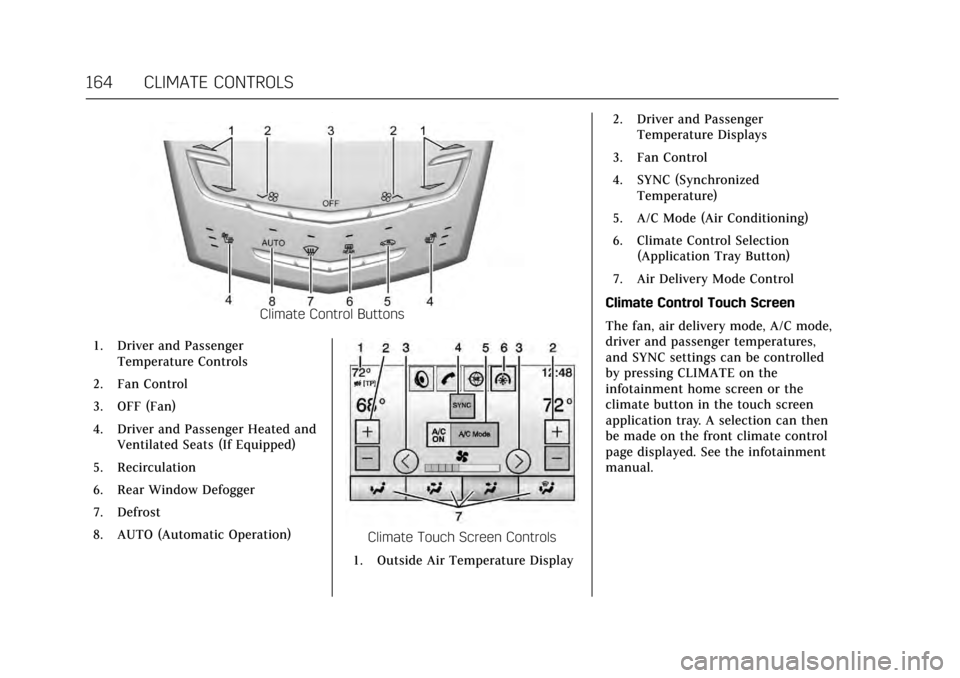
Climate Control Buttons
1. Driver and Passenger Temperature Controls
2. Fan Control
3. OFF (Fan)
4. Driver and Passenger Heated and Ventilated Seats (If Equipped)
5. Recirculation
6. Rear Window Defogger
7. Defrost
8. AUTO (Automatic Operation)
Climate Touch Screen Controls
1. Outside Air Temperature Display 2. Driver and Passenger
Temperature Displays
3. Fan Control
4. SYNC (Synchronized Temperature)
5. A/C Mode (Air Conditioning)
6. Climate Control Selection (Application Tray Button)
7. Air Delivery Mode Control
Climate Control Touch Screen
The fan, air delivery mode, A/C mode,
driver and passenger temperatures,
and SYNC settings can be controlled
by pressing CLIMATE on the
infotainment home screen or the
climate button in the touch screen
application tray. A selection can then
be made on the front climate control
page displayed. See the infotainment
manual.
Page 166 of 335
Cadillac ATS/ATS-V Owner Manual (GMNA-Localizing-MidEast-10287885) -
2017 - crc - 6/16/16
CLIMATE CONTROLS 165
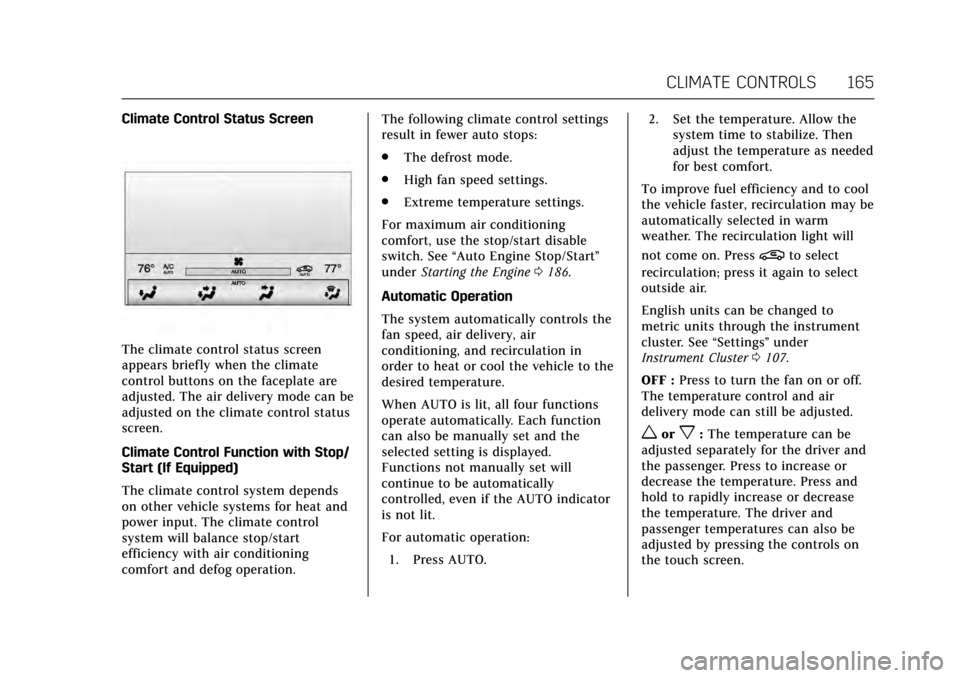
Climate Control Status Screen
The climate control status screen
appears briefly when the climate
control buttons on the faceplate are
adjusted. The air delivery mode can be
adjusted on the climate control status
screen.
Climate Control Function with Stop/
Start (If Equipped)
The climate control system depends
on other vehicle systems for heat and
power input. The climate control
system will balance stop/start
efficiency with air conditioning
comfort and defog operation.The following climate control settings
result in fewer auto stops:
.
The defrost mode.
. High fan speed settings.
. Extreme temperature settings.
For maximum air conditioning
comfort, use the stop/start disable
switch. See “Auto Engine Stop/Start ”
under Starting the Engine 0186.
Automatic Operation
The system automatically controls the
fan speed, air delivery, air
conditioning, and recirculation in
order to heat or cool the vehicle to the
desired temperature.
When AUTO is lit, all four functions
operate automatically. Each function
can also be manually set and the
selected setting is displayed.
Functions not manually set will
continue to be automatically
controlled, even if the AUTO indicator
is not lit.
For automatic operation: 1. Press AUTO. 2. Set the temperature. Allow the
system time to stabilize. Then
adjust the temperature as needed
for best comfort.
To improve fuel efficiency and to cool
the vehicle faster, recirculation may be
automatically selected in warm
weather. The recirculation light will
not come on. Press
@to select
recirculation; press it again to select
outside air.
English units can be changed to
metric units through the instrument
cluster. See “Settings”under
Instrument Cluster 0107.
OFF : Press to turn the fan on or off.
The temperature control and air
delivery mode can still be adjusted.
worx: The temperature can be
adjusted separately for the driver and
the passenger. Press to increase or
decrease the temperature. Press and
hold to rapidly increase or decrease
the temperature. The driver and
passenger temperatures can also be
adjusted by pressing the controls on
the touch screen.
Page 167 of 335
Cadillac ATS/ATS-V Owner Manual (GMNA-Localizing-MidEast-10287885) -
2017 - crc - 6/16/16
166 CLIMATE CONTROLS
SYNC :Press SYNC on the touch
screen to link all climate zone settings
to the driver settings. Adjust the
driver side temperature control to
change the linked temperature. When
the passenger settings are adjusted,
the SYNC button is displayed when
the temperatures are unlinked.
Manual Operation
z 9or9 y: Press the fan
control buttons or the touch screen
fan control to increase or decrease the
fan speed. Press and hold the buttons
or the touch screen control to adjust
speed more quickly. The fan speed
setting displays. Pressing either button
cancels automatic fan control and the
fan can be controlled manually. Press
AUTO to return to automatic
operation. To turn off the fan and
climate control system, press and hold
the fan down button or the touch
screen fan control until it is off.
Air Delivery Mode Control : Press
the CLIMATE touch screen button to
select climate control. Press the air
delivery mode touch screen button to
change the direction of the airf low.
The selected air delivery mode button is lit. Pressing any of the air delivery
buttons cancels automatic air delivery
control and the direction of the
airf low can be controlled manually.
Press AUTO to return to automatic
operation.
To change the current mode, select
one of the following:
Y:
Air is directed to the instrument
panel outlets.
\: Air is divided between the
instrument panel outlets and the floor
outlets.
[: Air is directed to the floor
outlets, with some air to the
windshield and side windows.
-: Clears the windows of fog or
moisture. Air is directed to the
windshield, side windows, and floor
outlets. Some air may go to the rear
floor outlets.
0: Press0to turn defrost on or
off. This clears the windshield of fog
or frost more quickly. Air is directed to
the windshield and side windows.
A/C Mode : Press the A/C Mode touch
screen control to turn the automatic
air conditioning on or off. If the fan is turned off, the air conditioner will not
run. Outside temperatures below
freezing may also prevent the air
conditioner from running.
Press AUTO to return to automatic
operation and the air conditioner runs
as needed.
Automatic Air Recirculation :
When
the AUTO indicator light is on, the air
is automatically recirculated as
needed to help quickly cool the inside
of the vehicle.
@: Press to alternate between
recirculating air inside the vehicle or
pulling in outside air. The indicator
light on the button is lit when
recirculation mode is active. This
helps to quickly cool the air inside the
vehicle or reduce the outside air and
odors that may enter.
Pressing this button cancels automatic
recirculation. Press AUTO to return to
automatic operation; recirculation
runs automatically as needed.
Manual recirculation mode is not
available when in Defrost or Defog
modes.
Page 168 of 335
Cadillac ATS/ATS-V Owner Manual (GMNA-Localizing-MidEast-10287885) -
2017 - crc - 6/16/16
CLIMATE CONTROLS 167
Auto Defog :The climate control
system may have a sensor to
automatically detect high humidity
inside the vehicle. When high
humidity is detected, the climate
control system may adjust to outside
air supply and turn on the air
conditioner. If the climate control
system does not detect possible
window fogging, it returns to normal
operation. To turn Auto Defog off or
on, see “Climate and Air Quality”
under Vehicle Personalization 0137.
Rear Window Defogger
K:Press to turn the rear window
defogger on or off. An indicator light
on the button comes on to show that
the rear window defogger is on.
The upper gridlines on the rear
window are antenna lines and are not
intended to heat when the defogger is
activated.
The heated outside mirrors turn on
when the rear window defogger
button is on. They help to clear fog or
frost from the surface of the mirrors. The rear window defogger can be set
to automatic operation. See
“Climate
and Air Quality” underVehicle
Personalization 0137. When auto rear
defog is selected, the rear window
defogger turns on automatically when
the interior temperature is cold and
the outside temperature is about 4 °C
(40 °F) and below. The auto rear
defogger turns off automatically.
Caution
Do not try to clear frost or other
material from the inside of the
front windshield and rear window
with a razor blade or anything else
that is sharp. This may damage the
rear window defogger grid and
affect the radio's ability to pick up
stations clearly. The repairs would
not be covered by the vehicle
warranty.
Jorz: If equipped, pressJorzto heat the driver or passenger seat
cushion and seatback.
If equipped, press
Cor{to ventilate
the driver or passenger seat. The vehicle also has auto heated and
ventilated seats that turn on when the
vehicle is on. The seats will activate at
the level required by the vehicle’s
interior temperature. Use the manual
heated or ventilated seat buttons to
turn auto heated or ventilated seats
off. The auto heated or ventilated
seats feature can be turned on or off.
See
Vehicle Personalization 0137 and
Heated and Ventilated Front Seats 058.
Remote Start Climate Control
Operation : With the remote vehicle
start feature, the climate control
system may run when the vehicle is
started remotely. The system uses the
driver's previous settings to heat or
cool the inside of the vehicle. See
Remote Vehicle Start 033.
The rear window defogger turns on if
it is cold outside.
Page 169 of 335

Cadillac ATS/ATS-V Owner Manual (GMNA-Localizing-MidEast-10287885) -
2017 - crc - 6/16/16
168 CLIMATE CONTROLS
Sensor
The solar sensor monitors the
solar heat.
The climate control system uses the
sensor information to adjust the
temperature, fan speed, recirculation,
and air delivery mode for best
comfort.
If the sensor is covered, the automatic
climate control system may not work
properly.
Air Vents
Adjustable air vents are in the center
and on the side of the instrument
panel.
Use the thumbwheels (1) near the air
vents to open or close off the airflow.
Move the slats (2) to change the
direction of the airflow.
Additional air vents are beneath the
windshield and the driver side and
passenger side door windows. These
are fixed and cannot be adjusted.
Operation Tips
.Clear away any ice, snow, or leaves
from air inlets at the base of the
windshield that could block the
flow of air into the vehicle.
. Keep the path under the front
seats clear of objects to help
circulate the air inside the vehicle
more effectively.
Page 170 of 335
Cadillac ATS/ATS-V Owner Manual (GMNA-Localizing-MidEast-10287885) -
2017 - crc - 6/16/16
CLIMATE CONTROLS 169
.Use of non-GM approved hood
deflectors can adversely affect the
performance of the system. Check
with your dealer before adding
equipment to the outside of the
vehicle.
. Do not attach any devices to the
air vent slats. This restricts airflow
and may cause damage to the air
vents.Maintenance
Passenger Compartment
Air Filter
The filter reduces dust, pollen, and
other airborne irritants from outside
air that is pulled into the vehicle. The
filter should be replaced as part of
routine scheduled maintenance. See
Maintenance Schedule 0307.
See your dealer regarding replacement
of the filter.
Service
All vehicles have a label underhood
that identifies the refrigerant used in
the vehicle. The refrigerant system
should only be serviced by trained and
certified technicians. The air
conditioning evaporator should never
be repaired or replaced by one from a
salvage vehicle. It should only be
replaced by a new evaporator to
ensure proper and safe operation.
During service, all refrigerants should
be reclaimed with proper equipment.
Venting refrigerants directly to the
atmosphere is harmful to the
environment and may also create
unsafe conditions based on inhalation,
combustion, frostbite, or other
health-based concerns.
Page 172 of 335
Cadillac ATS/ATS-V Owner Manual (GMNA-Localizing-MidEast-10287885) -
2017 - crc - 6/16/16
DRIVING AND OPERATING 171
Driving Information
Distracted Driving
Distraction comes in many forms and
can take your focus from the task of
driving. Exercise good judgment and
do not let other activities divert your
attention away from the road. Many
local governments have enacted laws
regarding driver distraction. Become
familiar with the local laws in
your area.
To avoid distracted driving, keep your
eyes on the road, keep your hands on
the steering wheel, and focus your
attention on driving.
.Do not use a phone in demanding
driving situations. Use a
hands-free method to place or
receive necessary phone calls.
. Watch the road. Do not read, take
notes, or look up information on
phones or other electronic devices.
. Designate a front seat passenger
to handle potential distractions. .
Become familiar with vehicle
features before driving, such as
programming favorite radio
stations and adjusting climate
control and seat settings. Program
all trip information into any
navigation device prior to driving.
. Wait until the vehicle is parked to
retrieve items that have fallen to
the floor.
. Stop or park the vehicle to tend to
children.
. Keep pets in an appropriate carrier
or restraint.
. Avoid stressful conversations
while driving, whether with a
passenger or on a cell phone.
{Warning
Taking your eyes off the road too
long or too often could cause a
crash resulting in injury or death.
Focus your attention on driving. Refer to the infotainment manual for
more information on using that
system, including pairing and using a
cell phone
Defensive Driving
Defensive driving means
“always
expect the unexpected.” The first step
in driving defensively is to wear the
safety belt. See Safety Belts061.
. Assume that other road users
(pedestrians, bicyclists, and other
drivers) are going to be careless
and make mistakes. Anticipate
what they might do and be ready.
. Allow enough following distance
between you and the driver in
front of you.
. Focus on the task of driving.
Control of a Vehicle
Braking, steering, and accelerating are
important factors in helping to control
a vehicle while driving.
Page 181 of 335
Cadillac ATS/ATS-V Owner Manual (GMNA-Localizing-MidEast-10287885) -
2017 - crc - 6/16/16
180 DRIVING AND OPERATING
.Tie a red cloth to an outside
mirror.
{Warning
Snow can trap engine exhaust
under the vehicle. This may cause
exhaust gases to get inside. Engine
exhaust contains carbon monoxide
(CO), which cannot be seen or
smelled. It can cause
unconsciousness and even death.
If the vehicle is stuck in snow:
. Clear snow from the base of
the vehicle, especially any
blocking the exhaust pipe.
. Open a window about 5 cm
(2 in) on the vehicle side that
is away from the wind, to
bring in fresh air.
. Fully open the air outlets on
or under the instrument
panel.
. Adjust the climate control
system to circulate the air
inside the vehicle and set the
(Continued)
Warning (Continued)
fan speed to the highest
setting. See“Climate Control
Systems.”
For more information about CO, see
Engine Exhaust 0190.
To save fuel, run the engine for short
periods to warm the vehicle and then
shut the engine off and partially close
the window. Moving about to keep
warm also helps.
If it takes time for help to arrive,
when running the engine, push the
accelerator pedal slightly so the
engine runs faster than the idle speed.
This keeps the battery charged to
restart the vehicle and to signal for
help with the headlamps. Do this as
little as possible, to save fuel.
If the Vehicle Is Stuck
Slowly and cautiously spin the wheels
to free the vehicle when stuck in sand,
mud, ice, or snow. If stuck too severely for the traction
system to free the vehicle, turn the
traction system off and use the
rocking method. See
Traction Control/
Electronic Stability Control 0198.
{Warning
If the vehicle's tires spin at high
speed, they can explode, and you or
others could be injured. The vehicle
can overheat, causing an engine
compartment fire or other damage.
Spin the wheels as little as possible
and avoid going above 56 km/h
(35 mph).
Rocking the Vehicle to Get it Out
Turn the steering wheel left and right
to clear the area around the front
wheels. Turn off any traction system.
Shift back and forth between
R (Reverse) and a low forward gear,
spinning the wheels as little as
possible. To prevent transmission
wear, wait until the wheels stop
spinning before shifting gears. Release
the accelerator pedal while shifting,
and press lightly on the accelerator
Page 189 of 335
Cadillac ATS/ATS-V Owner Manual (GMNA-Localizing-MidEast-10287885) -
2017 - crc - 6/16/16
188 DRIVING AND OPERATING
Auto Engine Stop/Start
When the brakes are applied and the
vehicle is at a complete stop, the
engine may turn off. When stopped,
the tachometer may point to AUTO
STOP, seeTachometer 0110. When
the brake pedal is released or the
accelerator pedal pressed, the engine
may restart.
Auto Stop may be deactivated if:
. A minimum vehicle speed is not
reached.
. The engine or transmission is not
at the required operating
temperature.
. The outside temperature is not in
the required operating range,
typically below −10 °C (14 °F) or
above 50 °C (122 °F).
. The shift lever is in any gear other
than D (Drive).
. The battery has been recently
disconnected.
. The battery charge is low. .
The interior comfort level has not
reached the required level for the
climate control system or defog
settings. See Dual Automatic
Climate Control System 0160 or
Dual Automatic Climate Control
System 0163.
. The Auto Stop time is greater than
two minutes.
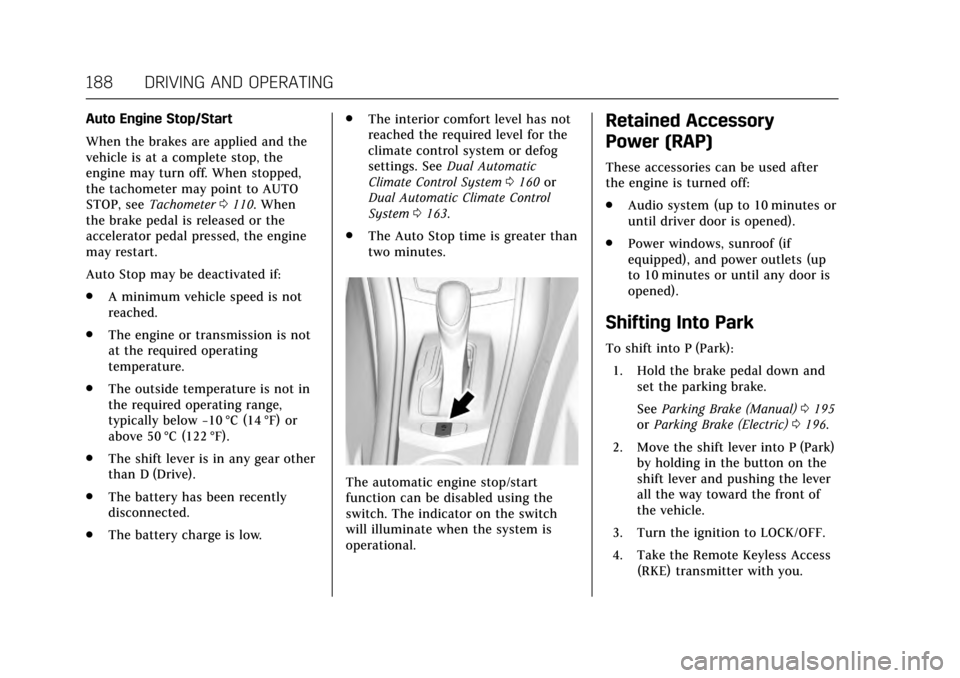
The automatic engine stop/start
function can be disabled using the
switch. The indicator on the switch
will illuminate when the system is
operational.
Retained Accessory
Power (RAP)
These accessories can be used after
the engine is turned off:
.Audio system (up to 10 minutes or
until driver door is opened).
. Power windows, sunroof (if
equipped), and power outlets (up
to 10 minutes or until any door is
opened).
Shifting Into Park
To shift into P (Park):
1. Hold the brake pedal down and set the parking brake.
See Parking Brake (Manual) 0195
or Parking Brake (Electric) 0196.
2. Move the shift lever into P (Park) by holding in the button on the
shift lever and pushing the lever
all the way toward the front of
the vehicle.
3. Turn the ignition to LOCK/OFF.
4. Take the Remote Keyless Access (RKE) transmitter with you.
Page 327 of 335

Cadillac ATS/ATS-V Owner Manual (GMNA-Localizing-MidEast-10287885) -
2017 - crc - 6/16/16
326 INDEX
Automatic (cont'd)Transmission Fluid . . . . . . . . . . . . . . . 244
Automatic Transmission Manual Mode . . . . . . . . . . . . . . . . . . . . . 193
Shift Lock Control Function
Check . . . . . . . . . . . . . . . . . . . . . . . . . . . . 257
B
Battery . . . . . . . . . . . . . . . . . . . . . . . . . . . . . . . 255Exterior Lighting Battery
Saver . . . . . . . . . . . . . . . . . . . . . . . . . . . . . 152
Jump Starting . . . . . . . . . . . . . . . . . . . . . 292
Power Protection . . . . . . . . . . . . . . . . . . 151
Voltage and Charging Messages . . . . . . . . . . . . . . . . . . . . . . . . 127
Blade Replacement, Wiper . . . . . . . . . 257
Brake System Warning Light . . . . . . . . . . . . 116
Brakes . . . . . . . . . . . . . . . . . . . . . . . . . . . . . . . 253
Antilock . . . . . . . . . . . . . . . . . . . . . . . . . . . 195
Assist . . . . . . . . . . . . . . . . . . . . . . . . . . . . . . 197
Fluid . . . . . . . . . . . . . . . . . . . . . . . . . . . . . . . 254
Parking . . . . . . . . . . . . . . . . . . . . . . . 195, 196
System Messages . . . . . . . . . . . . . . . . . 128
Braking . . . . . . . . . . . . . . . . . . . . . . . . . . . . . . 172 Automatic Forward . . . . . . . . . . . . . . . 221
Break-In, New Vehicle . . . . . . . . . . . . . . 184
Bulb Replacement . . . . . . . . . . . . . . . . . . 261 Back-up Lamps . . . . . . . . . . . . . . . . . . . 259 Bulb Replacement (cont'd)
Halogen Bulbs . . . . . . . . . . . . . . . . . . . . 259
Headlamp Aiming . . . . . . . . . . . . . . . . 258
Headlamps . . . . . . . . . . . . . . . . . . . . . . . . 259
High Intensity Discharge
(HID) Lighting . . . . . . . . . . . . . . . . . . . 259
License Plate Lamps . . . . . . . . . . . . . . 260
Buying New Tires . . . . . . . . . . . . . . . . . . . 280
C
Capacities and Specifications . . . . . . 319
Carbon Monoxide Engine Exhaust . . . . . . . . . . . . . . . . . . . 190
Trunk . . . . . . . . . . . . . . . . . . . . . . . . . . . . . . . . 38
Winter Driving . . . . . . . . . . . . . . . . . . . . 179
Cargo Tie-Downs . . . . . . . . . . . . . . . . . . . . . . . . . . . 98
Caution, Danger, and Warning . . . . . . . . 2
Center Console Storage . . . . . . . . . . . . . . 97
Chains, Tire . . . . . . . . . . . . . . . . . . . . . . . . . 284
Charging Wireless . . . . . . . . . . . . . . . . . . . . . . . . . . . 104
Charging System Light . . . . . . . . . . . . . 114
Check Malfunction Indicator EngineLight . . . . . . . . . . . . . . . . . . . . . . . . . . . . . 114
Child Restraints Infants and Young Children . . . . . . . . 81 Child Restraints (cont'd)
Lower Anchors and Tethers for
Children . . . . . . . . . . . . . . . . . . . . . . . . . . . 85
Older Children . . . . . . . . . . . . . . . . . . . . . . 79
Securing . . . . . . . . . . . . . . . . . . . . . . . . .91, 93
Systems . . . . . . . . . . . . . . . . . . . . . . . . . . . . . 83
Circuit Breakers . . . . . . . . . . . . . . . . . . . . . 261
Cleaning Exterior Care . . . . . . . . . . . . . . . . . . . . . . 298
Interior Care . . . . . . . . . . . . . . . . . . . . . . 302
Climate Control Systems Dual Automatic . . . . . . . . . . . . . . 160, 163
Clock . . . . . . . . . . . . . . . . . . . . . . . . . . . . . . . . . 102
Cluster, Instrument . . . . . . . . . . . . . . . . . 107
Compartments Storage . . . . . . . . . . . . . . . . . . . . . . . . . . . . . . 96
Competitive Driving Mode . . . . . . . . . 201
Composite Materials . . . . . . . . . . . . . . . . 184
Compressor Kit, Tire Sealant . . . . . . . 286
Control Traction and ElectronicStability . . . . . . . . . . . . . . . . . . . . . . . . . . 198
Control of a Vehicle . . . . . . . . . . . . . . . . 171
Convex Mirrors . . . . . . . . . . . . . . . . . . . . . . 42
Coolant
Engine . . . . . . . . . . . . . . . . . . . . . . . . . . . . . 248
Engine Temperature Gauge . . . . . . 111