instrument CADILLAC ATS V 2017 1.G Owners Manual
[x] Cancel search | Manufacturer: CADILLAC, Model Year: 2017, Model line: ATS V, Model: CADILLAC ATS V 2017 1.GPages: 335, PDF Size: 3.73 MB
Page 2 of 335

Cadillac ATS/ATS-V Owner Manual (GMNA-Localizing-MidEast-10287885) -
2017 - crc - 6/16/16
ContentsIntroduction . . . . . . . . . . . . . . . . . . . . . . . . . . 2
In Brief . . . . . . . . . . . . . . . . . . . . . . . . . . . . . . . 5
Keys, Doors, and Windows . . . . . . . . . 27
Seats and Restraints . . . . . . . . . . . . . . . 49
Storage . . . . . . . . . . . . . . . . . . . . . . . . . . . . . . 96
Instruments and Controls . . . . . . . . . . 99
Lighting . . . . . . . . . . . . . . . . . . . . . . . . . . . . 145
Infotainment System . . . . . . . . . . . . . 153
Climate Controls . . . . . . . . . . . . . . . . . . 160
Driving and Operating . . . . . . . . . . . . 170
Vehicle Care . . . . . . . . . . . . . . . . . . . . . . . 231
Service and Maintenance . . . . . . . . . 306
Technical Data . . . . . . . . . . . . . . . . . . . . 318
Customer Information . . . . . . . . . . . . 323
Index . . . . . . . . . . . . . . . . . . . . . . . . 325
Page 6 of 335
Cadillac ATS/ATS-V Owner Manual (GMNA-Localizing-MidEast-10287885) -
2017 - crc - 6/16/16
IN BRIEF 5
In Brief
Instrument Panel
Instrument Panel Overview . . . . . . . . . 6
Initial Drive Information
Initial Drive Information . . . . . . . . . . . 8
Stop/Start System . . . . . . . . . . . . . . . . . . . 8
Remote Keyless Entry (RKE)System . . . . . . . . . . . . . . . . . . . . . . . . . . . . . 8
Remote Vehicle Start . . . . . . . . . . . . . . . 8
Door Locks . . . . . . . . . . . . . . . . . . . . . . . . . . 9
Trunk . . . . . . . . . . . . . . . . . . . . . . . . . . . . . . . 10
Windows . . . . . . . . . . . . . . . . . . . . . . . . . . . 10
Seat Adjustment . . . . . . . . . . . . . . . . . . . 10
Memory Features . . . . . . . . . . . . . . . . . . 13
Second Row Seats . . . . . . . . . . . . . . . . . 14
Heated and Ventilated Seats . . . . . . 14
Head Restraint Adjustment . . . . . . . 14
Safety Belts . . . . . . . . . . . . . . . . . . . . . . . . . 15
Passenger Sensing System . . . . . . . . 15
Mirror Adjustment . . . . . . . . . . . . . . . . 15
Steering Wheel Adjustment . . . . . . . 16
Interior Lighting . . . . . . . . . . . . . . . . . . . 16
Exterior Lighting . . . . . . . . . . . . . . . . . . . 17
Windshield Wiper/Washer . . . . . . . . 18
Climate Controls . . . . . . . . . . . . . . . . . . . 18
Transmission . . . . . . . . . . . . . . . . . . . . . . . 20
Vehicle Features
Infotainment System . . . . . . . . . . . . . . 20
Steering Wheel Controls . . . . . . . . . . 20
Cruise Control . . . . . . . . . . . . . . . . . . . . . 21
Driver Information Center (DIC) . . . . . . . . . . . . . . . . . . . . . . 21
Forward Collision Alert (FCA) System . . . . . . . . . . . . . . . . . . . . . . . . . . . . 22
Forward Automatic Braking (FAB) . . . . . . . . . . . . . . . . . . . . 22
Lane Keep Assist (LKA) . . . . . . . . . . . 22
Lane Change Alert (LCA) . . . . . . . . . . 22
Rear Vision Camera (RVC) . . . . . . . . 22
Rear Cross Traffic Alert (RCTA) System . . . . . . . . . . . . . . . . . . . . . . . . . . . . 23
Parking Assist . . . . . . . . . . . . . . . . . . . . . . 23
Reverse Automatic Braking (RAB) . . . . . . . . . . . . . . . . . . . . 23
Power Outlets . . . . . . . . . . . . . . . . . . . . . . 23
Sunroof . . . . . . . . . . . . . . . . . . . . . . . . . . . . . 23
Performance and Maintenance
Traction Control/Electronic Stability Control . . . . . . . . . . . . . . . . . . 24
Tire Pressure Monitor . . . . . . . . . . . . . 24
Fuel (LTG 2.0L L4 Turbo Engine) . . . . . . . . . . . . . . . . . . . . . . . . . . . 25
Fuel (LCV 2.5L L4 and LGX 3.6L V6 Engines) . . . . . . . . . . . . . . . . . . . . . . 25
Fuel (LF4 3.6L Twin Turbo V6 Engine) . . . . . . . . . . . . . . . . . . . . . . . . 25 Engine Oil Life System . . . . . . . . . . . . 26
Driving for Better Fuel
Economy . . . . . . . . . . . . . . . . . . . . . . . . . . 26
Page 7 of 335
Cadillac ATS/ATS-V Owner Manual (GMNA-Localizing-MidEast-10287885) -
2017 - crc - 6/16/16
6 IN BRIEF
Instrument Panel
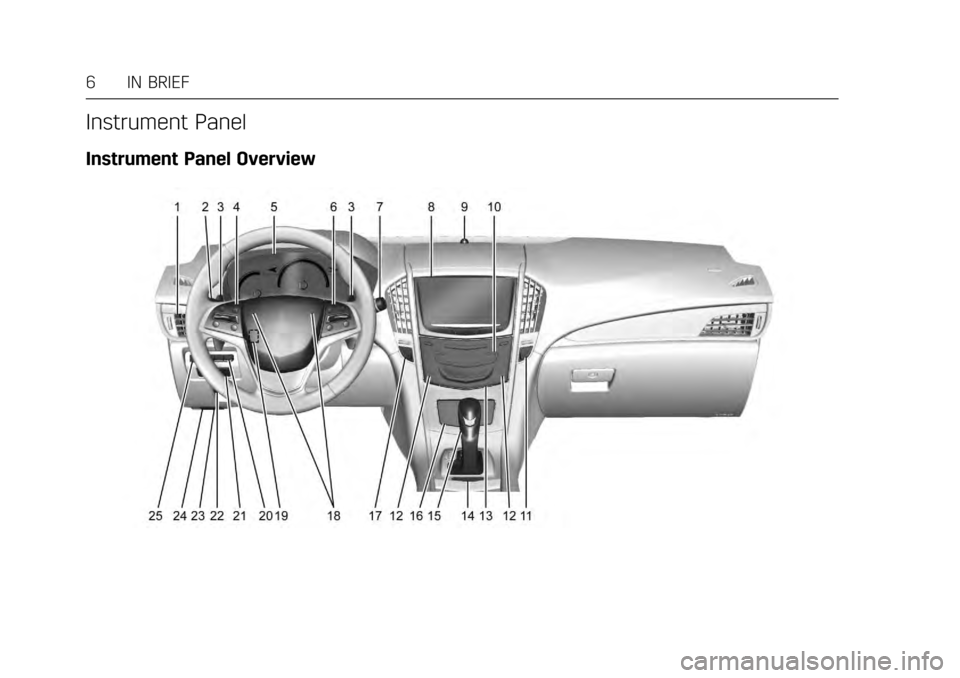
Instrument Panel Overview
Page 8 of 335

Cadillac ATS/ATS-V Owner Manual (GMNA-Localizing-MidEast-10287885) -
2017 - crc - 6/16/16
IN BRIEF 7
1.Air Vents 0168.
2. Exterior Lamp Controls 0145.
Turn Signal Lever. See Turn and
Lane-Change Signals 0149.
3. Tap Shift Controls (If Equipped). See Manual Mode 0193.
4. Cruise Control 0204.
Adaptive Cruise Control 0207 (If
Equipped).
Forward Collision Alert (FCA)
System 0218 (If Equipped).
Heated Steering Wheel 0100 (If
Equipped).
Traction Control/Electronic
Stability Control 0198 (ATS-V).
Steering Wheel Controls 0100.
5. Instrument Cluster 0107.
Driver Information Center (DIC)
Display. See Driver Information
Center (DIC) 0122.
6. Steering Wheel Controls 0100 (If
Equipped).
7. Windshield Wiper/Washer 0101.
8. Infotainment 0153. 9. Light Sensor. See
Automatic
Headlamp System 0147.
10. Dual Automatic Climate Control
System 0160 orDual Automatic
Climate Control System 0163.
11. Hazard Warning Flashers 0148.
12. Heated and Ventilated Front Seats
058 (If Equipped).
13. Instrument Panel Storage 096 (If
Equipped).
Wireless Charging Pad (If
Equipped) (Out of View). See
Wireless Charging 0104.
14. Traction Control/Electronic
Stability Control 0198 (ATS).
Stop/Start Disable Switch (If
Equipped). See Starting the
Engine 0186.
MODE Button (ATS) or
«/ª
Button (ATS-V). See Driver Mode
Control 0199.
15. Shift Lever. See Automatic
Transmission 0191.
16. Storage Bin. See Instrument Panel
Storage 096. 17. ENGINE START/STOP Button.
SeeIgnition Positions 0185.
18. Horn 0100.
19. Steering Wheel Adjustment 0100.
20. Head-Up Display (HUD) 0124 (If
Equipped).
21. Parking Assist Button. See Driver
Assistance Systems 0214.
Lane Keep Assist (LKA) 0224 (If
Equipped).
22. Electric Parking Brake (If Equipped). See Parking Brake
(Manual) 0195 orParking Brake
(Electric) 0196.
23. Data Link Connector (DLC) (Out of View). See Malfunction
Indicator Lamp (Check Engine
Light) 0114.
24. Hood Release (Out of View). See Hood 0233.
25. Instrument Panel Illumination
Control 0149.
Page 18 of 335
Cadillac ATS/ATS-V Owner Manual (GMNA-Localizing-MidEast-10287885) -
2017 - crc - 6/16/16
IN BRIEF 17
Reading Lamps
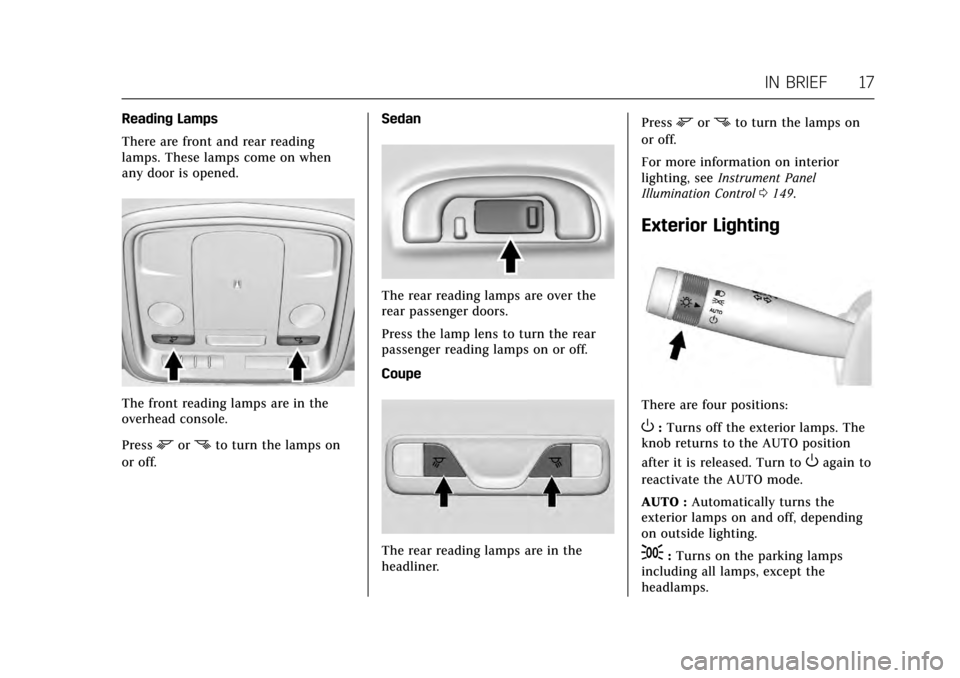
There are front and rear reading
lamps. These lamps come on when
any door is opened.
The front reading lamps are in the
overhead console.
Press
mornto turn the lamps on
or off. Sedan
The rear reading lamps are over the
rear passenger doors.
Press the lamp lens to turn the rear
passenger reading lamps on or off.
Coupe
The rear reading lamps are in the
headliner.Press
mornto turn the lamps on
or off.
For more information on interior
lighting, see Instrument Panel
Illumination Control 0149.
Exterior Lighting
There are four positions:
O:Turns off the exterior lamps. The
knob returns to the AUTO position
after it is released. Turn to
Oagain to
reactivate the AUTO mode.
AUTO : Automatically turns the
exterior lamps on and off, depending
on outside lighting.
;: Turns on the parking lamps
including all lamps, except the
headlamps.
Page 19 of 335
Cadillac ATS/ATS-V Owner Manual (GMNA-Localizing-MidEast-10287885) -
2017 - crc - 6/16/16
18 IN BRIEF
5:Turns on the headlamps together
with the parking lamps and
instrument panel lights.
See Exterior Lamp Controls 0145 and
Daytime Running Lamps (DRL) 0147.
Windshield Wiper/Washer
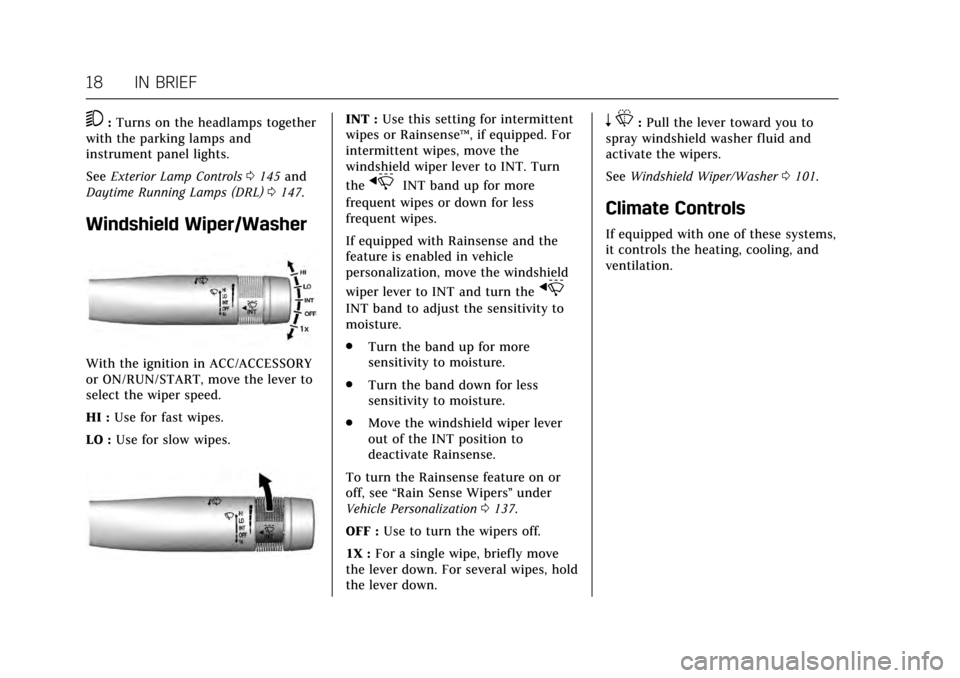
With the ignition in ACC/ACCESSORY
or ON/RUN/START, move the lever to
select the wiper speed.
HI : Use for fast wipes.
LO : Use for slow wipes.
INT : Use this setting for intermittent
wipes or Rainsense ™, if equipped. For
intermittent wipes, move the
windshield wiper lever to INT. Turn
the
xINT band up for more
frequent wipes or down for less
frequent wipes.
If equipped with Rainsense and the
feature is enabled in vehicle
personalization, move the windshield
wiper lever to INT and turn the
x
INT band to adjust the sensitivity to
moisture.
. Turn the band up for more
sensitivity to moisture.
. Turn the band down for less
sensitivity to moisture.
. Move the windshield wiper lever
out of the INT position to
deactivate Rainsense.
To turn the Rainsense feature on or
off, see “Rain Sense Wipers ”under
Vehicle Personalization 0137.
OFF : Use to turn the wipers off.
1X : For a single wipe, briefly move
the lever down. For several wipes, hold
the lever down.
n L: Pull the lever toward you to
spray windshield washer fluid and
activate the wipers.
See Windshield Wiper/Washer 0101.
Climate Controls
If equipped with one of these systems,
it controls the heating, cooling, and
ventilation.
Page 22 of 335
Cadillac ATS/ATS-V Owner Manual (GMNA-Localizing-MidEast-10287885) -
2017 - crc - 6/16/16
IN BRIEF 21
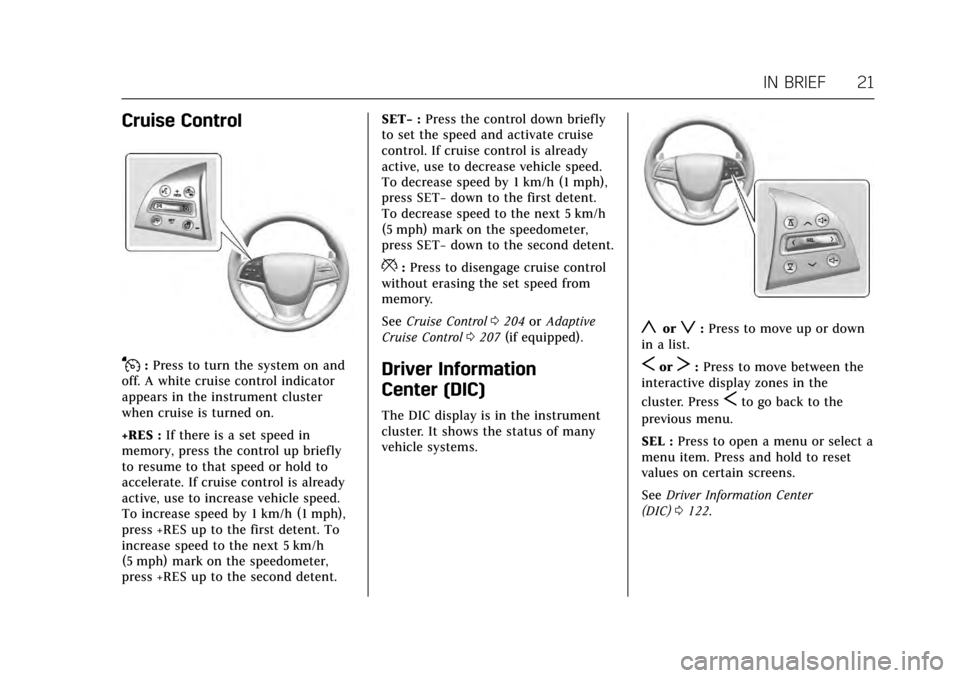
Cruise Control
J:Press to turn the system on and
off. A white cruise control indicator
appears in the instrument cluster
when cruise is turned on.
+RES : If there is a set speed in
memory, press the control up briefly
to resume to that speed or hold to
accelerate. If cruise control is already
active, use to increase vehicle speed.
To increase speed by 1 km/h (1 mph),
press +RES up to the first detent. To
increase speed to the next 5 km/h
(5 mph) mark on the speedometer,
press +RES up to the second detent. SET−
:Press the control down briefly
to set the speed and activate cruise
control. If cruise control is already
active, use to decrease vehicle speed.
To decrease speed by 1 km/h (1 mph),
press SET− down to the first detent.
To decrease speed to the next 5 km/h
(5 mph) mark on the speedometer,
press SET− down to the second detent.
*:Press to disengage cruise control
without erasing the set speed from
memory.
See Cruise Control 0204 orAdaptive
Cruise Control 0207 (if equipped).
Driver Information
Center (DIC)
The DIC display is in the instrument
cluster. It shows the status of many
vehicle systems.
yorz:Press to move up or down
in a list.
SorT: Press to move between the
interactive display zones in the
cluster. Press
Sto go back to the
previous menu.
SEL : Press to open a menu or select a
menu item. Press and hold to reset
values on certain screens.
See Driver Information Center
(DIC) 0122.
Page 24 of 335
Cadillac ATS/ATS-V Owner Manual (GMNA-Localizing-MidEast-10287885) -
2017 - crc - 6/16/16
IN BRIEF 23
Rear Cross Traffic Alert
(RCTA) System
If equipped, the RCTA system uses a
triangle with an arrow displayed on
the infotainment display to warn of
traffic behind your vehicle that may
cross your vehicle's path while in
R (Reverse). In addition, beeps will
sound, or the driver seat will pulse.
SeeAssistance Systems for Parking or
Backing 0215.
Parking Assist
If equipped, Rear Parking Assist (RPA)
uses sensors on the rear bumper to
assist with parking and avoiding
objects while in R (Reverse).
It operates at speeds less than 8 km/h
(5 mph). RPA may display a warning
triangle on the Rear Vision Camera
screen and a graphic on the
instrument cluster to provide the
object distance. In addition, multiple
beeps or seat pulses may occur if very
close to an object.
The vehicle may also have the Front
Parking Assist system. See
Assistance Systems for Parking or
Backing 0215.
Reverse Automatic
Braking (RAB)
If the vehicle has Adaptive Cruise
Control (ACC) it also has the RAB
system, which is designed to help
avoid or reduce the harm caused by
backing crashes when the vehicle is
shifted into R (Reverse). If the system
detects the vehicle is backing too fast
to avoid a crash with a detected object
behind your vehicle in your path, it
may automatically brake hard to
a stop.
See Assistance Systems for Parking or
Backing 0215.
Power Outlets
The accessory power outlets can be
used to plug in electrical equipment,
such as a cell phone or MP3 player.
The vehicle has two accessory power
outlets:
.
Inside the instrument panel
storage area below the climate
control system. .
On the rear of the center floor
console.
Lift the cover to access the accessory
power outlet.
See Power Outlets 0103.
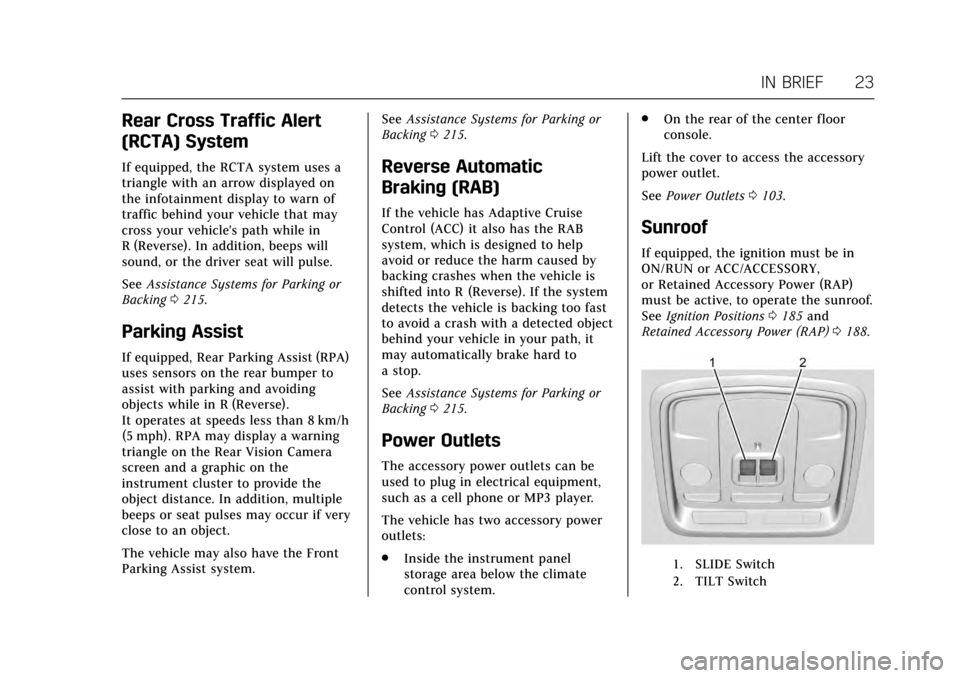
Sunroof
If equipped, the ignition must be in
ON/RUN or ACC/ACCESSORY,
or Retained Accessory Power (RAP)
must be active, to operate the sunroof.
See Ignition Positions 0185 and
Retained Accessory Power (RAP) 0188.
1. SLIDE Switch
2. TILT Switch
Page 25 of 335
Cadillac ATS/ATS-V Owner Manual (GMNA-Localizing-MidEast-10287885) -
2017 - crc - 6/16/16
24 IN BRIEF
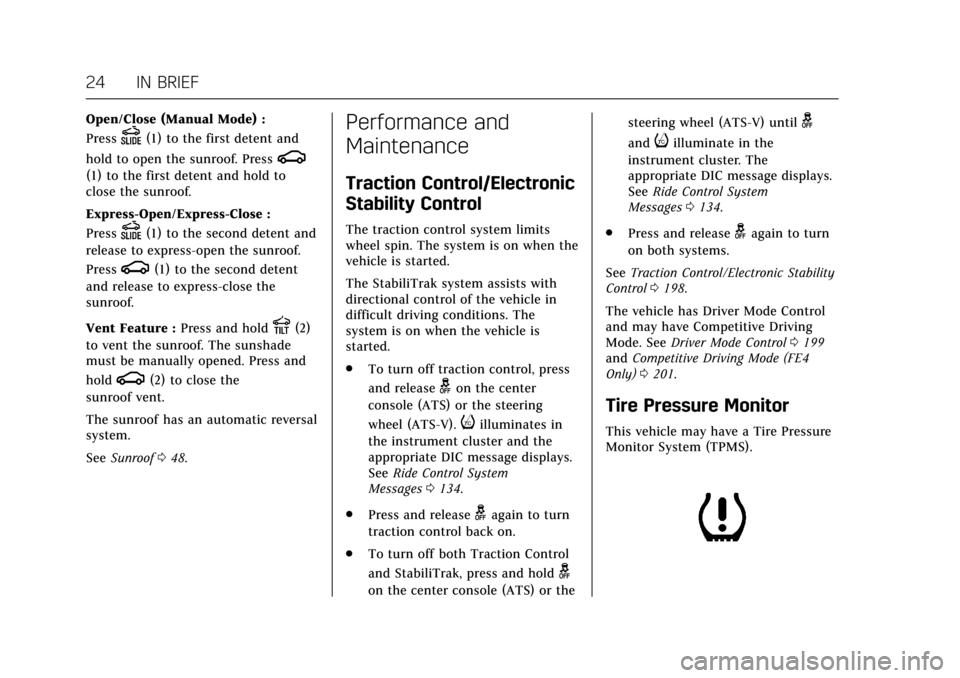
Open/Close (Manual Mode) :
Press
D(1) to the first detent and
hold to open the sunroof. Press
g
(1) to the first detent and hold to
close the sunroof.
Express-Open/Express-Close :
Press
D(1) to the second detent and
release to express-open the sunroof.
Press
g(1) to the second detent
and release to express-close the
sunroof.
Vent Feature : Press and hold
E(2)
to vent the sunroof. The sunshade
must be manually opened. Press and
hold
g(2) to close the
sunroof vent.
The sunroof has an automatic reversal
system.
See Sunroof 048.
Performance and
Maintenance
Traction Control/Electronic
Stability Control
The traction control system limits
wheel spin. The system is on when the
vehicle is started.
The StabiliTrak system assists with
directional control of the vehicle in
difficult driving conditions. The
system is on when the vehicle is
started.
.
To turn off traction control, press
and release
gon the center
console (ATS) or the steering
wheel (ATS-V).
iilluminates in
the instrument cluster and the
appropriate DIC message displays.
See Ride Control System
Messages 0134.
. Press and release
gagain to turn
traction control back on.
. To turn off both Traction Control
and StabiliTrak, press and hold
g
on the center console (ATS) or the steering wheel (ATS-V) until
g
andiilluminate in the
instrument cluster. The
appropriate DIC message displays.
See Ride Control System
Messages 0134.
. Press and release
gagain to turn
on both systems.
See Traction Control/Electronic Stability
Control 0198.
The vehicle has Driver Mode Control
and may have Competitive Driving
Mode. See Driver Mode Control 0199
and Competitive Driving Mode (FE4
Only) 0201.
Tire Pressure Monitor
This vehicle may have a Tire Pressure
Monitor System (TPMS).
Page 39 of 335
Cadillac ATS/ATS-V Owner Manual (GMNA-Localizing-MidEast-10287885) -
2017 - crc - 6/16/16
38 KEYS, DOORS, AND WINDOWS
If an inside rear door handle is being
pulled at the same time the safety
lock is deactivated, only that door will
remain locked and the indicator light
may flash. Release the handle, then
press the safety lock twice to
deactivate the safety locks.Doors
Trunk
{Warning
Exhaust gases can enter the vehicle
if it is driven with the liftgate or
trunk/hatch open, or with any
objects that pass through the seal
between the body and the trunk/
hatch or liftgate. Engine exhaust
contains carbon monoxide (CO)
which cannot be seen or smelled.
It can cause unconsciousness and
even death.
If the vehicle must be driven with
the liftgate or trunk/hatch open:. Close all of the windows.
. Fully open the air outlets on
or under the instrument
panel.
. Adjust the climate control
system to a setting that
brings in only outside air and
(Continued)
Warning (Continued)
set the fan speed to the
highest setting. See “Climate
Control Systems” in the Index.
. If the vehicle is equipped with
a power liftgate, disable the
power liftgate function.
See Engine Exhaust 0190.
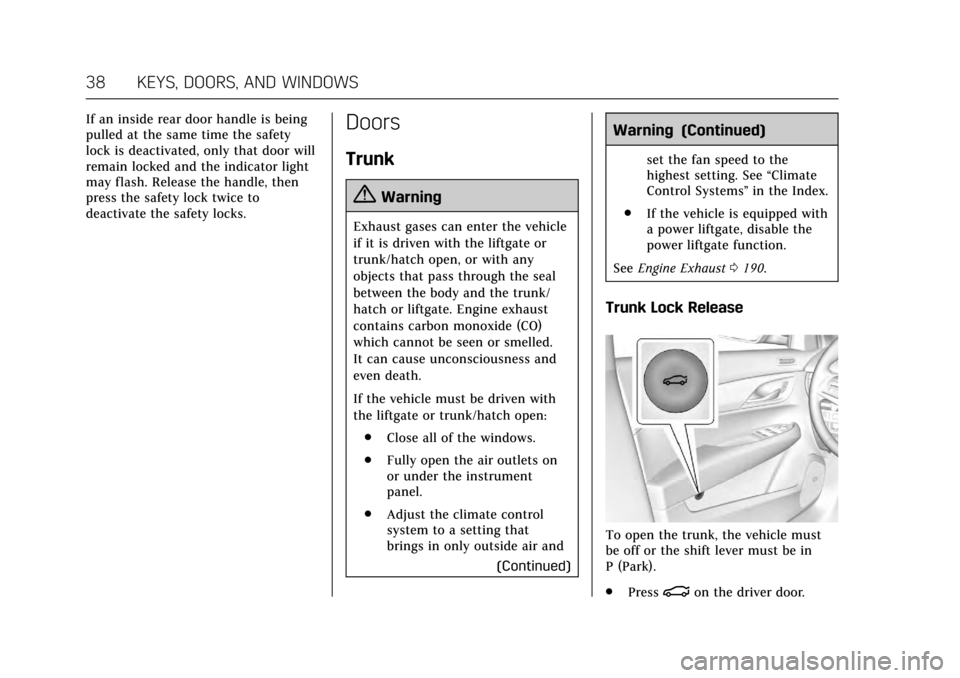
Trunk Lock Release
To open the trunk, the vehicle must
be off or the shift lever must be in
P (Park).
.
Press
|on the driver door.