seats CADILLAC CT4 2020 Workshop Manual
[x] Cancel search | Manufacturer: CADILLAC, Model Year: 2020, Model line: CT4, Model: CADILLAC CT4 2020Pages: 356, PDF Size: 4.61 MB
Page 78 of 356

Cadillac CT4 Owner Manual (GMNA-Localizing-U.S./Canada-13183937) -
2020 - crc - 4/28/20
SEATS AND RESTRAINTS 77
Do not secure a child seat in a
position without a top tether anchor if
a national or local law requires that
the top tether be anchored, or if the
instructions that come with the child
restraint say that the top tether must
be anchored.
In Canada, the law requires that
forward-facing child restraints have a
top tether, and that the tether be
attached.
If the child restraint or vehicle seat
position does not have the LATCH
system, you will be using the seat belt
to secure the child restraint. Be sure
to follow the instructions that came
with the child restraint.
If more than one child restraint needs
to be installed in the rear seat, be sure
to readWhere to Put the Restraint 069.
1. Put the child restraint on the seat.
If the head restraint interferes
with the proper installation of
the child restraint, see your
dealer for assistance. 2. Pick up the latch plate, and run
the lap and shoulder portions of
the vehicle seat belt through or
around the child restraint. The
child restraint instructions will
show you how.
3. Push the latch plate into thebuckle until it clicks.
Position the release button on
the buckle, away from the child
restraint, so that the seat belt
could be quickly unbuckled if
necessary.
4. Pull the shoulder belt all the wayout of the retractor to set the
lock. When the retractor lock is
set, the belt can be tightened but
not pulled out of the retractor.
Page 79 of 356

Cadillac CT4 Owner Manual (GMNA-Localizing-U.S./Canada-13183937) -
2020 - crc - 4/28/20
78 SEATS AND RESTRAINTS
5. To tighten the belt, push downon the child restraint, pull the
shoulder portion of the belt to
tighten the lap portion of the
belt, and feed the shoulder belt
back into the retractor. When
installing a forward-facing child
restraint, it may be helpful to use
your knee to push down on the
child restraint as you tighten
the belt.
Try to pull the belt out of the
retractor to make sure the
retractor is locked. If the
retractor is not locked, repeat
Steps 4 and 5. 6. If the child restraint has a top
tether, follow the child restraint
manufacturer's instructions
regarding the use of the top
tether. See Lower Anchors and
Tethers for Children (LATCH
System) 070.
7. Before placing a child in the child restraint, make sure it is
securely held in place. To check,
grasp the child restraint at the
seat belt path and attempt to
move it side to side and back
and forth. When the child
restraint is properly installed,
there should be no more than
2.5 cm (1 in) of movement.
To remove the child restraint,
unbuckle the vehicle seat belt and let
it return to the stowed position. If the
top tether is attached to a top tether
anchor, disconnect it.
If the head restraint was removed,
reinstall it before the seating position
is used. See "Head Restraint Removal and Reinstallation" underLower
Anchors and Tethers for Children
(LATCH System)
070 for additional
information on installing the head
restraint properly.
Securing Child Restraints
(With the Seat Belt in the
Front Seat)
This vehicle has airbags. A rear seat is
a safer place to secure a
forward-facing child restraint. See
Where to Put the Restraint 069.
In addition, the vehicle has a
passenger sensing system which is
designed to turn off the front
outboard passenger frontal airbag and
knee airbag under certain conditions.
See Passenger Sensing System 057 and
Passenger Airbag Status Indicator 099
for more information, including
important safety information.
Never put a rear-facing child seat in
the front. This is because the risk to
the rear-facing child is so great if the
airbag deploys.
Page 80 of 356

Cadillac CT4 Owner Manual (GMNA-Localizing-U.S./Canada-13183937) -
2020 - crc - 4/28/20
SEATS AND RESTRAINTS 79
{Warning
A child in a rear-facing child
restraint can be seriously injured or
killed if the front outboard
passenger frontal airbag inflates.
This is because the back of the
rear-facing child restraint would be
very close to the inflating airbag.
A child in a forward-facing child
restraint can be seriously injured or
killed if the front outboard
passenger frontal airbag inflates
and the passenger seat is in a
forward position.
Even if the passenger sensing
system has turned off the front
outboard passenger airbag(s), no
system is fail-safe. No one can
guarantee that an airbag will not
deploy under some unusual
circumstance, even though the
airbag(s) are off.
Secure rear-facing child restraints
in a rear seat, even if the airbag(s)
are off. If you secure a(Continued)
Warning (Continued)
forward-facing child restraint in the
front outboard passenger seat,
always move the seat as far back as
it will go. It is better to secure the
child restraint in a rear seat.
SeePassenger Sensing System 057
for additional information.
If the child restraint uses a top tether,
see Lower Anchors and Tethers for
Children (LATCH System) 070 for top
tether anchor locations.
Do not secure a child seat in a
position without a top tether anchor if
a national or local law requires that
the top tether be anchored, or if the
instructions that come with the child
restraint say that the top tether must
be anchored.
In Canada, the law requires that
forward-facing child restraints have a
top tether, and that the tether be
attached. When using the lap-shoulder belt to
secure the child restraint in this
position, follow the instructions that
came with the child restraint and the
following instructions:
1. Move the seat as far back as it will go before securing the
forward-facing child restraint.
Move the seat upward or the
seatback to an upright position,
if needed, to get a tight
installation of the child restraint.
When the passenger sensing
system has turned off the front
outboard passenger frontal
airbag and knee airbag, the OFF
indicator on the passenger airbag
status indicator should light and
stay lit when you start the
vehicle. See Passenger Airbag
Status Indicator 099.
2. Put the child restraint on the seat.
3. Pick up the latch plate, and run the lap and shoulder portions of
the vehicle seat belt through or
around the child restraint. The
child restraint instructions will
show you how.
Page 81 of 356
Cadillac CT4 Owner Manual (GMNA-Localizing-U.S./Canada-13183937) -
2020 - crc - 4/28/20
80 SEATS AND RESTRAINTS
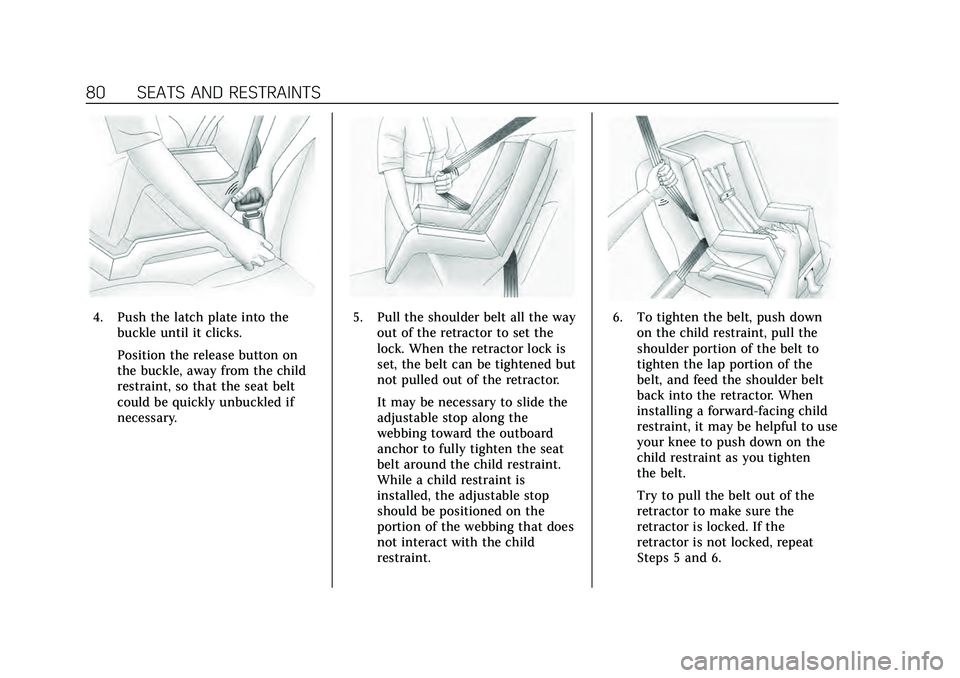
4. Push the latch plate into thebuckle until it clicks.
Position the release button on
the buckle, away from the child
restraint, so that the seat belt
could be quickly unbuckled if
necessary.5. Pull the shoulder belt all the wayout of the retractor to set the
lock. When the retractor lock is
set, the belt can be tightened but
not pulled out of the retractor.
It may be necessary to slide the
adjustable stop along the
webbing toward the outboard
anchor to fully tighten the seat
belt around the child restraint.
While a child restraint is
installed, the adjustable stop
should be positioned on the
portion of the webbing that does
not interact with the child
restraint.6. To tighten the belt, push downon the child restraint, pull the
shoulder portion of the belt to
tighten the lap portion of the
belt, and feed the shoulder belt
back into the retractor. When
installing a forward-facing child
restraint, it may be helpful to use
your knee to push down on the
child restraint as you tighten
the belt.
Try to pull the belt out of the
retractor to make sure the
retractor is locked. If the
retractor is not locked, repeat
Steps 5 and 6.
Page 82 of 356

Cadillac CT4 Owner Manual (GMNA-Localizing-U.S./Canada-13183937) -
2020 - crc - 4/28/20
SEATS AND RESTRAINTS 81
7. Before placing a child in thechild restraint, make sure it is
securely held in place. To check,
grasp the child restraint at the
seat belt path and attempt to
move it side to side and back
and forth. When the child
restraint is properly installed,
there should be no more than
2.5 cm (1 in) of movement. If the airbags are off, the OFF
indicator in the passenger airbag
status indicator will come on and stay
on when the vehicle is started.
If a child restraint has been installed
and the ON indicator is lit, see
“If the
On Indicator Is Lit for a Child
Restraint ”under Passenger Sensing
System 057.
To remove the child restraint,
unbuckle the vehicle seat belt and let
it return to the stowed position.
Page 87 of 356
Cadillac CT4 Owner Manual (GMNA-Localizing-U.S./Canada-13183937) -
2020 - crc - 4/28/20
86 INSTRUMENTS AND CONTROLS
Controls
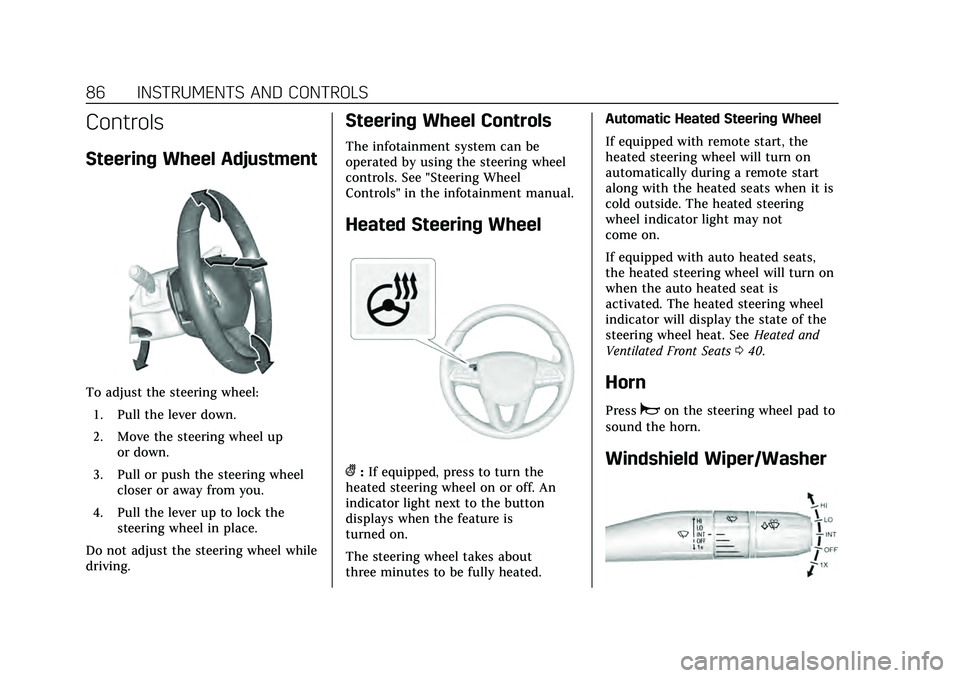
Steering Wheel Adjustment
To adjust the steering wheel:1. Pull the lever down.
2. Move the steering wheel up or down.
3. Pull or push the steering wheel closer or away from you.
4. Pull the lever up to lock the steering wheel in place.
Do not adjust the steering wheel while
driving.
Steering Wheel Controls
The infotainment system can be
operated by using the steering wheel
controls. See "Steering Wheel
Controls" in the infotainment manual.
Heated Steering Wheel
(: If equipped, press to turn the
heated steering wheel on or off. An
indicator light next to the button
displays when the feature is
turned on.
The steering wheel takes about
three minutes to be fully heated. Automatic Heated Steering Wheel
If equipped with remote start, the
heated steering wheel will turn on
automatically during a remote start
along with the heated seats when it is
cold outside. The heated steering
wheel indicator light may not
come on.
If equipped with auto heated seats,
the heated steering wheel will turn on
when the auto heated seat is
activated. The heated steering wheel
indicator will display the state of the
steering wheel heat. See
Heated and
Ventilated Front Seats 040.
Horn
Pressaon the steering wheel pad to
sound the horn.
Windshield Wiper/Washer
Page 118 of 356
Cadillac CT4 Owner Manual (GMNA-Localizing-U.S./Canada-13183937) -
2020 - crc - 4/28/20
INSTRUMENTS AND CONTROLS 117
Engine Sound
This setting adjusts the sound of the
engine exhaust from a quiet to a loud
exhaust volume.
Touch Stealth, Tour, Sport, or Track.
Steering
This setting adjusts how the steering
feels from a lighter to a reduced assist
for more steering feel.
Touch Tour, Sport, or Track.
Suspension
This setting adjusts the suspension
from a comfortable to a more
responsive tune.
Touch Tour, Sport, or Track.
Brake Response
This setting adjusts the brake pedal
response for specific driving
conditions or style.
Touch Tour, Sport, or Track.
Climate and Air Quality
Touch and the following may display:
.Auto Fan Speed .
Air Quality Sensor
. Auto Cooled Seats
. Auto Heated Seats
. Auto Defog
. Auto Rear Defog
. Ionizer
Auto Fan Speed
This setting specifies the amount of
airf low when the climate control fan
setting is Auto Fan.
Touch Low, Medium, or High.
Air Quality Sensor
This setting switches the system into
Recirculation Mode based on the
quality of the outside air.
Touch Off, Low Sensitivity, or High
Sensitivity.
Auto Cooled Seats
This setting automatically turns on
and regulates the ventilated seats
when the cabin temperature is warm.
See Heated and Ventilated Front Seats
0 40.
Touch Off or On. Auto Heated Seats
This setting automatically turns on
and regulates the heated seats when
the cabin temperature is cool. The
auto heated seats can be turned off by
using the heated seat buttons on the
center stack. See
Heated and Ventilated
Front Seats 040.
If equipped with auto heated steering
wheel, this feature will turn on when
the auto heated seats turn on.
Touch Off or On.
Auto Defog
This setting automatically turns the
front defogger on when the engine is
started.
Touch Off or On.
Auto Rear Defog
This setting automatically turns the
rear defogger on when the engine is
started.
Touch Off or On.
Page 120 of 356
Cadillac CT4 Owner Manual (GMNA-Localizing-U.S./Canada-13183937) -
2020 - crc - 4/28/20
INSTRUMENTS AND CONTROLS 119
.Remote Mirror Folding
. Rain Sense Wipers
Chime Volume
This setting determines the chime
volume level.
Touch the controls on the
infotainment display to adjust the
volume.
Reverse Tilt Mirror
When on, both the driver and
passenger, driver, or passenger outside
mirrors will tilt downward when the
vehicle is shifted to R (Reverse) to
improve visibility of the ground near
the rear wheels. They will return to
their previous driving position when
the vehicle is shifted out of
R (Reverse) or the engine is turned off.
See Reverse Tilt Mirrors 027.
Touch Off, On - Driver and Passenger,
On - Driver, or On - Passenger.
Remote Mirror Folding
This setting adjusts the outside
mirrors when locking and unlocking
the vehicle. Press
Qon the remote key
or lock button on the door handle to fold the mirrors in. Press
Kon the
remote key or unlock button on the
door handle to unfold the mirrors. See
Folding Mirrors 026.
Touch Off or On.
Rain Sense Wipers
This setting automatically turns on
the wipers when moisture is detected
and the wiper switch is in
intermittent mode.
Touch Disabled or Enabled.
Lighting
Touch and the following may display:
. Vehicle Locator Lights
. Exit Lighting
Vehicle Locator Lights
This setting flashes the vehicle’s
headlamps when
Kis pressed on the
remote key.
Touch Off or On.
Exit Lighting
This setting specifies how long the
headlamps stay on after the vehicle is
turned off and exited. Touch Off, 30 Seconds, 60 Seconds,
or 120 Seconds.
Power Door Locks
Touch and the following may display:
.
Auto Door Unlock
. Delayed Door Lock
Auto Door Unlock
This setting allows selection of which
doors will automatically unlock when
the vehicle is shifted into P (Park).
Touch Off, All Doors, or Driver Door.
Delayed Door Lock
This setting delays the locking of the
vehicle’s doors.
Touch Off or On.
Remote Lock, Unlock, Start
Touch and the following may display:
. Remote Unlock Light Feedback
. Remote Lock Feedback
. Remote Door Unlock
. Remote Start Auto Cool Seats
. Remote Start Auto Heat Seats
Page 121 of 356
Cadillac CT4 Owner Manual (GMNA-Localizing-U.S./Canada-13183937) -
2020 - crc - 4/28/20
120 INSTRUMENTS AND CONTROLS
.Remote Window Operation
. Passive Door Unlock
. Passive Door Lock
. Remote Left in Vehicle Alert
. Remote Removed from Vehicle
Alert
Remote Unlock Light Feedback
This setting flashes the exterior lamps
when the vehicle is unlocked with the
remote key.
Touch Off or Flash Lights.
Remote Lock Feedback
This setting specifies how the vehicle
responds when the vehicle is locked
with the remote key.
Touch Off, Lights and Horn, Lights
Only, or Horn Only.
Remote Door Unlock
This setting specifies whether all
doors, or just the driver door, unlock
when pressing
Kon the remote key.
Touch All Doors or Driver Door. Remote Start Auto Cool Seats
This setting automatically turns on
the ventilated seats when using the
remote start function on warm days.
See
Heated and Ventilated Front Seats
0 40 and
Remote Vehicle Start 014.
Touch Off or On.
Remote Start Auto Heat Seats
This setting automatically turns on
the heated seats when using the
remote start function on cold days.
See Heated and Ventilated Front Seats
0 40 and
Remote Vehicle Start 014.
If equipped with auto heated steering
wheel, this feature will turn on when
the remote start auto heated seats
turn on.
Touch Off or On.
Remote Window Operation
If equipped, this feature enables
remote open operation of the windows
with the remote key. See Remote
Keyless Entry (RKE) System Operation
0 8. Touch Off or On.
Passive Door Unlock
This setting specifies which doors
unlock when using the button on the
driver door handle to unlock the
vehicle.
Touch Off, All Doors or Driver
Door Only.
Passive Door Lock
This setting specifies if the vehicle will
automatically lock, or lock and
provide an alert after all the doors are
closed, and you walk away from the
vehicle with the remote key. See
Remote Keyless Entry (RKE) System
Operation
08.
Touch Off, On with Horn Chirp, or On.
Remote Left in Vehicle Alert
This feature sounds an alert when the
remote key is left in the vehicle.
Touch Off or On.
Page 122 of 356
Cadillac CT4 Owner Manual (GMNA-Localizing-U.S./Canada-13183937) -
2020 - crc - 4/28/20
INSTRUMENTS AND CONTROLS 121
Remote Removed from Vehicle
Alert
This feature beeps the horn 3 times
when exiting a running vehicle with
the remote key.
Touch Off or On.
Seating Position
Touch and the following may display:
.Seat Entry Memory
. Seat Exit Memory
Seat Entry Memory
This feature automatically recalls the
previously stored 1 or 2 button
positions when the ignition is changed
from off to on. See Memory Seats037.
Touch On or Off.
Seat Exit Memory
This feature automatically recalls the
previously stored exit button positions
when the ignition is changed from on
to off if the driver door is open or
opened. See Memory Seats 037.
Touch Off or On.
Teen Driver
See “Teen Driver” under“Settings ”in
the infotainment manual.
Valet Mode
This will lock the infotainment system
and steering wheel controls. It may
also limit access to vehicle storage
locations, if equipped.
To enable valet mode:
1. Enter a four-digit code on the keypad.
2. Touch Enter to go to the confirmation screen.
3. Re-enter the four-digit code.
Touch Lock or Unlock to lock or
unlock the system. Touch Back to go
back to the previous menu.
Universal Remote
System
See Radio Frequency Statement 0330.
Universal Remote System
Programming
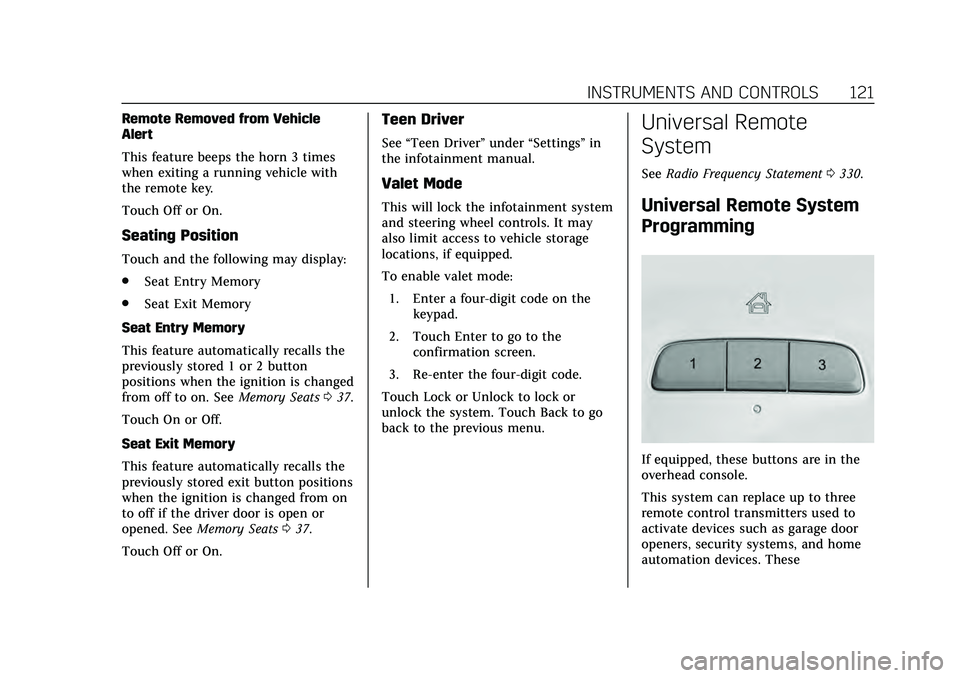
If equipped, these buttons are in the
overhead console.
This system can replace up to three
remote control transmitters used to
activate devices such as garage door
openers, security systems, and home
automation devices. These