ABS CADILLAC CT4 2020 Owner's Manual
[x] Cancel search | Manufacturer: CADILLAC, Model Year: 2020, Model line: CT4, Model: CADILLAC CT4 2020Pages: 356, PDF Size: 4.61 MB
Page 4 of 356
Cadillac CT4 Owner Manual (GMNA-Localizing-U.S./Canada-13183937) -
2020 - crc - 4/28/20
INTRODUCTION 3
Danger, Warning, and
Caution
Warning messages found on vehicle
labels and in this manual describe
hazards and what to do to avoid or
reduce them.
{Danger
Danger indicates a hazard with a
high level of risk which will result
in serious injury or death.
{Warning
Warning indicates a hazard that
could result in injury or death.
Caution
Caution indicates a hazard that
could result in property or vehicle
damage.
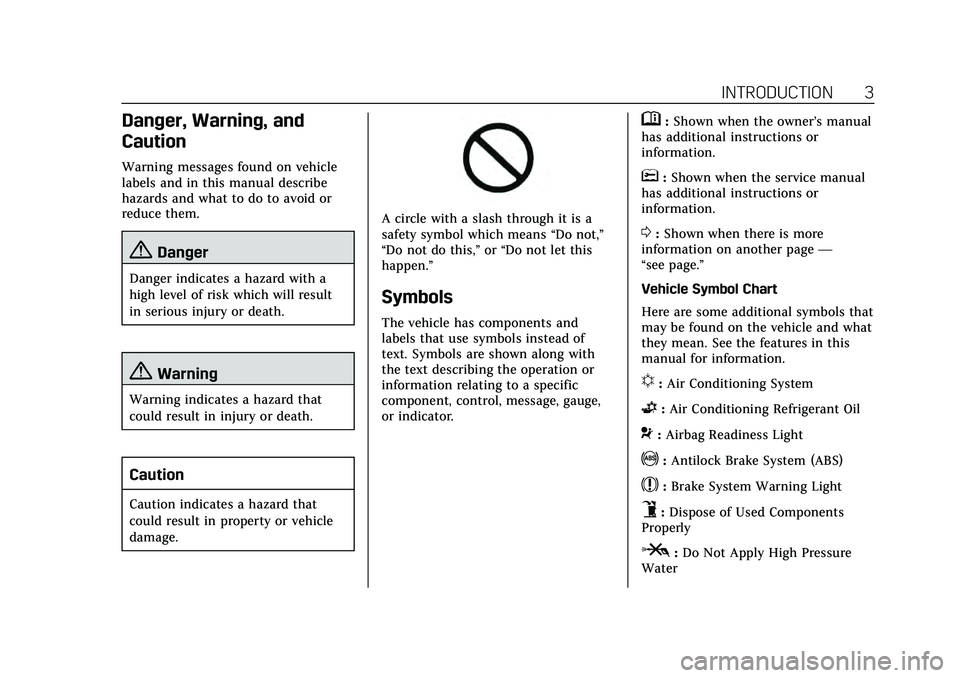
A circle with a slash through it is a
safety symbol which means“Do not,”
“Do not do this,” or“Do not let this
happen.”
Symbols
The vehicle has components and
labels that use symbols instead of
text. Symbols are shown along with
the text describing the operation or
information relating to a specific
component, control, message, gauge,
or indicator.
M: Shown when the owner’s manual
has additional instructions or
information.
*: Shown when the service manual
has additional instructions or
information.
0: Shown when there is more
information on another page —
“see page.”
Vehicle Symbol Chart
Here are some additional symbols that
may be found on the vehicle and what
they mean. See the features in this
manual for information.
u: Air Conditioning System
G:Air Conditioning Refrigerant Oil
9:Airbag Readiness Light
!:Antilock Brake System (ABS)
$:Brake System Warning Light
9:Dispose of Used Components
Properly
P: Do Not Apply High Pressure
Water
Page 18 of 356
Cadillac CT4 Owner Manual (GMNA-Localizing-U.S./Canada-13183937) -
2020 - crc - 4/28/20
KEYS, DOORS, AND WINDOWS 17
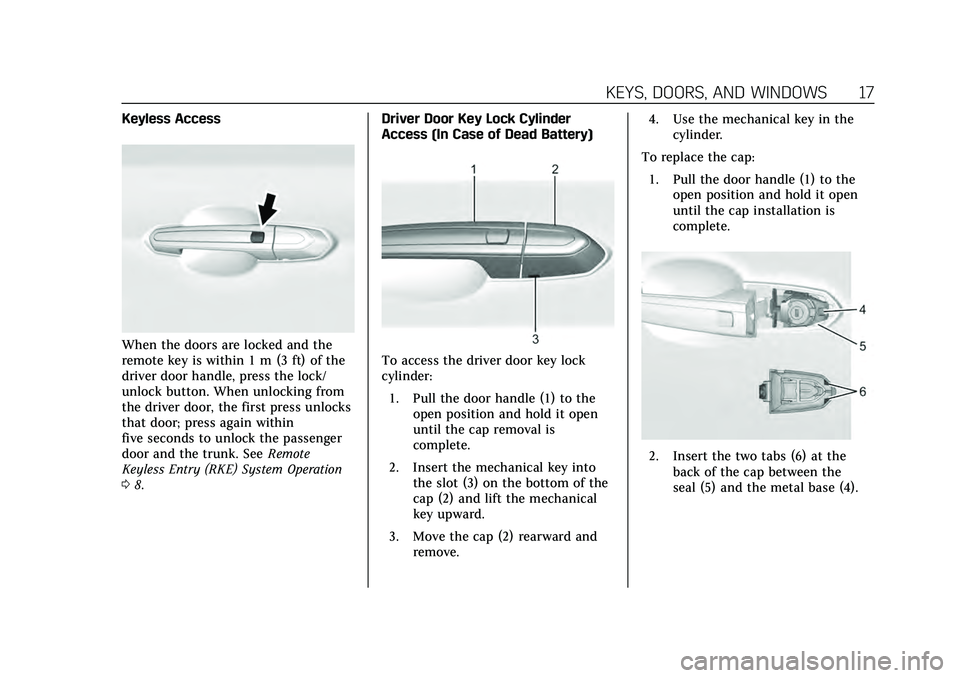
Keyless Access
When the doors are locked and the
remote key is within 1 m (3 ft) of the
driver door handle, press the lock/
unlock button. When unlocking from
the driver door, the first press unlocks
that door; press again within
five seconds to unlock the passenger
door and the trunk. SeeRemote
Keyless Entry (RKE) System Operation
0 8. Driver Door Key Lock Cylinder
Access (In Case of Dead Battery)To access the driver door key lock
cylinder:
1. Pull the door handle (1) to the open position and hold it open
until the cap removal is
complete.
2. Insert the mechanical key into the slot (3) on the bottom of the
cap (2) and lift the mechanical
key upward.
3. Move the cap (2) rearward and remove. 4. Use the mechanical key in the
cylinder.
To replace the cap: 1. Pull the door handle (1) to the open position and hold it open
until the cap installation is
complete.
2. Insert the two tabs (6) at the
back of the cap between the
seal (5) and the metal base (4).
Page 86 of 356
Cadillac CT4 Owner Manual (GMNA-Localizing-U.S./Canada-13183937) -
2020 - crc - 4/28/20
INSTRUMENTS AND CONTROLS 85
Instruments and
Controls
Controls
Steering Wheel Adjustment . . . . . . . 86
Steering Wheel Controls . . . . . . . . . . 86
Heated Steering Wheel . . . . . . . . . . . . 86
Horn . . . . . . . . . . . . . . . . . . . . . . . . . . . . . . . . 86
Windshield Wiper/Washer . . . . . . . . 86
Compass . . . . . . . . . . . . . . . . . . . . . . . . . . . . 88
Clock . . . . . . . . . . . . . . . . . . . . . . . . . . . . . . . 89
Power Outlets . . . . . . . . . . . . . . . . . . . . . . 89
Wireless Charging . . . . . . . . . . . . . . . . . 90
Warning Lights, Gauges, and
Indicators
Warning Lights, Gauges, andIndicators . . . . . . . . . . . . . . . . . . . . . . . . . 92
Instrument Cluster . . . . . . . . . . . . . . . . 93
Speedometer . . . . . . . . . . . . . . . . . . . . . . . 96
Odometer . . . . . . . . . . . . . . . . . . . . . . . . . . . 96
Trip Odometer . . . . . . . . . . . . . . . . . . . . . 96
Tachometer . . . . . . . . . . . . . . . . . . . . . . . . 96
Fuel Gauge . . . . . . . . . . . . . . . . . . . . . . . . . 96
Engine Coolant Temperature Gauge . . . . . . . . . . . . . . . . . . . . . . . . . . . . . 97
Seat Belt Reminders . . . . . . . . . . . . . . . 97
Airbag Readiness Light . . . . . . . . . . . . 98 Passenger Airbag Status
Indicator . . . . . . . . . . . . . . . . . . . . . . . . . . 99
Charging System Light . . . . . . . . . . . . 99
Malfunction Indicator Lamp (Check Engine Light) . . . . . . . . . . . 100
Brake System Warning Light . . . . 102
Electric Parking Brake Light . . . . . 102
Service Electric Parking Brake Light . . . . . . . . . . . . . . . . . . . . . . . . . . . . . 102
Antilock Brake System (ABS) Warning Light . . . . . . . . . . . . . . . . . . 103
Automatic Vehicle Hold (AVH) Light . . . . . . . . . . . . . . . . . . . . . . . . . . . . . 103
Lane Keep Assist (LKA) Light . . . 103
Vehicle Ahead Indicator . . . . . . . . . 104
Pedestrian Ahead Indicator . . . . . . 104
Traction Off Light . . . . . . . . . . . . . . . . 104
StabiliTrak OFF Light . . . . . . . . . . . . 104
Traction Control System (TCS)/ StabiliTrak Light . . . . . . . . . . . . . . . . 105
Engine Coolant Temperature Warning Light . . . . . . . . . . . . . . . . . . 105
Driver Mode Control Light . . . . . . . 106
Tire Pressure Light . . . . . . . . . . . . . . . 106
Engine Oil Pressure Light . . . . . . . . 107
Low Fuel Warning Light . . . . . . . . . 107
Security Light . . . . . . . . . . . . . . . . . . . . . 107
High-Beam On Light . . . . . . . . . . . . . 107
Lamps On Reminder . . . . . . . . . . . . . 108
Cruise Control Light . . . . . . . . . . . . . . 108 Door Ajar Light . . . . . . . . . . . . . . . . . . . 108
Information Displays
Driver Information
Center (DIC) . . . . . . . . . . . . . . . . . . . . . 109
Head-Up Display (HUD) . . . . . . . . . 111
Vehicle Messages
Vehicle Messages . . . . . . . . . . . . . . . . . 115
Engine Power Messages . . . . . . . . . . 115
Vehicle Speed Messages . . . . . . . . . 115
Vehicle Personalization
Vehicle Personalization . . . . . . . . . . 116
Universal Remote System
Universal Remote System . . . . . . . . 121
Universal Remote System Programming . . . . . . . . . . . . . . . . . . . 121
Universal Remote System
Operation . . . . . . . . . . . . . . . . . . . . . . . . 124
Page 104 of 356
Cadillac CT4 Owner Manual (GMNA-Localizing-U.S./Canada-13183937) -
2020 - crc - 4/28/20
INSTRUMENTS AND CONTROLS 103
On some vehicles the service electric
parking brake light should come on
briefly when the vehicle is started.
If it does not come on, have it fixed so
it will be ready to warn if there is a
problem. For vehicles with the
reconfigurable cluster, this light may
not come on when the vehicle is
started.
If this light stays on, the vehicle
should be taken to a dealer as soon as
possible. SeeElectric Parking Brake
0 179. A message may also display in
the Driver Information Center (DIC).
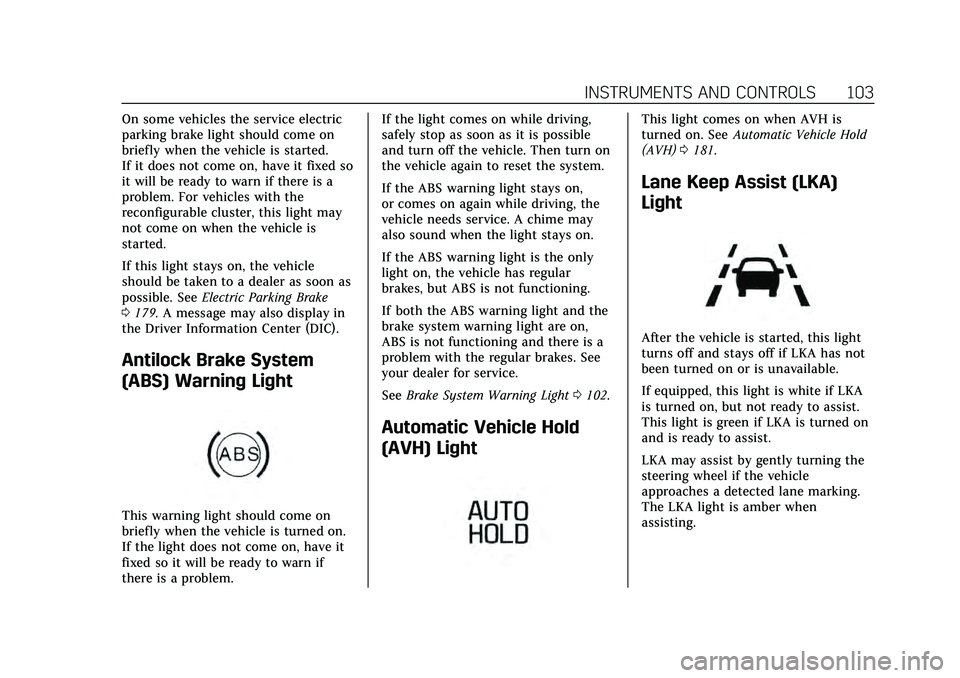
Antilock Brake System
(ABS) Warning Light
This warning light should come on
briefly when the vehicle is turned on.
If the light does not come on, have it
fixed so it will be ready to warn if
there is a problem. If the light comes on while driving,
safely stop as soon as it is possible
and turn off the vehicle. Then turn on
the vehicle again to reset the system.
If the ABS warning light stays on,
or comes on again while driving, the
vehicle needs service. A chime may
also sound when the light stays on.
If the ABS warning light is the only
light on, the vehicle has regular
brakes, but ABS is not functioning.
If both the ABS warning light and the
brake system warning light are on,
ABS is not functioning and there is a
problem with the regular brakes. See
your dealer for service.
See
Brake System Warning Light 0102.
Automatic Vehicle Hold
(AVH) Light
This light comes on when AVH is
turned on. See Automatic Vehicle Hold
(AVH) 0181.
Lane Keep Assist (LKA)
Light
After the vehicle is started, this light
turns off and stays off if LKA has not
been turned on or is unavailable.
If equipped, this light is white if LKA
is turned on, but not ready to assist.
This light is green if LKA is turned on
and is ready to assist.
LKA may assist by gently turning the
steering wheel if the vehicle
approaches a detected lane marking.
The LKA light is amber when
assisting.
Page 142 of 356

Cadillac CT4 Owner Manual (GMNA-Localizing-U.S./Canada-13183937) -
2020 - crc - 4/28/20
DRIVING AND OPERATING 141
Driving and
Operating
Driving Information
Driving for Better FuelEconomy . . . . . . . . . . . . . . . . . . . . . . . . 142
Distracted Driving . . . . . . . . . . . . . . . . 143
Defensive Driving . . . . . . . . . . . . . . . . 143
Drunk Driving . . . . . . . . . . . . . . . . . . . . 144
Control of a Vehicle . . . . . . . . . . . . . . 144
Braking . . . . . . . . . . . . . . . . . . . . . . . . . . . . 144
Steering . . . . . . . . . . . . . . . . . . . . . . . . . . . 144
Off-Road Recovery . . . . . . . . . . . . . . . . 145
Loss of Control . . . . . . . . . . . . . . . . . . . 146
Track Events and Competitive Driving (V-Series Only) . . . . . . . . . 146
Driving on Wet Roads . . . . . . . . . . . 151
Hill and Mountain Roads . . . . . . . . 151
Winter Driving . . . . . . . . . . . . . . . . . . . . 152
If the Vehicle Is Stuck . . . . . . . . . . . 153
Vehicle Load Limits . . . . . . . . . . . . . . 154
Starting and Operating
New Vehicle Break-In . . . . . . . . . . . . 157
Composite Materials . . . . . . . . . . . . . 157
Ignition Positions . . . . . . . . . . . . . . . . 158
Starting the Engine . . . . . . . . . . . . . . 160
Stop/Start System . . . . . . . . . . . . . . . . 161 Engine Heater . . . . . . . . . . . . . . . . . . . . 162
Retained Accessory
Power (RAP) . . . . . . . . . . . . . . . . . . . . 163
Shifting Into Park (Electronic Shifter) . . . . . . . . . . . . . . . . . . . . . . . . . . 163
Shifting Into Park (Mechanical Shifter) . . . . . . . . . . . . . . . . . . . . . . . . . . 164
Shifting out of Park (Mechanical Shifter) . . . . . . . . . . . . . . . . . . . . . . . . . . 165
Shifting out of Park (Electronic Shifter) . . . . . . . . . . . . . . . . . . . . . . . . . . 165
Parking over Things That Burn . . . . . . . . . . . . . . . . . . . . . . . 167
Active Fuel Management . . . . . . . . 167
Extended Parking . . . . . . . . . . . . . . . . . 167
Engine Exhaust
Engine Exhaust . . . . . . . . . . . . . . . . . . . 168
Running the Vehicle While Parked . . . . . . . . . . . . . . . . . . . . . . . . . . . 168
Automatic Transmission
Automatic Transmission(Mechanical Shifter) . . . . . . . . . . . . 169
Automatic Transmission (Electronic shifter) . . . . . . . . . . . . . . 171
Manual Mode (Mechanical Shifter) . . . . . . . . . . . . . . . . . . . . . . . . . . 176
Manual Mode (Electronic
Shifter) . . . . . . . . . . . . . . . . . . . . . . . . . . 177
Drive Systems
All-Wheel Drive . . . . . . . . . . . . . . . . . . 178
Brakes
Electric Brake Boost . . . . . . . . . . . . . . 179
Antilock Brake System (ABS) . . . . 179
Electric Parking Brake . . . . . . . . . . . . 179
Brake Assist . . . . . . . . . . . . . . . . . . . . . . . 181
Hill Start Assist (HSA) . . . . . . . . . . . 181
Automatic VehicleHold (AVH) . . . . . . . . . . . . . . . . . . . . . 181
Ride Control Systems
Traction Control/ElectronicStability Control . . . . . . . . . . . . . . . . 182
Driver Mode Control . . . . . . . . . . . . . 184
Competitive Driving Mode . . . . . . . 189
Limited-Slip Differential . . . . . . . . . 191
Cruise Control
Cruise Control . . . . . . . . . . . . . . . . . . . . 192
Adaptive Cruise Control . . . . . . . . . 194
Driver Assistance Systems
Driver Assistance Systems . . . . . . . 203
Assistance Systems for Parking or Backing . . . . . . . . . . . . . . . . . . . . . . . 204
Rear Pedestrian Alert . . . . . . . . . . . . 209
Assistance Systems for Driving . . . . . . . . . . . . . . . . . . . . . . . . . . 210
Page 146 of 356

Cadillac CT4 Owner Manual (GMNA-Localizing-U.S./Canada-13183937) -
2020 - crc - 4/28/20
DRIVING AND OPERATING 145
Electric Power Steering
The vehicle has electric power
steering. It does not have power
steering fluid. Regular maintenance is
not required.
If power steering assist is lost due to a
system malfunction, the vehicle can
be steered, but may require increased
effort.
If the steering assist is used for an
extended period of time while the
vehicle is not moving, power assist
may be reduced.
If the steering wheel is turned until it
reaches the end of its travel and is
held against that position for an
extended period of time, power
steering assist may be reduced.
Normal use of the power steering
assist should return when the system
cools down.
See your dealer if there is a problem.
Curve Tips
.Take curves at a reasonable speed.
. Reduce speed before entering a
curve. .
Maintain a reasonable steady
speed through the curve.
. Wait until the vehicle is out of the
curve before accelerating gently
into the straightaway.
Steering in Emergencies
.There are some situations when
steering around a problem may be
more effective than braking.
. Holding both sides of the steering
wheel allows you to turn
180 degrees without removing
a hand.
. The Antilock Brake System (ABS)
allows steering while braking.
Off-Road Recovery
The vehicle's right wheels can drop off
the edge of a road onto the shoulder
while driving. Follow these tips:
1. Ease off the accelerator and then, if there is nothing in the way,
steer the vehicle so that it
straddles the edge of the
pavement.
2. Turn the steering wheel about one-eighth of a turn, until the
right front tire contacts the
pavement edge.
3. Turn the steering wheel to go straight down the roadway.
Page 150 of 356

Cadillac CT4 Owner Manual (GMNA-Localizing-U.S./Canada-13183937) -
2020 - crc - 4/28/20
DRIVING AND OPERATING 149
Caution
Brake fade will occur during this
track burnish procedure and can
cause brake pedal travel and force
to increase. This could extend
stopping distance until the brakes
are fully burnished.
When this procedure is performed as
instructed, it will not damage the
brakes. The brake pads will smoke and
produce an odor. The braking force
and pedal travel may increase. After
the procedure, the brake pads may
appear white at the rotor contact.
Perform this procedure only on dry
pavement, in a safe manner, and in
compliance with all local and state
ordinances/laws regarding motor
vehicle operation.
Brake Burnish Procedure 1. Apply the brakes 25 times starting at 100 km/h (60 mph) to
50 km/h (30 mph) while
decelerating at 0.4 g. This is a
medium brake application. Drive for at least 1 km (0.6 mi)
between applying the brakes.
This first step may be skipped if
there are more than 320 km
(200 mi) on the brake pads.
2. Apply the brakes 25 times starting at 100 km/h (60 mph) to
25 km/h (15 mph) while
decelerating at 0.8 g. This is a
hard brake application, without
activating the Antilock Brake
System (ABS). Drive for at least
1 km (0.6 mi) between
applications.
3. Cool down: Drive at 100 km/h (60 mph) for approximately
15 km (10 mi) without using the
brakes.
4. Apply the brakes 25 times from 100 km/h (60 mph) to 50 km/h
(30 mph) while decelerating at
0.4 g. This is a medium brake
application. Drive for at least
1 km (0.6 mi) between
applications.
As with all high performance brake
systems, some amount of brake squeal
is normal.
Wheel Alignment
Wheel alignment suggested specs for
track use:
. Front: -2.0 deg camber, 0.2 deg
total toe
. Rear: -1.7 deg camber, 0.2 deg
total toe
Vehicles Equipped with the
Original Equipment Tires
Follow the requirements and
recommendations for tire inflation
pressures while driving on various
types of tracks/courses. This helps to
achieve a well-balanced vehicle and
enhance tire traction performance.
Use good judgment to determine the
appropriate tire inflation pressure and
speeds for the track/course
configuration and environmental
conditions. Contact the tire
manufacturer if further assistance is
needed.
To maximize tire life, drive 800 km
(500 mi) prior to racetrack driving or
complete the minimum track running
Page 153 of 356

Cadillac CT4 Owner Manual (GMNA-Localizing-U.S./Canada-13183937) -
2020 - crc - 4/28/20
152 DRIVING AND OPERATING
{Warning
Using the brakes to slow the vehicle
on a long downhill slope can cause
brake overheating, can reduce brake
performance, and could result in a
loss of braking. Shift the
transmission to a lower gear to let
the engine assist the brakes on a
steep downhill slope.
{Warning
Coasting downhill in N (Neutral) or
with the ignition off is dangerous.
This can cause overheating of the
brakes and loss of steering assist.
Always have the engine running
and the vehicle in gear.
. Drive at speeds that keep the
vehicle in its own lane. Do not
swing wide or cross the
center line. .
Be alert on top of hills; something
could be in your lane (e.g., stalled
car, crash).
. Pay attention to special road signs
(e.g., falling rocks area, winding
roads, long grades, passing or
no-passing zones) and take
appropriate action.
Winter Driving
Driving on Snow or Ice
Snow or ice between the tires and the
road creates less traction or grip, so
drive carefully. Wet ice can occur at
about 0 °C (32 °F) when freezing rain
begins to fall. Avoid driving on wet ice
or in freezing rain until roads can be
treated.
For Slippery Road Driving:
.Accelerate gently. Accelerating too
quickly causes the wheels to spin
and makes the surface under the
tires slick.
. Turn on Traction Control. See
Traction Control/Electronic Stability
Control 0182. .
Antilock Brake System (ABS)
improves vehicle stability during
hard stops, but the brakes should
be applied sooner than when on
dry pavement. See Antilock Brake
System (ABS) 0179.
. Allow greater following distance
and watch for slippery spots. Icy
patches can occur on otherwise
clear roads in shaded areas. The
surface of a curve or an overpass
can remain icy when the
surrounding roads are clear. Avoid
sudden steering maneuvers and
braking while on ice.
. Turn off cruise control.
Blizzard Conditions
Stay with the vehicle unless there is
help nearby. If possible, use Roadside
Assistance. See Roadside Service 0325.
To get help and keep everyone in the
vehicle safe:
. Turn on the hazard warning
flashers.
. Tie a red cloth to an outside
mirror.
Page 180 of 356

Cadillac CT4 Owner Manual (GMNA-Localizing-U.S./Canada-13183937) -
2020 - crc - 4/28/20
DRIVING AND OPERATING 179
Brakes
Electric Brake Boost
Vehicles equipped with electric brake
boost have hydraulic brake circuits
that are electronically controlled when
the brake pedal is applied during
normal operation. The system
performs routine tests and turns off
within a few minutes after the vehicle
is turned off. Noise may be heard
during this time. If the brake pedal is
pressed during the tests or when the
electric brake boost system is off, a
noticeable change in pedal force and
travel may be felt. This is normal.
Antilock Brake
System (ABS)
The Antilock Brake System (ABS)
helps prevent a braking skid and
maintain steering while braking hard.
If there is a problem with ABS, this
warning light stays on. SeeAntilock
Brake System (ABS) Warning Light
0 103.
ABS does not change the time needed
to get a foot on the brake pedal and
does not always decrease stopping
distance. If you get too close to the
vehicle ahead, there will not be
enough time to apply the brakes if
that vehicle suddenly slows or stops.
Always leave enough room ahead to
stop, even with ABS.
Using ABS
Do not pump the brakes. Just hold the
brake pedal down firmly. Hearing and
feeling ABS operate is normal.
Braking in Emergencies
ABS allows steering and braking at the
same time. In many emergencies,
steering can help even more than
braking.
Electric Parking Brake
The vehicle has an Electric Parking
Brake (EPB). The EPB can always be
activated, even if the ignition is off. To
prevent draining the battery, avoid
repeated cycles of the EPB system
when the engine is not running.
Page 182 of 356

Cadillac CT4 Owner Manual (GMNA-Localizing-U.S./Canada-13183937) -
2020 - crc - 4/28/20
DRIVING AND OPERATING 181
away. Avoid rapid acceleration when
the EPB is applied, to preserve parking
brake lining life.
Brake Assist
Brake Assist detects rapid brake pedal
applications due to emergency braking
situations and provides additional
braking to activate the Antilock Brake
System (ABS) if the brake pedal is not
pushed hard enough to activate ABS
normally. Minor noise, brake pedal
pulsation, and/or pedal movement
during this time may occur. Continue
to apply the brake pedal as the driving
situation dictates. Brake Assist
disengages when the brake pedal is
released.
Hill Start Assist (HSA)
{Warning
Do not rely on the HSA feature.
HSA does not replace the need to
pay attention and drive safely. You
may not hear or feel alerts or(Continued)
Warning (Continued)
warnings provided by this system.
Failure to use proper care when
driving may result in injury, death,
or vehicle damage. SeeDefensive
Driving 0143.
When the vehicle is stopped on a
grade, Hill Start Assist (HSA)
temporarily prevents the vehicle from
rolling in an unintended direction
during the transition from brake pedal
release to accelerator pedal apply. The
brakes release when the accelerator
pedal is applied or automatically
release after a few seconds. The brakes
may also release under other
conditions. Do not rely on HSA to
hold the vehicle.
HSA is available when the vehicle is
facing uphill in a forward gear,
or when facing downhill in
R (Reverse). The vehicle must come to
a complete stop on a grade for HSA to
activate.
Automatic Vehicle
Hold (AVH)
{Warning
Do not rely on this feature. It does
not replace the need to pay
attention and drive safely. You may
not hear or feel alerts or warnings
provided by this system. Failure to
use proper care when driving may
result in injury, death, or vehicle
damage.