brakes CADILLAC CT4 2021 User Guide
[x] Cancel search | Manufacturer: CADILLAC, Model Year: 2021, Model line: CT4, Model: CADILLAC CT4 2021Pages: 434, PDF Size: 8.3 MB
Page 211 of 434
Cadillac CT4 Owner Manual (GMNA-Localizing-U.S./Canada-14584335) -
2021 - CRC - 12/4/20
210 DRIVING AND OPERATING
and pedal travel may increase. After
the procedure, the brake pads may
appear white at the rotor contact.
Perform this procedure only on dry
pavement, in a safe manner, and in
compliance with all local and state
ordinances/laws regarding motor
vehicle operation.
Brake Burnish Procedure1. Apply the brakes 25 times starting at 100 km/h (60 mph) to 50 km/h
(30 mph) while decelerating at
0.4 g. This is a medium brake
application. Drive for at least 1 km
(0.6 mi) between applying the
brakes. This first step may be
skipped if there are more than
320 km (200 mi) on the brake pads.
2. Apply the brakes 25 times starting at 100 km/h (60 mph) to 25 km/h
(15 mph) while decelerating at
0.8 g. This is a hard brake
application, without activating the
Antilock Brake System (ABS). Drive
for at least 1 km (0.6 mi) between
applications.
3. Cool down: Drive at 100 km/h (60 mph) for approximately 15 km
(10 mi) without using the brakes. 4. Apply the brakes 25 times from
100 km/h (60 mph) to 50 km/h
(30 mph) while decelerating at
0.4 g. This is a medium brake
application. Drive for at least 1 km
(0.6 mi) between applications.
As with all high performance brake
systems, some amount of brake squeal
is normal.
Wheel Alignment
Wheel alignment suggested specs for
track use:
.Front: -2.0 deg camber, 0.2 deg
total toe
.Rear: -1.7 deg camber, 0.2 deg
total toe
Vehicles Equipped with the
Original Equipment Tires
Follow the requirements and
recommendations for tire inflation
pressures while driving on various
types of tracks/courses. This helps to
achieve a well-balanced vehicle and
enhance tire traction performance.
Use good judgment to determine the
appropriate tire inflation pressure and
speeds for the track/course configuration and environmental
conditions. Contact the tire
manufacturer if further assistance is
needed.
To maximize tire life, drive 800 km
(500 mi) prior to racetrack driving or
complete the minimum track running
that will increase the tire pressures by
35 kPa (5 psi). After this, immediately
let the tires cool to cold pressures.
Tire Inflation Pressure
Guidelines
Tire inflation pressures affect vehicle
handling and tire life, and should be
adjusted for various types of tracks/
courses.
Inspect the tires prior to every track/
course session. Track/course driving
will reduce the tire tread life.
Driving and Operating
{Warning
Operating the vehicle at high speeds
can be dangerous. Improper tire
inflation pressure can put
additional strain on the tires and
(Continued)
Page 213 of 434
Cadillac CT4 Owner Manual (GMNA-Localizing-U.S./Canada-14584335) -
2021 - CRC - 12/4/20
212 DRIVING AND OPERATING
{Warning
Wet brakes can cause crashes. They
might not work as well in a quick
stop and could cause pulling to one
side. You could lose control of the
vehicle.
After driving through a large puddle
of water or a car/vehicle wash,
lightly apply the brake pedal until
the brakes work normally.
Flowing or rushing water creates
strong forces. Driving through
flowing water could cause the
vehicle to be carried away. If this
happens, you and other vehicle
occupants could drown. Do not
ignore police warnings and be very
cautious about trying to drive
through flowing water.
Hydroplaning
Hydroplaning is dangerous. Water can
build up under the vehicle's tires so
they actually ride on the water. This
can happen if the road is wet enoughand you are going fast enough. When
the vehicle is hydroplaning, it has
little or no contact with the road.
There is no hard and fast rule about
hydroplaning. The best advice is to
slow down when the road is wet.
Other Rainy Weather Tips
Besides slowing down, other wet
weather driving tips include:
.Allow extra following distance.
.Pass with caution.
.Keep windshield wiping equipment
in good shape.
.Keep the windshield washer fluid
reservoir filled.
.Have good tires with proper tread
depth. See
Tires0339.
.Turn off cruise control.
Hill and Mountain Roads
Driving on steep hills or through
mountains is different than driving on
flat or rolling terrain. Tips include:
.Keep the vehicle serviced and in
good shape.
.Check all fluid levels and brakes,
tires, cooling system, and
transmission.
.Shift to a lower gear when going
down steep or long hills.
{Warning
Using the brakes to slow the vehicle
on a long downhill slope can cause
brake overheating, can reduce brake
performance, and could result in a
loss of braking. Shift the
transmission to a lower gear to let
the engine assist the brakes on a
steep downhill slope.
{Warning
Coasting downhill in N (Neutral) or
with the ignition off is dangerous.
This can cause overheating of the
brakes and loss of steering assist.
Always have the engine running
and the vehicle in gear.
.Drive at speeds that keep the
vehicle in its own lane. Do not
swing wide or cross the center line.
Page 214 of 434
Cadillac CT4 Owner Manual (GMNA-Localizing-U.S./Canada-14584335) -
2021 - CRC - 12/4/20
DRIVING AND OPERATING 213
.Be alert on top of hills; something
could be in your lane (e.g., stalled
car, crash).
.Pay attention to special road signs
(e.g., falling rocks area, winding
roads, long grades, passing or
no-passing zones) and take
appropriate action.
Winter Driving
Driving on Snow or Ice
Snow or ice between the tires and the
road creates less traction or grip, so
drive carefully. Wet ice can occur at
about 0 °C (32 °F) when freezing rain
begins to fall. Avoid driving on wet ice
or in freezing rain until roads can be
treated.
For slippery road driving:
.Accelerate gently. Accelerating too
quickly causes the wheels to spin
and makes the surface under the
tires slick.
.Turn on Traction Control. See
Traction Control/Electronic Stability
Control0239.
.Antilock Brake System (ABS)
improves vehicle stability during
hard stops, but the brakes should be
applied sooner than when on dry
pavement. See Antilock Brake System
(ABS) 0236.
See Driver Mode Control 0241.
.Allow greater following distance and
watch for slippery spots. Icy patches
can occur on otherwise clear roads
in shaded areas. The surface of a
curve or an overpass can remain icy
when the surrounding roads are
clear. Avoid sudden steering
maneuvers and braking while
on ice.
.Turn off cruise control.
Blizzard Conditions
Stop the vehicle in a safe place and
signal for help. Stay with the vehicle
unless there is help nearby. If possible,
use Roadside Service. See Roadside
Service 0403. To get help and keep
everyone in the vehicle safe:
.Turn on the hazard warning
flashers.
.Tie a red cloth to an outside mirror.
{Warning
Snow can trap engine exhaust
under the vehicle. This may cause
exhaust gases to get inside. Engine
exhaust contains carbon monoxide
(CO), which cannot be seen or
smelled. It can cause
unconsciousness and even death.
If the vehicle is stuck in snow:
.Clear snow from the base of the
vehicle, especially any blocking
the exhaust pipe.
.Open a window about 5 cm (2 in)
on the vehicle side that is away
from the wind, to bring in
fresh air.
.Fully open the air outlets on or
under the instrument panel.
.Adjust the climate control
system to circulate the air inside
the vehicle and set the fan speed
to the highest setting. See
“Climate Control Systems.”
For more information about CO, see
Engine Exhaust 0226.
Page 220 of 434
Cadillac CT4 Owner Manual (GMNA-Localizing-U.S./Canada-14584335) -
2021 - CRC - 12/4/20
DRIVING AND OPERATING 219
Ignition Positions
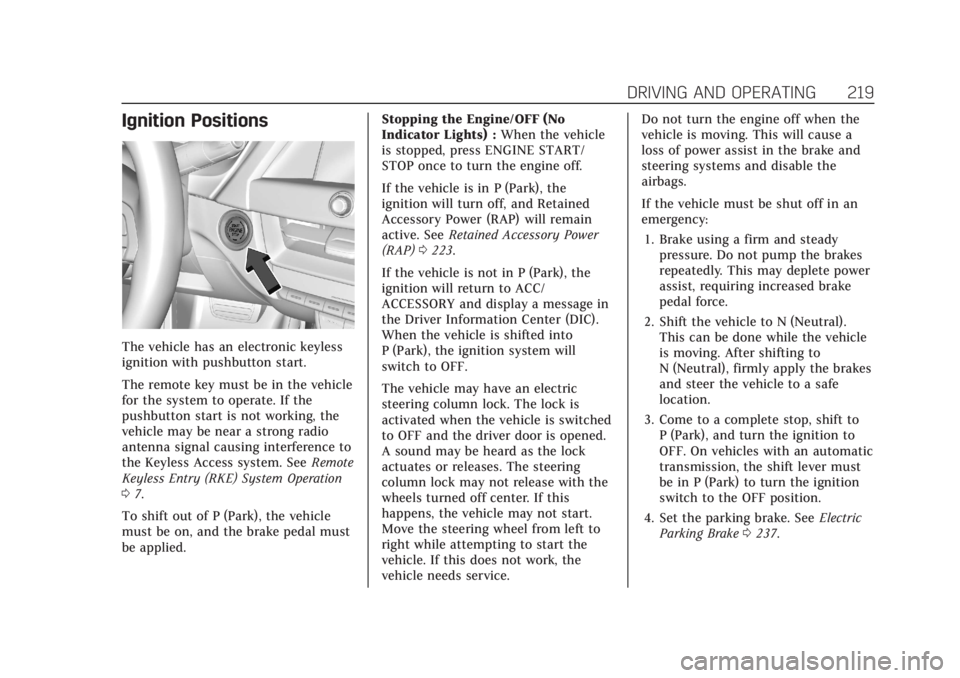
The vehicle has an electronic keyless
ignition with pushbutton start.
The remote key must be in the vehicle
for the system to operate. If the
pushbutton start is not working, the
vehicle may be near a strong radio
antenna signal causing interference to
the Keyless Access system. SeeRemote
Keyless Entry (RKE) System Operation
0 7.
To shift out of P (Park), the vehicle
must be on, and the brake pedal must
be applied. Stopping the Engine/OFF (No
Indicator Lights) :
When the vehicle
is stopped, press ENGINE START/
STOP once to turn the engine off.
If the vehicle is in P (Park), the
ignition will turn off, and Retained
Accessory Power (RAP) will remain
active. See Retained Accessory Power
(RAP) 0223.
If the vehicle is not in P (Park), the
ignition will return to ACC/
ACCESSORY and display a message in
the Driver Information Center (DIC).
When the vehicle is shifted into
P (Park), the ignition system will
switch to OFF.
The vehicle may have an electric
steering column lock. The lock is
activated when the vehicle is switched
to OFF and the driver door is opened.
A sound may be heard as the lock
actuates or releases. The steering
column lock may not release with the
wheels turned off center. If this
happens, the vehicle may not start.
Move the steering wheel from left to
right while attempting to start the
vehicle. If this does not work, the
vehicle needs service. Do not turn the engine off when the
vehicle is moving. This will cause a
loss of power assist in the brake and
steering systems and disable the
airbags.
If the vehicle must be shut off in an
emergency:
1. Brake using a firm and steady pressure. Do not pump the brakes
repeatedly. This may deplete power
assist, requiring increased brake
pedal force.
2. Shift the vehicle to N (Neutral). This can be done while the vehicle
is moving. After shifting to
N (Neutral), firmly apply the brakes
and steer the vehicle to a safe
location.
3. Come to a complete stop, shift to P (Park), and turn the ignition to
OFF. On vehicles with an automatic
transmission, the shift lever must
be in P (Park) to turn the ignition
switch to the OFF position.
4. Set the parking brake. See Electric
Parking Brake 0237.
Page 222 of 434
Cadillac CT4 Owner Manual (GMNA-Localizing-U.S./Canada-14584335) -
2021 - CRC - 12/4/20
DRIVING AND OPERATING 221
If the remote key is not in the
vehicle, if there is interference, or if
the remote key battery is low, a
Driver Information Center (DIC)
message will display. SeeRemote
Keyless Entry (RKE) System
Operation 07.
Caution
Cranking the engine for long
periods of time, by pressing
ENGINE START/STOP immediately
after cranking has ended, can
overheat and damage the cranking
motor, and drain the battery. Wait
at least 15 seconds between each
try, to let the cranking motor
cool down.
2. If the engine does not start after five to 10 seconds, especially in
very cold weather (below −18 °C or
0 °F), it could be flooded with too
much gasoline. Try pushing the
accelerator pedal all the way to the
floor and hold it there, then press
ENGINE START/STOP for up to a
maximum of 15 seconds. Wait at
least 15 seconds between each try,
to allow the cranking motor to cool down. When the engine starts, let
go of the button and the
accelerator. If the vehicle starts
briefly but then stops again, do the
same thing. This clears the extra
gasoline from the engine. Do not
race the engine immediately after
starting it. Operate the engine and
transmission gently until the oil
warms up and lubricates all
moving parts.
Stopping the Engine
Move the shift lever to P (Park) and
press and hold ENGINE START/STOP
on the instrument panel, until the
engine shuts off. If the shift lever is
not in P (Park), the engine shuts off
and the ignition goes to ACC/
ACCESSORY. The DIC displays SHIFT
TO PARK. Once the shift lever is
moved to P (Park), the vehicle
turns off.
If the remote key is not detected
inside the vehicle when it is turned off
the DIC displays a message.
Stop/Start System
The Stop/Start system will shut off
the engine to help conserve fuel.
It has components designed for the
increased number of starts.
{Warning
The automatic engine Stop/Start
feature causes the engine to shut
off while the vehicle is still on. Do
not exit the vehicle before shifting
to P (Park). The vehicle may restart
and move unexpectedly. Always
shift to P (Park), and then turn the
ignition off before exiting the
vehicle.
Auto Engine Stop/Start
When the brakes are applied and the
vehicle is at a complete stop, the
engine may turn off. When stopped,
the tachometer displays AUTO STOP.
See Tachometer 093. When the brake
pedal is released or the accelerator
pedal is pressed, the engine will
restart.
Page 229 of 434

Cadillac CT4 Owner Manual (GMNA-Localizing-U.S./Canada-14584335) -
2021 - CRC - 12/4/20
228 DRIVING AND OPERATING
{Warning
It is dangerous to get out of the
vehicle if the shift lever is not fully
in P (Park) with the parking brake
firmly set. The vehicle can roll.
Do not leave the vehicle when the
engine is running unless you have
to. If you have left the engine
running, the vehicle can move
suddenly. You or others could be
injured. To be sure the vehicle will
not move, even when you are on
fairly level ground, always set the
parking brake and move the shift
lever to P (Park). SeeShifting Into
Park (Mechanical Shifter) 0223 or
Shifting Into Park (Electronic Shifter)
0 224. If you are pulling a trailer,
see Driving Characteristics and
Towing Tips 0297.
Make sure the shift lever is fully in
P (Park) before starting the engine.
The vehicle has an electronic shift
lock release system. Fully apply the
regular brakes first and then press the
shift lever button before shifting from
P (Park) when the ignition is on. If you cannot shift out of P (Park), ease
pressure on the shift lever and push
the shift lever all the way into P (Park)
as you maintain brake application.
Then press the shift lever button and
move the shift lever into another gear.
See
Shifting out of Park (Mechanical
Shifter) 0225 or
Shifting out of Park (Electronic Shifter)
0 225.
Caution
Shifting to R (Reverse) while the
vehicle is moving forward could
damage the transmission. The
repairs would not be covered by the
vehicle warranty. Shift to
R (Reverse) only after the vehicle is
stopped.
R : Use this gear to back up.
At low vehicle speeds, R (Reverse) can
be used to rock the vehicle back and
forth to get out of snow, ice, or sand
without damaging the transmission.
See If the Vehicle Is Stuck 0214. N :
In this position, the engine does
not connect with the wheels. To
restart the engine when the vehicle is
already moving, use N (Neutral) only.
{Warning
Shifting into a drive gear while the
engine is running at high speed is
dangerous. Unless your foot is
firmly on the brake pedal, the
vehicle could move very rapidly.
You could lose control and hit
people or objects. Do not shift into
a drive gear while the engine is
running at high speed.
Caution
Shifting out of P (Park) or
N (Neutral) with the engine running
at high speed may damage the
transmission. The repairs would not
be covered by the vehicle warranty.
Be sure the engine is not running at
high speed when shifting the
vehicle.
Page 230 of 434
Cadillac CT4 Owner Manual (GMNA-Localizing-U.S./Canada-14584335) -
2021 - CRC - 12/4/20
DRIVING AND OPERATING 229
Caution
A transmission hot message may
display if the automatic
transmission fluid is too hot.
Driving under this condition can
damage the vehicle. Stop and idle
the engine to cool the automatic
transmission fluid. This message
clears when the transmission fluid
has cooled sufficiently.
D : This position is for normal driving.
If more power is needed for passing,
press the accelerator pedal down.
Downshifting the transmission in
slippery road conditions could result
in skidding. See “Skidding”underLoss
of Control 0206.
M : This mode can be entered by
moving the shift lever from D (Drive)
to M (Manual Mode). M (Manual
Mode) allows the driver to select gears
appropriate for current driving
conditions. M (Manual Mode) can be
exited by returning the shift lever to D (Drive). See
Manual Mode (Electronic
Shifter) 0235 or
Manual Mode (Mechanical Shifter)
0 234.
Caution
Spinning the tires or holding the
vehicle in one place on a hill using
only the accelerator pedal may
damage the transmission. The
repair will not be covered by the
vehicle warranty. If the vehicle is
stuck, do not spin the tires. When
stopping on a hill, use the brakes to
hold the vehicle in place.
While in Sport or Track Mode, the
vehicle monitors driving behavior, and
automatically enables Performance
Shift Features when spirited driving is
detected. These features maintain
lower transmission gears to increase
available engine braking and improve
acceleration response. The vehicle will
exit these features and return to Sport
or Track Mode normal operation after
a short period when no spirited
driving is detected. See Driver Mode
Control 0241. Engine speeds may be increased while
driving at highway speeds while the
engine is still warming up.
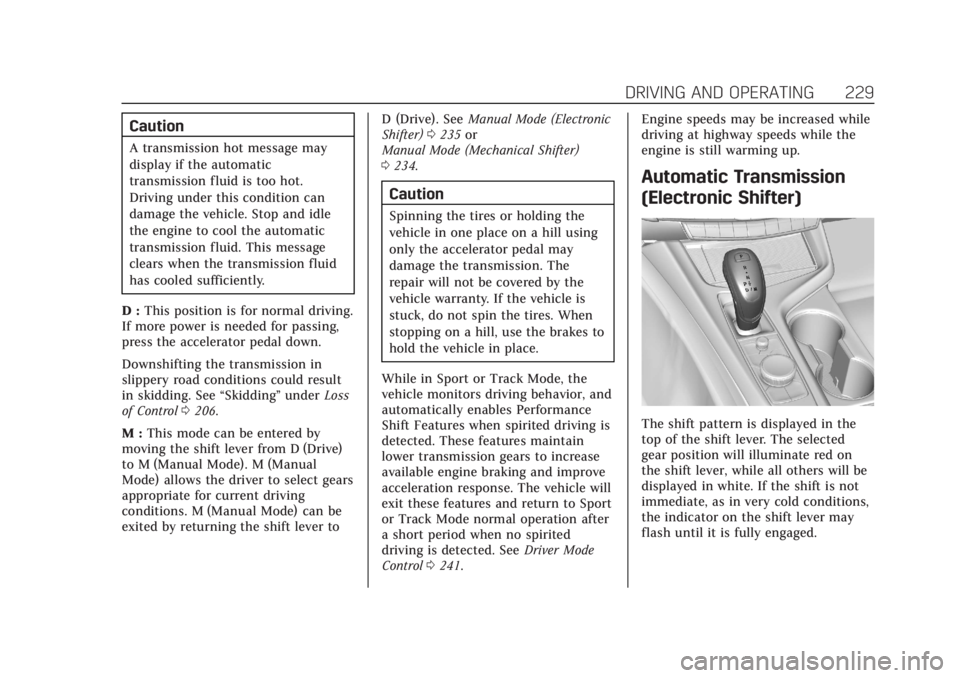
Automatic Transmission
(Electronic Shifter)
The shift pattern is displayed in the
top of the shift lever. The selected
gear position will illuminate red on
the shift lever, while all others will be
displayed in white. If the shift is not
immediate, as in very cold conditions,
the indicator on the shift lever may
flash until it is fully engaged.
Page 235 of 434

Cadillac CT4 Owner Manual (GMNA-Localizing-U.S./Canada-14584335) -
2021 - CRC - 12/4/20
234 DRIVING AND OPERATING
Caution
Spinning the tires or holding the
vehicle in one place on a hill using
only the accelerator pedal may
damage the transmission. The
repair will not be covered by the
vehicle warranty. If the vehicle is
stuck, do not spin the tires. When
stopping on a hill, use the brakes to
hold the vehicle in place.
Manual Mode (Mechanical
Shifter)
Tap ShiftCaution
Driving with the engine at a high
rpm without upshifting while using
Tap Shift, could damage the vehicle.
Always upshift when necessary
while using Tap Shift.
Vehicles with Tap Shift have controls
on the back of the steering wheel to
manually shift the automatic
transmission.
To enter Permanent Tap Shift Mode:1. Move the shift lever from D (Drive) to M (Manual Mode). While in Tap
Shift Mode, the M on the
instrument cluster will become
highlighted, and the current gear is
indicated.
2. Tap the left control to downshift, and the right control to upshift. To
shift to the lowest available gear,
press and hold the left control. 3. To exit, move the shift lever back
to D (Drive).
With the shift lever in D (Drive) and
not in Permanent Tap Shift Mode, the
tap shift controls will activate a
temporary tap manual shift mode,
allowing the transmission to be
manually shifted. While in Temporary
Tap Shift Mode, the D on the
instrument cluster will be highlighted
and the current gear shown.
Automatic shifts return after no
manual shifts have been done for
seven to 10 seconds. The Temporary
Tap Shift Mode can also be
deactivated by holding the right
upshift control briefly.
While using Tap Shift, the vehicle will
have firmer, quicker shifting. You can
use this for sport driving or when
climbing or descending hills, to stay in
gear longer, or to downshift for more
power or engine braking.
The transmission will only allow you
to shift into gears appropriate for the
vehicle speed and engine revolutions
per minute (rpm). The transmission
will not automatically shift to the next
Page 237 of 434
Cadillac CT4 Owner Manual (GMNA-Localizing-U.S./Canada-14584335) -
2021 - CRC - 12/4/20
236 DRIVING AND OPERATING
Temporary Tap Shift Mode
To enter Temporary Tap Shift Mode:1. With the transmission in D (Drive) and not in Permanent Tap Shift
Mode, the Tap Shift controls will
activate a Temporary Tap Shift
Mode, allowing the transmission to
be manually shifted. While in
Temporary Tap Shift Mode, the D
on the instrument cluster will be
highlighted and the current gear
shown.
2. To shift to the lowest available gear, press and hold the left
control.
3. To deactivate, hold the right control briefly. Automatic shifts
return after no manual shifts have
been done for seven to 10 seconds.
While using Tap Shift, the vehicle will
have firmer, quicker shifting. This can
be used for sport driving or when
climbing or descending hills, to stay in
gear longer, or to downshift for more
power or engine braking.
The transmission will only allow
shifting into gears appropriate for the
vehicle speed and engine revolutions per minute (rpm). If shifting is
prevented for any reason, the M or D
will flash in the instrument cluster.
The transmission will not
automatically shift to the next higher
gear if the engine rpm is too high.
It will only automatically shift to the
next lower gear if the engine rpm is
much too low.
Drive Systems
All-Wheel Drive
Vehicles with this feature always send
engine power to all four wheels. It is
fully automatic, and adjusts itself as
needed for road conditions.
Brakes
Electric Brake Boost
Vehicles equipped with electric brake
boost have hydraulic brake circuits
that are electronically controlled when
the brake pedal is applied during
normal operation. The system
performs routine tests and turns off
within a few minutes after the vehicle
is turned off. Noise may be heardduring this time. If the brake pedal is
pressed during the tests or when the
electric brake boost system is off, a
noticeable change in pedal force and
travel may be felt. This is normal.
Antilock Brake
System (ABS)
The Antilock Brake System (ABS)
helps prevent a braking skid and
maintain steering while braking hard.
If there is a problem with ABS, this
warning light stays on. See
Antilock
Brake System (ABS) Warning Light
0 100.
ABS does not change the time needed
to get a foot on the brake pedal and
does not always decrease stopping
distance. If you get too close to the
vehicle ahead, there will not be
enough time to apply the brakes if
Page 238 of 434

Cadillac CT4 Owner Manual (GMNA-Localizing-U.S./Canada-14584335) -
2021 - CRC - 12/4/20
DRIVING AND OPERATING 237
that vehicle suddenly slows or stops.
Always leave enough room ahead to
stop, even with ABS.
Using ABS
Do not pump the brakes. Just hold the
brake pedal down firmly. Hearing and
feeling ABS operate is normal.
Braking in Emergencies
ABS allows steering and braking at the
same time. In many emergencies,
steering can help even more than
braking.
Electric Parking Brake
The Electric Parking Brake (EPB) can
always be applied, even if the vehicle
is off. In case of insufficient electrical
power, the EPB cannot be applied or
released. To prevent draining the
battery, avoid unnecessary repeated
cycles of the EPB.
The system has a red parking brake
status light and an amber service
parking brake warning light. See
Electric Parking Brake Light0100 and
Service Electric Parking Brake Light
0 100. There are also parking
brake-related Driver Information
Center (DIC) messages.
Before leaving the vehicle, check the
red parking brake status light to
ensure that the parking brake is
applied.
EPB Apply
To apply the EPB:
1. Be sure the vehicle is at a complete stop.
2. Press the EPB switch momentarily.
The red parking brake status light will
flash and then stay on once the EPB is
fully applied. If the red parking brake status light flashes continuously, then
the EPB is only partially applied or
there is a problem with the EPB.
A DIC message will display. Release
the EPB and try to apply it again.
If the light does not come on, or keeps
flashing, have the vehicle serviced. Do
not drive the vehicle if the red parking
brake status light is flashing. See your
dealer.
If the amber service parking brake
warning light is on, press the EPB
switch. Continue to hold the switch
until the red parking brake status light
remains on. If the amber service
parking brake warning light is on, see
your dealer.
If the EPB is applied while the vehicle
is moving, the vehicle will decelerate
as long as the switch is pressed. If the
switch is pressed until the vehicle
comes to a stop, the EPB will remain
applied.
The vehicle may automatically apply
the EPB in some situations when the
vehicle is not moving. This is normal,
and is done to periodically check the