transmission CADILLAC CT4 2022 User Guide
[x] Cancel search | Manufacturer: CADILLAC, Model Year: 2022, Model line: CT4, Model: CADILLAC CT4 2022Pages: 464, PDF Size: 7.82 MB
Page 96 of 464

Cadillac CT4 Owner Manual (GMNA-Localizing-U.S./Canada-15283641) -
2022 - CRC - 10/12/21
INSTRUMENTS AND CONTROLS 95
Simplify
Press the thumbwheel to enter the
Simplify menu. Simplify Mode allows
certain features of the instrument
cluster to be hidden. These features
include info tiles and interactive areas.
Using the thumbwheel
SorT, except
to acknowledge an alert, will exit
Simplify Mode.
The selected features will stay hidden
even after starting and restarting the
vehicle, unless Simplify Mode is
manually canceled.
Speedometer
The speedometer shows the vehicle
speed in either kilometers per hour
(km/h) or miles per hour (mph).
Odometer
The odometer shows how far the
vehicle has been driven, in either
kilometers or miles.
Trip Odometer
The trip odometer shows how far the
vehicle has been driven since the trip
odometer was last reset.
The trip odometer is accessed and
reset through the Driver Information
Center (DIC). See Driver Information
Center (DIC) (Base Level) 0109 or
Driver Information Center (DIC)
(Uplevel) 0112.
Tachometer
The tachometer displays the engine
speed in revolutions per minute (rpm).
For vehicles with the Stop/Start
system, when the ignition is on, the
tachometer indicates the vehicle
status. When pointing to AUTO STOP
(Base Level) or the cluster displays
AUTO STOP text (Uplevel), the engine
is off but the vehicle is on and can
move. The engine could auto start at
any time. When the indicator points
to OFF, the vehicle is off.
The tachometer may vary by several
hundred rpm, during Auto Stop mode,
when the engine is shutting off and
restarting. Uplevel
The redline of the tachometer adjusts
dynamically based on engine
temperature. The redline displays a
lower indication when the vehicles
odometer value is less than
805 kilometers (500 miles).
If equipped, the shift indicators are
displayed on instrument cluster and
Head-Up Display (HUD). The shift
indicators are only operational when
the automatic transmission is in
Manual mode, or the vehicle has a
manual transmission. See
Manual
Mode (Electronic Shifter) 0249 or
Manual Mode (Mechanical Shifter)
0 248. When the vehicle engine is less
than 70°C (158°F) and the vehicle
odometer value is less than
805 kilometers (500 miles) the shift
indications are not displayed.
A strong visual indicator is displayed
as the vehicle approaches the red line.
Tour and Sport themes feature shift
rings while the Track theme features
shift lights accompanied by a
numerical tachometer display.
Page 101 of 464
Cadillac CT4 Owner Manual (GMNA-Localizing-U.S./Canada-15283641) -
2022 - CRC - 10/12/21
100 INSTRUMENTS AND CONTROLS
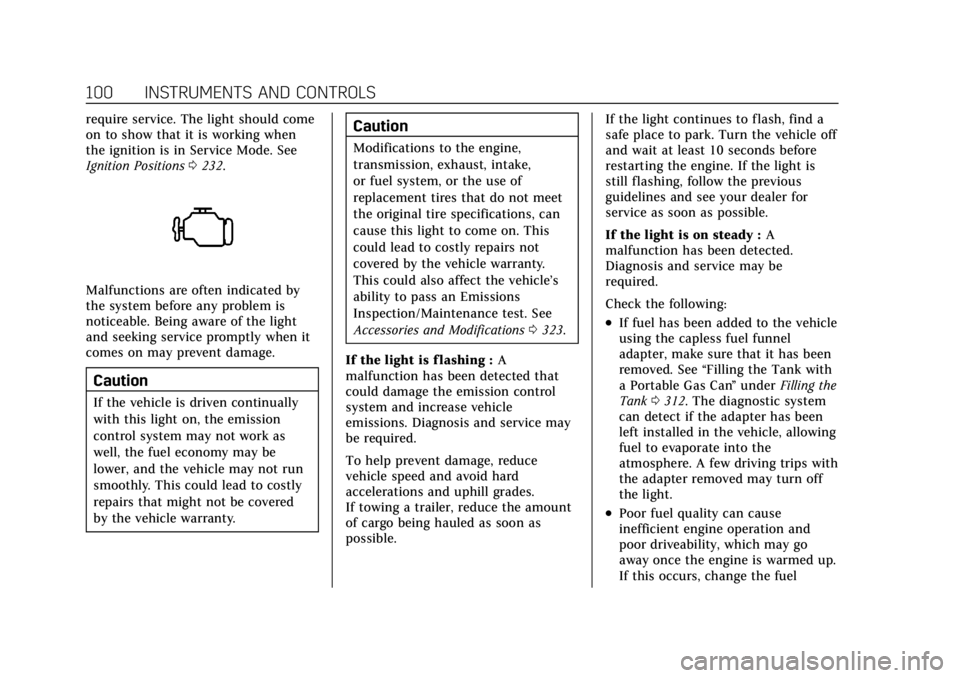
require service. The light should come
on to show that it is working when
the ignition is in Service Mode. See
Ignition Positions0232.
Malfunctions are often indicated by
the system before any problem is
noticeable. Being aware of the light
and seeking service promptly when it
comes on may prevent damage.
Caution
If the vehicle is driven continually
with this light on, the emission
control system may not work as
well, the fuel economy may be
lower, and the vehicle may not run
smoothly. This could lead to costly
repairs that might not be covered
by the vehicle warranty.
Caution
Modifications to the engine,
transmission, exhaust, intake,
or fuel system, or the use of
replacement tires that do not meet
the original tire specifications, can
cause this light to come on. This
could lead to costly repairs not
covered by the vehicle warranty.
This could also affect the vehicle’s
ability to pass an Emissions
Inspection/Maintenance test. See
Accessories and Modifications 0323.
If the light is f lashing : A
malfunction has been detected that
could damage the emission control
system and increase vehicle
emissions. Diagnosis and service may
be required.
To help prevent damage, reduce
vehicle speed and avoid hard
accelerations and uphill grades.
If towing a trailer, reduce the amount
of cargo being hauled as soon as
possible. If the light continues to flash, find a
safe place to park. Turn the vehicle off
and wait at least 10 seconds before
restarting the engine. If the light is
still flashing, follow the previous
guidelines and see your dealer for
service as soon as possible.
If the light is on steady :
A
malfunction has been detected.
Diagnosis and service may be
required.
Check the following:
.If fuel has been added to the vehicle
using the capless fuel funnel
adapter, make sure that it has been
removed. See “Filling the Tank with
a Portable Gas Can ”under Filling the
Tank 0312. The diagnostic system
can detect if the adapter has been
left installed in the vehicle, allowing
fuel to evaporate into the
atmosphere. A few driving trips with
the adapter removed may turn off
the light.
.Poor fuel quality can cause
inefficient engine operation and
poor driveability, which may go
away once the engine is warmed up.
If this occurs, change the fuel
Page 113 of 464
Cadillac CT4 Owner Manual (GMNA-Localizing-U.S./Canada-15283641) -
2022 - CRC - 10/12/21
112 INSTRUMENTS AND CONTROLS
Follow Distance/Gap Setting :When
Adaptive Cruise Control (ACC) is not
engaged, the current follow time to
the vehicle ahead is displayed as a
time value on this page. When ACC
has been engaged, the display
switches to the gap setting page. This
page shows the current gap setting
along with the vehicle ahead telltale.
Driver Assistance : If equipped,
shows information for Lane Keep
Assist (LKA) and Forward Collision
Alert (FCA).
Battery Voltage : Shows the current
battery voltage.
Coolant Temperature : Shows the
engine coolant temperature in either
degrees Celsius (°C) or degrees
Fahrenheit (°F).
Oil Temperature : Shows the engine
oil temperature in either degrees
Celsius (°C) or degrees Fahrenheit (°F).
Engine Hours (Hourmeter) : Shows
the total number of hours the engine
has run. The display also shows the
engine idle hours. Engine Boost :
Displays engine
manifold pressure relative to ambient
air pressure. It will display boost
pressure generated by the
turbocharging system.
Transmission Fluid Temperature :
Shows the temperature of the
automatic transmission fluid in either
degrees Celsius (°C) or degrees
Fahrenheit (°F).
Info Page Options : Scroll to choose
which info pages appear on the DIC.
Press the thumbwheel to select or
deselect.
Blank Page : Allows for no
information to be displayed in the
cluster info display areas.
Driver Information Center
(DIC) (Uplevel)
The DIC is displayed in the
instrument cluster. It shows the status
of many vehicle systems.
DIC information is broken down into
two main zones: Left Zone :
Displays on the
instrument cluster to the left of the
speedometer.
Right Zone : Displays on the
instrument cluster to the right of the
speedometer.
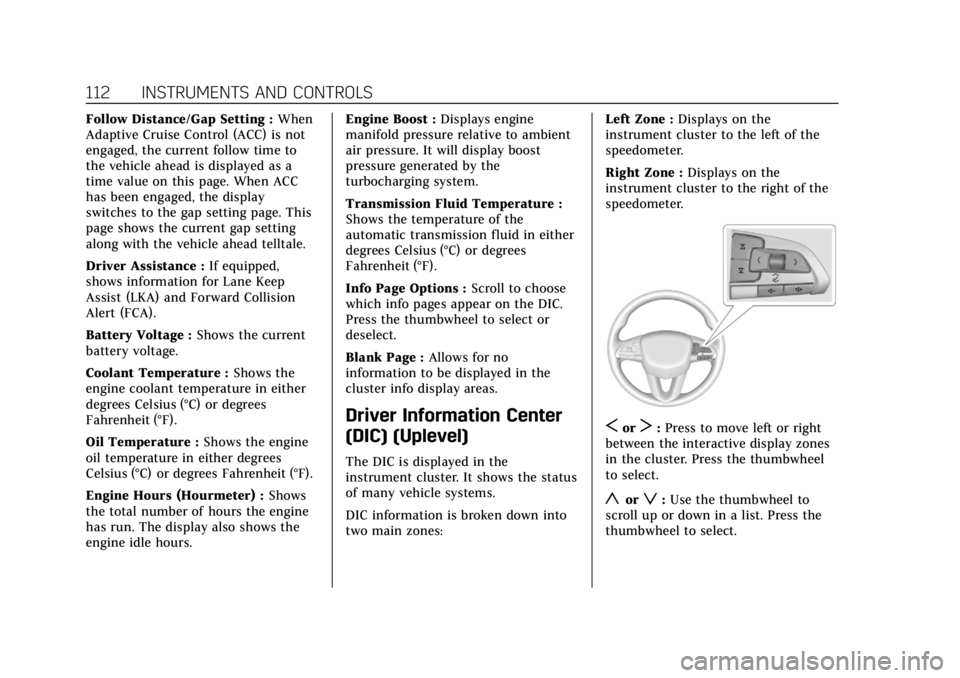
SorT: Press to move left or right
between the interactive display zones
in the cluster. Press the thumbwheel
to select.
yorz: Use the thumbwheel to
scroll up or down in a list. Press the
thumbwheel to select.
Page 114 of 464
Cadillac CT4 Owner Manual (GMNA-Localizing-U.S./Canada-15283641) -
2022 - CRC - 10/12/21
INSTRUMENTS AND CONTROLS 113
DIC Info Tiles Selection
The following is the list of all possible
DIC Info Tiles. Depending on the
vehicle, some may not be available.
Left Zone
Battery Voltage :Displays the current
battery voltage. The battery voltage
can fluctuate while viewing this
information on the DIC. This is
normal.
Coolant Temperature : Displays the
coolant temperature in either degrees
Celsius (°C) or degrees Fahrenheit (°F).
eLSD : Displays the amount of rear
differential coupling when the
Electronic Limited-Slip Differential
(eLSD) is active and functioning
during vehicle operation. A reading of
1% is an open differential and 100% is
locked. It is normal for the value to
make small or large changes due to
driving conditions and driver inputs.
For the V-Series Blackwing models,
the eLSD maintains some coupling
even if the vehicle is stationary or not
accelerating. Coupling values of 3%
and up are typical. See Limited-Slip
Differential 0266. Engine Boost :
If equipped, displays
engine manifold pressure relative to
ambient air pressure. It will display
boost pressure generated by the
turbocharging system.
Instantaneous Fuel Economy/
Economy Trend : Displays the current
fuel economy in liters per
100 kilometers (L/100 km) or miles per
gallon (mpg). This number reflects
only the approximate fuel economy
and changes frequently as driving
conditions change. This display
cannot be reset.
When in tour mode, shows history of
the Average Fuel Economy from the
last 100 km (62 mi). Each bar
represents about 5 km (3 mi) of
driving. When driving, the bars shift
to reflect the most recent distance on
the right side.
Lateral G-Force : If equipped,
displays inertial forces being exerted
on the vehicle in the lateral
(side-to-side) direction as numerical
value and as graphical depiction.
Oil Pressure : Shows the current oil
pressure in either kilopascal (kPa) or
in pounds per square inch (psi). Oil Temperature :
Shows the current
oil temperature in either degrees
Celsius (°C) or degrees Fahrenheit (°F).
Time & Temperature : Displays the
current time and the current outside
air temperature.
Tire Status : Shows individual tire
pressures and overall temperature as
either Cold, Cool, Normal, Warm,
or Hot. Normal is typical for normal
driving while Warm is typical for
aggressive driving. Unknown displays
when tire temperature information is
unavailable.
Transmission Fluid Temperature :
If equipped, shows the temperature of
the transmission fluid in either
degrees Celsius (°C) or degrees
Fahrenheit (°F).
Right Zone
Trip 1 or 2/Average Speed/Average
Fuel Economy : Trip displays the
current distance traveled, in either
kilometers (km) or miles (mi), since
the trip odometer was last reset. The
trip odometer can be reset by pressing
and holding the thumbwheel while
this display is active.
Page 118 of 464
Cadillac CT4 Owner Manual (GMNA-Localizing-U.S./Canada-15283641) -
2022 - CRC - 10/12/21
INSTRUMENTS AND CONTROLS 117
Metric
English
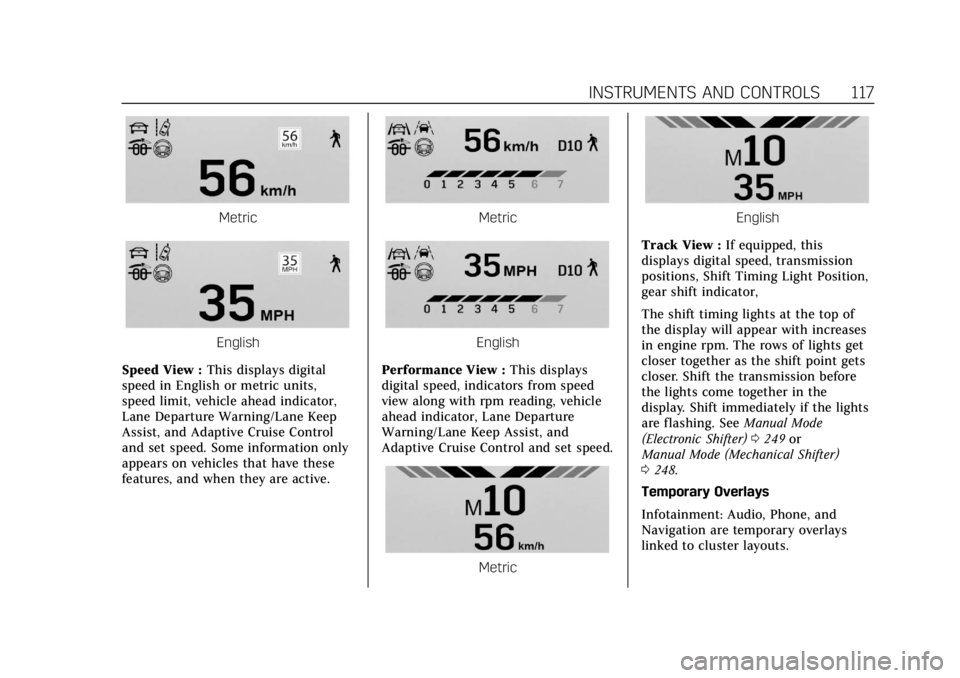
Speed View : This displays digital
speed in English or metric units,
speed limit, vehicle ahead indicator,
Lane Departure Warning/Lane Keep
Assist, and Adaptive Cruise Control
and set speed. Some information only
appears on vehicles that have these
features, and when they are active.
Metric
English
Performance View : This displays
digital speed, indicators from speed
view along with rpm reading, vehicle
ahead indicator, Lane Departure
Warning/Lane Keep Assist, and
Adaptive Cruise Control and set speed.
Metric
English
Track View : If equipped, this
displays digital speed, transmission
positions, Shift Timing Light Position,
gear shift indicator,
The shift timing lights at the top of
the display will appear with increases
in engine rpm. The rows of lights get
closer together as the shift point gets
closer. Shift the transmission before
the lights come together in the
display. Shift immediately if the lights
are flashing. See Manual Mode
(Electronic Shifter) 0249 or
Manual Mode (Mechanical Shifter)
0 248.
Temporary Overlays
Infotainment: Audio, Phone, and
Navigation are temporary overlays
linked to cluster layouts.
Page 120 of 464
Cadillac CT4 Owner Manual (GMNA-Localizing-U.S./Canada-15283641) -
2022 - CRC - 10/12/21
INSTRUMENTS AND CONTROLS 119
The windshield is part of the HUD
system. If windshield replacement is
required, seeWindshield Replacement
0 351.
Vehicle Messages
Messages displayed on the Driver
Information Center (DIC) indicate the
status of the vehicle or some action
that may be needed to correct a
condition. Multiple messages may
appear one after another.
The messages that do not require
immediate action can be
acknowledged and cleared by pressing
the thumbwheel. The messages that
require immediate action cannot be
cleared until that action is performed.
All messages should be taken
seriously; clearing the message does
not correct the problem.
If a SERVICE message appears, see
your dealer. Follow the instructions given in the
messages. The system displays
messages regarding the following
topics:
.Service Messages
.Fluid Levels
.Vehicle Security
.Brakes
.Steering
.Ride Control Systems
.Driver Assistance Systems
.Cruise Control
.Lighting and Bulb Replacement
.Wiper/Washer Systems
.Doors and Windows
.Seat Belts
.Airbag Systems
.Engine and Transmission
.Tire Pressure
.Battery
Engine Power Messages
REDUCED ACCELERATION DRIVE
WITH CARE
This message displays when the
vehicle's propulsion power is reduced.
A reduction in propulsion power can
affect the vehicle's ability to
accelerate. If this message is on, but
there is no observed reduction in
performance, proceed to your
destination. Under certain conditions
the performance may be reduced the
next time the vehicle is driven. The
vehicle may be driven while this
message is on, but maximum
acceleration and speed may be
reduced. Anytime this message stays
on, or displays repeatedly, the vehicle
should be taken to your dealer for
service as soon as possible.
Under certain operating conditions,
propulsion will be disabled. Try
restarting after the ignition has been
off for two minutes.
Page 126 of 464
Cadillac CT4 Owner Manual (GMNA-Localizing-U.S./Canada-15283641) -
2022 - CRC - 10/12/21
INSTRUMENTS AND CONTROLS 125
Seat Exit Memory
This feature automatically recalls the
previously stored exit button positions
when the ignition is changed from on
or ACC/ACCESSORY to off if the driver
door is open or opened. SeeMemory
Seats 034.
Touch Off or On.
Teen Driver
See “Teen Driver” underSettings 0182.
Valet Mode
This will lock the infotainment system
and steering wheel controls. It may
also limit access to vehicle storage
locations, if equipped.
To enable valet mode:
1. Enter a four-digit code on the keypad.
2. Touch Enter to go to the confirmation screen.
3. Re-enter the four-digit code.
Touch Lock or Unlock to lock or
unlock the system. Touch Back to go
back to the previous menu.
Universal Remote
System
See Radio Frequency Statement 0438.
Universal Remote System
Programming
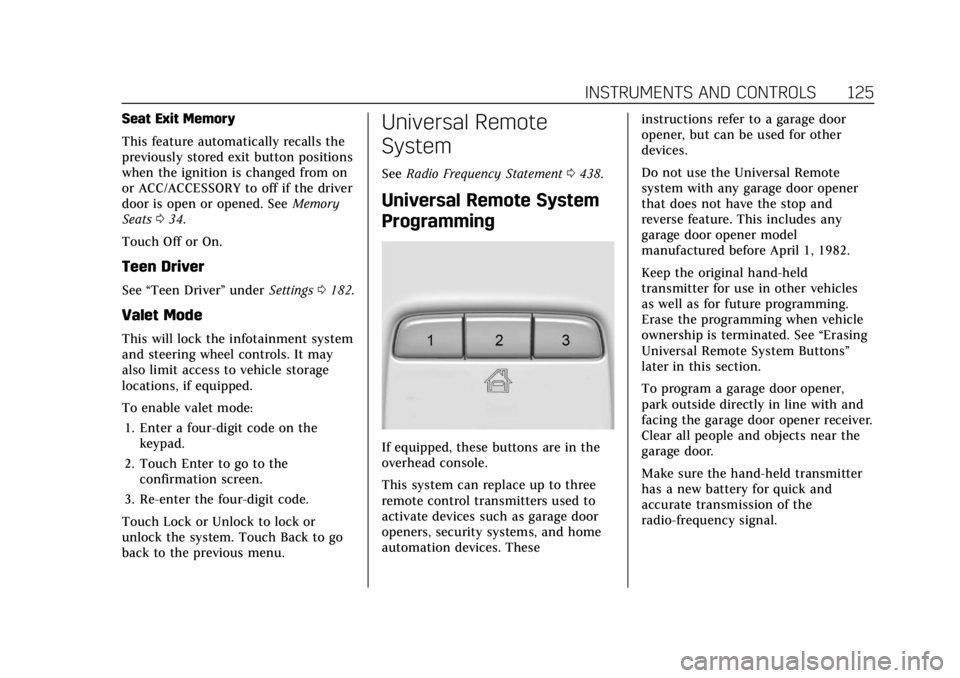
If equipped, these buttons are in the
overhead console.
This system can replace up to three
remote control transmitters used to
activate devices such as garage door
openers, security systems, and home
automation devices. These instructions refer to a garage door
opener, but can be used for other
devices.
Do not use the Universal Remote
system with any garage door opener
that does not have the stop and
reverse feature. This includes any
garage door opener model
manufactured before April 1, 1982.
Keep the original hand-held
transmitter for use in other vehicles
as well as for future programming.
Erase the programming when vehicle
ownership is terminated. See
“Erasing
Universal Remote System Buttons”
later in this section.
To program a garage door opener,
park outside directly in line with and
facing the garage door opener receiver.
Clear all people and objects near the
garage door.
Make sure the hand-held transmitter
has a new battery for quick and
accurate transmission of the
radio-frequency signal.
Page 128 of 464
Cadillac CT4 Owner Manual (GMNA-Localizing-U.S./Canada-15283641) -
2022 - CRC - 10/12/21
INSTRUMENTS AND CONTROLS 127
The Universal Remote system should
now activate the garage door. Repeat
the process for programming the
remaining two buttons.
For questions or programming help,
see www.homelink.com/gm or call
1-800-355-3515. For calls placed
outside the U.S., Canada, or Puerto
Rico, international rates will apply and
may differ based on landline or mobile
phone.
Radio Signals for Some Gate
Operators
Some gate operators and
radio-frequency laws require
transmitter signals to time out or quit
after several seconds of transmission.
This may not be long enough for the
Universal Remote system to pick up
the signal during programming.
If the programming did not work,
replace Step 2 under“Programming
the Universal Remote System ”with
the following: Press and hold the Universal Remote
system button while pressing and
releasing the hand-held transmitter
button every two seconds until the
signal has been successfully accepted
by the Universal Remote system. The
Universal Remote system indicator
light will flash slowly at first and then
change to a rapid flash or continuous
solid-light. Proceed with Step 3 under
“Programming the Universal Remote
System
”to complete.
Universal Remote System
Operation
Using the Universal Remote
System
Press and hold the appropriate
Universal Remote system button for at
least one-half second. The indicator
light will come on while the signal is
being transmitted.
Erasing Universal Remote
System Buttons
Erase all programmed buttons when
vehicle ownership is terminated.
To erase:
1. Press and hold the two outside buttons until the indicator light
begins to flash. This should take
about 10 seconds.
2. Release both buttons.
Reprogramming a Single
Universal Remote System
Button
To reprogram any of the system
buttons: 1. Press and hold any one of the buttons. Do not release the button.
2. The indicator light will begin to flash after 20 seconds. Without
releasing the button, proceed with
Step 1 under “Programming the
Universal Remote System.”
Page 132 of 464

Cadillac CT4 Owner Manual (GMNA-Localizing-U.S./Canada-15283641) -
2022 - CRC - 10/12/21
LIGHTING 131
If the vehicle is started in a dark
garage, the automatic headlamp
system comes on immediately. If it is
light outside when the vehicle leaves
the garage, there is a slight delay
before the automatic headlamp
system turns off the headlamps.
During that delay, the instrument
cluster may not be as bright as usual.
Make sure the instrument panel
brightness control is in the full bright
position. SeeInstrument Panel
Illumination Control 0132.
When it is bright enough outside, the
headlamps will turn off.
The automatic headlamp system turns
off when the exterior lamp control is
turned to
Oor the ignition is off. For
vehicles sold in Canada, this control
only works when the transmission is
in P (Park).
Lights On with Wipers
If the windshield wipers are activated
in daylight with the engine on, and
the exterior lamp control is in AUTO,
the headlamps, parking lamps, and
other exterior lamps come on. The
transition time for the lamps coming on varies based on wiper speed. When
the wipers are not operating, these
lamps turn off. Move the exterior
lamp control to
Oor;to disable
this feature.
Hazard Warning Flashers
|: Press this button to make the
front and rear turn signal lamps flash
on and off. Release the button for at
least one second and press again to
turn the flashers off.
The hazard warning flashers turn on
automatically if the airbags deploy.
Turn and Lane-Change
Signals
Move the lever all the way up or down
to signal a turn.
An arrow on the instrument cluster
flashes in the direction of the turn or
lane change.
Raise or lower the lever until the
arrow starts to flash to signal a lane
change. Hold it there until the lane
change is completed. If the lever is
briefly pressed and released, the turn
signal flashes three times.
The turn and lane-change signal can
be turned off manually by moving the
lever back to its original position.
Page 173 of 464

Cadillac CT4 Owner Manual (GMNA-Localizing-U.S./Canada-15283641) -
2022 - CRC - 10/12/21
172 INFOTAINMENT SYSTEM
Sport:
Displays these vehicle metrics:
.Vehicle Speed: Up to three digits are
displayed in km/h or MPH
depending on vehicle settings.
.Engine Revolutions Per Minute
(rpm): The vertical line and triangle
show current rpm’s. As the rpm’s
increase, the backfill follows.
.Transmission State (Current Gear):
Transmissions display 1, 2, etc.
.Lateral G-Force Graphic: Left and
Right G-Forces are displayed. The
graphic fills to the left or the right
depending on the measure value.
The measured G-Force displays as a
number at the top of the graphic.
.Event Odometer: This displays the
distance driven since the recording
began.
Track:
Displays these vehicle metrics:
.Vehicle Speed: Same as Sport.
.GPS Tracking Map: Shows the
vehicle’s current position relative to
a known route.
.Engine Revolutions Per Minute
(rpm): The vertical line and triangle
show current rpm’s. As the rpm’s
increase, the backfill follows.
.Transmission State (Current Gear):
Same as Sport.
.Friction Bubble Graphic: Lateral and
longitudinal G-Forces are displayed
as a dot within a bubble. A red dot
displays when the vehicle starts braking and turns green when the
vehicle accelerates. The dot is white
when the vehicle is not moving.
A white dot is the default.
.Brake and Throttle Graphic:
Displays the percentage value of
brake and throttle pedal position
from 0–100%.
.Steering Angle: The graphic fills
from the center to the left or right
depending on the direction of
steering. The numerical steering
angle displays below the graphic.
.Active Handling Active Indicator:
The graphic only displays if the
active handling systems are
activated.
.Performance Traction Management
(PTM) Mode: Displays the current
PTM mode. The options are Wet,
Dry, Sport 1, Sport 2, or Race.
.Current Lap Time: Displays the
elapsed lap time if the finish line is
defined and the vehicle has crossed
the defined finish line at least once.
.Event Odometer: This displays the
distance driven since the recording
began.